
UWB Container Tracker
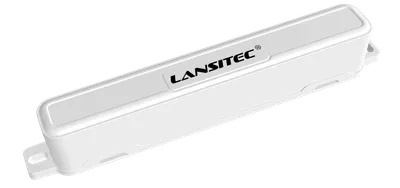
UWB Container Tracker
Lansitec
- Platform
- ThingsBoard
- Hardware Type
- Trackers
- Connectivity
- LoRaWAN
- Industry
- Transportation & Logistics, Smart Cities, Security
- Use Case
- Fleet Tracking
UWB Container Tracker is designed using LoRaWAN and UWB technologies.
It calculates the distance with anchors and forward the distance information to a LoRaWAN gateway to calculate its position in the server. The accuracy can be as low as 10cm.
Prerequisites
To continue with this guide we will need the following:
- UWB Container Tracker
- LoRaWAN Gateway
- Bluetooth Beacon
- Network Server account
-
ThingsBoard account at
YOUR_TB_HOST
Configuration
Only ThingsBoard Cloud works when using direct communication from this device to ThingsBoard via MQTT.
You may use ThingsBoard PE on-premises or ThingsBoard Cloud when using ThingsBoard Integrations.
To create an integration with a network server please choose first one of the supported network servers:
Add a gateway on the Chirpstack
We need to add a gateway on the Chirpstack.
To add a gateway, follow next steps:
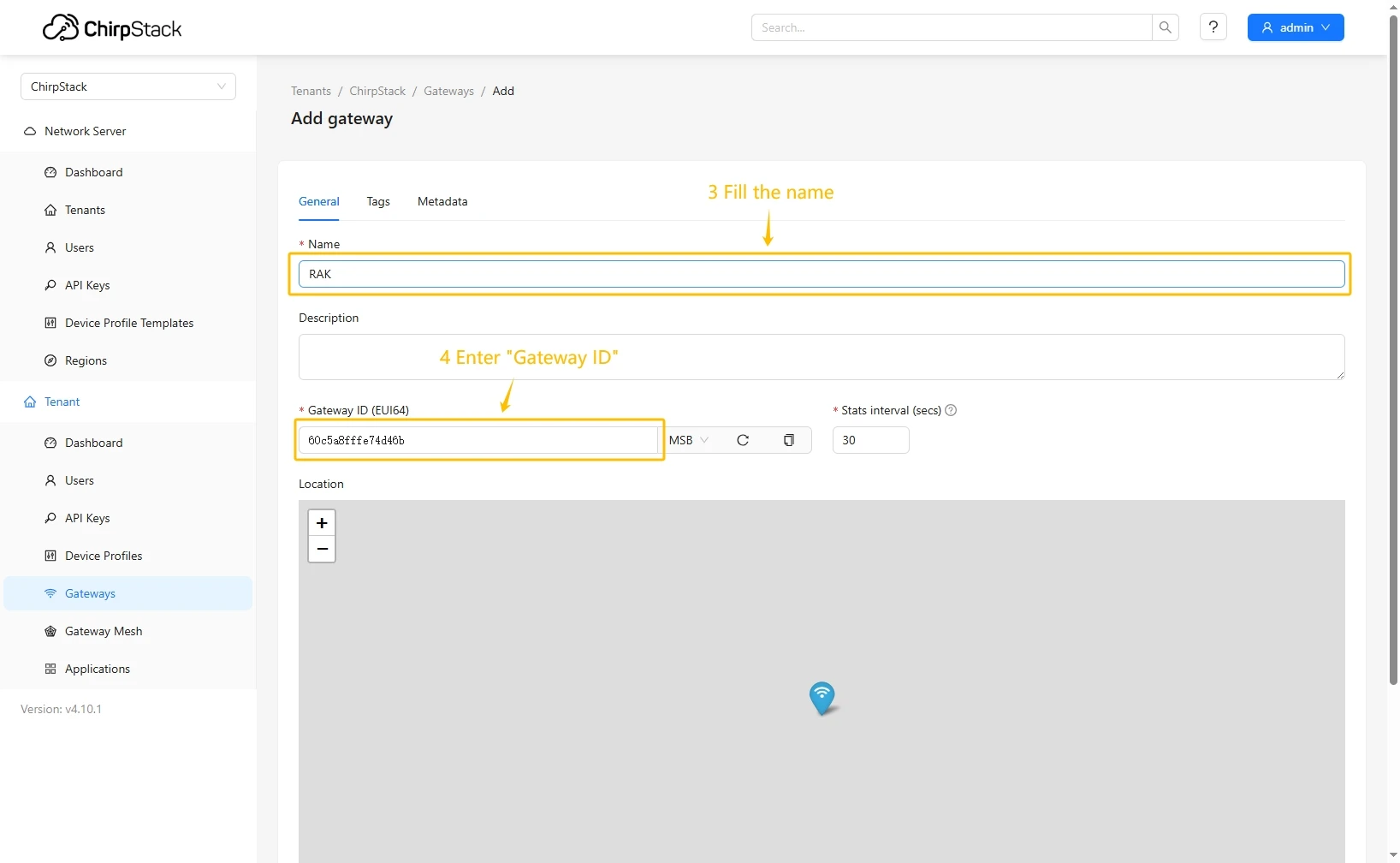
- Login to Chirpstack server. Go to the “Gateways” page and click on the “Add gateway” button.
- Fill name, Gateway ID (It will be different, you can find it on the gateway control panel) with your data, scroll down and click on the “Submit” button.
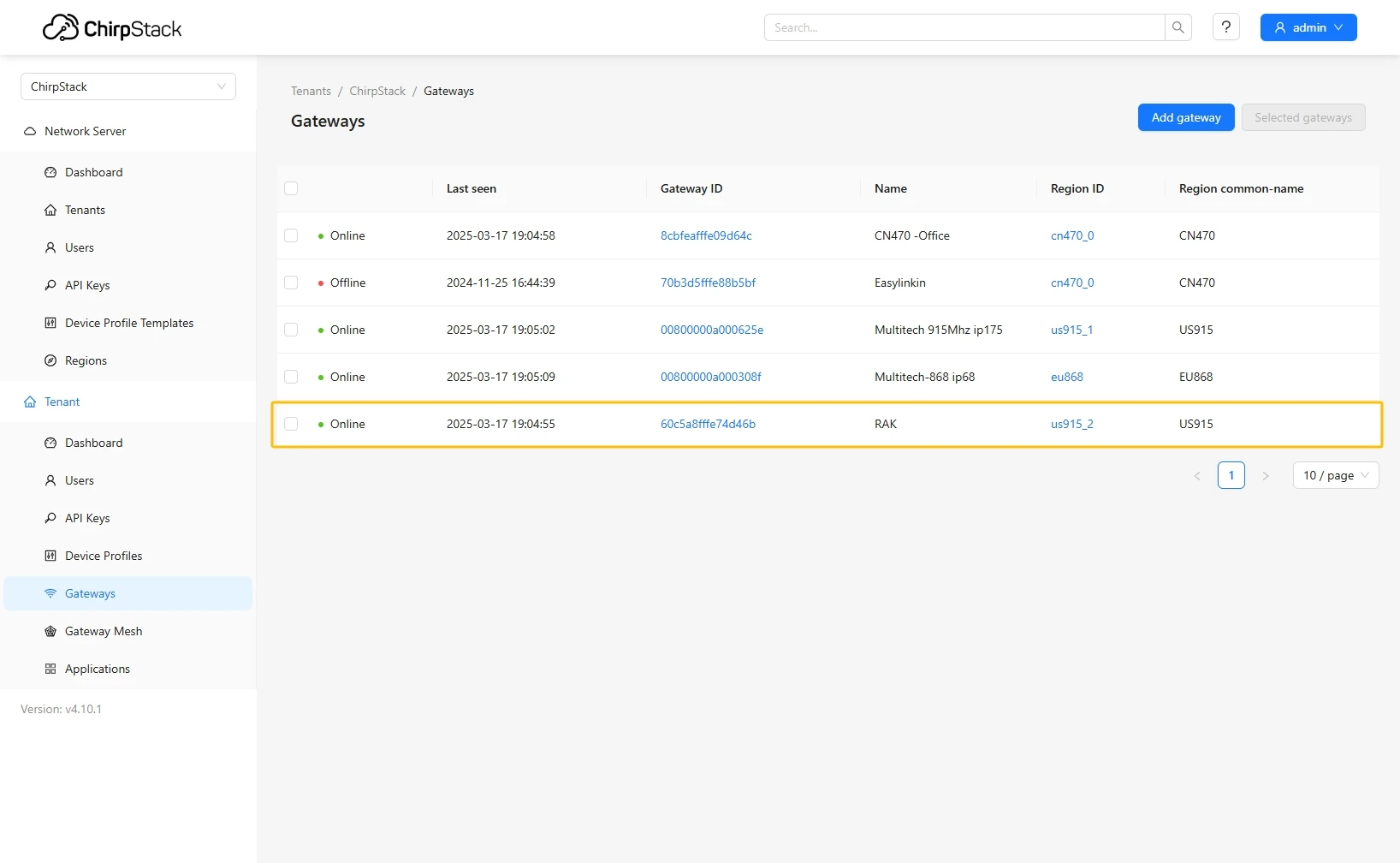
- The gateway is added. In gateways tab you can see its status.

Add device profile on the Chirpstack
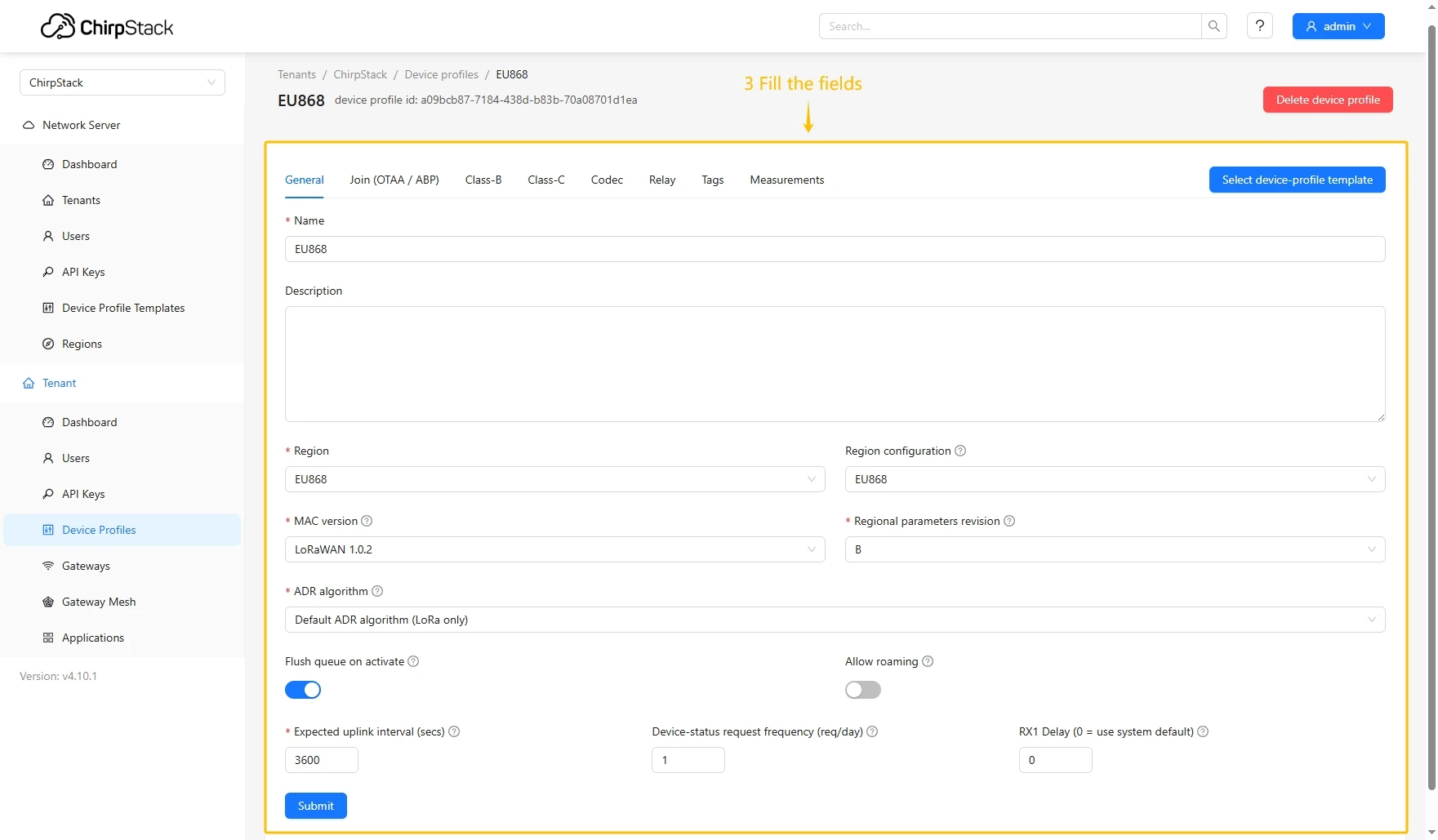
- Login to Chirpstack server. Go to the “Device profiles” page and click on Add device profile button.
- Fill in the required fields.
- Go to the Codec tab, select JavaScript functions from the Payload codec dropdown menu, and paste the decoder function. Then click the Submit button.

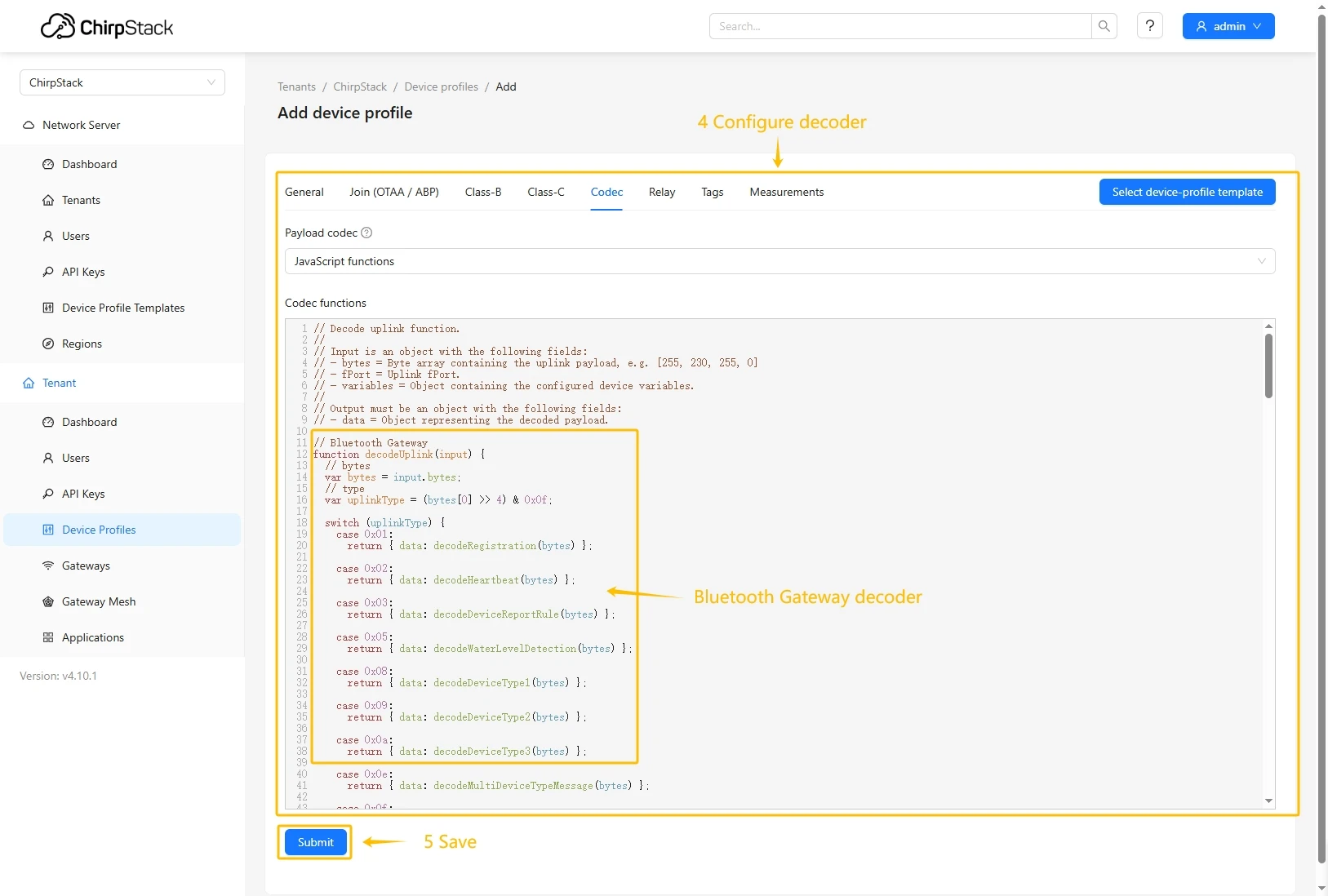
Decode function:
// UWB Container Tracker decoderfunction decodeUplink(input) {// bytes    var bytes = input.bytes;// type    var type = (bytes[0] >> 4) & 0x0f;    switch (type) {        case 0x01:            return {data: decodeRegistration(bytes)};        case 0x02:            return {data: decodeHeartbeat(bytes)};        case 0x03:            return {data: decodeGNSSPosition(bytes)};        case 0x04:            return {data: decodeBeacon(bytes)};        case 0x05:            return {data: decodeAlarm(bytes)};        case 0x06:            return {data: decodeSingleConfigurationParameter(bytes)};        case 0x07:            return {data: decodeRuleBeacon(bytes)};        case 0x08:            return {data: decodeDistance(bytes)};        default:            return;    }}
// type: 0x1 Registrationfunction decodeRegistration(bytes) {    var data = {};    data.type = "RegistrationMessage";    data.softwareVersion = ((bytes[1] << 8) & 0xff00) | (bytes[2] & 0xff);    data.hardwareVersion = ((bytes[3] << 8) & 0xff00) | (bytes[4] & 0xff);    data.deviceState =        (bytes[5] << 24) | (bytes[6] << 16) | (bytes[7] << 8) | bytes[8];    data.lorSynPeriod = bytes[9];    data.lorSynFreq =        (bytes[10] << 24) | (bytes[11] << 16) | (bytes[12] << 8) | bytes[13];    data.lorSynDr = bytes[14];    data.heartbeatPeriod = ((bytes[15] << 8) & 0xff00) | (bytes[16] & 0xff);    data.messageId = ((bytes[17] << 8) & 0xff00) | (bytes[18] & 0xff);    return data;}
// type: 0x2 Heartbeatfunction decodeHeartbeat(bytes) {    var data = {};    data.type = "HeartbeatMessage";    data.deviceState =        (bytes[1] << 24) | (bytes[2] << 16) | (bytes[3] << 8) | bytes[4];    data.powerVol = bytes[5];    data.powerPersent = bytes[6];    data.uwbRangeCount = bytes[7];    data.bleOnCount = bytes[8];    data.gnssOnCount = bytes[9];    data.temperature = ((bytes[10] << 8) & 0xff00) | (bytes[11] & 0xff);    data.movementTime = ((bytes[12] << 8) & 0xff00) | (bytes[13] & 0xff);    data.wearTime = ((bytes[14] << 8) & 0xff00) | (bytes[15] & 0xff);    data.chargeTime = ((bytes[16] << 8) & 0xff00) | (bytes[17] & 0xff);    data.messageId = ((bytes[18] << 8) & 0xff00) | (bytes[19] & 0xff);    return data;}
// type: 0x03 GNSSPositionfunction decodeGNSSPosition(bytes) {    var data = {};    data.type = "GNSSPosition";    data.gnssState =        (bytes[0] & 0x01) === 0 ? "GNSS location success" : "GNSS location    failed    ";// longitude    let longitude =        (bytes[1] << 24) | (bytes[2] << 16) | (bytes[3] << 8) | bytes[4];    data.longitude = hex2float(longitude);// latitude    let latitude =        (bytes[5] << 24) | (bytes[6] << 16) | (bytes[7] << 8) | bytes[8];    data.latitude = hex2float(latitude);// time    let time =        (bytes[9] << 24) | (bytes[10] << 16) | (bytes[11] << 8) | bytes[12];    data.time = timestampToTime((time + 8 * 60 * 60) * 1000);// wearState    data.wearState = bytes[13] === 0 ? "no wear" : "wear";    return data;}
// type: 0x4 Beaconfunction decodeBeacon(bytes) {    var data = {};    data.type = "BeaconMessage";    data.beaconType =        (bytes[0] & 0x01) === 0 ? "PositioningBeacon" : "AssetBeacon";    data.beaconCount = bytes[1] & 0x0f;    for (let i = 0; i < data.beaconCount; i++) {        var index = 2 + 5 * i;        var major = (((bytes[index] << 8) & 0xff00) | (bytes[index + 1] & 0xff))            .toString(16)            .toUpperCase()            .padStart(4, "0");        var minor = (((bytes[index + 2] << 8) & 0xff00) | (bytes[index + 3] &            0xff))            .toString(16)            .toUpperCase()            .padStart(4, "0");        var rssi = bytes[index + 4] - 256 + "dBm";        data["beacon" + (i + 1)] = major + minor;        data["rssi" + (i + 1)] = rssi;    }// wearState    var wearIndex = data.beaconCount * 5 + 2;    data.wearState = bytes[wearIndex] === 0 ? "no wear" : "wear";    return data;}
// type: 0x5 Alarmfunction decodeAlarm(bytes) {    var data = {};    data.type = "AlarmMessage";    var alarmValue = bytes[1] & 0x0f;    if (alarmValue == 1) {        data.alarm = "SOS";    } else if (alarmValue == 2) {        data.alarm = "Fall";    } else if (alarmValue == 3) {        data.alarm = "Special area";    } else if (alarmValue == 4) {        data.alarm = "Search";    } else if (alarmValue == 5) {        data.alarm = "Magnet remove";    }    return data;}
// type: 0x6 Single Configuration Parameterfunction decodeSingleConfigurationParameter(bytes) {    var data = {};    data.type = "ConfigurationParameterResponse";    var parameter = [];    let byteLength = bytes.length;    var index = 0;    while (index + 1 < byteLength) {        var commandBitField = {};        var parameterType = bytes[index + 1] & 0xff;        commandBitField.parameterType = parameterType;        var commandBitFieldLength = getCommandBitFieldLength(parameterType);        var parameterValue = getParameterValue(bytes, index,            commandBitFieldLength);        commandBitField.parameterValue = parameterValue;        commandBitField.name = getParameterName(parameterType);        commandBitField.parameterDefinition = getParameterDefinition(            parameterType,            parameterValue        );        index = index + commandBitFieldLength;        parameter.push(commandBitField);    }    data.parameter = parameter;    return data;}
// type: 0x7 Rule Beaconfunction decodeRuleBeacon(bytes) {    var data = {};    data.type = "RuleBeaconMessage";    var deviceTypeId = bytes[0] & 0x03;    if (deviceTypeId == 1) {        data.deviceTypeId = "deviceTypeId1";    } else if (deviceTypeId == 2) {        data.deviceTypeId = "deviceTypeId2";    } else if (deviceTypeId == 3) {        data.deviceTypeId = "deviceTypeId3";    }    data.beaconCount = bytes[1] & 0x0f;    for (let i = 0; i < data.beaconCount; i++) {        var index = 2 + 5 * i;        var major = (((bytes[index] << 8) & 0xff00) | (bytes[index + 1] & 0xff))            .toString(16)            .toUpperCase()            .padStart(4, "0");        var minor = (((bytes[index + 2] << 8) & 0xff00) | (bytes[index + 3] &            0xff))            .toString(16)            .toUpperCase()            .padStart(4, "0");        var rssi = bytes[index + 4] - 256 + "dBm";        data["beacon" + (i + 1)] = major + minor;        data["rssi" + (i + 1)] = rssi;    }// wearState    var wearIndex = data.beaconCount * 5 + 2;    data.wearState = bytes[wearIndex] === 0 ? "no wear" : "wear";    return data;}
// type: 0x8 Distancefunction decodeDistance(bytes) {    var data = {};    data.type = "Distance";    data.uwbBeaconCount = bytes[1] & 0x0f;// data.uwbBeaconCount = 3;    for (let i = 0; i < data.uwbBeaconCount; i++) {        var index = 2 + 7 * i;        var dev = (((bytes[index] << 8) & 0xff00) | (bytes[index + 1] & 0xff))            .toString(16)            .toUpperCase()            .padStart(4, "0");        var eui = (((bytes[index + 2] << 8) & 0xff00) | (bytes[index + 3] &            0xff))            .toString(16)            .toUpperCase()            .padStart(4, "0");        data["majorminor" + (i + 1)] = dev + eui;        data["distance" + (i + 1)] =            (bytes[index + 4] << 16) | (bytes[index + 5] << 8) | bytes[index + 6];    }// wearState    var wearIndex = data.uwbBeaconCount * 7 + 2;    data.wearState = bytes[wearIndex] === 0 ? "no wear" : "wear";    return data;}
// getParameterValue hexStringfunction getParameterValue(bytes, index, length) {    var hexString = "";    for (var i = 2; i <= length; i++) {        var hex = (bytes[index + i] & 0xff).toString(16).toUpperCase();        hexString += hex.padStart(2, "0");    }    return hexString;}
// getCommandBitFieldLengthfunction getCommandBitFieldLength(parameterType) {    let lengths = {        0x00: 3,        0x01: 3,        0x02: 3,        0x03: 3,        0x04: 3,        0x05: 2,        0x06: 2,        0x07: 2,        0x08: 2,        0x0a: 17,        0x0b: 17,        0x0e: 9,        0x1e: 2,        0x1f: 2,        0x20: 2,        0x29: 2,        0x2a: 2,        0x2b: 2,        0x2e: 2,        0x2f: 2,        0x30: 2,        0x31: 2,    };    return lengths[parameterType] ?? 0;}
// Parameter Namefunction getParameterName(parameterType) {    let name = {        0x00: "SoftwareVersion",        0x01: "HBPeriod",        0x02: "BlePositionReportInterval",        0x03: "GNSSPositionReportInterval",        0x04: "AssetBeaconReportInterval",        0x05: "BlePositionReceivingDuration",        0x06: "GNSSPositionReceivingDuration",        0x07: "AssetBleReceivingDuration",        0x08: "FallThreshold",        0x0a: "PosBeaconUUID",        0x0b: "AssetBeaconUUID",        0x0e: "ISMI",        0x1e: "FallDetectionAlarmEnable",        0x1f: "SOSAlarmEnable",        0x20: "PosMode",        0x29: "AssetManagementEnable",        0x2a: "GNSSFailureReportEnable", 0x2b: "AssetBeaconSortEnable",        0x2e: "PowerSwitchEnable",        0x2f: "NetworkStatusCheck",        0x30: "GNSSEnableState",        0x31: "BleEnable",    };    return name[parameterType] ?? "No matching parameter names";}
// Parameter Definitionfunction getParameterDefinition(parameterType, parameterValue) {    var val = parseInt(parameterValue, 16);    let name = {        0x00: "SoftwareVersion",        0x01: val * 30 + "s, The interval of the heartbeat message, unit: 30s",        0x02: val * 5 + "s, The interval of Bluetooth position repor, unit: 5s",        0x03: val * 5 + "s, The interval of GNSS position report, unit: 5s",        0x04: val * 5 + "s, The interval of asset beacons report, unit: 5s",        0x05:            val * 1 + "s, The duration of BLE position beacon receiving, unit: 1s",        0x06: val * 5 + "s, The duration of GNSS position receiving, unit: 5s",        0x07: val * 1 + "s, The duration of asset beacon receiving, unit 1s",        0x08:            val / 2 +            "s, The threshold of the fall detection, the unit is 0.5 meters",        0x0a: "PosBeaconUUIDFilter",        0x0b: "AssetBeaconUUIDFilter",        0x0e: "ISMI",        0x1e: val == 0 ? "Disable" : "Enable",        0x1f: val == 0 ? "Disable" : "Enable",        0x20:            val == 0                ? "Period Mode"                : val == 1                    ? " Autonomous Mode"                    : "On-demand Mode",        0x29: val == 0 ? "Disable" : "Enable",        0x2a: val == 0 ? "Disable" : "Enable",        0x2b: val == 0 ? "Disable" : "Enable",        0x2e: val == 0 ? "Disable" : "Enable",        0x2f: val == 0 ? "Disable" : "Enable",        0x30: val == 0 ? "Disable" : "Enable",        0x31: val == 0 ? "Disable" : "Enable",    };    return name[parameterType] ?? "No matching parameter names";}
// Floating point conversionfunction hex2float(num) {    var sign = num & 0x80000000 ? -1 : 1;    var exponent = ((num >> 23) & 0xff) - 127;    var mantissa = 1 + (num & 0x7fffff) / 0x7fffff;    return sign * mantissa * Math.pow(2, exponent);}
function asciiToHex(str) {    var hexString = "";    for (let i = 0; i < str.length; i++) {        var hex = str.charCodeAt(i).toString(16);        hexString += hex.padStart(2, "0");    }    return hexString;}
function hexStringToByteArray(hexString) {    var byteArray = [];    for (let i = 0; i < hexString.length; i += 2) {        byteArray.push(parseInt(hexString.substr(i, 2), 16));    }    return new Uint8Array(byteArray);}
function timestampToTime(timestamp) {    const date = new Date(timestamp);    const year = date.getFullYear();    const month = (date.getMonth() + 1).toString().padStart(2, "0");    const day = date.getDate().toString().padStart(2, "0");    const hour = date.getHours().toString().padStart(2, "0");    const minute = date.getMinutes().toString().padStart(2, "0");    const second = date.getSeconds().toString().padStart(2, "0");    return `${year}-${month}-${day} ${hour}:${minute}:${second}`;}
Add a device on the Chirpstack
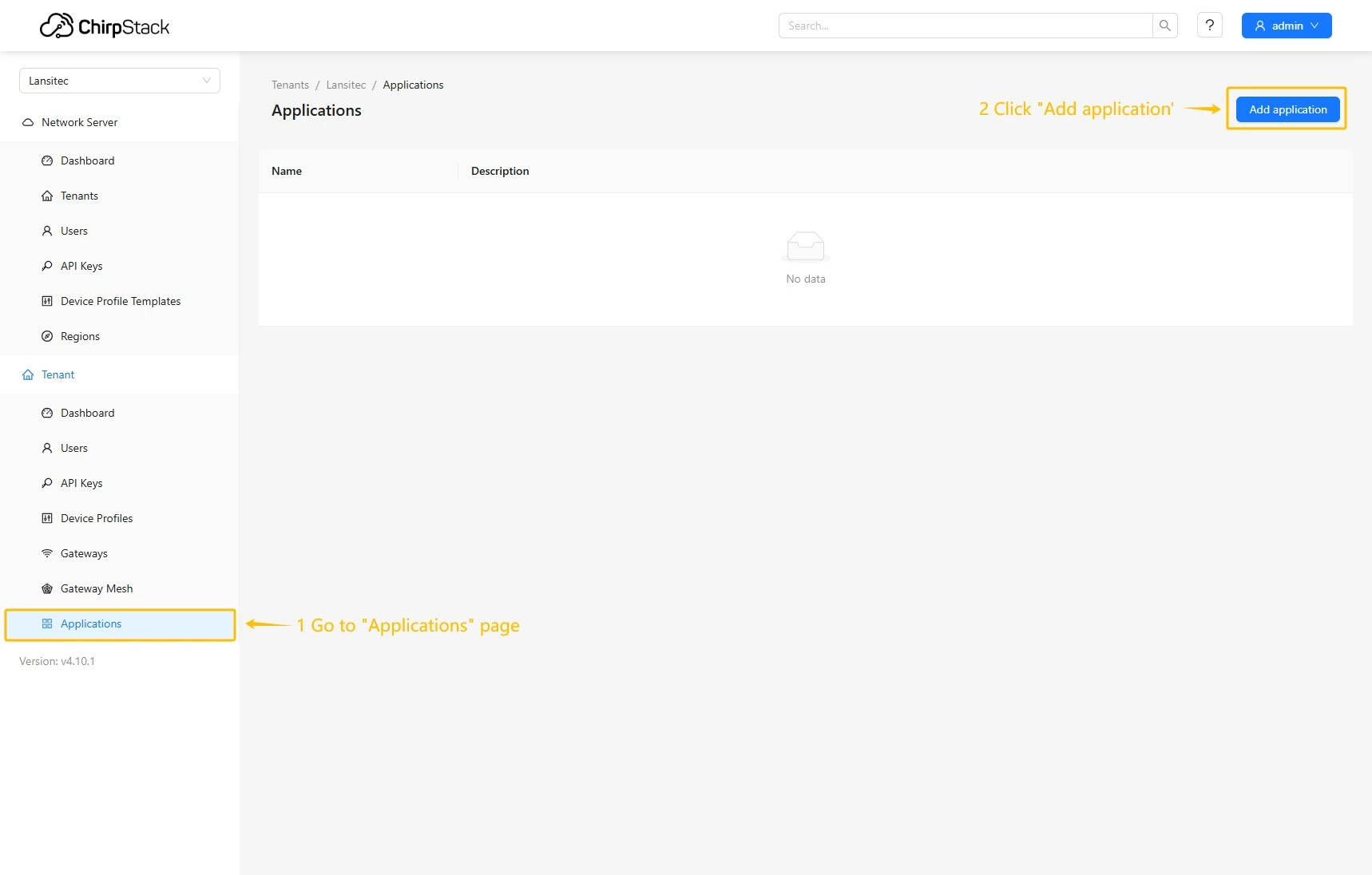
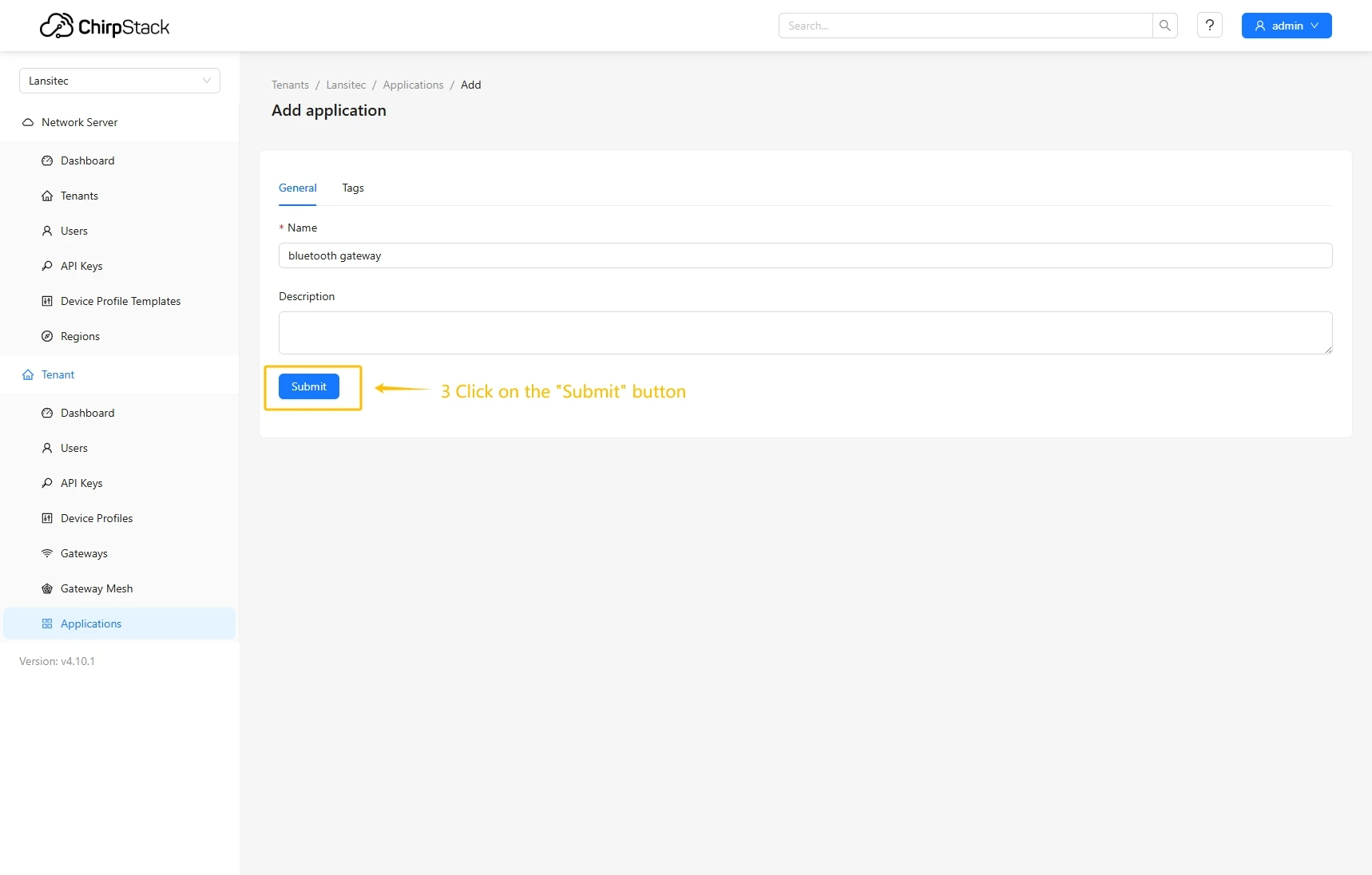
- Go to the Applications page and click on Add application button.
- Enter name and click Submit button.
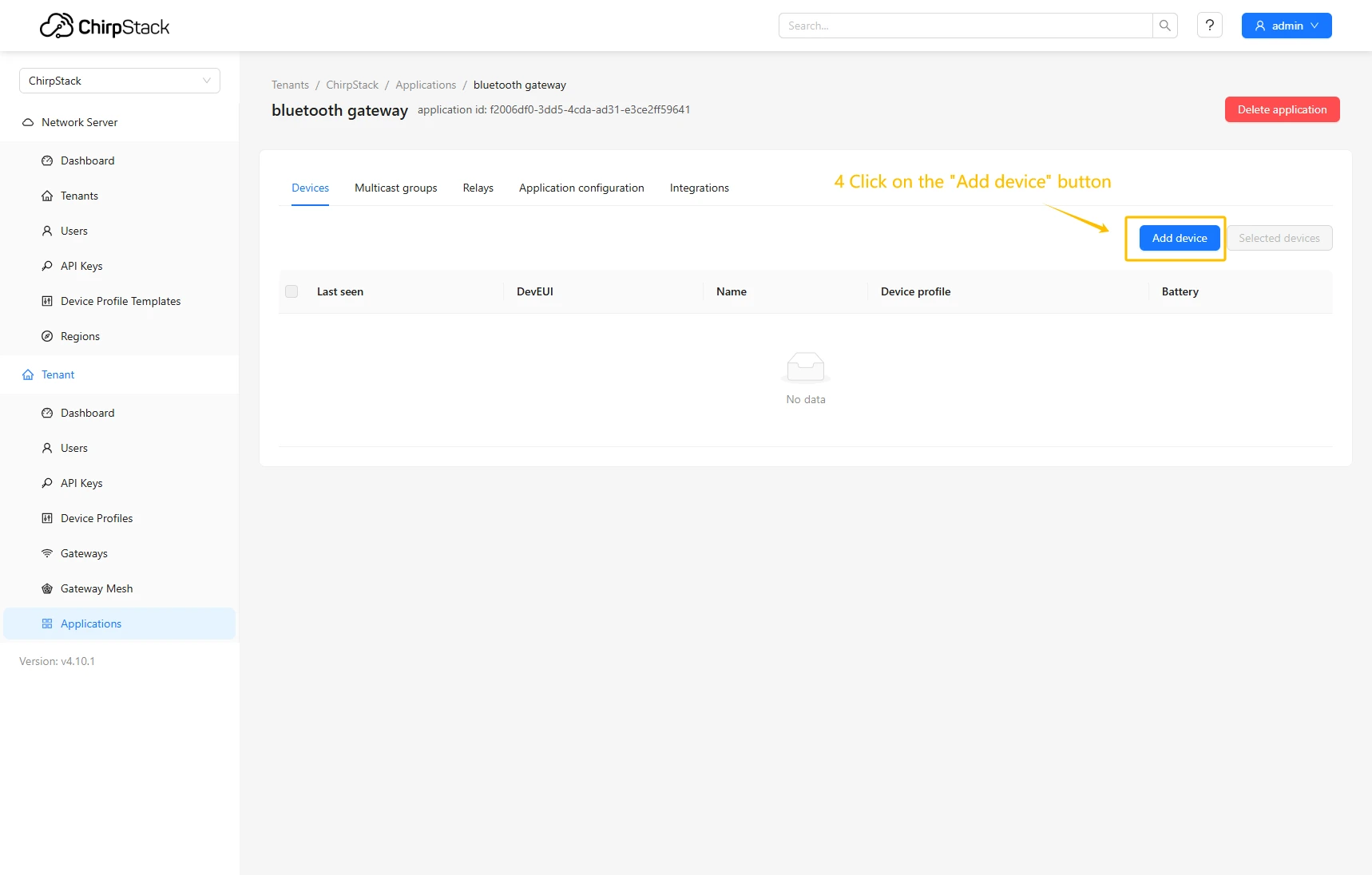
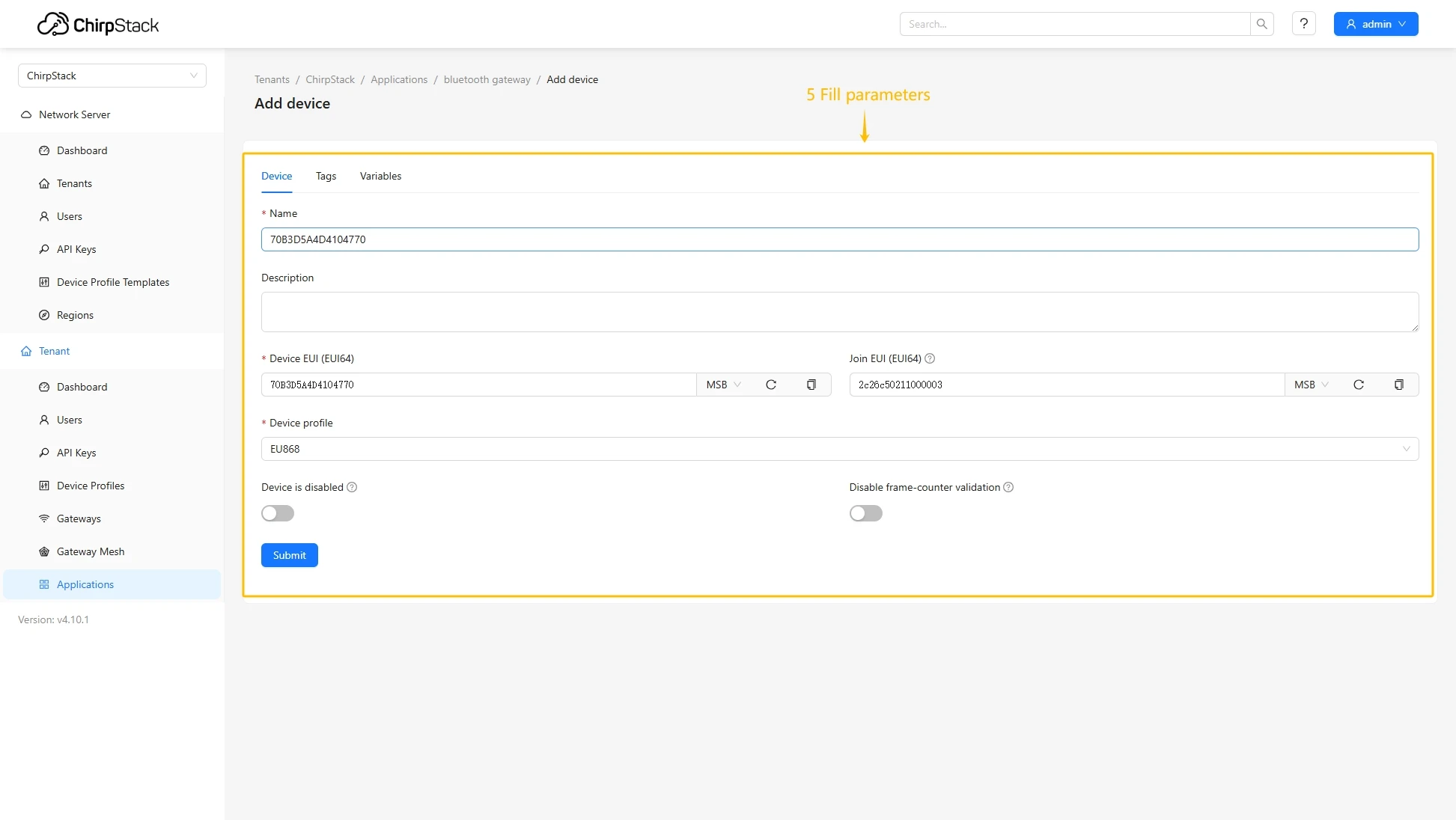
- Click Add device.
- Fill in the required fields with your device information and specify the previously created device profile.
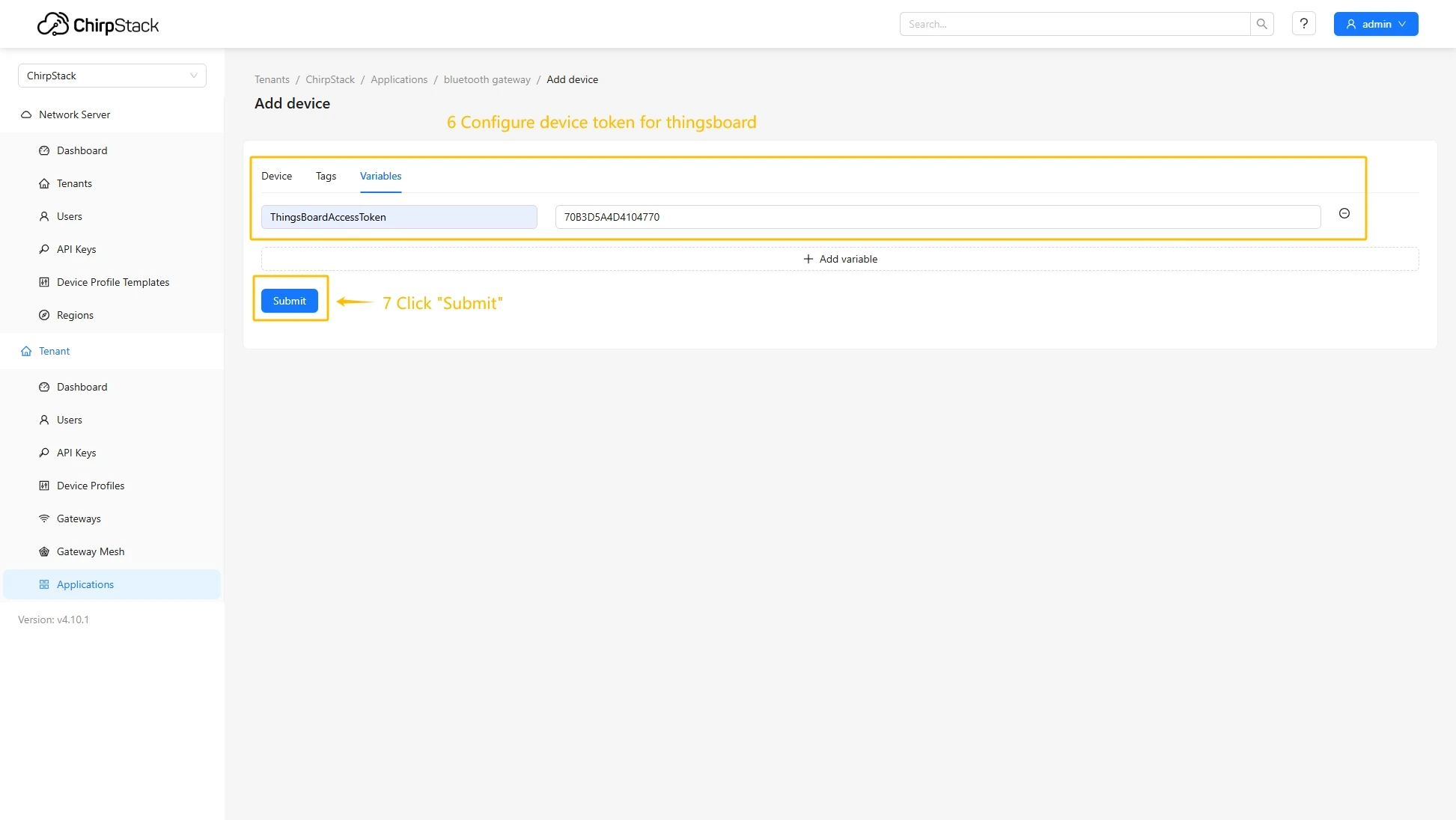
- Go to the Variables tab, enter the value for ThingsBoardAccessToken, and click the Submit button.
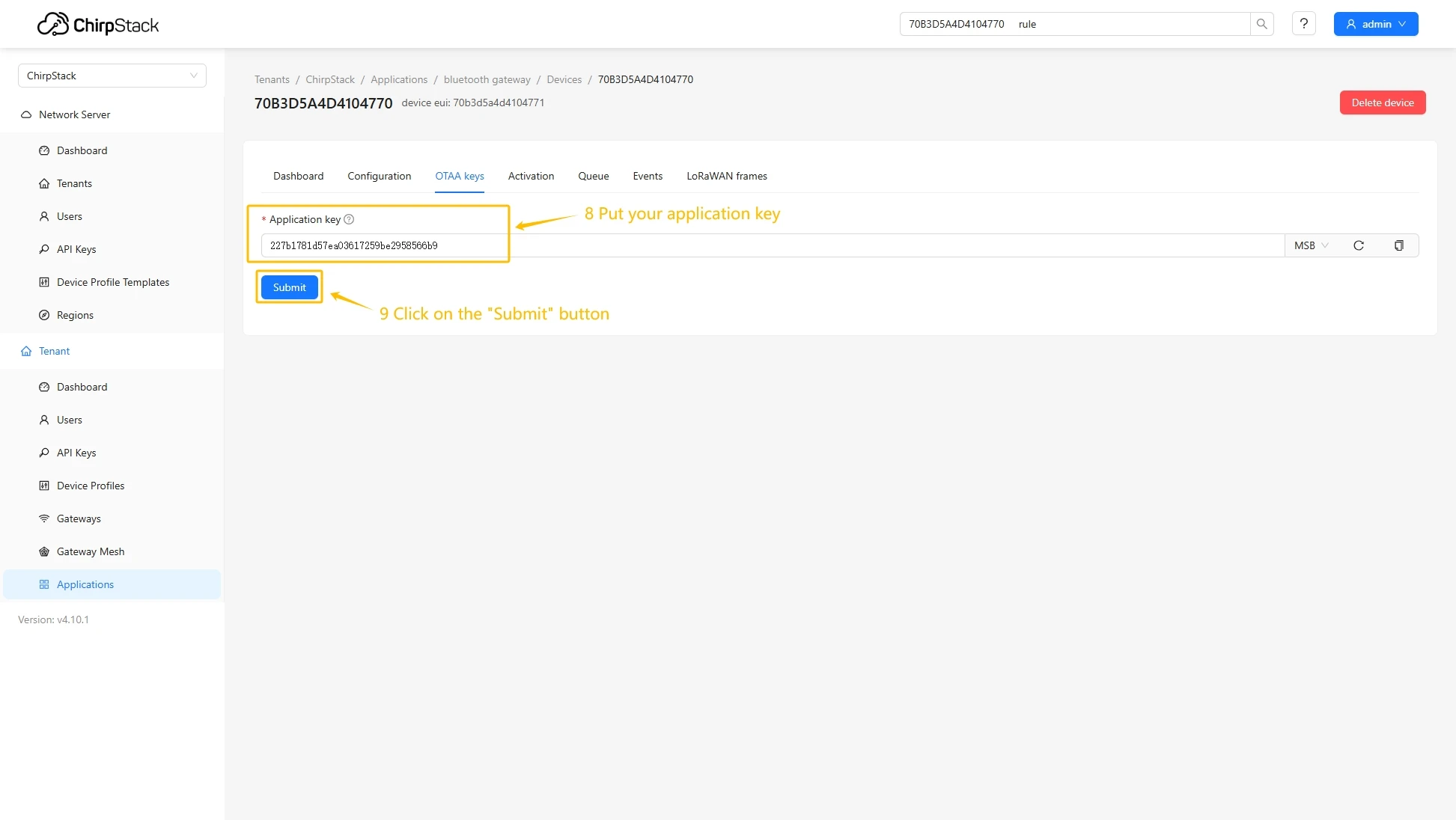
- Put your Application key to the field and click on Submit button to save the device.
Configure application integration with ThingsBoard
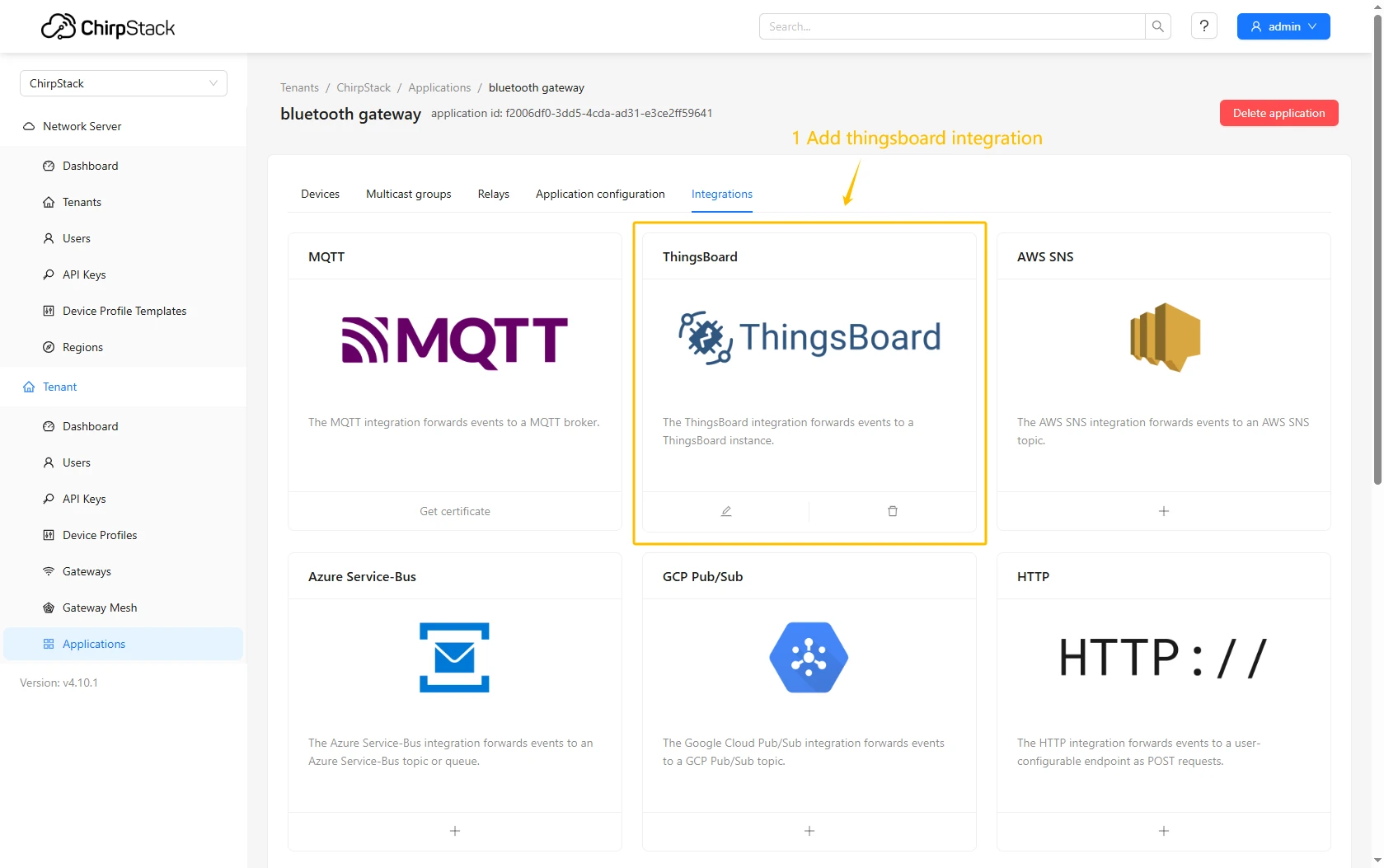
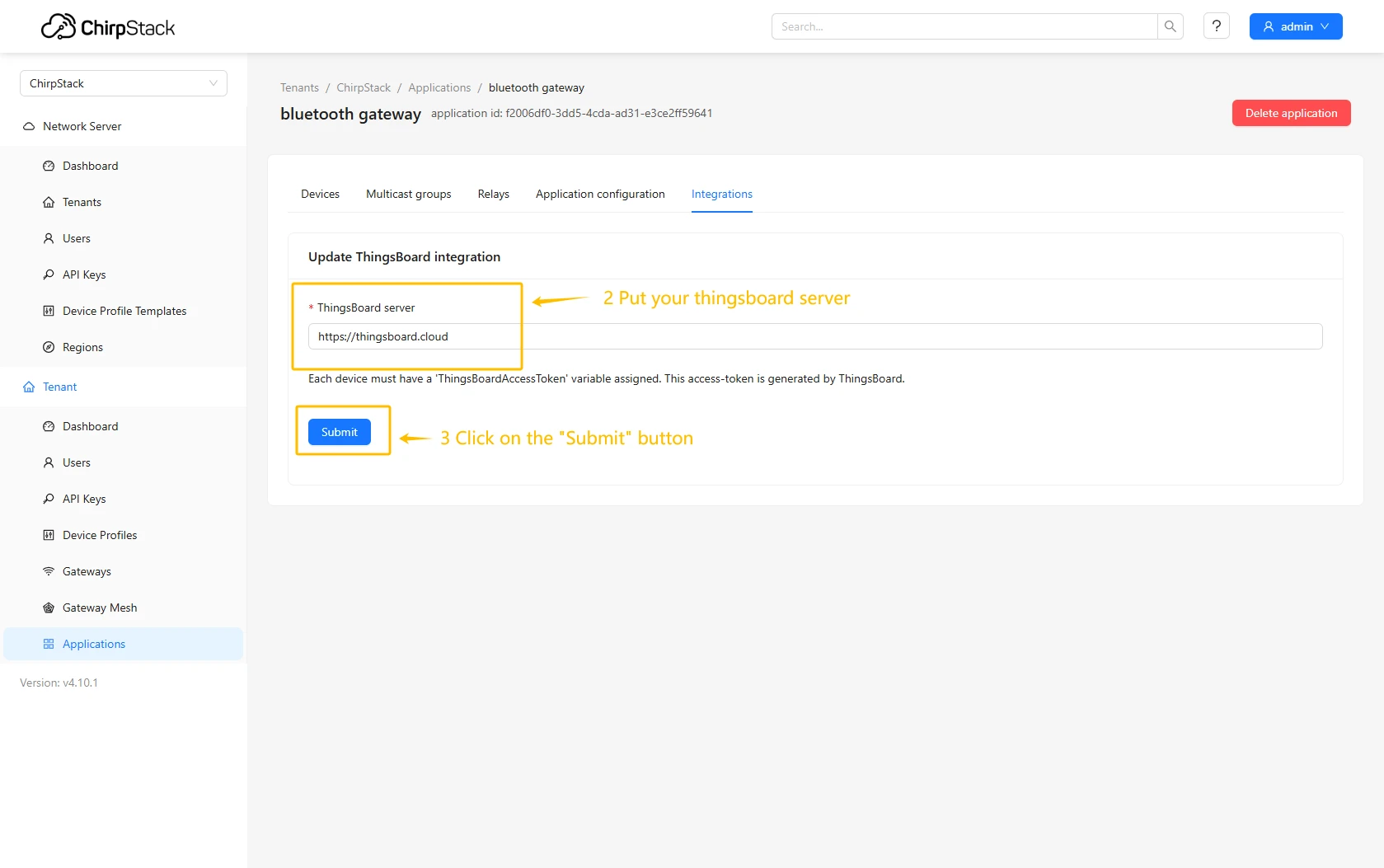
- Go to the Integrations page, find and select the ThingsBoard.
- Enter the URL of your ThingsBoard server and click Submit button.
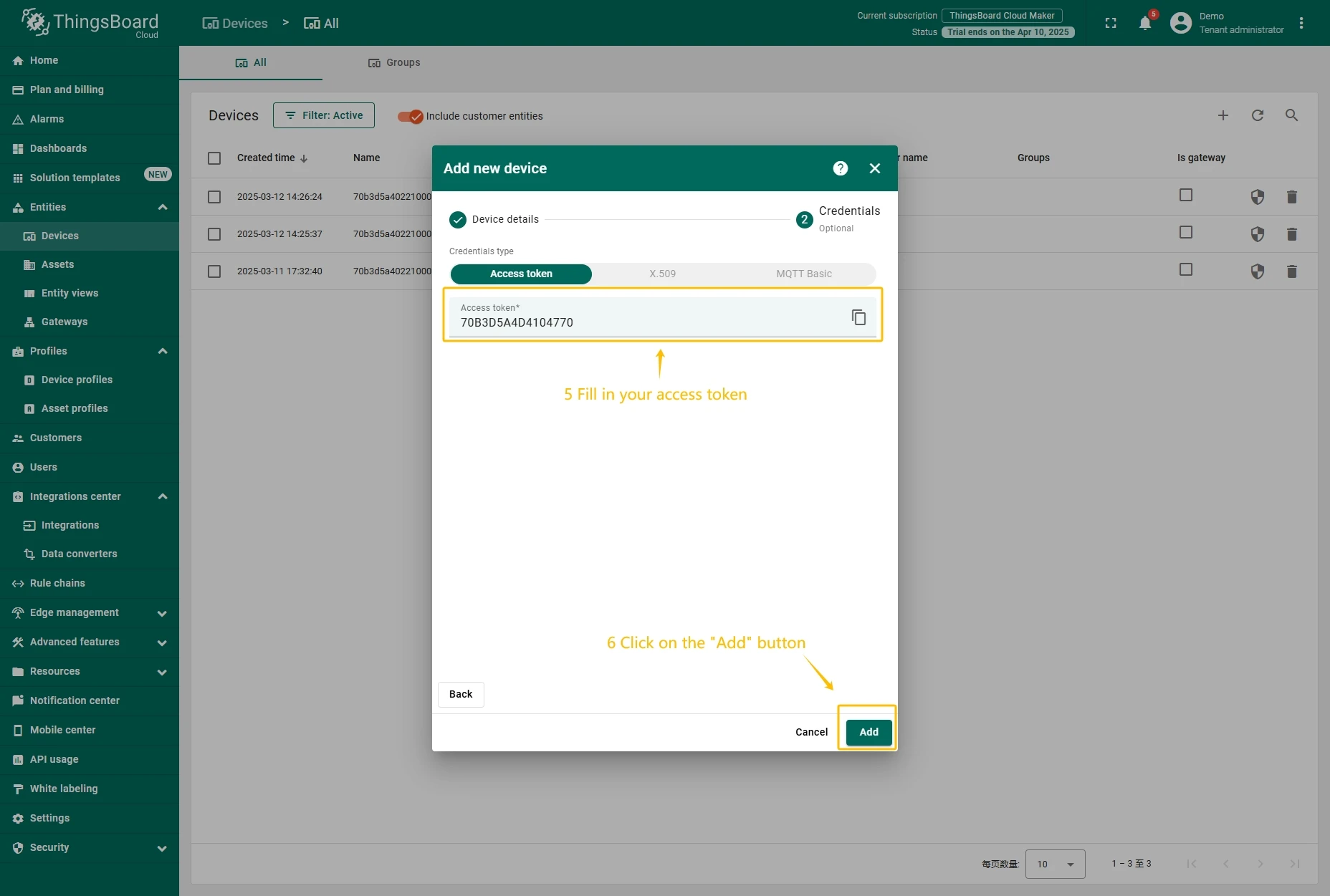
Create device on ThingsBoard
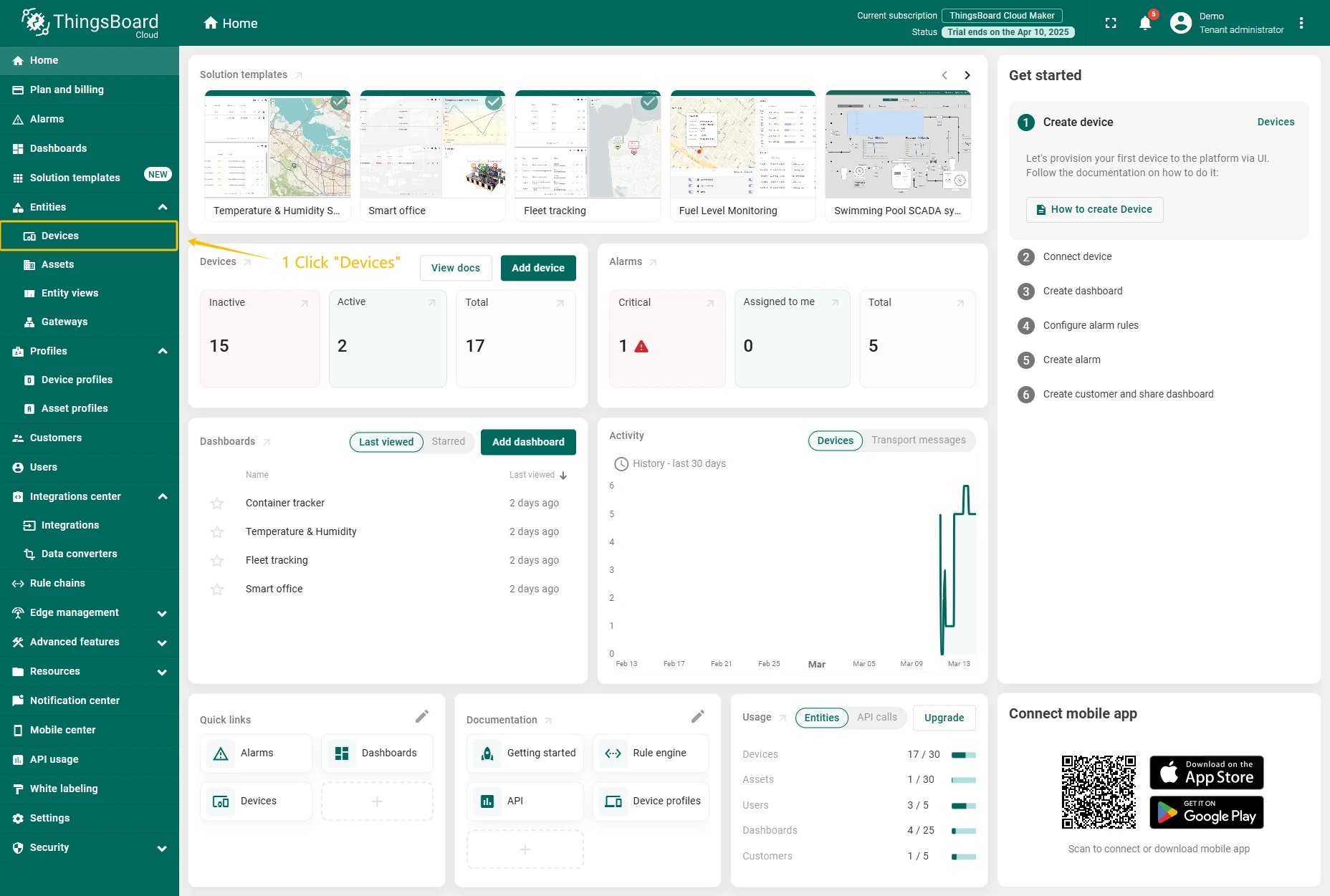
- Go to the Devices page.
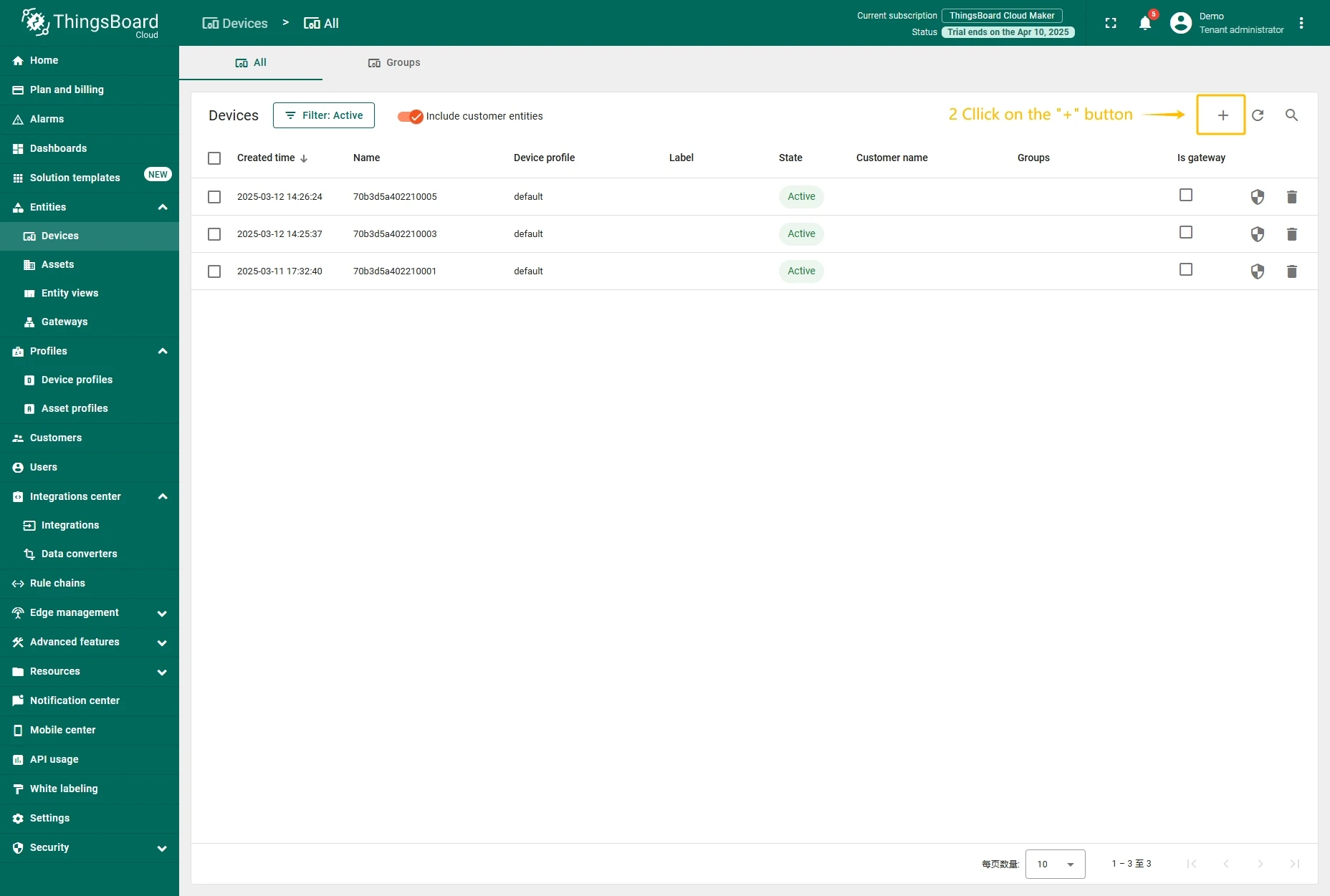
- Click on Add device button.
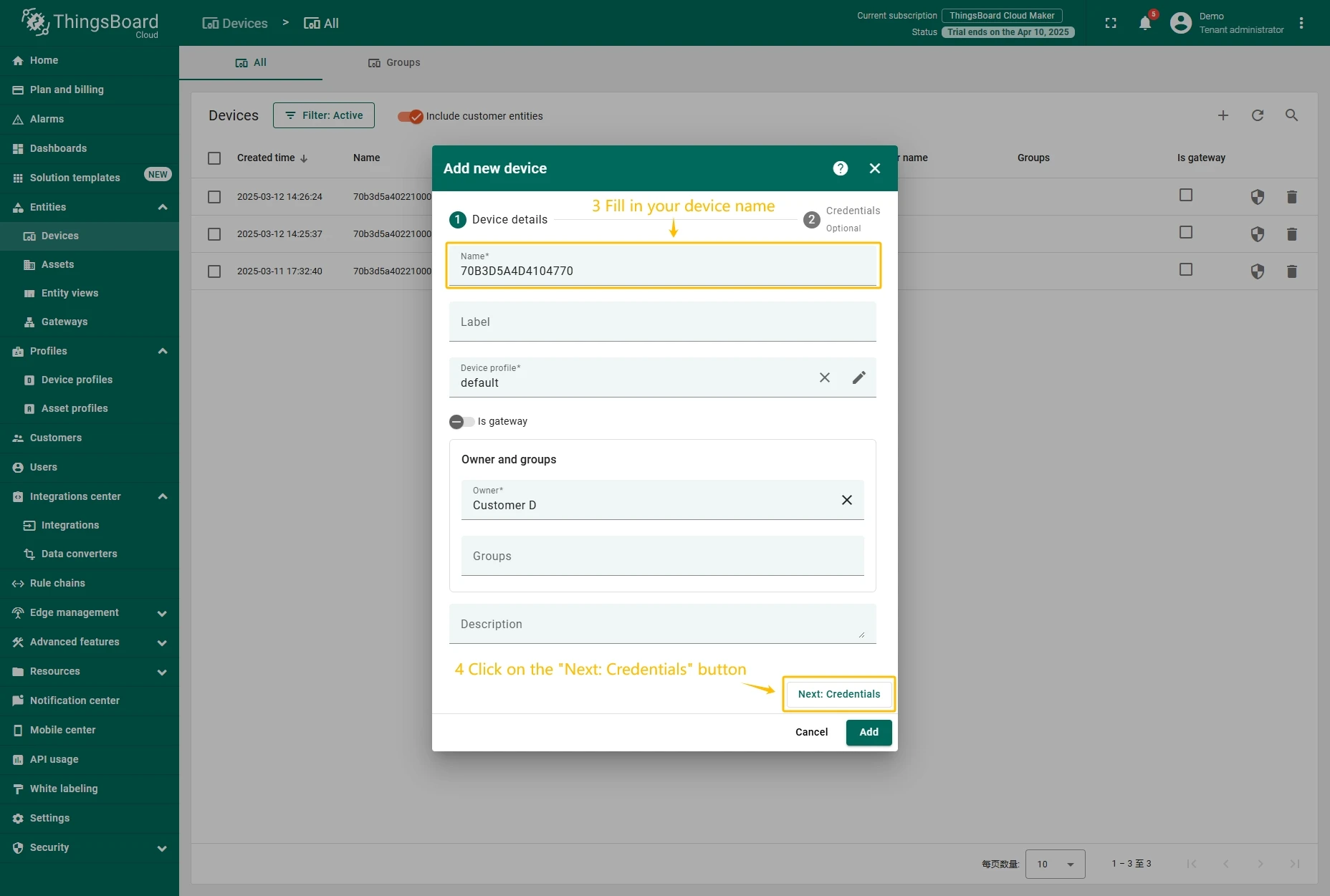
- Fill in the device name and click the Next: Credentials button.
- Enter the device Access token (previously copied Device EUI value) and click the Add button.
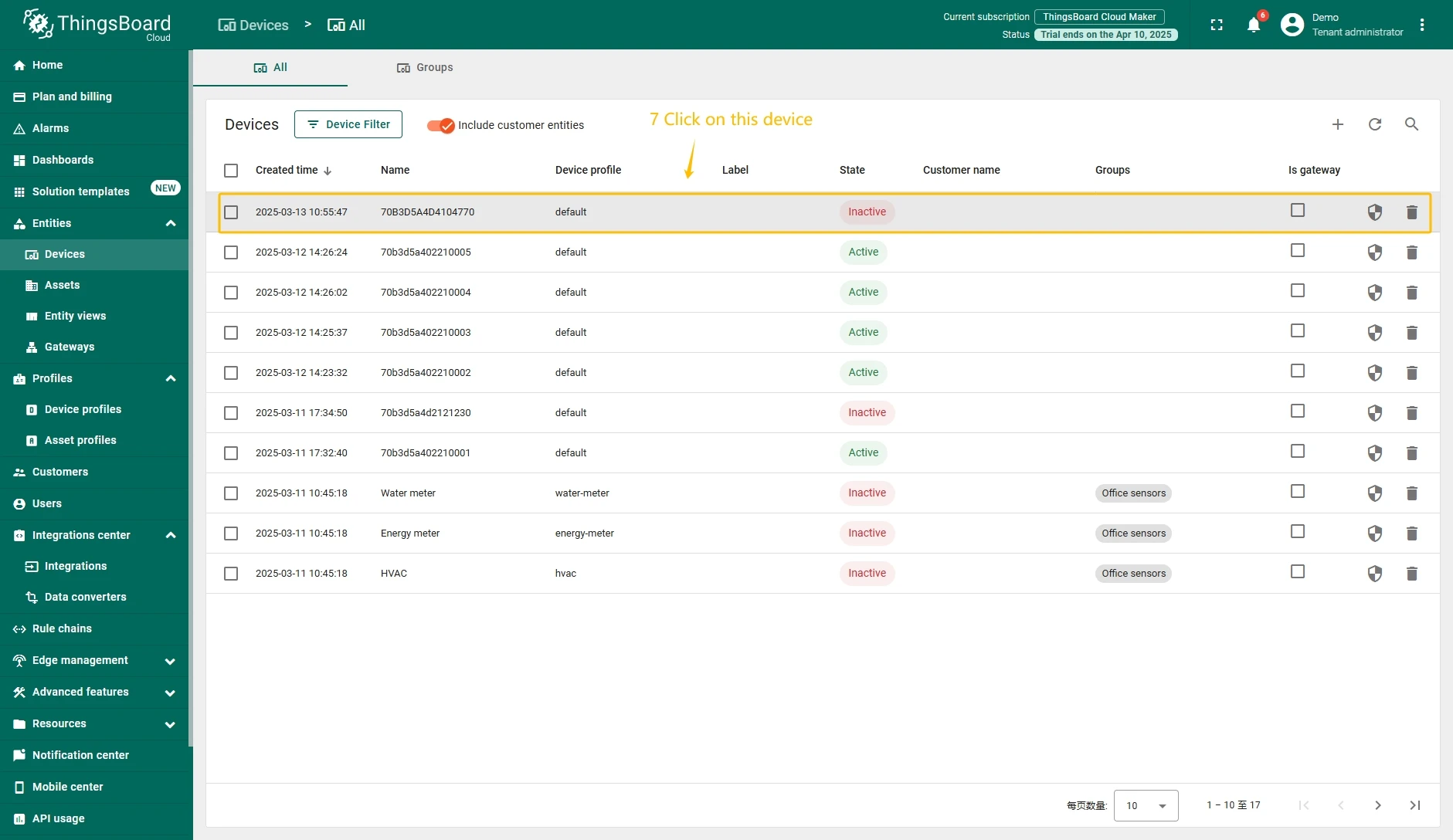
- Click on the device to open device information window.
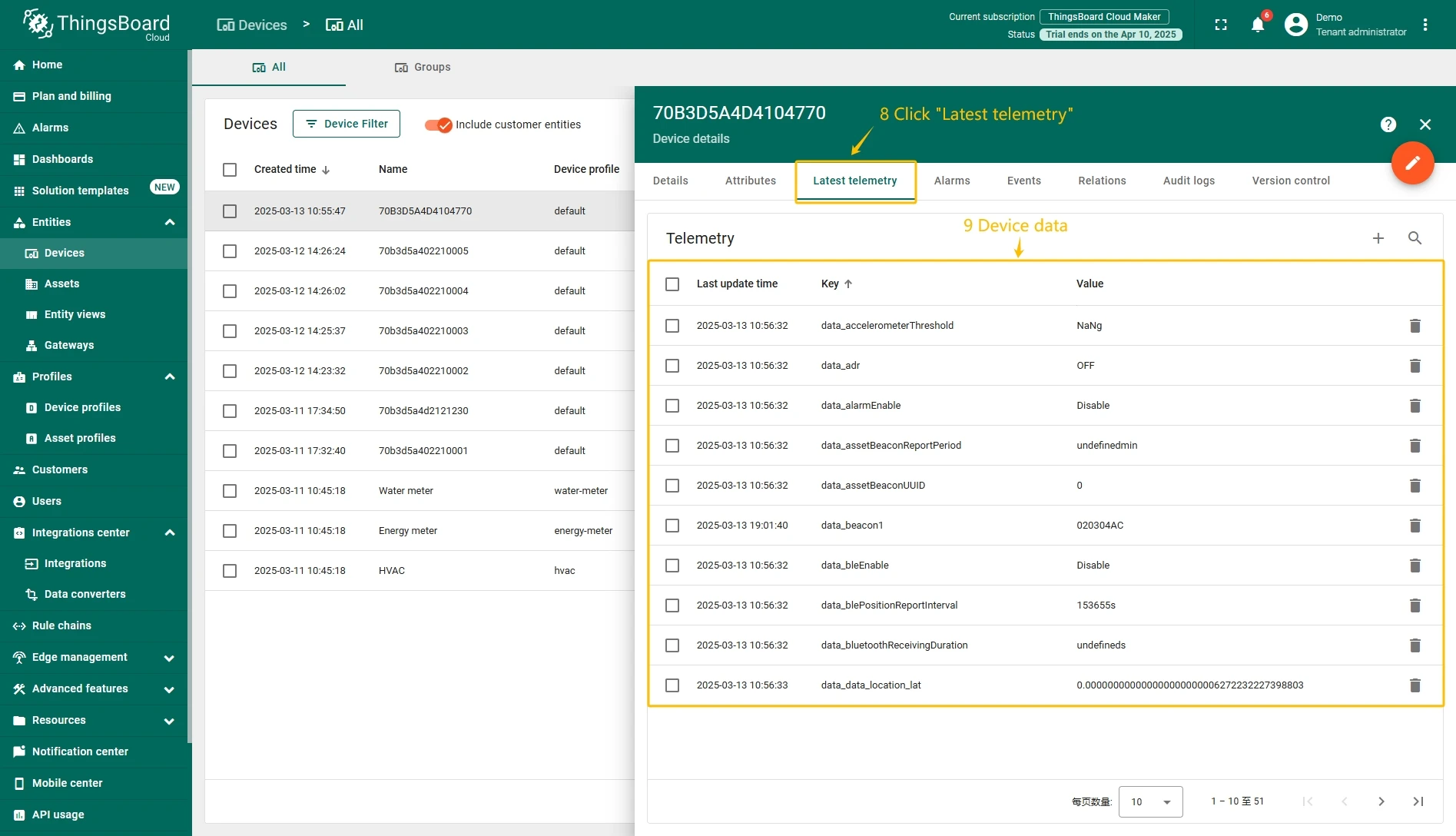
- Go to the Latest telemetry tab to view device reported data.
Add a gateway on The Things Stack Community Edition
We need to add a gateway on The Things Stack Community Edition.
To add a gateway, you can follow next steps:
- Login to the cloud and open your console.
- Go to the Home page press the “Register gateway” button.
- Put information about the gateway (gateway EUI) and click the “Register gateway”button.
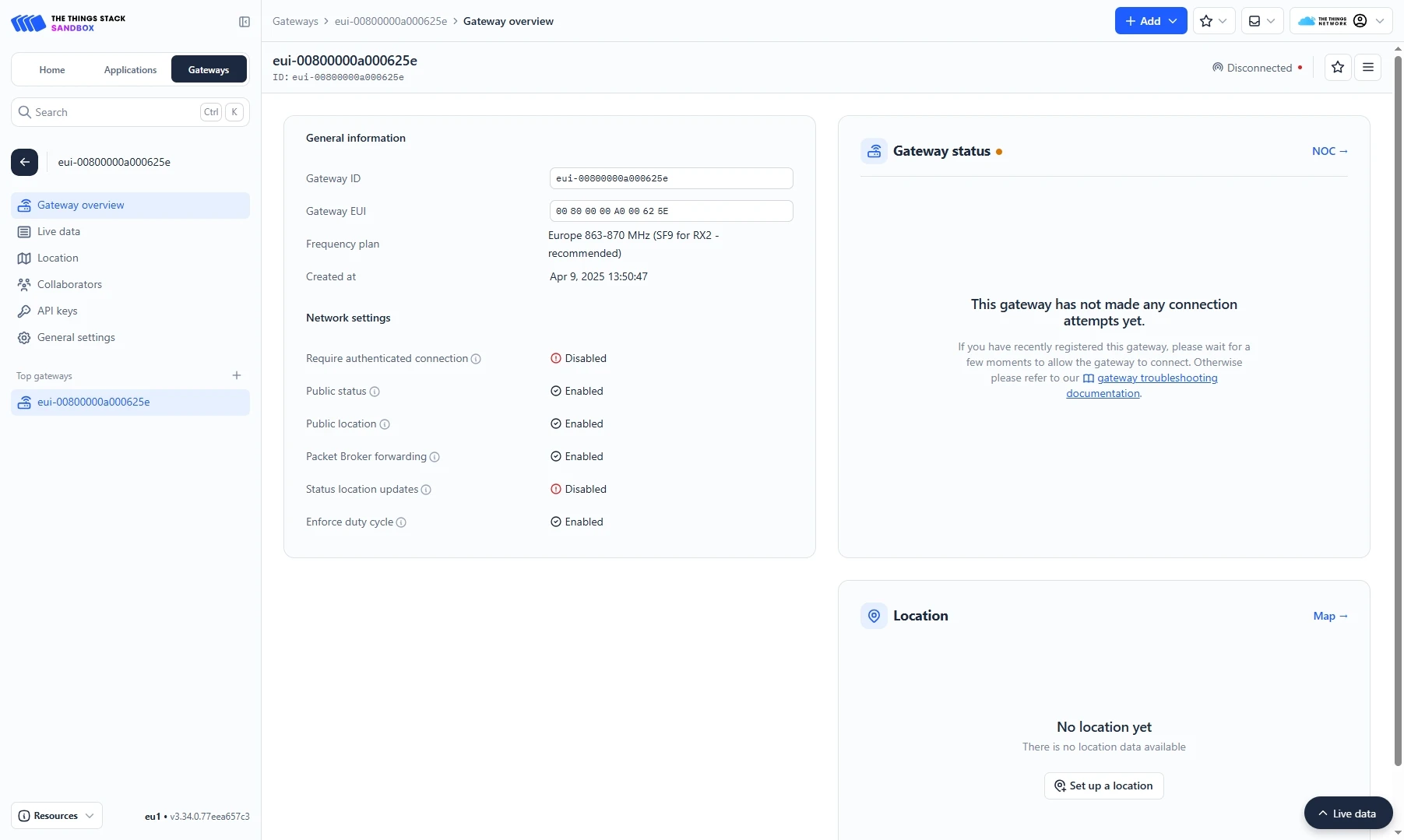
- The gateway is added. You can see its status - disconnected.


Add a device on The Things Stack Community Edition
We need to add a device on The Things Stack Community Edition.
To add a device, you can follow next steps:
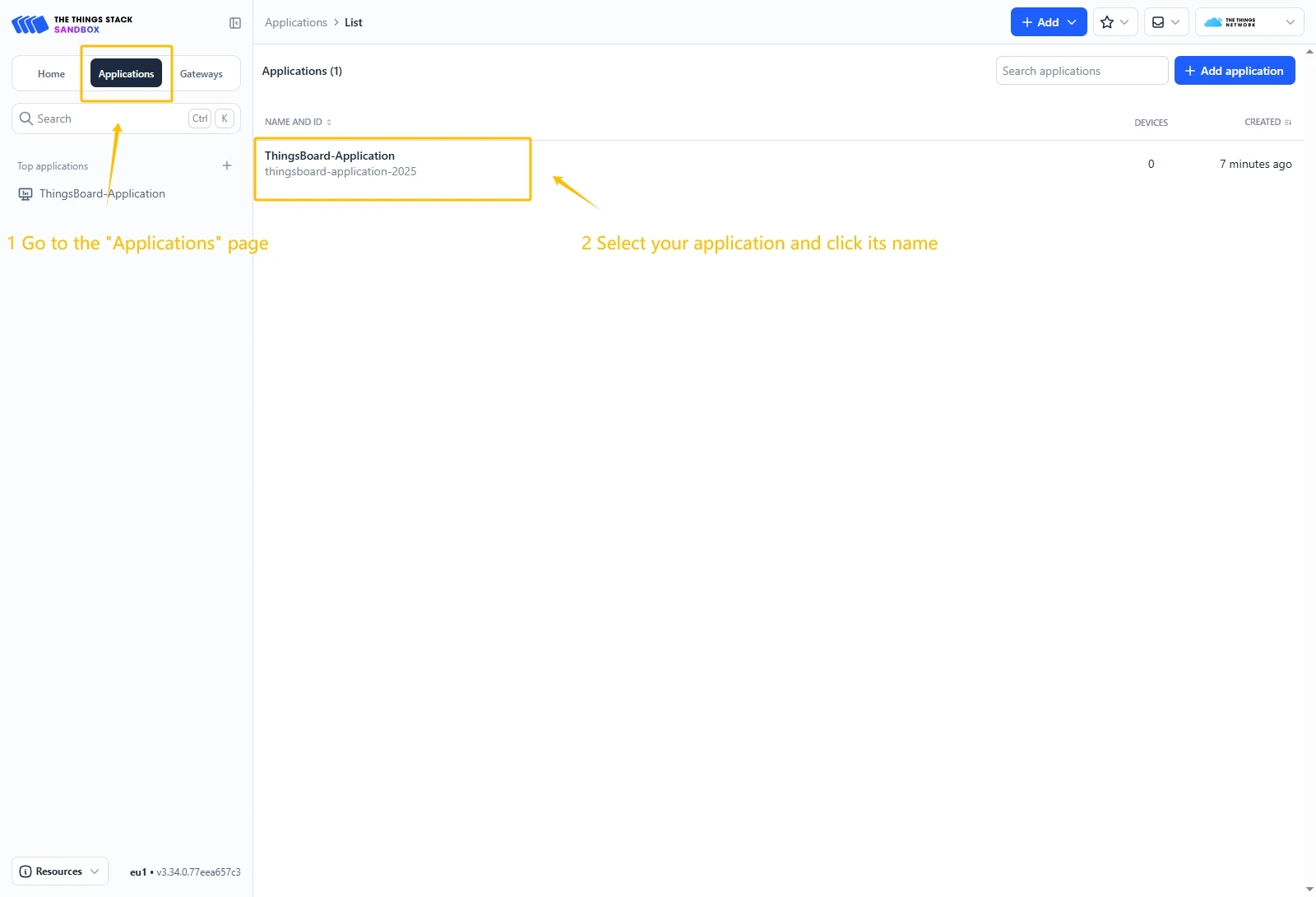
- Go to the Applications page. Then select your application and click on its name.
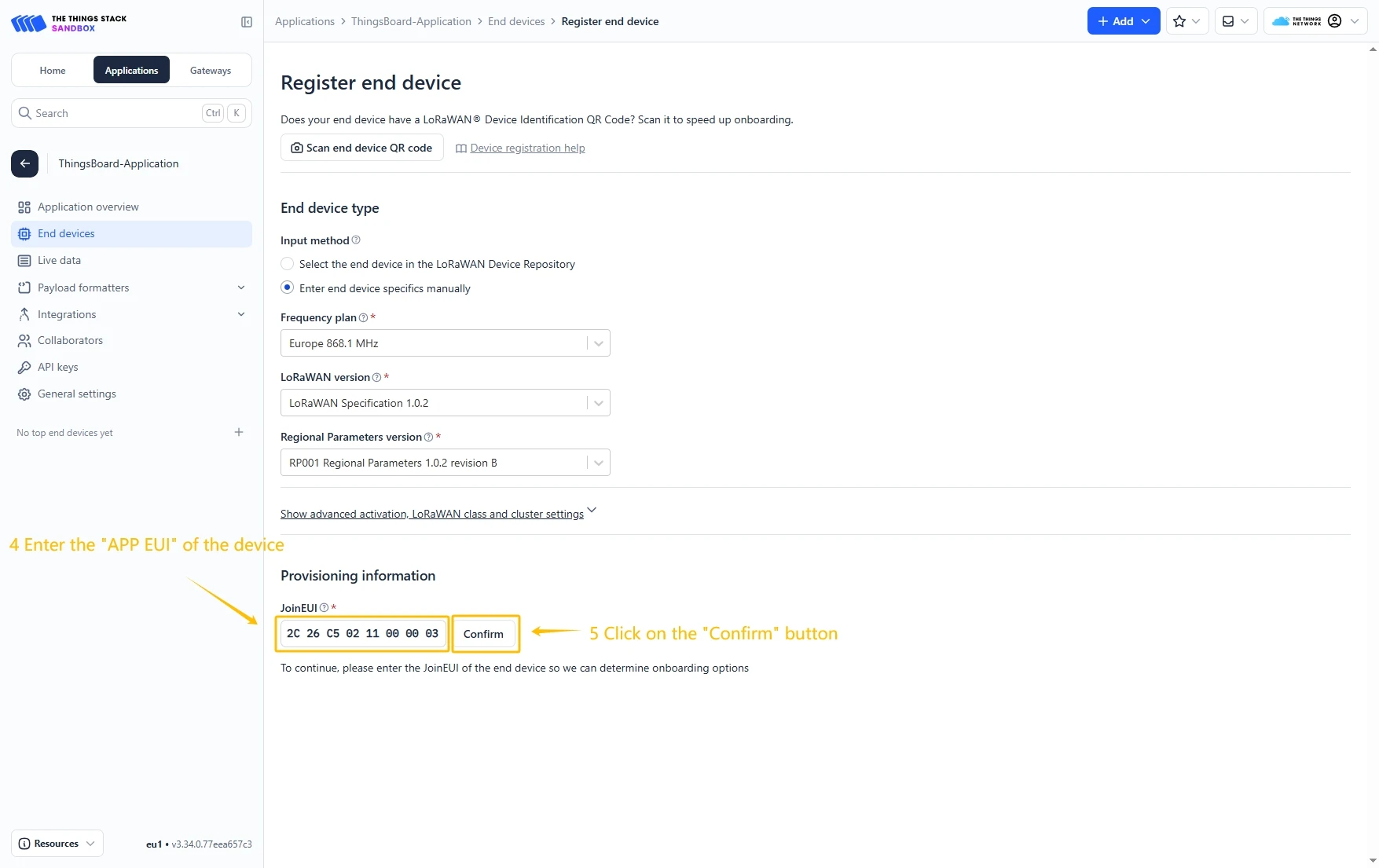
- Click on the Register end device button.
- Put the APP EUI value to the JoinEUI field. Then, press the Confirm button.
- Fill the rest parameters and press Register end device button.


Configure Payload Formatter
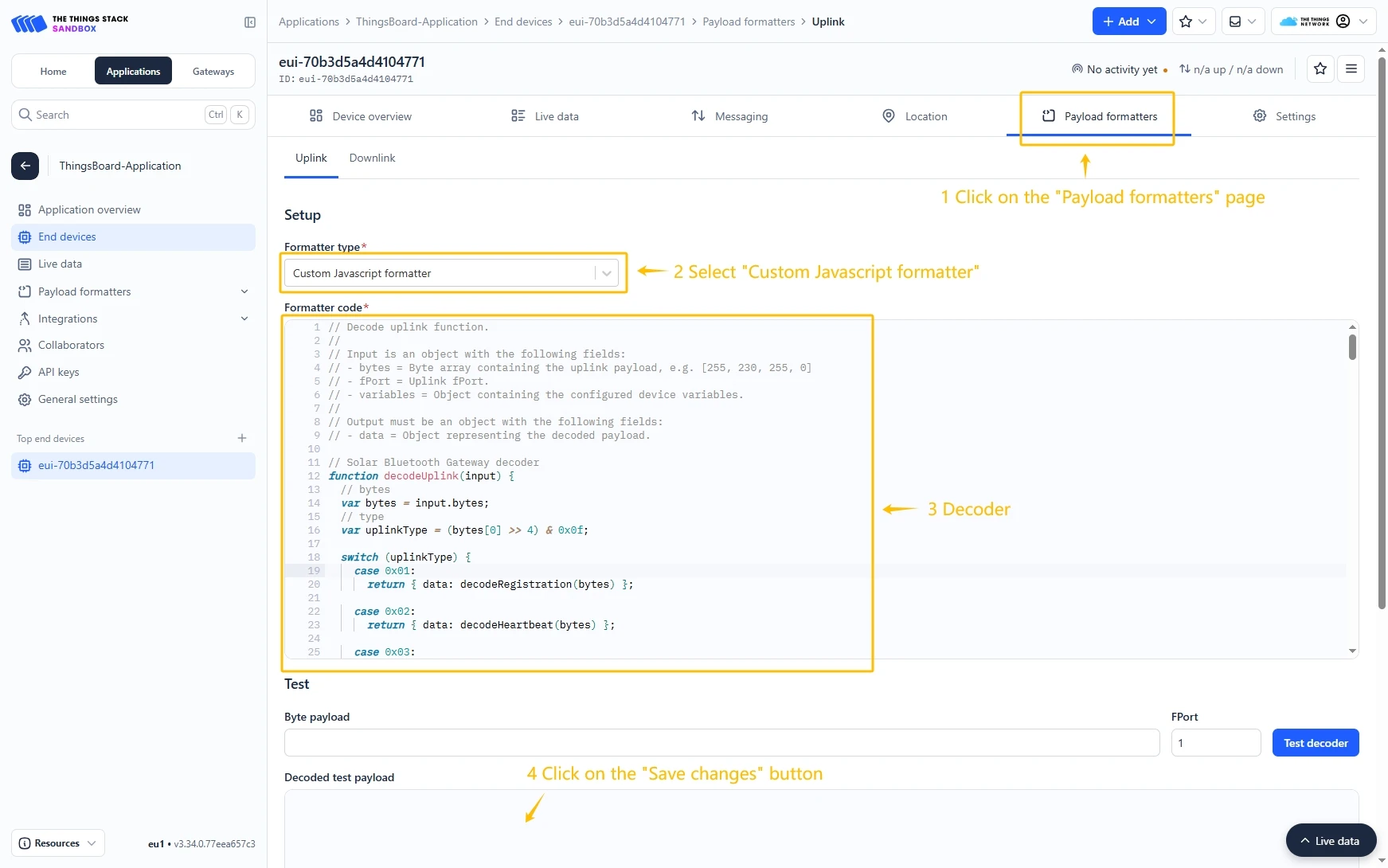
Go to the Payload formatters page and select Custom Javascript formatter for Formatter type. Paste the decode function and click Save changes button.
Decode function:
// UWB Container Tracker decoderfunction decodeUplink(input) {// bytes    var bytes = input.bytes;// type    var type = (bytes[0] >> 4) & 0x0f;    switch (type) {        case 0x01:            return {data: decodeRegistration(bytes)};        case 0x02:            return {data: decodeHeartbeat(bytes)};        case 0x03:            return {data: decodeGNSSPosition(bytes)};        case 0x04:            return {data: decodeBeacon(bytes)};        case 0x05:            return {data: decodeAlarm(bytes)};        case 0x06:            return {data: decodeSingleConfigurationParameter(bytes)};        case 0x07:            return {data: decodeRuleBeacon(bytes)};        case 0x08:            return {data: decodeDistance(bytes)};        default:            return;    }}
// type: 0x1 Registrationfunction decodeRegistration(bytes) {    var data = {};    data.type = "RegistrationMessage";    data.softwareVersion = ((bytes[1] << 8) & 0xff00) | (bytes[2] & 0xff);    data.hardwareVersion = ((bytes[3] << 8) & 0xff00) | (bytes[4] & 0xff);    data.deviceState =        (bytes[5] << 24) | (bytes[6] << 16) | (bytes[7] << 8) | bytes[8];    data.lorSynPeriod = bytes[9];    data.lorSynFreq =        (bytes[10] << 24) | (bytes[11] << 16) | (bytes[12] << 8) | bytes[13];    data.lorSynDr = bytes[14];    data.heartbeatPeriod = ((bytes[15] << 8) & 0xff00) | (bytes[16] & 0xff);    data.messageId = ((bytes[17] << 8) & 0xff00) | (bytes[18] & 0xff);    return data;}
// type: 0x2 Heartbeatfunction decodeHeartbeat(bytes) {    var data = {};    data.type = "HeartbeatMessage";    data.deviceState =        (bytes[1] << 24) | (bytes[2] << 16) | (bytes[3] << 8) | bytes[4];    data.powerVol = bytes[5];    data.powerPersent = bytes[6];    data.uwbRangeCount = bytes[7];    data.bleOnCount = bytes[8];    data.gnssOnCount = bytes[9];    data.temperature = ((bytes[10] << 8) & 0xff00) | (bytes[11] & 0xff);    data.movementTime = ((bytes[12] << 8) & 0xff00) | (bytes[13] & 0xff);    data.wearTime = ((bytes[14] << 8) & 0xff00) | (bytes[15] & 0xff);    data.chargeTime = ((bytes[16] << 8) & 0xff00) | (bytes[17] & 0xff);    data.messageId = ((bytes[18] << 8) & 0xff00) | (bytes[19] & 0xff);    return data;}
// type: 0x03 GNSSPositionfunction decodeGNSSPosition(bytes) {    var data = {};    data.type = "GNSSPosition";    data.gnssState =        (bytes[0] & 0x01) === 0 ? "GNSS location success" : "GNSS location failed";// longitude    let longitude =        (bytes[1] << 24) | (bytes[2] << 16) | (bytes[3] << 8) | bytes[4];    data.longitude = hex2float(longitude);// latitude    let latitude =        (bytes[5] << 24) | (bytes[6] << 16) | (bytes[7] << 8) | bytes[8];    data.latitude = hex2float(latitude);// time    let time =        (bytes[9] << 24) | (bytes[10] << 16) | (bytes[11] << 8) | bytes[12];    data.time = timestampToTime((time + 8 * 60 * 60) * 1000);// wearState    data.wearState = bytes[13] === 0 ? "no wear" : "wear";    return data;}
// type: 0x4 Beaconfunction decodeBeacon(bytes) {    var data = {};    data.type = "BeaconMessage";    data.beaconType =        (bytes[0] & 0x01) === 0 ? "PositioningBeacon" : "AssetBeacon";    data.beaconCount = bytes[1] & 0x0f;    for (let i = 0; i < data.beaconCount; i++) {        var index = 2 + 5 * i;        var major = (((bytes[index] << 8) & 0xff00) | (bytes[index + 1] & 0xff))            .toString(16)            .toUpperCase()            .padStart(4, "0");        var minor = (((bytes[index + 2] << 8) & 0xff00) | (bytes[index + 3] & 0xff))            .toString(16)            .toUpperCase()            .padStart(4, "0");        var rssi = bytes[index + 4] - 256 + "dBm";        data["beacon" + (i + 1)] = major + minor;        data["rssi" + (i + 1)] = rssi;    }// wearState    var wearIndex = data.beaconCount * 5 + 2;    data.wearState = bytes[wearIndex] === 0 ? "no wear" : "wear";    return data;}
// type: 0x5 Alarmfunction decodeAlarm(bytes) {    var data = {};    data.type = "AlarmMessage";    var alarmValue = bytes[1] & 0x0f;    if (alarmValue == 1) {        data.alarm = "SOS";    } else if (alarmValue == 2) {        data.alarm = "Fall";    } else if (alarmValue == 3) {        data.alarm = "Special area";    } else if (alarmValue == 4) {        data.alarm = "Search";    } else if (alarmValue == 5) {        data.alarm = "Magnet remove";    }    return data;}
// type: 0x6 Single Configuration Parameterfunction decodeSingleConfigurationParameter(bytes) {    var data = {};    data.type = "ConfigurationParameterResponse";    var parameter = [];    let byteLength = bytes.length;    var index = 0;    while (index + 1 < byteLength) {        var commandBitField = {};        var parameterType = bytes[index + 1] & 0xff;        commandBitField.parameterType = parameterType;        var commandBitFieldLength = getCommandBitFieldLength(parameterType);        var parameterValue = getParameterValue(bytes, index, commandBitFieldLength);        commandBitField.parameterValue = parameterValue;        commandBitField.name = getParameterName(parameterType);        commandBitField.parameterDefinition = getParameterDefinition(            parameterType,            parameterValue        );        index = index + commandBitFieldLength;        parameter.push(commandBitField);    }    data.parameter = parameter;    return data;}
// type: 0x7 Rule Beaconfunction decodeRuleBeacon(bytes) {    var data = {};    data.type = "RuleBeaconMessage";    var deviceTypeId = bytes[0] & 0x03;    if (deviceTypeId == 1) {        data.deviceTypeId = "deviceTypeId1";    } else if (deviceTypeId == 2) {        data.deviceTypeId = "deviceTypeId2";    } else if (deviceTypeId == 3) {        data.deviceTypeId = "deviceTypeId3";    }    data.beaconCount = bytes[1] & 0x0f;    for (let i = 0; i < data.beaconCount; i++) {        var index = 2 + 5 * i;        var major = (((bytes[index] << 8) & 0xff00) | (bytes[index + 1] & 0xff))            .toString(16)            .toUpperCase()            .padStart(4, "0");        var minor = (((bytes[index + 2] << 8) & 0xff00) | (bytes[index + 3] & 0xff))            .toString(16)            .toUpperCase()            .padStart(4, "0");        var rssi = bytes[index + 4] - 256 + "dBm";        data["beacon" + (i + 1)] = major + minor;        data["rssi" + (i + 1)] = rssi;    }// wearState    var wearIndex = data.beaconCount * 5 + 2;    data.wearState = bytes[wearIndex] === 0 ? "no wear" : "wear";    return data;}
// type: 0x8 Distancefunction decodeDistance(bytes) {    var data = {};    data.type = "Distance";    data.uwbBeaconCount = bytes[1] & 0x0f;// data.uwbBeaconCount = 3;    for (let i = 0; i < data.uwbBeaconCount; i++) {        var index = 2 + 7 * i;        var dev = (((bytes[index] << 8) & 0xff00) | (bytes[index + 1] & 0xff))            .toString(16)            .toUpperCase()            .padStart(4, "0");        var eui = (((bytes[index + 2] << 8) & 0xff00) | (bytes[index + 3] & 0xff))            .toString(16)            .toUpperCase()            .padStart(4, "0");        data["majorminor" + (i + 1)] = dev + eui;        data["distance" + (i + 1)] =            (bytes[index + 4] << 16) | (bytes[index + 5] << 8) | bytes[index + 6];    }// wearState    var wearIndex = data.uwbBeaconCount * 7 + 2;    data.wearState = bytes[wearIndex] === 0 ? "no wear" : "wear";    return data;}
// getParameterValue hexStringfunction getParameterValue(bytes, index, length) {    var hexString = "";    for (var i = 2; i <= length; i++) {        var hex = (bytes[index + i] & 0xff).toString(16).toUpperCase();        hexString += hex.padStart(2, "0");    }    return hexString;}
// getCommandBitFieldLengthfunction getCommandBitFieldLength(parameterType) {    let lengths = {        0x00: 3,        0x01: 3,        0x02: 3,        0x03: 3,        0x04: 3,        0x05: 2,        0x06: 2,        0x07: 2, 0x08: 2,        0x0a: 17,        0x0b: 17,        0x0e: 9,        0x1e: 2,        0x1f: 2,        0x20: 2,        0x29: 2,        0x2a: 2,        0x2b: 2,        0x2e: 2,        0x2f: 2,        0x30: 2,        0x31: 2,    };    return lengths[parameterType] ?? 0;}
// Parameter Namefunction getParameterName(parameterType) {    let name = {        0x00: "SoftwareVersion",        0x01: "HBPeriod",        0x02: "BlePositionReportInterval",        0x03: "GNSSPositionReportInterval",        0x04: "AssetBeaconReportInterval",        0x05: "BlePositionReceivingDuration",        0x06: "GNSSPositionReceivingDuration",        0x07: "AssetBleReceivingDuration",        0x08: "FallThreshold",        0x0a: "PosBeaconUUID",        0x0b: "AssetBeaconUUID",        0x0e: "ISMI",        0x1e: "FallDetectionAlarmEnable",        0x1f: "SOSAlarmEnable",        0x20: "PosMode",        0x29: "AssetManagementEnable",        0x2a: "GNSSFailureReportEnable",        0x2b: "AssetBeaconSortEnable",        0x2e: "PowerSwitchEnable",        0x2f: "NetworkStatusCheck",        0x30: "GNSSEnableState",        0x31: "BleEnable",    };    return name[parameterType] ?? "No matching parameter names";}
// Parameter Definitionfunction getParameterDefinition(parameterType, parameterValue) {    var val = parseInt(parameterValue, 16);    let name = {        0x00: "SoftwareVersion",        0x01: val * 30 + "s, The interval of the heartbeat message, unit: 30s",        0x02: val * 5 + "s, The interval of Bluetooth position repor, unit: 5s",        0x03: val * 5 + "s, The interval of GNSS position report, unit: 5s",        0x04: val * 5 + "s, The interval of asset beacons report, unit: 5s", 0x05:            val * 1 + "s, The duration of BLE position beacon receiving, unit: 1s",        0x06: val * 5 + "s, The duration of GNSS position receiving, unit: 5s",        0x07: val * 1 + "s, The duration of asset beacon receiving, unit 1s",        0x08:            val / 2 +            "s, The threshold of the fall detection, the unit is 0.5 meters",        0x0a: "PosBeaconUUIDFilter",        0x0b: "AssetBeaconUUIDFilter",        0x0e: "ISMI",        0x1e: val == 0 ? "Disable" : "Enable",        0x1f: val == 0 ? "Disable" : "Enable",        0x20:            val == 0                ? "Period Mode"                : val == 1                    ? " Autonomous Mode"                    : "On-demand Mode",        0x29: val == 0 ? "Disable" : "Enable",        0x2a: val == 0 ? "Disable" : "Enable",        0x2b: val == 0 ? "Disable" : "Enable",        0x2e: val == 0 ? "Disable" : "Enable",        0x2f: val == 0 ? "Disable" : "Enable",        0x30: val == 0 ? "Disable" : "Enable",        0x31: val == 0 ? "Disable" : "Enable",    };    return name[parameterType] ?? "No matching parameter names";}
// Floating point conversionfunction hex2float(num) {    var sign = num & 0x80000000 ? -1 : 1;    var exponent = ((num >> 23) & 0xff) - 127;    var mantissa = 1 + (num & 0x7fffff) / 0x7fffff;    return sign * mantissa * Math.pow(2, exponent);}
function asciiToHex(str) {    var hexString = "";    for (let i = 0; i < str.length; i++) {        var hex = str.charCodeAt(i).toString(16);        hexString += hex.padStart(2, "0");    }    return hexString;}
function hexStringToByteArray(hexString) {    var byteArray = [];    for (let i = 0; i < hexString.length; i += 2) {        byteArray.push(parseInt(hexString.substr(i, 2), 16));    }    return new Uint8Array(byteArray);}
function timestampToTime(timestamp) {    const date = new Date(timestamp);    const year = date.getFullYear();    const month = (date.getMonth() + 1).toString().padStart(2, "0");    const day = date.getDate().toString().padStart(2, "0");    const hour = date.getHours().toString().padStart(2, "0");    const minute = date.getMinutes().toString().padStart(2, "0");    const second = date.getSeconds().toString().padStart(2, "0");    return `${year}-${month}-${day} ${hour}:${minute}:${second}`;}
Create integration in ThingsBoard
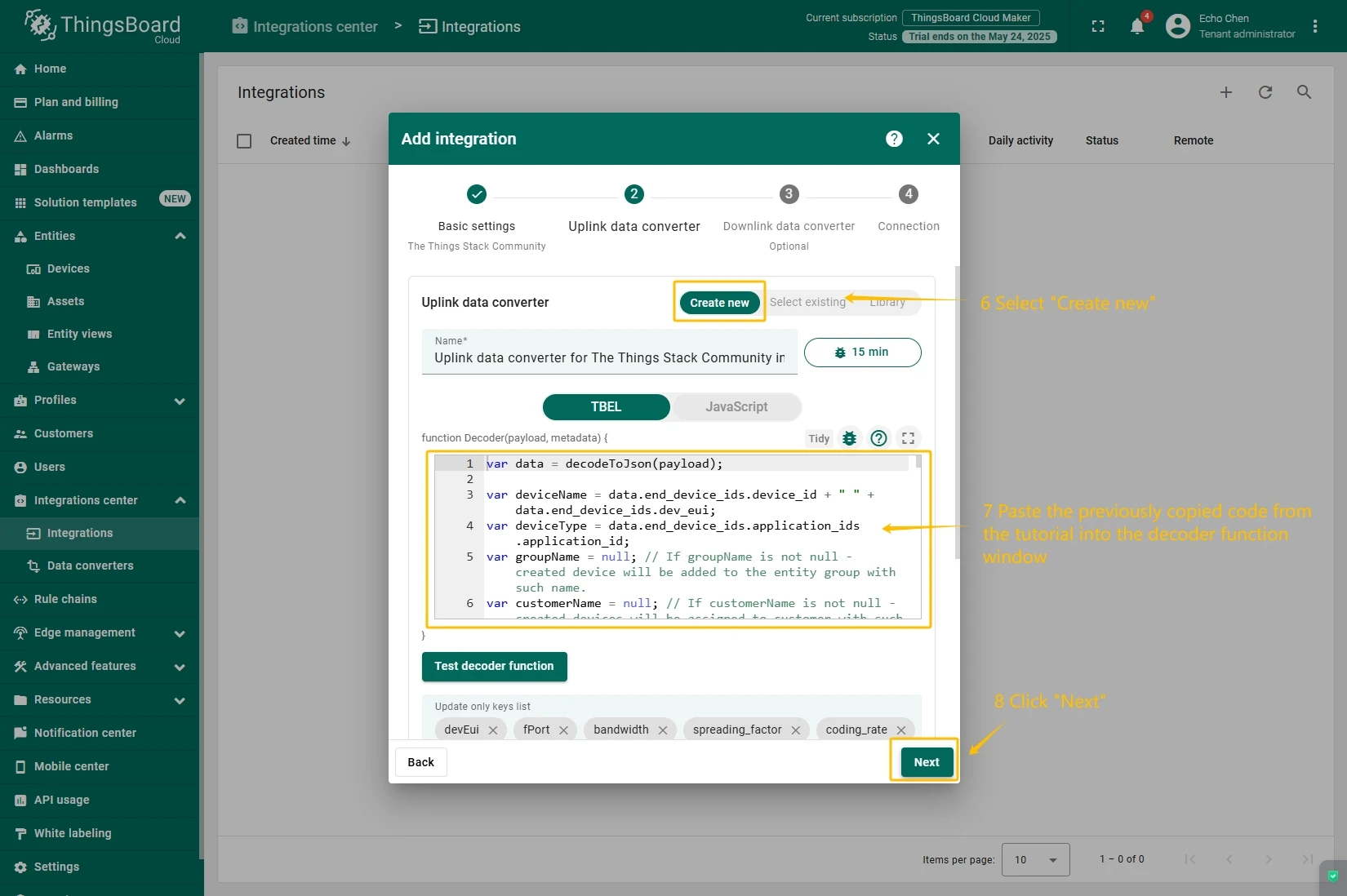
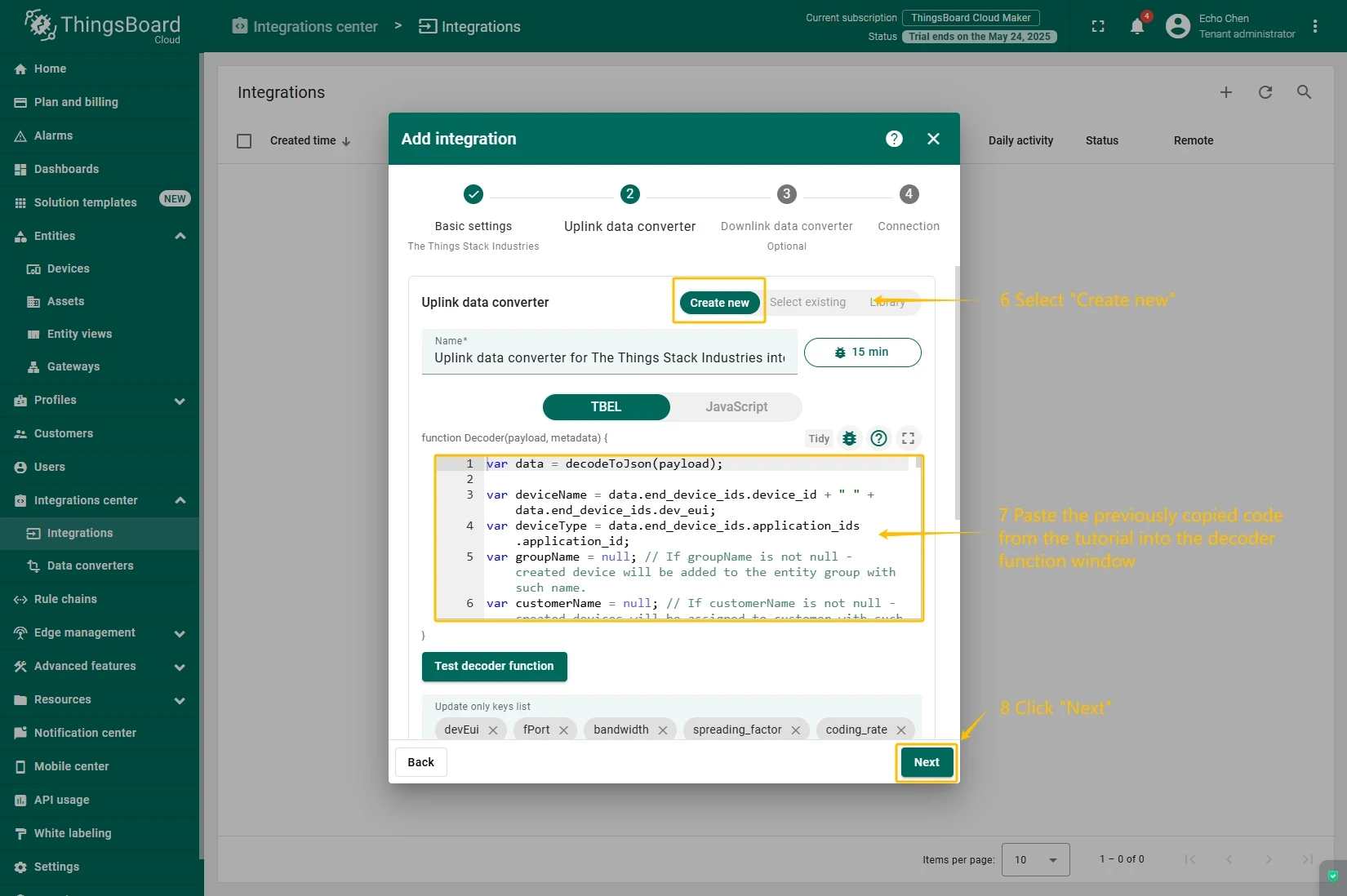
Next we will create “The Things Stack” (TTS) integration inside the ThingsBoard.
At first, copy the code, we will need it to create the uplink converter:
var data = decodeToJson(payload);var deviceName = data.end_device_ids.device_id;var deviceType = data.end_device_ids.application_ids.application_id;
var result = {  deviceName: deviceName,  deviceType: deviceType,  telemetry: data.uplink_message.decoded_payload};
return result;
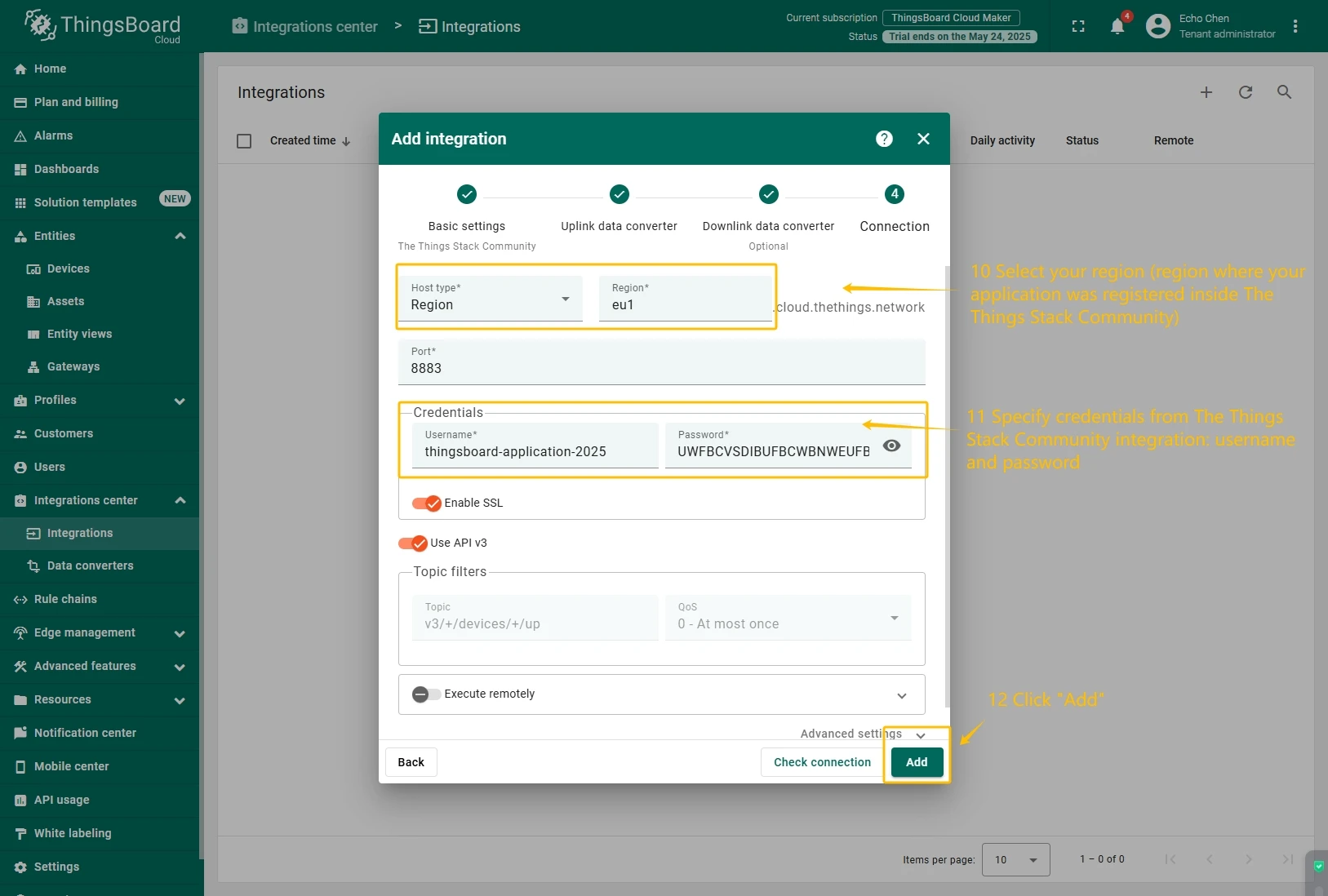
In the “Connect”step, you will need the following parameters:
- Region: eu1 (region where your application was registered inside The Things Stack Community)
- Username: thingsboard-application-2025-06@ttn (use Username from integration on TTS)
- Password: use Password from integration on The Things Stack Community
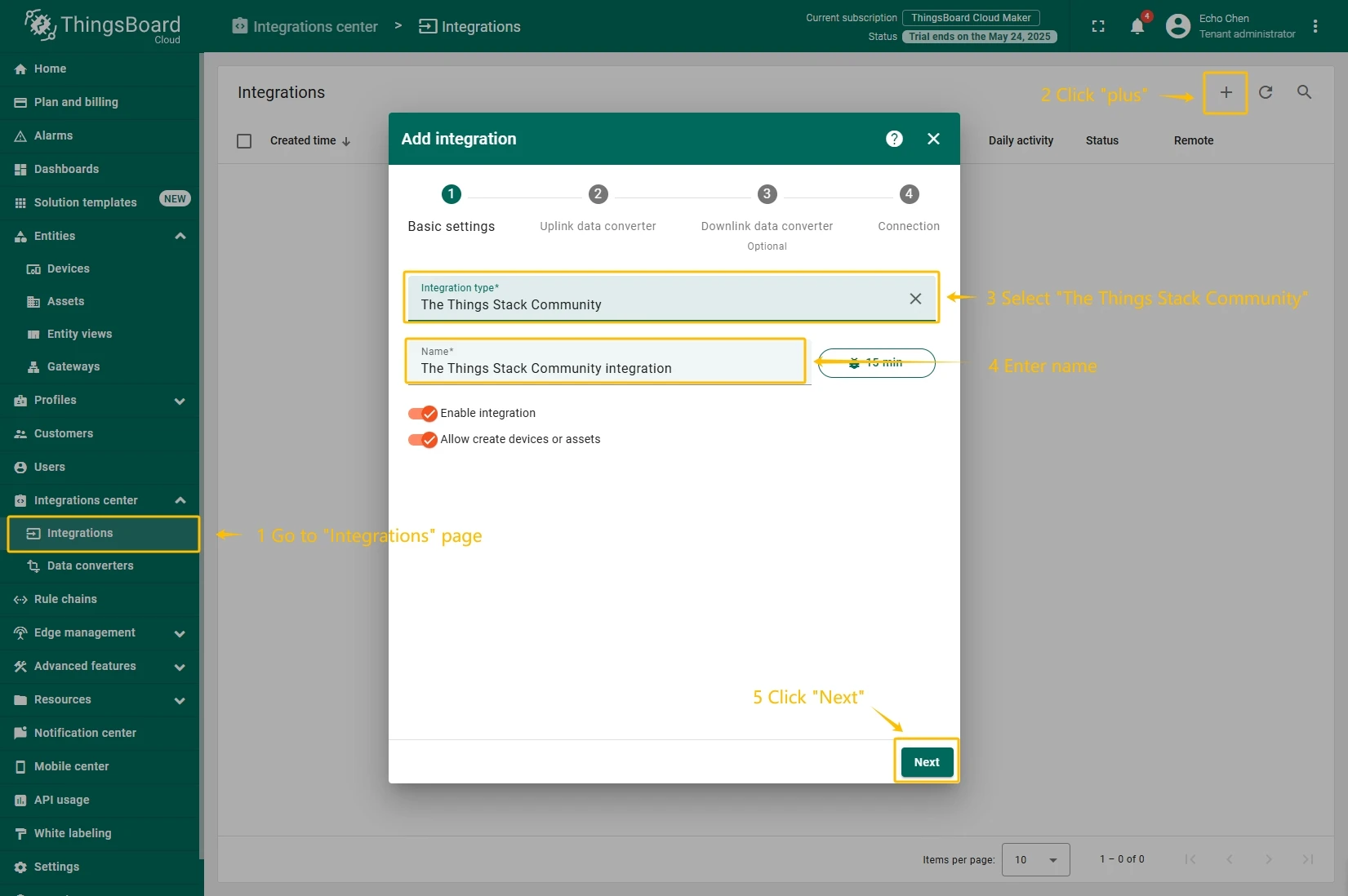
Now, navigate to the “Integrations” page under the “Integrations center” section and follow this steps:
- Click “plus” icon in the upper right corner to add new integration. Select type “The Things Stack Community”. Then, click “Next” button.
- Paste the previously copied script to the Decoder function section. Click “Next” button.
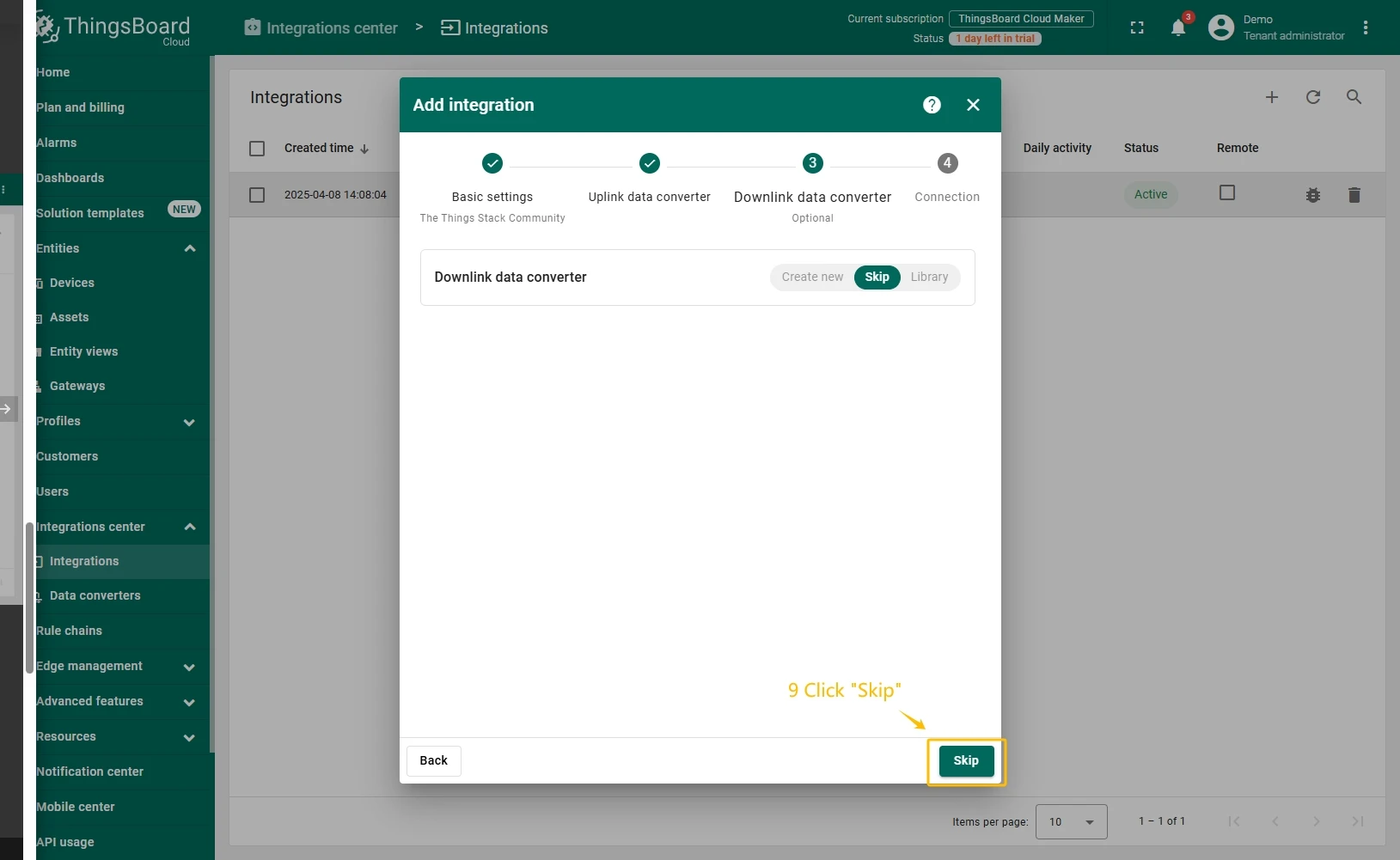
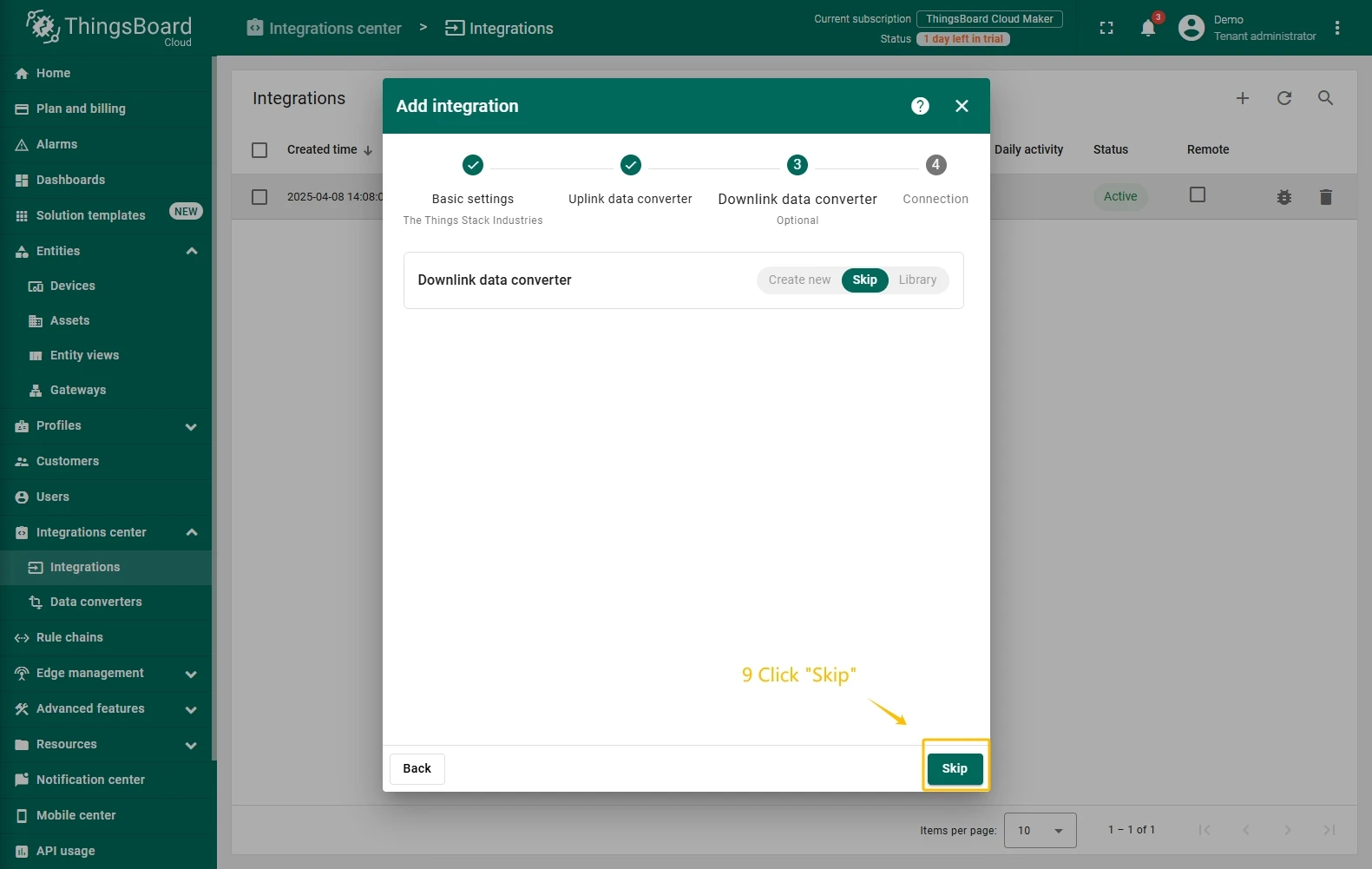
- Leave the “Downlink data converter” field empty. Click on “Skip” button.
- Next, fill in the fields with your parameters. After, press “Add” button.
Add a gateway on The Things Industries
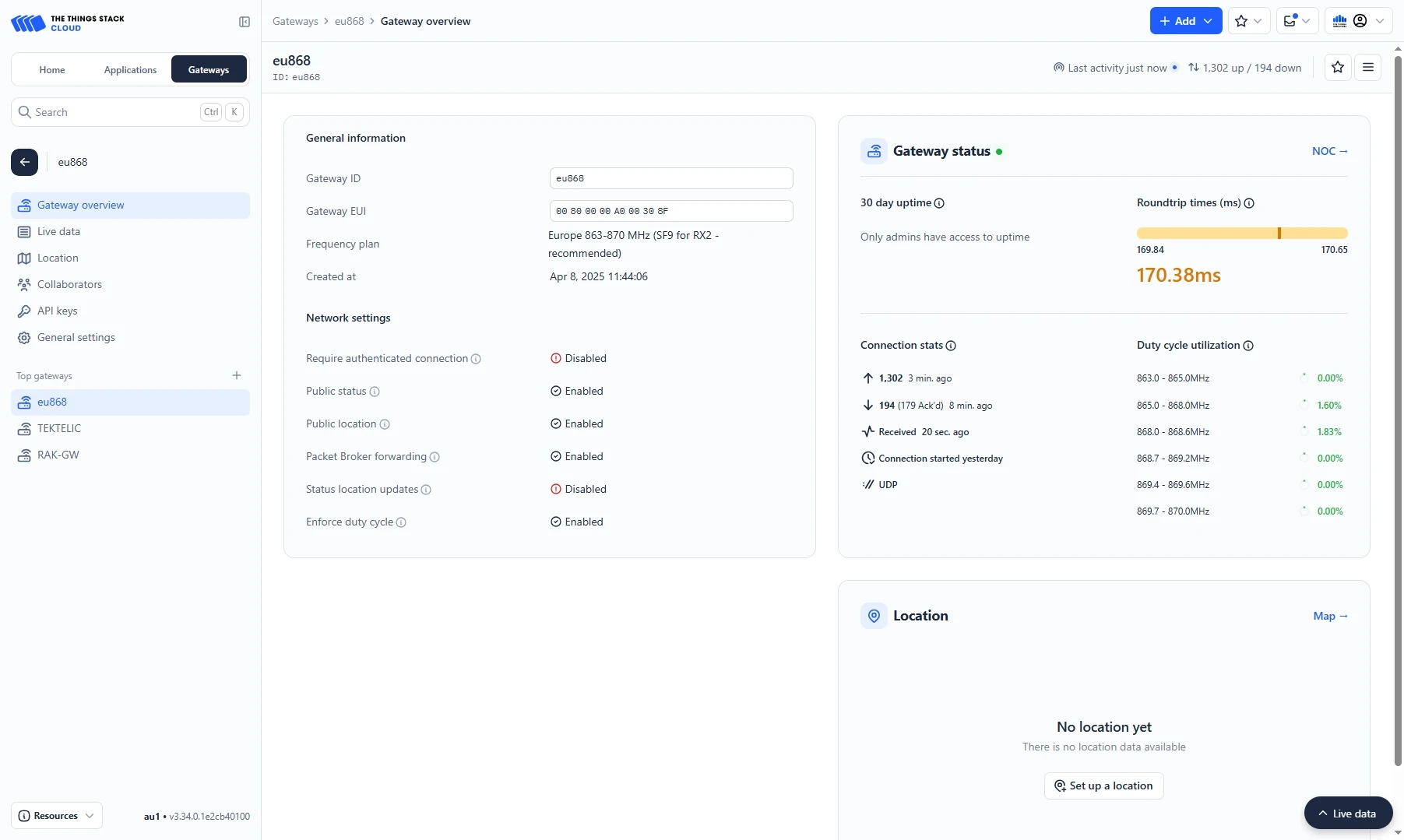
We need to add a gateway on The Things Industries cloud.
To add a gateway, you can follow next steps:
- Login to the cloud and open your console.
- Go to the Home page press the “Register gateway” button.
- Put information about the gateway (gateway EUI) and click the “Register gateway”button.
- The gateway is added. You can see its status - disconnected.


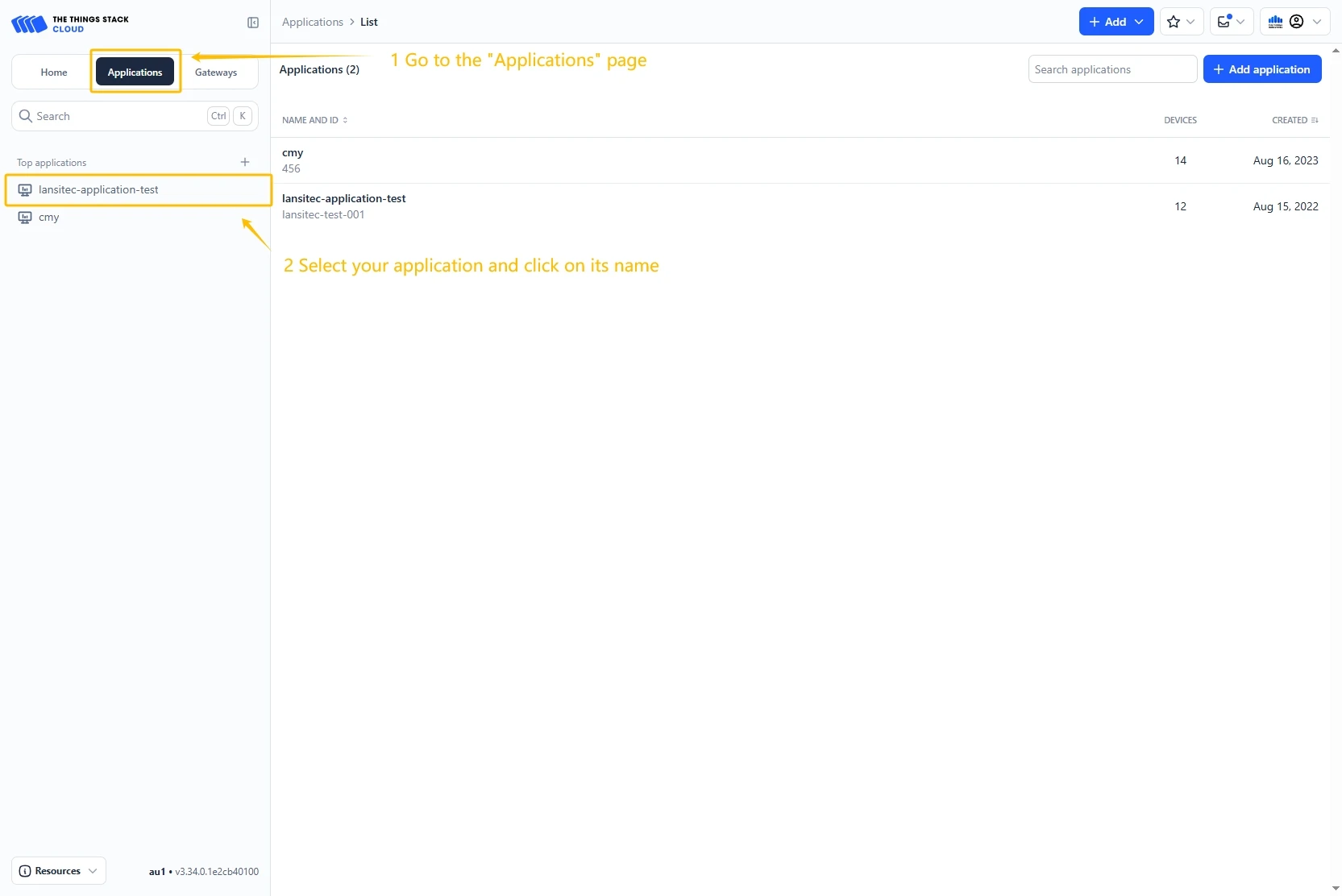
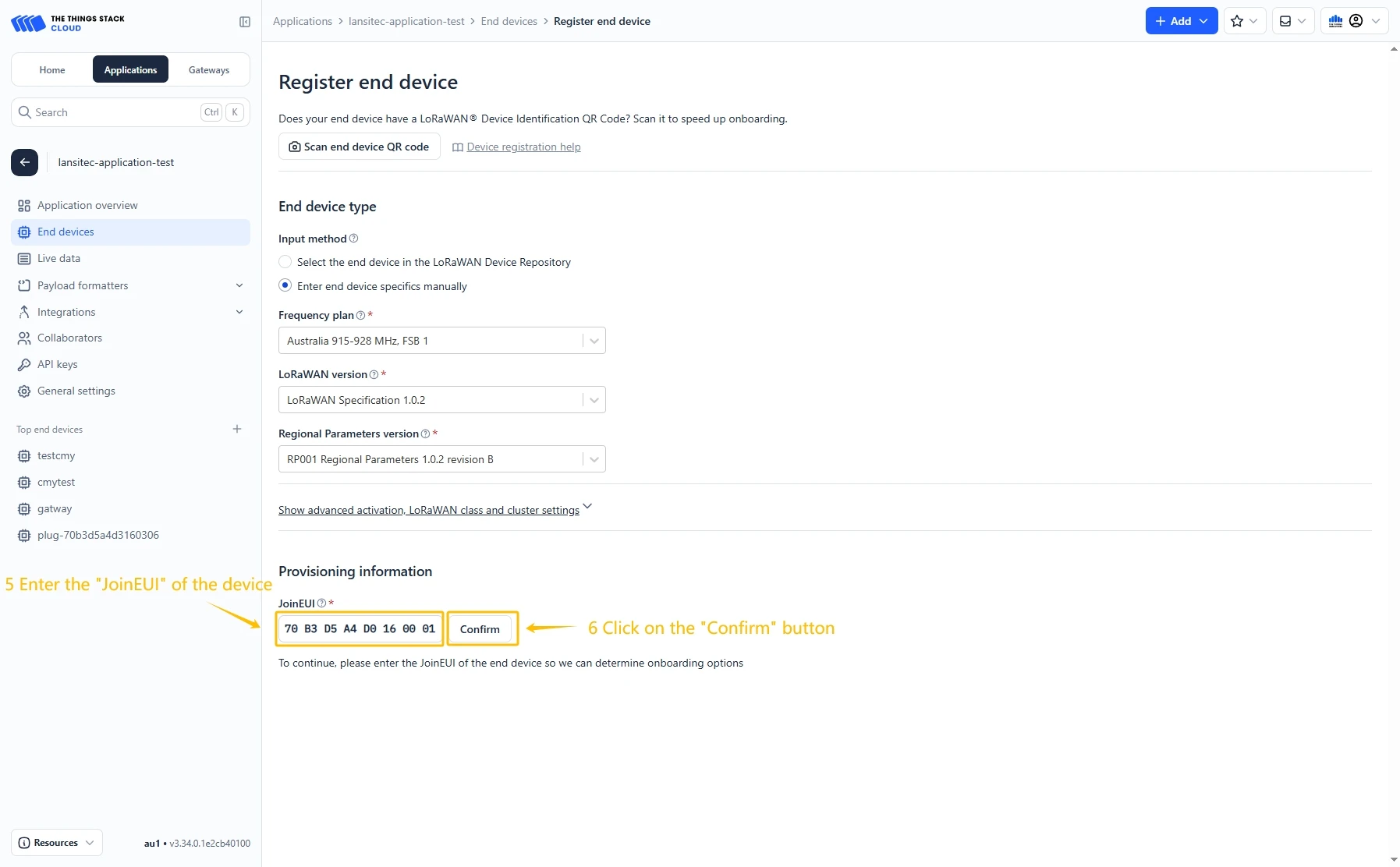
Add a device on The Things Industries
We need to add a device on The Things Industries cloud.
To add a device, you can follow next steps:
- Go to the Applications page. Then select your application and click on its name.
- Click on the Register end device button.
- Put the APP EUI value to the JoinEUI field. Then, press the Confirm button.
- Fill the rest parameters and press Register end device button.


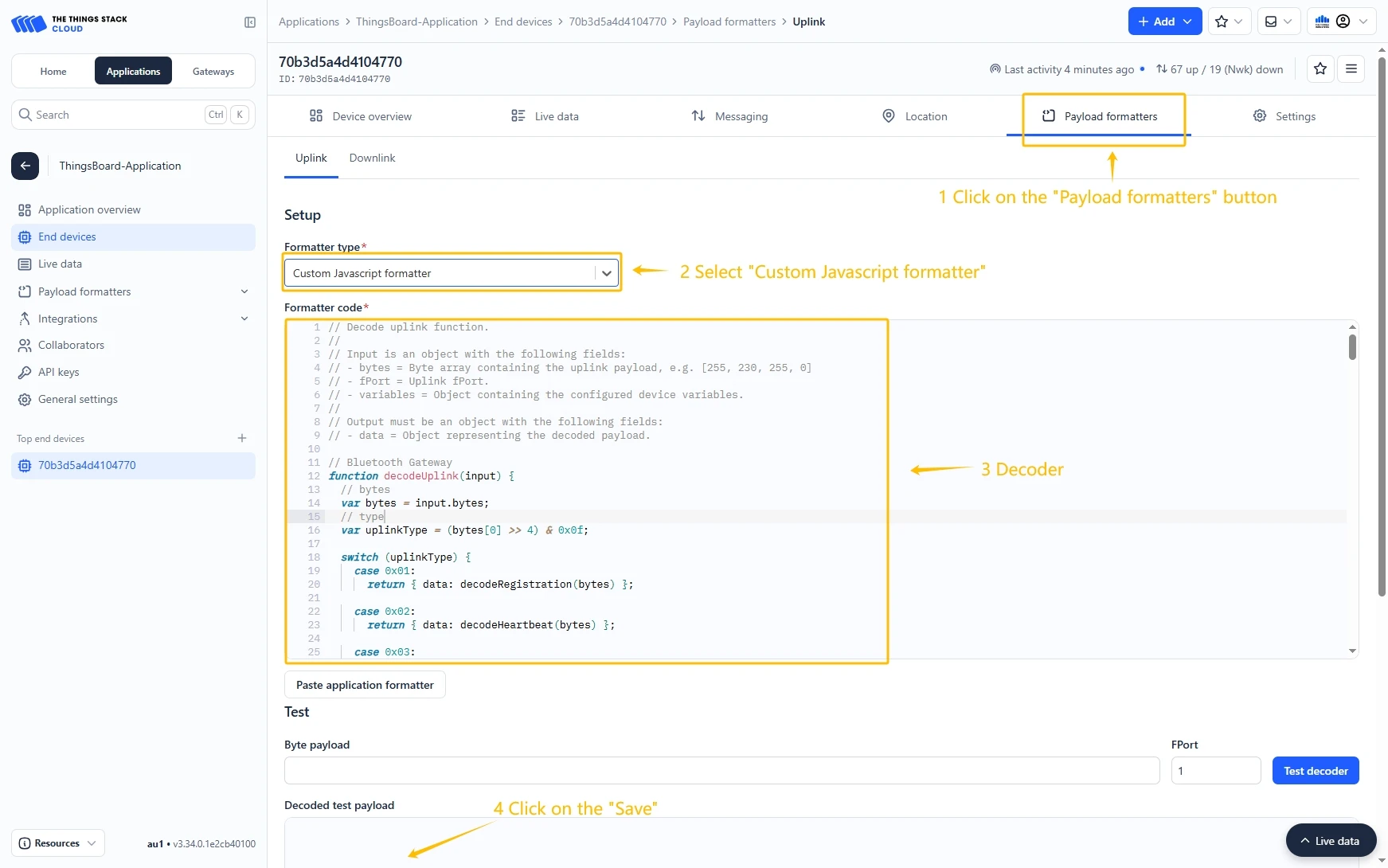
Configure Payload Formatter
Go to the Payload formatters page and select Custom JavaScript formatter as the Formatter type. Paste the decode function into the editor and click the Save changes button.
Decode function:
// UWB Container Tracker decoderfunction decodeUplink(input) {// bytes    var bytes = input.bytes;// type    var type = (bytes[0] >> 4) & 0x0f;    switch (type) {        case 0x01:            return {data: decodeRegistration(bytes)};        case 0x02:            return {data: decodeHeartbeat(bytes)};        case 0x03:            return {data: decodeGNSSPosition(bytes)};        case 0x04:            return {data: decodeBeacon(bytes)};        case 0x05:            return {data: decodeAlarm(bytes)};        case 0x06:            return {data: decodeSingleConfigurationParameter(bytes)};        case 0x07:            return {data: decodeRuleBeacon(bytes)};        case 0x08:            return {data: decodeDistance(bytes)};        default:            return;    }}
// type: 0x1 Registrationfunction decodeRegistration(bytes) {    var data = {};    data.type = "RegistrationMessage";    data.softwareVersion = ((bytes[1] << 8) & 0xff00) | (bytes[2] & 0xff);    data.hardwareVersion = ((bytes[3] << 8) & 0xff00) | (bytes[4] & 0xff);    data.deviceState =        (bytes[5] << 24) | (bytes[6] << 16) | (bytes[7] << 8) | bytes[8];    data.lorSynPeriod = bytes[9];    data.lorSynFreq =        (bytes[10] << 24) | (bytes[11] << 16) | (bytes[12] << 8) | bytes[13];    data.lorSynDr = bytes[14];    data.heartbeatPeriod = ((bytes[15] << 8) & 0xff00) | (bytes[16] & 0xff);    data.messageId = ((bytes[17] << 8) & 0xff00) | (bytes[18] & 0xff);    return data;}
// type: 0x2 Heartbeatfunction decodeHeartbeat(bytes) {    var data = {};    data.type = "HeartbeatMessage";    data.deviceState =        (bytes[1] << 24) | (bytes[2] << 16) | (bytes[3] << 8) | bytes[4];    data.powerVol = bytes[5];    data.powerPersent = bytes[6];    data.uwbRangeCount = bytes[7];    data.bleOnCount = bytes[8];    data.gnssOnCount = bytes[9];    data.temperature = ((bytes[10] << 8) & 0xff00) | (bytes[11] & 0xff);    data.movementTime = ((bytes[12] << 8) & 0xff00) | (bytes[13] & 0xff);    data.wearTime = ((bytes[14] << 8) & 0xff00) | (bytes[15] & 0xff);    data.chargeTime = ((bytes[16] << 8) & 0xff00) | (bytes[17] & 0xff);    data.messageId = ((bytes[18] << 8) & 0xff00) | (bytes[19] & 0xff);    return data;}
// type: 0x03 GNSSPositionfunction decodeGNSSPosition(bytes) {    var data = {};    data.type = "GNSSPosition";    data.gnssState =        (bytes[0] & 0x01) === 0 ? "GNSS location success" : "GNSS location failed";// longitude    let longitude =        (bytes[1] << 24) | (bytes[2] << 16) | (bytes[3] << 8) | bytes[4];    data.longitude = hex2float(longitude);// latitude    let latitude =        (bytes[5] << 24) | (bytes[6] << 16) | (bytes[7] << 8) | bytes[8];    data.latitude = hex2float(latitude);// timelet time =    (bytes[9] << 24) | (bytes[10] << 16) | (bytes[11] << 8) | bytes[12];    data.time = timestampToTime((time + 8 * 60 * 60) * 1000);// wearState    data.wearState = bytes[13] === 0 ? "no wear" : "wear";    return data;}
// type: 0x4 Beaconfunction decodeBeacon(bytes) {    var data = {};    data.type = "BeaconMessage";    data.beaconType =        (bytes[0] & 0x01) === 0 ? "PositioningBeacon" : "AssetBeacon";    data.beaconCount = bytes[1] & 0x0f;    for (let i = 0; i < data.beaconCount; i++) {        var index = 2 + 5 * i;        var major = (((bytes[index] << 8) & 0xff00) | (bytes[index + 1] & 0xff))            .toString(16)            .toUpperCase()            .padStart(4, "0");        var minor = (((bytes[index + 2] << 8) & 0xff00) | (bytes[index + 3] & 0xff))            .toString(16)            .toUpperCase()            .padStart(4, "0");        var rssi = bytes[index + 4] - 256 + "dBm";        data["beacon" + (i + 1)] = major + minor;        data["rssi" + (i + 1)] = rssi;    }// wearState    var wearIndex = data.beaconCount * 5 + 2;    data.wearState = bytes[wearIndex] === 0 ? "no wear" : "wear";    return data;}
// type: 0x5 Alarmfunction decodeAlarm(bytes) {    var data = {};    data.type = "AlarmMessage";    var alarmValue = bytes[1] & 0x0f;    if (alarmValue == 1) {        data.alarm = "SOS";    } else if (alarmValue == 2) {        data.alarm = "Fall";    } else if (alarmValue == 3) {        data.alarm = "Special area";    } else if (alarmValue == 4) {        data.alarm = "Search";    } else if (alarmValue == 5) {        data.alarm = "Magnet remove";    }    return data;}// type: 0x6 Single Configuration Parameterfunction decodeSingleConfigurationParameter(bytes) {    var data = {};    data.type = "ConfigurationParameterResponse";    var parameter = [];    let byteLength = bytes.length;    var index = 0;    while (index + 1 < byteLength) {        var commandBitField = {};        var parameterType = bytes[index + 1] & 0xff;        commandBitField.parameterType = parameterType;        var commandBitFieldLength = getCommandBitFieldLength(parameterType);        var parameterValue = getParameterValue(bytes, index, commandBitFieldLength);        commandBitField.parameterValue = parameterValue;        commandBitField.name = getParameterName(parameterType);        commandBitField.parameterDefinition = getParameterDefinition(            parameterType,            parameterValue        );        index = index + commandBitFieldLength;        parameter.push(commandBitField);    }    data.parameter = parameter;    return data;}
// type: 0x7 Rule Beaconfunction decodeRuleBeacon(bytes) {    var data = {};    data.type = "RuleBeaconMessage";    var deviceTypeId = bytes[0] & 0x03;    if (deviceTypeId == 1) {        data.deviceTypeId = "deviceTypeId1";    } else if (deviceTypeId == 2) {        data.deviceTypeId = "deviceTypeId2";    } else if (deviceTypeId == 3) {        data.deviceTypeId = "deviceTypeId3";    }    data.beaconCount = bytes[1] & 0x0f;    for (let i = 0; i < data.beaconCount; i++) {        var index = 2 + 5 * i;        var major = (((bytes[index] << 8) & 0xff00) | (bytes[index + 1] & 0xff))            .toString(16)            .toUpperCase()            .padStart(4, "0");        var minor = (((bytes[index + 2] << 8) & 0xff00) | (bytes[index + 3] & 0xff))            .toString(16)            .toUpperCase()            .padStart(4, "0");        var rssi = bytes[index + 4] - 256 + "dBm";        data["beacon" + (i + 1)] = major + minor;        data["rssi" + (i + 1)] = rssi;    }// wearStatevar wearIndex = data.beaconCount * 5 + 2;    data.wearState = bytes[wearIndex] === 0 ? "no wear" : "wear";    return data;}
// type: 0x8 Distancefunction decodeDistance(bytes) {    var data = {};    data.type = "Distance";    data.uwbBeaconCount = bytes[1] & 0x0f;// data.uwbBeaconCount = 3;    for (let i = 0; i < data.uwbBeaconCount; i++) {        var index = 2 + 7 * i;        var dev = (((bytes[index] << 8) & 0xff00) | (bytes[index + 1] & 0xff))            .toString(16)            .toUpperCase()            .padStart(4, "0");        var eui = (((bytes[index + 2] << 8) & 0xff00) | (bytes[index + 3] & 0xff))            .toString(16)            .toUpperCase()            .padStart(4, "0");        data["majorminor" + (i + 1)] = dev + eui;        data["distance" + (i + 1)] =            (bytes[index + 4] << 16) | (bytes[index + 5] << 8) | bytes[index + 6];    }// wearState    var wearIndex = data.uwbBeaconCount * 7 + 2;    data.wearState = bytes[wearIndex] === 0 ? "no wear" : "wear";    return data;}
// getParameterValue hexStringfunction getParameterValue(bytes, index, length) {    var hexString = "";    for (var i = 2; i <= length; i++) {        var hex = (bytes[index + i] & 0xff).toString(16).toUpperCase();        hexString += hex.padStart(2, "0");    }    return hexString;}
// getCommandBitFieldLengthfunction getCommandBitFieldLength(parameterType) {    let lengths = {        0x00: 3,        0x01: 3,        0x02: 3,        0x03: 3,        0x04: 3,        0x05: 2,        0x06: 2,        0x07: 2,        0x08: 2, 0x0a: 17,        0x0b: 17,        0x0e: 9,        0x1e: 2,        0x1f: 2,        0x20: 2,        0x29: 2,        0x2a: 2,        0x2b: 2,        0x2e: 2,        0x2f: 2,        0x30: 2,        0x31: 2,    };    return lengths[parameterType] ?? 0;}
// Parameter Namefunction getParameterName(parameterType) {    let name = {        0x00: "SoftwareVersion",        0x01: "HBPeriod",        0x02: "BlePositionReportInterval",        0x03: "GNSSPositionReportInterval",        0x04: "AssetBeaconReportInterval",        0x05: "BlePositionReceivingDuration",        0x06: "GNSSPositionReceivingDuration",        0x07: "AssetBleReceivingDuration",        0x08: "FallThreshold",        0x0a: "PosBeaconUUID",        0x0b: "AssetBeaconUUID",        0x0e: "ISMI",        0x1e: "FallDetectionAlarmEnable",        0x1f: "SOSAlarmEnable",        0x20: "PosMode",        0x29: "AssetManagementEnable",        0x2a: "GNSSFailureReportEnable",        0x2b: "AssetBeaconSortEnable",        0x2e: "PowerSwitchEnable",        0x2f: "NetworkStatusCheck",        0x30: "GNSSEnableState",        0x31: "BleEnable",    };    return name[parameterType] ?? "No matching parameter names";}
// Parameter Definitionfunction getParameterDefinition(parameterType, parameterValue) {    var val = parseInt(parameterValue, 16);    let name = {        0x00: "SoftwareVersion",        0x01: val * 30 + "s, The interval of the heartbeat message, unit: 30s",        0x02: val * 5 + "s, The interval of Bluetooth position repor, unit: 5s",        0x03: val * 5 + "s, The interval of GNSS position report, unit: 5s",        0x04: val * 5 + "s, The interval of asset beacons report, unit: 5s",        0x05: val * 1 + "s, The duration of BLE position beacon receiving, unit: 1s",        0x06: val * 5 + "s, The duration of GNSS position receiving, unit: 5s",        0x07: val * 1 + "s, The duration of asset beacon receiving, unit 1s",        0x08:            val / 2 +            "s, The threshold of the fall detection, the unit is 0.5 meters",        0x0a: "PosBeaconUUIDFilter",        0x0b: "AssetBeaconUUIDFilter",        0x0e: "ISMI",        0x1e: val == 0 ? "Disable" : "Enable",        0x1f: val == 0 ? "Disable" : "Enable",        0x20:            val == 0                ? "Period Mode"                : val == 1                    ? " Autonomous Mode"                    : "On-demand Mode",        0x29: val == 0 ? "Disable" : "Enable",        0x2a: val == 0 ? "Disable" : "Enable",        0x2b: val == 0 ? "Disable" : "Enable",        0x2e: val == 0 ? "Disable" : "Enable",        0x2f: val == 0 ? "Disable" : "Enable",        0x30: val == 0 ? "Disable" : "Enable",        0x31: val == 0 ? "Disable" : "Enable",    };    return name[parameterType] ?? "No matching parameter names";}
// Floating point conversionfunction hex2float(num) {    var sign = num & 0x80000000 ? -1 : 1;    var exponent = ((num >> 23) & 0xff) - 127;    var mantissa = 1 + (num & 0x7fffff) / 0x7fffff;    return sign * mantissa * Math.pow(2, exponent);}
function asciiToHex(str) {    var hexString = "";    for (let i = 0; i < str.length; i++) {        var hex = str.charCodeAt(i).toString(16);        hexString += hex.padStart(2, "0");    }    return hexString;}
function hexStringToByteArray(hexString) {    var byteArray = [];    for (let i = 0; i < hexString.length; i += 2) {        byteArray.push(parseInt(hexString.substr(i, 2), 16));    }    return new Uint8Array(byteArray);}
function timestampToTime(timestamp) {    const date = new Date(timestamp);    const year = date.getFullYear();    const month = (date.getMonth() + 1).toString().padStart(2, "0");    const day = date.getDate().toString().padStart(2, "0");    const hour = date.getHours().toString().padStart(2, "0");    const minute = date.getMinutes().toString().padStart(2, "0");    const second = date.getSeconds().toString().padStart(2, "0");    return `${year}-${month}-${day} ${hour}:${minute}:${second}`;}
Create integration in ThingsBoard
Next, we will create the “TheThingsIndustries” integration inside the ThingsBoard.
At first, copy the code, we will need it to create the uplink converter:
var data = decodeToJson(payload);var deviceName = data.end_device_ids.device_id;var deviceType = data.end_device_ids.application_ids.application_id;
var result = {  deviceName: deviceName,  deviceType: deviceType,  telemetry: data.uplink_message.decoded_payload};
return result;
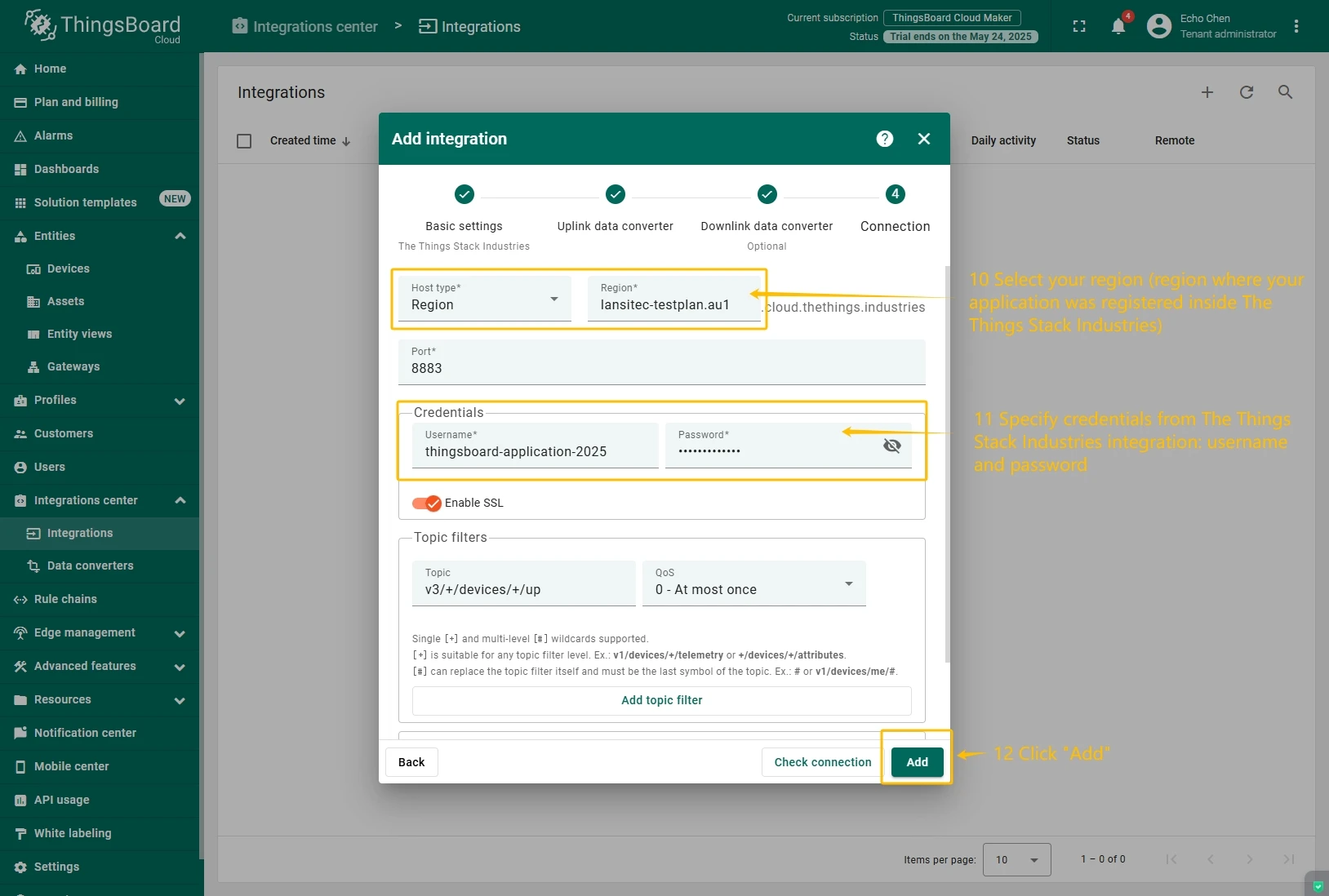
In the “Connect”step, you will need the following parameters:
- Region: eu1 (region where your application was registered inside The Things Industries Console);
- Username: thingsboard-application-2025-05@lansitec-testplan (use Username from integration on The Things Stack Industries);
- Password: use Password from integration on The Things Industries.
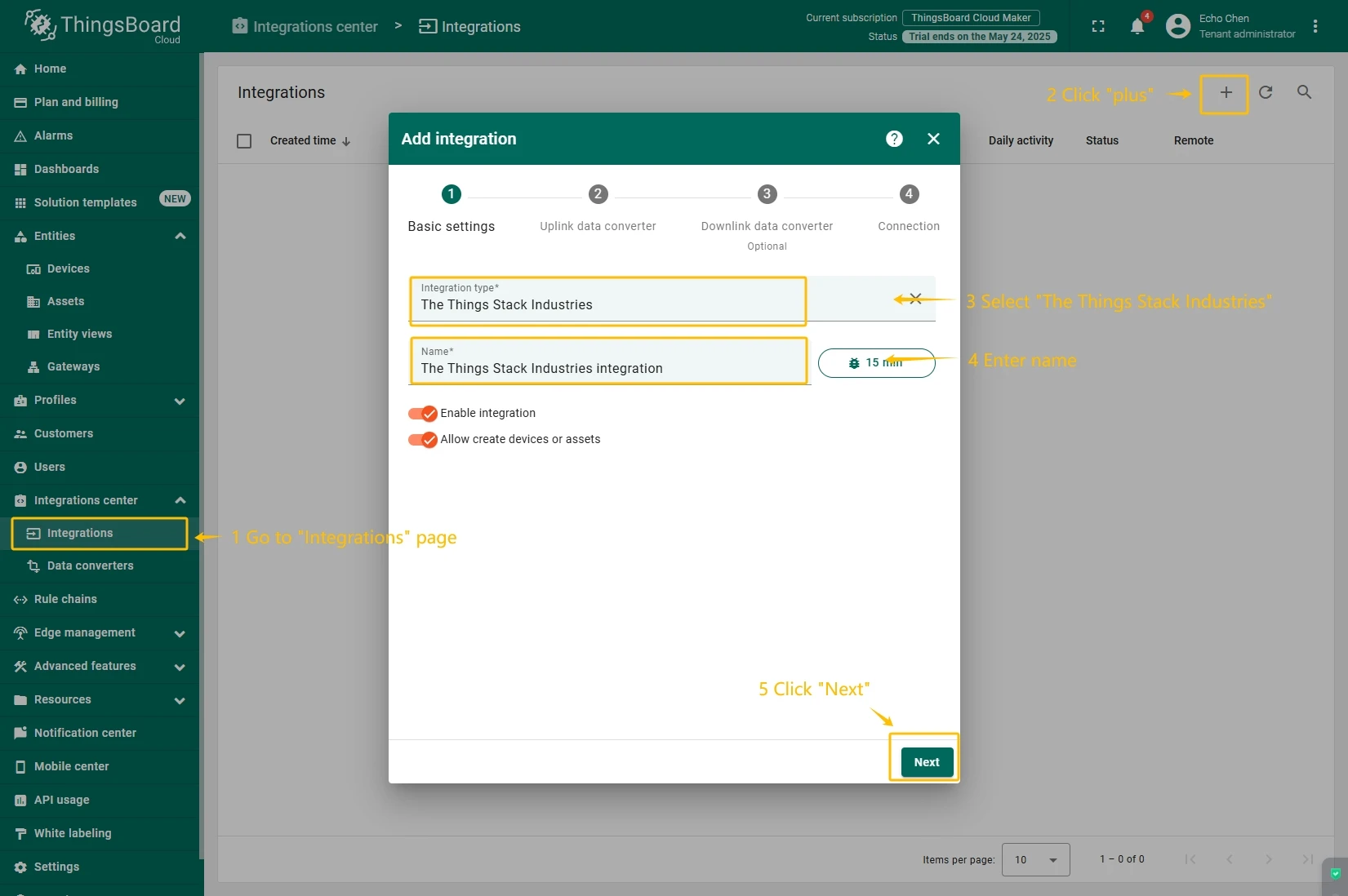
Now, navigate to the “Integrations” page under the “Integrations center” section and follow this steps:
- Click “plus”icon in the upper right corner to add new integration. Select type “The Things Industries Integration”. Then, click “Next” button.
- Paste the previously copied script to the Decoder function section. Click “Next” button.
- Leave the “Downlink data converter”field empty. Click on “Skip”button.
- Next, fill in the fields with your parameters. After, press “Add” button.
Add a gateway on the Loriot
We need to add a gateway on the Loriot.
To add a gateway, you can follow next steps:
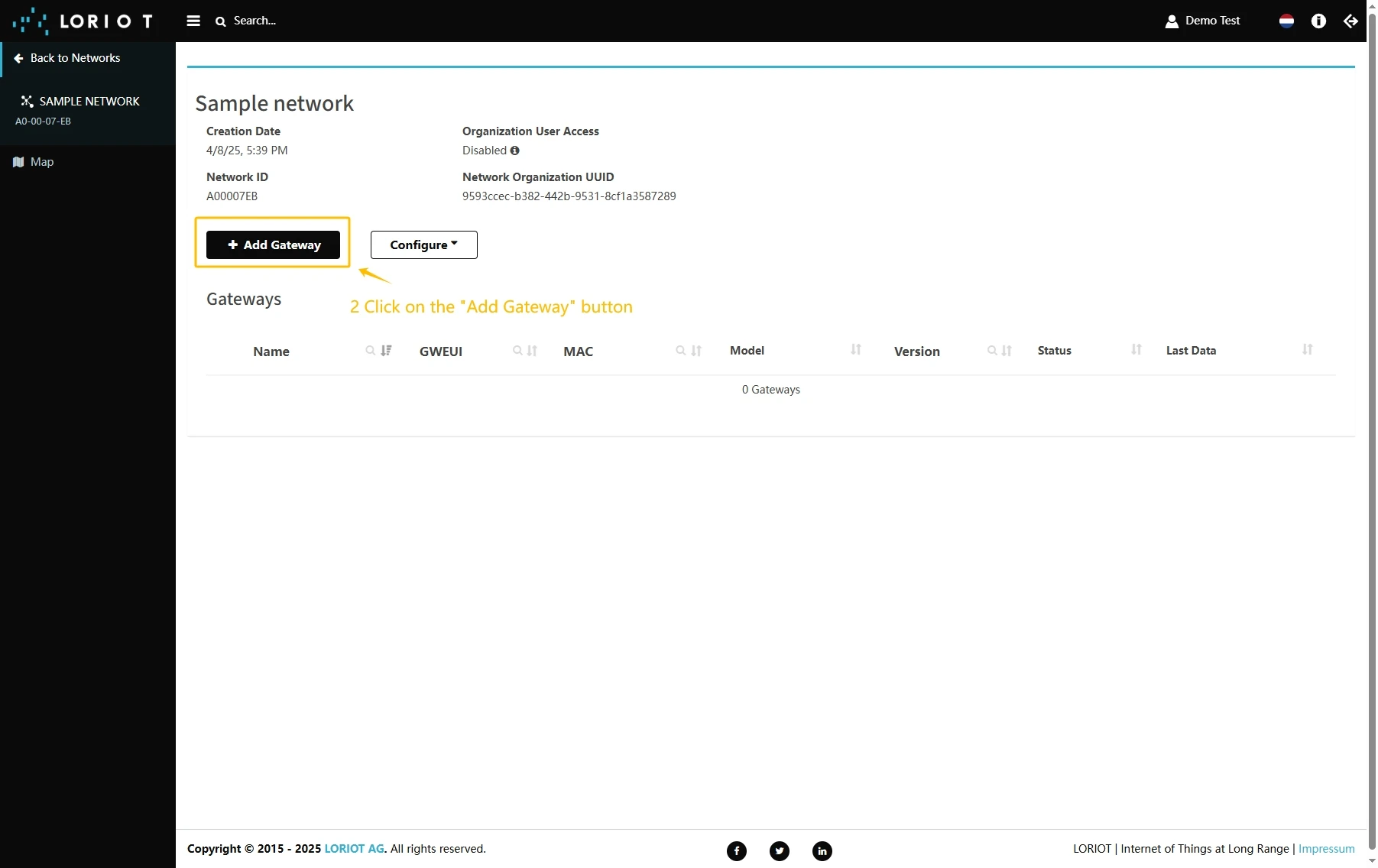
- Login to Loriot server. Open the “Sample network” or create a new one in the “Networks” section.
- Click on the “Add Gateway” button.
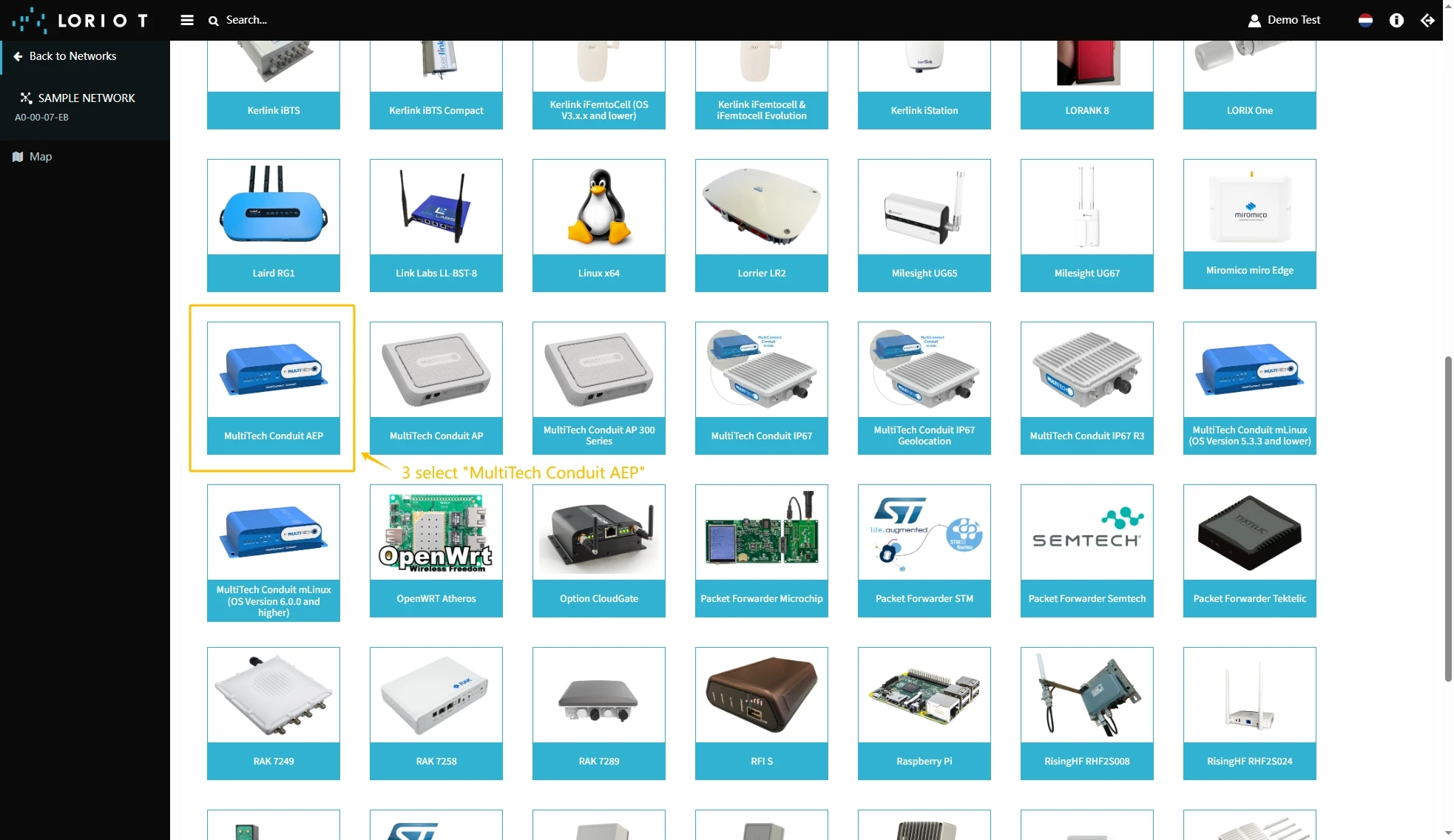
- Scroll down and select “MultiTech Conduit AEP”.
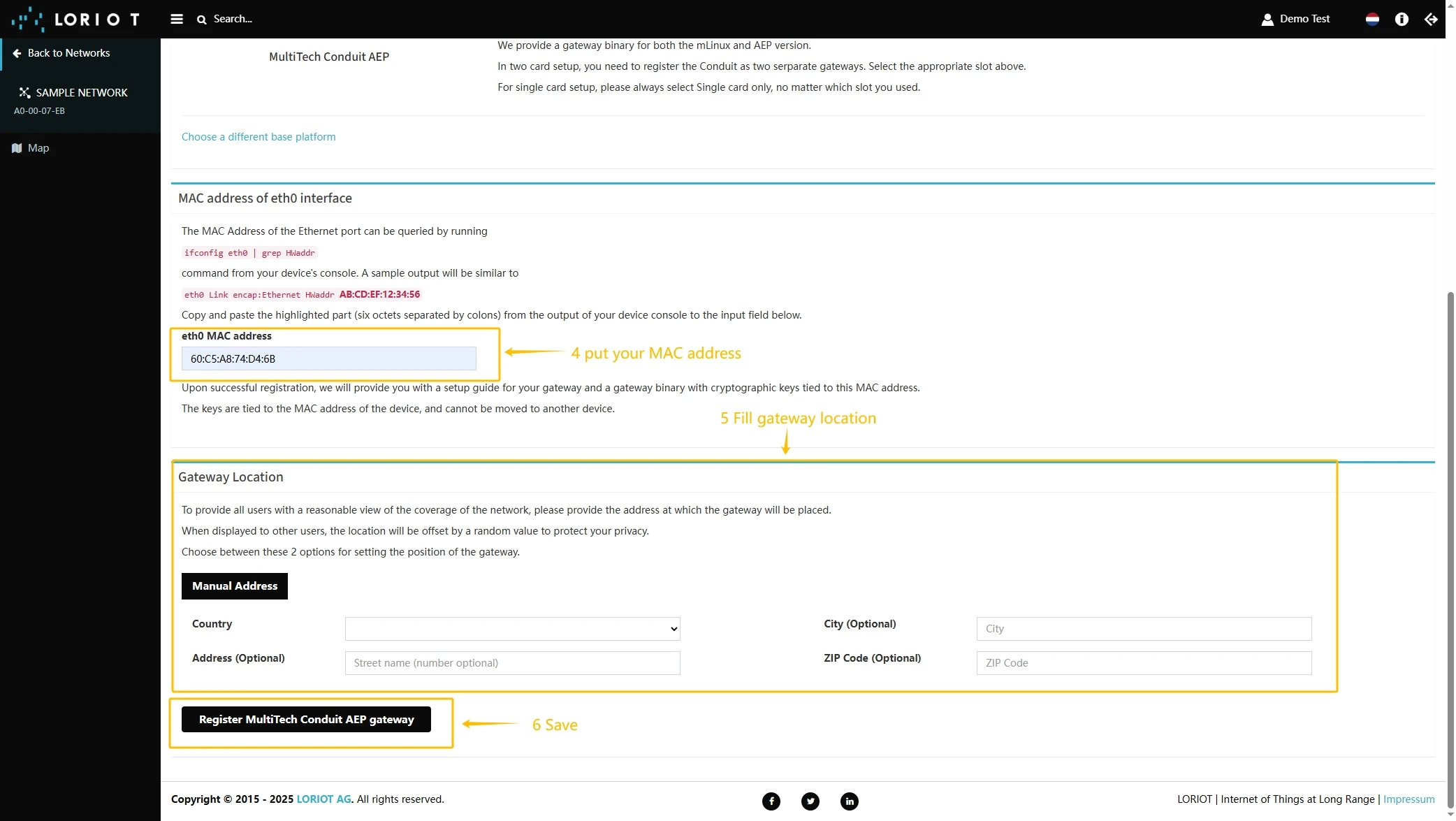
- Scroll up and put information about the gateway MAC Address (Just remove FFFF or FFFE in the middle of gateway EUI) into eth0 MAC address and gateway EUI to Custom EUI field.
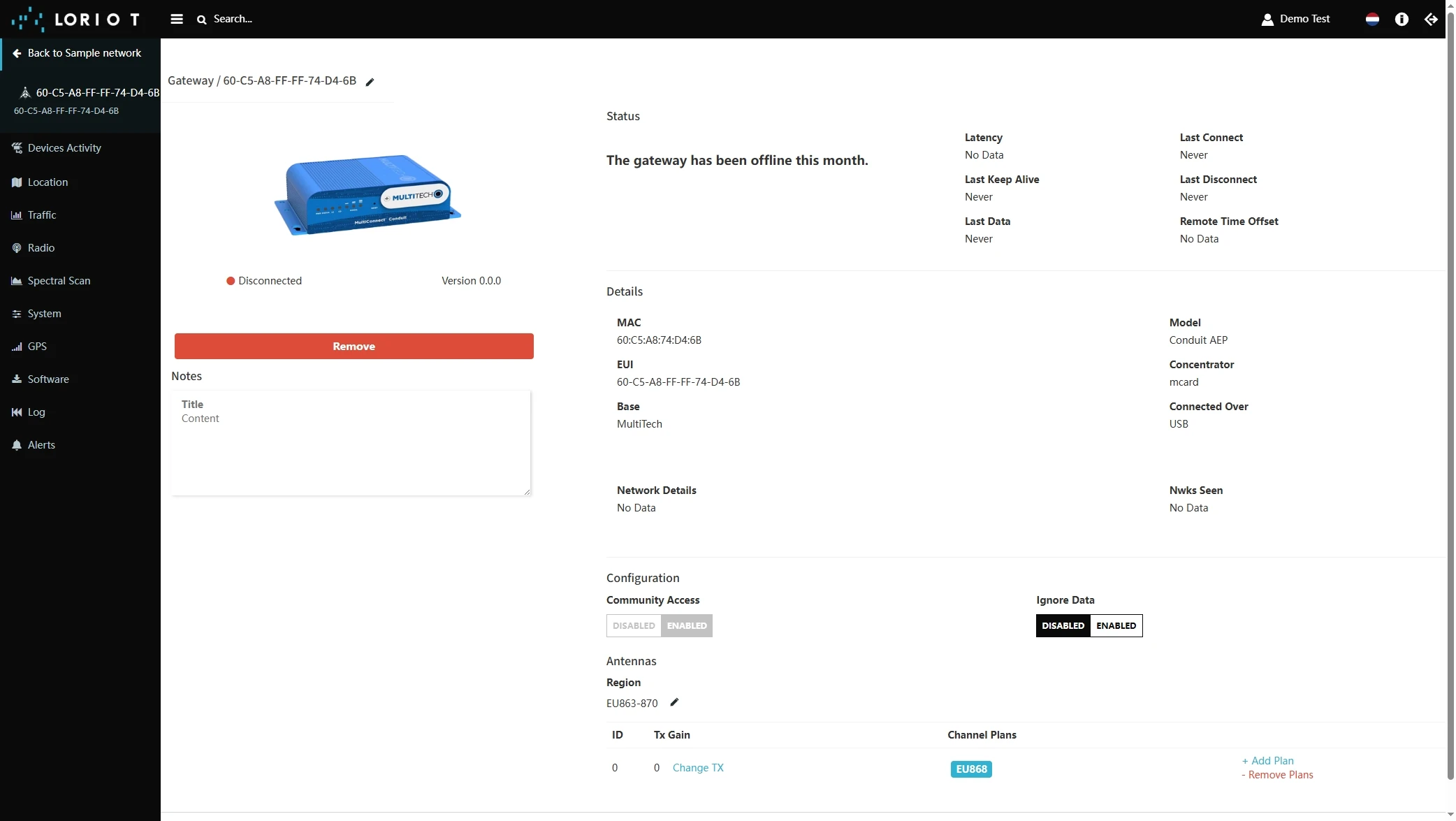
- The gateway is added. You can see its status - disconnected.

Add a device on the Loriot
We need to add a device on the Loriot.
To add a device, you can follow next steps:
- Login to Loriot server. We use eu2.loriot.io, but it depends on chosen region during registration.
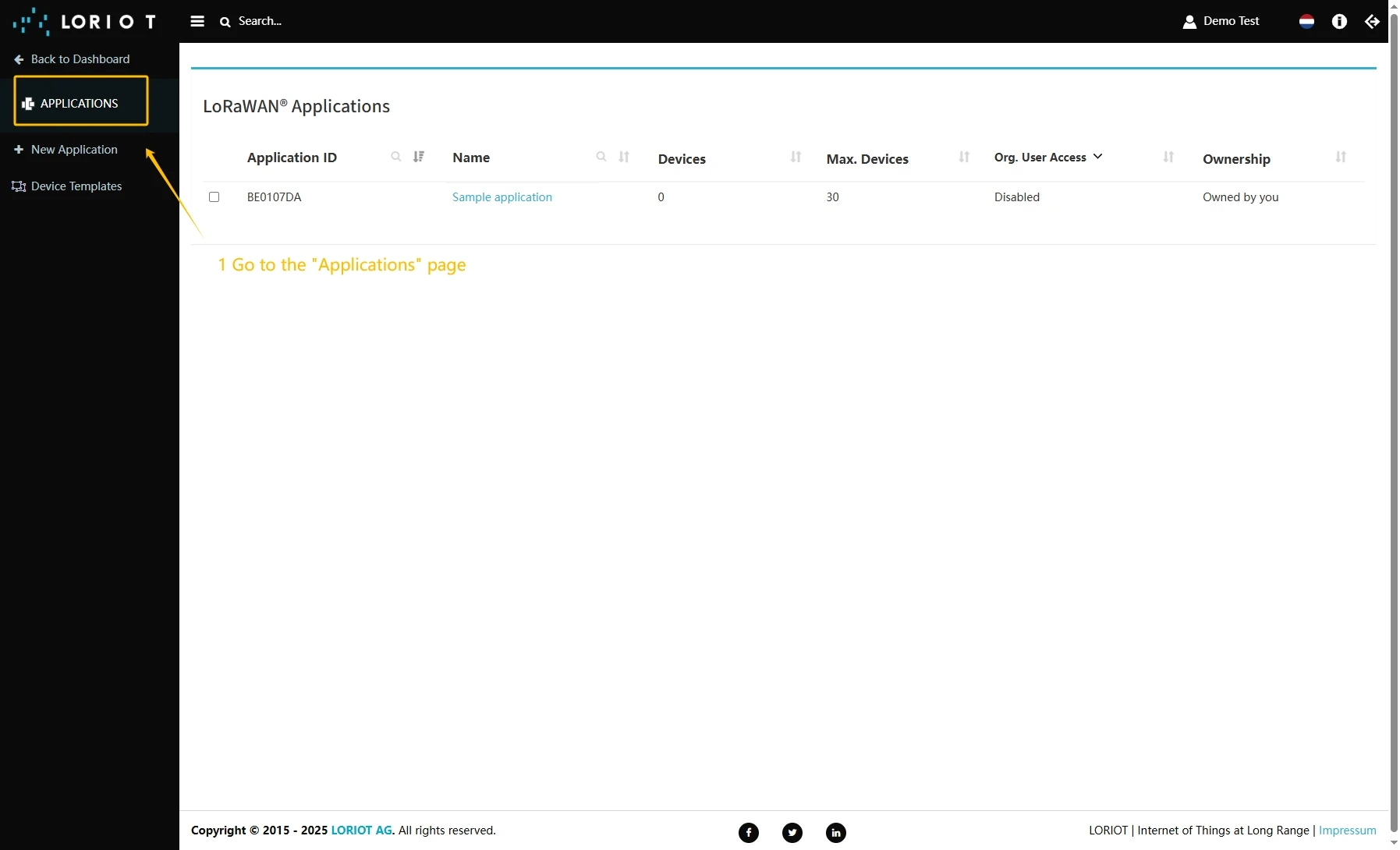
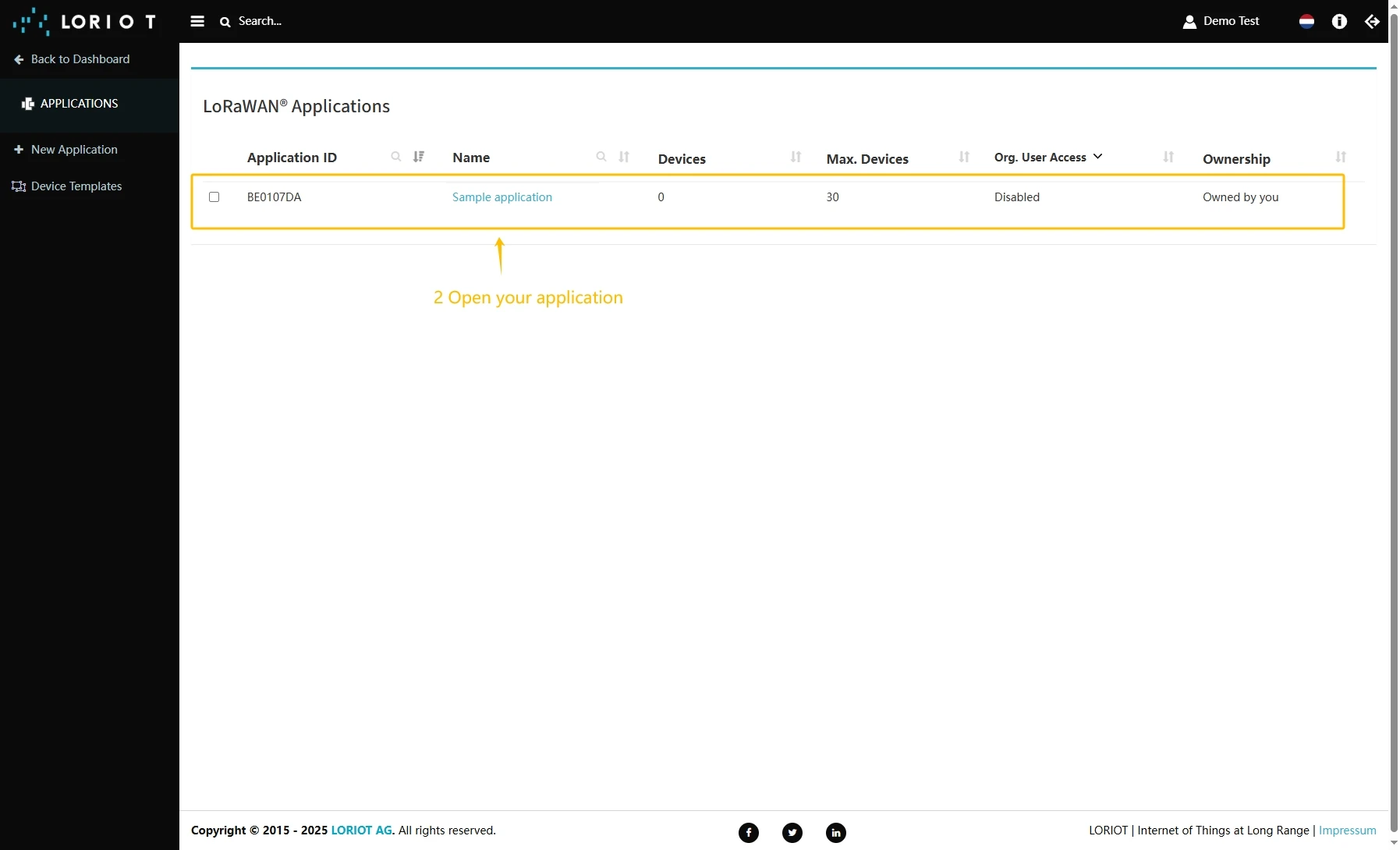
- Go to the “Applications” page in left menu.
- Open your application, in our case it is “SampleApp”.
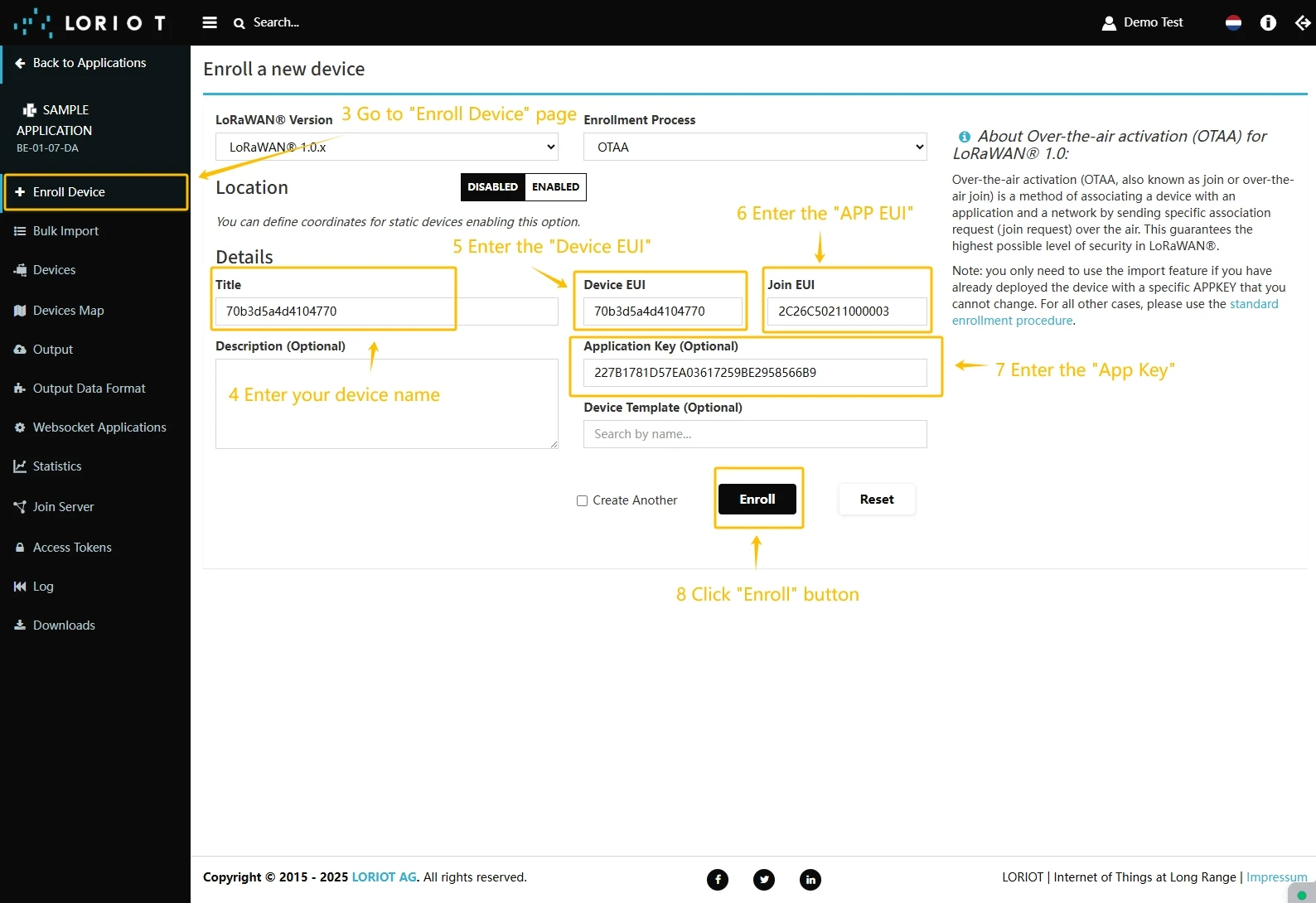
- Go to the “Enroll Device” page. Fill in the fields, with a configuration from your device. Then click the “Enroll” button.

Create integration in ThingsBoard
Next we will create an integration with Loriot inside the ThingsBoard.
At first, copy the code, we will need it to create the uplink converter:
var data = decodeToJson(payload);var deviceName = data.end_device_ids.device_id;var deviceType = data.end_device_ids.application_ids.application_id;
var result = {  deviceName: deviceName,  deviceType: deviceType,  telemetry: data.uplink_message.decoded_payload};
return result;
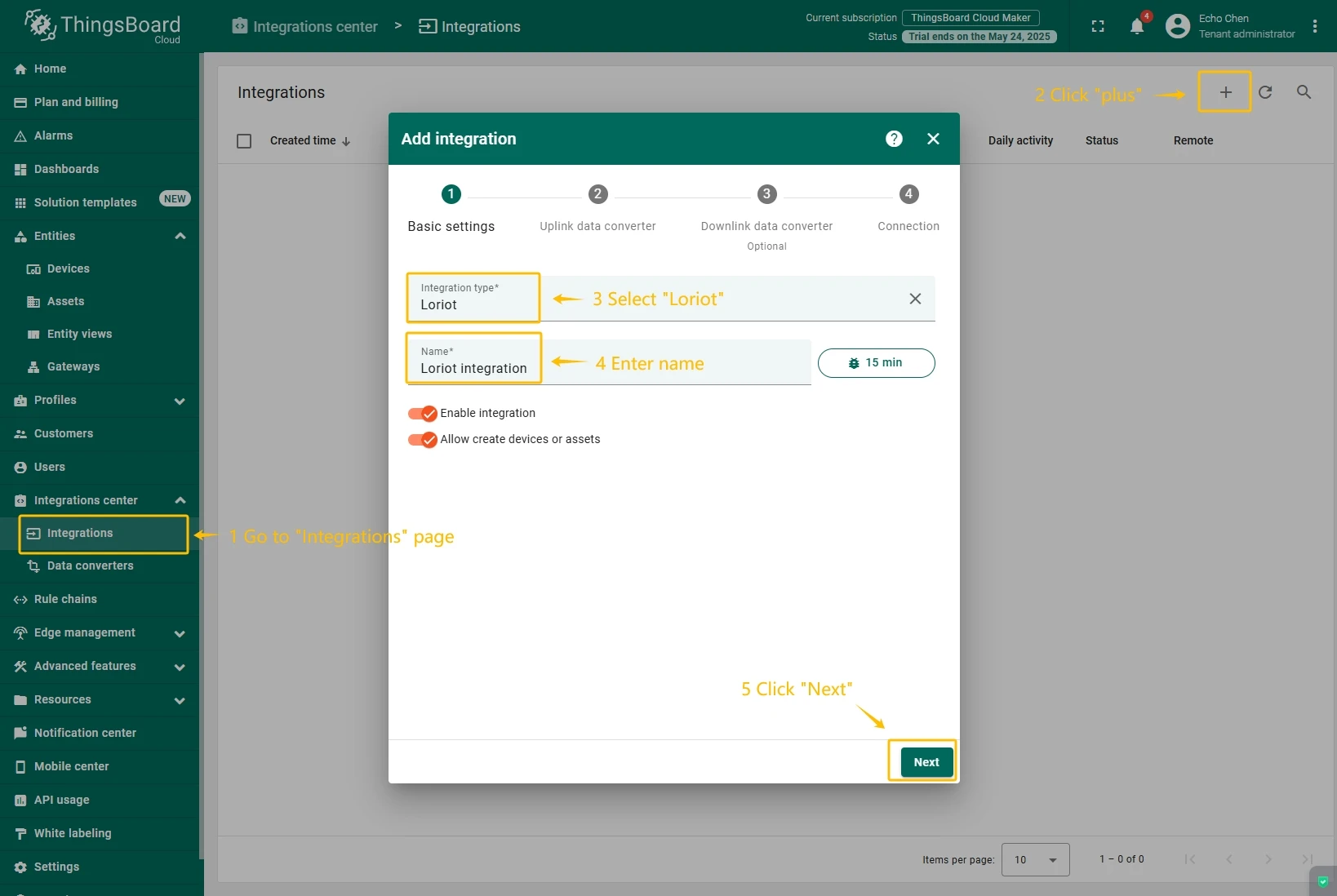
Now, navigate to the “Integrations” page under the “Integrations center” section and follow this steps:
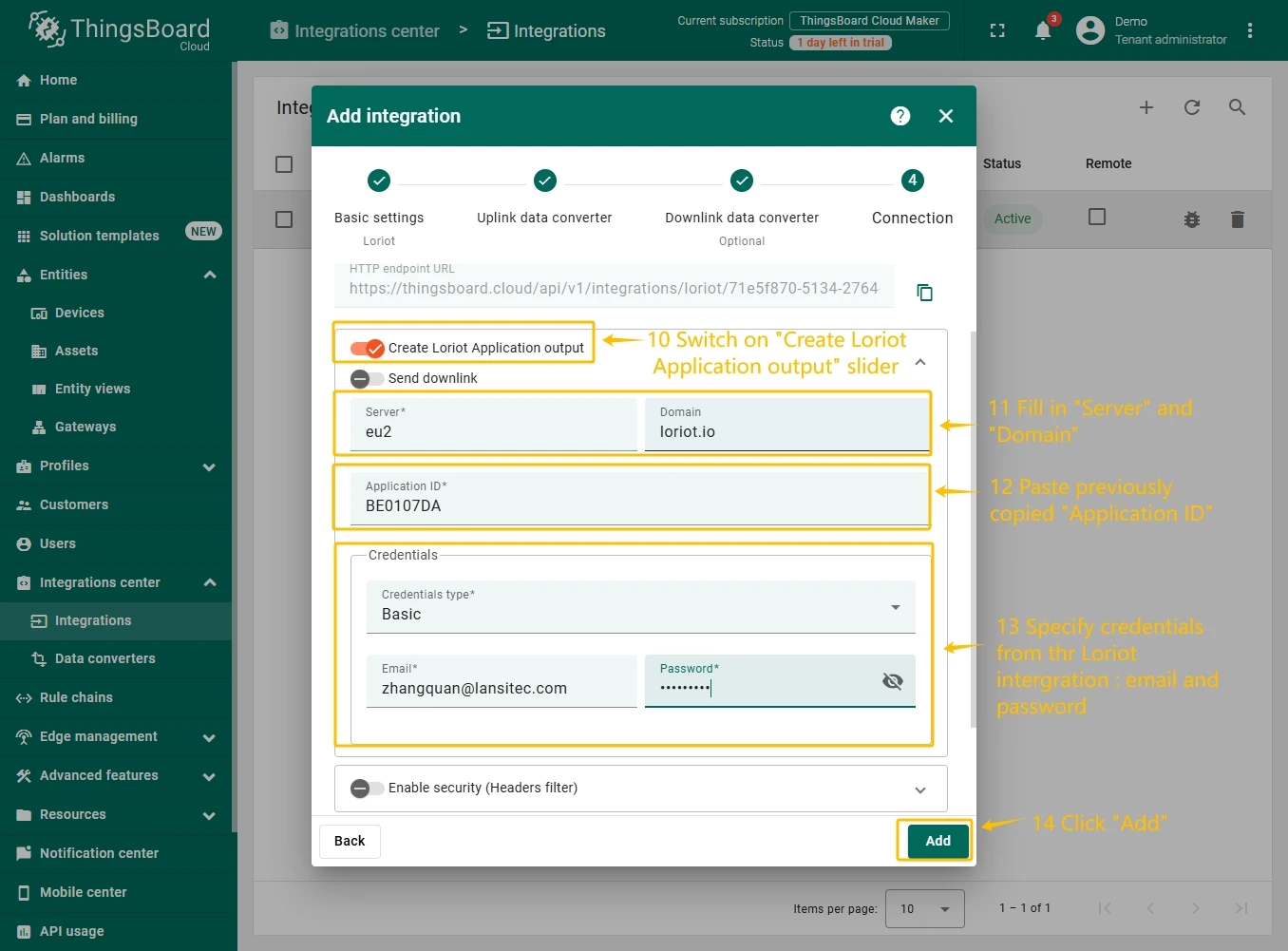
- Click “plus” icon button in the upper right corner to add new integration. Select type “Loriot”. Then, click “Next” button.
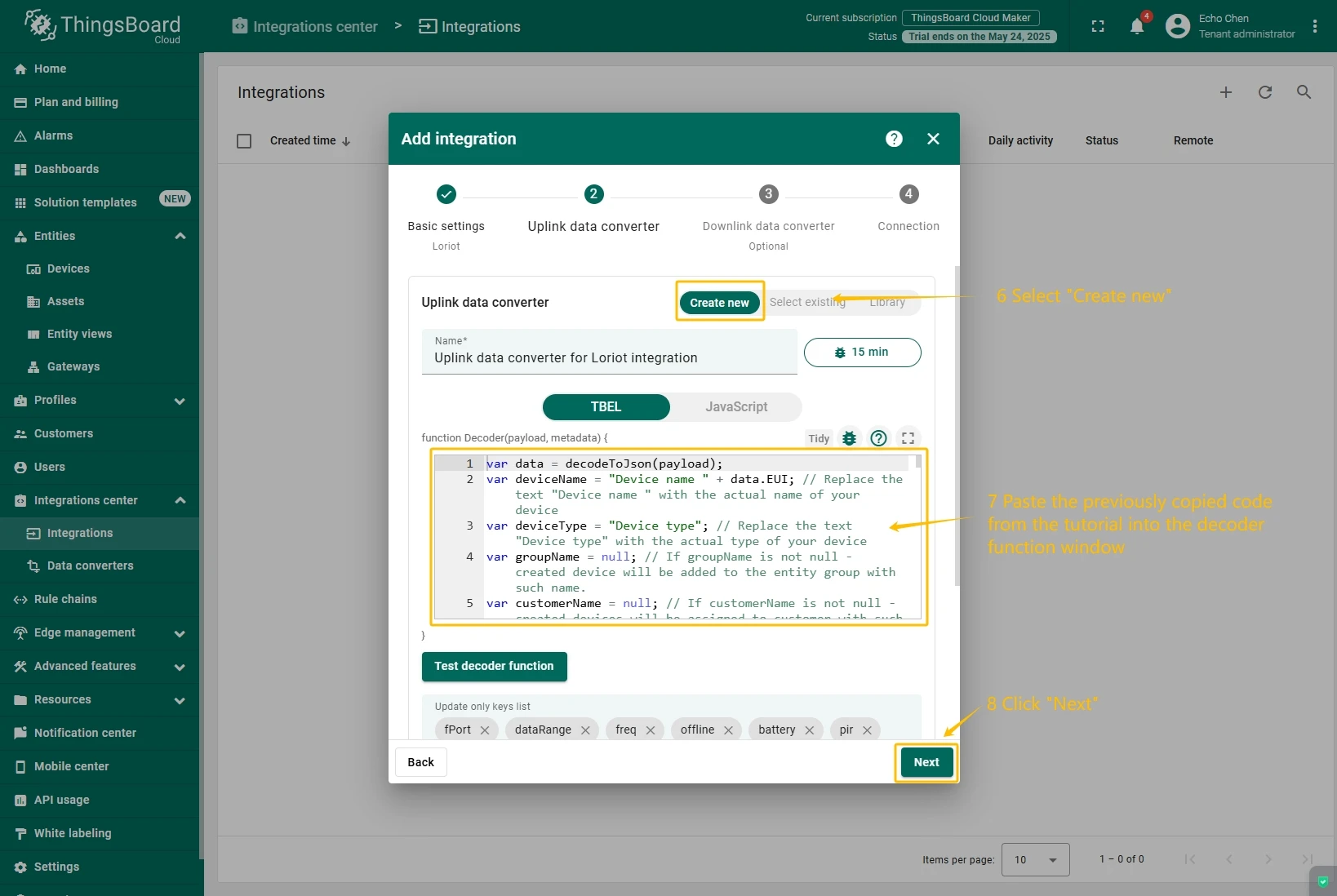
- Paste the previously copied script to the Decoder function section. Click “Next” button.
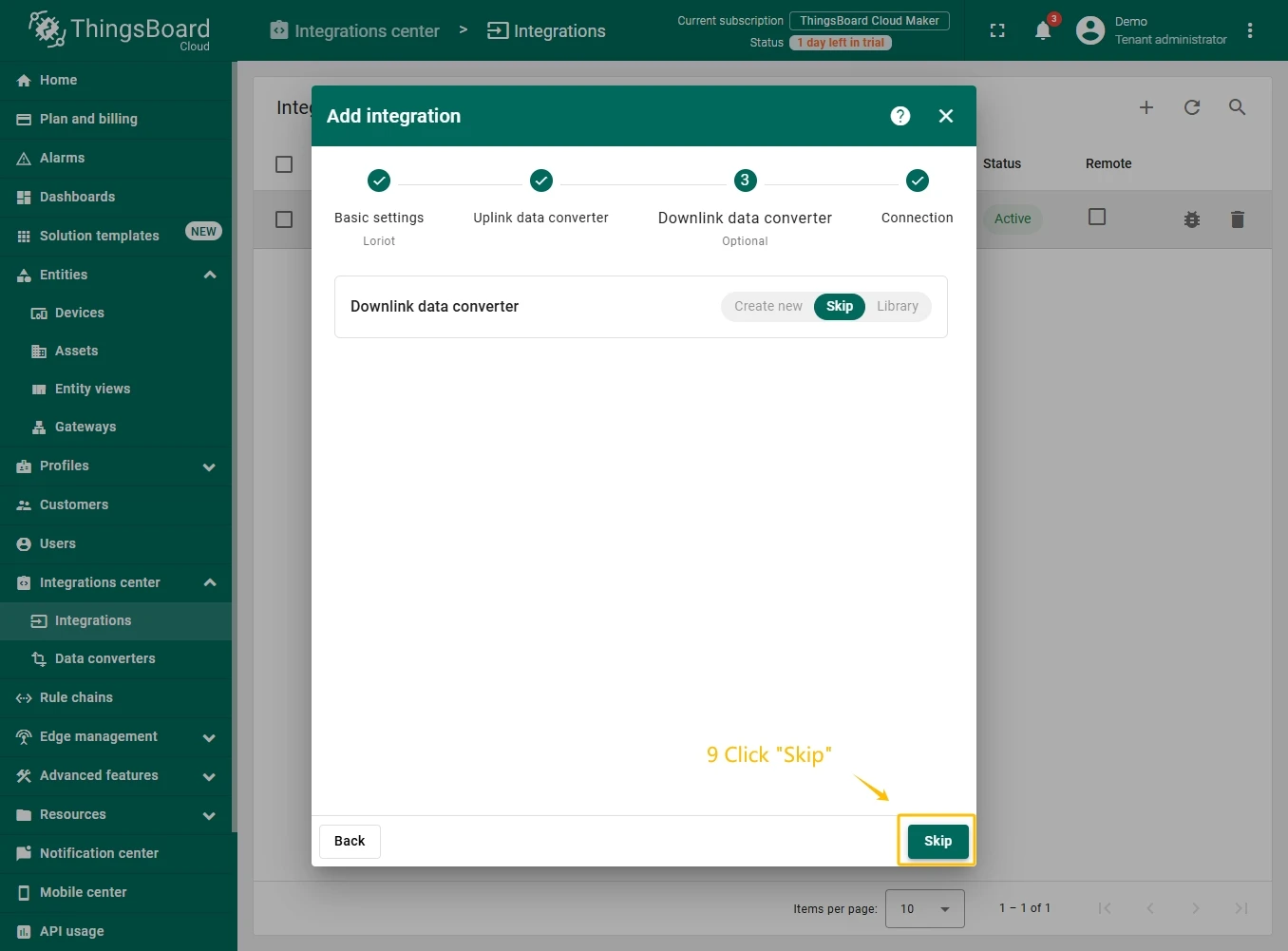
- Leave the “Downlink data converter” field empty. Click on “Skip”button.
- Next, fill in the fields with your parameters. After, press “Add” button.
Check data on ThingsBoard
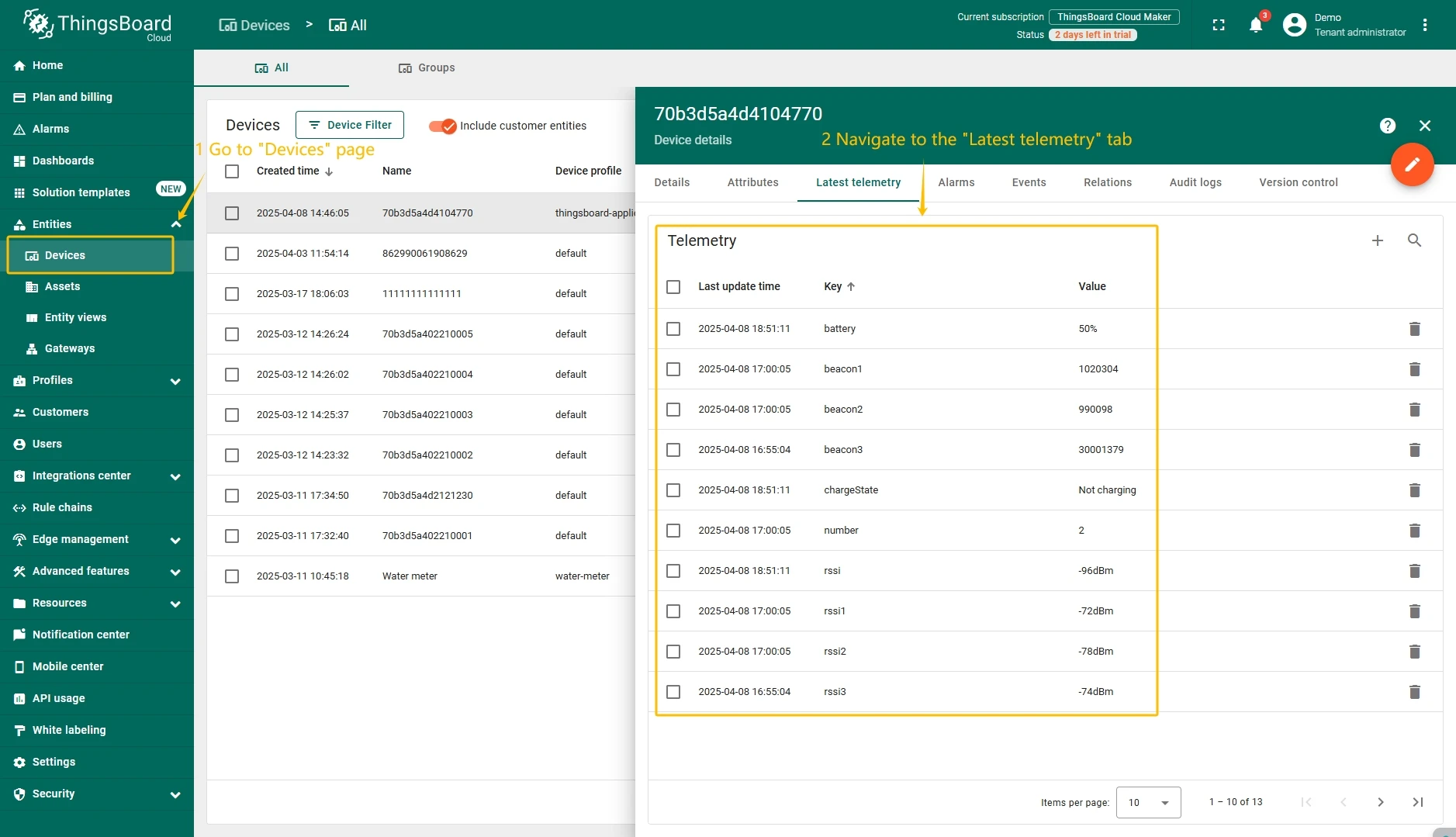
So, the device was added and if it sends any data - it should appear in the devices. To check it you may open Devices page in Entities section. The device should be in devices list. You can check the data by click on it and open tab Attributes or Latest telemetry.
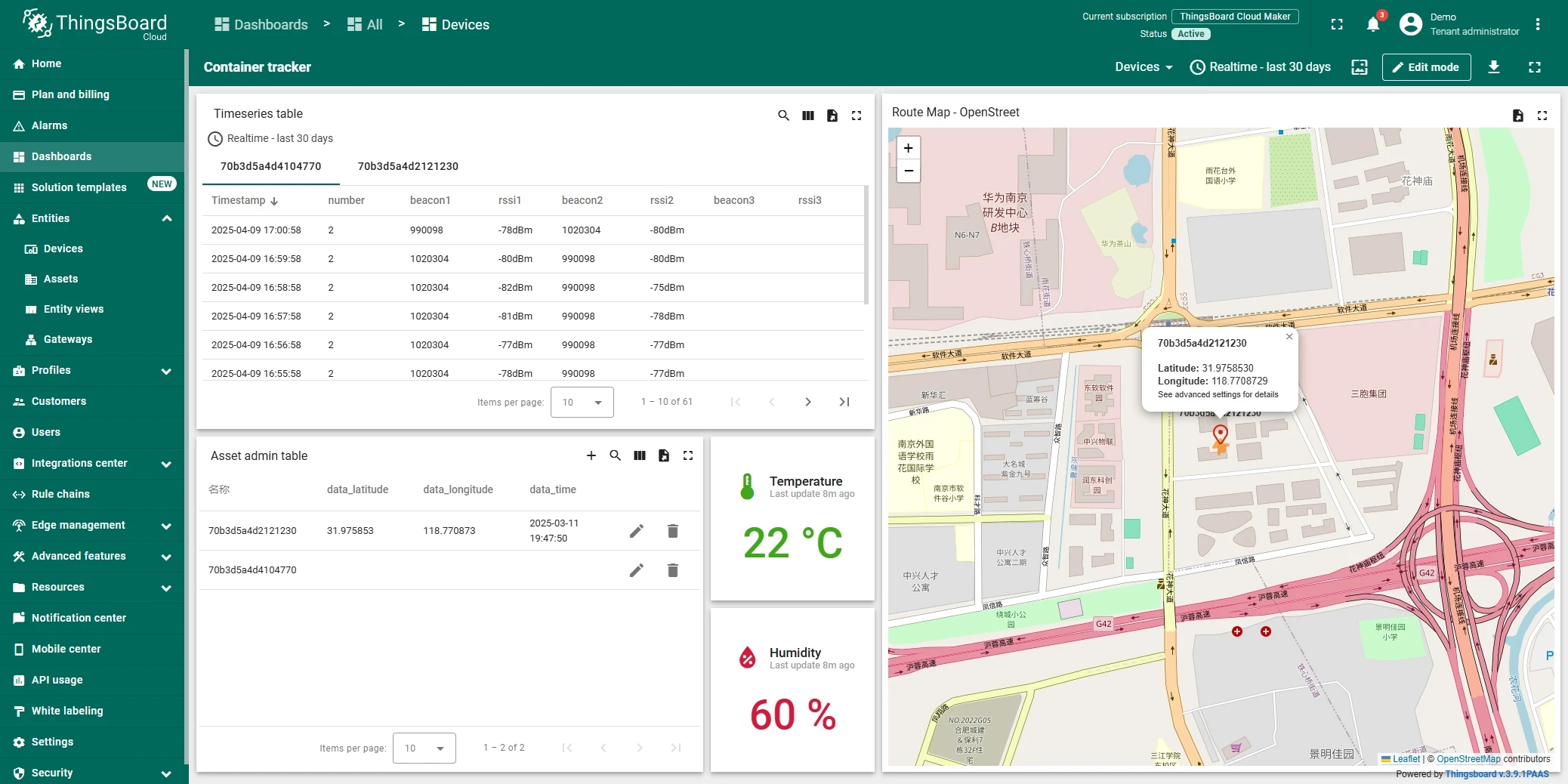
In order to get more user-friendly view - you can use dashboards. You can download a simple dashboard for this device, it is configured to display a data from “latitude” and “longitude” telemetry keys for device with name “Devices”.
ThingsBoard provides the ability to create and customize interactive visualizations (dashboards) for monitoring and managing data and devices. Through ThingsBoard dashboards, you can efficiently manage and monitor your IoT devices and data. So, we will create the dashboard, for our device.
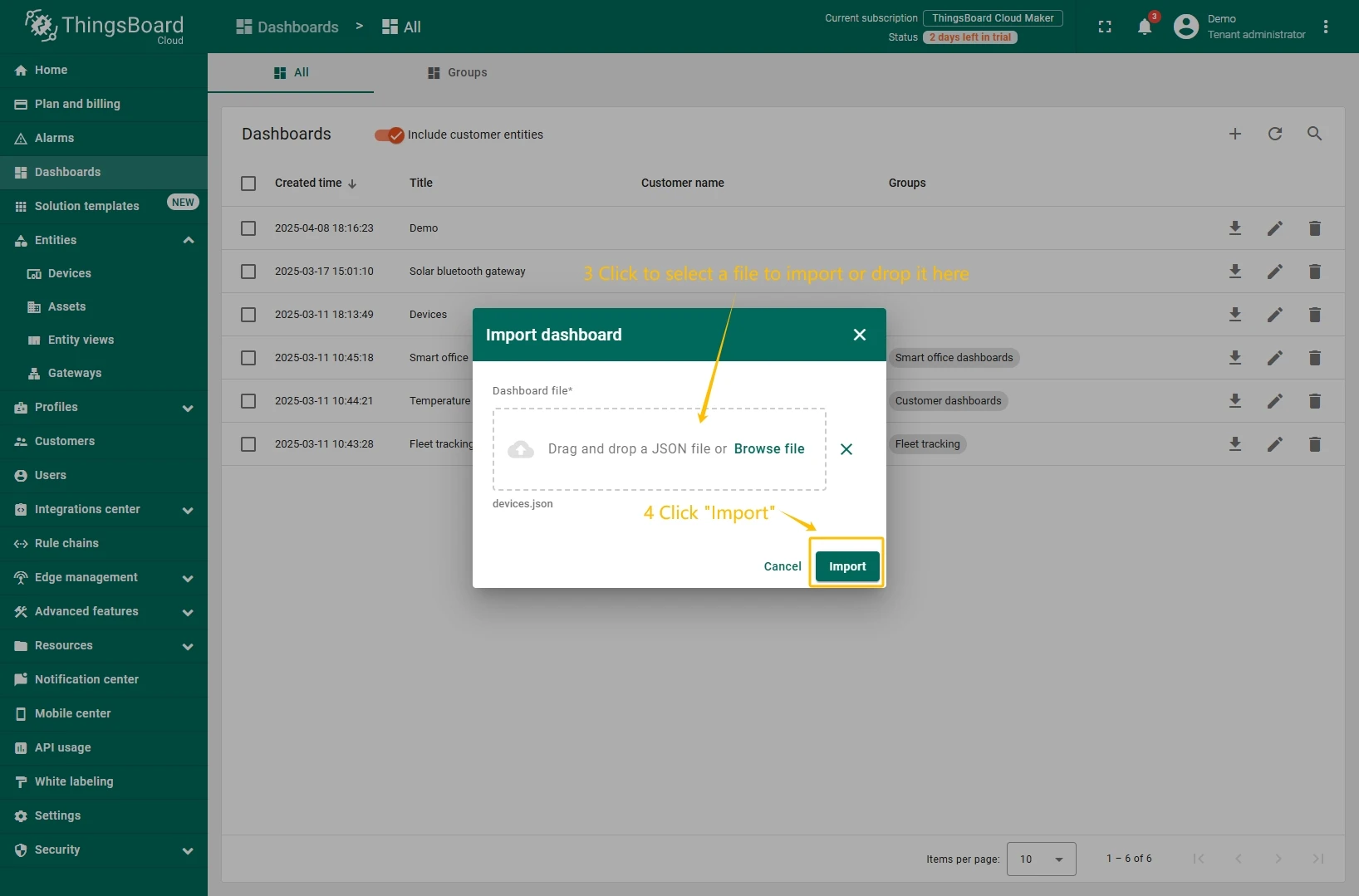
To add the dashboard to ThingsBoard, we need to import it. To import a dashboard, follow these steps:
- First download the Check and control device data dashboard file.
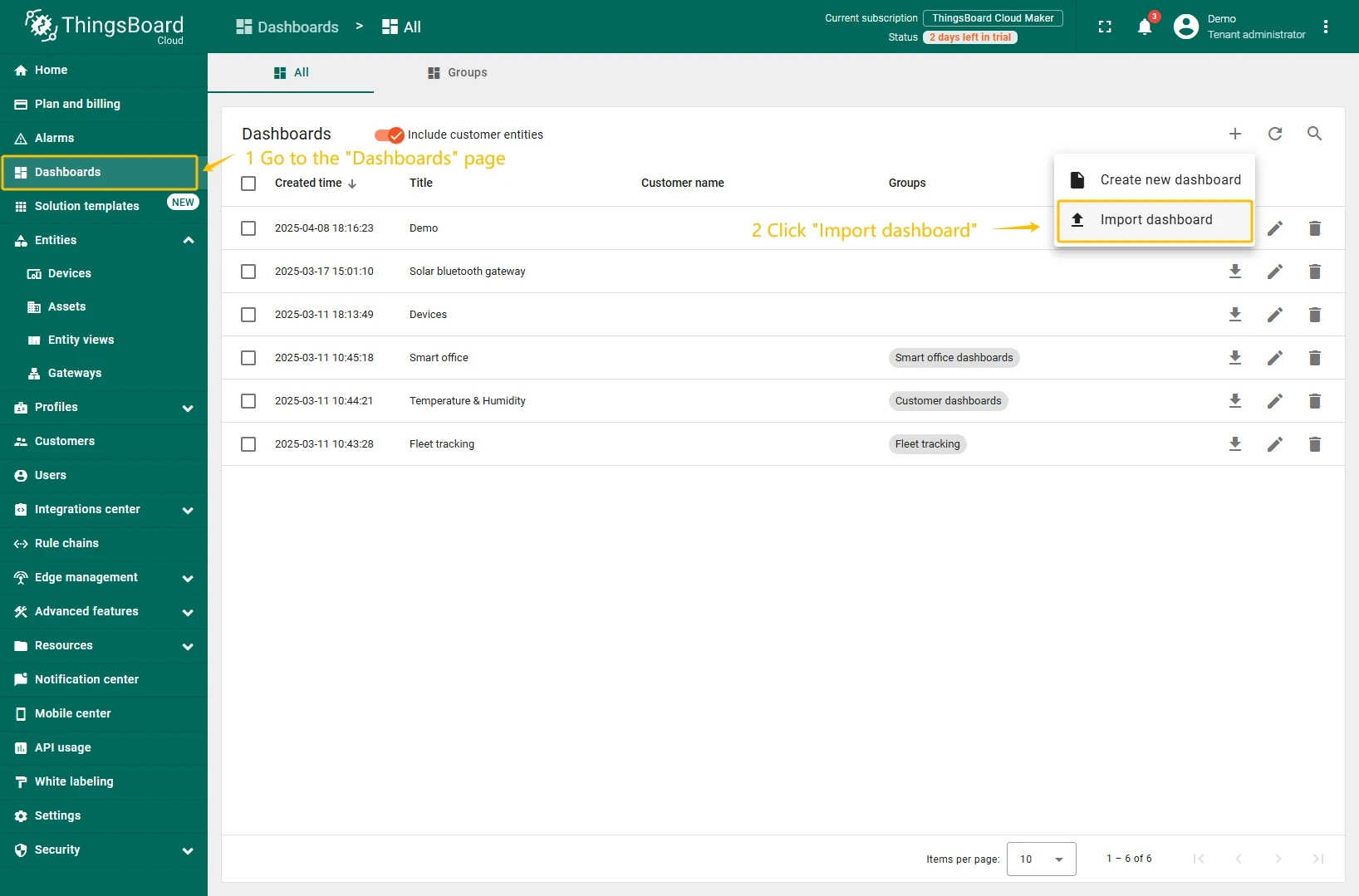
- Navigate to the “Dashboards” page. By default, you navigate to the dashboard group “All”. Click on the “plus” icon in the top right corner. Select “Import dashboard”.
- In the dashboard import window, upload the JSON file and click “Import” button.
- Dashboard has been imported.
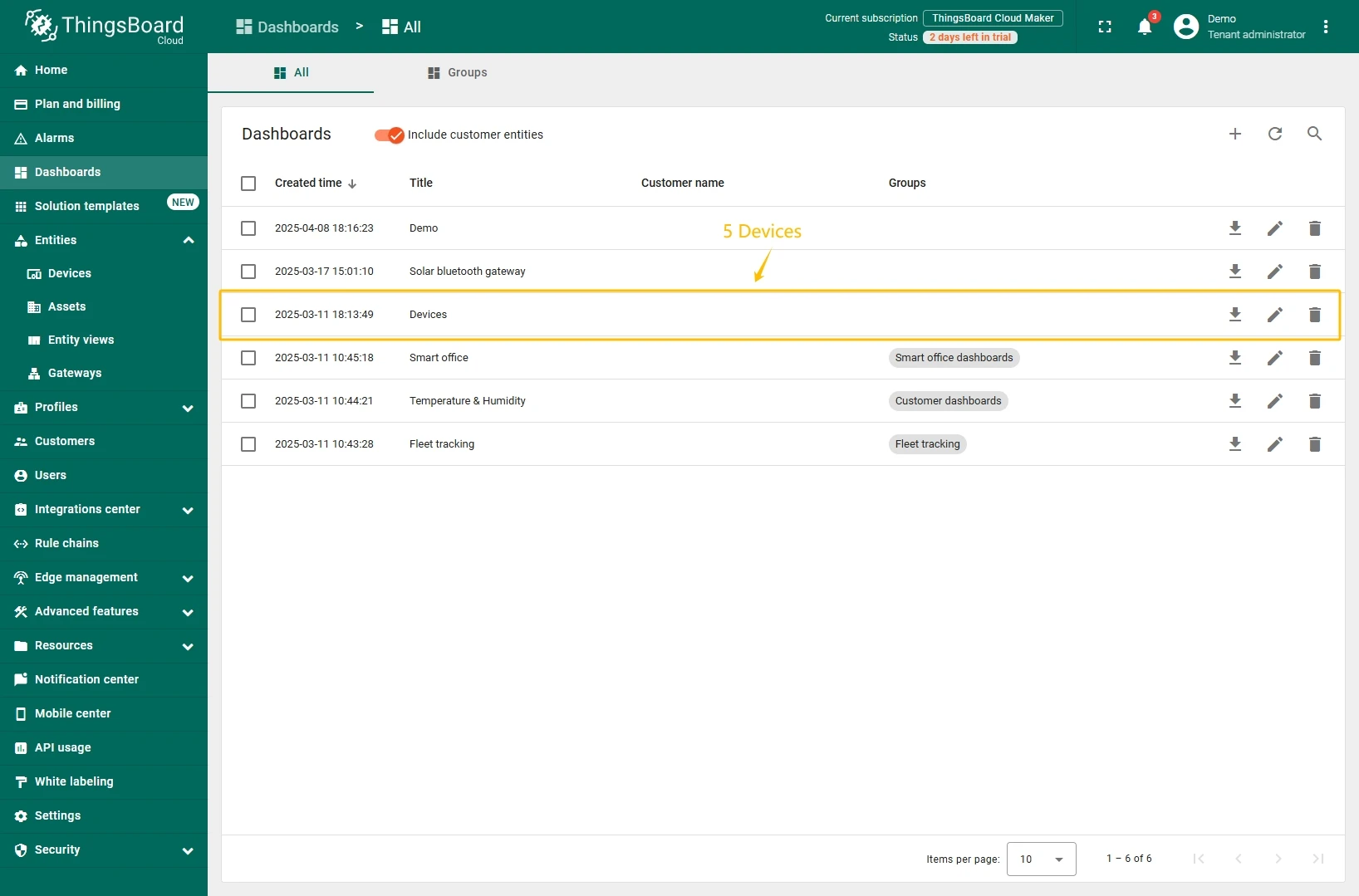
To open the imported dashboard, click on it. Then you should specify your device in entity alias of the dashboard.
To do this, follow these steps:
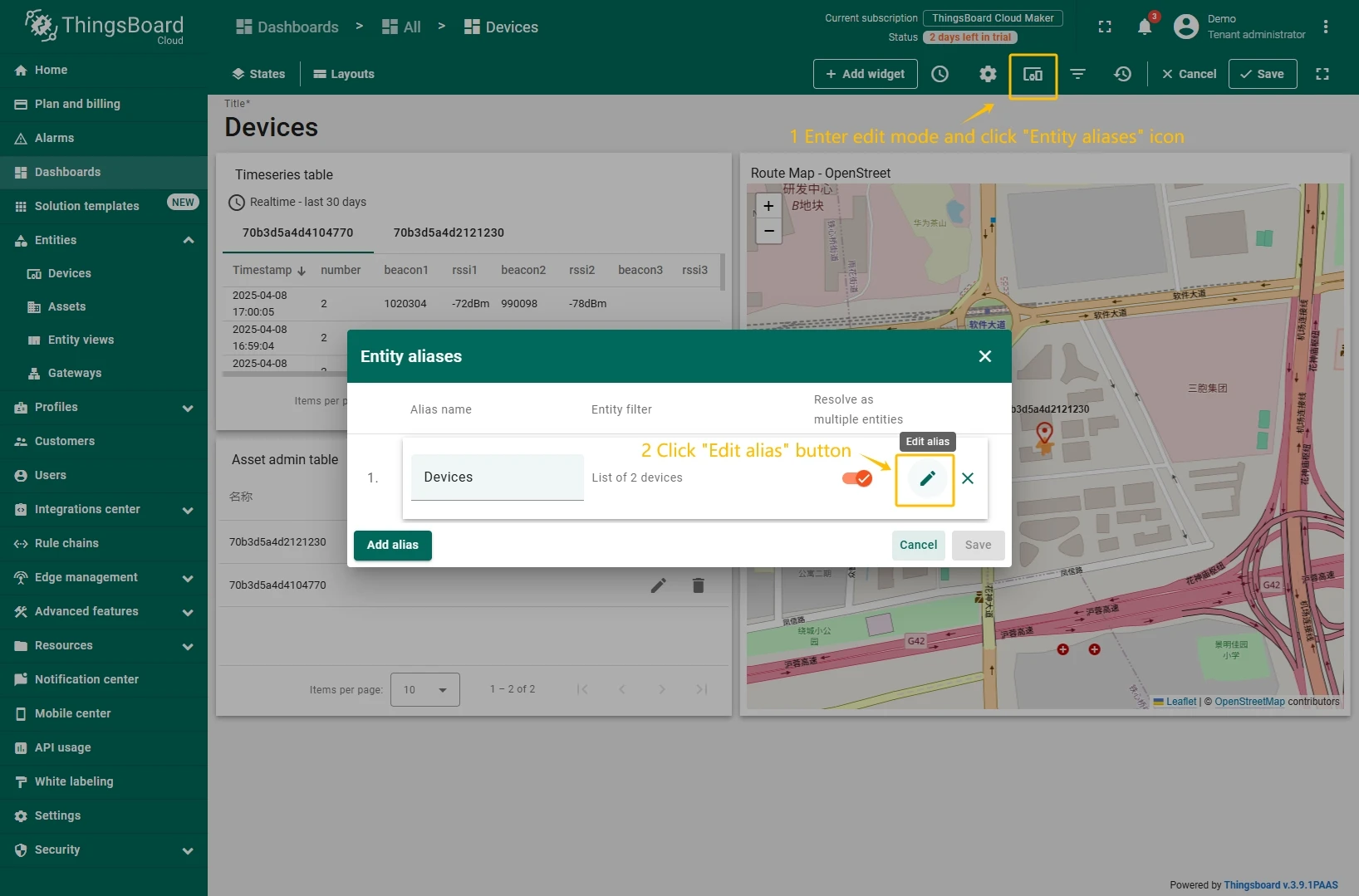
- Open the dashboard and enter edit mode. Click the “Entity aliases” icon, then in the pop-up window click the “Edit alias” icon next to the alias.
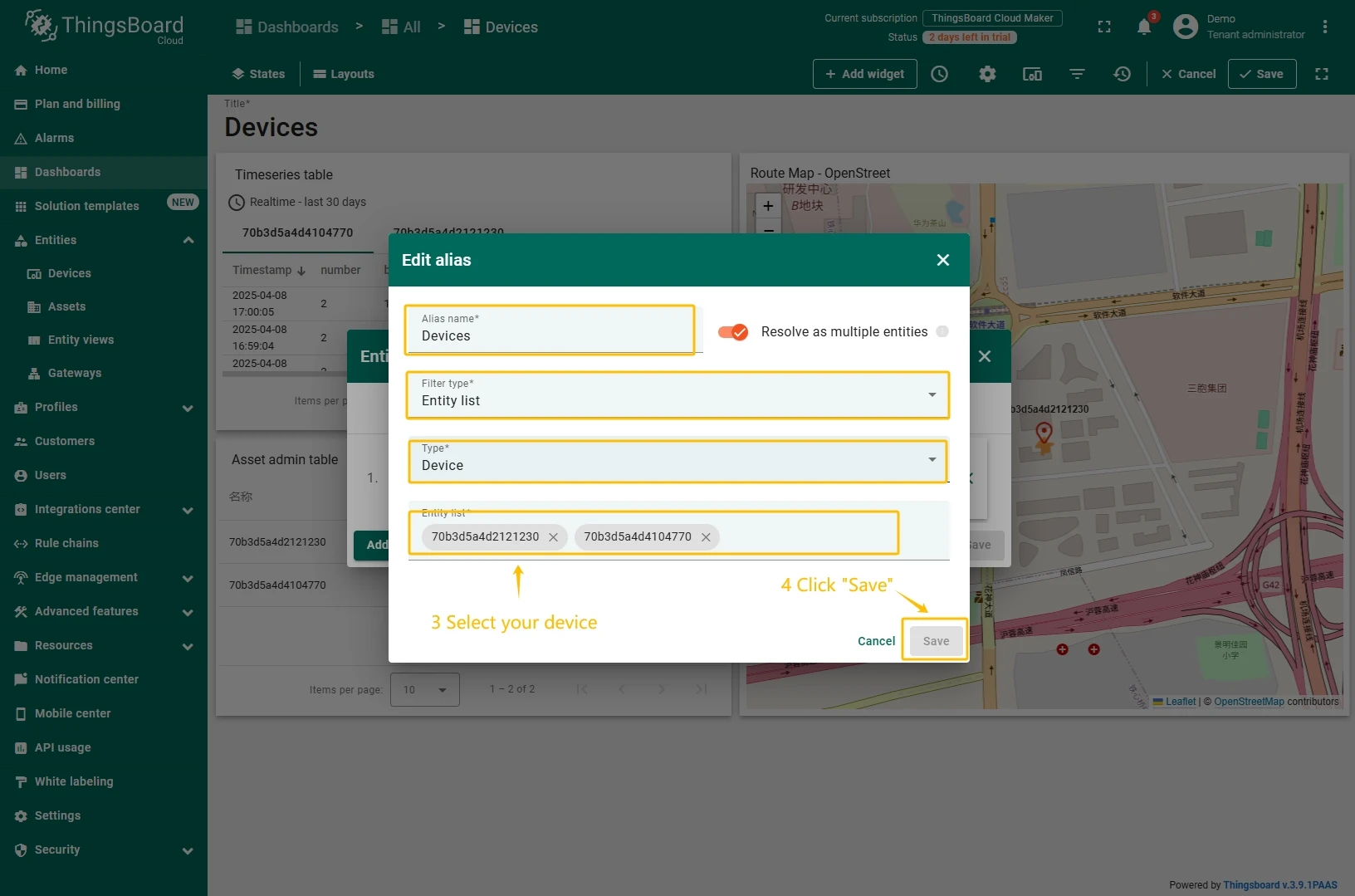
- In edit alias window select your device from dropdown list and save entity alias.
- Apply all changes.
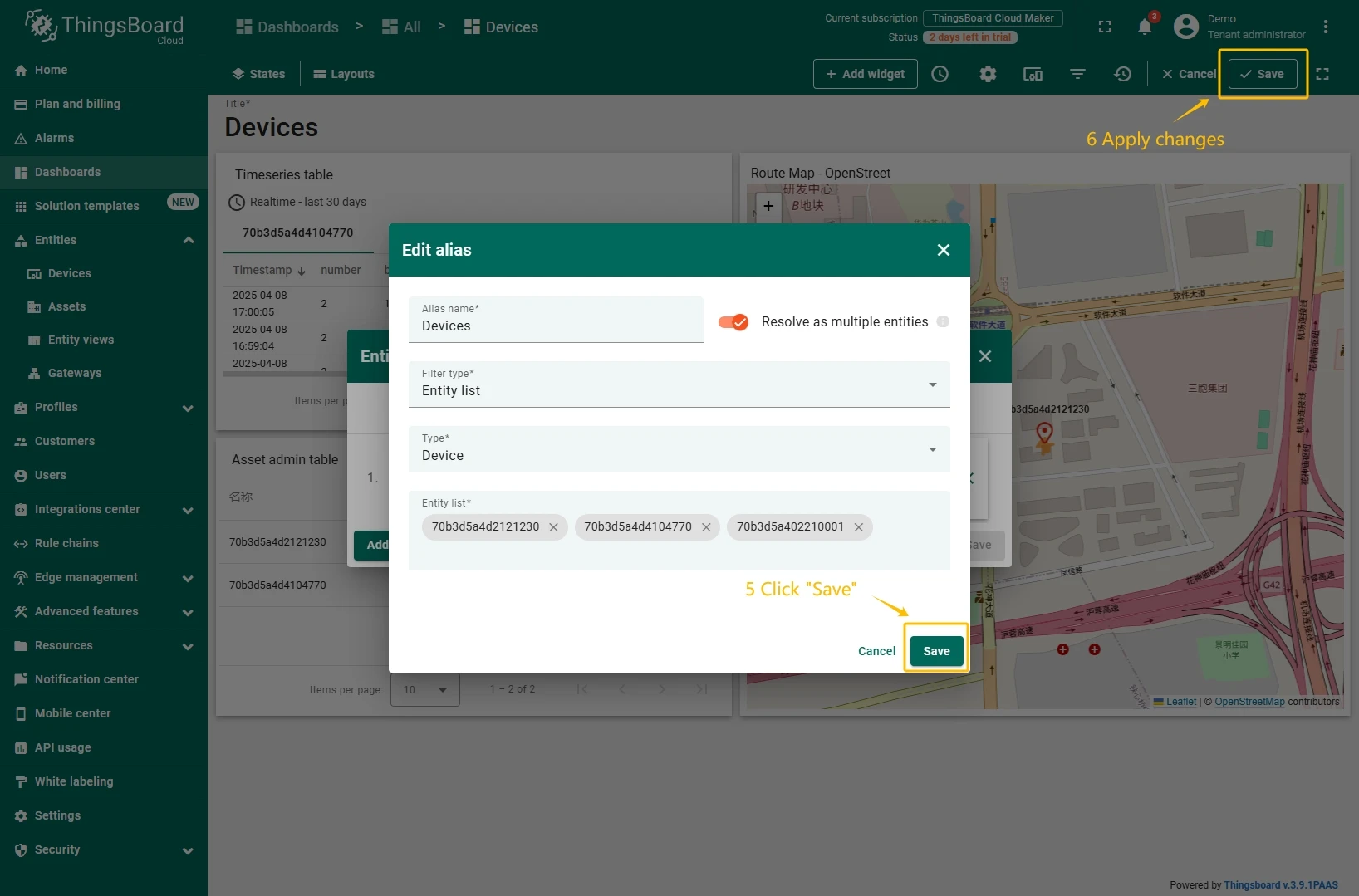
You should now see data from the device.
Example of the dashboard with data:
Conclusion
With the knowledge outlined in this guide, you can easily connect your Asset Management Tracker and send data to ThingsBoard.
Explore the platform documentation to learn more about key concepts and features. For example, configure alarm rules or dashboards.