Stand with Ukraine flag
Pricing Try it now

Smart energy

Smart energy is intelligent energy resource management using IoT to improve efficiency, reduce costs, and automate processes. ThingsBoard is a perfect platform for these tasks, providing scalable data collection, analytics, and real-time remote control.

View live demo

IoT is radically transforming the approach to energy management. IoT sensors capture the consumption of electricity, water, heat, as well as environmental parameters such as pressure, temperature, and more. This data is used to make automated decisions — from shutting down systems in case of failures to optimizing consumption and preventing losses.

The ThingsBoard platform provides a powerful technology stack for building such systems. It supports data collection from various types of devices and protocols (MQTT, CoAP, HTTP, etc.), dashboard visualizations, and advanced automation through its rule engine and alerting system. This enables real-time energy monitoring and rapid response to anomalies, reducing costs and improving operational efficiency.

ThingsBoard dashboard in light theme showing energy data from smart meters
ThingsBoard dashboard in dark theme with smart meter data visualization

Accelerate your IoT roadmap with our team

Our team is a trusted partner for scalable solutions delivered fast and on a fixed timeline.

Letter icon
How it works

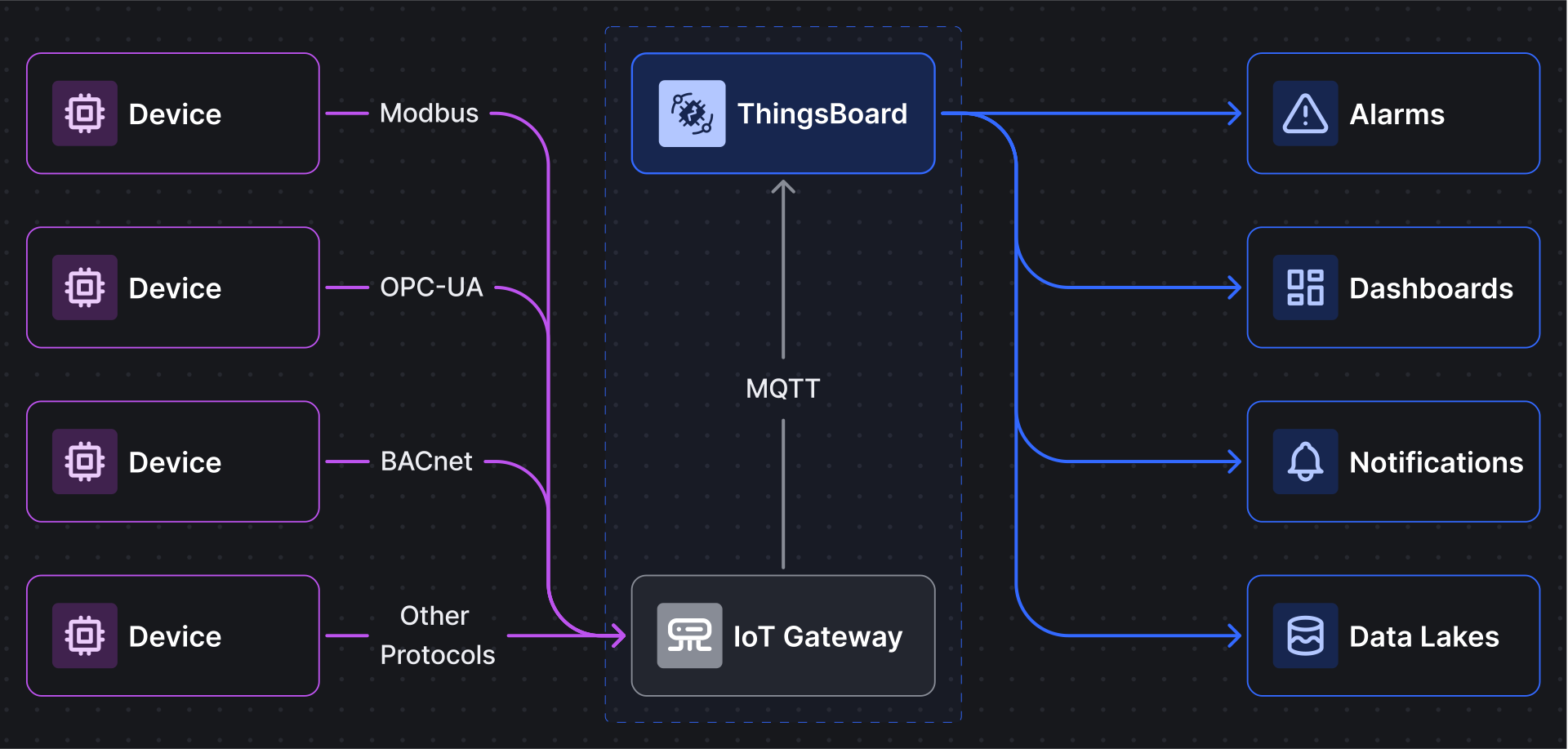
Solution structure of smart energy use case

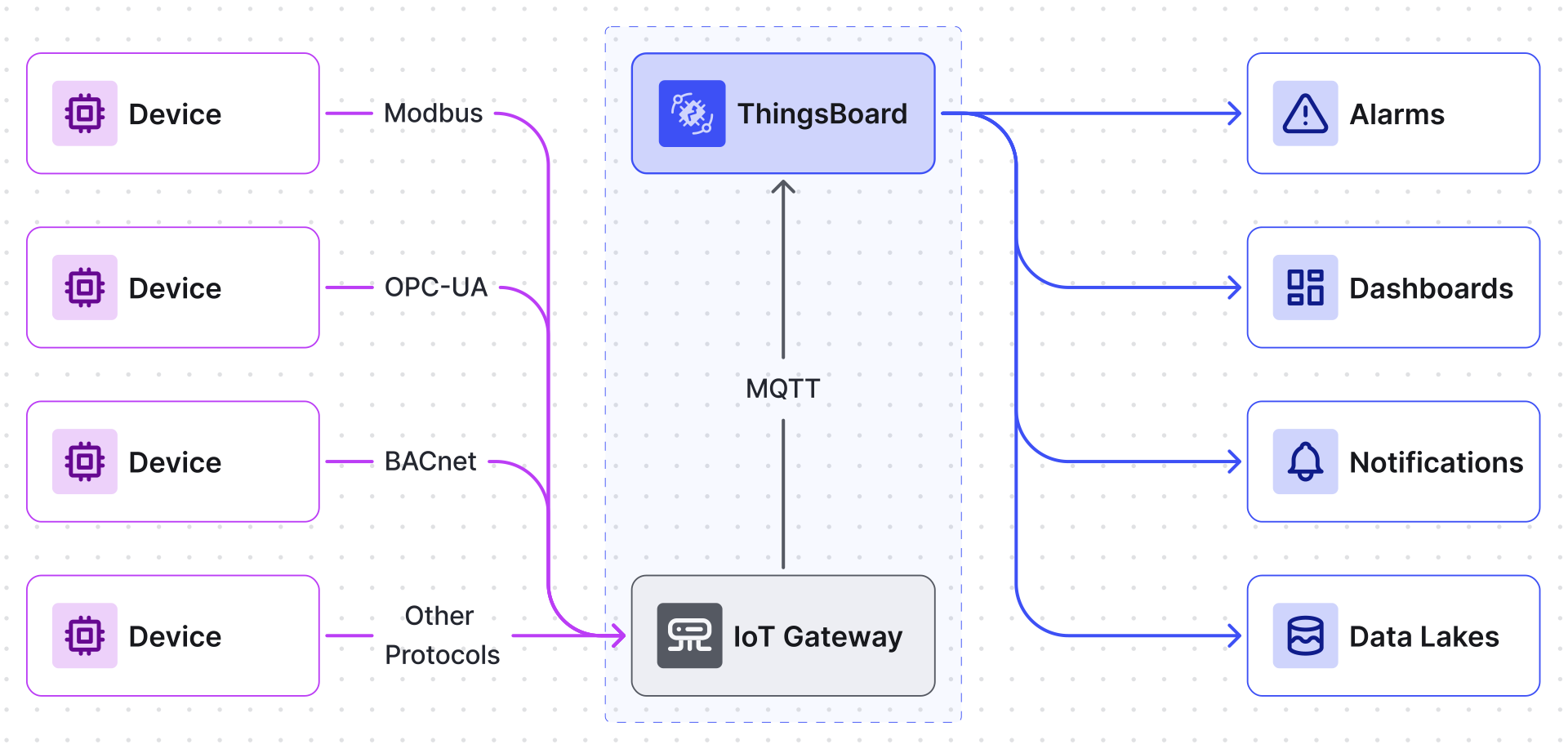
ThingsBoard offers a comprehensive IoT-based energy monitoring solution built on a modular, scalable architecture. At the device level, smart meters and industrial Modbus meters collect real-time data on energy consumption across facilities.

These devices connect through IoT gateways that support a wide range of communication protocols, including MQTT, CoAP, HTTP, and LwM2M, ensuring secure and seamless data transmission to the cloud.

ThingsBoard core handles device and user management, real-time data processing via a powerful rule engine. The collected data is visualized through intuitive dashboards and mobile applications, giving users clear insights into energy usage, system alarms, and performance metrics — all in real time, from a single interface.

Smart energy solution architecture: devices connect via protocols and gateways to ThingsBoard for alarms, dashboards, notifications, and data lakes Smart energy solution architecture: devices connect via protocols and gateways to ThingsBoard for alarms, dashboards, notifications, and data lakes
Smart energy solution architecture: devices connect via protocols and gateways to ThingsBoard for processing, visualization, and automation
Why choose Smart energy

Smart energy benefits

The smart energy solution provides a wide range of benefits for businesses, facility managers, and technical teams, enabling efficient, automated, and scalable energy management.

Failure detection and risk mitigation

Real-time monitoring detects unusual patterns that may signal potential system failures, helping reduce risks and prevent downtime.

Dynamic energy optimization

IoT-powered energy systems automatically adjust consumption based on time of day, weather, or pricing factors, improving efficiency and occupant comfort.

Centralized monitoring and control

A unified platform enables centralized oversight of energy usage across multiple facilities, simplifying management and enhancing visibility.

Increased energy efficiency

IoT sensors track detailed consumption patterns by device or system, allowing identification of inefficiencies and driving smarter energy use.

Sustainability and cost savings

Continuous monitoring and automation help reduce operational costs and maintenance needs, supporting long-term sustainability goals.

Regulatory compliance

Automated tracking and reporting features make it easier to meet energy regulations and environmental standards.

Interface insights

Dashboard structure of smart energy solution

The live dashboard displays real-time data from several smart meters collected using ThingsBoard MQTT API. Collected data is processed via the rule engine to raise alarms on certain thresholds. The main dashboard displays the energy meters, corresponding alarms, and real-time data feeds. Click on the alarm or energy meter row to open the meter details. You may export the dashboard from our live demo server and import it to your ThingsBoard instance.

Smart energy state

Smart Meter A — 1st Floor state

Smart Meter B — 2nd Floor state

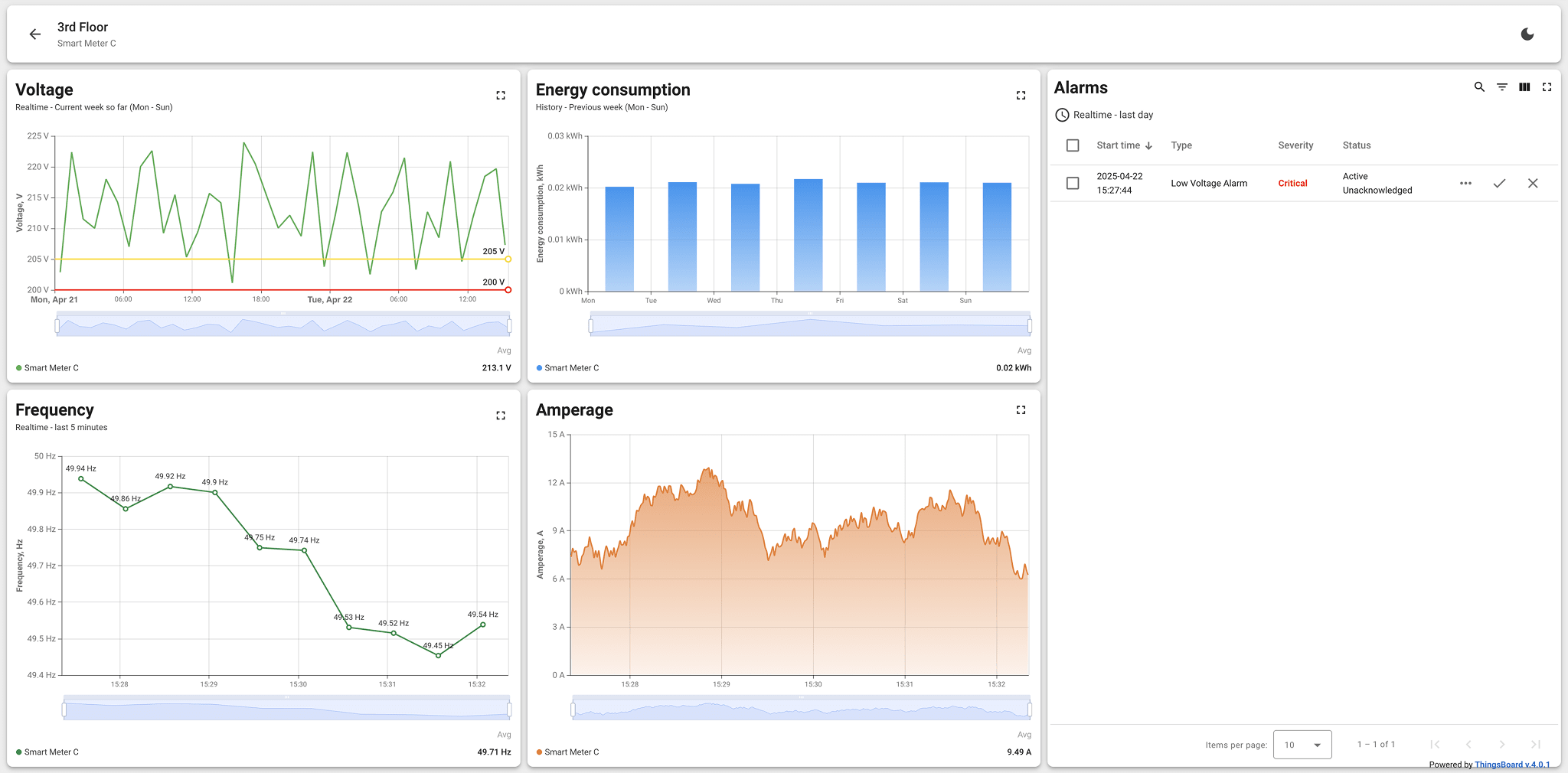
Smart Meter C — 3rd Floor state

Theme toggle mode

This unified dashboard provides a comprehensive real-time view of voltage, amperage, frequency, and energy consumption across all three floors. Operators can monitor Smart Meters A, B, and C, analyze, compare performance, and detect anomalies instantly. Alarm widgets notify users about critical events like low or high voltage, while interactive charts and tables offer full control and insight — all from a single interface.

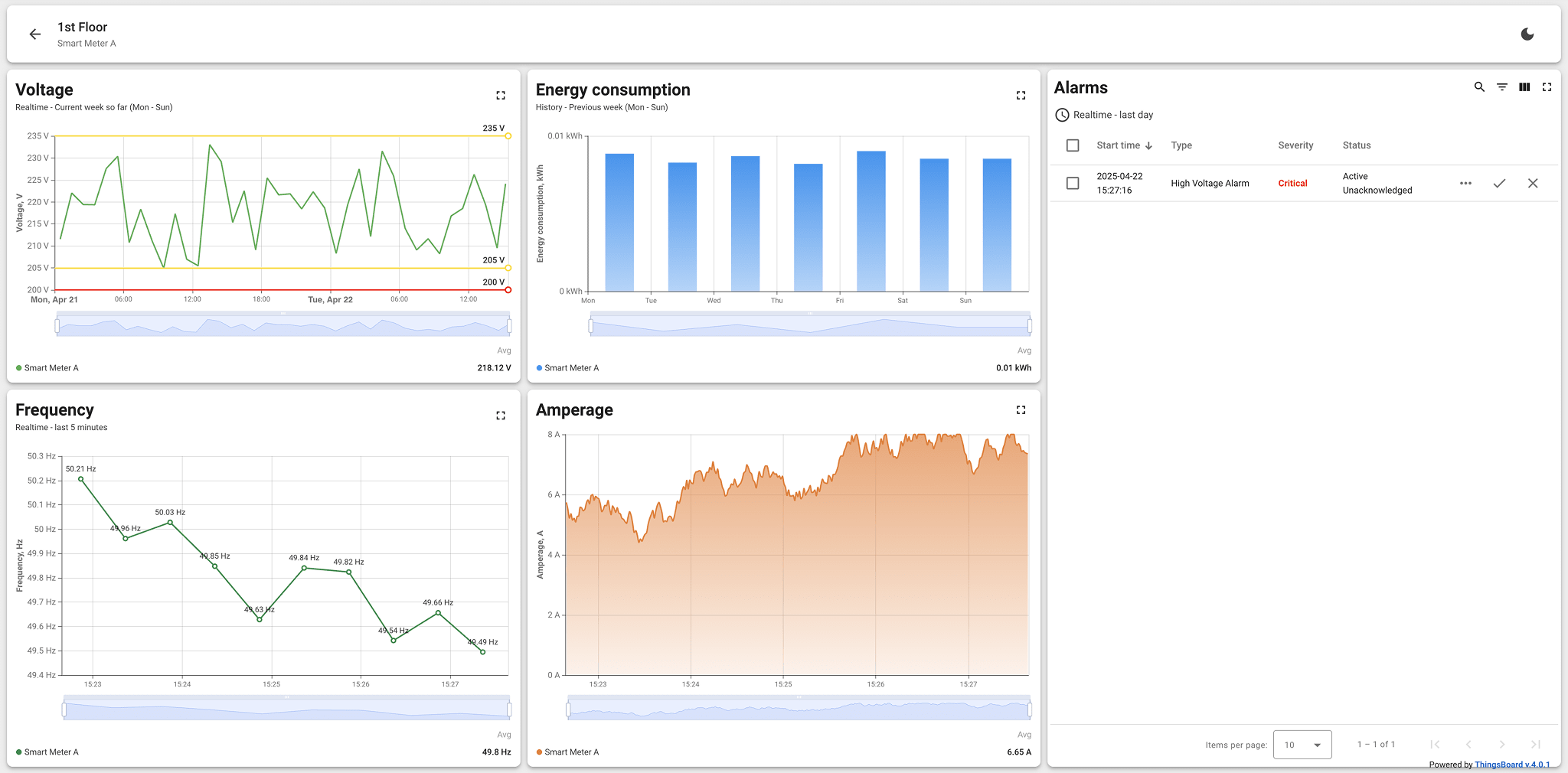
This dashboard provides full visibility into voltage, frequency, amperage, and energy consumption for Smart Meter A. Real-time charts help detect instability in power supply, while a historical consumption graph supports weekly analysis. The frequency dip and critical high-voltage alarm enable timely diagnostics and response.
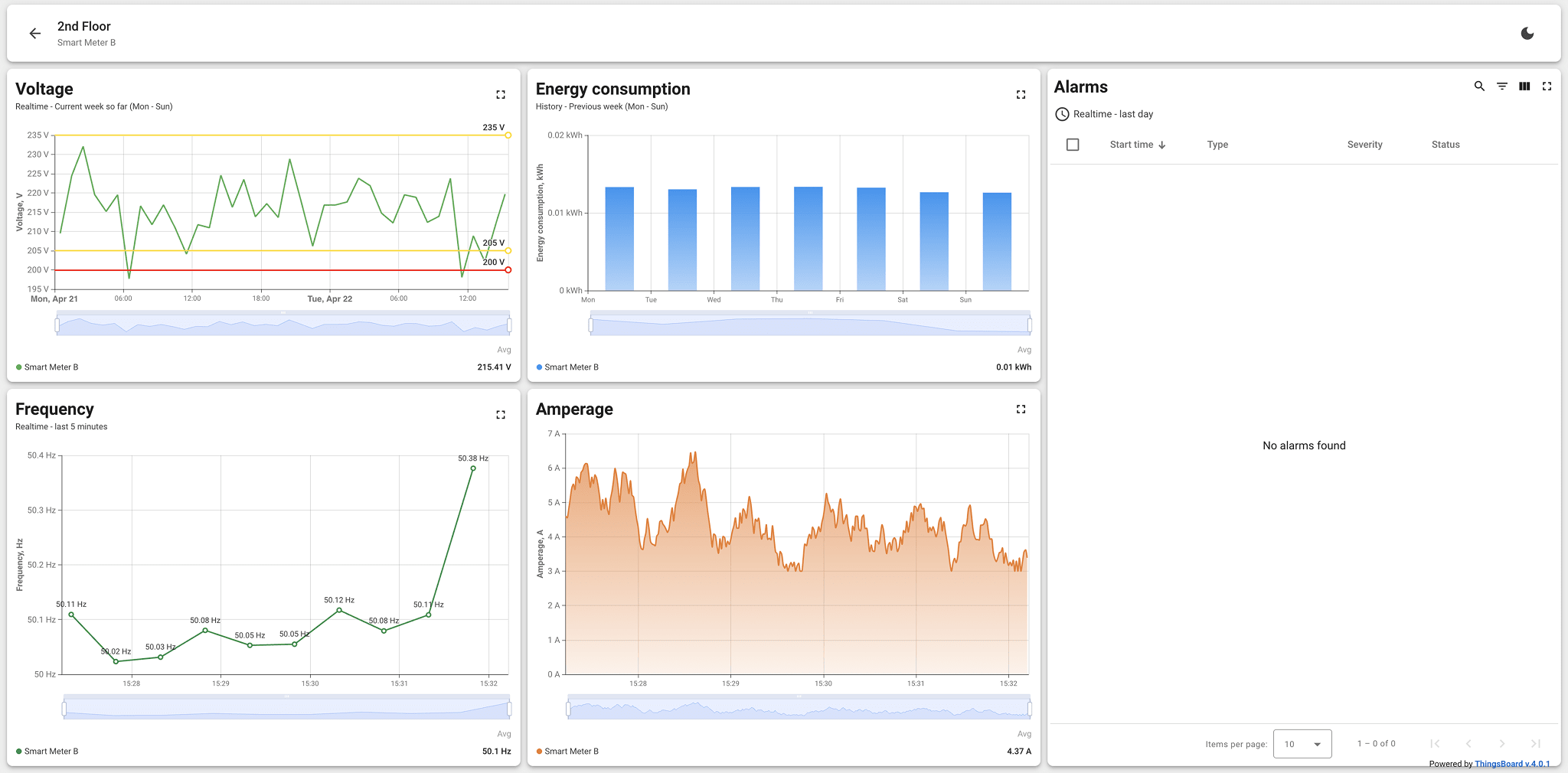
This dashboard provides full visibility into voltage, frequency, amperage, and energy consumption for Smart Meter B. Real-time charts help detect instability in power supply, while a historical consumption graph supports weekly analysis. The frequency dip and critical high-voltage alarm enable timely diagnostics and response.
This dashboard provides full visibility into voltage, frequency, amperage, and energy consumption for Smart Meter C. Real-time charts help detect instability in power supply, while a historical consumption graph supports weekly analysis. The frequency dip and critical high-voltage alarm enable timely diagnostics and response.
With a single click on the theme icon in the top right corner, users can switch between light and dark modes. This flexibility enhances user comfort in various lighting conditions, improves focus, and reduces eye strain — especially during night shifts or long monitoring sessions. The dark theme preserves full dashboard functionality, including charts, alerts, and controls.


Smart energy state

This unified dashboard provides a comprehensive real-time view of voltage, amperage, frequency, and energy consumption across all three floors. Operators can monitor Smart Meters A, B, and C, analyze, compare performance, and detect anomalies instantly. Alarm widgets notify users about critical events like low or high voltage, while interactive charts and tables offer full control and insight — all from a single interface.

ThingsBoard dashboard in light theme showing energy data from smart meters

Smart Meter A — 1st Floor state

This dashboard provides full visibility into voltage, frequency, amperage, and energy consumption for Smart Meter A. Real-time charts help detect instability in power supply, while a historical consumption graph supports weekly analysis. The frequency dip and critical high-voltage alarm enable timely diagnostics and response.

Smart Meter A dashboard on the 1st floor showing voltage, frequency, amperage, and energy consumption

Smart Meter B — 2nd Floor state

This dashboard provides full visibility into voltage, frequency, amperage, and energy consumption for Smart Meter B. Real-time charts help detect instability in power supply, while a historical consumption graph supports weekly analysis. The frequency dip and critical high-voltage alarm enable timely diagnostics and response.

Smart Meter B dashboard on the 2nd floor with energy data and real-time frequency

Smart Meter C — 3rd Floor state

This dashboard provides full visibility into voltage, frequency, amperage, and energy consumption for Smart Meter C. Real-time charts help detect instability in power supply, while a historical consumption graph supports weekly analysis. The frequency dip and critical high-voltage alarm enable timely diagnostics and response.

Smart Meter C dashboard on the 3rd floor showing real-time energy metrics and critical alarm

Theme toggle mode

With a single click on the theme icon in the top right corner, users can switch between light and dark modes. This flexibility enhances user comfort in various lighting conditions, improves focus, and reduces eye strain — especially during night shifts or long monitoring sessions. The dark theme preserves full dashboard functionality, including charts, alerts, and controls.
ThingsBoard dashboard in dark theme with smart meter data visualization
Versatile implementation

Applications of smart energy solution

A scalable IoT-based energy monitoring and management system can be adapted for a wide range of industries and infrastructure types. Below are just a few examples of where smart energy solutions can be applied.

Industrial facilities and factories

Tracking energy usage of heavy machinery, identifying inefficiencies, and improving power distribution for safer and more cost-effective production processes.

Educational institutions and campuses

Controlling power consumption in classrooms, labs, and dormitories, scheduling energy use based on occupancy, and ensuring sustainability targets are met.

Shopping malls and retail chains

Monitoring energy usage across multiple locations, managing peak hours, and controlling lighting and HVAC systems automatically for higher efficiency.

Factory
Buildings
School
Data centers
Mall

Commercial buildings and offices

Optimizing HVAC, lighting, and equipment usage across floors and departments, with real-time monitoring to reduce energy waste and operational costs.

Data centers

Maintaining stable voltage, temperature, and load balancing to ensure uninterrupted operations while reducing electricity consumption and cooling costs.

Factory

Industrial facilities and factories

Tracking energy usage of heavy machinery, identifying inefficiencies, and improving power distribution for safer and more cost-effective production processes.

Buildings

Commercial buildings and offices

Optimizing HVAC, lighting, and equipment usage across floors and departments, with real-time monitoring to reduce energy waste and operational costs.

School

Educational institutions and campuses

Controlling power consumption in classrooms, labs, and dormitories, scheduling energy use based on occupancy, and ensuring sustainability targets are met.

Data centers

Data centers

Maintaining stable voltage, temperature, and load balancing to ensure uninterrupted operations while reducing electricity consumption and cooling costs.

Mall

Shopping malls and retail chains

Monitoring energy usage across multiple locations, managing peak hours, and controlling lighting and HVAC systems automatically for higher efficiency.