TBMQ 2.3: External authentication, bulk provisioning, and enterprise audit trails

On this page
We’re excited to announce the release of TBMQ 2.3.0 (Community Edition / Professional Edition). This version extends how TBMQ handles authentication, scales operator workflows for large client fleets, and strengthens the enterprise controls in the Professional Edition.
Here’s what’s new in 2.3 across both editions:
| New in TBMQ 2.3 | Community | Professional |
|---|---|---|
| HTTP authentication provider | ✓ | ✓ |
| Bulk import of MQTT client credentials | ✓ | ✓ |
| TLS + ACL for Redis/Valkey | ✓ | ✓ |
| Audit logs | — | ✓ |
| SSO role mapping | — | ✓ |
Let’s take a closer look at each change, starting with Community Edition.
Community Edition
HTTP authentication provider
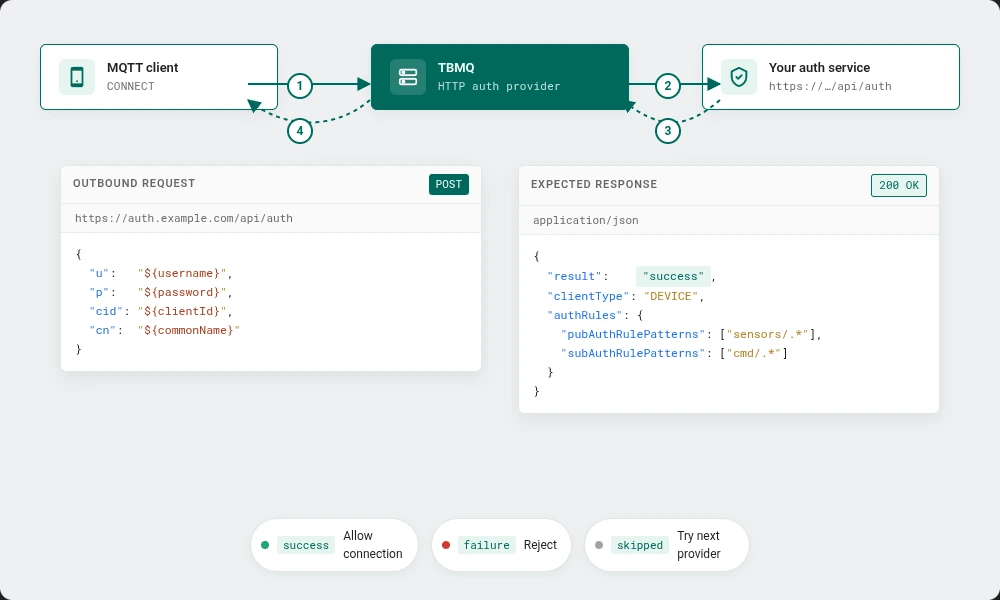
TBMQ 2.2 moved the broker’s authentication providers into the database and made them pluggable. With 2.3, we’ve extended that framework with a new provider that delegates client authentication to an external HTTP service.
With the HTTP authentication provider enabled, every MQTT CONNECT attempt is forwarded as a signed HTTP request to an endpoint you configure. The response drives the authentication decision — accept or reject, together with the client type (DEVICE or APPLICATION) and the authorization rules TBMQ should enforce for the session.
How it works
- On
CONNECT, TBMQ serializes the client credentials (client ID, username, password, and — for mTLS connections — the client certificate’s Common Name) into a JSON request. - TBMQ sends that request to your configured endpoint, applying the headers and timeout you’ve set.
- Your service evaluates the credentials against whatever identity store or policy engine you already run, and returns a response body with the authentication verdict and optional authorization rules.
- TBMQ uses the response to allow or deny the connection, and to apply per-topic pub/sub rules for the session.
Why it matters
Teams with bespoke identity systems — internal IAM, policy engines, HR directories, multi-tenant authorization services — often can’t express their auth logic as credentials stored in TBMQ (Basic, X.509, SCRAM) or as claims encoded in a JWT. The decision itself lives in their own service, and the broker simply needs to ask. The HTTP provider lets that logic stay where it already lives, and still gives you broker-side enforcement at connect time. It also composes with the existing providers: you can order HTTP behind JWT, or in front of Basic, depending on how you want credentials evaluated.
For full configuration details, request/response schemas, and end-to-end setup examples, see the HTTP authentication provider guide.
Bulk import of MQTT client credentials
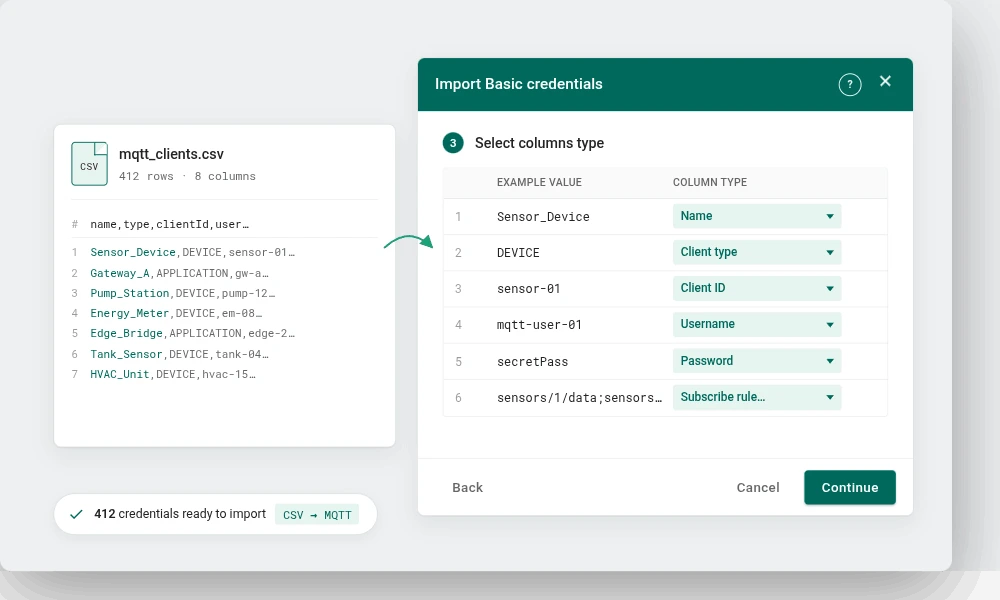
Provisioning a handful of clients through the UI is fine. Provisioning tens of thousands — typical for an IoT rollout, a migration from another broker, or an environment with per-device certificates — is not.
TBMQ 2.3 adds bulk import of MQTT client credentials through a CSV upload. You supply a CSV describing the Basic credentials to provision — with columns for name, client type, client ID, username, password, subscribe and publish topic patterns, and description — and TBMQ processes it as an upsert: entries are matched by their Name, with new rows created and matching rows updated in place.
Column mapping is interactive, so your CSV doesn’t have to match a fixed layout. After processing, the importer reports how many credentials were created, updated, or rejected, so partial batches surface actionable errors instead of silently skipping rows.
This closes the main onboarding gap that teams hit when moving production fleets onto TBMQ, and removes the need to script provisioning against the per-credential API for bulk operations.
The bulk provisioning guide walks through the CSV format, the interactive column mapping, and how passwords and authorization rules are handled on create and update.
Secure Redis/Valkey connections
TBMQ stores persistent device messages and other hot-path state in Redis (or Valkey). Until 2.3, the broker connected to that store over plaintext and without user-scoped ACLs — acceptable inside a private network, but limiting as soon as the data store lives behind a managed endpoint or crosses a trust boundary.
TBMQ 2.3 adds SSL/TLS support and ACL username authentication for the broker’s Redis/Valkey connection. You can now:
- Terminate the broker → Redis connection over TLS with standard certificate validation.
- Authenticate using an ACL username alongside the password, matching the Redis 6+ / Valkey ACL model.
- Run TBMQ against managed services that mandate encrypted connections and per-user credentials — AWS ElastiCache, GCP Memorystore, managed Valkey offerings — without proxies or sidecars.
Configuration parameters are described in the TBMQ configuration reference.
Other improvements
The release also includes a number of narrower updates:
- Modernized infrastructure. The reference stack has moved to Apache Kafka 4.0, Valkey 8.0 (as a drop-in alternative to Redis > 7.2), and PostgreSQL 17. Operators should review the new infrastructure versions in the full release notes before upgrading.
- Session management refactor. Session-management internals have been refactored for performance and race-condition fixes.
- UI. Home, login, and getting-started pages were refreshed; monitoring charts were updated; and the UI now ships Spanish, Hindi, and Simplified Chinese translations.
- Per-listener proxy protocol. Proxy protocol can now be enabled or disabled independently for each MQTT listener (TCP, TLS, WS, WSS).
- CN placeholder in X.509 rules. Certificate Common Name can be used as a placeholder inside authorization rules, simplifying dynamic, certificate-driven policies.
- Dependency security. HIGH and MEDIUM CVEs in Spring Boot, Netty, Tomcat, Jackson, Logback, and BouncyCastle have been addressed.
Professional Edition
TBMQ PE 2.3 inherits every change above and adds the following PE-exclusive capabilities.
Audit logs
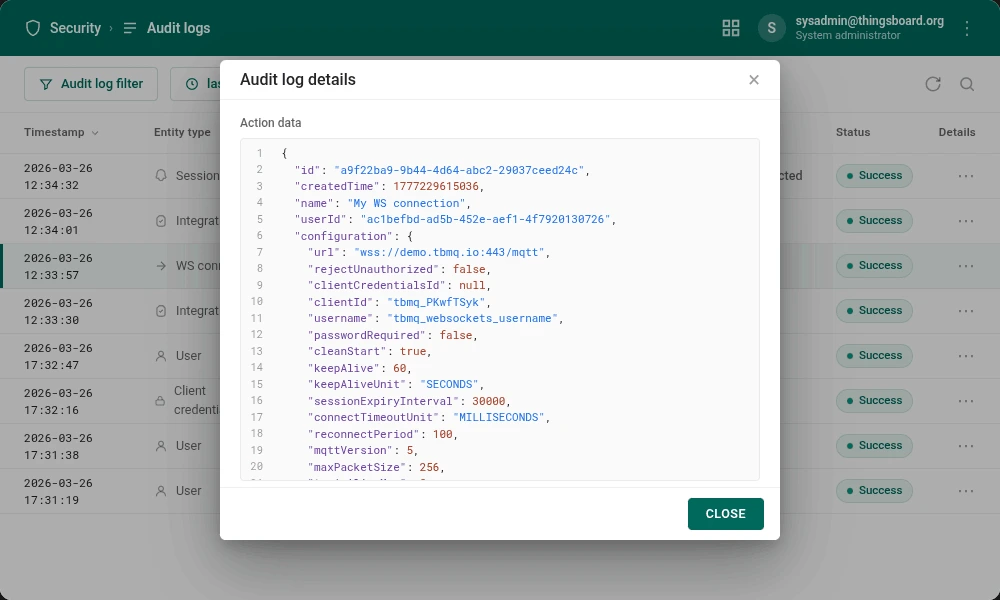
Until now, tracing administrative activity inside TBMQ — who changed what, and when — meant piecing the trail together from application logs and container output. TBMQ PE 2.3 replaces that exercise with a built-in audit log.
Every administrative action and significant system event is now recorded as an audit entry: user logins, credential changes, integration configuration updates, and role assignments. Entries capture the actor, the target entity, the action type, a timestamp, and an action data payload with the full context of what was applied — for a login, the client address, browser, OS, and device; for a configuration change, the resulting entity state.
The audit log is queryable from the PE UI and via the REST API, with filtering by actor, action type, and time window. Retention is configurable so that operators can match their compliance posture without carrying unbounded history.
Typical uses: compliance reporting (SOC 2, ISO 27001, HIPAA), post-incident forensics, and day-to-day security monitoring.
For the full list of audited events, retention settings, and the query API, see the audit log documentation.
SSO role management
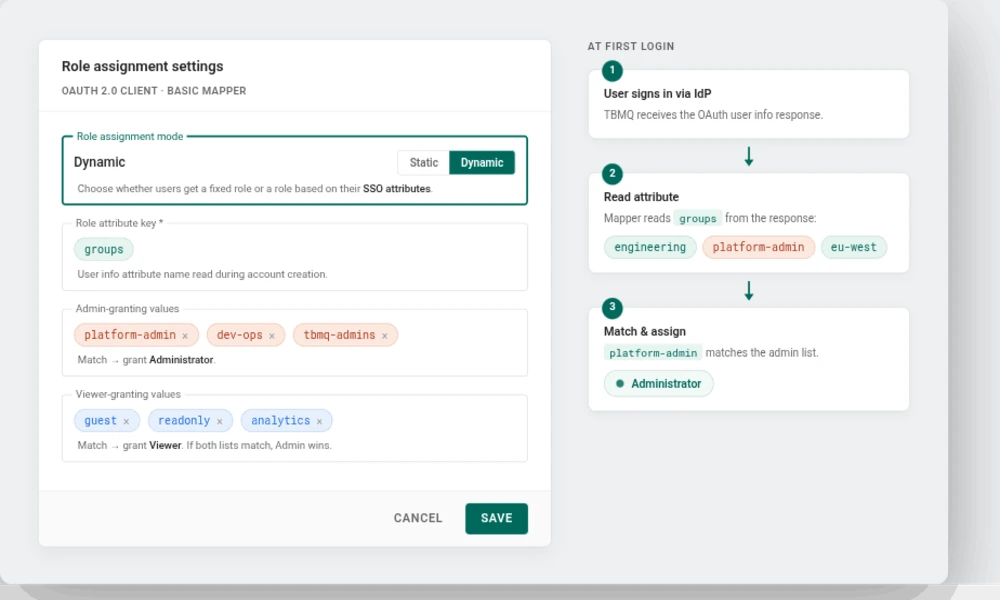
TBMQ PE 2.2 introduced Single Sign-On alongside RBAC. At the time, the Basic mapper could only stamp a single fixed role on every user coming from a given OAuth 2.0 client, so administrators had to reassign roles by hand as users arrived — painful at enterprise scale and a frequent source of drift.
TBMQ PE 2.3 adds dynamic role assignment to the Basic mapper. Each OAuth 2.0 client can now derive a user’s TBMQ role from an attribute in the identity provider’s user info response — typically roles or groups — instead of assigning the same role to every incoming user.
- Static or dynamic, per client. Keep the 2.2 behavior (one fixed role) or switch a specific client to dynamic mode.
- Attribute-driven mapping. Pick the user info attribute to read, then list the values that should grant Administrator and the values that should grant Viewer.
- Deterministic precedence. If a user’s attribute values match both lists, Administrator wins.
- No IdP changes. The mapping lives inside the TBMQ OAuth 2.0 client configuration — no change to the identity provider or to the OAuth 2.0 flow itself.
The practical outcome: users provisioned via SSO arrive in TBMQ with the right role already set, based on their IdP attributes — no manual role-assignment step for each new user. The mapping is evaluated when the account is created, so subsequent attribute changes in the IdP don’t automatically update an existing user’s role; role changes for existing users stay under TBMQ administrator control.
For full configuration details and walkthroughs for Google, Auth0, and Keycloak, see the OAuth 2.0 and SSO — Basic mapper documentation.
Final words
TBMQ 2.3 tightens the broker’s fit for demanding deployments at both ends of the spectrum: flexible external authentication and smoother large-fleet operations for Community Edition users, and first-class audit trails plus automated SSO role mapping for Professional Edition users running in regulated environments.
For the complete list of changes, see the Community Edition release notes and the Professional Edition release notes.
If you find TBMQ useful, support the project by starring the TBMQ GitHub repository and by opening issues or pull requests.
Evaluate TBMQ Professional Edition
Audit logs, SSO role mapping, white labeling, RBAC, and more — available as a 30-day trial or an upgrade from TBMQ CE.