
Audit logs
TBMQ tracks user actions across the system and records them as audit logs. Each log entry captures who performed the action, what entity was affected, the type and status of the operation, and a timestamp. This provides administrators with a reliable history of changes for troubleshooting, compliance, and security monitoring.
User interface
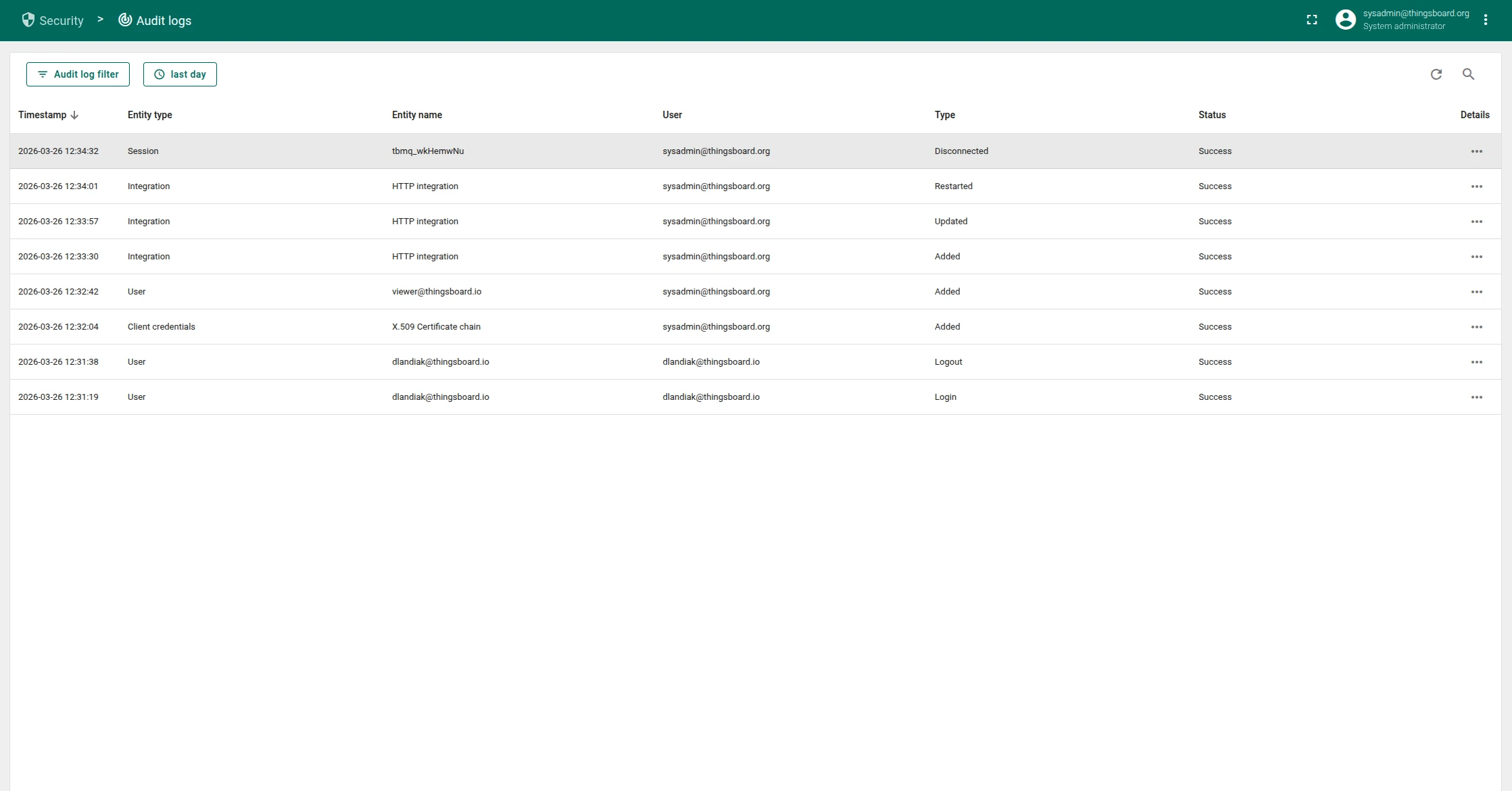
Section titled “User interface”Administrators can review audit logs on the Security → Audit Logs page. The page displays a table of logged actions with the following columns:
- Timestamp: When the action occurred.
- Entity type: The type of entity affected (e.g., User, Integration, MQTT Client Credentials).
- Entity name: The name or identifier of the affected entity.
- User: The user who performed the action.
- Type: The action type (e.g., Added, Updated, Deleted, Login, Logout).
- Status: Whether the action succeeded or failed.
Use the date range picker and the text search field to filter audit log entries.
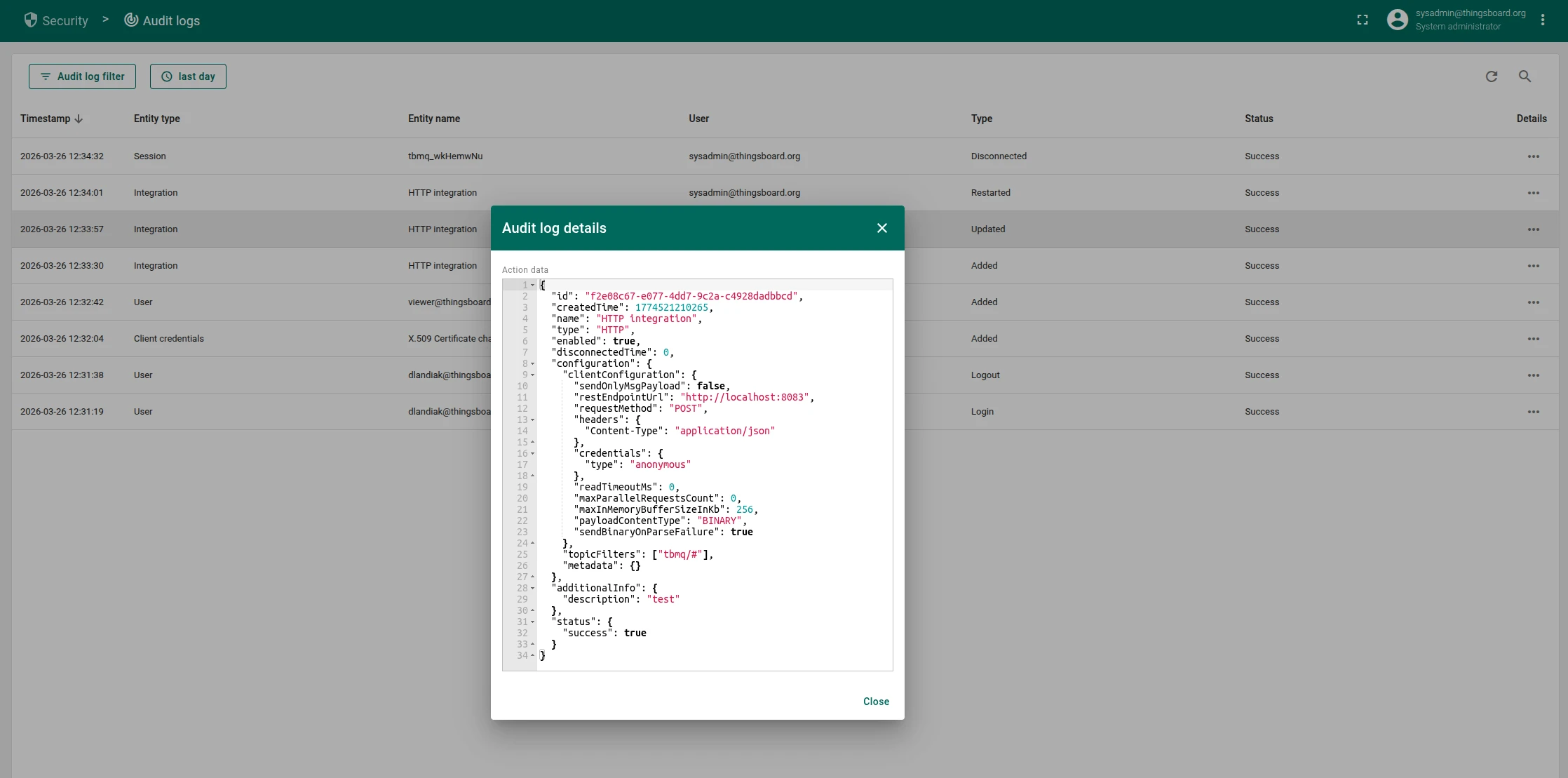
Click Details (...) to open a dialog with the full JSON payload of the logged action.
This includes the entity ID, additional metadata, and a complete snapshot of the changes made.
Audited entity types
Section titled “Audited entity types”TBMQ records audit log entries for the following entity types:
| Entity type | Description |
|---|---|
| Admin settings | Changes to general broker settings and security configuration |
| Blocked client | MQTT clients that have been blocked from connecting to the broker |
| Domain | Custom domain configurations used for broker access |
| Event | Integration events such as statistics, lifecycle changes, and errors |
| Integration | External system integrations configured in the broker |
| Kafka consumer group | Kafka consumer groups used for message processing |
| Kafka topic | Kafka topics used internally for message routing and storage |
| MQTT auth provider | Authentication provider configurations (e.g., Basic, X.509, JWT, SCRAM, HTTP) |
| MQTT client credentials | Credentials used to authenticate MQTT clients connecting to the broker |
| MQTT session | Active and persistent MQTT client sessions |
| OAuth2 client | OAuth 2.0 client configurations used for user authentication |
| Retained message | MQTT retained messages stored by the broker |
| Resource | Uploaded resources such as images used in white labeling |
| Service info | Broker service node metadata and cluster membership |
| Shared subscription | Application-level shared subscriptions with Kafka-backed consumer groups |
| Subscription | Individual MQTT client topic subscriptions |
| Time series | Time series telemetry data collected by the broker |
| User | System user accounts and their profile changes |
| WebSocket connection | WebSocket connections established through the TBMQ UI |
| WebSocket subscription | Topic subscriptions created within WebSocket connections |
| White labeling | Custom branding and appearance settings |
Action types
Section titled “Action types”Each audit log entry records one of the following action types:
| Action type | Description |
|---|---|
| Added | Entity created |
| Updated | Entity modified |
| Deleted | Entity removed |
| Login | User logged in |
| Logout | User logged out |
| Subscriptions updated | Client subscriptions modified |
| Disconnected | MQTT client disconnected |
| Removed | MQTT session removed |
| Restarted | Integration restarted |
| Events cleared | Events cleared for an entity |
| Timeseries deleted | Time series data deleted |
| Blocked | Client blocked |
| Unblocked | Client unblocked |
Configuration
Section titled “Configuration”Audit log behavior is controlled through the thingsboard-mqtt-broker.yml configuration file or the corresponding environment variables.
Enable or disable audit logging
Section titled “Enable or disable audit logging”audit-log: enabled: "${AUDIT_LOG_ENABLED:true}"Logging levels
Section titled “Logging levels”You can configure the logging level for each entity type individually. The following values are accepted:
- OFF: Audit logging is disabled for this entity type.
- W: Only write operations — create, update, delete — are logged.
- RW: Both read and write operations are logged.
audit-log: logging-level: mask: "admin_settings": "${AUDIT_LOG_MASK_ADMIN_SETTINGS:W}" "blocked_client": "${AUDIT_LOG_MASK_BLOCKED_CLIENT:W}" "domain": "${AUDIT_LOG_MASK_DOMAIN:W}" "integration": "${AUDIT_LOG_MASK_INTEGRATION:W}" "kafka_consumer_group": "${AUDIT_LOG_MASK_KAFKA_CONSUMER_GROUP:W}" "kafka_topic": "${AUDIT_LOG_MASK_KAFKA_TOPIC:W}" "mqtt_auth_provider": "${AUDIT_LOG_MASK_MQTT_AUTH_PROVIDER:W}" "mqtt_client_credentials": "${AUDIT_LOG_MASK_CREDENTIALS:W}" "mqtt_session": "${AUDIT_LOG_MASK_MQTT_SESSION:W}" "oauth2_client": "${AUDIT_LOG_MASK_OAUTH2_CLIENT:W}" "retained_message": "${AUDIT_LOG_MASK_RETAINED_MESSAGE:W}" "service_info": "${AUDIT_LOG_MASK_SERVICE_INFO:W}" "shared_subscription": "${AUDIT_LOG_MASK_SHARED_SUBSCRIPTION:W}" "subscription": "${AUDIT_LOG_MASK_SUBSCRIPTION:W}" "tb_resource": "${AUDIT_LOG_MASK_RESOURCE:W}" "timeseries": "${AUDIT_LOG_MASK_TIME_SERIES:W}" "unauthorized_client": "${AUDIT_LOG_MASK_UNAUTHORIZED_CLIENT:W}" "user": "${AUDIT_LOG_MASK_USER:W}" "ws_connection": "${AUDIT_LOG_MASK_WS_CONNECTION:W}" "ws_subscription": "${AUDIT_LOG_MASK_WS_SUBSCRIPTION:W}" "white_labeling": "${AUDIT_LOG_MASK_WHITE_LABELING:W}" "event": "${AUDIT_LOG_MASK_EVENT:W}"By default, all entity types are set to W — write operations only.
To disable logging for a specific entity type, set its value to OFF.
To also log read operations, set the value to RW.
Data retention
Section titled “Data retention”Audit log records are stored in the PostgreSQL database using time-based partitioning. You can configure the partition size and TTL (Time To Live) for automatic cleanup:
sql: audit_logs: # Number of hours per partition. Defaults to one week (168 hours). partition_size: "${SQL_AUDIT_LOGS_PARTITION_SIZE_HOURS:168}" ttl: audit_logs: # Enables or disables TTL for audit log records. enabled: "${SQL_TTL_AUDIT_LOGS_ENABLED:true}" # TTL in seconds. Defaults to 0 (no expiration). ttl: "${SQL_TTL_AUDIT_LOGS_SECS:0}" # How often the cleanup task runs, in milliseconds. Defaults to one day. checking_interval_ms: "${SQL_TTL_AUDIT_LOGS_CHECKING_INTERVAL_MS:86400000}"External sink (Elasticsearch)
Section titled “External sink (Elasticsearch)”TBMQ supports pushing audit log records to an external Elasticsearch instance for centralized log management and analysis.
audit-log: sink: # Accepted values: none, elasticsearch. type: "${AUDIT_LOG_SINK_TYPE:none}" index_pattern: "${AUDIT_LOG_SINK_INDEX_PATTERN:TBMQ_AUDIT_LOG_@{DATE}}" date_format: "${AUDIT_LOG_SINK_DATE_FORMAT:YYYY.MM.dd}" scheme_name: "${AUDIT_LOG_SINK_SCHEME_NAME:http}" host: "${AUDIT_LOG_SINK_HOST:localhost}" port: "${AUDIT_LOG_SINK_PORT:9200}" user_name: "${AUDIT_LOG_SINK_USER_NAME:}" password: "${AUDIT_LOG_SINK_PASSWORD:}"The index_pattern supports the @{DATE} placeholder, which is replaced with the current date in the format specified by date_format.
Set type to elasticsearch and provide the connection details to enable the sink.
REST API
Section titled “REST API”Audit logs can also be retrieved programmatically via the REST API. The following endpoints are available:
GET /api/audit/logs— Fetches all audit log records with pagination, text search, time range, and action type filters.GET /api/audit/logs/user/{userId}— Fetches audit logs for a specific user.GET /api/audit/logs/entity/{entityType}/{entityId}— Fetches audit logs for a specific entity.
All endpoints require the SYS_ADMIN authority. For details, see the REST API documentation.
Was this helpful?