Import an existing solution
You can bring entities that you made in the ThingsBoard UI under the CLI. Pull them into a solution. Then change them with your agent and push them back. Push updates the original entities. It does not make copies.
What you need before you start
Section titled “What you need before you start”- ThingsBoard CLI and a working profile for the server that has the entities. See Getting Started.
- A project folder. If you do not have one, run
tb initin an empty folder.
In this guide, the entities monitor HVAC units, and the solution is hvac.
Pull the entities
Section titled “Pull the entities”Select one option. Both options write the entity files to solutions/hvac/.
-
Start the agent in the project folder.
-
Send this prompt:
Pull my HVAC solution from ThingsBoard into a solution named hvac. -
Check the list. The agent finds the matching entities and adds the related ones: profiles, owner customers, entity groups, roles, and user groups. Then it asks Is this the right set?
-
Select Pull all. To change the list, select Adjust the matches and name the entities to add or remove.
The agent pulls the entities into solutions/hvac/.
-
Create an empty solution:
Terminal window tb solution new hvac -
Open the interactive picker:
Terminal window tb pull -i --solution hvac -
Select the entities. Use the keys in the table below.
-
Press Enter. The CLI shows what it will pull, with the profile and the solution. Press Enter to pull, or Esc to go back.
-
Commit the files:
Terminal window git add solutions/hvacgit commit -m "Import HVAC entities"
Use the interactive picker
Section titled “Use the interactive picker”The picker shows one section for each entity type. Each section lists the entity groups first, then the entities.
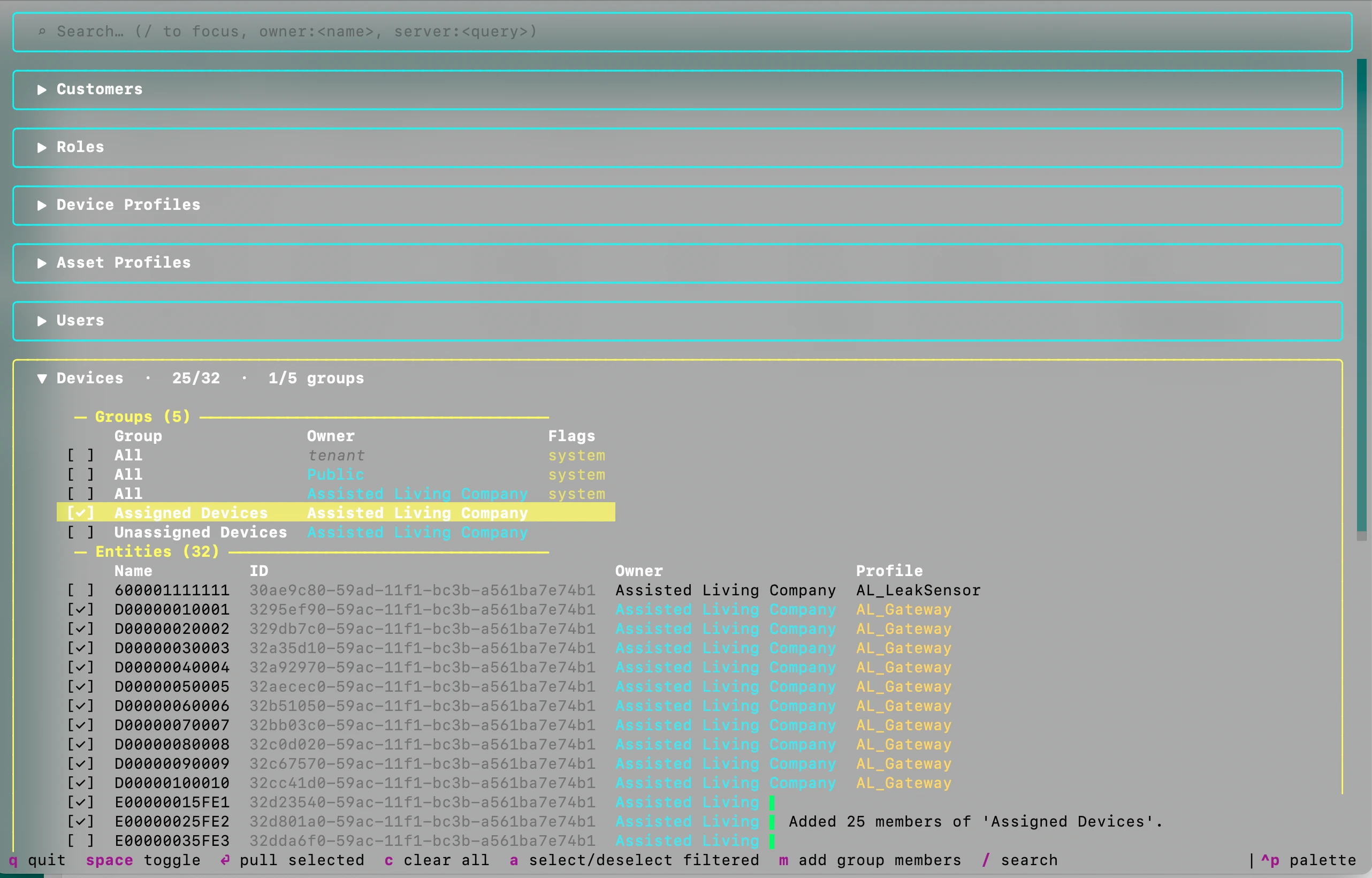
| Key | What it does |
|---|---|
| Up, Down | Move between rows. |
| Right, Left | Open or close a section. |
| Space | Select or clear the row. |
| m | On a group row: select the group and all its members. |
| a | Select all rows that match the search. Press again to clear them. |
| c | Clear all selections. |
| / | Go to the search field. |
| Enter | Pull the selected entities. |
| q | Quit without a pull. |
Type in the search field to filter the rows by name. Two filters are available:
owner:<name>: Show only rows of this owner and its sub-customers, likeowner:Acme. Use quotes for names with spaces, likeowner:"Water Plant". Separate hierarchy levels with>, likeowner:Acme>East. Add a word after the filter to also match the name, likeowner:Acme HVAC.server:<query>: Search on the server. Use it when a section has too many entities to list.
Pull one entity by its ID
Section titled “Pull one entity by its ID”To add one entity, pull it by its ID. Copy the ID from the entity details in ThingsBoard:
tb pull device <uuid> --solution hvacThe types are device, device-profile, asset, asset-profile, dashboard, customer, user, role, entity-group, and rule-chain. You can give several IDs in one command.
The pull also brings the entities that are connected by relations. It does not bring the device profile, the owner customer, or the groups of the entity. Pull these too, or ask the agent. The agent finds them for you.
After a partial pull, tb pull and tb validate show a warning for each missing entity, like the device profile. The validation still passes. Pull the missing entities before you push the solution to a new server.
Options for every pull:
--dry-run: Show the files that the pull will write. No files change.--with-credentials: Also pull the device credentials. They are off by default.--force: Overwrite files that have uncommitted git changes.
Without --with-credentials, the files have no device credentials. When you push the solution to a new server, each device gets a new random access token. Update the token on the physical devices.
Change the entities and push them
Section titled “Change the entities and push them”-
Describe the change to the agent:
In hvac, add an alarm when the supply air temperature goes above 30 °C. -
Answer the questions. The agent can ask Refresh from instance? Select the Yes option if someone changed the entities in the UI after your pull.
-
Approve the design. For entities made in the UI, the agent first writes a design from them and asks Does it look right before I apply your change?
-
Approve the plan. The agent asks Does this plan look right? Select Approve and apply.
-
Deploy. The agent asks Deploy to ThingsBoard and stream live demo data for 5 minutes? Select Deploy only.
The push updates the original entities in ThingsBoard. It does not create copies.
Next steps
Section titled “Next steps”- Environments and CI: push the imported entities to a staging server.
- Commands: all pull options.
Was this helpful?