Configure app icon and splash screen in ThingsBoard Mobile Application
An app icon is the visual representation of your app on the device home screen and app drawer. A splash screen is the initial screen displayed while the app loads, typically showing your logo or branding.
For app version 1.7.0 and later, place your custom assets in the assets/branding folder — default examples are included there.
Required assets
Section titled “Required assets”| Asset | Specifications | Description |
|---|---|---|
icon_filled.png |
512×512 px | Filled icon with background color |
icon_foreground.png |
438×438 px, transparent background | Foreground icon element |
icon_monochrome.png |
438×438 px, transparent background, solid color | Monochrome version for themed icons |
splash_android_12.png |
Variable size | Splash screen for Android 12+ |
splash.png |
320×320 px | General splash screen logo |
Replace all images in assets/branding with your own assets, keeping the same file names.
Android 12 splash screen icon
Section titled “Android 12 splash screen icon”Choose one of these options depending on how you want your splash screen to look:
- Without background — 1152×1152 px; the icon must fit within a circle 768 px in diameter.
- With background — 960×960 px; the icon must fit within a circle 640 px in diameter.
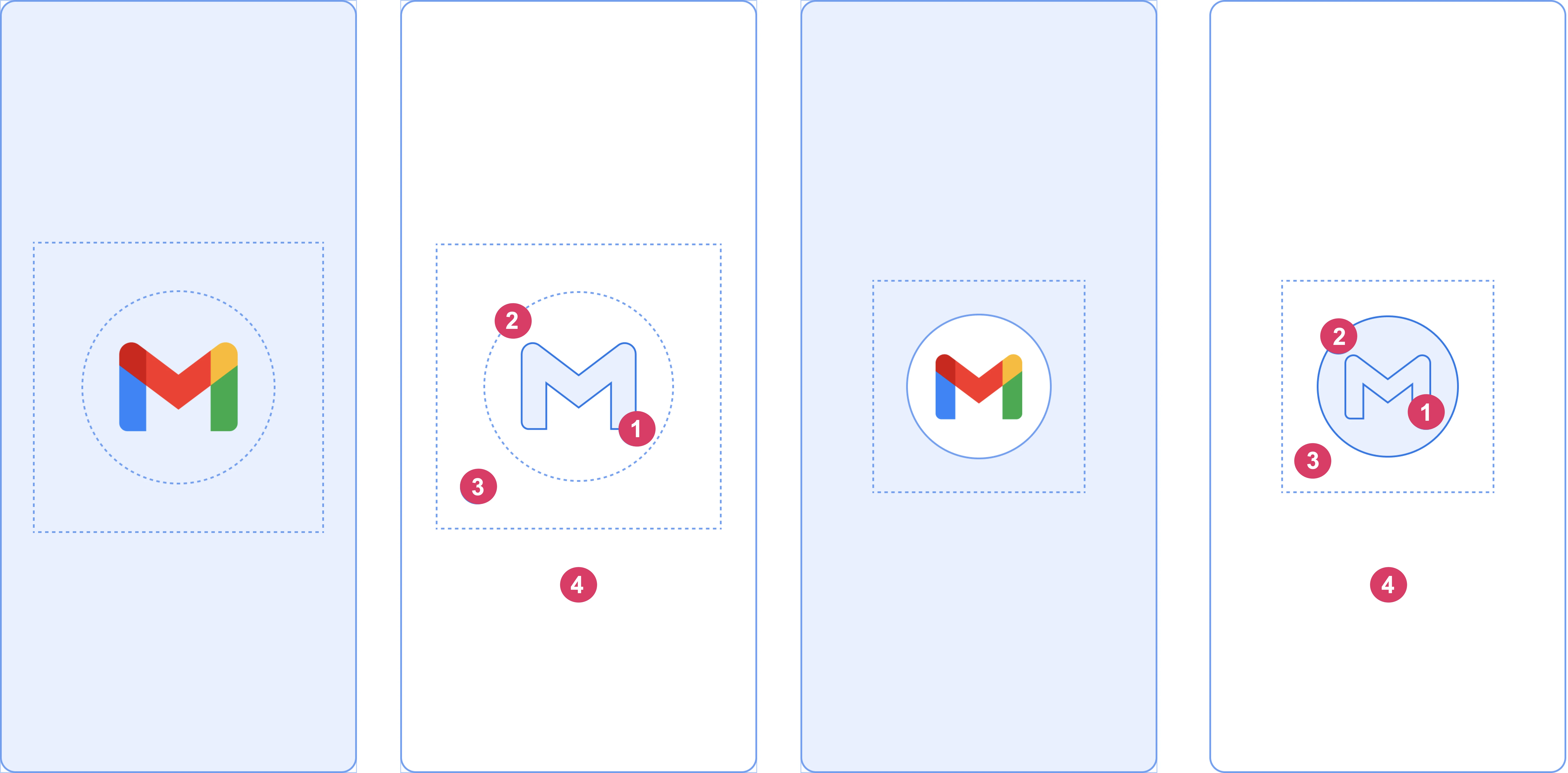
App icon configuration
Section titled “App icon configuration”Configure app icons in pubspec.yaml. For details, see the flutter_launcher_icons documentation.
flutter_launcher_icons: ### Android config android: "launcher_icon" # Fallback Android icon image_path_android: "assets/branding/icon_filled.png" # Icon config for Android 13+ adaptive_icon_background: "#ffffff" adaptive_icon_foreground: "assets/branding/icon_foreground.png" adaptive_icon_foreground_inset: 16 adaptive_icon_monochrome: "assets/branding/icon_monochrome.png" ### ### iOS config ios: true # Fallback iOS icon image_path_ios: "assets/branding/icon_foreground.png" background_color_ios: "#ffffff" desaturate_tinted_to_grayscale_ios: true remove_alpha_ios: true # iOS 18+ icon image_path_ios_dark_transparent: "assets/branding/icon_foreground.png"Configuration options
Section titled “Configuration options”background_color_ios — hex color for the iOS icon background.
adaptive_icon_background — hex color for the Android icon background.
adaptive_icon_foreground_inset — padding between the logo and the icon frame edge. Start with the default value of 16 and adjust:
- Increase if your logo overflows the icon frame.
- Decrease if your logo appears too small.
Custom background images
Section titled “Custom background images”By default, the same icon is used for both iOS and Android, with a solid background color. To use a custom background image instead:
iOS:
- Add a 438×438 px logo image with background to
assets/branding. - Update
image_path_iosinpubspec.yaml:image_path_ios: "assets/branding/your_custom_ios_logo.png"
Android:
- Create a 438×438 px background image and add it to
assets/branding. - Update
adaptive_icon_backgroundinpubspec.yaml:adaptive_icon_background: "assets/branding/your_android_background.png"
Splash screen configuration
Section titled “Splash screen configuration”Configure the splash screen in flutter_native_splash.yaml:
flutter_native_splash: color: "#ffffff" image: assets/branding/splash.png android_12: image: assets/branding/splash_android_12.png color: "#ffffff" icon_background_color: "#ffffff" android: true ios: trueUpdate color and icon_background_color to change the splash screen and Android 12+ icon background colors.
Apply settings
Section titled “Apply settings”After updating assets and configuration files, run the following commands:
dart run flutter_launcher_iconsdart run flutter_native_splash:createWas this helpful?