S7
This documentation will help you configure the S7 protocol for your IoT gateway. We’ll explain the configuration parameters in simple terms to make it easy for you to understand and follow. The S7 protocol is commonly used for communication with Siemens PLCs. Follow the steps below to set up the S7 protocol in your IoT gateway. Use general configuration to enable this extension.
The S7 connector allows you to connect to Siemens S7 PLCs and collect data from them. It supports both S7-300 and S7-400 series PLCs, as well as the newer S7-1200 and S7-1500 series. Also, Siemens Logo! PLCs are supported. The connector uses the S7 protocol to communicate with the PLCs and retrieve data.
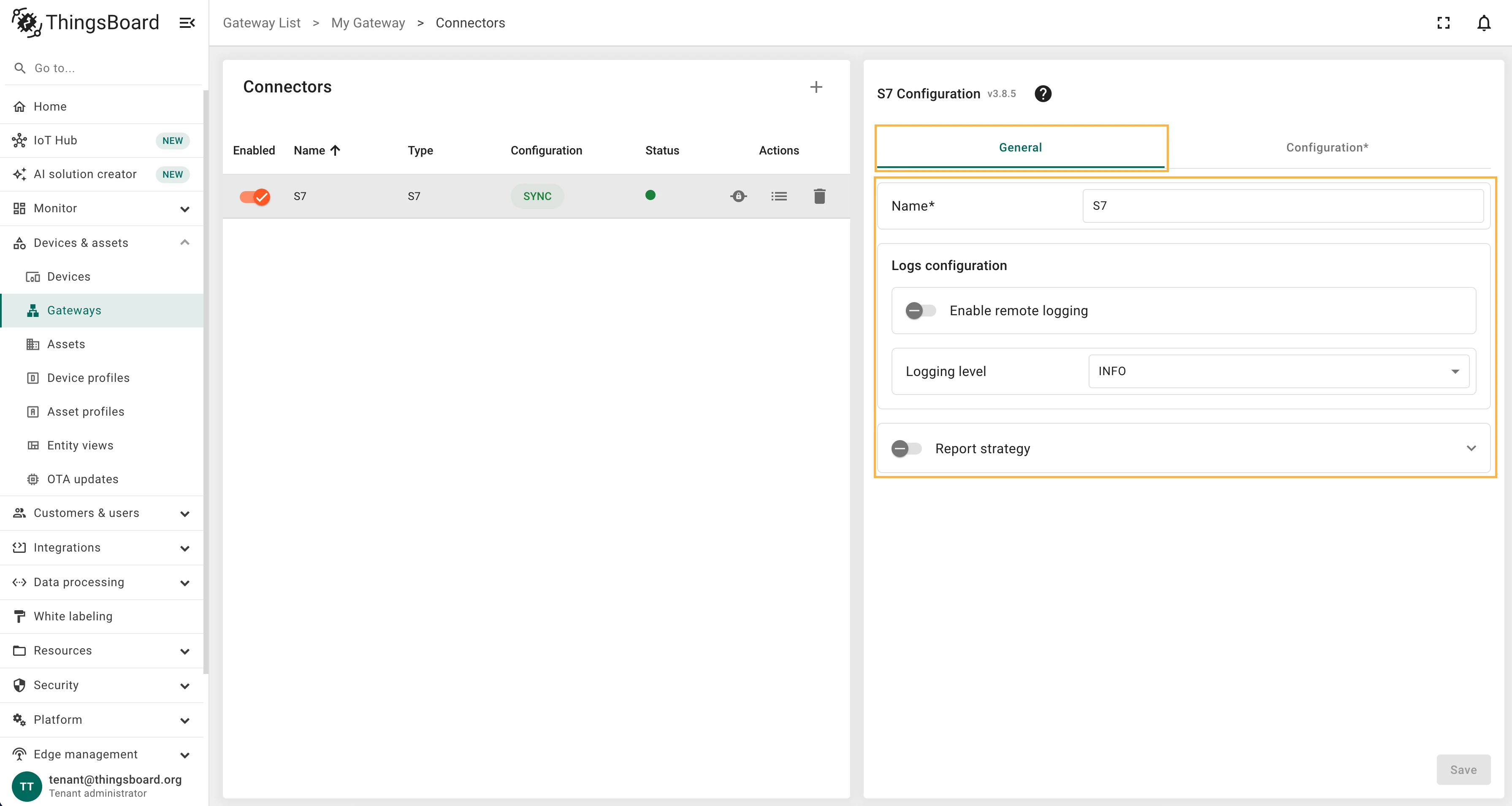
General settings
Section titled “General settings”This configuration section contains general connector settings, such as:
- Name - connector name used for logs and saving to persistent devices;
- Logs configuration - settings for local and remote logging:
- Enable remote logging - enables remote logging for the connector;
- Logging level - logging level for local and remote logs: NONE, ERROR, CRITICAL, WARNING, INFO, DEBUG, TRACE;
- Report strategy - strategy for sending data to ThingsBoard:
- Report period - period for sending data to ThingsBoard in milliseconds;
- Type - type of the report strategy:
- On report period - sends data to ThingsBoard after the report period;
- On value change - sends data to ThingsBoard when the value changes;
- On value change or report period - sends data to ThingsBoard when the value changes or after the report period;
- On received - sends data to ThingsBoard after receiving data from the device (default strategy).
Configuration
Section titled “Configuration”Connector can be configured in “Advanced” configuration mode only for now. Below is a full example of the configuration file:
{ "devices": [ { "type": "PLC", "address": "127.0.0.1", "port": 1102, "rack": 0, "slot": 1, "deviceName": "S7 PLC", "deviceProfileName": "default", "autoReconnect": true, "maxRetries": 3, "retryDelay": 1, "maxDelay": 30, "heartbeatInterval": 5, "pollPeriod": 10000, "attributes": [ { "type": "tag", "key": "power", "tag": "DB1.DBD204:REAL" }, { "type": "tag", "key": "frequency", "tag": "DB1.DBD200:REAL" } ], "timeseries": [ { "type": "data", "key": "temperature", "dataType": "real", "dbNumber": 1, "start": 50, "size": 4 }, { "type": "data", "key": "humidity", "dataType": "lreal", "dbNumber": 1, "start": 54, "size": 8 }, { "type": "data", "key": "relay", "dataType": "bool", "dbNumber": 1, "start": 0, "size": 1, "bit": 0 } ], "attributeUpdates": [ { "type": "tag", "key": "relay", "tag": "DB1.DBX0.0:BOOL" } ], "serverSideRpc": [ { "method": "getRelay", "requestType": "read", "type": "data", "dataType": "bool", "dbNumber": 1, "start": 0, "size": 1, "bit": 0 }, { "method": "setRelay", "requestType": "write", "type": "data", "dataType": "bool", "dbNumber": 1, "start": 0, "size": 1, "bit": 0 } ] }, { "type": "LOGO", "address": "127.0.0.1", "port": 102, "tsapSnap7": 20, "tsapLogo": 30, "deviceName": "LOGO", "deviceProfileName": "default", "autoReconnect": true, "maxRetries": 3, "retryDelay": 1, "maxDelay": 30, "heartbeatInterval": 5, "pollPeriod": 10000, "attributes": [], "timeseries": [ { "type": "vm", "key": "temperature", "vmAddress": "VW30" }, { "type": "vm", "key": "humidity", "vmAddress": "VW0" } ], "attributeUpdates": [ { "type": "vm", "key": "lightLevel", "vmAddress": "VW30" } ], "serverSideRpc": [ { "method": "setLight", "requestType": "write", "type": "vm", "vmAddress": "VW30" }, { "method": "getLight", "requestType": "read", "type": "vm", "vmAddress": "VW30" } ] } ]}Device types
Section titled “Device types”Connector supports the following device types:
- PLC - Siemens S7 PLCs (S7-300, S7-400, S7-1200, S7-1500);
- LOGO - Siemens Logo! PLCs.
In the configuration file, you can specify the device type using the “type” parameter. The connector will use this parameter to determine how to communicate with the device. Also, each device type has its own set of parameters that can be configured. For example, the “PLC” device type has parameters for the rack and slot, while the “LOGO” device type has parameters for the TSAP.
Devices
Section titled “Devices”This configuration section contains the list of devices that the connector will connect to. Each device has its own configuration, including the device type, address, port, and other settings. The connector supports both S7 PLCs and Siemens Logo! PLCs.
Configuration parameters for devices:
| Parameter | Default value | Description |
|---|---|---|
devices[].type |
Device type: PLC or LOGO. | |
devices[].address |
Device IP address or hostname. | |
devices[].port |
Device port number. | |
devices[].rack |
0 | Rack number for S7 PLCs (only for PLC type). |
devices[].slot |
1 | Slot number for S7 PLCs (only for PLC type). |
devices[].autoReconnect |
true |
Enable automatic reconnection to the device. |
devices[].maxRetries |
3 | Maximum number of reconnection attempts. |
devices[].retryDelay |
1.0 | Delay between reconnection attempts in seconds. |
devices[].maxDelay |
30.0 | Maximum delay between reconnection attempts in seconds. |
devices[].heartbeatInterval |
5 | Heartbeat interval in seconds. |
devices[].tsapSnap7 ** |
0 | TSAP for Siemens Logo! PLCs (only for LOGO type). |
devices[].tsapLogo ** |
0 | TSAP for Siemens Logo! PLCs (only for LOGO type). |
devices[].deviceName |
Device name in ThingsBoard. | |
devices[].deviceProfileName |
Device profile name in ThingsBoard. | |
devices[].pollPeriod |
1000 | Polling period in milliseconds for reading data from the device. |
devices[].reportPeriod |
1000 | (Optional) Report strategy object using for configuring report strategy for device. |
Example of the PLC configuration:
{ "devices": [ { "type": "PLC", "address": "127.0.0.1", "port": 1102, "rack": 0, "slot": 1, "deviceName": "S7 PLC", "deviceProfileName": "default", "autoReconnect": true, "maxRetries": 3, "retryDelay": 1.0, "maxDelay": 30.0, "heartbeatInterval": 5, "pollPeriod": 30000, ... } ]}Example of the LOGO configuration:
{ "devices": [ { "type": "LOGO", "address": "127.0.0.1", "port": 102, "tsapSnap7": 20, "tsapLogo": 30, "deviceName": "LOGO", "deviceProfileName": "default", "autoReconnect": true, "maxRetries": 3, "retryDelay": 1, "maxDelay": 30, "heartbeatInterval": 5, "pollPeriod": 1000, ... } ]}Data mapping
Section titled “Data mapping”In the data mapping, you can specify how the connector will interact with the device and what data it will read. You can also use this section to configure which data will be sent as device attributes or telemetry. Data mapping contains all the necessary settings for flexible data management.
Attributes and Time series
Section titled “Attributes and Time series”The configuration in this unit provides settings for data processing. These settings will be interpreted in ThingsBoard platform instance as attributes/time series of the device.
PLC device data can be read in two ways: using data or tag parameters.
Use the following parameters for reading values from S7 PLCs by data type request:
| Parameter | Description |
|---|---|
devices[].attributes[].type |
Type of the parameter: data. |
devices[].attributes[].key |
Key name of the attribute parameter. |
devices[].attributes[].dataType |
Data type of the parameter. Please, refer to the Supported data types section. |
devices[].attributes[].dbNumber |
DB number for S7 PLCs. |
devices[].attributes[].start |
Start address for S7 PLCs. |
devices[].attributes[].size |
Size of the parameter in bytes for S7 PLCs. |
devices[].attributes[].bit |
Bit number for S7 PLCs. Only for boolean values. |
devices[].timeseries[].type |
Type of the parameter: data. |
devices[].timeseries[].key |
Key name of the time series parameter. |
devices[].timeseries[].dataType |
Data type of the parameter. Please, refer to the Supported data types section. |
devices[].timeseries[].dbNumber |
DB number for S7 PLCs. |
devices[].timeseries[].start |
Start address for S7 PLCs. |
devices[].timeseries[].size |
Size of the parameter in bytes for S7 PLCs. |
devices[].timeseries[].bit |
Bit number for S7 PLCs. Only for boolean values. |
Configuration example for reading values from S7 PLCs by data type request:
{ "attributes": [ { "type": "data", "key": "status", "dataType": "bool", "dbNumber": 0, "start": 0, "size": 1, "bit": 1 } ], "timeseries": [ { "type": "data", "key": "temperature", "dataType": "float", "dbNumber": 0, "start": 2, "size": 4 } ]}Use the following parameters for reading values from S7 PLCs by tag type request:
| Parameter | Description |
|---|---|
devices[].attributes[].type |
Type of the parameter: tag. |
devices[].attributes[].key |
Key name of the attribute or time series parameter. |
devices[].attributes[].tag |
Tag name for S7 PLCs. Please, refer to the Supported tag formats section. |
Configuration example for reading values from S7 PLCs by tag type request:
{ "attributes": [ { "type": "tag", "key": "raw_data", "tag": "DB0.DBB100:STRING[37]" } ], "timeseries": [ { "type": "tag", "key": "temperature", "tag": "DB0.DBD104:REAL" } ]}The following parameters are used to configure device attributes and time series:
| Parameter | Description |
|---|---|
devices[].attributes[].type |
Type of the parameter: vm. |
devices[].attributes[].key |
Key name of the attribute. |
devices[].attributes[].vmAddress |
VM address for Siemens Logo! PLCs. |
devices[].timeseries[].type |
Type of the parameter: vm. |
devices[].timeseries[].key |
Key name of the time series parameter. |
devices[].timeseries[].vmAddress |
VM address for Siemens Logo! PLCs. |
Example of the attributes and telemetry configuration for Siemens Logo! PLCs:
{ "attributes": [ { "type": "vm", "key": "temperature", "vmAddress": "VW30" } ], "timeseries": [ { "type": "vm", "key": "humidity", "vmAddress": "VW0" } ]}Requests mapping
Section titled “Requests mapping”The Requests mapping section allows you to configure how the ThingsBoard platform instance will interact with the devices. That is, how the platform will request data from the devices, how it will update device attributes, and how it will send RPC commands to the devices.
S7 connector supports the following requests mapping:
- Attribute updates - allows update device values from ThingsBoard platform instance.
- RPC methods - allows sending RPC commands to devices. Using RPC methods, you can get or set values of the PLC. S7 connector supports different types of RPC methods. See the RPC methods section for more details.
Attribute updates
Section titled “Attribute updates”This subsection contains configuration for attribute updates request from ThingsBoard platform instance.
ThingsBoard allows the provisioning of device attributes and fetches some of them from the device application. You can treat this as a remote configuration for devices, enabling them to request shared attributes from ThingsBoard. See user guide for more details.
The following parameters are used to configure attribute updates:
Same as reading attributes/time series, the S7 PLCs can be configured to update device attributes using data or tag parameters.
Use the following parameters to configure attribute updates for S7 PLCs by data type request:
| Parameter | Description |
|---|---|
devices[].attributeUpdates[].type |
Type of the parameter: data. |
devices[].attributeUpdates[].key |
Key name of the attribute parameter. |
devices[].attributeUpdates[].dataType |
Data type of the parameter. Please, refer to the Supported data types section. |
devices[].attributeUpdates[].dbNumber |
DB number for S7 PLCs. |
devices[].attributeUpdates[].start |
Start address for S7 PLCs. |
devices[].attributeUpdates[].size |
Size of the parameter in bytes for S7 PLCs. |
devices[].attributeUpdates[].bit |
Bit number for S7 PLCs. Only for boolean values. |
Configuration example for attribute updates for S7 PLCs by data type request:
{ "attributeUpdates": [ { "type": "data", "key": "isOpen", "dataType": "bool", "dbNumber": 1, "start": 2, "size": 1, "bit": 1 } ]}Use the following parameters to configure attribute updates for S7 PLCs by tag type request:
| Parameter | Description |
|---|---|
devices[].attributeUpdates[].type |
Type of the parameter: tag. |
devices[].attributeUpdates[].key |
Key name of the attribute parameter. |
devices[].attributeUpdates[].tag |
Tag name for S7 PLCs. Please, refer to the Supported tag formats section. |
Configuration example for attribute updates for S7 PLCs by tag type request:
{ "attributeUpdates": [ { "type": "tag", "key": "isOpen", "tag": "DB1.DBX2.0:BOOL" } ]}The following parameters are used to configure attribute updates for Siemens Logo! PLCs:
| Parameter | Description |
|---|---|
devices[].attributeUpdates[].type |
Type of the parameter: vm. |
devices[].attributeUpdates[].key |
Key name of the attribute parameter. |
devices[].attributeUpdates[].vmAddress |
VM address for Siemens Logo! PLCs. |
Configuration example for attribute updates for Siemens Logo! PLCs:
{ "attributeUpdates": [ { "type": "vm", "key": "lightLevel", "vmAddress": "VW30" } ]}RPC methods
Section titled “RPC methods”ThingsBoard allows sending RPC commands to the device that is connected to ThingsBoard directly or via Gateway. The S7 connector supports three main RPC approaches:
- Configurable RPC to device - these methods allow you to configure custom RPC commands in connector configuration that can be sent to the devices.
- Reserved GET/SET RPCs - reserved methods that allow reading or writing any address without manually configuring serverSideRpc. See the RPC guide.
- Connector RPC - ad-hoc requests sent directly to the S7 connector for instant debugging and testing parameters from the ThingsBoard UI.
The parameters listed below are used specifically to configure RPCs to devices in the serverSideRpc section:
Same as reading atttributes/time series, the S7 PLCs can be configured to receive RPC commands using data or tag parameters.
Use the following parameters to configure RPC methods for S7 PLCs by data type request:
| Parameter | Description |
|---|---|
devices[].serverSideRpc[].method |
RPC method name. |
devices[].serverSideRpc[].requestType |
RPC request type: read or write. |
devices[].serverSideRpc[].type |
Type of the parameter: data. |
devices[].serverSideRpc[].dataType |
Data type of the parameter. Please, refer to the Supported data types section. |
devices[].serverSideRpc[].dbNumber |
DB number for S7 PLCs. |
devices[].serverSideRpc[].start |
Start address for S7 PLCs. |
devices[].serverSideRpc[].size |
Size of the parameter in bytes for S7 PLCs. |
devices[].serverSideRpc[].bit |
Bit number for S7 PLCs. Only for boolean values. |
Configuration example for RPC methods for S7 PLCs by data type request:
{ "serverSideRpc": [ { "method": "set_light", "requestType": "write", "type": "data", "dataType": "bool", "dbNumber": 1, "start": 0, "size": 1, "bit": 1 }, { "method": "get_light", "requestType": "read", "type": "data", "dataType": "bool", "dbNumber": 1, "start": 0, "size": 1, "bit": 1 } ]}Use the following parameters to configure RPC methods for S7 PLCs by tag type request:
| Parameter | Description |
|---|---|
devices[].serverSideRpc[].method |
RPC method name. |
devices[].serverSideRpc[].requestType |
RPC request type: read or write. |
devices[].serverSideRpc[].type |
Type of the parameter: tag. |
devices[].serverSideRpc[].tag |
Tag name for S7 PLCs. Please, refer to the Supported tag formats section. |
Configuration example for RPC methods for S7 PLCs by tag type request:
{ "serverSideRpc": [ { "method": "set_light", "requestType": "write", "type": "tag", "tag": "DB1.DBX0.0:BOOL" }, { "method": "get_light", "requestType": "read", "type": "tag", "tag": "DB1.DBX0.0:BOOL" } ]}The following parameters are used to configure RPC methods for Siemens Logo! PLCs:
| Parameter | Description |
|---|---|
devices[].serverSideRpc[].method |
RPC method name. |
devices[].serverSideRpc[].requestType |
RPC request type: read or write. |
devices[].serverSideRpc[].type |
Type of the parameter: vm. |
devices[].serverSideRpc[].vmAddress |
VM address for Siemens Logo! PLCs. |
Configuration example for RPC methods for Siemens Logo! PLCs:
{ "serverSideRpc": [ { "method": "set_light", "requestType": "write", "type": "vm", "vmAddress": "VW30" }, { "method": "get_light", "requestType": "read", "type": "vm", "vmAddress": "VW30" } ]}Additional information
Section titled “Additional information”Tag syntax
Section titled “Tag syntax”S7 connector supports PLC4X / Siemens STEP7 dialect tag syntax. The following table contains the supported tag syntax for S7 PLCs:
| Tag | Description |
|---|---|
| DB1.DBX0.0:BOOL | Bit in data block |
| DB1.DBB10:BYTE | Byte in data block |
| DB1.DBW10:INT | Word (2 bytes) |
| DB1.DBD10:REAL | Double word (4 bytes) |
| DB1:10:INT | Short form (DB 1, offset 10) |
| DB1:10:STRING[20] | Variable-length string |
| DB1:10:REAL[5] | Array of 5 REALs |
| M10.5:BOOL | Merker bit |
| MW20:WORD | Merker word |
| I0.0:BOOL | Input bit |
| Q0.0:BOOL | Output bit |
Supported data types
Section titled “Supported data types”S7 connector supports the following data types for both uplink and downlink:
- Boolean & Bits:
boolean/bool,bit. - Integers & Words:
byte,usint,uint8,sint,int8,int,int16,short,uint,uint16,word,dint,int32,udint,uint32,dword,lint,ulint,lword. - Floating Point:
real,float,float32,lreal,double,float64. - Characters & Strings:
char,wchar,string/str/s7string,wstring,fstring. - Date & Time:
time,ltime,tod,ltod,date,dt,ldt,dtl. - Raw Bytes:
raw,bytes.
Was this helpful?