
Security model
TBMQ enforces security in three sequential layers: transport encryption, authentication, and authorization. Every connection passes through all three in order — a client cannot reach the authentication step without a valid transport channel, and cannot publish or subscribe without passing authorization. Understanding this layered model helps you decide which options to enable and in what combination for your deployment.
The three layers are independent and composable. You can run unencrypted TCP with Basic authentication in a trusted private network, or mutual TLS with JWT and strict per-topic authorization for a public-facing deployment. Each layer has sensible defaults, and each can be tuned without touching the others.
Security layers
Section titled “Security layers”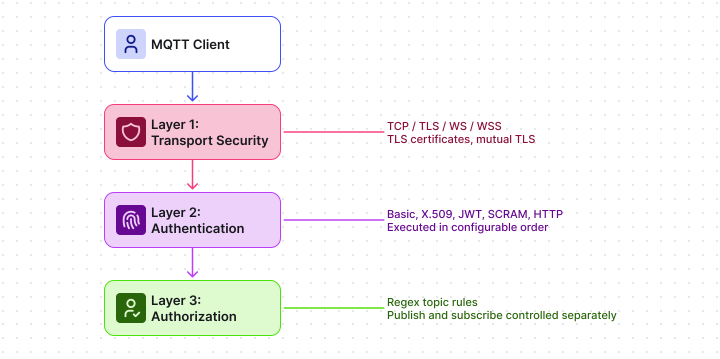
Layer 1: Transport security
Section titled “Layer 1: Transport security”Transport security is configured through listeners — the network endpoints the broker accepts connections on. Four listener types are available:
| Listener | Protocol | Default port | Encrypted |
|---|---|---|---|
| TCP | MQTT over plain TCP | 1883 | No |
| SSL/TLS | MQTT over TLS | 8883 | Yes |
| WS | MQTT over WebSocket | 8084 | No |
| WSS | MQTT over WebSocket Secure | 8085 | Yes |
Each listener is independently enabled or disabled. In production, disable the plain TCP and WS listeners and use only TLS or WSS to prevent credentials from being sent in clear text.
One-way vs mutual TLS: TLS listeners support both modes.
- One-way TLS: the client verifies the broker’s certificate. Credentials still travel in the
CONNECTpacket. - Mutual TLS (mTLS): both sides present certificates. This is the foundation for X.509 certificate authentication.
For configuration details, see Listeners and MQTTS.
Layer 2: Authentication
Section titled “Layer 2: Authentication”Authentication verifies client identity during the MQTT CONNECT handshake. TBMQ implements authentication as
pluggable providers — each method is a separate, individually enabled provider. TBMQ tries them in a configurable
execution order and grants access on the first successful match.
Authentication methods
Section titled “Authentication methods”| Method | How identity is proved | Credential location | Notes |
|---|---|---|---|
| Basic | clientId, username, and/or password | CONNECT packet fields | Most common; Redis lookup for performance |
| X.509 | Client TLS certificate (CN matched against stored credentials) | TLS handshake | Requires mTLS listener; supports exact and regex CN matching |
| JWT | Signed JSON Web Token | password field of CONNECT | No static credentials stored; supports HMAC, PEM, and JWKS verifiers |
| SCRAM | Challenge-response using hashed credentials | MQTT 5.0 enhanced auth | Password never transmitted in clear text; MQTT 5.0 only |
| HTTP | Delegated to an external HTTP service | External system | Returns clientType and authorization rules dynamically |
Adding or removing providers is not supported — only their configuration and execution order can be changed.
Provider execution order
Section titled “Provider execution order”When multiple providers are enabled, TBMQ tries each in the configured sequence until one successfully authenticates the client. If no provider grants access, the connection is refused.
Configure the order on the MQTT Authentication Settings page.
Credential caching
Section titled “Credential caching”Matched credentials are cached in Redis for fast lookups on subsequent CONNECT packets from the same client.
PostgreSQL is the persistent store; Redis is the performance layer in front of it.
When to use which method
Section titled “When to use which method”| Situation | Recommended method |
|---|---|
| Internal IoT devices with fixed credentials | Basic |
| Devices already enrolled with certificates via PKI | X.509 |
| Integration with an OAuth2 / OpenID Connect identity provider | JWT |
| Regulated environment where plaintext passwords are not acceptable | SCRAM |
| Credentials managed by an existing external system or custom logic | HTTP |
| Multiple credential types coexist in the same deployment | Enable multiple providers, set execution order |
Layer 3: Authorization
Section titled “Layer 3: Authorization”Authorization controls what an authenticated client can do after connecting. TBMQ enforces topic-level access control per credential using regular expression patterns. Publish and subscribe permissions are configured independently.
For example, a credential sensor-device-001 might carry these rules:
| Field | Value |
|---|---|
| Publish rule | sensors/device-001/.* |
| Subscribe rule | commands/device-001/[^/]+ |
When a client publishes to a topic not covered by its authorization rules, the broker’s response depends on the MQTT version:
- MQTT 3.x — the broker disconnects the client.
- MQTT 5.0 — the broker sends a
PUBACK(QoS 1) orPUBREC(QoS 2) with theNot Authorizedreason code, and the client remains connected.
When a client subscribes to a topic not covered by its authorization rules, the broker sends a SUBACK with
the Not Authorized reason code. The subscription is not established.
Dynamic authorization
Section titled “Dynamic authorization”Two providers support returning authorization rules at connection time rather than storing them statically:
- JWT: rules extracted from token claims. The token payload can specify client type and topic patterns, enabling centralized access control through your identity provider.
- HTTP: the external authentication service returns
clientTypeand authorization rules in its response body. If the response omits these fields, the provider’s default rules apply.
This means you can manage topic permissions in your identity system and have TBMQ enforce them without maintaining per-device credential records in the broker.
Authorization and client type
Section titled “Authorization and client type”Each credential carries two things: topic authorization rules and a client type.
Both are resolved from the same credential during the CONNECT handshake.
The clientType field determines whether the connecting client is treated as DEVICE or APPLICATION, which
controls how the broker stores its session state and routes messages to it — not just what topics it can access.
For example, a credential sensor-gateway-001 might carry these attributes:
| Field | Value |
|---|---|
| clientType | DEVICE |
| Publish rule | sensors/gateway-001/.* |
| Subscribe rule | commands/gateway-001/[^/]+ |
For static providers (Basic, X.509, SCRAM), clientType is set when the credential is created in the UI and does not
change between connections. For dynamic providers (JWT, HTTP), clientType is returned at connection time — the JWT
payload or HTTP response body can specify it, which allows the same broker credential store to serve clients of
different types without creating separate credential records.
Putting the layers together
Section titled “Putting the layers together”A practical example for a production IoT deployment:
| Layer | Configuration |
|---|---|
| Transport | SSL listener (mutual TLS, port 8883) |
| Authentication | X.509 provider — CN matched against device credentials |
| Authorization | Publish to sensors/{device-id}/+, subscribe to commands/{device-id}/+ |
Result: the device’s identity is proven by its certificate (no password needed), the channel is encrypted, and the broker rejects any attempt to publish to another device’s topic.
Was this helpful?