
Sessions
An MQTT session is the server-side state TBMQ maintains for a connected client. It holds the client’s active subscriptions, pending QoS 1 and QoS 2 message acknowledgements, and — for persistent sessions — messages queued while the client was offline. Understanding sessions is a prerequisite for reasoning about message delivery guarantees, reconnect behavior, and resource usage.
Whether that state survives a disconnect is what separates a persistent session from a non-persistent (clean) one. Getting this choice right matters: persistent sessions guarantee no missed messages at the cost of broker-side storage, while non-persistent sessions are stateless and lightweight but lose undelivered messages on disconnect.
Session state
Section titled “Session state”Regardless of type, every session while active holds:
| State | What it contains |
|---|---|
| Subscriptions | All topic filters the client has subscribed to, with their QoS levels |
| In-flight messages | QoS 1 and QoS 2 messages sent but not yet acknowledged |
| QoS 2 receive state | Packet IDs of QoS 2 publishes received but not yet released (PUBREL pending) |
Persistent sessions additionally retain this state after the client disconnects, so it is restored on reconnect.
Persistent vs non-persistent sessions
Section titled “Persistent vs non-persistent sessions”Non-persistent session
Section titled “Non-persistent session”A session is non-persistent when the CONNECT packet meets any of these conditions:
| MQTT version | Condition |
|---|---|
| MQTT 3.1.1 | Clean Session = 1 |
| MQTT 5.0 | Clean Start = 1 and Session Expiry Interval = 0 (or not set) |
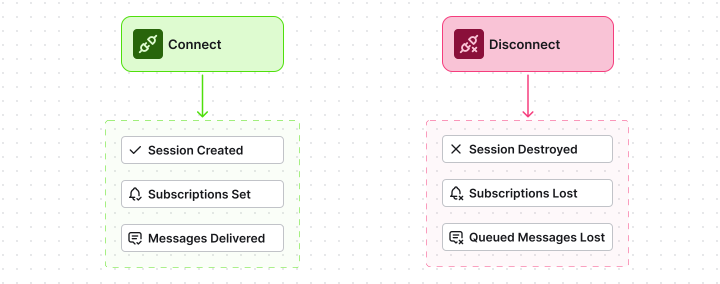
TBMQ creates session state for the duration of the connection and discards it immediately on disconnect. There is no server-side storage between connections. The next CONNECT creates a fresh session from scratch.
Use when: the client always resubscribes on connect, does not need missed messages, and you want to minimize broker memory usage. Typical examples: dashboards, short-lived CLI tools, stateless microservices that always start clean.
Persistent session
Section titled “Persistent session”A session is persistent when the CONNECT packet meets any of these conditions:
| MQTT version | Condition |
|---|---|
| MQTT 3.1.1 | Clean Session = 0 |
| MQTT 5.0 | Session Expiry Interval > 0 (regardless of Clean Start) |
| MQTT 5.0 | Clean Start = 0 and Session Expiry Interval = 0 (or not set) |
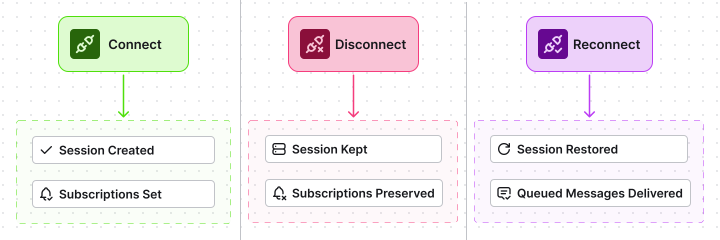
TBMQ retains subscriptions and queued messages across the disconnect. On reconnect, the broker resumes the session — the client does not need to resubscribe, and any messages that arrived while it was offline are delivered in order.
Use when: the client must not miss messages during outages or restarts. Typical examples: IoT devices on unreliable networks, backend services that process every event, rule engines that must consume a complete stream.
How TBMQ stores persistent session state
Section titled “How TBMQ stores persistent session state”The storage backend for a persistent session depends on the client type:
| DEVICE client | APPLICATION client | |
|---|---|---|
| Subscription state | In-memory on the broker node, replicated via Kafka | In-memory on the broker node, replicated via Kafka |
| Offline message queue | Redis | Dedicated Kafka topic (tbmq.msg.app.$CLIENT_ID) |
| Queue depth limit | MQTT_PERSISTENT_SESSION_DEVICE_PERSISTED_MESSAGES_LIMIT | Kafka topic retention settings |
| Delivery on reconnect | From Redis on the reconnecting node | From the client’s Kafka topic |
Redis gives DEVICE clients fast, low-latency queue reads suitable for moderate message volumes. APPLICATION clients get a durable Kafka log that scales to high throughput and long retention without memory pressure.
When to use persistent sessions
Section titled “When to use persistent sessions”| Situation | Recommendation |
|---|---|
| IoT device on a cellular or satellite link | Persistent — connections drop frequently |
| Backend analytics service | Persistent — must consume every event |
| Mobile app or browser dashboard | Non-persistent — always resubscribes; stale messages are not useful |
| Load testing or benchmarking client | Non-persistent — no need for state between runs |
| APPLICATION client (any) | Persistent — non-persistent APPLICATION sessions produce no Kafka topic and provide no offline buffer |
Session visibility in the UI
Section titled “Session visibility in the UI”Active and disconnected persistent sessions are visible on the Sessions page in the TBMQ UI. From there, you can inspect subscription lists and connection metadata, or manually clear a session if needed. For details, see Sessions.
Was this helpful?