ThingsBoard Edge cluster setup with Docker Compose
ThingsBoard Edge clustering connects multiple Edge nodes to a shared database and syncs aggregated data to ThingsBoard Server or Cloud. It is designed for large-scale deployments — factories, smart cities, or any site with thousands of devices in one region.
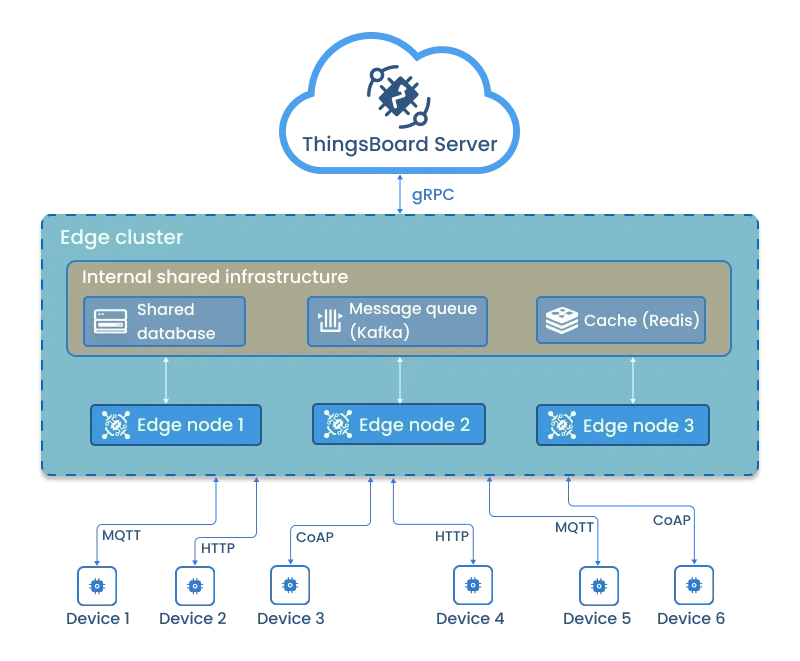
Key properties of an Edge cluster:
- All Edge nodes connect to the same database.
- Devices connect to any node based on load balancing.
- Edge nodes share workload and maintain local failover.
- The cluster syncs aggregated data to ThingsBoard Server or Cloud.
For details about microservices architecture, see the microservices architecture page.
Prerequisites
Section titled “Prerequisites”ThingsBoard Edge microservices run in a Dockerized environment. Install Docker CE and Docker Compose before continuing.
You also need an active ThingsBoard Community Edition account with an Edge instance created on the server.
You can use a self-hosted ThingsBoard CE server.
Hardware requirements
Section titled “Hardware requirements”| Workload | RAM per node | Description |
|---|---|---|
| Light | 2 GB | Fewer than 1,000 devices per node |
| Heavy | 4 GB+ | 1,000+ devices or high data ingestion rates |
Step 1. Pull the ThingsBoard Edge image
Section titled “Step 1. Pull the ThingsBoard Edge image”docker pull thingsboard/tb-edge:4.3.1.1Step 2. Clone the Docker Compose scripts
Section titled “Step 2. Clone the Docker Compose scripts”git clone -b release-4.3 https://github.com/thingsboard/thingsboard-edge.git --depth 1cd thingsboard-edge/docker-edgeStep 3. Configure database and queue
Section titled “Step 3. Configure database and queue”Open the .env file:
nano .envSet at minimum the following variables:
| Variable | Description |
|---|---|
DATABASE | postgres — PostgreSQL only. |
TB_QUEUE_TYPE | Use kafka. The In Memory queue does not support cluster deployments. |
CLOUD_ROUTING_KEY | Your Edge key |
CLOUD_ROUTING_SECRET | Your Edge secret |
CLOUD_RPC_HOST | Hostname or IP address of the ThingsBoard CE server. |
CACHE | redis — Redis standalone (one node, one master). |
MONITORING_ENABLED | Set to true to deploy Prometheus and Grafana alongside the cluster containers. |
JAVA_OPTS | JVM memory settings. Adjust -Xmx and -Xms based on available RAM. |
Full .env file reference:
# Cache type: redis | redis-cluster | redis-sentinelCACHE=redis
DOCKER_REPO=thingsboardTB_EDGE_NODE_DOCKER_NAME=tb-edge-nodeTB_EDGE_VERSION=latest
# Database: postgres (PostgreSQL) or hybrid (PostgreSQL + Cassandra for time-series)DATABASE=postgresTB_QUEUE_TYPE=kafka
CLOUD_ROUTING_KEY=PUT_YOUR_EDGE_KEY_HERECLOUD_ROUTING_SECRET=PUT_YOUR_EDGE_SECRET_HERECLOUD_RPC_HOST=PUT_YOUR_THINGSBOARD_SERVER_DOMAIN_OR_IP_HERECLOUD_RPC_PORT=7070
LOAD_BALANCER_NAME=haproxy-certbot
# Set to true to deploy Prometheus and Grafana containersMONITORING_ENABLED=false
# JVM memory limitsJAVA_OPTS="-Xmx2048M -Xms2048M -Xss384k -XX:+AlwaysPreTouch"Step 4. Create host volumes
Section titled “Step 4. Create host volumes”Create the log folders and set correct ownership:
./docker-create-log-folders.shVerify that all required volume folders exist with correct ownership:
./docker-check-log-folders.shStep 5. Install and start ThingsBoard Edge
Section titled “Step 5. Install and start ThingsBoard Edge”Run the installation script:
./docker-install-tb.shStart all services:
./docker-start-services.shTo view Edge node logs:
docker compose logs -f tb-edge1 tb-edge2 tb-edge3To check the status of all containers:
docker compose psTo view logs for all running services:
docker compose logs -fStop and remove containers
Section titled “Stop and remove containers”To stop all services:
./docker-stop-services.shTo stop and remove all deployed containers:
./docker-remove-services.shUpgrading
Section titled “Upgrading”To update one or more services (pulls a newer Docker image and rebuilds the container):
./docker-update-service.sh [SERVICE...]Omit [SERVICE...] to update all services.
To upgrade the database:
./docker-stop-services.sh./docker-upgrade-tb.sh./docker-start-services.shHTTPS with a valid certificate
Section titled “HTTPS with a valid certificate”ThingsBoard Edge uses HAproxy for traffic proxying, with ports 80 and 443 for the web UI. To obtain a valid TLS certificate via Certbot:
docker exec haproxy-certbot certbot-certonly --domain your_domain --email your_emaildocker exec haproxy-certbot haproxy-refreshWas this helpful?