Microservices Architecture
In a monolithic deployment, all ThingsBoard services run in a single process — you cannot scale MQTT transport independently from the Rule Engine, and upgrading any component requires restarting the entire instance. Microservices architecture (available since version 2.2) splits services into independent containers so each can be scaled, upgraded, and restarted without affecting the others.
Architecture
Section titled “Architecture”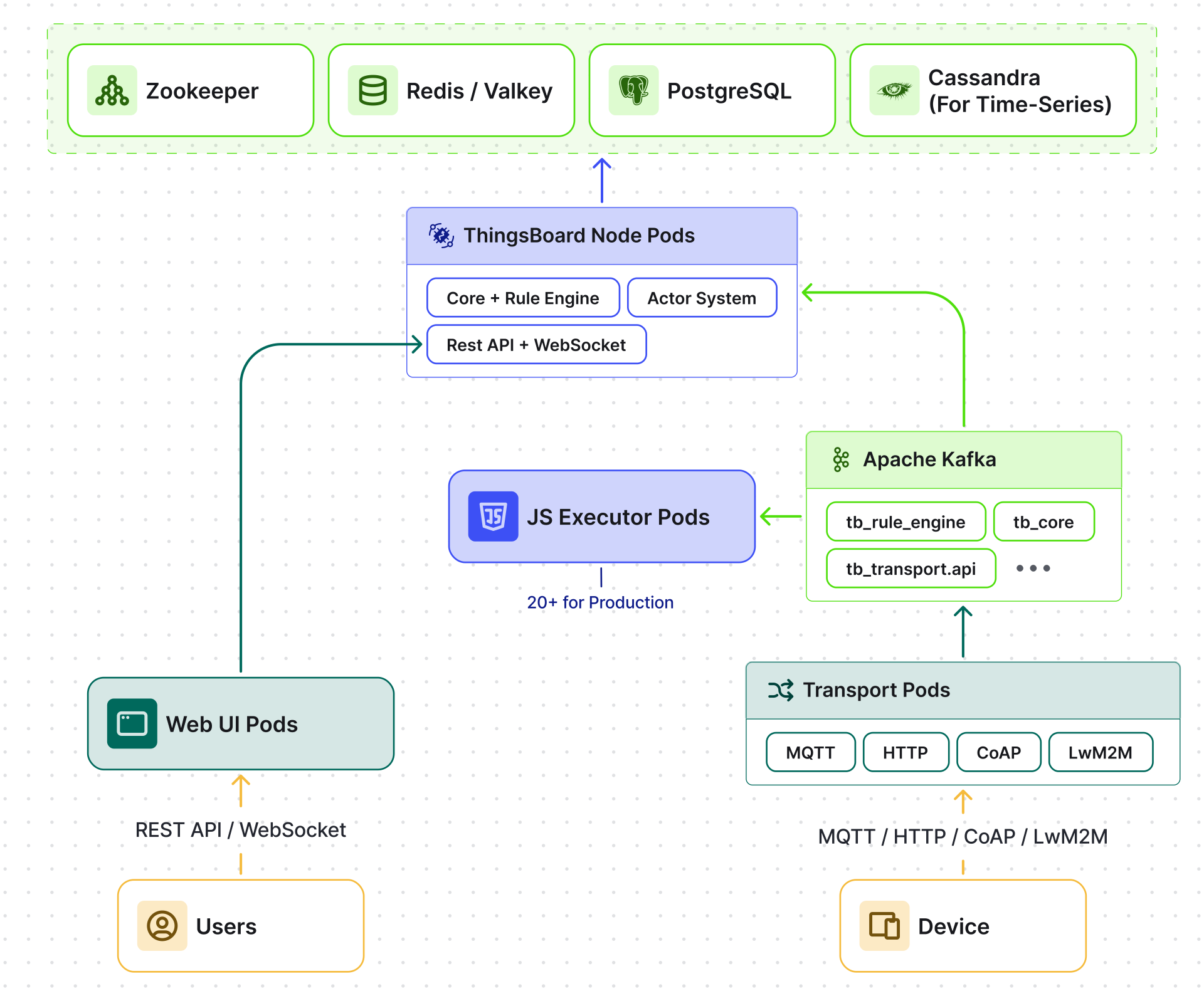
Services
Section titled “Services”Every service is stateless — all persistent state lives in the database and cache. Scaling any service means adding more replicas.
| Service | Container | Default port | Scales by | Notes |
|---|---|---|---|---|
| MQTT Transport | tb-mqtt-transport | 1883 | Adding replicas | — |
| HTTP Transport | tb-http-transport | 8080 | Adding replicas | — |
| CoAP Transport | tb-coap-transport | 5683 | Adding replicas | — |
| LwM2M Transport | tb-lwm2m-transport | 5685 | Adding replicas | — |
| SNMP Transport | tb-snmp-transport | — | Adding replicas | — |
| ThingsBoard Node | tb-node | 8080 | Adding replicas + Zookeeper partition rebalance | Core, Rule Engine, REST API |
| JS Executor | tb-js-executor | — | Adding instances | 20+ recommended for production |
| Web UI | tb-web-ui | 8080 | Adding replicas | Node.js / Express.js, proxies REST/WS to TB Node |
Transports
Section titled “Transports”Each transport protocol runs as a separate container. This allows you to scale MQTT independently from HTTP or CoAP based on your device fleet composition. Transport containers authenticate devices via the Core service and push messages into Kafka.
Key Kafka topics used by transports:
| Topic | Direction | Purpose |
|---|---|---|
tb_transport.api.requests |
Transport → Core | Credential validation, attribute fetch |
tb_transport.api.responses |
Core → Transport | Authentication results |
tb_rule_engine |
Transport → Rule Engine | Telemetry, attributes, RPC, lifecycle events |
tb_core |
Rule Engine → Core | Entity lifecycle events, connectivity updates |
See Message Queue for the full topic topology and tuning.
ThingsBoard Node
Section titled “ThingsBoard Node”The central service that runs REST API, WebSocket server, Rule Engine, and Actor System. Instances are stateless in the traditional sense — all persistent state lives in the database and cache. The Actor System creates ephemeral per-entity actors (device actors, rule chain actors, tenant actors), but these are rebuilt from stored state when a node restarts. Zookeeper assigns entity partitions across nodes automatically.
JavaScript Executor
Section titled “JavaScript Executor”Rule engine script nodes (filters, transformations) execute user-defined JavaScript in isolated Node.js sandboxes. Each JS Executor processes scripts sequentially and communicates with ThingsBoard Node via Kafka:
| Topic | Direction | Purpose |
|---|---|---|
js.eval.requests |
TB Node → JS Executor | Script evaluation request |
js.eval.responses |
JS Executor → TB Node | Evaluation result |
Failover and Partition Rebalancing
Section titled “Failover and Partition Rebalancing”When a ThingsBoard Node pod goes down:
- Zookeeper detects the node is unresponsive (heartbeat timeout).
- Partitions reassign — the entity partitions owned by the failed node are redistributed across surviving nodes.
- Actors rebuild — surviving nodes create new actors for the reassigned entities, loading state from the database.
- Message processing resumes — surviving TB Nodes pick up Kafka partitions from the failed node. Transports are unaffected — they continue producing to the same Kafka topics regardless of which TB Nodes are consuming.
Message ordering is preserved throughout — since all messages for a given entity go to the same Kafka partition, they are processed in order regardless of which TB Node consumes them.
Third-party Services
Section titled “Third-party Services”A microservices deployment requires several supporting services:
| Service | Purpose | HA configuration |
|---|---|---|
| Apache Kafka | Message queue between all services | 3-node cluster minimum |
| Redis / Valkey | Cache for sessions, entity data, rate limits | Sentinel or Cluster mode |
| Zookeeper | Service discovery and partition assignment | 3-node ensemble |
| HAProxy / nginx | Load balancer for HTTP, MQTT, CoAP | Active-passive or active-active |
| PostgreSQL | Entity storage, system data | Streaming replication or managed service |
| Cassandra | Time-series storage (Hybrid mode) | 3+ node cluster with RF=3 |
For full deployment instructions, see Installation.
Was this helpful?