ThingsBoard Edge cluster setup with Docker Compose
ThingsBoard Edge clustering connects multiple Edge nodes to a shared database and syncs aggregated data to ThingsBoard Server or Cloud. It is designed for large-scale deployments — factories, smart cities, or any site with thousands of devices in one region.
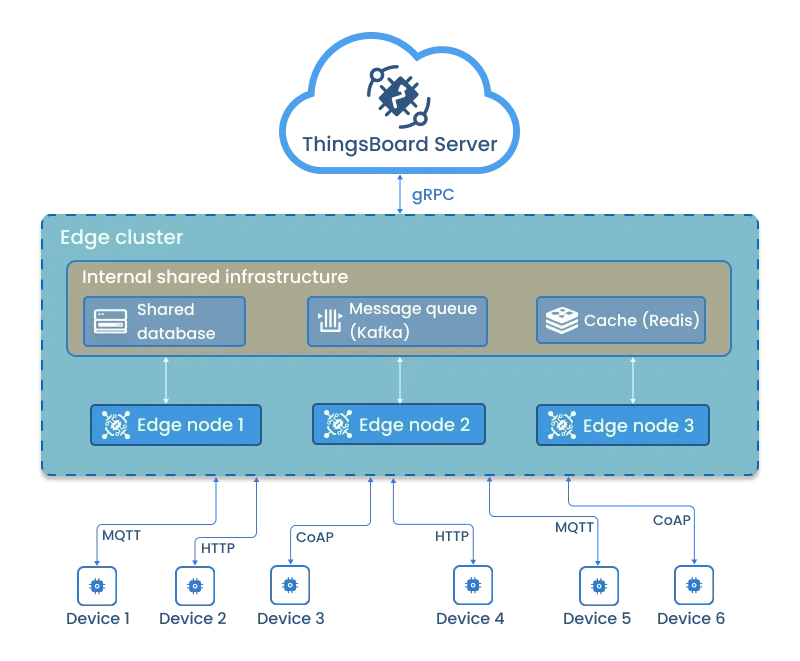
Key properties of an Edge cluster:
- All Edge nodes connect to the same database.
- Devices connect to any node based on load balancing.
- Edge nodes share workload and maintain local failover.
- The cluster syncs aggregated data to ThingsBoard Server or Cloud.
For details about microservices architecture, see the microservices architecture page.
Prerequisites
Section titled “Prerequisites”ThingsBoard Edge microservices run in a Dockerized environment. Install Docker CE and Docker Compose before continuing.
You also need an active ThingsBoard Professional Edition account with an Edge instance created on the server.
You can use ThingsBoard Cloud or a self-hosted ThingsBoard PE server.
Hardware requirements
Section titled “Hardware requirements”| Workload | RAM per node | Description |
|---|---|---|
| Light | 2 GB | Fewer than 1,000 devices per node |
| Heavy | 4 GB+ | 1,000+ devices or high data ingestion rates |
Step 1. Pull the ThingsBoard Edge image
Section titled “Step 1. Pull the ThingsBoard Edge image”docker pull thingsboard/tb-edge-pe:4.3.1.1EDGEPEStep 2. Clone the Docker Compose scripts
Section titled “Step 2. Clone the Docker Compose scripts”git clone -b release-4.3.0 https://github.com/thingsboard/thingsboard-edge-pe-docker-compose.git tb-edge-pe-docker-compose --depth 1cd tb-edge-pe-docker-composeStep 3. Configure database and queue
Section titled “Step 3. Configure database and queue”Open the .env file:
nano .envSet at minimum the following variables:
| Variable | Description |
|---|---|
DATABASE | postgres — PostgreSQL only. |
TB_QUEUE_TYPE | Use kafka. The In Memory queue does not support cluster deployments. |
CLOUD_ROUTING_KEY | Your Edge key |
CLOUD_ROUTING_SECRET | Your Edge secret |
CLOUD_RPC_HOST | Use thingsboard.cloud or eu.thingsboard.cloud for ThingsBoard Cloud, or the IP address of a self-hosted ThingsBoard PE server. |
CACHE | redis — Redis standalone (one node, one master). |
MONITORING_ENABLED | Set to true to deploy Prometheus and Grafana alongside the cluster containers. |
JAVA_OPTS | JVM memory settings. Adjust -Xmx and -Xms based on available RAM. |
Full .env file reference:
# Cache type: redis | redis-cluster | redis-sentinelCACHE=redis
DOCKER_REPO=thingsboardTB_EDGE_NODE_DOCKER_NAME=tb-edge-pe-nodeTB_EDGE_VERSION=latest
# Database: postgres (PostgreSQL) or hybrid (PostgreSQL + Cassandra for time-series)DATABASE=postgresTB_QUEUE_TYPE=kafka
CLOUD_ROUTING_KEY=PUT_YOUR_EDGE_KEY_HERECLOUD_ROUTING_SECRET=PUT_YOUR_EDGE_SECRET_HERECLOUD_RPC_HOST=thingsboard.cloudCLOUD_RPC_PORT=7070CLOUD_RPC_SSL_ENABLED=true
LOAD_BALANCER_NAME=haproxy-certbot
# Set to true to deploy Prometheus and Grafana containersMONITORING_ENABLED=false
# JVM memory limitsJAVA_OPTS="-Xmx2048M -Xms2048M -Xss384k -XX:+AlwaysPreTouch"Step 4. Create host volumes
Section titled “Step 4. Create host volumes”Create the log folders and set correct ownership:
./docker-create-log-folders.shVerify that all required volume folders exist with correct ownership:
./docker-check-log-folders.shStep 5. Install and start ThingsBoard Edge
Section titled “Step 5. Install and start ThingsBoard Edge”Run the installation script:
./docker-install-tb.shStart all services:
./docker-start-services.shTo view Edge node logs:
docker compose logs -f tb-edge1 tb-edge2 tb-edge3To check the status of all containers:
docker compose psTo view logs for all running services:
docker compose logs -fStop and remove containers
Section titled “Stop and remove containers”To stop all services:
./docker-stop-services.shTo stop and remove all deployed containers:
./docker-remove-services.shUpgrading
Section titled “Upgrading”To update one or more services (pulls a newer Docker image and rebuilds the container):
./docker-update-service.sh [SERVICE...]Omit [SERVICE...] to update all services.
To upgrade the database:
./docker-stop-services.sh./docker-upgrade-tb.sh./docker-start-services.shHTTPS with a valid certificate
Section titled “HTTPS with a valid certificate”ThingsBoard Edge uses HAproxy for traffic proxying, with ports 80 and 443 for the web UI. To obtain a valid TLS certificate via Certbot:
docker exec haproxy-certbot certbot-certonly --domain your_domain --email your_emaildocker exec haproxy-certbot haproxy-refreshWas this helpful?