
Client types
TBMQ classifies every connecting MQTT client as one of two types: DEVICE or APPLICATION. This distinction is more than a label — it determines how the broker stores session state, routes messages, and manages offline delivery. Choosing the right type for each client is one of the most important architectural decisions in a TBMQ deployment.
The classification reflects a pattern observed consistently in IoT systems: most clients either produce data at high frequency (sensors, controllers, gateways) or consume data at high volume (analytics engines, rule processors, integration services). These two roles have fundamentally different persistence and throughput requirements. TBMQ optimizes the message pipeline for each separately rather than applying a one-size-fits-all approach.
When to use what
Section titled “When to use what”| DEVICE | APPLICATION | |
|---|---|---|
| Primary role | Publishes frequently; subscribes to a few topics with low traffic | Subscribes to many topics or high-volume streams |
| Typical clients | Sensors, controllers, IoT gateways | Analytics engines, rule processors, backend services |
| Session persistence | Persistent or non-persistent | Persistent (non-persistent sessions are supported but not recommended) |
| Offline message storage | Redis | Dedicated Kafka topic per client |
| Assigned by default | Yes — unauthenticated clients always get DEVICE type | No — requires authentication with credentials that set clientType = APPLICATION |
| Per-client Kafka topic | No | Yes — tbmq.msg.app.$CLIENT_ID |
| Horizontal scale path | Add broker nodes; add Redis nodes | Add broker nodes; add Kafka nodes |
DEVICE client
Section titled “DEVICE client”The DEVICE type is designed for the publishing side of IoT: devices that send telemetry, status, or events at regular intervals and occasionally receive commands on a small set of topics.
How persistent sessions work for DEVICE clients:
All MQTT messages flow through the shared tbmq.msg.all Kafka topic. When a DEVICE client uses a persistent session,
messages addressed to it are also forwarded to tbmq.msg.persisted. A dedicated Kafka consumer reads from that topic
and writes the messages to Redis before dispatching to online subscribers.
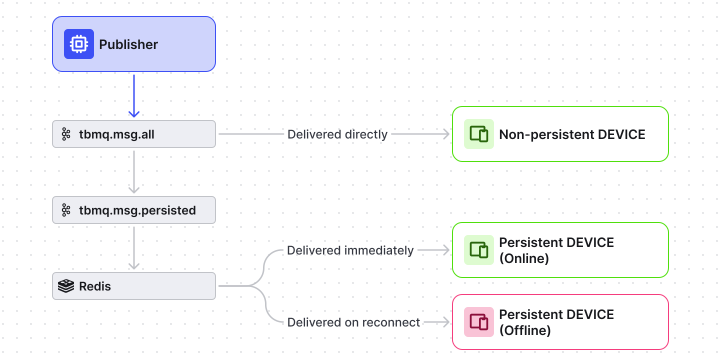
When an offline DEVICE client reconnects, it receives the messages stored in Redis during its absence.
The number of queued messages delivered on reconnect is controlled by MQTT_PERSISTENT_SESSION_DEVICE_PERSISTED_MESSAGES_LIMIT.
Why Redis: Redis gives DEVICE clients fast random-access reads and low-latency delivery on reconnect. Because DEVICE clients typically subscribe to a small number of topics with moderate traffic, the per-device state fits comfortably in memory and does not require the throughput infrastructure of a dedicated Kafka topic.
APPLICATION client
Section titled “APPLICATION client”The APPLICATION type is designed for the subscribing side: backend systems that consume high-volume streams and must not lose messages even during planned restarts or brief outages.
How persistent sessions work for APPLICATION clients:
When an authenticated APPLICATION client establishes a persistent session, TBMQ automatically creates a dedicated Kafka topic:
tbmq.msg.app.$CLIENT_IDIf the client ID contains characters outside [a-zA-Z0-9], a hash of the client ID is used instead:
tbmq.msg.app.$CLIENT_ID_HASHThis hash-based fallback is controlled by TB_APP_PERSISTED_MSG_CLIENT_ID_VALIDATION (enabled by default).
Disabling it prevents topic creation for clients with special characters in their ID.
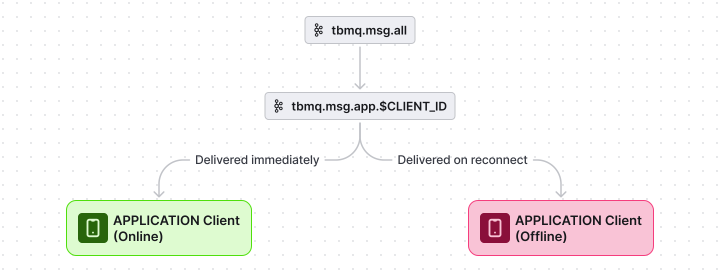
Each APPLICATION client is processed in a separate thread backed by its own Kafka topic. This means the throughput of one high-volume subscriber does not affect any other client, and Kafka’s durable log provides the offline buffer.
Why Kafka: Kafka’s append-only log scales to millions of messages per topic without degrading read latency for the consumer. For APPLICATION clients that subscribe across thousands of device topics — like an analytics service aggregating sensor data — this is the right storage primitive. Redis would not sustain the write rate or the retention depth required.
How TBMQ assigns the client type
Section titled “How TBMQ assigns the client type”The type is resolved during the CONNECT packet handshake:
- If both Basic and TLS authentication are disabled, all clients are assigned DEVICE.
- If authentication is enabled, the
clientTypefield on the matching MQTT client credential determines the type.
For details on configuring authentication, see the security overview.
Was this helpful?