
Security Overview
TBMQ provides a set of security features designed to protect MQTT communication, control client access, and enforce topic-level permissions. These features cover key aspects of MQTT security — from connection level settings to fine-grained authorization rules — and offer flexible configuration options for a variety of deployment scenarios.
Connection-level security
Section titled “Connection-level security”Connection-level security focuses on configuring how clients connect to the broker. It defines supported transport protocols, encryption options, and network-level parameters — all essential to establishing a secure communication channel before authentication and authorization are applied. In TBMQ, this is achieved through the configuration of MQTT listeners, which support both encrypted and unencrypted protocols (TCP, TLS, WebSockets). Each listener exposes configurable properties — such as ports, host addresses, and performance tuning options — that can be set via configuration files or overridden using environment variables. For TLS and WebSocket Secure (WSS) listeners, encryption parameters such as certificates and supported protocols can also be configured.
Authentication
Section titled “Authentication”Authentication verifies the identity of clients attempting to connect. It is the process of validating client credentials before granting access to the broker. Supported authentication methods include: Basic (client id/username/password), HTTP (client id/username/password sent to the HTTP server), X.509 Certificate Chain, JWT, and SCRAM.
Providers management
Section titled “Providers management”Authentication methods are implemented as pluggable authentication providers:
- Basic — Authenticates clients using a clientId, username, and password sent in the
CONNECTpacket. - X.509 Certificate Chain — Uses the client’s X.509 certificate chain during TLS handshake for authentication.
- JWT (JSON Web Token) — Authenticates clients using a signed JWT passed in the password field of the
CONNECTpacket. - SCRAM — Performs a secure challenge-response using hashed credentials to authenticate without sending the actual password (MQTT 5.0 only).
- HTTP — Authenticates clients via an external HTTP service using the clientId, username, and password.
Each provider can be individually enabled, disabled, and configured to meet requirements for different deployment use cases.
You can check the authentication provider status and enable or disable it directly from the TBMQ user interface, without modifying configuration files or restarting the broker.
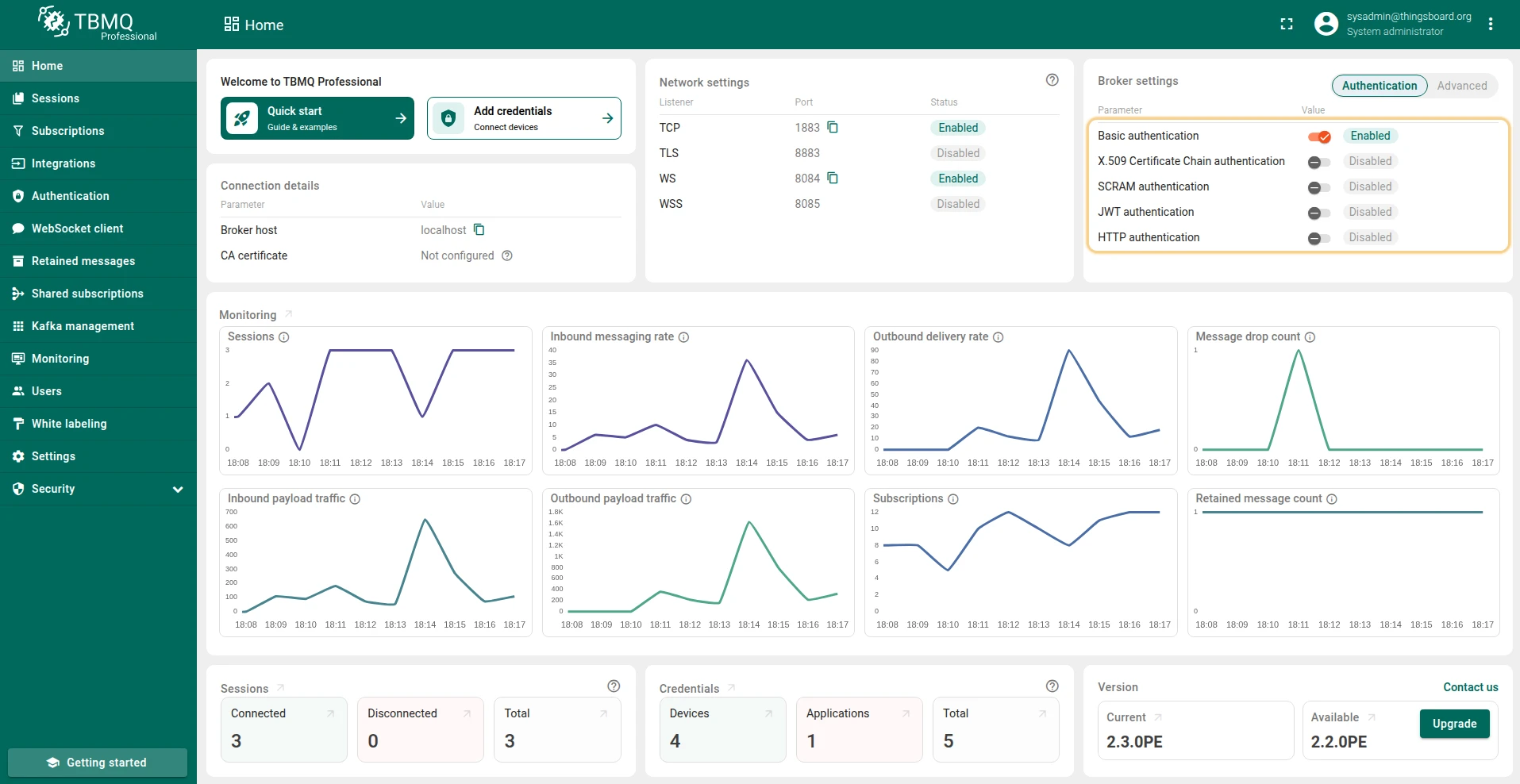
- On the Home page, in the Broker Settings card, you’ll find quick-toggle buttons for each available authentication provider. Click the button next to the desired provider to enable or disable it.
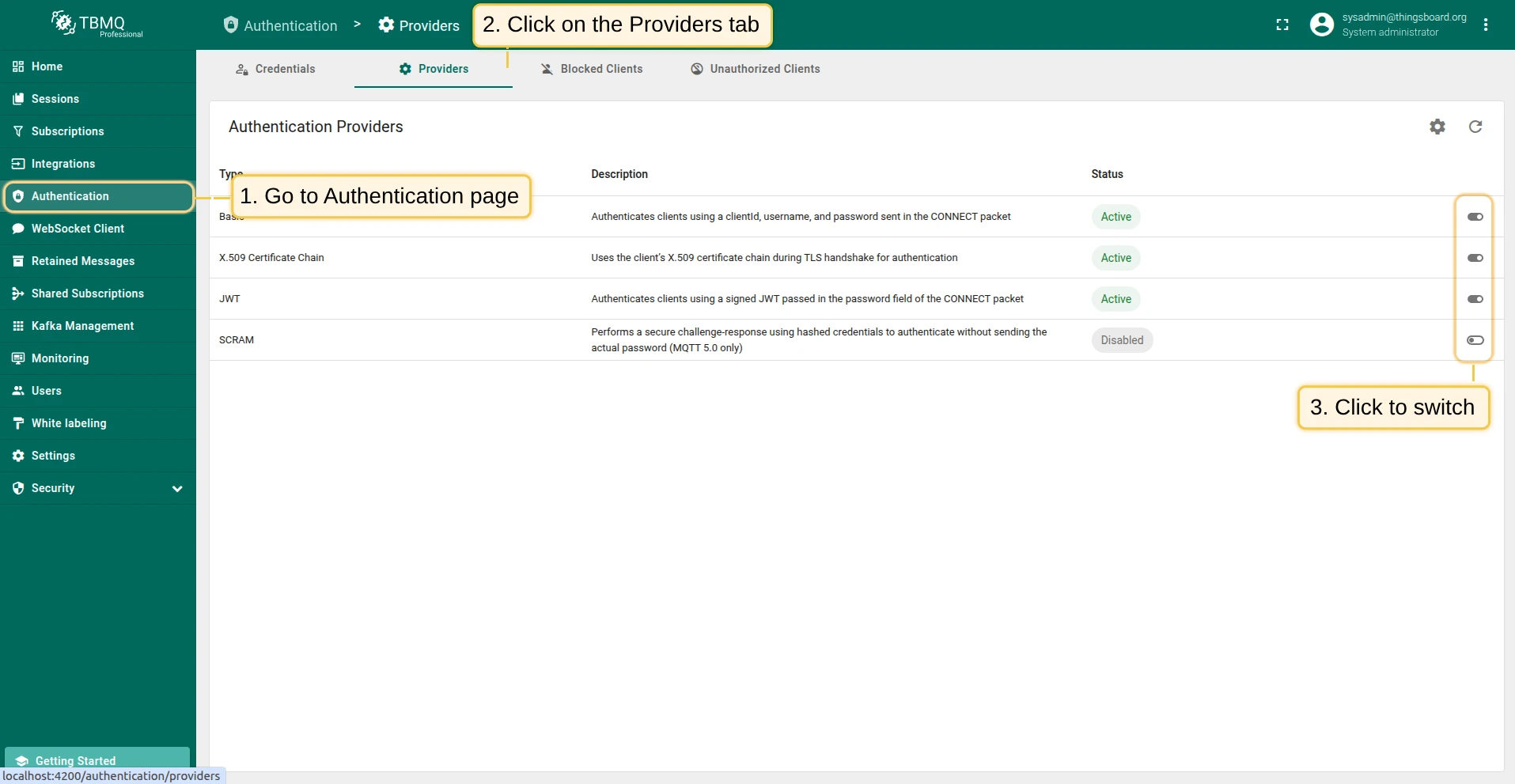
- On the Authentication Providers page, you have more control and visibility:
- You can enable or disable a provider directly from the table by clicking the Switch button in the corresponding row.
- For more detailed management, click on a provider to open its details page, where you can change the status or other parameters.
Providers execution order
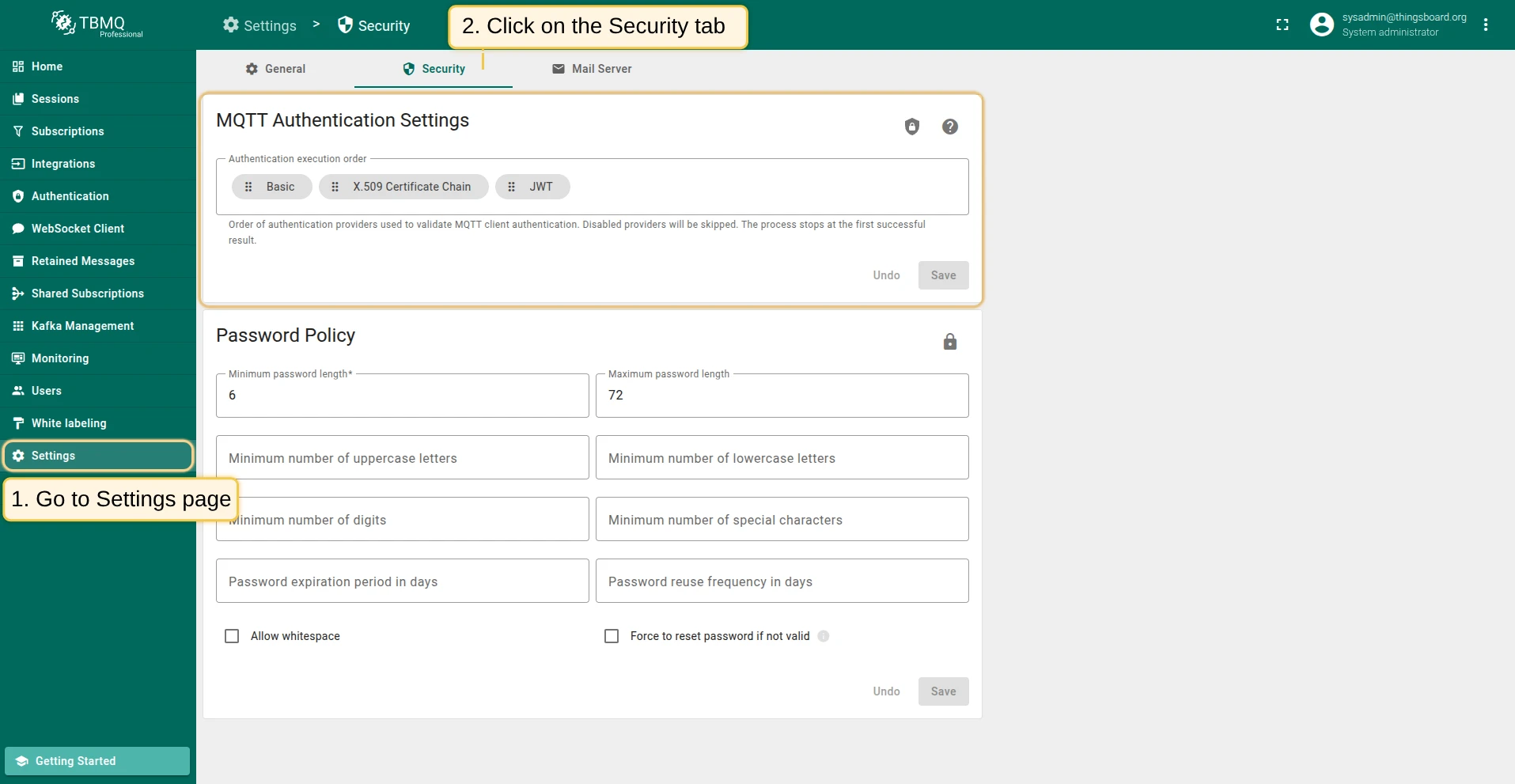
Section titled “Providers execution order”TBMQ processes authentication providers in a configurable execution order. This can be configured from the MQTT Authentication Settings page, which is designed to configure key MQTT authentication-related parameters.
The Authentication Execution Order setting defines the order in which the broker uses authentication providers to validate MQTT client connections.
Key rules:
When all providers are disabled, the execution flow is bypassed entirely. All clients are authenticated automatically and assigned the DEVICE type with no topic restrictions. This is acceptable in isolated lab environments but must not be used in production.
When at least one provider is enabled, each provider in the configured order is evaluated until the flow stops:
success— the client is authenticated; no further providers are tried.failure— the provider explicitly rejected the client; the connection is rejected immediately without trying subsequent providers. This is used by providers that apply custom authorization logic, such as the HTTP provider returning a non-success response.skipped— the provider could not process the credentials (for example, no client certificate was presented to the X.509 provider); the next provider in the order is tried. Disabled providers always returnskipped.
If the flow reaches the end of the list without a success or failure result, the connection is rejected.
Authorization
Section titled “Authorization”Authorization involves granting or denying access to specific resources or actions based on the authenticated client’s privileges. To achieve this, define topic-level access control by applying configurable rules that determine whether a client can publish to or subscribe from specific topics. TBMQ uses regular expression–based topic patterns to enforce these rules. Authorization settings are typically configured per client credentials. Both HTTP and JWT authentication support provider-level authorization rules, enabling dynamic access control based on token claims or external responses.
Was this helpful?