
Blocked clients
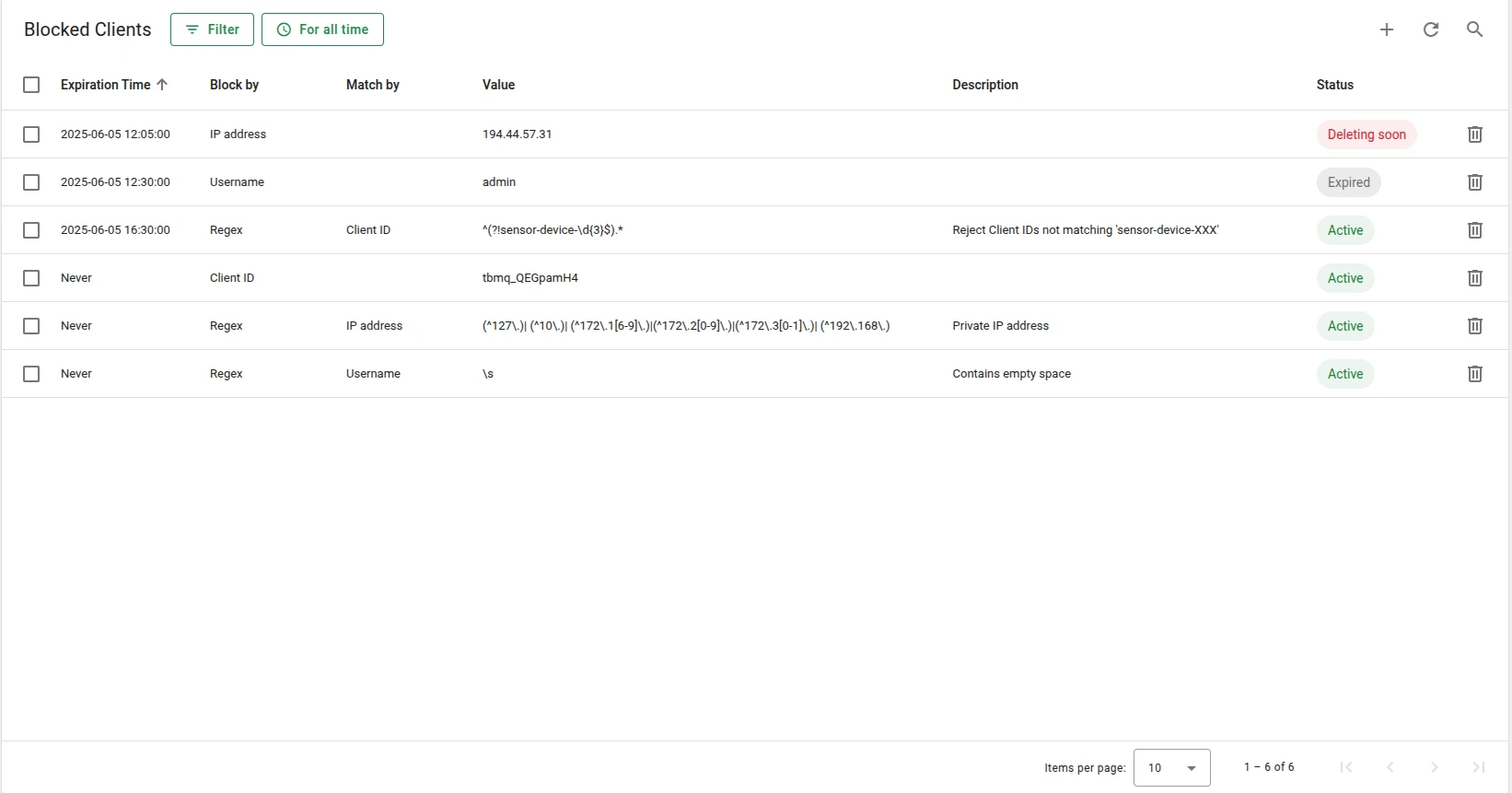
The Blocked Clients feature lets administrators restrict broker access based on client identifiers or pattern-based rules. It strengthens security, conserves system resources, and provides fine-grained control over who can initiate and maintain connections.
TBMQ stores blocked client entries in memory for fast matching and synchronizes them across all broker nodes in a cluster using Kafka, ensuring consistent enforcement in distributed deployments.
Each entry supports an optional expiration timestamp. Once expired, the entry is treated as inactive and cleaned up automatically.
Block types
Section titled “Block types”You can block a client using any of the following identifiers:
| Block by | UI label | Description |
|---|---|---|
CLIENT_ID | Client ID | Block clients with a specific client ID |
USERNAME | Username | Block by MQTT username |
IP_ADDRESS | IP address | Block by the client’s IP address |
REGEX | Regex | Pattern-based blocking using a regular expression |
The REGEX type matches against one of: BY_CLIENT_ID — labeled Client ID in the UI, BY_USERNAME — labeled Username, or BY_IP_ADDRESS — labeled IP address.
Example: To block all clients whose IDs start with test- followed by digits:
Block by: REGEXRegex pattern value: ^test-\d+$Match by: BY_CLIENT_IDThis matches test-001, test-42, and test-9999, but not demo-test-1, test-user, or test-.
Entry statuses
Section titled “Entry statuses”| Status | Description |
|---|---|
| Active | The entry is valid and enforced. |
| Expired | The entry is no longer valid but has not yet been cleaned up. |
| Deleting soon | The entry is expired and more than half of the cleanup grace period has passed. Removal is imminent. |
Matching order
Section titled “Matching order”During the connection phase, each client is evaluated in the following order:
- Exact match on
CLIENT_ID - Exact match on
USERNAME - Exact match on
IP_ADDRESS - Regex-based match (if any exist)
If a match is found and the entry is not expired, the connection is rejected. Blocked client events are also visible in the Unauthorized Clients view.
Automatic cleanup
Section titled “Automatic cleanup”Expired entries are cleaned up automatically by a background process.
blocked-client: cleanup: # Interval between cleanup runs, in minutes. Default: 5 minutes period: "${BLOCKED_CLIENT_CLEANUP_PERIOD_MINUTES:5}" # Time-to-live for expired entries, in minutes. # After this period, the expired entry is removed permanently. Default: one week ttl: "${BLOCKED_CLIENT_CLEANUP_TTL_MINUTES:10080}"Cleanup runs only after both the expiration timestamp and the TTL period have passed.
Recommendations
Section titled “Recommendations”- Prefer exact matches over regex. Regex rules are evaluated for every connection; they add overhead that scales with the number of blocked entries. Use them only when
CLIENT_ID,USERNAME, orIP_ADDRESSmatching is insufficient. - Use authentication as the primary rejection mechanism. Blocked clients should serve as an additional control layer, not the main one.
- Keep the list small. A large number of entries, especially regex-based ones, increases memory usage and slows down lookups.
Was this helpful?