
Architecture
TBMQ is designed with four core attributes:
- Scalability — horizontally scalable, built on proven open-source technologies.
- Fault tolerance — no single point of failure; every node in the cluster is functionally identical.
- Performance — handles millions of clients and processes millions of messages per second.
- Durability — high message durability; once the broker acknowledges a message, it is never lost.
Architecture diagram
Section titled “Architecture diagram”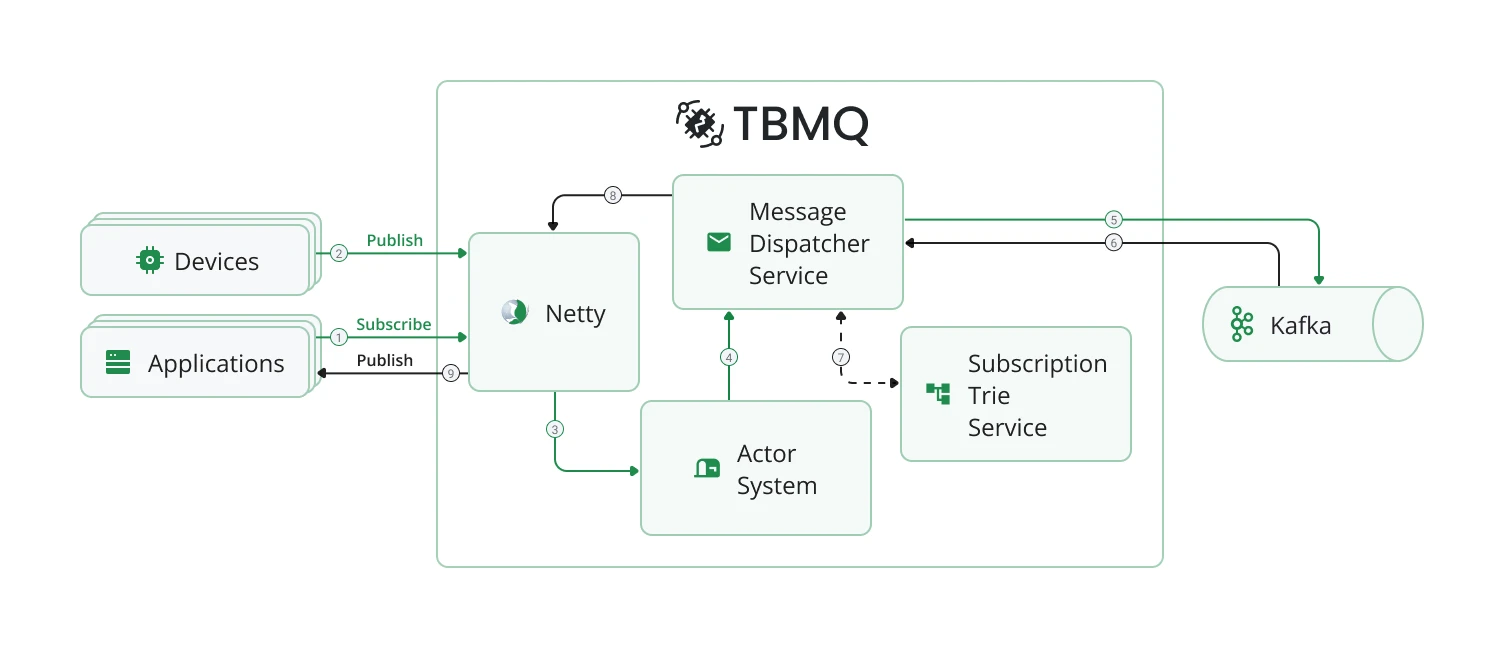
Motivation
Section titled “Motivation”ThingsBoard’s experience building scalable IoT applications has surfaced three primary MQTT messaging scenarios:
- Fan-in — many devices generate large message volumes consumed by a few applications. No message can be missed.
- Fan-out (broadcast) — a few publishers trigger high-volume outgoing data to many subscribers.
- Point-to-point (P2P) — one publisher routes messages to a specific subscriber through uniquely defined topics. Ideal for private messaging and command delivery.
In all scenarios, persistent clients with QoS 1 or 2 are often used to ensure reliable delivery even during temporary offline periods.
TBMQ is intentionally designed to excel at all three. Key design principles:
- No master or coordinator processes — all nodes have identical functionality.
- Distributed processing enables effortless horizontal scalability.
- High-throughput, low-latency delivery; data durability and replication guaranteed.
- Kafka as the underlying backbone prevents message loss even during node or client failures.
How TBMQ works
Section titled “How TBMQ works”Kafka stores all unprocessed published messages, client sessions, and subscriptions in dedicated topics (see Kafka topics for the full list). All broker nodes maintain local copies of sessions and subscriptions for efficient processing. When a client disconnects from one node, other nodes continue based on the latest state. Newly added nodes receive the current state on startup.
Client subscriptions are organized in a Trie data structure for fast topic matching.
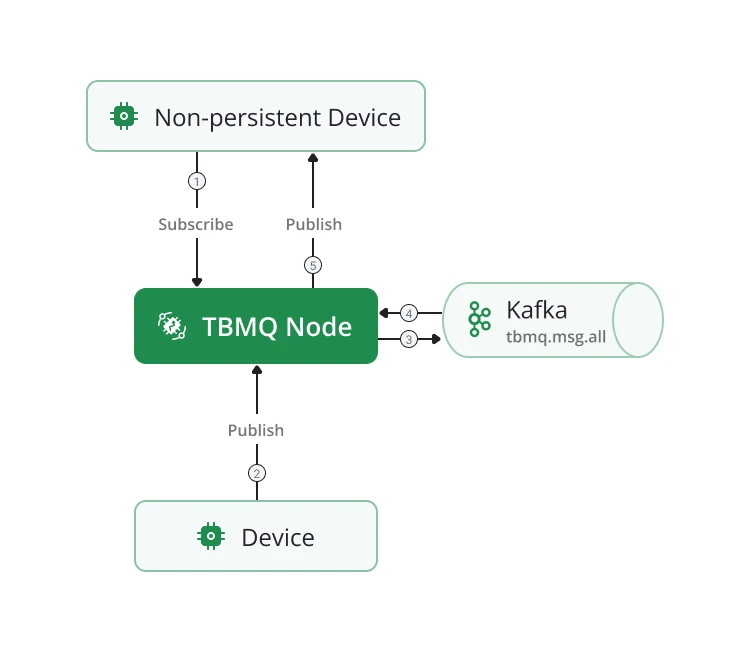
When a publisher sends a PUBLISH message:
- It is stored in the
tbmq.msg.allKafka topic. - Once Kafka acknowledges persistence, the broker replies with PUBACK/PUBREC (or no response for QoS 0).
- Kafka consumer threads retrieve messages and use the Subscription Trie to identify recipients.
- Depending on client type (DEVICE or APPLICATION) and persistence settings, the broker either routes the message to another Kafka topic or delivers it directly.
Non-persistent client
Section titled “Non-persistent client”A client is non-persistent when the CONNECT packet specifies:
- MQTT v3.x:
clean_session = true - MQTT v5:
clean_start = trueandsessionExpiryInterval = 0(or not specified)
Non-persistent clients receive messages published directly without additional persistence. Only DEVICE clients can be non-persistent.
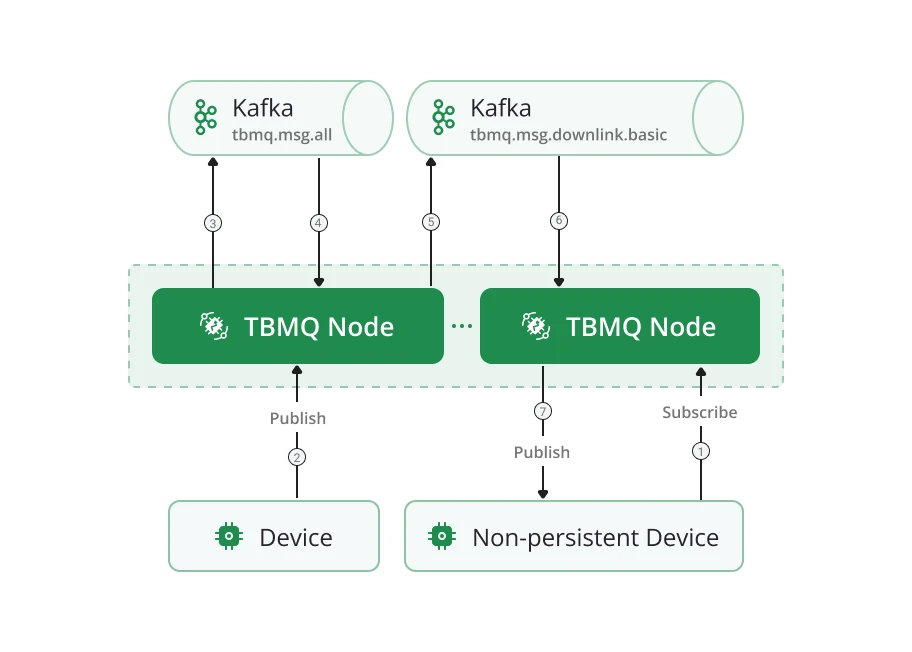
Cluster mode: multiple TBMQ nodes run Kafka consumers in the same consumer group for tbmq.msg.all. A
published message may be processed by a node different from the one the subscriber is connected to. The
tbmq.msg.downlink.basic Kafka topic is used to forward messages between nodes for delivery via the established
connection.
Persistent client
Section titled “Persistent client”A client is persistent when:
- MQTT v3.x:
clean_session = false - MQTT v5:
sessionExpiryInterval > 0(anyclean_start), orclean_start = falsewithsessionExpiryInterval = 0
Persistent clients are classified into two types:
- DEVICE — primarily publish large volumes; subscribe to few topics with moderate message rates. Typically IoT sensors.
- APPLICATION — subscribe to high-rate topics; require offline message persistence for later delivery. Used for analytics, data processing, and similar backend functions.
Persistent DEVICE client
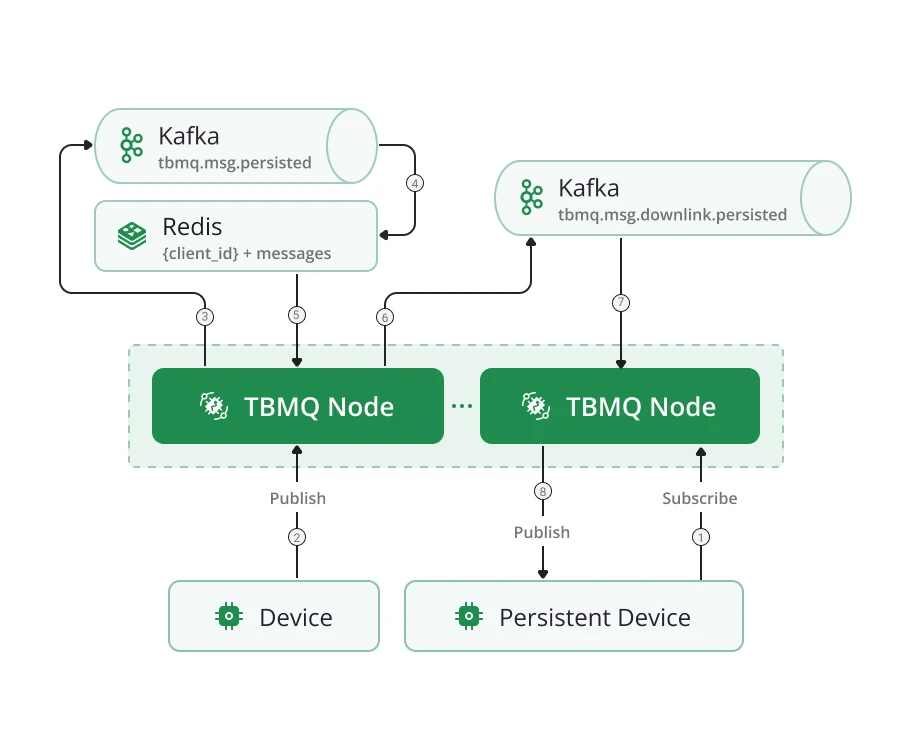
Section titled “Persistent DEVICE client”Messages for persistent DEVICE clients flow through the tbmq.msg.persisted Kafka topic, separating them from
other message types. Dedicated Kafka consumer threads persist messages to Redis for storage. When a
client reconnects, stored messages are retrieved and delivered efficiently.
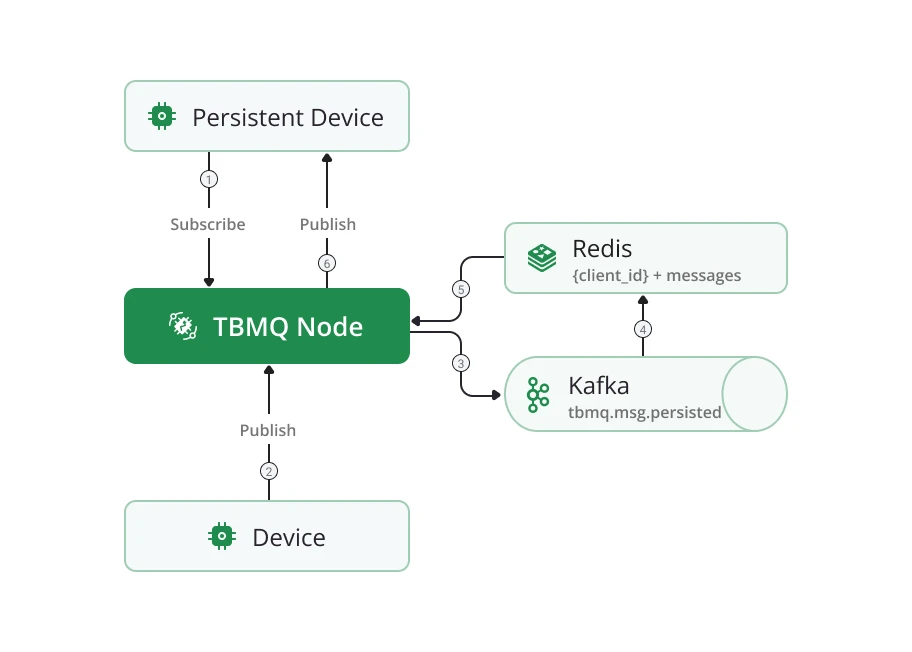
A detailed breakdown of Redis-based persistence for DEVICE clients is available in the Persistent DEVICE client reference.
Cluster mode: nodes run Kafka consumers in the same group for tbmq.msg.persisted. The
tbmq.msg.downlink.persisted Kafka topic forwards messages to the node where the subscriber is connected.
Persistent APPLICATION client
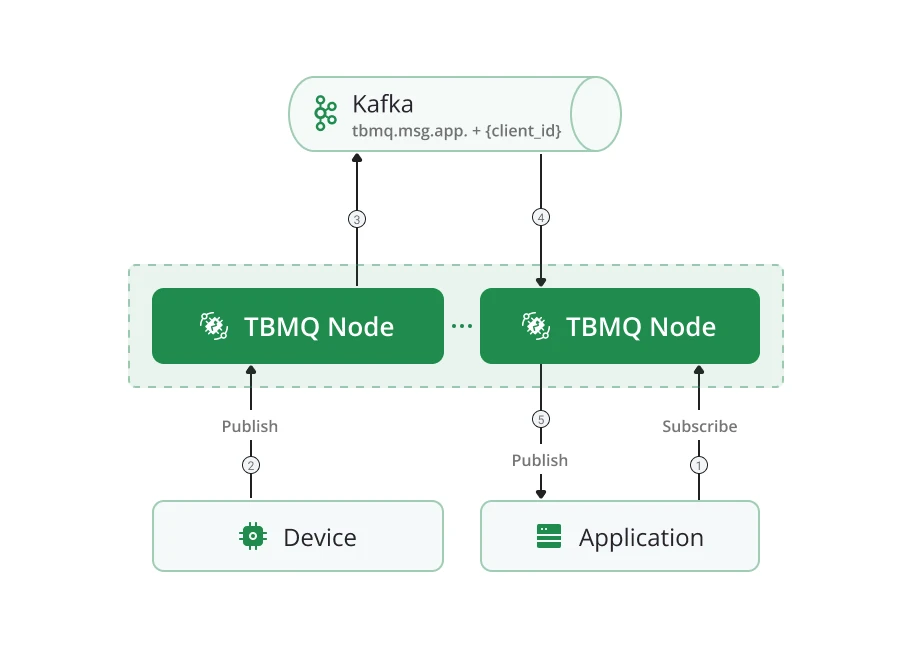
Section titled “Persistent APPLICATION client”Each APPLICATION client maps to a dedicated Kafka topic (tbmq.msg.app.$CLIENT_ID). Messages read from
tbmq.msg.all are routed to the client’s topic. A separate Kafka consumer thread per APPLICATION client
retrieves and delivers messages. This architecture supports millions of topics and enables high message throughput
for individual clients, reaching millions of messages per second.
The dedicated consumer group structure also makes MQTT 5 shared subscriptions extremely efficient for APPLICATION clients.
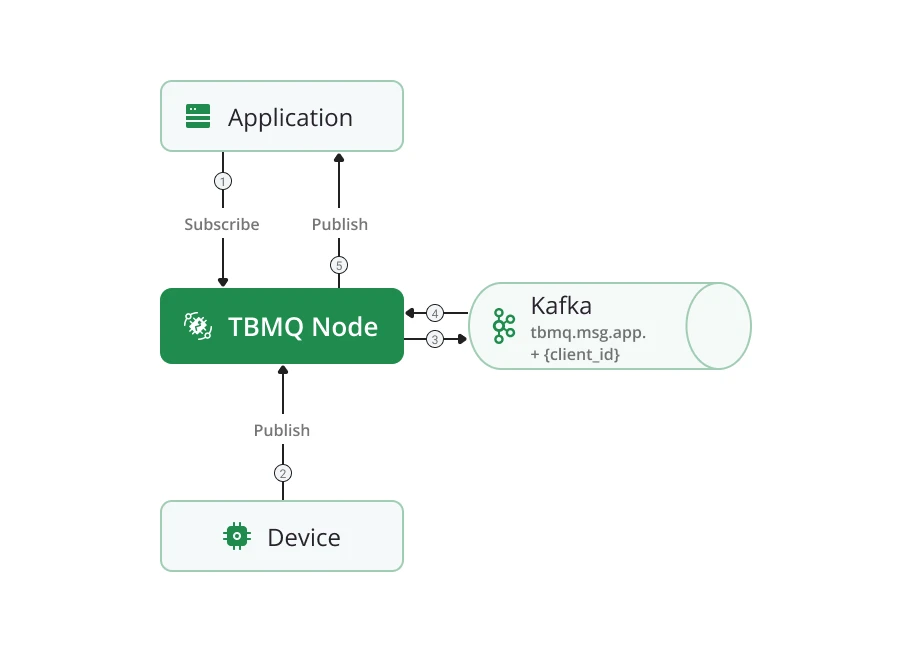
Cluster mode: APPLICATION clients work identically in cluster and standalone modes — no internode communication is needed. A dedicated consumer is created on the node where the client connects, so message processing happens directly on the target node.
Persistence configuration — the following environment variables control message retention per client type:
| Variable | Purpose |
|---|---|
TB_KAFKA_APP_PERSISTED_MSG_TOPIC_PROPERTIES | Kafka topic properties for APPLICATION client messages |
MQTT_PERSISTENT_SESSION_DEVICE_PERSISTED_MESSAGES_LIMIT | Max persisted messages per DEVICE client |
MQTT_PERSISTENT_SESSION_DEVICE_PERSISTED_MESSAGES_TTL | TTL for persisted DEVICE client messages |
See the full configuration reference for details.
Kafka topics
Section titled “Kafka topics”| Topic | Description |
|---|---|
tbmq.msg.all | All published messages from MQTT clients |
tbmq.msg.app.$CLIENT_ID | Messages for a specific APPLICATION client |
tbmq.msg.app.shared.$TOPIC_FILTER | Messages for APPLICATION clients on a shared subscription |
tbmq.msg.persisted | Messages for DEVICE persistent clients |
tbmq.msg.retained | All retained messages |
tbmq.client.session | Sessions of all clients |
tbmq.client.subscriptions | Subscriptions of all clients |
tbmq.client.session.event.request | Session events (CONNECTION_REQUEST, DISCONNECTION_REQUEST, CLEAR_SESSION_REQUEST, etc.) |
tbmq.client.session.event.response.$SERVICE_ID | Responses to session events, routed to the target broker node |
tbmq.client.disconnect.$SERVICE_ID | Forced client disconnection events (admin request or session conflict) |
tbmq.msg.downlink.basic.$SERVICE_ID | Forwards messages between nodes for non-persistent DEVICE subscribers |
tbmq.msg.downlink.persisted.$SERVICE_ID | Forwards messages between nodes for persistent DEVICE subscribers |
tbmq.sys.app.removed | Events for removal of an APPLICATION client’s Kafka topic (client type changed to DEVICE) |
tbmq.sys.historical.data | Historical statistics (incoming/outgoing message counts, etc.) published from each broker node to calculate total values per cluster |
tbmq.client.blocked | Distributes and stores the blocked clients list across the cluster |
tbmq.sys.internode.notifications.$SERVICE_ID | System notifications between broker nodes for auth provider sync, admin settings sync, and cache cleanup |
Redis is an in-memory data store used in TBMQ to persist messages for DEVICE persistent clients. Its low-latency, high-throughput read/write operations and Redis Cluster horizontal scalability ensure that persistent messages can be retrieved and delivered efficiently even as message volume grows.
PostgreSQL
Section titled “PostgreSQL”TBMQ uses PostgreSQL to store users, user credentials, MQTT client credentials, statistics, WebSocket connections, WebSocket subscriptions, and other metadata. PostgreSQL’s ACID compliance and transaction management guarantee data integrity and consistency for these critical entities.
Web UI
Section titled “Web UI”The TBMQ management UI provides a lightweight graphical interface for administration:
- MQTT client credentials — create, update, and delete client credentials.
- Client sessions and subscriptions — monitor and control active sessions; add, remove, and modify subscriptions.
- Shared subscriptions — manage Application Shared Subscription entities for message distribution to APPLICATION clients.
- Retained messages — view and manage retained messages.
- WebSocket client — establish and manage WebSocket connections for real-time debugging and testing.
- Monitoring dashboards — real-time metrics and visualizations for broker performance and system health.
TBMQ uses Netty — a high-performance, asynchronous, event-driven network framework — as the TCP server for the MQTT protocol.
In IoT environments where thousands or millions of devices maintain persistent connections, efficient resource management is critical. Netty uses non-blocking I/O (NIO), which allows it to handle large numbers of simultaneous connections without dedicating a thread to each one, greatly reducing overhead. This approach ensures high throughput and low-latency communication even under heavy loads.
Netty’s modular design provides fine-grained control over protocol handling, message parsing, and connection management. It also offers built-in TLS encryption support, making it both secure and extensible.
Actor system
Section titled “Actor system”TBMQ uses a custom Actor System as the underlying mechanism for handling MQTT clients. The Actor model enables efficient, concurrent message processing — each actor operates independently, which eliminates shared-state contention and ensures high-performance operation.
Two distinct actor types exist within the system:
- Client actors — one per connected MQTT client. Responsible for processing the main MQTT message types: CONNECT, SUBSCRIBE, UNSUBSCRIBE, PUBLISH, and related control messages. Client actors manage all interactions with their respective MQTT client.
- Persisted Device actors — one per persistent DEVICE client, created in addition to the Client actor. Specifically designated to manage persistence-related operations, including the storage and retrieval of messages for offline delivery.
Message dispatcher service
Section titled “Message dispatcher service”The Message dispatcher service manages the flow from publisher to Kafka to subscribers:
- Receives the published message from the Actor system and persists it to Kafka.
- Once Kafka confirms storage, retrieves the message and queries the Subscription Trie for eligible subscribers.
- Routes each message based on subscriber type:
- Non-persistent DEVICE: delivered directly to the client.
- Persistent DEVICE: published to
tbmq.msg.persisted, then stored in Redis. - Persistent APPLICATION: published to the client’s dedicated
tbmq.msg.app.$CLIENT_IDtopic.
- Passes messages to Netty for network transmission to online clients.
Subscriptions Trie
Section titled “Subscriptions Trie”The Trie data structure provides fast topic matching:
- Common topic prefixes are stored once, minimizing memory and search space.
- Lookup time depends on the topic length, not the total number of subscriptions — consistent performance at scale.
All subscriptions are consumed from Kafka and stored in the Trie in memory. The Trie organizes topic filters hierarchically — each node represents a topic level. When a PUBLISH message arrives, the broker queries the Trie with the topic name to find all matching subscribers, then delivers a copy to each. The trade-off is increased memory consumption proportional to the number of active subscriptions.
Standalone vs cluster mode
Section titled “Standalone vs cluster mode”In standalone mode, a single TBMQ node handles all connections and processing. In cluster mode:
- All nodes are identical; no master or coordinator processes.
- A load balancer distributes incoming client connections across nodes.
- If a client loses its connection to a node (node failure, network issue), it reconnects to any healthy node.
- New nodes added to the cluster automatically receive the current state from Kafka topics.
Programming languages
Section titled “Programming languages”TBMQ backend is implemented in Java 17. The frontend is a single-page application built with Angular 19.
Was this helpful?