
Non-persistent and persistent sessions
An MQTT session is core to reliable communication between clients and the broker. This is especially important in IoT environments, where devices may disconnect and reconnect due to power-saving modes, connectivity issues, or network changes.
An MQTT session stores state related to the interaction between a client and the broker. This state can be reused when the client reconnects, allowing communication to continue without reinitializing everything from scratch.
Think of it like a hotel reservation: a persistent session is a booked room where your luggage (subscriptions and missed messages) stays waiting for your return, while a non-persistent session is a walk-in stay — everything is forgotten the moment you leave.
Persistent session
Section titled “Persistent session”A persistent session preserves state after a client disconnects, allowing subscriptions and queued messages to be restored when the client reconnects. A persistent session requires a fixed Client ID, which allows the broker to correctly restore the session state. If the session expires before the client reconnects, any queued messages are discarded.
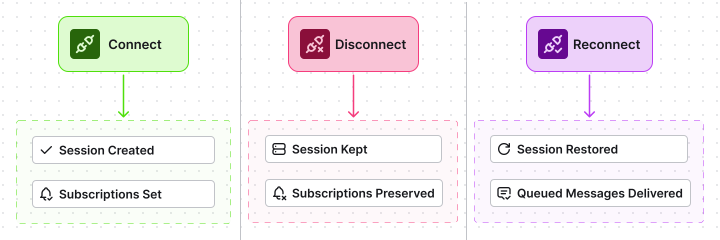
Offline message delivery works only for persistent sessions and requires QoS 1 or QoS 2. For applications where message loss is unacceptable, always combine persistent sessions with QoS 1 or QoS 2 (see Quality of Service). This mode improves reliability but introduces additional acknowledgments and storage, increasing overall system complexity.
The following information may be stored as part of a persistent session and removed when the session expires or is explicitly cleared:
- Session identity (Client ID)
- Active subscriptions, including topic filters and subscription identifiers
- Queued messages waiting to be delivered (QoS 1 and QoS 2)
- In-flight messages sent but not yet fully acknowledged (QoS 1 and QoS 2)
- QoS 2 messages received from the client but not yet fully acknowledged
- Configured Will Message and Will Delay Interval
- Session Expiry Interval and calculated session expiration time
- Internal delivery state required to correctly resume message flow after reconnect
Non-persistent session
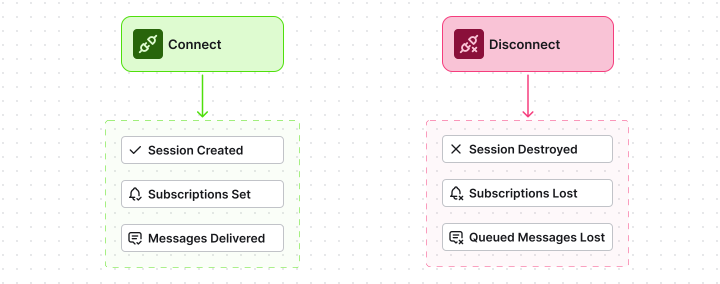
Section titled “Non-persistent session”A non-persistent (clean) session always starts with a fresh state. The broker does not retain any session state when the client disconnects:
- Subscriptions are not preserved and must be recreated on every connection.
- Messages published while the client is offline are not stored or delivered later.
- This mode has minimal overhead, as it does not require message acknowledgments or session storage.
- Clean sessions are typically used with QoS 0, though higher QoS levels are also supported, where low latency matters more than guaranteed delivery.
How the broker indicates an existing session
Section titled “How the broker indicates an existing session”When a client connects, the broker informs it whether a previous session already exists by setting the Session Present flag in the CONNACK packet:
- Session Present = true — the broker found an existing session for the given Client ID and resumed it. Subscriptions and any stored session state are available.
- Session Present = false — no existing session was found and a new session was created. The client must subscribe again if needed.
This flag is especially important for clients using persistent sessions, as it allows them to determine whether they are resuming a previous session or starting from a clean state.
Session configuration in MQTT v3.x and MQTT v5.0
Section titled “Session configuration in MQTT v3.x and MQTT v5.0”Session management was significantly improved in MQTT v5.0 compared to MQTT v3.x. While MQTT v3.x provides only basic control over session persistence, MQTT v5.0 introduces more flexible and explicit mechanisms better suited for modern IoT systems, especially for unstable networks and large numbers of clients.
The key change is that MQTT v5.0 replaces the single Clean Session flag with two separate controls: Clean Start and Session Expiry Interval. This allows clients to control precisely when a session starts fresh and how long the broker keeps session data after a disconnect.
| Session type | MQTT v3.x | MQTT v5.0 | Explanation |
|---|---|---|---|
| Non-persistent session | Clean Session = 1 | Clean Start = 1 Session Expiry Interval = 0 | A new session is always created. No subscriptions or messages are stored. Messages published while the client is offline are lost. Suitable for real-time data where persistence is not required. |
| Persistent session | Clean Session = 0 | Session Expiry Interval > 0 | Session state is preserved across disconnects for a defined period. The maximum Session Expiry Interval is 4,294,967,295 seconds (~136 years). Subscriptions and queued messages are restored on reconnect. Suitable for intermittent connectivity with controlled resource usage. |
For details on viewing and managing sessions in TBMQ, see Sessions.
Session state management in TBMQ
Section titled “Session state management in TBMQ”TBMQ is designed to operate at scale across highly diverse MQTT traffic patterns, ranging from lightweight IoT devices to high-throughput backend applications. Session state lifecycle, persistence, and resource impact are all influenced by how a client connects, how much data it produces or consumes, and how reliably messages must be delivered.
Client types and session behavior
Section titled “Client types and session behavior”TBMQ classifies clients into two types — DEVICE and APPLICATION — each with distinct traffic patterns and usage expectations. This classification allows TBMQ to apply tailored session persistence and message delivery strategies for efficient resource usage.
| Client type | Session type | Typical use case | Persistence details |
|---|---|---|---|
| DEVICE | Non-persistent | Basic environmental monitoring. | No session storage. Messages are dropped on disconnect. The device must re-subscribe after reconnect. TBMQ skips messages if the device is too slow, preventing broker overload. |
| DEVICE | Persistent | Command delivery and configuration updates. | Messages are queued while offline. TBMQ limits stored messages per DEVICE session to 65,535 and removes stale messages using a configurable TTL. |
| APPLICATION | Non-persistent | Generally not recommended for data processing applications. | Messages may be lost during disconnects. TBMQ shows a warning to administrators about the risk of data loss. |
| APPLICATION | Persistent | Enterprise backend and analytics systems. | Designed for very high throughput. Supports shared subscriptions with efficient load balancing across multiple application instances. |
For the full client type reference, see Client type.
Session configuration parameters
Section titled “Session configuration parameters”The configuration parameters (see Configuration properties) control how TBMQ handles persistent sessions and session expiration. They define limits and cleanup rules that affect message retention, buffering behavior, and the lifetime of inactive client sessions.
- The
client-session-expiryparameters control how long inactive sessions are allowed to exist and how expired sessions are periodically cleaned up, preventing unused session state from accumulating in the system. - The
persistent-sessionparameters regulate how messages are stored and delivered for persistent DEVICE and APPLICATION clients, influencing memory usage, throughput, and delivery latency.
client-session-expiry: # Cron job to schedule clearing of expired and not active client sessions. Defaults to 'every hour' cron: "${MQTT_CLIENT_SESSION_EXPIRY_CRON:0 0 * ? * *}" # Timezone for the client sessions clearing cron job zone: "${MQTT_CLIENT_SESSION_EXPIRY_ZONE:UTC}" # Max expiry interval allowed for inactive sessions in seconds (default: one week) max-expiry-interval: "${MQTT_CLIENT_SESSION_EXPIRY_MAX_EXPIRY_INTERVAL:604800}" # Administrative TTL in seconds for sessions that never expire by protocol rules # (e.g. MQTT v3 cleanSession=false or MQTT v5 cleanStart=false with sessionExpiryInterval=0). # Set to 0 or a negative value to disable. Default: one week ttl: "${MQTT_CLIENT_SESSION_EXPIRY_TTL:604800}"persistent-session: device: persisted-messages: # Maximum number of PUBLISH messages stored for each persisted DEVICE client limit: "${MQTT_PERSISTENT_SESSION_DEVICE_PERSISTED_MESSAGES_LIMIT:10000}" # TTL of persisted DEVICE messages in seconds (default: one week) ttl: "${MQTT_PERSISTENT_SESSION_DEVICE_PERSISTED_MESSAGES_TTL:604800}" # If enabled, each message is flushed immediately; when disabled, messages are buffered write-and-flush: "${MQTT_PERSISTENT_MSG_WRITE_AND_FLUSH:true}" # Number of messages buffered before flushing (used when write-and-flush is false) buffered-msg-count: "${MQTT_PERSISTENT_BUFFERED_MSG_COUNT:5}" app: persisted-messages: # Kafka topic properties separated by semicolon for tbmq.msg.app topics topic-properties: "${TB_KAFKA_APP_PERSISTED_MSG_TOPIC_PROPERTIES:retention.ms:604800000;segment.bytes:26214400;retention.bytes:1048576000;replication.factor:1}" # If enabled, each message is flushed immediately; when disabled, messages are buffered write-and-flush: "${MQTT_APP_MSG_WRITE_AND_FLUSH:false}" # Number of messages buffered before flushing (used when write-and-flush is false) buffered-msg-count: "${MQTT_APP_BUFFERED_MSG_COUNT:10}"Message Expiry Interval and session state
Section titled “Message Expiry Interval and session state”The Message Expiry Interval (MQTT v5.0) defines how long a published message remains valid before the broker discards it. It applies to individual messages and is independent of the client’s connection state.
The Message Expiry Interval starts counting down as soon as the broker receives the message. Once the interval elapses, the message is discarded and will not be delivered, even if the session still exists.
For persistent sessions, Message Expiry Interval plays a critical role in offline message queuing:
- Messages with QoS 1 or QoS 2 may be queued while the client is offline.
- If a queued message expires before the client reconnects, it is removed from the session queue.
- This prevents delivery of outdated data and limits long-lived message accumulation in persistent sessions.
For non-persistent sessions, Message Expiry Interval has limited practical effect:
- Messages are delivered only while the client is connected.
- If the client is offline, messages are not queued regardless of the expiry setting.
Message Expiry Interval and Session Expiry Interval serve different purposes:
- Message Expiry Interval — controls how long an individual message is valid.
- Session Expiry Interval — controls how long the session state is retained after disconnect.
A message is delivered only if the session still exists and the Message Expiry Interval has not elapsed.
Demonstrating a persistent session
Section titled “Demonstrating a persistent session”The following example shows how a persistent session works in practice using the WebSocket client. Messages published while a client is offline are not lost and are delivered when the client reconnects.
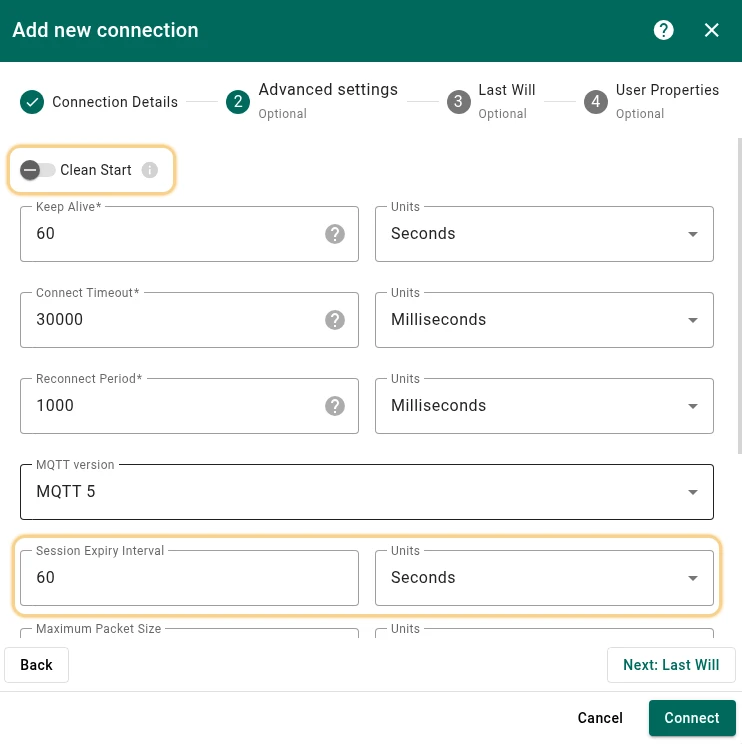
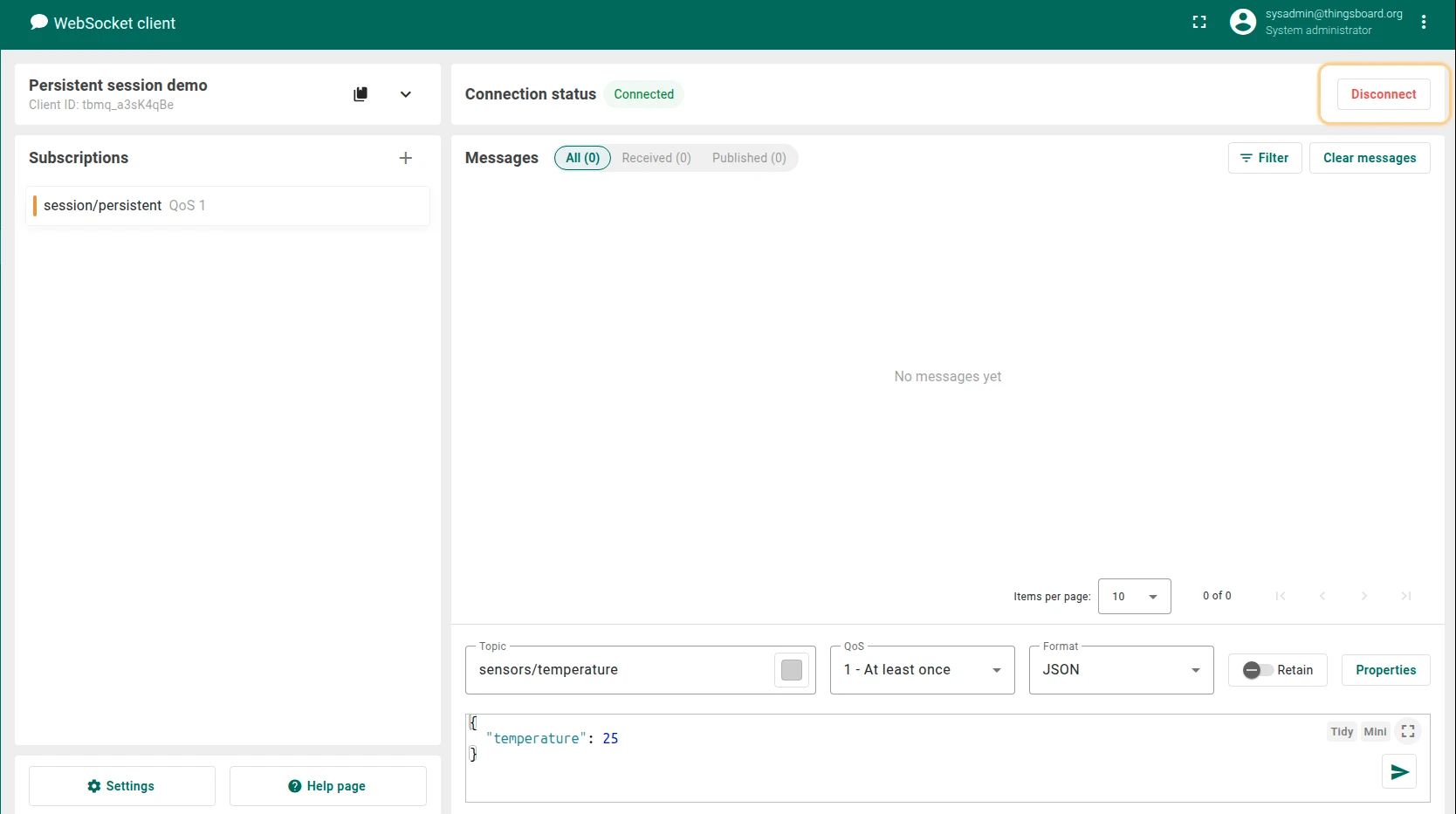
- Open a WebSocket Client connection, enable the persistent session (disable Clean Start), set a Session Expiry Interval greater than zero, and click Connect.
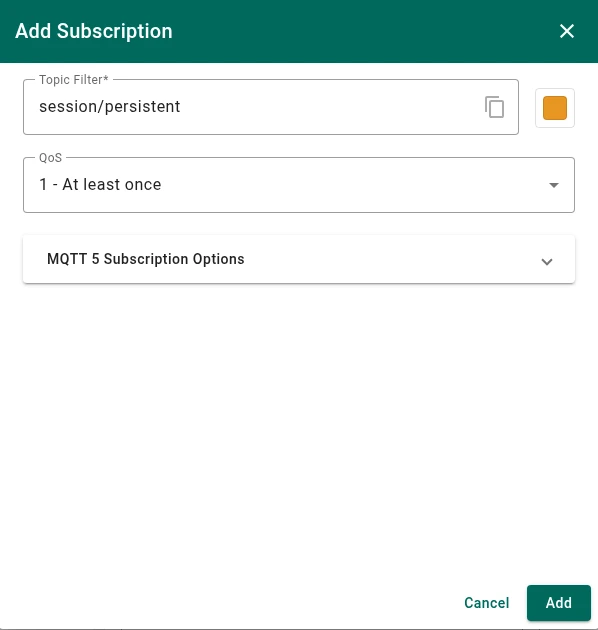
- Add a subscription to the topic
session/persistentwith QoS 1. - Click the Disconnect button.
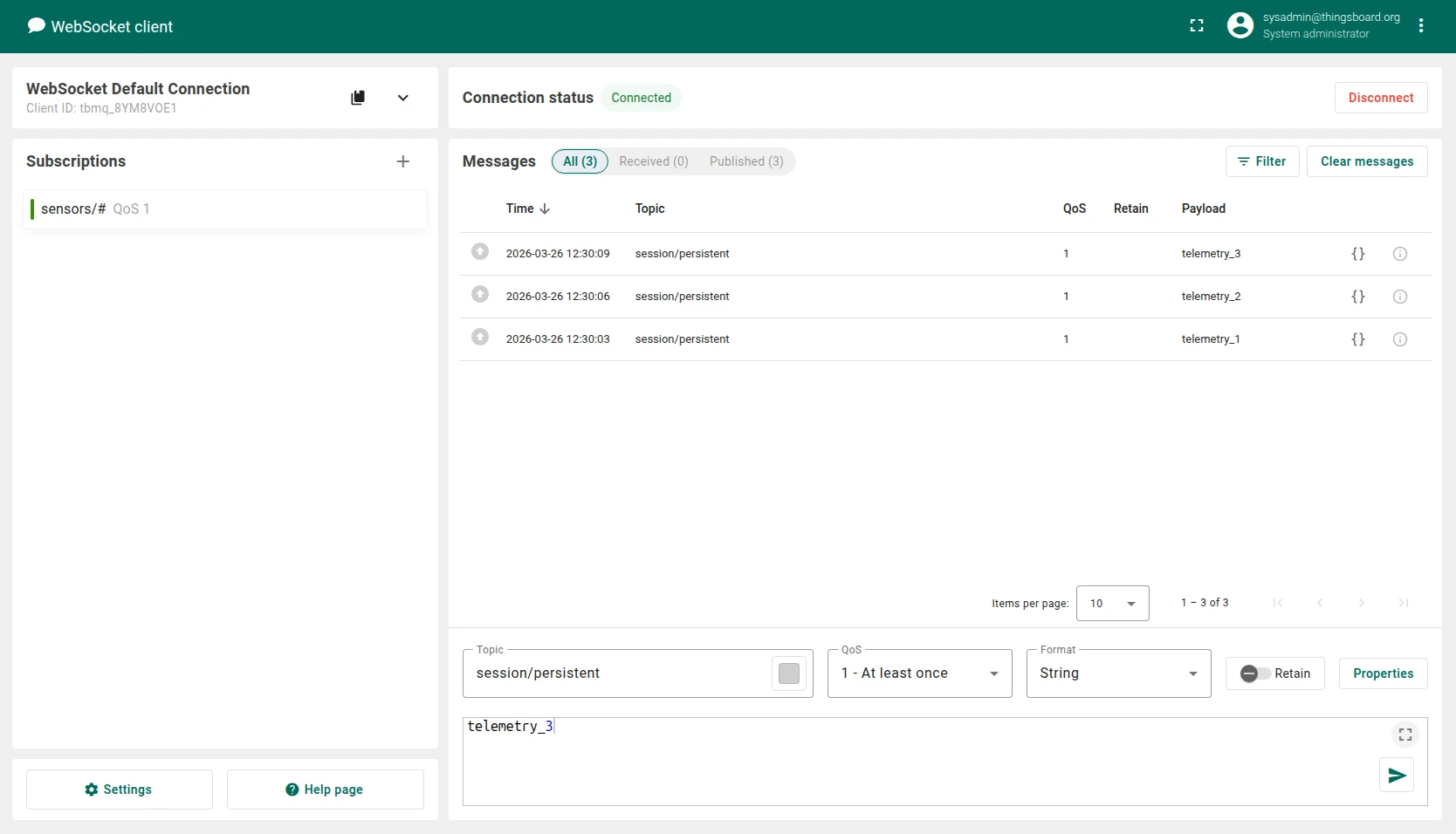
- Switch to another client and publish several messages to the topic
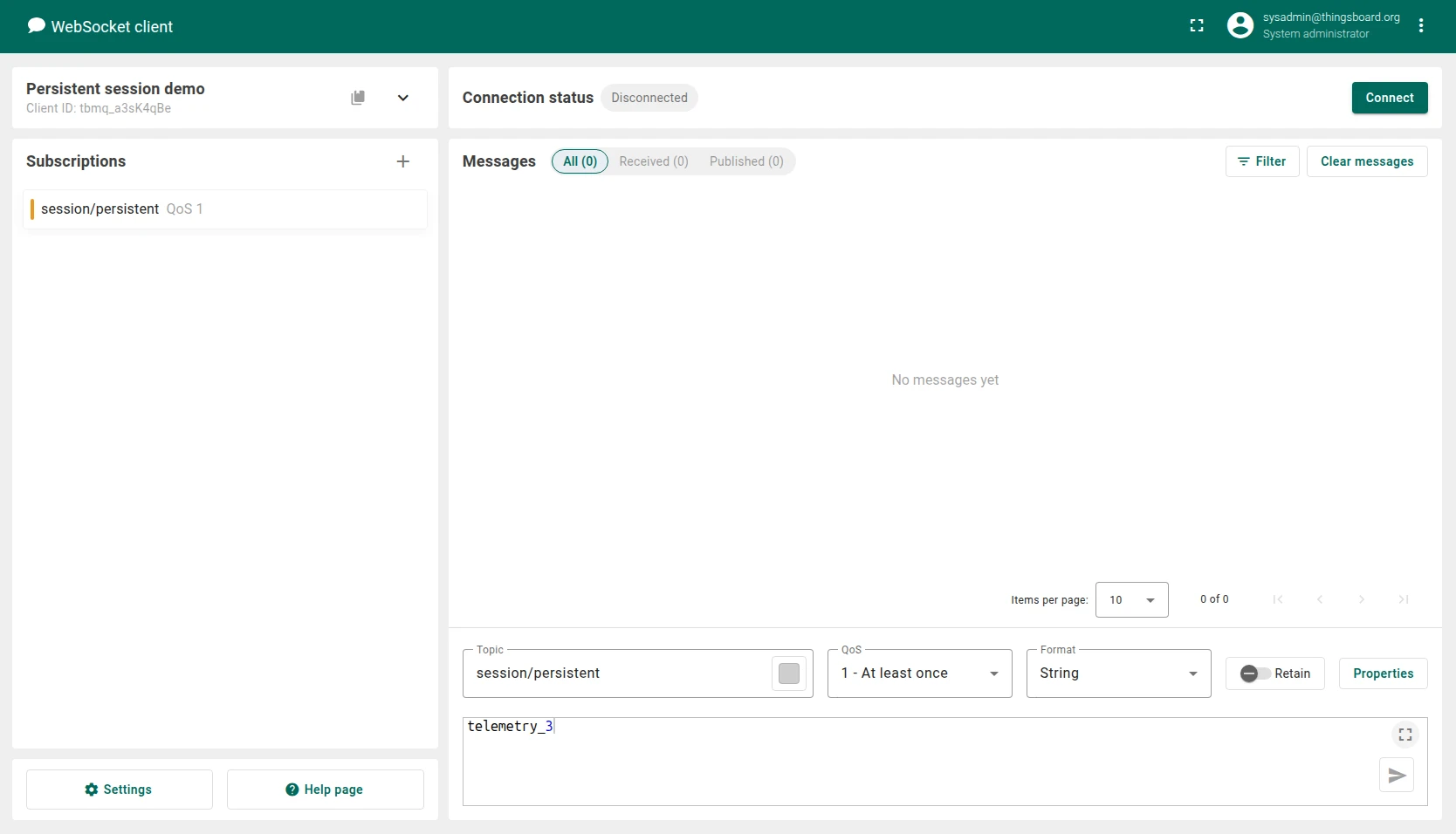
session/persistent. - Switch back to the “Persistent session demo” client and click Connect.
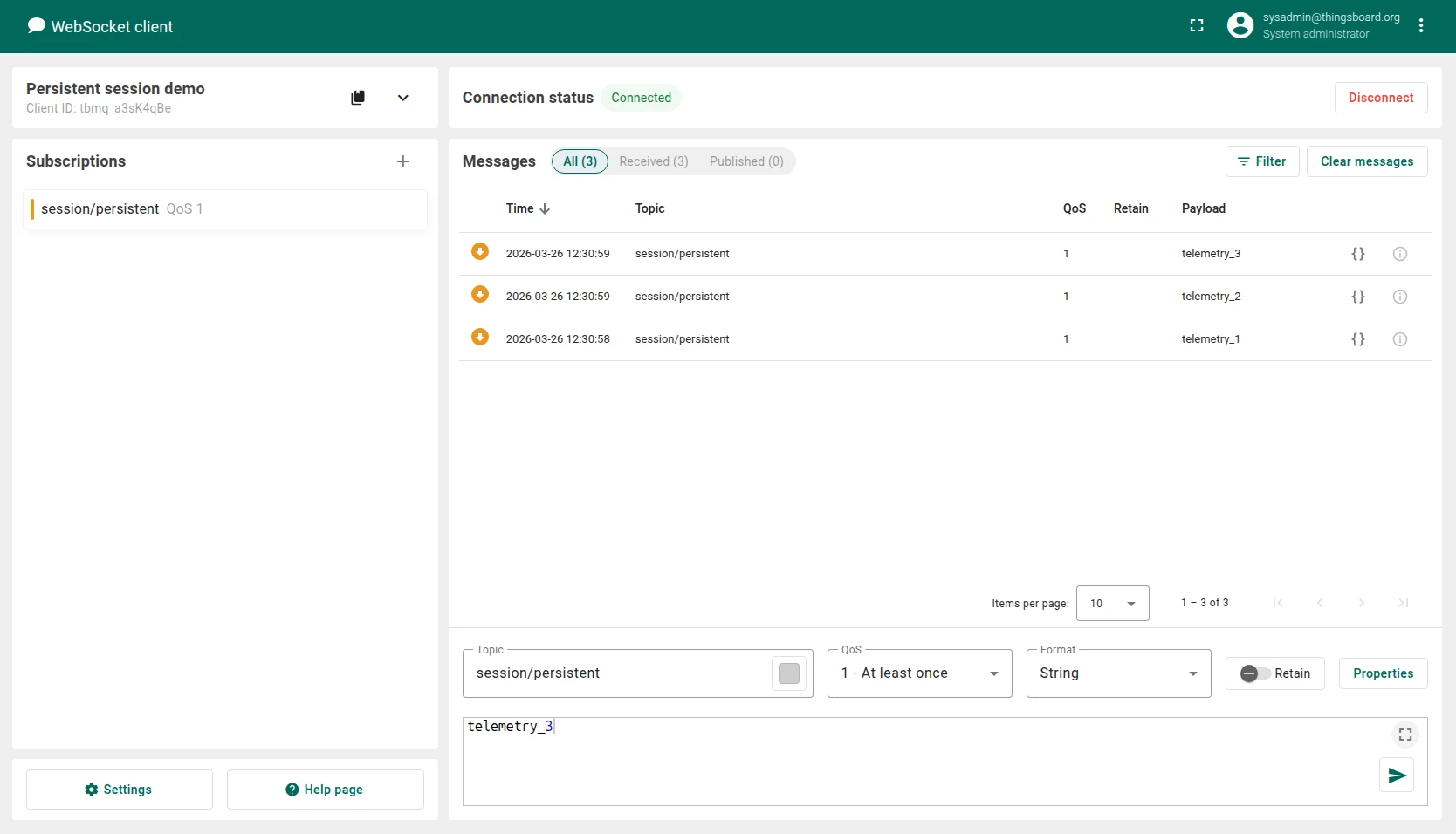
- After a successful connection, the client receives the messages that were published while it was offline.
This behavior is possible only because the session is persistent and messages are delivered using QoS 1 or QoS 2.
Was this helpful?