
Integrations
Integrations in TBMQ forward MQTT messages from connected clients to external systems such as HTTP endpoints, Kafka brokers, or other MQTT brokers. They connect IoT devices with the broader data infrastructure, allowing the MQTT broker to act as a central integration point in your architecture.
Why use integrations
Section titled “Why use integrations”- Bridge MQTT messages to external systems for processing, storage, or analytics.
- Enable interoperability between MQTT and other protocols.
- Build complex event-driven workflows across different platforms.
- Maintain modularity and scalability in your IoT architecture.
High-level design
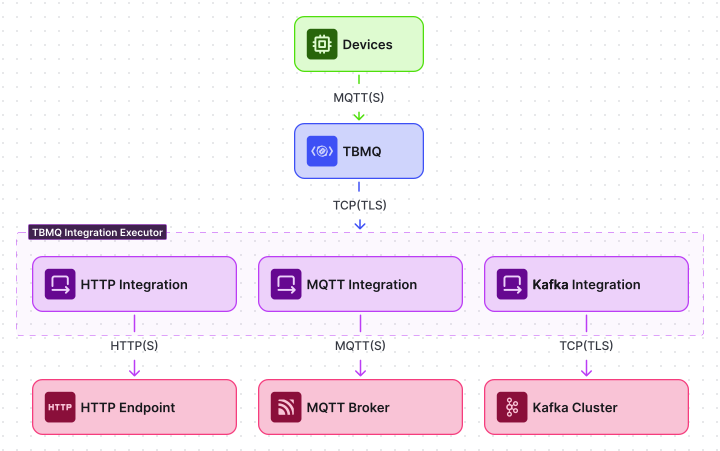
Section titled “High-level design”At a high level, the integration flow in TBMQ works as follows:
- MQTT clients connect to TBMQ and publish messages.
- When a message matches an integration topic filter (MQTT subscription), TBMQ forwards the message to the TBMQ Integration Executor via Kafka.
- The Integration Executor receives the message, processes it, and forwards it to the configured external system:
- An HTTP endpoint over HTTP or HTTPS.
- Another MQTT broker over MQTT or MQTTS.
- A Kafka broker using the Kafka binary protocol over TCP or TLS.
Architecture
Section titled “Architecture”TBMQ Integration Executor
Section titled “TBMQ Integration Executor”TBMQ uses a dedicated microservice called TBMQ Integration Executor (TBMQ IE) to manage and run integrations.
Two service types are defined by the TB_SERVICE_TYPE environment variable:
tbmq— the core MQTT broker.tbmq-integration-executor— the integration execution service.
The Integration Executor listens for integration events and messages from TBMQ (via Kafka), processes them according to the integration configuration, and forwards the data to the external system. Multiple Integration Executor instances can be deployed within a TBMQ cluster for scalability and fault isolation.
Why not embedded in TBMQ?
Integration logic is intentionally kept separate from the broker:
- Isolation — failures or slow responses from external systems do not affect MQTT message processing.
- Scalability —
tbmq-ieinstances can be scaled independently. - Resilience — each Integration Executor can restart or fail without interrupting core MQTT services.
- Extensibility — new integration types can be added to the executor without changing the broker.
- Separation of concerns — the broker handles MQTT protocol logic; the executor handles data delivery.
Integration entity
Section titled “Integration entity”Integration entities are stored in TBMQ’s PostgreSQL database and are used for management via the Web UI and REST API. Each integration entity includes:
- Type — HTTP, Kafka, or MQTT.
- Name — a human-readable name.
- Enabled — whether the integration is active.
- Status — current state:
Disabled— not active.Active— running and processing messages.Failed— encountered a connection failure.Pending— waiting for validation and activation.
- Configuration — connection details and parameters for the external system.
- Topic filters — MQTT-based subscriptions that trigger the integration when a matching message is received.
Multiple integrations with different types, topic filters, and targets can be configured and managed independently.
Internal communication
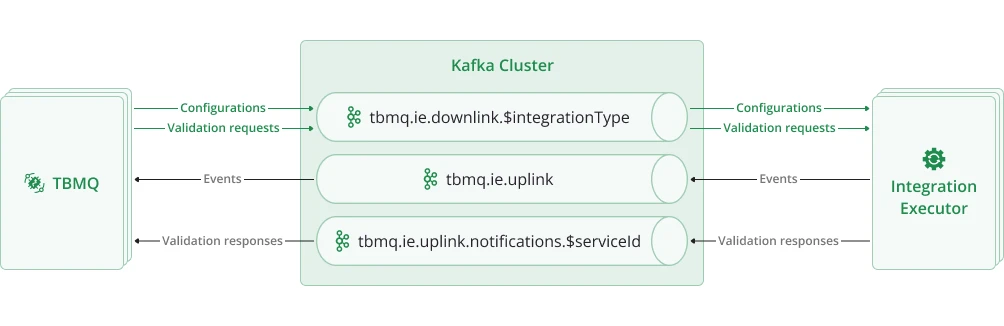
Section titled “Internal communication”TBMQ and its Integration Executor microservices communicate asynchronously over Kafka using dedicated topics:
| Topic | Purpose |
|---|---|
tbmq.ie.downlink.$integrationType | Compact topic for delivering integration configurations and validation requests from TBMQ to IE. |
tbmq.ie.uplink | Sends lifecycle events, statistics, and errors from IE back to TBMQ. |
tbmq.ie.uplink.notifications.$serviceId | Routes validation responses to the correct TBMQ node. |
tbmq.msg.ie.$integrationId | Per-integration topic for forwarding MQTT messages from TBMQ to IE. |
Downlink topics
Section titled “Downlink topics”TBMQ uses Kafka compact topics for downlink communication, one per integration type:
tbmq.ie.downlink.httptbmq.ie.downlink.mqtttbmq.ie.downlink.kafka
These topics deliver integration configuration events (create, update, delete) and trigger connection validation requests.
Kafka’s log compaction keeps only the most recent configuration per integration ID. On startup, a tbmq-ie instance enters restoration mode:
- Seeks to the beginning of the assigned topic partitions.
- Restores the latest state of all relevant integrations from compacted records.
- Skips all validation requests since they were already processed in the past.
- Once the end of the partition is reached, transitions to real-time mode for normal operation.
Integrations are only initialized after their latest configurations are fully restored from Kafka.
In real-time mode, new integration events are handled immediately and validation requests are processed on the fly.
On shutdown or partition revocation, the tbmq-ie instance stops the affected integrations and cleans up underlying resources such as protocol clients and connections.
This approach ensures:
- Resilience — full recovery after restarts without requiring external configuration stores.
- Consistency — always works with the latest valid configuration, avoiding stale or conflicting states.
- Scalability — stateless service design with all configuration state persisted in Kafka.
- Reduced load — only changed configurations are written, eliminating the need to resend the full configuration set repeatedly.
Separate downlink topics enable executor specialization via TB_SERVICE_INTEGRATIONS_SUPPORTED and TB_SERVICE_INTEGRATIONS_EXCLUDED environment variables. This design provides the following benefits:
- Targeted consumption — executors subscribe only to topics they are configured to handle.
- Improved isolation — different integration types have different configuration payloads and validation logic; dedicated topics ensure only relevant messages are received.
- Operational simplicity — easier to debug and monitor traffic per integration type.
- Flexible scaling — each topic can be tuned individually (e.g., partitions, retention) based on the load characteristics of each integration type.
Uplink topics
Section titled “Uplink topics”tbmq.ie.uplink — Integration Executors send lifecycle events, statistics, and error reports back to TBMQ via this topic.
All messages are stored as Event entities in the database for diagnostics and administrative visibility.
tbmq.ie.uplink.notifications.$serviceId — node-specific topics for direct replies to specific TBMQ nodes, such as responses to “Check Connection” requests and validation results.
This mechanism ensures that responses are routed to the correct instance in clustered environments and maintains accurate request-response correlation.
Message processing
Section titled “Message processing”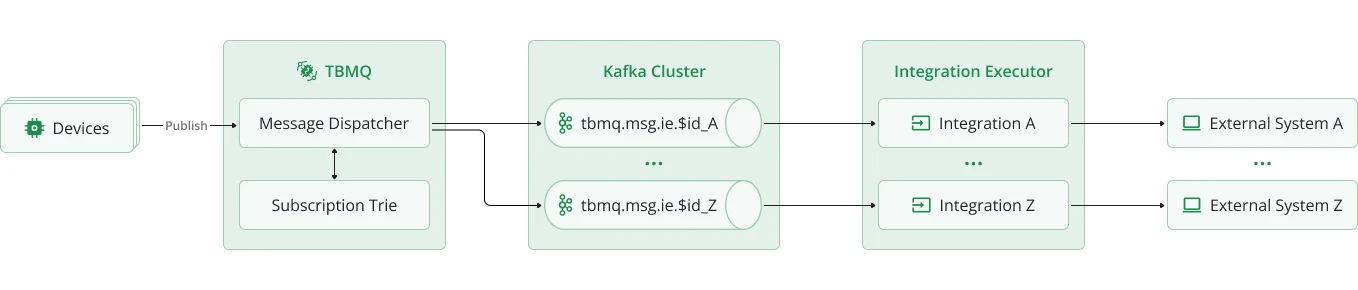
TBMQ uses a dedicated Kafka topic per integration (tbmq.msg.ie.$integrationId) to deliver MQTT messages to the Integration Executor.
When an MQTT client publishes a message, TBMQ checks the Subscription Trie for matching integration topic filters. If a match is found, the message is serialized and published to that integration’s Kafka topic. The Integration Executor consumes it and forwards it to the configured external system.
This decoupled flow means the broker never waits for external responses, preserving low-latency MQTT performance even when external systems are slow or unavailable.
Each integration has its own Kafka topic, which enables full isolation of message flow. Messages for different integrations are processed independently, in separate threads — one Kafka consumer per integration — allowing parallel execution and fine-grained error control. Kafka’s retention policies and buffering capabilities provide additional resilience in high-load or temporary-failure scenarios.
This design provides the following benefits:
- High throughput and non-blocking broker performance.
- Full isolation of message flow per integration.
- Fine-grained retry, backpressure, and error handling per integration.
Disabled integrations and cleanup
Section titled “Disabled integrations and cleanup”Even when an integration is disabled, TBMQ continues publishing matching messages to its Kafka topic, ensuring no message loss when the integration is re-enabled.
To avoid unused topics consuming storage indefinitely, TBMQ automatically deletes the Kafka topic for integrations that remain disabled beyond a configurable TTL. The topic is recreated automatically when the integration is re-enabled.
| Environment variable | Default | Description |
|---|---|---|
INTEGRATIONS_CLEANUP_PERIOD_SEC | 10800 | How often the cleanup task runs (seconds). Default: 3 hours. |
INTEGRATIONS_CLEANUP_TTL_SEC | 604800 | Inactivity TTL before topic deletion (seconds). Default: 1 week. |
Kafka topic retention settings can be customized to fine-tune storage limits and control how long messages are retained per topic.
Integration lifecycle
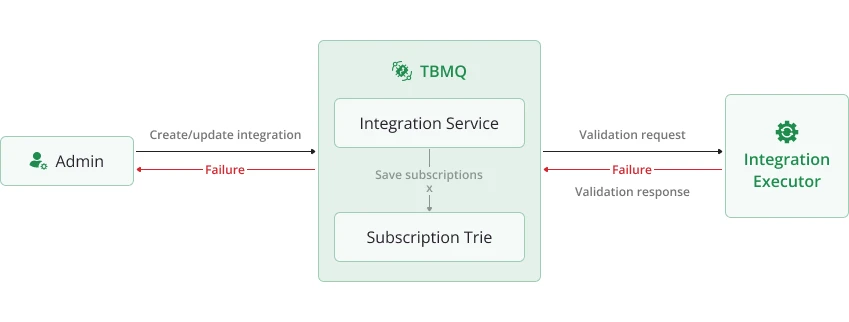
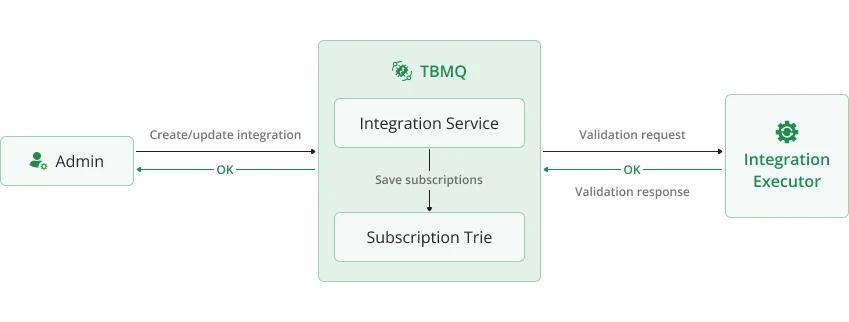
Section titled “Integration lifecycle”When a create or update request is received, TBMQ sends a validation request to the Integration Executor. The IE validates the configuration and responds before the integration is saved.
The validation can result in one of three outcomes:
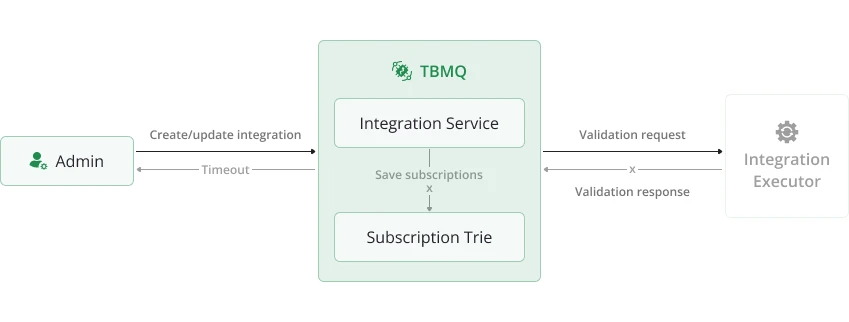
- Timeout — the Integration Executor is not running, so the broker waits until a timeout occurs. The integration is not saved.
- Failure — the Integration Executor is running, but the configuration is invalid. The integration is not saved.
- Success — the configuration is valid. The integration entity is saved in the database, subscriptions are added to the Subscription Trie, and the configuration event is sent to IE.
You can manually test connectivity to the external system at any time using the Check Connection button in the UI or via the REST API.
Error handling and retry
Section titled “Error handling and retry”When a message fails to be processed, the Integration Executor handles it based on the configured acknowledgment strategy:
| Environment variable | Default | Description |
|---|---|---|
TB_IE_MSG_POLL_INTERVAL | 1000 | Poll interval for tbmq.msg.ie topics (ms). |
TB_IE_MSG_PACK_PROCESSING_TIMEOUT | 30000 | Processing timeout per message batch (ms). |
TB_IE_MSG_ACK_STRATEGY_TYPE | SKIP_ALL | Strategy: SKIP_ALL or RETRY_ALL. |
TB_IE_MSG_ACK_STRATEGY_RETRIES | 5 | Number of retries (0 = unlimited). Used with RETRY_ALL. |
TB_IE_MSG_ACK_STRATEGY_PAUSE_BETWEEN_RETRIES | 1 | Pause between retries (seconds). |
SKIP_ALL(default) — failed messages are logged and skipped. High throughput, no delivery guarantee to external systems.RETRY_ALL— failed messages are retried up to the configured limit with a pause between attempts. Setretriesto0for unlimited retries.
Each batch of messages has a processing timeout (TB_IE_MSG_PACK_PROCESSING_TIMEOUT) to prevent long-running tasks from blocking the consumer thread.
This ensures system responsiveness even under high load or with slow external targets.
Hot reinitialization
Section titled “Hot reinitialization”If an integration enters the FAILED state, the Integration Executor periodically attempts to reinitialize it:
| Environment variable | Default | Description |
|---|---|---|
INTEGRATIONS_REINIT_ENABLED | true | Enable/disable hot reinitialization. |
INTEGRATIONS_REINIT_FREQUENCY_MS | 300000 | Check interval (ms). Default: 5 minutes. |
If the underlying issue is resolved (e.g., the remote system becomes reachable), the integration is restored automatically without manual intervention.
Integration metrics
Section titled “Integration metrics”The Integration Executor collects and reports detailed metrics that give visibility into the health, performance, and behavior of all configured integrations. These metrics are logged periodically and can be exported to external monitoring systems like Prometheus or Grafana for alerting, dashboards, and historical analysis.
Current integration activity
Section titled “Current integration activity”Per-integration-type counters for the current reporting interval:
IntegrationStatisticsKey(integrationStatisticsMetricName=START, success=true, integrationType=HTTP) = [0]START— number of times an integration startup was attempted.STOP— number of times integration shutdown was triggered.MSGS_UPLINK— number of messages forwarded from the executor to external systems.success=true | false— whether the attempt succeeded or failed.integrationType— the type of integration (e.g., HTTP, MQTT, Kafka).
Integration state summary
Section titled “Integration state summary”Tracks the current state of all integrations managed by the executor:
START, success=true, integrationType=MQTT = [1]success=true— number of integrations inSTARTEDstate.success=false— number of integrations inFAILEDstate.
These values are updated whenever any integration changes state and help administrators understand the real-time health of all running integrations.
Integration uplink queue stats
Section titled “Integration uplink queue stats”Summarizes the state of the uplink Kafka topic used by the executor to send error, statistics, and lifecycle events back to TBMQ:
queueSize = [0]totalMsgs = [1]successfulMsgs = [1]failedMsgs = [0]queueSize— messages currently waiting in the uplink Kafka queue.totalMsgs— total messages sent to the uplink topic.successfulMsgs— messages published successfully.failedMsgs— messages that failed to publish.
Message processing stats
Section titled “Message processing stats”Per-integration-instance metrics that reflect how messages are being processed and delivered to external systems:
[integrationProcessor][f6e82897-dd18-4c6f-ac31-5f19ce75e2db]totalMsgs = [38]successfulMsgs = [38]tmpTimeout = [0]tmpFailed = [0]timeoutMsgs = [0]failedMsgs = [0]successfulIterations = [38]failedIterations = [0]totalMsgs— total messages received for processing.successfulMsgs— messages successfully delivered.tmpTimeout— messages that exceeded the processing timeout but will be retried.tmpFailed— messages that failed but will be retried.timeoutMsgs— messages that exceeded the processing timeout and will not be retried.failedMsgs— messages that failed permanently after retry attempts.successfulIterations— successful message batch executions.failedIterations— message batch executions that resulted in one or more processing failures.
Scalability and fault tolerance
Section titled “Scalability and fault tolerance”- Executor scaling — multiple
tbmq-ieinstances can run in parallel; Kafka distributes integration messages across executors automatically. - Fault isolation — issues in external systems affect only the Integration Executor; the TBMQ broker continues operating normally.
- Backpressure management — Kafka buffers messages when executors are slow or overloaded.
- Resilience — executor instances restart independently; integrations are restored from compacted configuration topics.
Supported integration types
Section titled “Supported integration types”- HTTP Integration — forward MQTT messages to REST APIs or webhooks via HTTP(S).
- MQTT Integration — bridge messages to external MQTT brokers for cross-broker communication.
- Kafka Integration — stream messages into Kafka topics for real-time processing.
Roadmap
Section titled “Roadmap”Upcoming integration capabilities:
- New outbound integration types — Redis, PostgreSQL, RabbitMQ, and more.
- Inbound (source) integrations — receive messages from external systems (e.g., Kafka consumers, MQTT subscribers).
- Message transformation and filtering — dynamic processing before forwarding to external targets.
Was this helpful?