Device connectivity
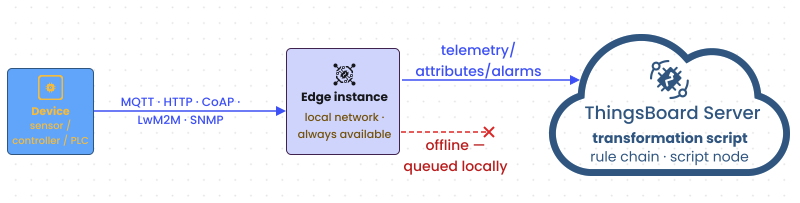
Devices connect directly to ThingsBoard Edge, not to the cloud server. Edge exposes the same transport protocols as the ThingsBoard server — MQTT, HTTP, CoAP, LwM2M, and SNMP — on the local network. Devices communicate with Edge even when the internet connection is unavailable.
Supported protocols and ports
Section titled “Supported protocols and ports”| Protocol | Default port | TLS/DTLS port |
|---|---|---|
| MQTT | 1883 | 8883 |
| HTTP | 8080 | 443 |
| CoAP | 5683 (UDP) | 5684 (DTLS) |
| LwM2M | 5685 (UDP), 5687 (UDP, Bootstrap) | 5686 (DTLS), 5688 (DTLS, Bootstrap) |
| SNMP | 161 (UDP) | — |
Use the hostname or IP address of your Edge instance in place of $EDGE_HOST in all examples below.
Get device credentials
Section titled “Get device credentials”Each device authenticates with an access token or an X.509 certificate. Access tokens are the simplest option and work with all three protocols.
-
Log in to your Edge instance and go to Entities → Devices.
-
Open the device and click Copy access token on the Device details page.
Store the token as an environment variable for convenience:
export ACCESS_TOKEN=your_device_tokenexport EDGE_HOST=your_edge_host_or_ipSend telemetry to verify connectivity
Section titled “Send telemetry to verify connectivity”Use the protocol your device supports to send a test telemetry message.
mosquitto_pub -d \ -h $EDGE_HOST \ -t "v1/devices/me/telemetry" \ -u "$ACCESS_TOKEN" \ -m '{"temperature": 25}'curl -v -X POST \ "http://$EDGE_HOST:8080/api/v1/$ACCESS_TOKEN/telemetry" \ --header "Content-Type: application/json" \ --data '{"temperature": 25}'coap post coap://$EDGE_HOST/api/v1/$ACCESS_TOKEN/telemetry \ --payload '{"temperature": 25}'After sending, go to Entities → Devices, open the device, and select the Latest telemetry tab. The temperature key appears with the value you sent.
Subscribe to receive commands
Section titled “Subscribe to receive commands”Devices that need to receive RPC commands or shared attribute updates must subscribe to the appropriate topics or long-poll the HTTP endpoint. For the full API reference, see:
TLS connections
Section titled “TLS connections”X.509 certificates
Section titled “X.509 certificates”For production deployments where access tokens are not acceptable, ThingsBoard supports X.509 certificate-based authentication. Provision the device certificate via Device credentials on the Device details page.
For the full certificate provisioning reference, see Mutual TLS for MQTT.
Was this helpful?