Alarms
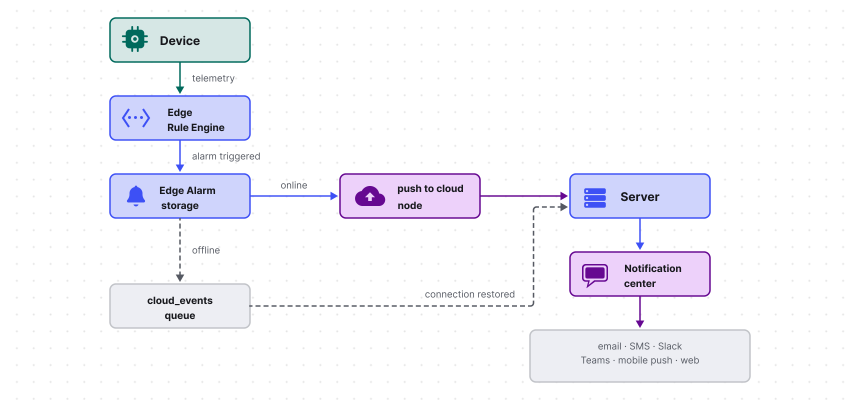
An alarm in ThingsBoard Edge is triggered and managed locally by the Rule Engine, with no server connection required. Alarms are stored in the local database and can be viewed, acknowledged, and cleared from the Edge UI at any time: from the entity-level Alarms tab or from the top-level Alarms section in the left navigation menu, which shows all alarms across all entities. They can also be synchronized bidirectionally with the server: alarms raised on Edge can be pushed to the server, and alarms created on the server can be pushed to Edge.
The alarm model on Edge is identical to the server: each alarm tracks an originator, type, severity, and lifecycle status. An alarm is unique per originator and type. When the same condition re-triggers on an active alarm, the existing alarm is updated rather than duplicated. For details on alarm properties, severity levels, and the four-state lifecycle (active/cleared × acknowledged/unacknowledged), see Alarms.
Creating alarms
Section titled “Creating alarms”There are two ways to configure alarm rules on Edge:
- Device profile alarm rules: The most common approach. Define threshold conditions directly in the device profile under the Alarm rules tab. No rule chain customization is required. For details, see Alarm rules.
- Rule engine nodes: For more complex logic, like multi-condition alarms, cross-entity comparisons, or custom escalation flows, use the create alarm and clear alarm rule nodes in the rule chain.
Alarm synchronization
Section titled “Alarm synchronization”Alarms are synchronized the same way as telemetry, through the push to cloud and push to edge rule nodes. Each alarm event travels as a separate message carrying the full alarm payload: originator, type, severity, and status.
Acknowledgment and clear operations follow the same path. When a user acknowledges or clears an alarm on one side, the action produces a message that the push node forwards to the other side, provided the corresponding relation is connected. Both sides converge to the same state once the message is delivered.
Offline behavior
Section titled “Offline behavior”When Edge is disconnected from the server, the Rule Engine continues to trigger and manage alarms locally without interruption. Alarm events that pass through the push to cloud node accumulate in the cloud events queue and are sent to the server in order once the connection is restored, preserving the alarm timeline.
Notifications
Section titled “Notifications”ThingsBoard notifies users of alarm events through the Notification center on the server. Notification rules define which alarm events trigger a notification, who receives it, and through which delivery channels: web, email, SMS, Slack, Microsoft Teams, or mobile push.
Alarms raised on Edge are evaluated by the server’s notification rules once they are synchronized. No Edge configuration is needed — syncing the alarm to the server is sufficient for the notification rules to evaluate and dispatch the notification.
For details on configuring notification rules and delivery channels, see Notification center.
Was this helpful?