RPC and device commands
Remote Procedure Calls (RPC) let you send commands to a device and, optionally, receive a response. ThingsBoard Edge supports the same two RPC directions as the server: server-side RPC (platform sends a command to the device) and client-side RPC (device sends a request and waits for a response).
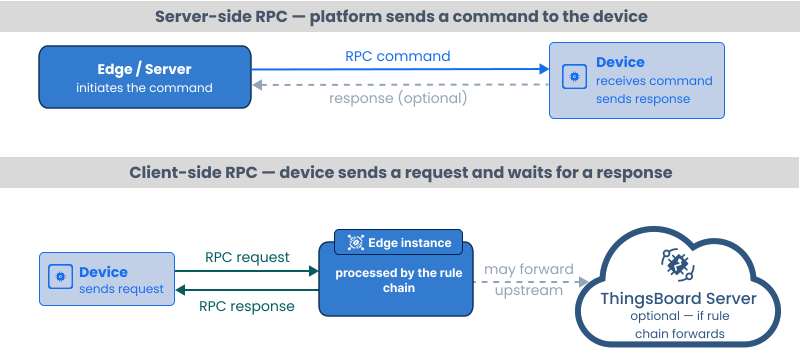
RPC calls are processed by the Edge rule engine. Server-side RPC reaches the device through the Edge transport layer (MQTT, HTTP, or CoAP). The device does not need a direct connection to the cloud server.
Server-side RPC
Section titled “Server-side RPC”Server-side RPC is divided into two subtypes:
- One-way: The platform sends a command and does not wait for a response. Use for fire-and-forget actions like toggling a relay or sending a configuration update.
- Two-way: The platform sends a command and waits for the device to respond within a configurable timeout. Use when the result of the action must be confirmed.
Send RPC from the Edge UI
Section titled “Send RPC from the Edge UI”-
Log in to your Edge instance and go to Entities → Devices.
-
Open the device and select the RPC tab.
-
Select One-way or Two-way, enter the Method name and Params JSON, and click Send RPC command (►).
The response appears in the Response field for two-way calls.
Send RPC from a rule chain
Section titled “Send RPC from a rule chain”Use the RPC call request action node to send an RPC command programmatically. Attach it to any rule chain that processes a message you want to convert into a device command.
The node sends the message as an RPC request to the device identified by the originator. Configure the method name and parameters as a transformation in a preceding script node if the values depend on the message content.
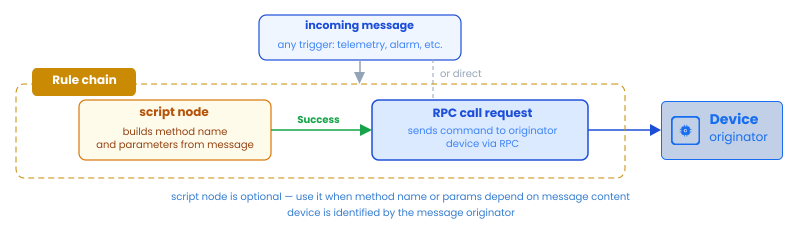
For the full rule node reference, see RPC call request.
Send RPC from a device API (protocol reference)
Section titled “Send RPC from a device API (protocol reference)”The device subscribes to an RPC topic or endpoint to receive commands sent from Edge or the server:
Subscribe to server-side RPC commands:
mosquitto_sub -d \ -h $EDGE_HOST \ -t "v1/devices/me/rpc/request/+" \ -u "$ACCESS_TOKEN"Respond to a two-way RPC command (replace {requestId} with the ID from the received message):
mosquitto_pub -d \ -h $EDGE_HOST \ -t "v1/devices/me/rpc/response/{requestId}" \ -u "$ACCESS_TOKEN" \ -m '{"result": "done"}'Poll for a pending server-side RPC command:
curl -v -X GET \ "http://$EDGE_HOST:8080/api/v1/$ACCESS_TOKEN/rpc?timeout=20000"Reply to a two-way command (replace {requestId} with the ID from the received payload):
curl -v -X POST \ "http://$EDGE_HOST:8080/api/v1/$ACCESS_TOKEN/rpc/{requestId}" \ --header "Content-Type: application/json" \ --data '{"result": "done"}'Subscribe to server-side RPC commands:
coap get -o coap://$EDGE_HOST/api/v1/$ACCESS_TOKEN/rpcClient-side RPC
Section titled “Client-side RPC”Client-side RPC lets the device send a request to Edge and receive a response. The device originates the call; the rule engine processes it and replies.
Typical use cases: requesting the current timestamp, fetching a configuration value stored on Edge, or delegating a decision to a third-party service via an external call node.
Process client-side RPC in a rule chain
Section titled “Process client-side RPC in a rule chain”When a device sends a client-side RPC request, Edge generates a message with type TO_SERVER_RPC_REQUEST. The requestId metadata field identifies the request. After processing, use the RPC call reply action node to send the response back to the device.
device RPC request │ ▼ (msg type: TO_SERVER_RPC_REQUEST) ┌──────────────┐ Success ┌────────────────┐ │ script node │──────────────▶│ RPC call reply │──▶ device │ (build reply)│ │ (send reply) │ └──────────────┘ └────────────────┘Example script that replies to a getCurrentTime request:
var response;if (msg.method === 'getCurrentTime') { response = new Date().getTime();} else { response = 'Unknown method: ' + msg.method;}return { msg: response, metadata: metadata, msgType: msgType };For the full rule node reference, see RPC call reply.
Send a client-side RPC from a device (MQTT)
Section titled “Send a client-side RPC from a device (MQTT)”mosquitto_pub -d \ -h $EDGE_HOST \ -t "v1/devices/me/rpc/request/1" \ -u "$ACCESS_TOKEN" \ -m '{"method": "getCurrentTime", "params": {}}'Subscribe on a separate terminal to receive the reply:
mosquitto_sub -d \ -h $EDGE_HOST \ -t "v1/devices/me/rpc/response/1" \ -u "$ACCESS_TOKEN"Persistent RPC
Section titled “Persistent RPC”By default, RPC calls are lightweight — they exist only in memory and expire after the timeout. If the device is offline or on a poor connection, the command is lost.
Persistent RPC stores the command in the database and retries it according to a configurable retry count and expiration time. Use persistent RPC when the device may be offline for extended periods.
For the full RPC API reference including persistent RPC fields and protocol-specific details, see:
Was this helpful?