Remote Integrations
Any ThingsBoard Integration can run remotely from the ThingsBoard Edge instance — either on the same machine or on a separate machine that has network access to the Edge. This guide walks through setting up a remote HTTP integration as a concrete example.

Prerequisites
Section titled “Prerequisites”- A running ThingsBoard Edge instance already connected to the Cloud server, with Tenant administrator access.
Configure ThingsBoard server
Section titled “Configure ThingsBoard server”Converter and integration templates are created on the Cloud instance. Log in as Tenant administrator.
Step 1. Create the uplink converter
Section titled “Step 1. Create the uplink converter”The uplink converter parses incoming device data into ThingsBoard telemetry and attributes.
-
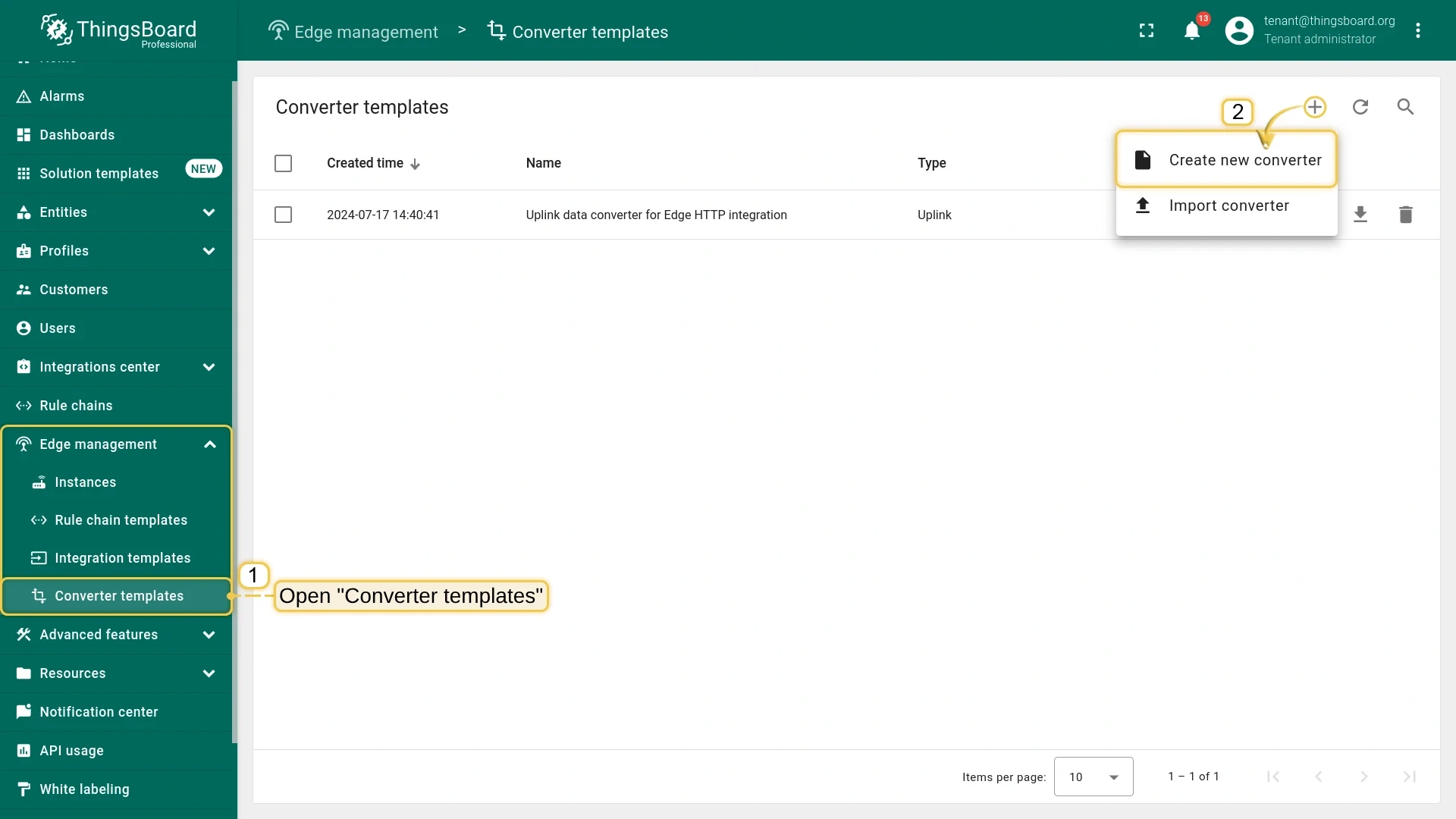
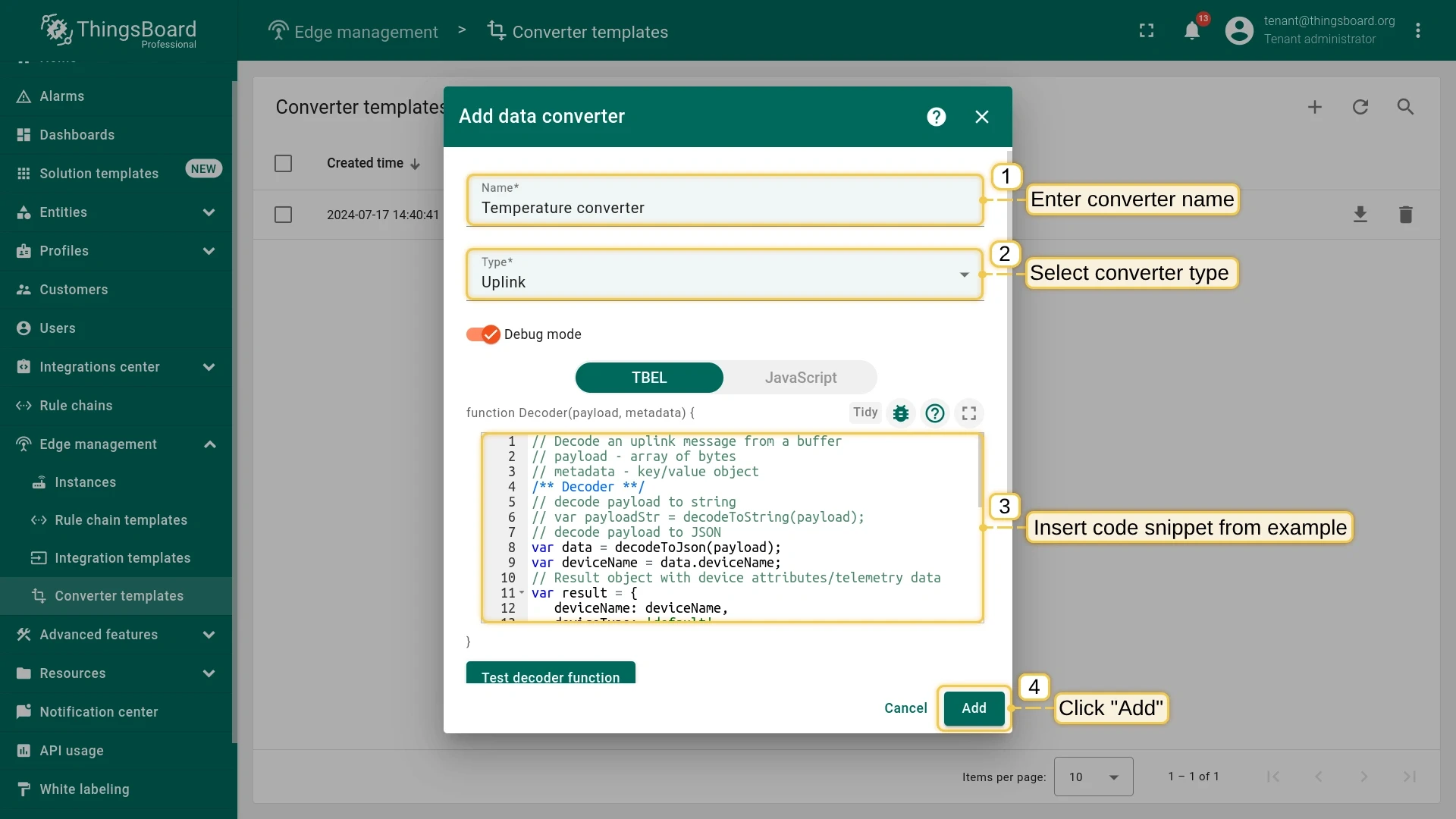
Go to Edge management > Converter templates and click +, then Create new converter. Set type to Uplink and enable Debug mode.
-
Paste the following decoder script into the function Decoder field, then click Add:
// decode payload to JSONvar data = decodeToJson(payload);var deviceName = data.deviceName;var result = {deviceName: deviceName,deviceType: 'default',attributes: {model: data.model,},telemetry: {temperature: data.temperature}};function decodeToString(payload) {return String.fromCharCode.apply(String, payload);}function decodeToJson(payload) {var str = decodeToString(payload);return JSON.parse(str);}return result;
Step 2. Create the remote integration template
Section titled “Step 2. Create the remote integration template”-
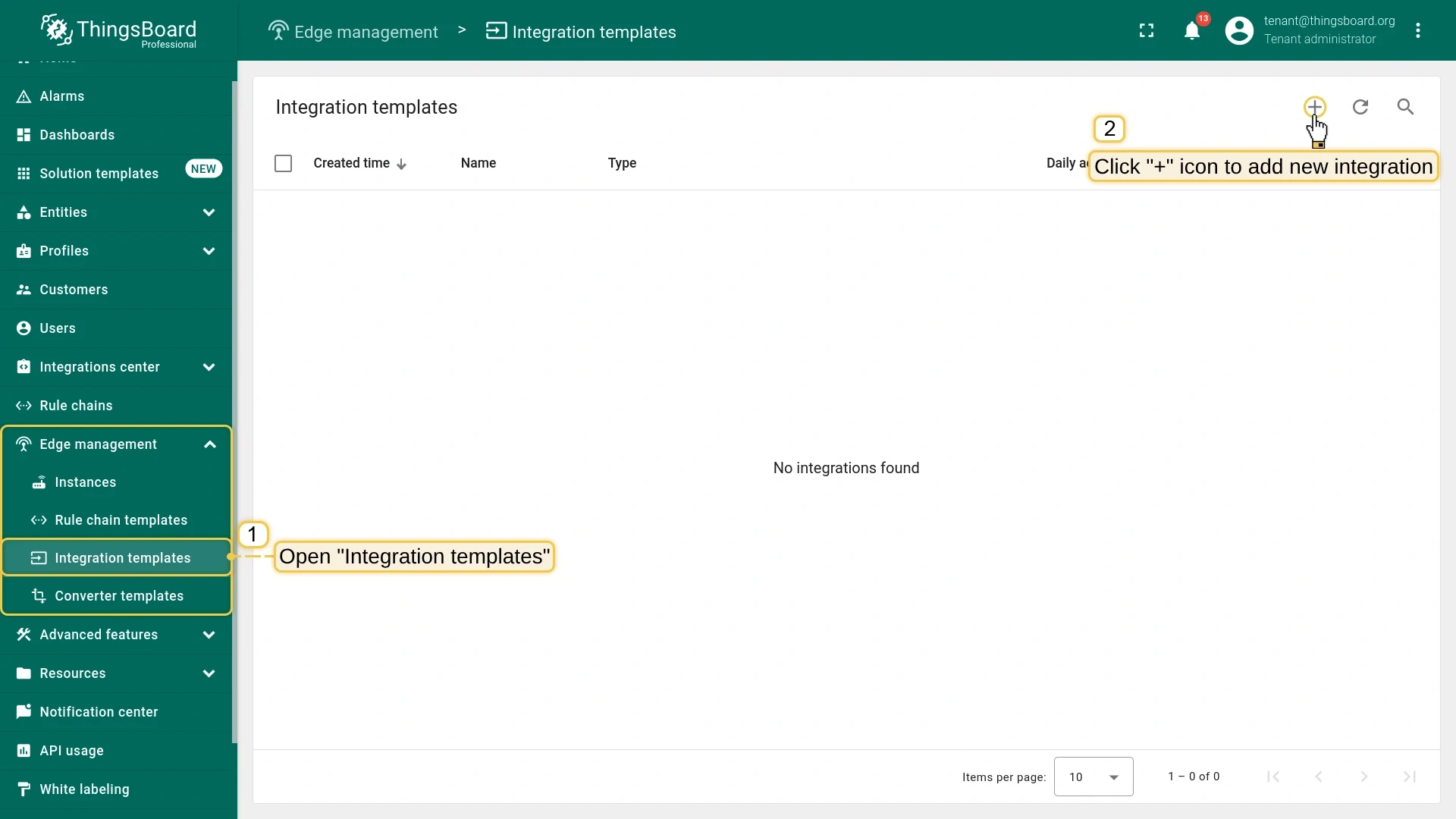
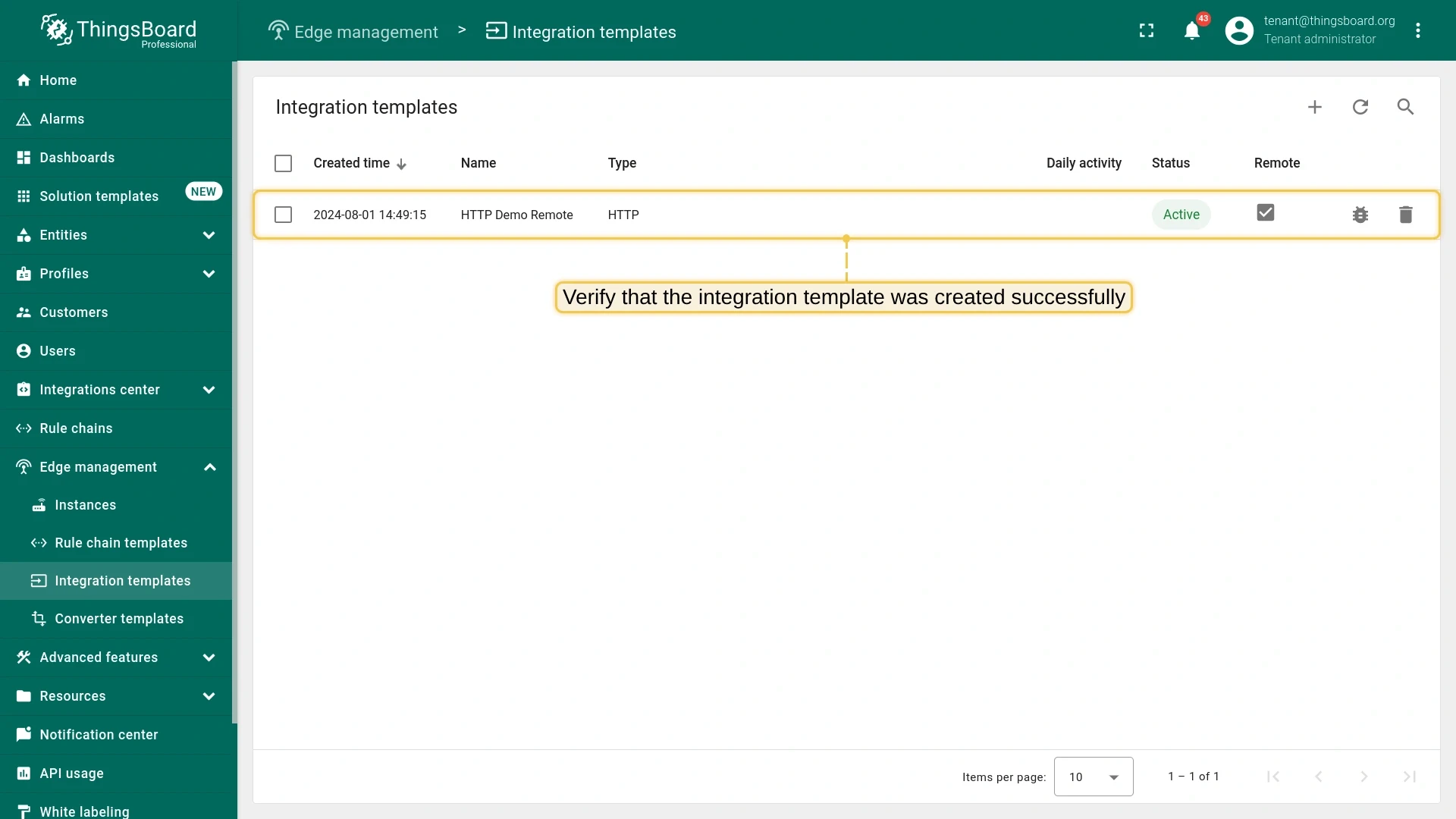
Go to Edge management > Integration templates and click +, then Create new integration.
-
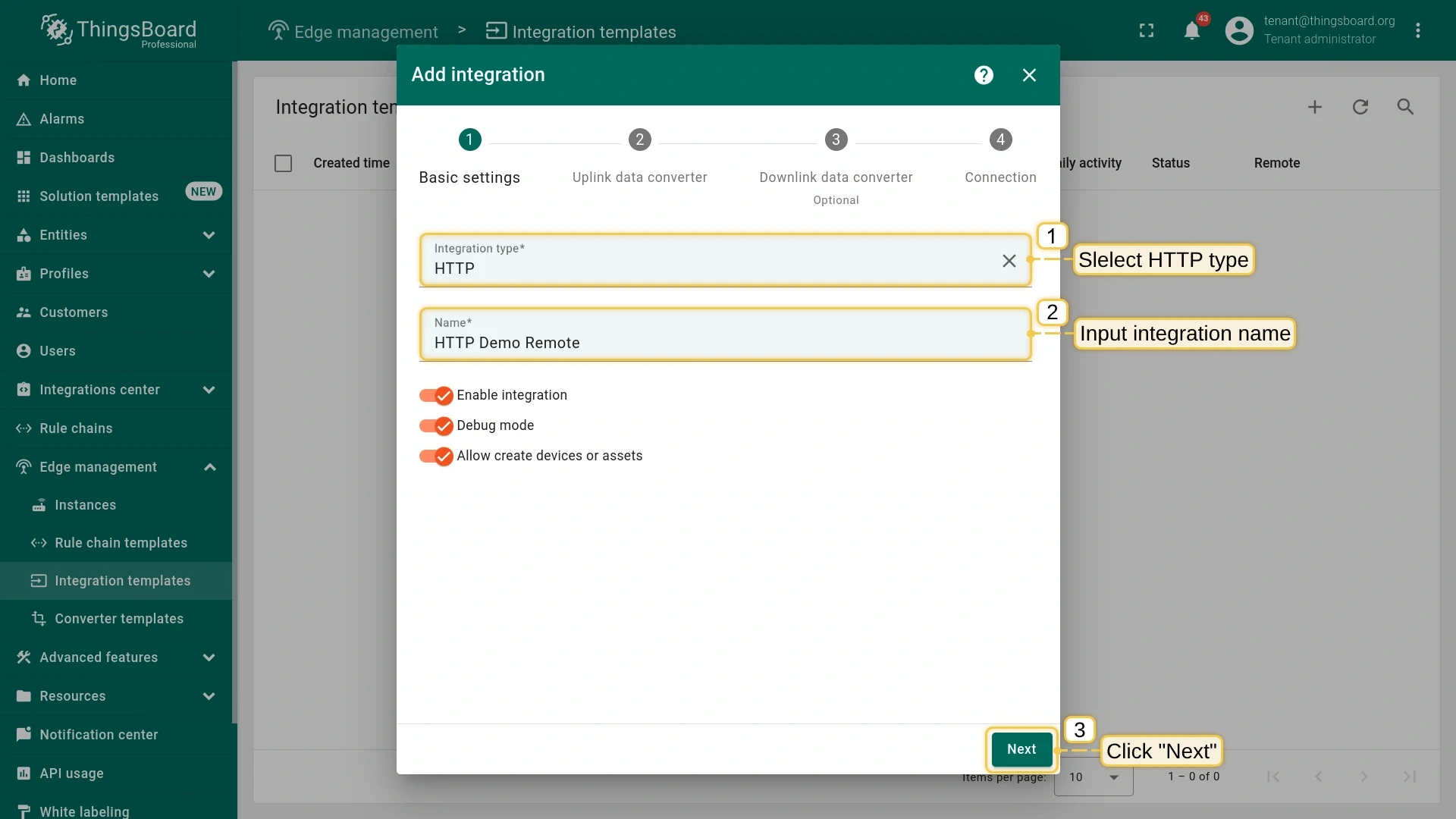
In Basic settings: set Integration type to HTTP and enter a name (e.g.
HTTP Demo Remote). Click Next. -
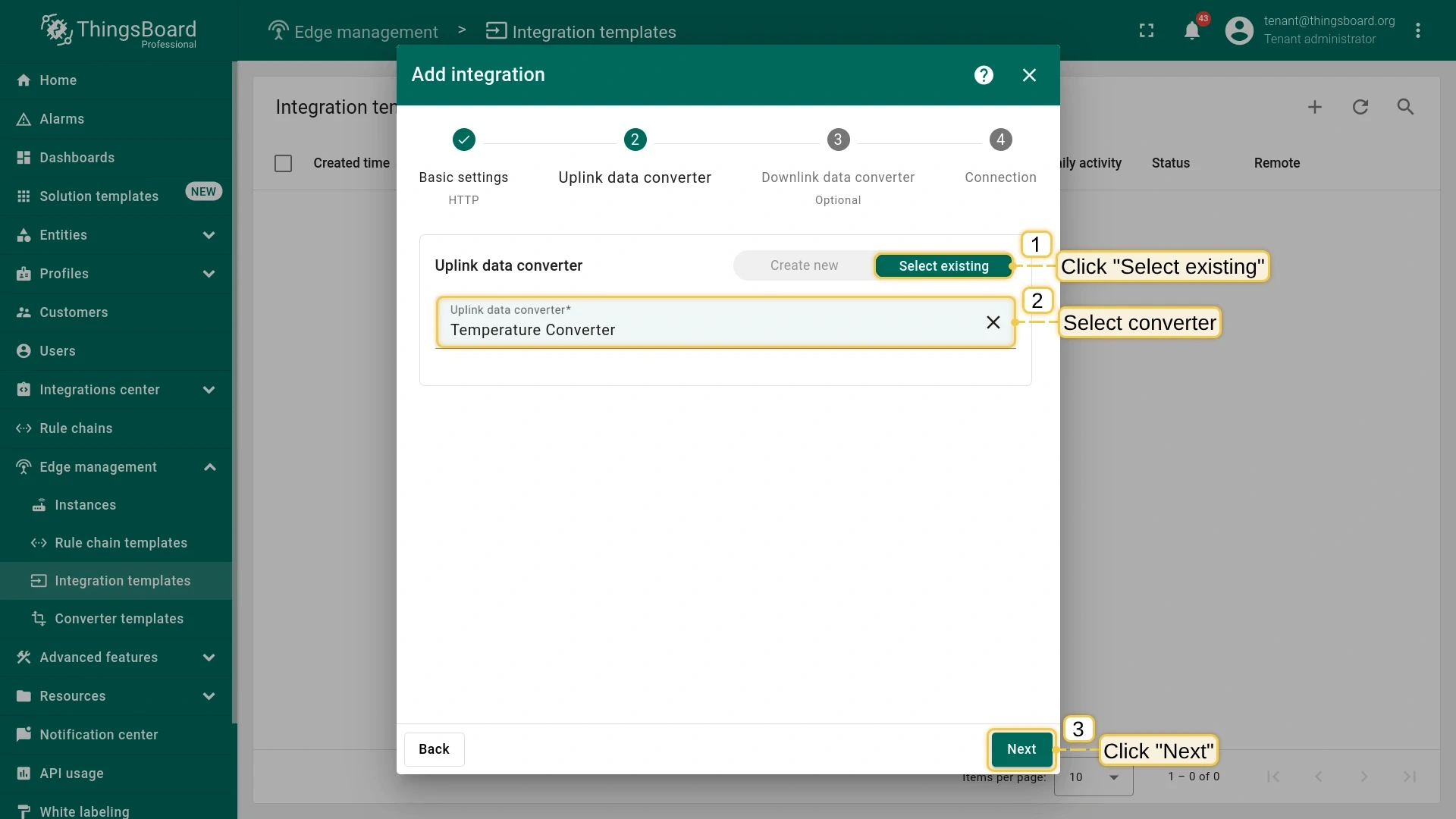
In Uplink data converter: select the Select existing tab and choose the converter created in Step 1. Click Next.
Alternatively, create a new converter inline.
-
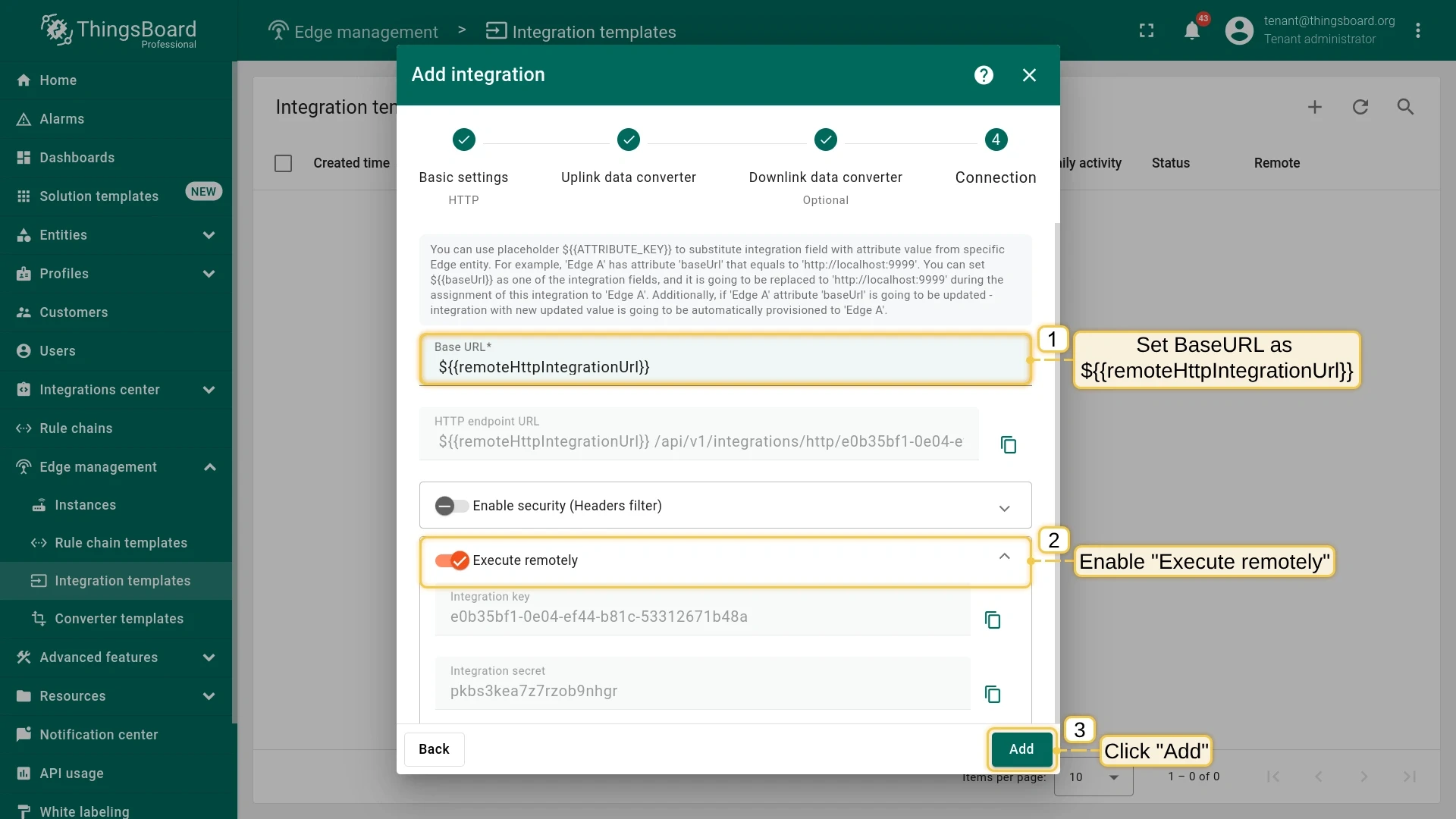
In Connection: set Base URL to
{{remoteHttpIntegrationUrl}}. Enable the Execute remotely toggle. Click Add.The
{{remoteHttpIntegrationUrl}}placeholder will be replaced by an Edge attribute value when the integration is assigned to the Edge.
Step 3. Save the integration credentials
Section titled “Step 3. Save the integration credentials”You will need the Integration key and Integration secret when configuring the remote service.
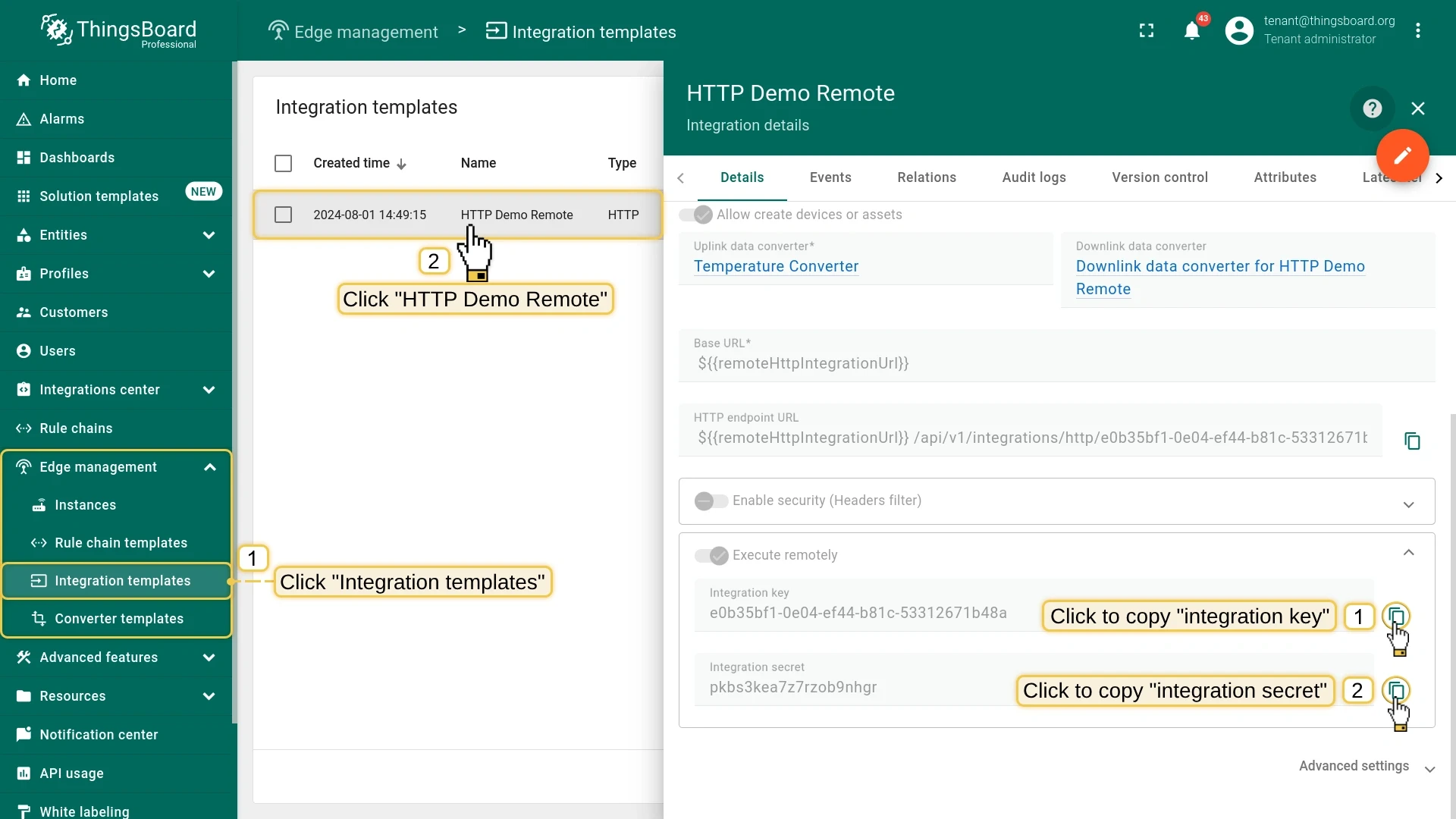
- Go to Edge management > Integration templates and open the integration you created.
- In the Execute remotely block, copy the Integration key and Integration secret.
Step 4. Assign the integration to Edge
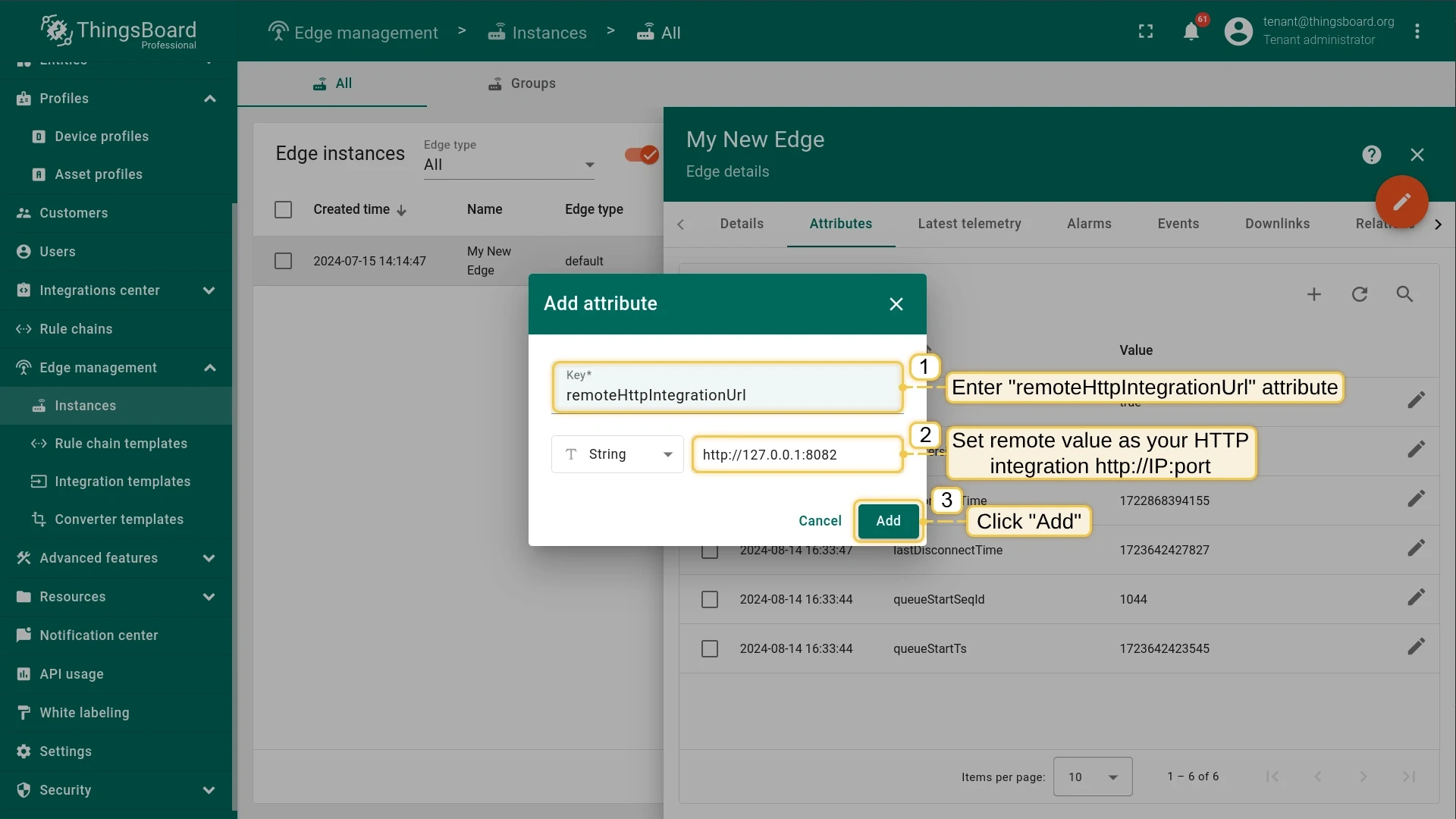
Section titled “Step 4. Assign the integration to Edge”Before assigning the integration, add the remoteHttpIntegrationUrl attribute to the Edge instance. This attribute provides the IP address and port of the machine where the remote HTTP integration service will run (default port: 8082).
-
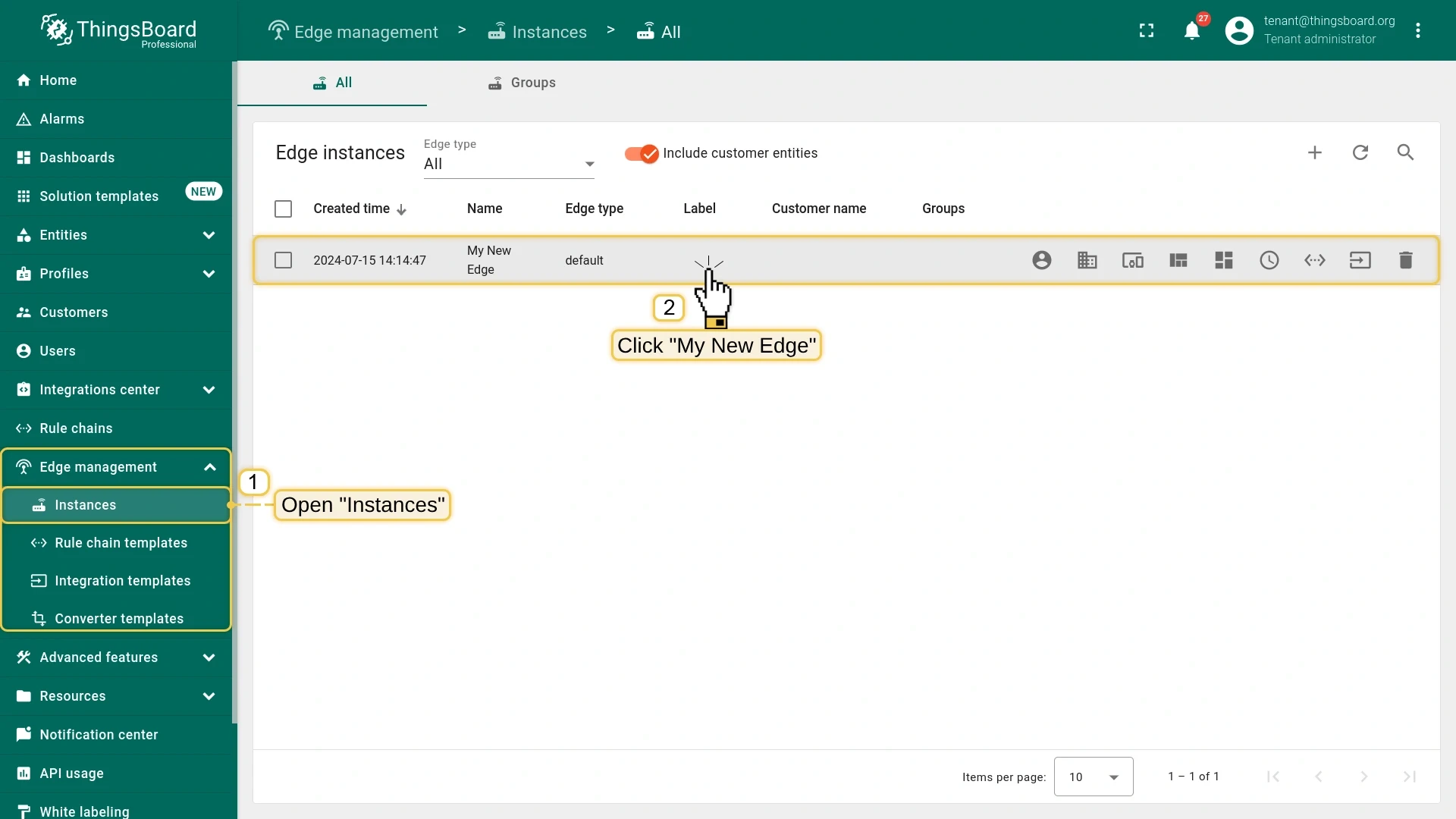
Go to Edge management > Instances and click the Edge instance.
-
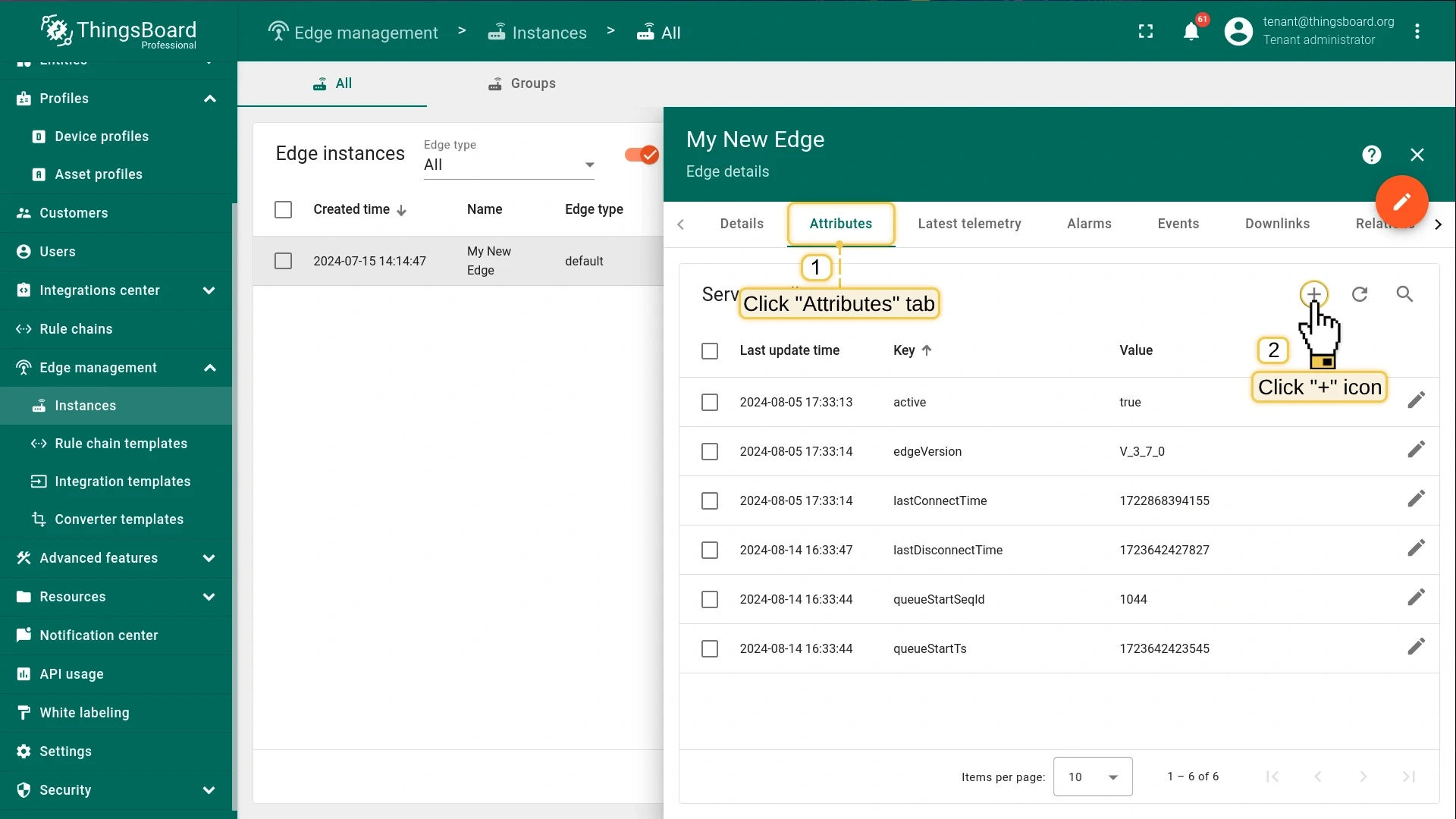
On the Edge details page, select the Attributes tab and click Add.
-
In the Add attribute dialog, enter
remoteHttpIntegrationUrlas the key andhttp://IP:8082(the address of your remote integration machine) as the value. Click Add. -
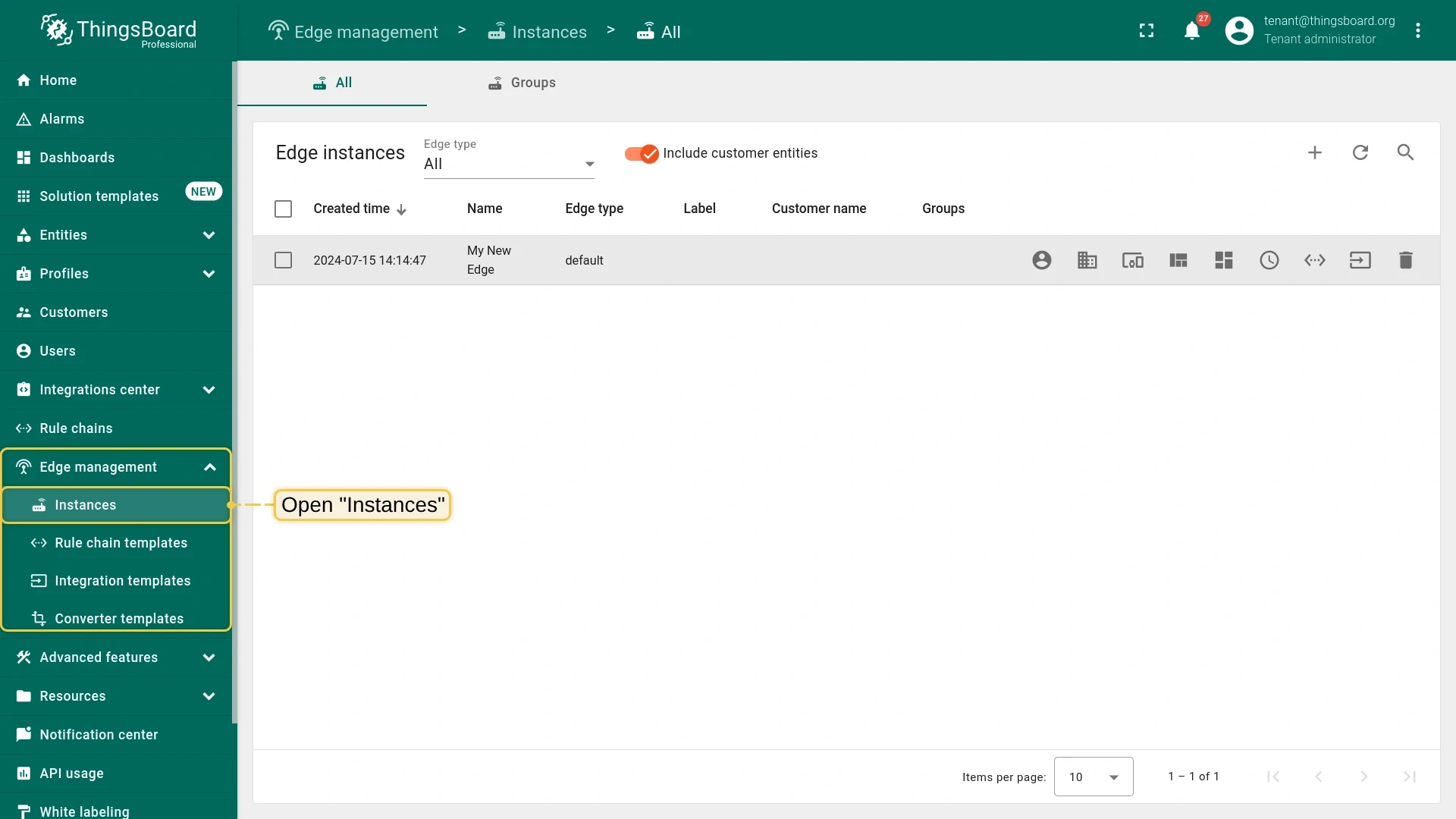
Close the Edge details page and return to the Instances section.
-
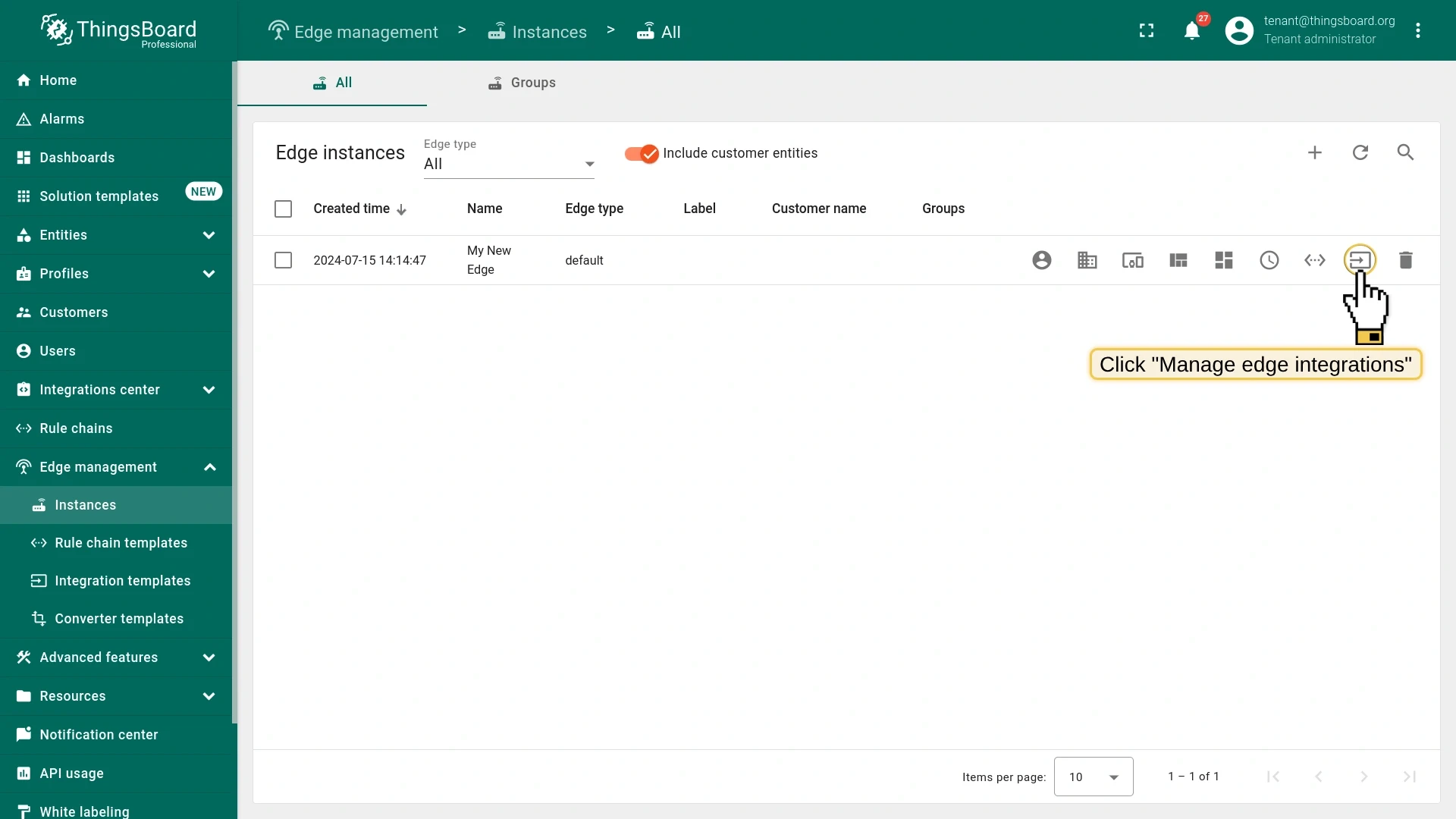
Click Manage edge integrations on the Edge row.
-
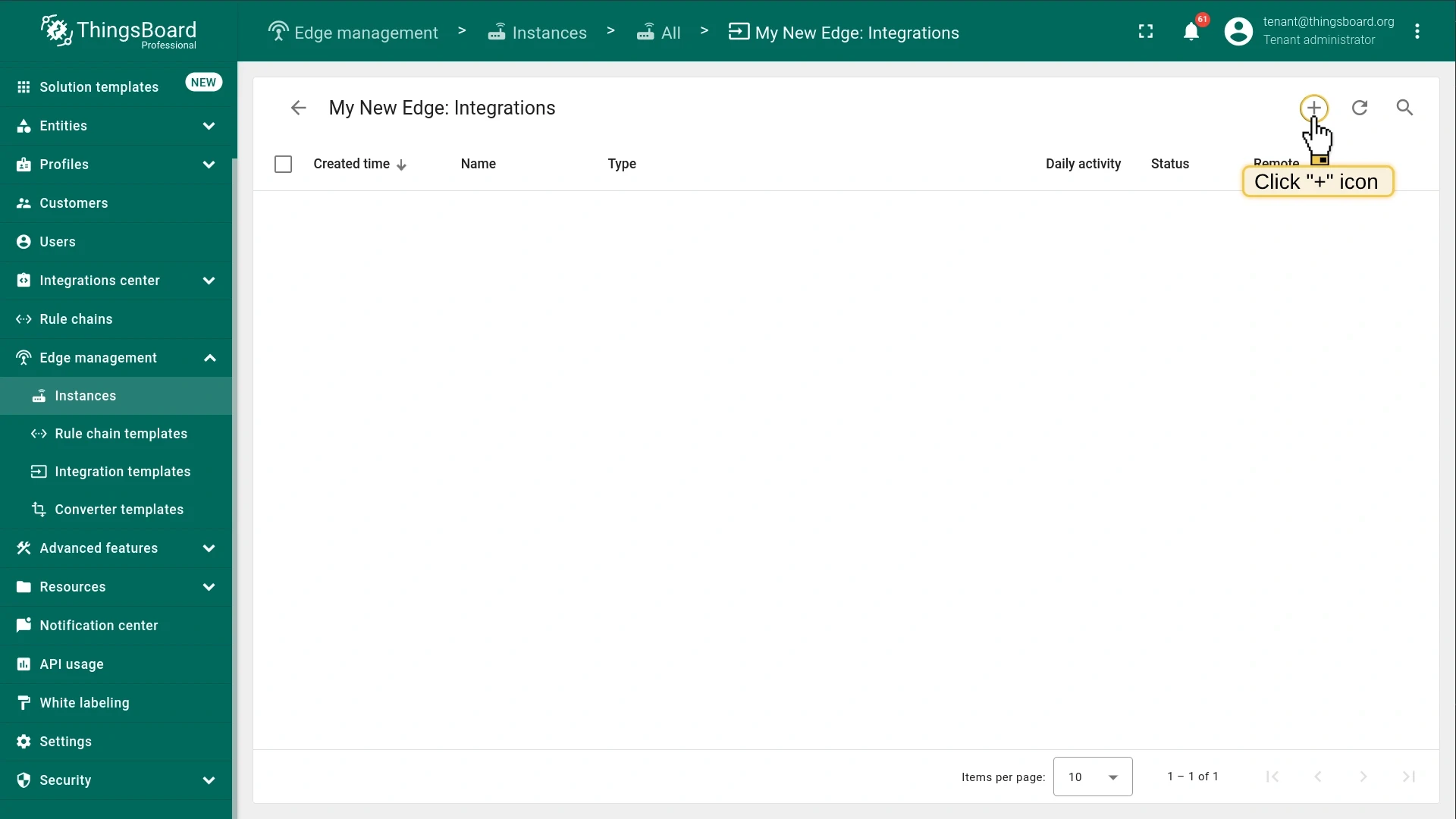
Click Assign to edge.
-
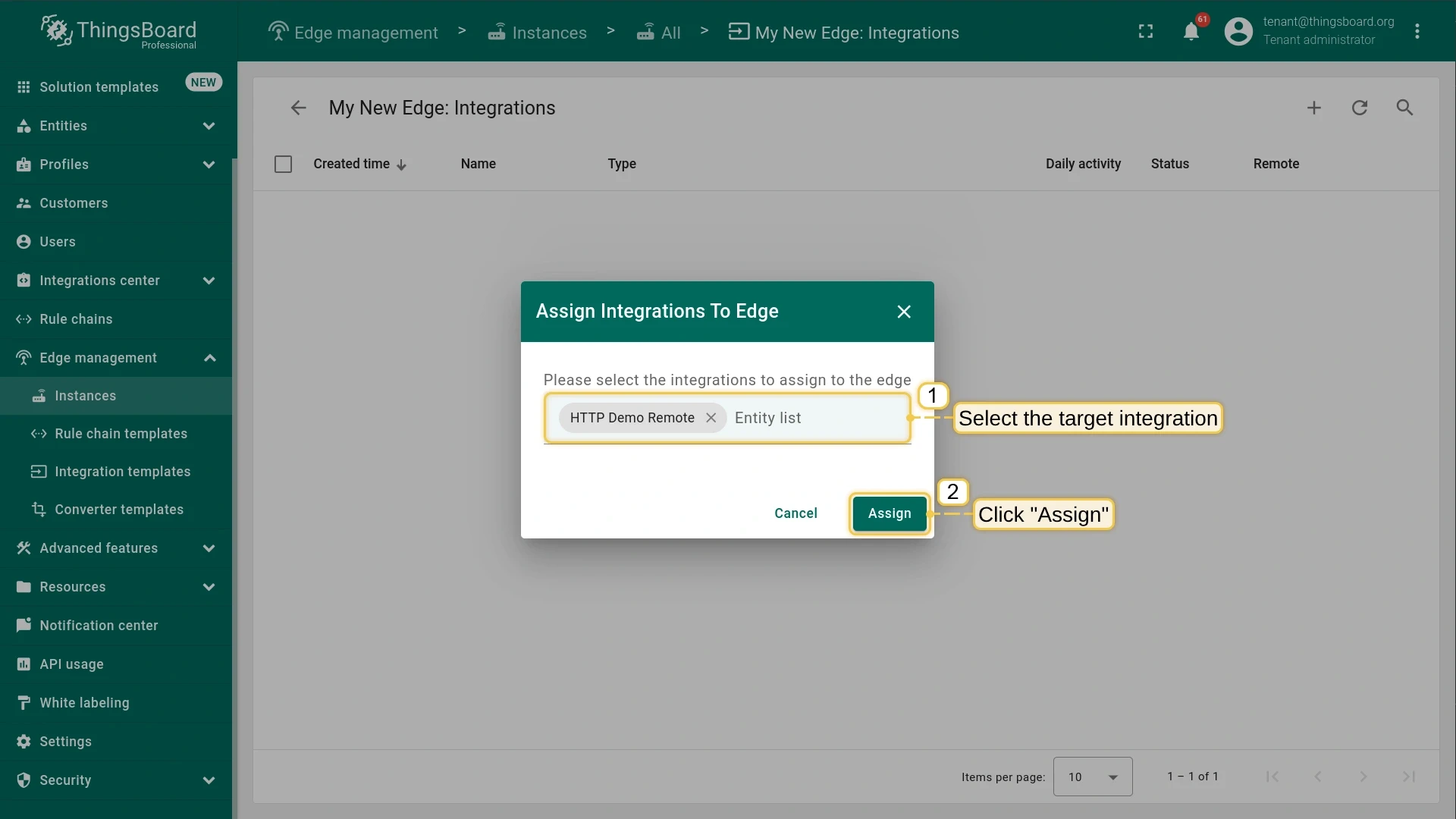
Select the HTTP integration from the drop-down and click Assign.
-
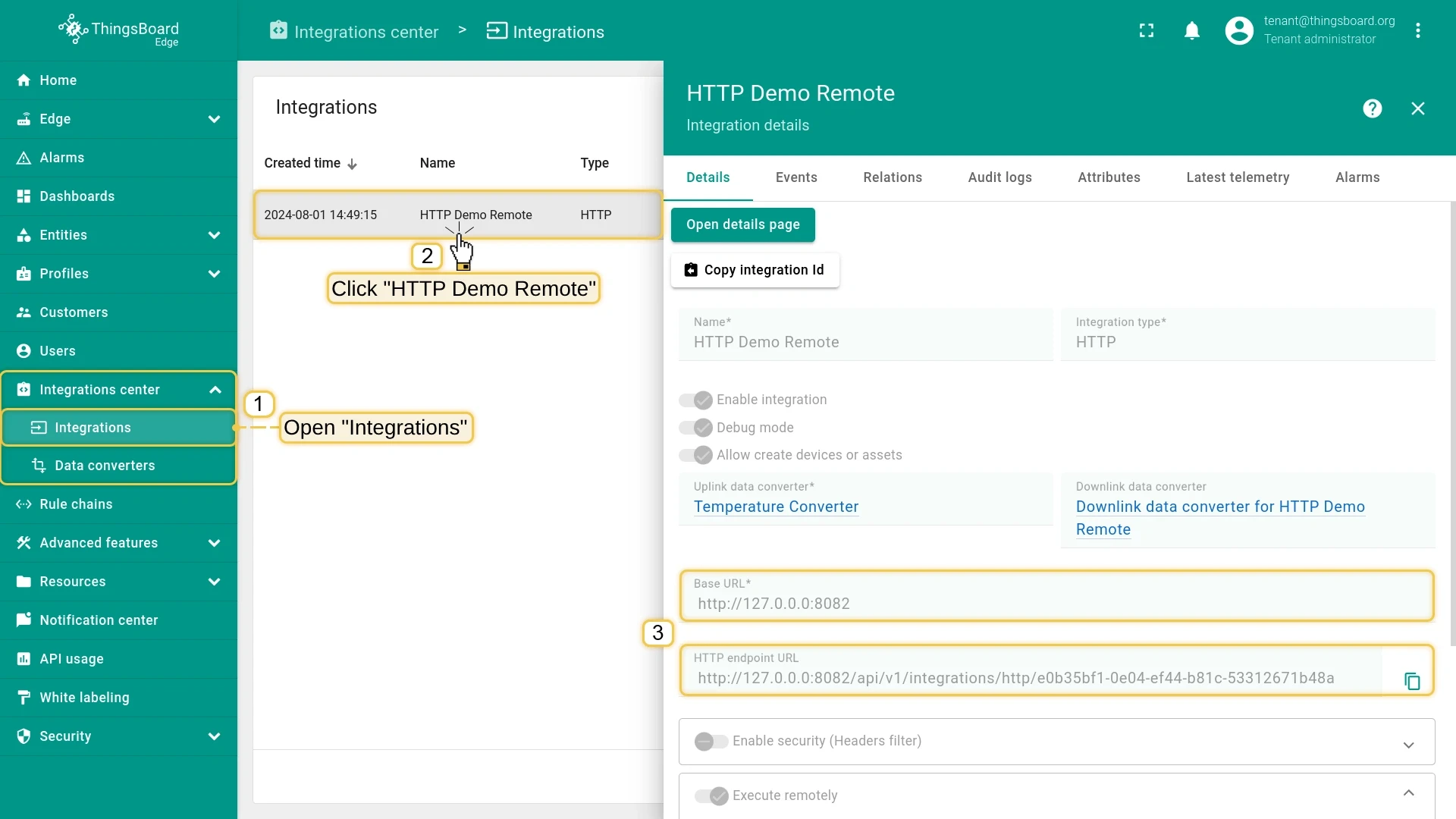
Log in to the ThingsBoard Edge instance and go to Integration center > Integrations. Open the HTTP Demo Remote integration and confirm that the
{{remoteHttpIntegrationUrl}}placeholder is replaced with the attribute value.
Install the remote integration service
Section titled “Install the remote integration service”Use the Integration key and Integration secret from Step 3 to configure the service.
Make sure Docker CE is installed.
Pull the image:
docker pull thingsboard/tb-http-integration:4.4.0Create a log volume:
mkdir -p ~/.tb-pe-http-integration-logs && sudo chown -R 799:799 ~/.tb-pe-http-integration-logsRun the integration:
docker run -it \-v ~/.tb-pe-http-integration-logs:/var/log/tb-http-integration \-e "RPC_HOST=mytbedge" \-e "RPC_PORT=9090" \-e "INTEGRATION_ROUTING_KEY=YOUR_ROUTING_KEY" \-e "INTEGRATION_SECRET=YOUR_SECRET" \--name my-tb-pe-http-integration \--network edge_docker_default \--restart always \thingsboard/tb-http-integration:4.4.0Useful commands:
docker attach my-tb-pe-http-integration # view logsdocker stop my-tb-pe-http-integrationdocker start my-tb-pe-http-integrationPull the image:
docker pull thingsboard/tb-mqtt-integration:4.4.0Create a log volume:
mkdir -p ~/.tb-pe-mqtt-integration-logs && sudo chown -R 799:799 ~/.tb-pe-mqtt-integration-logsRun the integration:
docker run -it \-v ~/.tb-pe-mqtt-integration-logs:/var/log/tb-mqtt-integration \-e "RPC_HOST=mytbedge" \-e "RPC_PORT=9090" \-e "INTEGRATION_ROUTING_KEY=YOUR_ROUTING_KEY" \-e "INTEGRATION_SECRET=YOUR_SECRET" \--name my-tb-pe-mqtt-integration \--network edge_docker_default \--restart always \thingsboard/tb-mqtt-integration:4.4.0Useful commands:
docker attach my-tb-pe-mqtt-integrationdocker stop my-tb-pe-mqtt-integrationdocker start my-tb-pe-mqtt-integrationPull the image:
docker pull thingsboard/tb-opc-ua-integration:4.4.0Create a log volume:
mkdir -p ~/.tb-pe-opc-ua-integration-logs && sudo chown -R 799:799 ~/.tb-pe-opc-ua-integration-logsRun the integration:
docker run -it \-v ~/.tb-pe-opc-ua-integration-logs:/var/log/tb-opc-ua-integration \-e "RPC_HOST=mytbedge" \-e "RPC_PORT=9090" \-e "INTEGRATION_ROUTING_KEY=YOUR_ROUTING_KEY" \-e "INTEGRATION_SECRET=YOUR_SECRET" \--name my-tb-pe-opc-ua-integration \--network edge_docker_default \--restart always \thingsboard/tb-opc-ua-integration:4.4.0Useful commands:
docker attach my-tb-pe-opc-ua-integrationdocker stop my-tb-pe-opc-ua-integrationdocker start my-tb-pe-opc-ua-integrationPull the image:
docker pull thingsboard/tb-tcp-udp-integration:4.4.0Create a log volume:
mkdir -p ~/.tb-pe-tcp-udp-integration-logs && sudo chown -R 799:799 ~/.tb-pe-tcp-udp-integration-logsRun the integration (adjust -p for TCP or UDP):
# TCP (port 10560):docker run -it -p 10560:10560 \-v ~/.tb-pe-tcp-udp-integration-logs:/var/log/tb-tcp-udp-integration \-e "RPC_HOST=mytbedge" \-e "RPC_PORT=9090" \-e "INTEGRATION_ROUTING_KEY=YOUR_ROUTING_KEY" \-e "INTEGRATION_SECRET=YOUR_SECRET" \--name my-tb-pe-tcp-udp-integration \--network NETWORK_NAME \--restart always \thingsboard/tb-tcp-udp-integration:4.4.0
# UDP (port 11560):docker run -it -p 11560:11560/udp \-v ~/.tb-pe-tcp-udp-integration-logs:/var/log/tb-tcp-udp-integration \-e "RPC_HOST=mytbedge" \-e "RPC_PORT=9090" \-e "INTEGRATION_ROUTING_KEY=YOUR_ROUTING_KEY" \-e "INTEGRATION_SECRET=YOUR_SECRET" \--name my-tb-pe-tcp-udp-integration \--network NETWORK_NAME \--restart always \thingsboard/tb-tcp-udp-integration:4.4.0
Use docker network ls to find NETWORK_NAME.
Useful commands:
docker attach my-tb-pe-tcp-udp-integrationdocker stop my-tb-pe-tcp-udp-integrationdocker start my-tb-pe-tcp-udp-integrationPull the image:
docker pull thingsboard/tb-coap-integration:4.4.0Create a log volume:
mkdir -p ~/.tb-pe-coap-integration-logs && sudo chown -R 799:799 ~/.tb-pe-coap-integration-logsRun the integration:
docker run -it -p 5683:5683/udp \-v ~/.tb-pe-coap-integration-logs:/var/log/tb-coap-integration \-e "RPC_HOST=mytbedge" \-e "RPC_PORT=9090" \-e "INTEGRATION_ROUTING_KEY=YOUR_ROUTING_KEY" \-e "INTEGRATION_SECRET=YOUR_SECRET" \--name my-tb-pe-coap-integration \--network edge_docker_default \--restart always \thingsboard/tb-coap-integration:4.4.0Useful commands:
docker attach my-tb-pe-coap-integrationdocker stop my-tb-pe-coap-integrationdocker start my-tb-pe-coap-integrationCommon Docker parameters:
| Parameter | Description |
|---|---|
mytbedge |
Hostname of the ThingsBoard Edge service |
9090 |
Integration RPC port (INTEGRATIONS_RPC_PORT in tb-edge.yml) |
YOUR_ROUTING_KEY |
Integration key from Step 3 |
YOUR_SECRET |
Integration secret from Step 3 |
edge_docker_default |
Docker network where the Edge container runs. Check with docker network ls |
--restart always |
Automatically restarts on system reboot or failure |
To detach without stopping the container, press Ctrl+p then Ctrl+q.
First, install Java 25 (OpenJDK):
sudo apt updatesudo apt install openjdk-25-jdkThen select your integration package:
wget https://github.com/thingsboard/thingsboard/releases/download/v4.4/tb-http-integration-4.4.debsudo dpkg -i tb-http-integration-4.4.debEdit the configuration:
sudo nano /etc/tb-http-integration/conf/tb-http-integration.confUncomment and set the connection parameters:
export RPC_HOST=127.0.0.1 # IP address of your Edge instanceexport RPC_PORT=9090export INTEGRATION_ROUTING_KEY=YOUR_ROUTING_KEYexport INTEGRATION_SECRET=YOUR_SECRETStart the service:
sudo service tb-http-integration startLogs: /var/log/tb-http-integration/
wget https://github.com/thingsboard/thingsboard/releases/download/v4.4/tb-mqtt-integration-4.4.debsudo dpkg -i tb-mqtt-integration-4.4.debEdit the configuration:
sudo nano /etc/tb-mqtt-integration/conf/tb-mqtt-integration.confUncomment and set the connection parameters:
export RPC_HOST=127.0.0.1export RPC_PORT=9090export INTEGRATION_ROUTING_KEY=YOUR_ROUTING_KEYexport INTEGRATION_SECRET=YOUR_SECRETStart the service:
sudo service tb-mqtt-integration startLogs: /var/log/tb-mqtt-integration/
wget https://github.com/thingsboard/thingsboard/releases/download/v4.4/tb-opc-ua-integration-4.4.debsudo dpkg -i tb-opc-ua-integration-4.4.debEdit the configuration:
sudo nano /etc/tb-opc-ua-integration/conf/tb-opc-ua-integration.confUncomment and set the connection parameters:
export RPC_HOST=127.0.0.1export RPC_PORT=9090export INTEGRATION_ROUTING_KEY=YOUR_ROUTING_KEYexport INTEGRATION_SECRET=YOUR_SECRETStart the service:
sudo service tb-opc-ua-integration startLogs: /var/log/tb-opc-ua-integration/
wget https://github.com/thingsboard/thingsboard/releases/download/v4.4/tb-tcp-udp-integration-4.4.debsudo dpkg -i tb-tcp-udp-integration-4.4.debEdit the configuration:
sudo nano /etc/tb-tcp-udp-integration/conf/tb-tcp-udp-integration.confUncomment and set the connection parameters:
export RPC_HOST=127.0.0.1export RPC_PORT=9090export INTEGRATION_ROUTING_KEY=YOUR_ROUTING_KEYexport INTEGRATION_SECRET=YOUR_SECRETStart the service:
sudo service tb-tcp-udp-integration startLogs: /var/log/tb-tcp-udp-integration/
wget https://github.com/thingsboard/thingsboard/releases/download/v4.4/tb-coap-integration-4.4.debsudo dpkg -i tb-coap-integration-4.4.debEdit the configuration:
sudo nano /etc/tb-coap-integration/conf/tb-coap-integration.confUncomment and set the connection parameters:
export RPC_HOST=127.0.0.1export RPC_PORT=9090export INTEGRATION_ROUTING_KEY=YOUR_ROUTING_KEYexport INTEGRATION_SECRET=YOUR_SECRETStart the service:
sudo service tb-coap-integration startLogs: /var/log/tb-coap-integration/
First, install Java 25 (OpenJDK):
sudo yum install java-25-openjdkThen select your integration package:
wget https://github.com/thingsboard/thingsboard/releases/download/v4.4/tb-http-integration-4.4.rpmsudo rpm -Uvh tb-http-integration-4.4.rpmEdit the configuration:
sudo nano /etc/tb-http-integration/conf/tb-http-integration.confUncomment and set the connection parameters:
export RPC_HOST=127.0.0.1export RPC_PORT=9090export INTEGRATION_ROUTING_KEY=YOUR_ROUTING_KEYexport INTEGRATION_SECRET=YOUR_SECRETStart the service:
sudo service tb-http-integration startLogs: /var/log/tb-http-integration/
wget https://github.com/thingsboard/thingsboard/releases/download/v4.4/tb-mqtt-integration-4.4.rpmsudo rpm -Uvh tb-mqtt-integration-4.4.rpmEdit the configuration:
sudo nano /etc/tb-mqtt-integration/conf/tb-mqtt-integration.confUncomment and set the connection parameters:
export RPC_HOST=127.0.0.1export RPC_PORT=9090export INTEGRATION_ROUTING_KEY=YOUR_ROUTING_KEYexport INTEGRATION_SECRET=YOUR_SECRETStart the service:
sudo service tb-mqtt-integration startLogs: /var/log/tb-mqtt-integration/
wget https://github.com/thingsboard/thingsboard/releases/download/v4.4/tb-opc-ua-integration-4.4.rpmsudo rpm -Uvh tb-opc-ua-integration-4.4.rpmEdit the configuration:
sudo nano /etc/tb-opc-ua-integration/conf/tb-opc-ua-integration.confUncomment and set the connection parameters:
export RPC_HOST=127.0.0.1export RPC_PORT=9090export INTEGRATION_ROUTING_KEY=YOUR_ROUTING_KEYexport INTEGRATION_SECRET=YOUR_SECRETStart the service:
sudo service tb-opc-ua-integration startLogs: /var/log/tb-opc-ua-integration/
wget https://github.com/thingsboard/thingsboard/releases/download/v4.4/tb-tcp-udp-integration-4.4.rpmsudo rpm -Uvh tb-tcp-udp-integration-4.4.rpmEdit the configuration:
sudo nano /etc/tb-tcp-udp-integration/conf/tb-tcp-udp-integration.confUncomment and set the connection parameters:
export RPC_HOST=127.0.0.1export RPC_PORT=9090export INTEGRATION_ROUTING_KEY=YOUR_ROUTING_KEYexport INTEGRATION_SECRET=YOUR_SECRETStart the service:
sudo service tb-tcp-udp-integration startLogs: /var/log/tb-tcp-udp-integration/
wget https://github.com/thingsboard/thingsboard/releases/download/v4.4/tb-coap-integration-4.4.rpmsudo rpm -Uvh tb-coap-integration-4.4.rpmEdit the configuration:
sudo nano /etc/tb-coap-integration/conf/tb-coap-integration.confUncomment and set the connection parameters:
export RPC_HOST=127.0.0.1export RPC_PORT=9090export INTEGRATION_ROUTING_KEY=YOUR_ROUTING_KEYexport INTEGRATION_SECRET=YOUR_SECRETStart the service:
sudo service tb-coap-integration startLogs: /var/log/tb-coap-integration/
Validate the remote HTTP integration
Section titled “Validate the remote HTTP integration”-
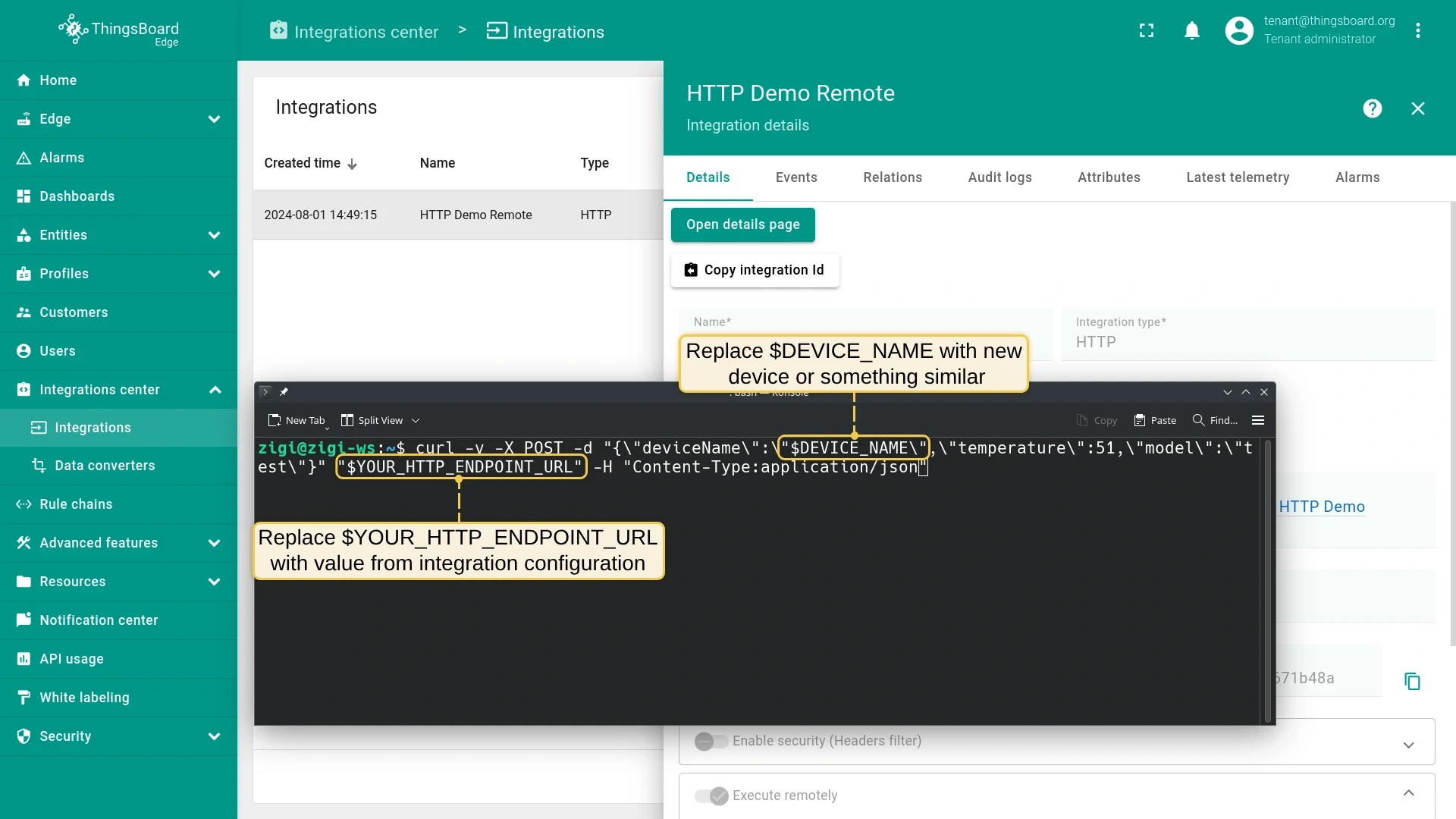
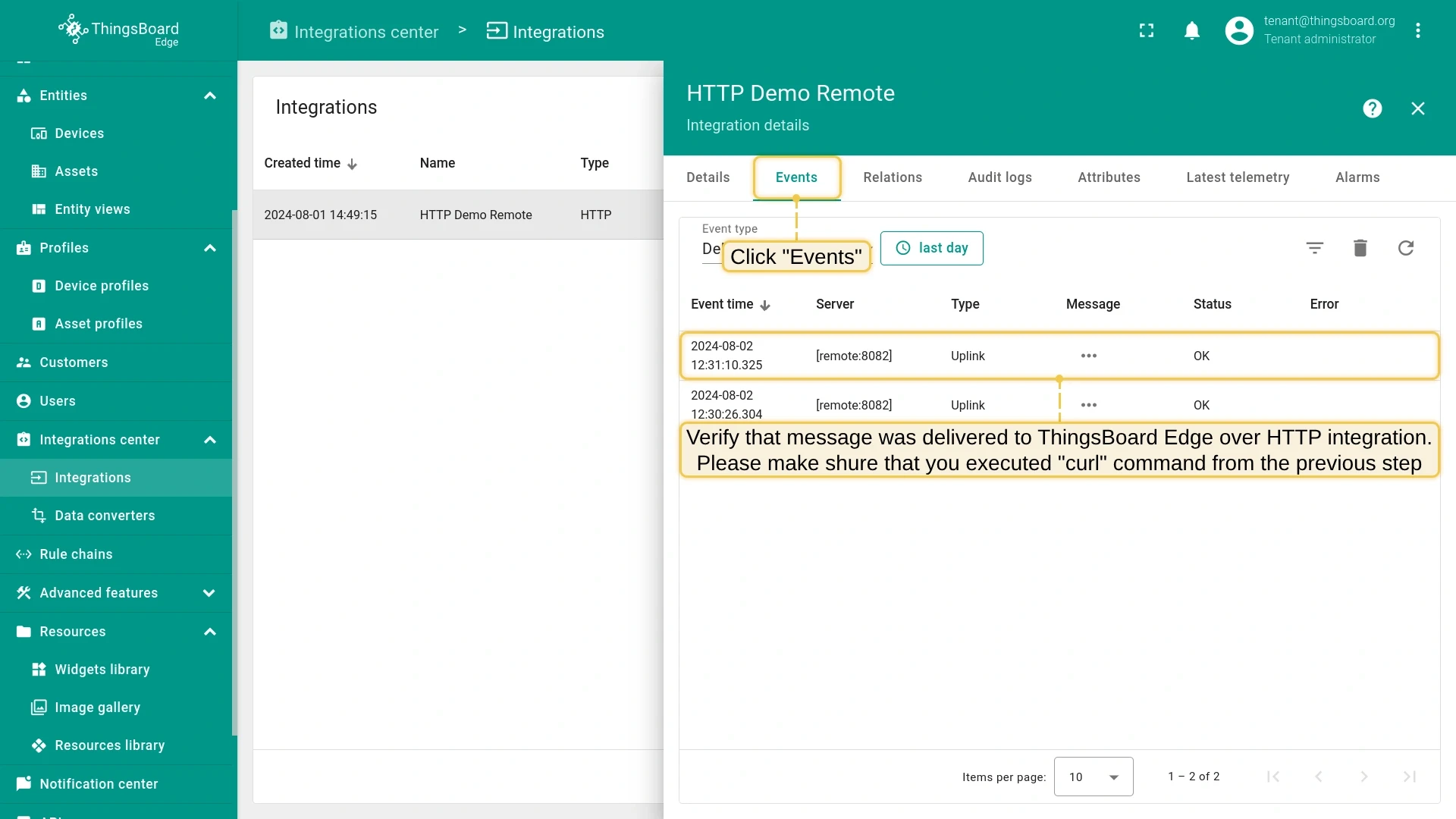
On the Edge, go to Integration center > Integrations and open the HTTP Demo Remote integration. Copy the HTTP endpoint URL.
-
Send a test uplink message (replace
$DEVICE_NAMEand$YOUR_HTTP_ENDPOINT_URLwith actual values):Terminal window curl -v -X POST \-d '{"deviceName":"$DEVICE_NAME","temperature":33,"model":"test"}' \$YOUR_HTTP_ENDPOINT_URL \-H "Content-Type:application/json" -
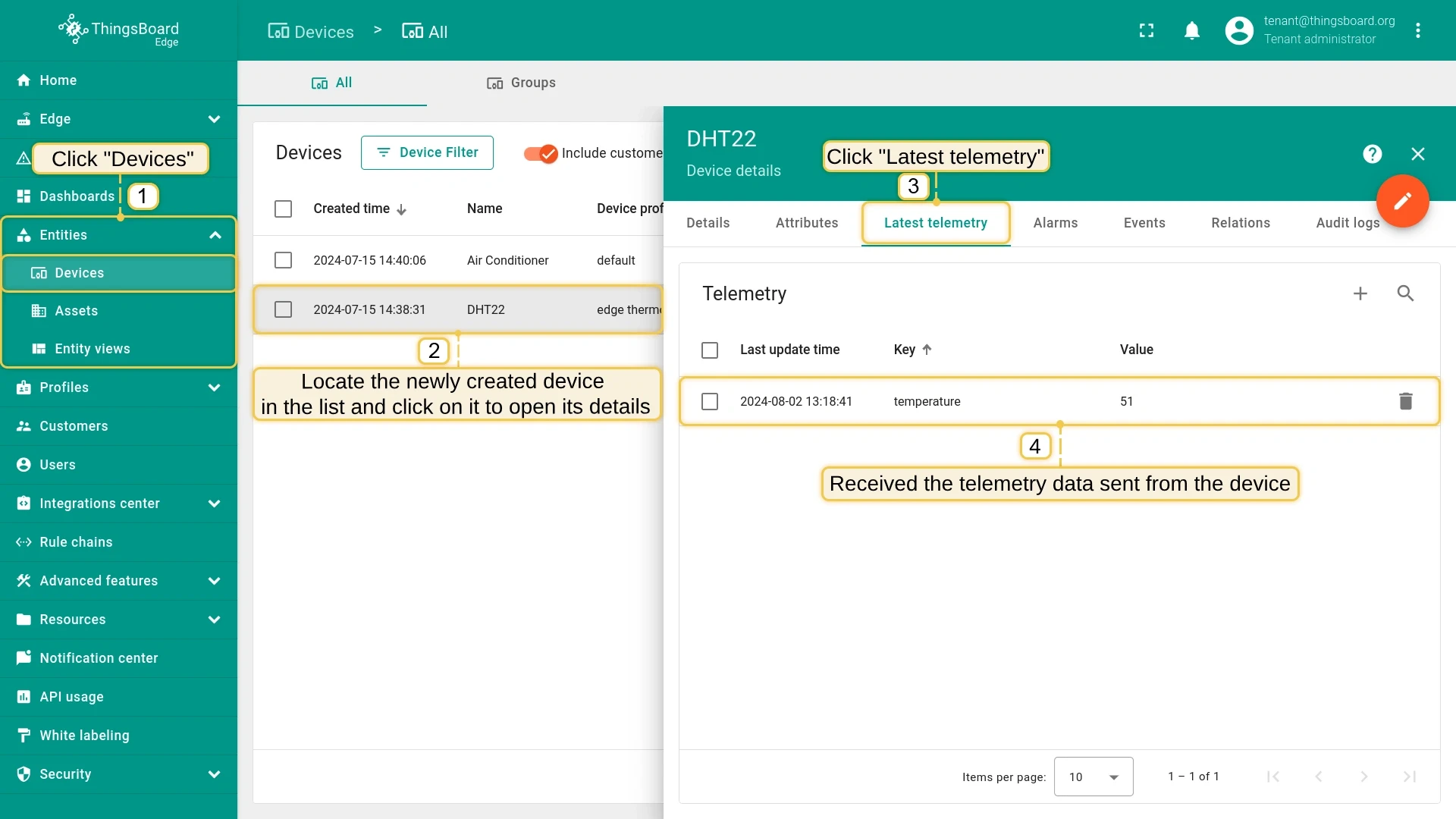
Go to Entities > Devices on the Edge to see the newly created device and its telemetry.
Remote integration configuration
Section titled “Remote integration configuration”Configuration is done entirely through the ThingsBoard interface — no special steps are required on the remote service side beyond the connection parameters. For integration-specific configuration, see:
- HTTP Integration
- MQTT Integration
- OPC-UA Integration
- TCP Integration
- UDP Integration
- CoAP Integration
Troubleshooting
Section titled “Troubleshooting”Check the log files. Their location depends on the platform and installation method used:
- Docker:
~/.tb-pe-{type}-integration-logs/ - Ubuntu / CentOS:
/var/log/tb-{type}-integration/
Look for INFO log messages showing the latest integration configuration received from the server.
Was this helpful?