Edge instance
A ThingsBoard Edge instance is a standalone ThingsBoard deployment that runs locally, on-premises or on a device at the network edge. It connects to a ThingsBoard server, which provisions it, pushes configuration (device profiles, rule chains, dashboards), and receives synchronized data. The key difference from a cloud deployment is where data is processed:
| ThingsBoard Edge | ThingsBoard Cloud | |
|---|---|---|
| Data processing | Locally on the Edge device | Centrally in the cloud |
| Connectivity | Operates over LAN without internet | Requires internet connectivity |
| Clustering | Supported from release 4.0 | Supported |
Synchronization architecture
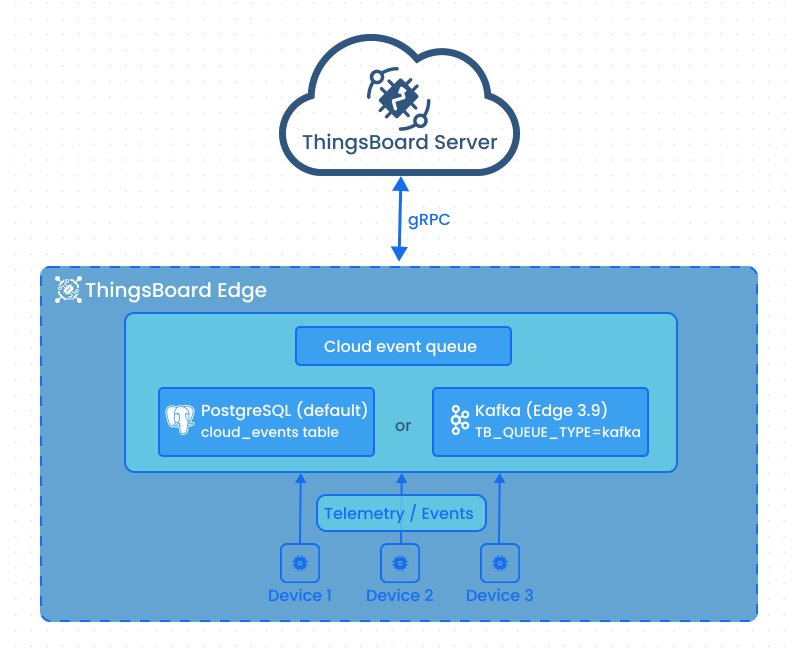
Section titled “Synchronization architecture”ThingsBoard Edge and the ThingsBoard server communicate using the gRPC protocol over port 7070 by default. Messages are serialized with Protocol Buffers (ProtoBuf) to minimize overhead and latency.
All messages sent from Edge to the server are stored locally in a PostgreSQL table (cloud_events) before transmission. Starting with release 3.9, these events can be stored in Kafka topics when Kafka is used as the queue. This lets Edge operate without a live server connection. Once connectivity is restored, all queued messages are sent and marked as transferred.
Key connection defaults (configurable via environment variables in tb-edge.conf):
| Parameter | Default | Env variable |
|---|---|---|
| gRPC port | 7070 | CLOUD_RPC_PORT |
| Reconnect interval | 3000 ms | CLOUD_RECONNECT_TIMEOUT |
| Uplink batch size | 50 records | CLOUD_RPC_STORAGE_MAX_READ_RECORDS_COUNT |
| Keepalive ping interval | 10 s | CLOUD_RPC_KEEP_ALIVE_TIME_SEC |
Downlinks
Section titled “Downlinks”Downlinks are messages pushed from the server to the Edge: entity assignments, configuration changes, rule chain updates, and similar operations. When an entity is assigned to an Edge instance on the server, it is added to the downlink queue. If the Edge is connected, the entity arrives immediately; if disconnected, it is delivered once the connection is restored.
Inspecting downlinks is useful when an Edge instance is missing an expected configuration: you can verify whether the server has sent it and whether it was received. The Downlinks tab is available on the Edge instance details page on the server.
Entity management
Section titled “Entity management”Most entities can be created directly on the Edge instance. The exceptions are Customers and Users: access control and authentication are managed centrally on the server, so these entities must be created there and then assigned to the Edge.
Provisioning
Section titled “Provisioning”Before installing Edge, you must create an Edge instance on the server. Go to Edge Management → Instances and click Add Edge instance. This generates the Edge key and Edge secret used during installation to bind the Edge to the server. For installation instructions, see Edge installation.
Was this helpful?