Attributes
Unlike telemetry, attributes are not time-series — they represent the current state or static configuration of an entity and persist until explicitly changed. Edge stores attributes locally in its PostgreSQL database, making them available for rule logic, dashboards, and external integrations even when the server connection is unavailable.
ThingsBoard supports three attribute scopes:
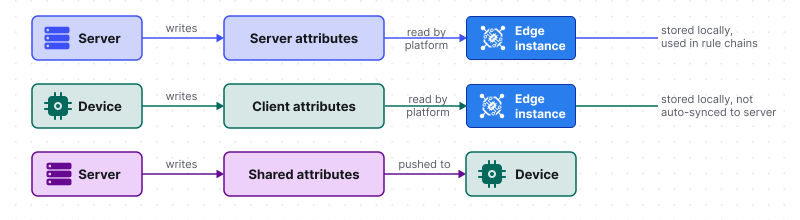
- Server attributes: Set by a user or server-side rule chain and pushed down to Edge. Not reported by the device. Used for configuration, metadata, and context — like an installation location or a threshold value.
- Client attributes: Reported by the device to Edge. Stored locally on Edge. Not automatically forwarded to the server — a push to cloud rule node is required to sync them upstream.
- Shared attributes: Set on the server or Edge and pushed to the device when it subscribes. The device can read and react to them. Changes made on Edge are not automatically propagated to the server.
Attribute synchronization
Section titled “Attribute synchronization”Attribute changes are not automatically propagated between Edge and the server in either direction. Synchronization requires explicit rule chain configuration on both sides:
- Edge → server: Connect the Attributes Updated output relation of a processing node to a push to cloud node in the Edge rule chain.
- Server → Edge: Connect the Attributes Updated output relation to a push to edge node in the server rule chain.
During a connectivity outage, attribute updates are queued locally and sent once the connection is restored. For a step-by-step configuration walkthrough, see Attribute synchronization.
Edge instance attributes
Section titled “Edge instance attributes”Attributes can be assigned to the Edge instance itself — not just to devices or assets. This is a distinct concept introduced in release 3.9. Edge instance attributes act as placeholders in rule chains, letting a single rule chain template serve multiple Edge instances with different configurations at runtime — eliminating the need for a separate template per instance.
For example, you can store an edgeAccessToken attribute on the Edge instance and reference it in a REST API call node via metadata — so the same rule chain works across Edge deployments with different tokens.
Was this helpful?