Related Entities Aggregation
Related entities aggregation collects the latest telemetry or attribute values from
multiple entities related to the target entity, applies aggregation functions, and stores the
result on the target entity. For example, a Building A asset can compute avgTemperature
and maxTemperature from all child sensor devices automatically.
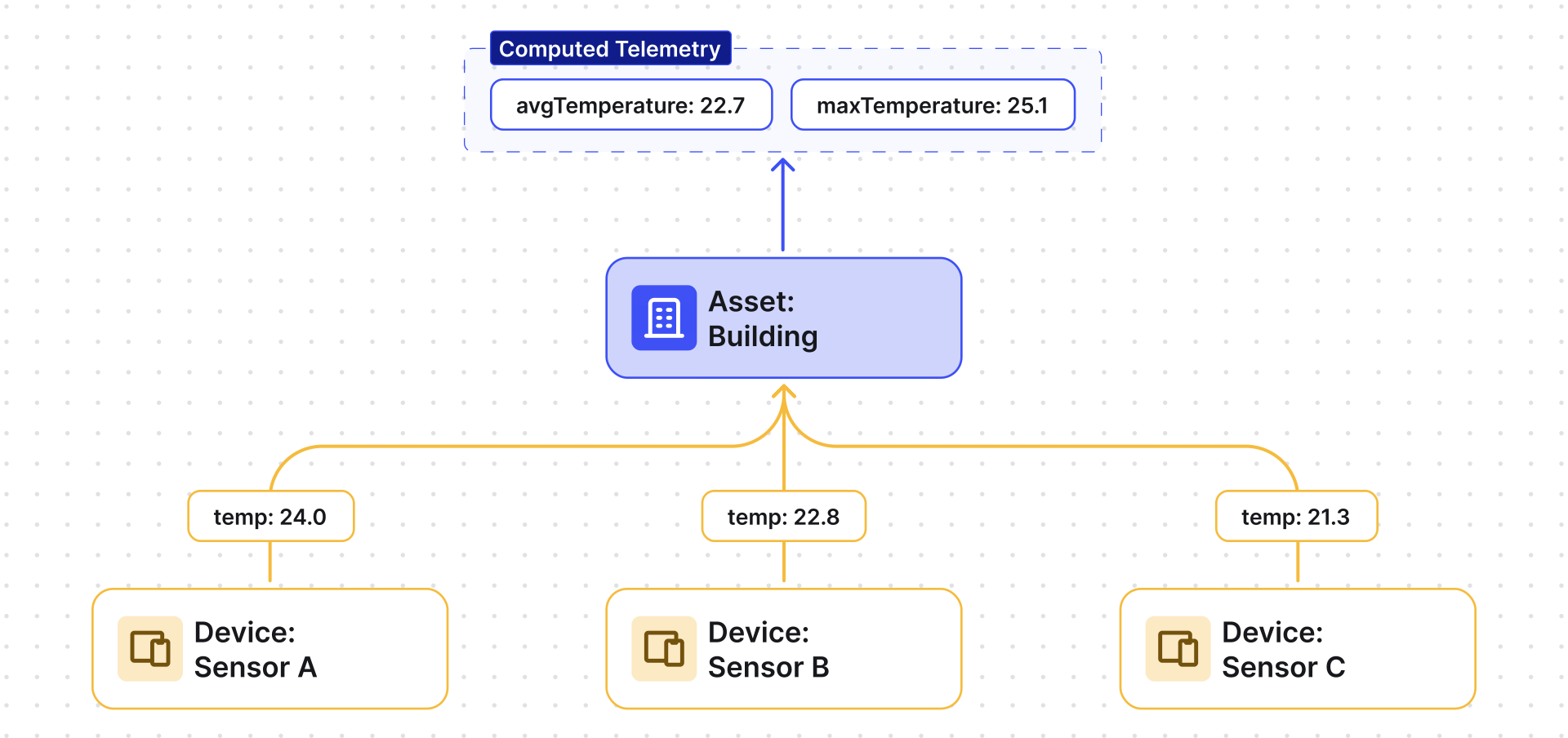
Use Related entities aggregation when you need:
- Fleet or building dashboards — average temperature, total power, max vibration across devices
- Operational KPIs — count of active devices, count of alarms, percentage online
- Occupancy tracking — count devices in a specific state
- Quality monitoring — min/max readings across a group
- Filtered aggregation — aggregate only a subset (e.g., only devices with
status = "active")
Configuration
Section titled “Configuration”- Open the Data processing ⇾ Calculated fields page.
- Click the + Add calculated field ⇾ Create new calculated field in the top-right corner.
- In General, enter a title, specify the entity the field applies to, and select the Related entities aggregation type.
- Configure the Aggregation path, Arguments, Metrics, and Output.
- Click Add to save.
Aggregation Path
Section titled “Aggregation Path”Defines which related entities contribute data:
| Setting | Options |
|---|---|
| Relation direction | Down to child — data is aggregated from child entities Up to parent — data is aggregated from parent entities |
| Relation type | The relation type between the target entity and related entities (e.g., Manages, Contains) |
Arguments
Section titled “Arguments”Arguments define what data is read from each related entity.
Click Add argument and fill in:
| Field | Description |
|---|---|
| Argument type | Latest telemetry or Attribute |
| Time series key / Attribute key | The key to read from each entity |
| Argument name | Variable name used in metrics |
| Default value | Fallback if data is missing on an entity |
For full argument configuration details, see Calculated Fields — Arguments.
Metrics
Section titled “Metrics”Each metric produces one output key by applying one aggregation function to one argument.
Click Add metric and configure:
| Field | Description |
|---|---|
| Metric name | Output key stored on the target entity (e.g., avgTemperature) |
| Aggregation | Average, Min, Max, Sum, Count, or Count unique |
| Filter (optional) | A TBEL function returning true/false to include/exclude entities |
| Value source | Key (direct argument value) or Function (computed value) |
| Argument name | The argument whose data is aggregated |
Filter example — include only active devices above a threshold:
return temperature > 10 && status == "active";Deduplication interval: limits how often aggregation runs when many entities send frequent updates. The first update triggers aggregation; subsequent updates within the interval are ignored. After the interval ends, aggregation runs again with the latest data. Set the interval value and its Units (default: 10 seconds). Minimum interval: 10 seconds.
Output
Section titled “Output”Results are stored as time series or attributes on the target entity. Optionally set Decimals by default to round values. For time series output, enable Use latest timestamp to align with source data.
For output strategy options, see Calculated Fields — Output Strategy.
Example: Aggregate Temperature from Child Devices
Section titled “Example: Aggregate Temperature from Child Devices”Multiple temperature sensors are installed in Building A and publish temperature as telemetry.
Goal: compute avgTemperature and maxTemperature across all sensors and store them on Building A.
Preparation
Section titled “Preparation”Import the demo devices and asset, then connect them:
- Download device-data-with-temperature-telemetry.csv and import it as devices with delimiter
,; set thetemperaturecolumn type to Time series. Creates Smart Device 1, Smart Device 2, and Smart Device 3 (profile:sensor). - Download building-asset-data.csv and import it as asset with delimiter
,. Creates Building A (type:building). - Open Building A, go to the Relations tab, and add:
- Building A ⇾ Smart Device 1, Smart Device 2, and Smart Device 3
- Relation direction: From
- Relation type:
Manages
- Building A ⇾ Smart Device 1, Smart Device 2, and Smart Device 3
Configuration
Section titled “Configuration”- Apply the Related entities aggregation calculated field to the Building A device profile.
- Aggregation path:
- Relation direction: Down to child
- Relation type: Manages
- Add argument:
- Argument type: Latest telemetry
- Time series key:
temperature - Argument name:
temperature - Default value:
0
- Add metric 1:
- Metric name:
avgTemperature - Aggregation: Average
- Value source: Key
- Argument name:
temperature
- Metric name:
- Add metric 2:
- Metric name:
maxTemperature - Aggregation: Max
- Value source: Key
- Argument name:
temperature
- Metric name:
- Set Deduplication interval: 60 seconds.
- Output type: Time series.
- Click Add.
Result: Building A stores aggregated telemetry:
{ "avgTemperature": 22.7, "maxTemperature": 25.1 }These values update whenever any child sensor reports new temperature data.
Was this helpful?