Remote Integrations
Remote Integrations allow reliable data streaming from multiple devices in the local area network (LAN) to the ThingsBoard platform in the cloud. They are helpful if you have, for example, a local MQTT broker or OPC-UA server with no external IP address that is unreachable from your ThingsBoard instance. The remote integration initiates a connection to these servers, pulls the data, stores it locally, and then streams it to the ThingsBoard instance.
Although this approach requires some additional steps in the deployment process, it allows integration with servers and devices deployed in the LAN. A separate integration process improves isolation level and performance.
The remote integration approach enables tenants to launch plain TCP and UDP integrations. Those two integrations are unique because they start a server that binds to a specific port. Since ThingsBoard is a multi-tenant environment, TCP and UDP integrations cannot run as part of the core service due to possible port collisions between tenants. That is why each tenant needs to launch a TCP/UDP integration as a remote one. The same applies to any custom integration created by the tenant.
Before proceeding, check whether the IoT Gateway already supports your protocol — it provides built-in connectors for MQTT, OPC-UA, Modbus, BACnet, and others. If a connector covers your use case, the gateway is simpler to deploy.
If a remote integration is the right choice, the essential step is enabling the Execute remotely toggle in the integration’s Connection settings. This generates the Integration key and Integration secret required to launch the integration as a standalone process.
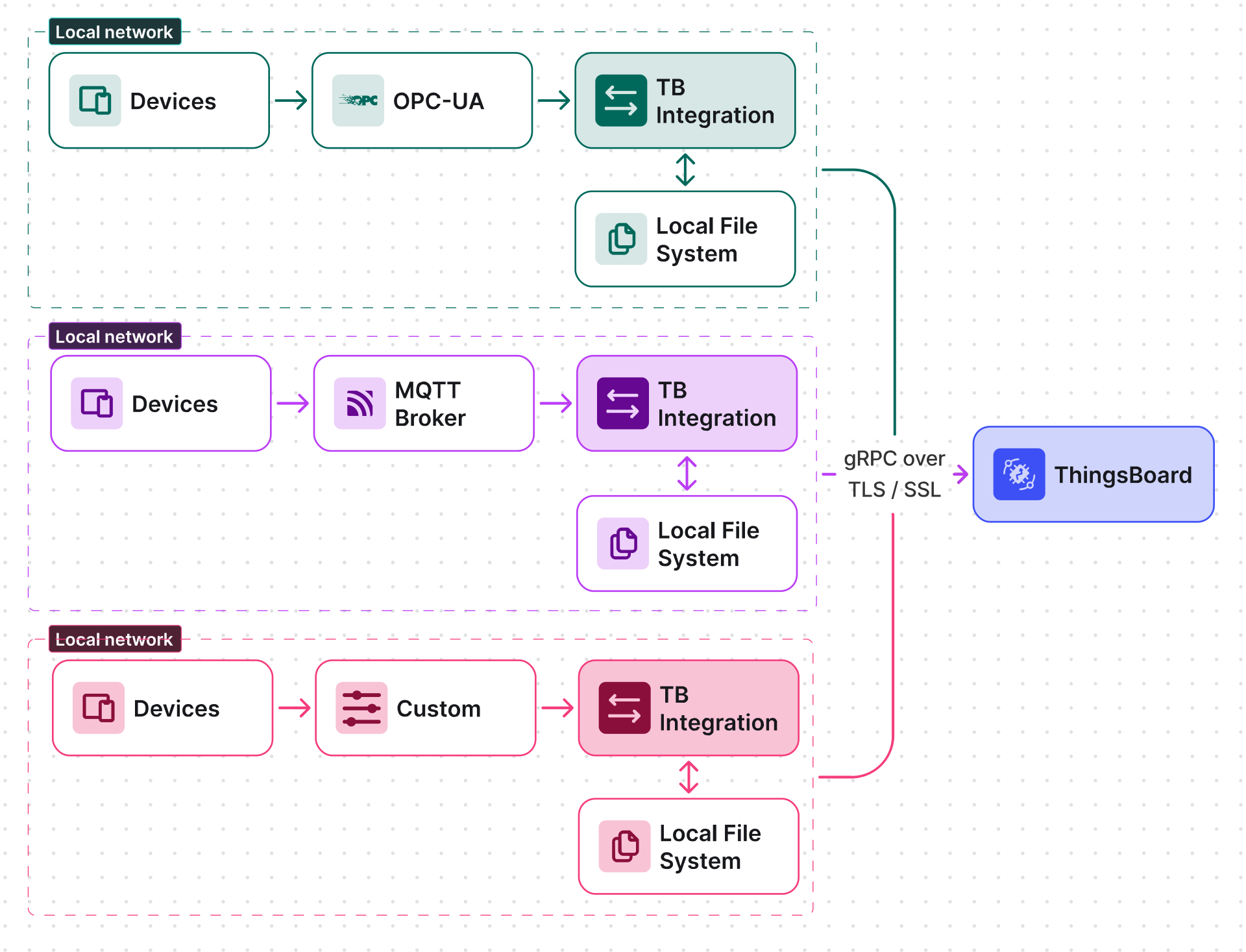
Any ThingsBoard integration can be executed separately from the main ThingsBoard instance.
This guide walks through launching an MQTT remote integration that connects to a local MQTT broker and pushes data to ThingsBoard.
For more information, see the Integrations documentation.
ThingsBoard Configuration
Section titled “ThingsBoard Configuration”We assume you already have a tenant administrator account on your own self-hosted ThingsBoard instance or ThingsBoard Cloud.
Create Remote Integration in ThingsBoard
Section titled “Create Remote Integration in ThingsBoard”The following steps create a remote MQTT integration that connects to a local broker on port 1883 and subscribes to all topics.
- Go to Integrations ⇾ Integrations and click the + Add integration.
- Select the Integration type: MQTT and set the Name to MQTT remote integration. Click Next.
- Create a default Uplink data converter and click Next.
- Leave the Downlink data converter field empty. Click Skip.
- On the Connection step:
-
Set Host to
eu.thingsboard.cloudand Port to1883. - Subscribe to all topics by entering
#in the Topic field. - Select an MQTT QoS level (default: 0 — At most once).
- Enable the Execute remotely toggle. The Integration key and Integration secret fields will appear — copy and save both values, as you will need them when launching the remote integration process.
-
Set Host to
- Expand Advanced settings and uncheck the Clean session parameter. Many brokers do not support sticky sessions and will silently close the connection if this option is enabled.
- Click Add to create the integration.
Choose Your Platform and Install
Section titled “Choose Your Platform and Install”ThingsBoard Integration can be installed via Docker, Debian, or RPM packages.
Docker on Linux/Mac
Section titled “Docker on Linux/Mac”Pull the Docker image:
docker pull thingsboard/tb-http-integration:4.4.0Create a volume for the integration logs (799 is the user ID of the ThingsBoard non-root Docker user):
mkdir -p ~/.tb-pe-http-integration-logs && sudo chown -R 799:799 ~/.tb-pe-http-integration-logsRun the integration:
docker run -it -p 8082:8082 -v ~/.tb-pe-http-integration-logs:/var/log/tb-http-integration \-e "RPC_HOST=eu.thingsboard.cloud" -e "RPC_PORT=9090" \-e "INTEGRATION_ROUTING_KEY=YOUR_ROUTING_KEY" -e "INTEGRATION_SECRET=YOUR_SECRET" \--name my-tb-pe-http-integration --restart always thingsboard/tb-http-integration:4.4.0Where:
eu.thingsboard.cloud— host name of your ThingsBoard instance;9090— integration gRPC port, configured viaINTEGRATIONS_RPC_PORTinthingsboard.yml;YOUR_ROUTING_KEY— integration key obtained in Create remote integration in ThingsBoard;YOUR_SECRET— integration secret obtained in Create remote integration in ThingsBoard;-p 8082:8082— maps the host port 8082 to the container’s HTTP integration port;-v ~/.tb-pe-http-integration-logs:/var/log/tb-http-integration— mounts the host directory to the integration logs directory;--restart always— automatically starts the integration after system reboot or failure.
Logs are written to ~/.tb-pe-http-integration-logs. After startup you should see INFO log messages with the latest integration configuration received from the server.
Reattach, stop, and start commands:
docker attach my-tb-pe-http-integrationdocker stop my-tb-pe-http-integrationdocker start my-tb-pe-http-integrationPull the Docker image:
docker pull thingsboard/tb-mqtt-integration:4.4.0Create a volume for the integration logs:
mkdir -p ~/.tb-pe-mqtt-integration-logs && sudo chown -R 799:799 ~/.tb-pe-mqtt-integration-logsRun the integration:
docker run -it -v ~/.tb-pe-mqtt-integration-logs:/var/log/tb-mqtt-integration \-e "RPC_HOST=eu.thingsboard.cloud" -e "RPC_PORT=9090" \-e "INTEGRATION_ROUTING_KEY=YOUR_ROUTING_KEY" -e "INTEGRATION_SECRET=YOUR_SECRET" \--name my-tb-pe-mqtt-integration --restart always thingsboard/tb-mqtt-integration:4.4.0Where:
eu.thingsboard.cloud— host name of your ThingsBoard instance;9090— integration gRPC port;YOUR_ROUTING_KEY— integration key obtained in Create remote integration in ThingsBoard;YOUR_SECRET— integration secret obtained in Create remote integration in ThingsBoard.
Logs are written to ~/.tb-pe-mqtt-integration-logs.
Reattach, stop, and start commands:
docker attach my-tb-pe-mqtt-integrationdocker stop my-tb-pe-mqtt-integrationdocker start my-tb-pe-mqtt-integrationPull the Docker image:
docker pull thingsboard/tb-aws-integration:4.4.0Create a volume for the integration logs:
mkdir -p ~/.tb-pe-aws-integration-logs && sudo chown -R 799:799 ~/.tb-pe-aws-integration-logsRun the integration:
docker run -it -v ~/.tb-pe-aws-integration-logs:/var/log/tb-aws-integration \-e "RPC_HOST=eu.thingsboard.cloud" -e "RPC_PORT=9090" \-e "INTEGRATION_ROUTING_KEY=YOUR_ROUTING_KEY" -e "INTEGRATION_SECRET=YOUR_SECRET" \--name my-tb-pe-aws-integration --restart always thingsboard/tb-aws-integration:4.4.0Where:
eu.thingsboard.cloud— host name of your ThingsBoard instance;9090— integration gRPC port;YOUR_ROUTING_KEY— integration key obtained in Create remote integration in ThingsBoard;YOUR_SECRET— integration secret obtained in Create remote integration in ThingsBoard.
Logs are written to ~/.tb-pe-aws-integration-logs.
Reattach, stop, and start commands:
docker attach my-tb-pe-aws-integrationdocker stop my-tb-pe-aws-integrationdocker start my-tb-pe-aws-integrationPull the Docker image:
docker pull thingsboard/tb-azure-integration:4.4.0Create a volume for the integration logs:
mkdir -p ~/.tb-pe-azure-integration-logs && sudo chown -R 799:799 ~/.tb-pe-azure-integration-logsRun the integration:
docker run -it -v ~/.tb-pe-azure-integration-logs:/var/log/tb-azure-integration \-e "RPC_HOST=eu.thingsboard.cloud" -e "RPC_PORT=9090" \-e "INTEGRATION_ROUTING_KEY=YOUR_ROUTING_KEY" -e "INTEGRATION_SECRET=YOUR_SECRET" \--name my-tb-pe-azure-integration --restart always thingsboard/tb-azure-integration:4.4.0Where:
eu.thingsboard.cloud— host name of your ThingsBoard instance;9090— integration gRPC port;YOUR_ROUTING_KEY— integration key obtained in Create remote integration in ThingsBoard;YOUR_SECRET— integration secret obtained in Create remote integration in ThingsBoard.
Logs are written to ~/.tb-pe-azure-integration-logs.
Reattach, stop, and start commands:
docker attach my-tb-pe-azure-integrationdocker stop my-tb-pe-azure-integrationdocker start my-tb-pe-azure-integrationPull the Docker image:
docker pull thingsboard/tb-opc-ua-integration:4.4.0Create a volume for the integration logs:
mkdir -p ~/.tb-pe-opc-ua-integration-logs && sudo chown -R 799:799 ~/.tb-pe-opc-ua-integration-logsRun the integration:
docker run -it -v ~/.tb-pe-opc-ua-integration-logs:/var/log/tb-opc-ua-integration \-e "RPC_HOST=eu.thingsboard.cloud" -e "RPC_PORT=9090" \-e "INTEGRATION_ROUTING_KEY=YOUR_ROUTING_KEY" -e "INTEGRATION_SECRET=YOUR_SECRET" \--name my-tb-pe-opc-ua-integration --restart always thingsboard/tb-opc-ua-integration:4.4.0Where:
eu.thingsboard.cloud— host name of your ThingsBoard instance;9090— integration gRPC port;YOUR_ROUTING_KEY— integration key obtained in Create remote integration in ThingsBoard;YOUR_SECRET— integration secret obtained in Create remote integration in ThingsBoard.
Logs are written to ~/.tb-pe-opc-ua-integration-logs.
Reattach, stop, and start commands:
docker attach my-tb-pe-opc-ua-integrationdocker stop my-tb-pe-opc-ua-integrationdocker start my-tb-pe-opc-ua-integrationPull the Docker image:
docker pull thingsboard/tb-tcp-udp-integration:4.4.0Create a volume for the integration logs:
mkdir -p ~/.tb-pe-tcp-udp-integration-logs && sudo chown -R 799:799 ~/.tb-pe-tcp-udp-integration-logsRun the integration:
docker run -it -p 10560:10560 -v ~/.tb-pe-tcp-udp-integration-logs:/var/log/tb-tcp-udp-integration \-e "RPC_HOST=eu.thingsboard.cloud" -e "RPC_PORT=9090" \-e "INTEGRATION_ROUTING_KEY=YOUR_ROUTING_KEY" -e "INTEGRATION_SECRET=YOUR_SECRET" \--name my-tb-pe-tcp-udp-integration --restart always thingsboard/tb-tcp-udp-integration:4.4.0Where:
eu.thingsboard.cloud— host name of your ThingsBoard instance;9090— integration gRPC port;YOUR_ROUTING_KEY— integration key obtained in Create remote integration in ThingsBoard;YOUR_SECRET— integration secret obtained in Create remote integration in ThingsBoard;-p 10560:10560— maps the host port to the integration TCP port. For UDP add/udp, e.g.-p 11560:11560/udp.
Logs are written to ~/.tb-pe-tcp-udp-integration-logs.
Reattach, stop, and start commands:
docker attach my-tb-pe-tcp-udp-integrationdocker stop my-tb-pe-tcp-udp-integrationdocker start my-tb-pe-tcp-udp-integrationPull the Docker image:
docker pull thingsboard/tb-coap-integration:4.4.0Create a volume for the integration logs:
mkdir -p ~/.tb-pe-coap-integration-logs && sudo chown -R 799:799 ~/.tb-pe-coap-integration-logsRun the integration:
docker run -it -p 5683:5683/udp -v ~/.tb-pe-coap-integration-logs:/var/log/tb-coap-integration \-e "RPC_HOST=eu.thingsboard.cloud" -e "RPC_PORT=9090" \-e "INTEGRATION_ROUTING_KEY=YOUR_ROUTING_KEY" -e "INTEGRATION_SECRET=YOUR_SECRET" \--name my-tb-pe-coap-integration --restart always thingsboard/tb-coap-integration:4.4.0Where:
eu.thingsboard.cloud— host name of your ThingsBoard instance;9090— integration gRPC port;YOUR_ROUTING_KEY— integration key obtained in Create remote integration in ThingsBoard;YOUR_SECRET— integration secret obtained in Create remote integration in ThingsBoard;-p 5683:5683/udp— maps the host UDP port 5683 to the CoAP integration port.
Logs are written to ~/.tb-pe-coap-integration-logs.
Reattach, stop, and start commands:
docker attach my-tb-pe-coap-integrationdocker stop my-tb-pe-coap-integrationdocker start my-tb-pe-coap-integrationPull the Docker image:
docker pull thingsboard/tb-apache-pulsar-integration:4.4.0Create a volume for the integration logs (799 is the user ID of the ThingsBoard non-root Docker user):
mkdir -p ~/.tb-pe-pulsar-integration-logs && sudo chown -R 799:799 ~/.tb-pe-pulsar-integration-logsRun the integration:
docker run -it -v ~/.tb-pe-pulsar-integration-logs:/var/log/tb-pulsar-integration \-e "RPC_HOST=eu.thingsboard.cloud" -e "RPC_PORT=9090" \-e "INTEGRATION_ROUTING_KEY=YOUR_ROUTING_KEY" -e "INTEGRATION_SECRET=YOUR_SECRET" -e "PULSAR_SERVICE_URL=pulsar://host.docker.internal:6650" -e "PULSAR_ADMIN_URL=http://host.docker.internal:8080" \--name my-tb-pe-pulsar-integration --add-host=host.docker.internal:host-gateway --restart always thingsboard/tb-apache-pulsar-integration:4.4.0Where:
eu.thingsboard.cloud— host name of your ThingsBoard instance;9090— integration gRPC port;YOUR_ROUTING_KEY— integration key obtained in Create remote integration in ThingsBoard;YOUR_SECRET— integration secret obtained in Create remote integration in ThingsBoard;PULSAR_SERVICE_URL— URL of your Apache Pulsar broker service;PULSAR_ADMIN_URL— URL of your Apache Pulsar admin REST API;--add-host=host.docker.internal:host-gateway— lets the container reach a Pulsar broker running on the Docker host viahost.docker.internal. If Pulsar is running on a different server, replacehost.docker.internalinPULSAR_SERVICE_URLandPULSAR_ADMIN_URLwith its IP address (e.g.,192.168.1.50) and remove the--add-hostflag.
Logs are written to ~/.tb-pe-pulsar-integration-logs. After startup you should see INFO log messages with the latest integration configuration received from the server.
Reattach, stop, and start commands:
docker attach my-tb-pe-pulsar-integrationdocker stop my-tb-pe-pulsar-integrationdocker start my-tb-pe-pulsar-integrationAdvanced configuration
See the configuration YAML below for the full list of configuration parameters, corresponding environment variables, and their default values.
For example, the default client ID used in integration debug messages is remote and can be changed by setting the RPC_CLIENT_ID environment variable.
server:  # Server bind address  address: "${HTTP_BIND_ADDRESS:0.0.0.0}"  # Server bind port  port: "${HTTP_BIND_PORT:8082}"
integration:  routingKey: "${INTEGRATION_ROUTING_KEY:PUT_YOUR_ROUTING_KEY_HERE}"  secret: "${INTEGRATION_SECRET:PUT_YOUR_SECRET_HERE}"  # Allows connection to the localhost resources. For example, local MQTT broker, etc.  allow_local_network_hosts: "${INTEGRATION_ALLOW_LOCAL_NETWORK_HOSTS:true}"  statistics:    # Enable/disable integration statistics    enabled: "${INTEGRATION_STATISTICS_ENABLED:true}"    # Send statistics interval. Default value is once per hour    persist_frequency: "${INTEGRATION_STATISTICS_PERSIST_FREQUENCY:3600000}"
storage:  # Location of the folder to store data files  data_folder_path: "${INTEGRATION_STORAGE_DATA_FOLDER_PATH:./}"  # Max amount of data files to maintain  max_file_count: "${INTEGRATION_STORAGE_MAX_FILE_COUNT:100}"  # Max records per data file  max_records_per_file: "${INTEGRATION_STORAGE_MAX_RECORDS_PER_FILE:30}"  # Max records between persistence of data file  max_records_between_fsync: "${INTEGRATION_STORAGE_MAX_RECORDS_BETWEEN_FSYNC:100}"  # Size of the upload chunk  max_read_records_count: "${INTEGRATION_STORAGE_MAX_READ_RECORDS_COUNT:50}"  # Sleep interval while no new records  no_read_records_sleep: "${INTEGRATION_STORAGE_NO_READ_RECORDS_SLEEP:1000}"
executors:  # Size of the thread pool to handle incoming messages and tasks  thread_pool_size: "${EXECUTORS_SIZE:1}"  # Timeout to reconnect to ThingsBoard  reconnect_timeout: "${EXECUTORS_RECONNECT_TIMEOUT:3000}" # in milliseconds
rpc:  # Host of the ThingsBoard server  host: "${RPC_HOST:thingsboard.cloud}"  # Port of the ThingsBoard server  port: "${RPC_PORT:9090}"  # No reply timeout  timeout: "${RPC_TIMEOUT:5}" # Timeout in seconds for channel termination  # ID of the RPC client  client_id: "${RPC_CLIENT_ID:remote}"  ssl:    # SSL enabled/disabled    enabled: "${RPC_SSL_ENABLED:false}"    # SSL certificate    cert: "${RPC_SSL_CERT:roots.pem}"
js:  evaluator: "${JS_EVALUATOR:local}"  # Built-in JVM JavaScript environment properties  local:    # Use Sandboxed (secured) JVM JavaScript environment    use_js_sandbox: "${USE_LOCAL_JS_SANDBOX:true}"    # Specify thread pool size for JavaScript sandbox resource monitor    monitor_thread_pool_size: "${LOCAL_JS_SANDBOX_MONITOR_THREAD_POOL_SIZE:4}"    # Maximum CPU time in milliseconds allowed for script execution    max_cpu_time: "${LOCAL_JS_SANDBOX_MAX_CPU_TIME:5000}"    # Maximum allowed JavaScript execution errors before JavaScript will be blacklisted    max_errors: "${LOCAL_JS_SANDBOX_MAX_ERRORS:3}"
service: type: "${TB_SERVICE_TYPE:tb-integration}"Troubleshooting
Docker on Windows
Section titled “Docker on Windows”Install Docker Desktop for Windows
Windows users should use Docker managed volumes for integration logs. Open Docker Quickstart Terminal and create the volume before running the container.
Create a Docker volume:
docker volume create tb-pe-http-integration-logsRun the integration:
docker run -it -v tb-pe-http-integration-logs:/var/log/tb-http-integration `-e "RPC_HOST=eu.thingsboard.cloud" -e "RPC_PORT=9090" `-e "INTEGRATION_ROUTING_KEY=YOUR_ROUTING_KEY" -e "INTEGRATION_SECRET=YOUR_SECRET" `--name my-tb-pe-http-integration --restart always thingsboard/tb-http-integration:4.4.0Where:
eu.thingsboard.cloud— host name of your ThingsBoard instance;9090— integration gRPC port;YOUR_ROUTING_KEY— integration key obtained in Create remote integration in ThingsBoard;YOUR_SECRET— integration secret obtained in Create remote integration in ThingsBoard.
Reattach, stop, and start commands:
docker attach my-tb-pe-http-integrationdocker stop my-tb-pe-http-integrationdocker start my-tb-pe-http-integrationCreate a Docker volume:
docker volume create tb-pe-mqtt-integration-logsRun the integration:
docker run -it -v tb-pe-mqtt-integration-logs:/var/log/tb-mqtt-integration `-e "RPC_HOST=eu.thingsboard.cloud" -e "RPC_PORT=9090" `-e "INTEGRATION_ROUTING_KEY=YOUR_ROUTING_KEY" -e "INTEGRATION_SECRET=YOUR_SECRET" `--name my-tb-pe-mqtt-integration --restart always thingsboard/tb-mqtt-integration:4.4.0Where:
eu.thingsboard.cloud— host name of your ThingsBoard instance;9090— integration gRPC port;YOUR_ROUTING_KEY— integration key obtained in Create remote integration in ThingsBoard;YOUR_SECRET— integration secret obtained in Create remote integration in ThingsBoard.
Reattach, stop, and start commands:
docker attach my-tb-pe-mqtt-integrationdocker stop my-tb-pe-mqtt-integrationdocker start my-tb-pe-mqtt-integrationCreate a Docker volume:
docker volume create tb-pe-aws-integration-logsRun the integration:
docker run -it -v tb-pe-aws-integration-logs:/var/log/tb-aws-integration `-e "RPC_HOST=eu.thingsboard.cloud" -e "RPC_PORT=9090" `-e "INTEGRATION_ROUTING_KEY=YOUR_ROUTING_KEY" -e "INTEGRATION_SECRET=YOUR_SECRET" `--name my-tb-pe-aws-integration --restart always thingsboard/tb-aws-integration:4.4.0Where:
eu.thingsboard.cloud— host name of your ThingsBoard instance;9090— integration gRPC port;YOUR_ROUTING_KEY— integration key obtained in Create remote integration in ThingsBoard;YOUR_SECRET— integration secret obtained in Create remote integration in ThingsBoard.
Reattach, stop, and start commands:
docker attach my-tb-pe-aws-integrationdocker stop my-tb-pe-aws-integrationdocker start my-tb-pe-aws-integrationCreate a Docker volume:
docker volume create tb-pe-azure-integration-logsRun the integration:
docker run -it -v tb-pe-azure-integration-logs:/var/log/tb-azure-integration `-e "RPC_HOST=eu.thingsboard.cloud" -e "RPC_PORT=9090" `-e "INTEGRATION_ROUTING_KEY=YOUR_ROUTING_KEY" -e "INTEGRATION_SECRET=YOUR_SECRET" `--name my-tb-pe-azure-integration --restart always thingsboard/tb-azure-integration:4.4.0Where:
eu.thingsboard.cloud— host name of your ThingsBoard instance;9090— integration gRPC port;YOUR_ROUTING_KEY— integration key obtained in Create remote integration in ThingsBoard;YOUR_SECRET— integration secret obtained in Create remote integration in ThingsBoard.
Reattach, stop, and start commands:
docker attach my-tb-pe-azure-integrationdocker stop my-tb-pe-azure-integrationdocker start my-tb-pe-azure-integrationCreate a Docker volume:
docker volume create tb-pe-opc-ua-integration-logsRun the integration:
docker run -it -v tb-pe-opc-ua-integration-logs:/var/log/tb-opc-ua-integration `-e "RPC_HOST=eu.thingsboard.cloud" -e "RPC_PORT=9090" `-e "INTEGRATION_ROUTING_KEY=YOUR_ROUTING_KEY" -e "INTEGRATION_SECRET=YOUR_SECRET" `--name my-tb-pe-opc-ua-integration --restart always thingsboard/tb-opc-ua-integration:4.4.0Where:
eu.thingsboard.cloud— host name of your ThingsBoard instance;9090— integration gRPC port;YOUR_ROUTING_KEY— integration key obtained in Create remote integration in ThingsBoard;YOUR_SECRET— integration secret obtained in Create remote integration in ThingsBoard.
Reattach, stop, and start commands:
docker attach my-tb-pe-opc-ua-integrationdocker stop my-tb-pe-opc-ua-integrationdocker start my-tb-pe-opc-ua-integrationCreate a Docker volume:
docker volume create tb-pe-tcp-udp-integration-logsRun the integration:
docker run -it -p 10560:10560 -v tb-pe-tcp-udp-integration-logs:/var/log/tb-tcp-udp-integration `-e "RPC_HOST=eu.thingsboard.cloud" -e "RPC_PORT=9090" `-e "INTEGRATION_ROUTING_KEY=YOUR_ROUTING_KEY" -e "INTEGRATION_SECRET=YOUR_SECRET" `--name my-tb-pe-tcp-udp-integration --restart always thingsboard/tb-tcp-udp-integration:4.4.0Where:
eu.thingsboard.cloud— host name of your ThingsBoard instance;9090— integration gRPC port;YOUR_ROUTING_KEY— integration key obtained in Create remote integration in ThingsBoard;YOUR_SECRET— integration secret obtained in Create remote integration in ThingsBoard;-p 10560:10560— maps the host port to the integration TCP port.
Reattach, stop, and start commands:
docker attach my-tb-pe-tcp-udp-integrationdocker stop my-tb-pe-tcp-udp-integrationdocker start my-tb-pe-tcp-udp-integrationCreate a Docker volume:
docker volume create tb-pe-coap-integration-logsRun the integration:
docker run -it -p 5683:5683/udp -v tb-pe-coap-integration-logs:/var/log/tb-coap-integration `-e "RPC_HOST=eu.thingsboard.cloud" -e "RPC_PORT=9090" `-e "INTEGRATION_ROUTING_KEY=YOUR_ROUTING_KEY" -e "INTEGRATION_SECRET=YOUR_SECRET" `--name my-tb-pe-coap-integration --restart always thingsboard/tb-coap-integration:4.4.0Where:
eu.thingsboard.cloud— host name of your ThingsBoard instance;9090— integration gRPC port;YOUR_ROUTING_KEY— integration key obtained in Create remote integration in ThingsBoard;YOUR_SECRET— integration secret obtained in Create remote integration in ThingsBoard;-p 5683:5683/udp— maps the host UDP port 5683 to the CoAP integration port.
Reattach, stop, and start commands:
docker attach my-tb-pe-coap-integrationdocker stop my-tb-pe-coap-integrationdocker start my-tb-pe-coap-integrationCreate a Docker volume:
docker volume create tb-pe-pulsar-integration-logsRun the integration:
docker run -it -d -v tb-pe-pulsar-integration-logs:/var/log/tb-pulsar-integration `-e "RPC_HOST=eu.thingsboard.cloud" -e "RPC_PORT=9090" `-e "INTEGRATION_ROUTING_KEY=YOUR_ROUTING_KEY" -e "INTEGRATION_SECRET=YOUR_SECRET" -e "PULSAR_SERVICE_URL=pulsar://host.docker.internal:6650" -e "PULSAR_ADMIN_URL=http://host.docker.internal:8080" `--name my-tb-pe-pulsar-integration --add-host=host.docker.internal:host-gateway --restart always thingsboard/tb-apache-pulsar-integration:4.4.0Where:
eu.thingsboard.cloud— host name of your ThingsBoard instance;9090— integration gRPC port;YOUR_ROUTING_KEY— integration key obtained in Create remote integration in ThingsBoard;YOUR_SECRET— integration secret obtained in Create remote integration in ThingsBoard;PULSAR_SERVICE_URL— URL of your Apache Pulsar broker service;PULSAR_ADMIN_URL— URL of your Apache Pulsar admin REST API;--add-host=host.docker.internal:host-gateway— lets the container reach a Pulsar broker running on the Docker host viahost.docker.internal. If Pulsar is running on a different server, replacehost.docker.internalinPULSAR_SERVICE_URLandPULSAR_ADMIN_URLwith its IP address (e.g.,192.168.1.50) and remove the--add-hostflag.
Reattach, stop, and start commands:
docker attach my-tb-pe-pulsar-integrationdocker stop my-tb-pe-pulsar-integrationdocker start my-tb-pe-pulsar-integrationAdvanced configuration
See the advanced configuration yml in the Docker on Linux/Mac section above.
Troubleshooting
Ubuntu Server
Section titled “Ubuntu Server”Install Java 25 (OpenJDK):
sudo apt update && sudo apt install openjdk-25-jdk-headlessConfigure the default Java version:
sudo update-alternatives --config javaVerify the installation:
java -versionExpected output:
openjdk version "25.x.xx"OpenJDK Runtime Environment (...)OpenJDK 64-Bit Server VM (...)Download the installation package:
wget https://github.com/thingsboard/thingsboard/releases/download/v4.4/tb-http-integration-4.4.debInstall the integration as a service:
sudo dpkg -i tb-http-integration-4.4.debOpen the configuration file:
sudo nano /etc/tb-http-integration/conf/tb-http-integration.confLocate the following block and set your connection parameters (uncomment the export statements):
# UNCOMMENT NEXT LINES AND PUT YOUR CONNECTION PARAMETERS:export RPC_HOST=eu.thingsboard.cloudexport RPC_PORT=9090export INTEGRATION_ROUTING_KEY=YOUR_INTEGRATION_KEYexport INTEGRATION_SECRET=YOUR_INTEGRATION_SECRETStart the integration:
sudo service tb-http-integration startLogs are written to /var/log/tb-http-integration/.
Download the installation package:
wget https://github.com/thingsboard/thingsboard/releases/download/v4.4/tb-mqtt-integration-4.4.debInstall the integration as a service:
sudo dpkg -i tb-mqtt-integration-4.4.debOpen the configuration file:
sudo nano /etc/tb-mqtt-integration/conf/tb-mqtt-integration.confLocate the following block and set your connection parameters:
# UNCOMMENT NEXT LINES AND PUT YOUR CONNECTION PARAMETERS:export RPC_HOST=eu.thingsboard.cloudexport RPC_PORT=9090export INTEGRATION_ROUTING_KEY=YOUR_INTEGRATION_KEYexport INTEGRATION_SECRET=YOUR_INTEGRATION_SECRETStart the integration:
sudo service tb-mqtt-integration startLogs are written to /var/log/tb-mqtt-integration/.
Download the installation package:
wget https://github.com/thingsboard/thingsboard/releases/download/v4.4/tb-aws-integration-4.4.debInstall the integration as a service:
sudo dpkg -i tb-aws-integration-4.4.debOpen the configuration file:
sudo nano /etc/tb-aws-integration/conf/tb-aws-integration.confLocate the following block and set your connection parameters:
# UNCOMMENT NEXT LINES AND PUT YOUR CONNECTION PARAMETERS:export RPC_HOST=eu.thingsboard.cloudexport RPC_PORT=9090export INTEGRATION_ROUTING_KEY=YOUR_INTEGRATION_KEYexport INTEGRATION_SECRET=YOUR_INTEGRATION_SECRETStart the integration:
sudo service tb-aws-integration startLogs are written to /var/log/tb-aws-integration/.
Download the installation package:
wget https://github.com/thingsboard/thingsboard/releases/download/v4.4/tb-azure-integration-4.4.debInstall the integration as a service:
sudo dpkg -i tb-azure-integration-4.4.debOpen the configuration file:
sudo nano /etc/tb-azure-integration/conf/tb-azure-integration.confLocate the following block and set your connection parameters:
# UNCOMMENT NEXT LINES AND PUT YOUR CONNECTION PARAMETERS:export RPC_HOST=eu.thingsboard.cloudexport RPC_PORT=9090export INTEGRATION_ROUTING_KEY=YOUR_INTEGRATION_KEYexport INTEGRATION_SECRET=YOUR_INTEGRATION_SECRETStart the integration:
sudo service tb-azure-integration startLogs are written to /var/log/tb-azure-integration/.
Download the installation package:
wget https://github.com/thingsboard/thingsboard/releases/download/v4.4/tb-opc-ua-integration-4.4.debInstall the integration as a service:
sudo dpkg -i tb-opc-ua-integration-4.4.debOpen the configuration file:
sudo nano /etc/tb-opc-ua-integration/conf/tb-opc-ua-integration.confLocate the following block and set your connection parameters:
# UNCOMMENT NEXT LINES AND PUT YOUR CONNECTION PARAMETERS:export RPC_HOST=eu.thingsboard.cloudexport RPC_PORT=9090export INTEGRATION_ROUTING_KEY=YOUR_INTEGRATION_KEYexport INTEGRATION_SECRET=YOUR_INTEGRATION_SECRETStart the integration:
sudo service tb-opc-ua-integration startLogs are written to /var/log/tb-opc-ua-integration/.
Download the installation package:
wget https://github.com/thingsboard/thingsboard/releases/download/v4.4/tb-tcp-udp-integration-4.4.debInstall the integration as a service:
sudo dpkg -i tb-tcp-udp-integration-4.4.debOpen the configuration file:
sudo nano /etc/tb-tcp-udp-integration/conf/tb-tcp-udp-integration.confLocate the following block and set your connection parameters:
# UNCOMMENT NEXT LINES AND PUT YOUR CONNECTION PARAMETERS:export RPC_HOST=eu.thingsboard.cloudexport RPC_PORT=9090export INTEGRATION_ROUTING_KEY=YOUR_INTEGRATION_KEYexport INTEGRATION_SECRET=YOUR_INTEGRATION_SECRETStart the integration:
sudo service tb-tcp-udp-integration startLogs are written to /var/log/tb-tcp-udp-integration/.
Download the installation package:
wget https://github.com/thingsboard/thingsboard/releases/download/v4.4/tb-coap-integration-4.4.debInstall the integration as a service:
sudo dpkg -i tb-coap-integration-4.4.debOpen the configuration file:
sudo nano /etc/tb-coap-integration/conf/tb-coap-integration.confLocate the following block and set your connection parameters:
# UNCOMMENT NEXT LINES AND PUT YOUR CONNECTION PARAMETERS:export RPC_HOST=eu.thingsboard.cloudexport RPC_PORT=9090export INTEGRATION_ROUTING_KEY=YOUR_INTEGRATION_KEYexport INTEGRATION_SECRET=YOUR_INTEGRATION_SECRETStart the integration:
sudo service tb-coap-integration startLogs are written to /var/log/tb-coap-integration/.
Download the installation package:
wget https://github.com/thingsboard/thingsboard/releases/download/v4.4/tb-apache-pulsar-integration-4.4.debInstall the integration as a service:
sudo dpkg -i tb-apache-pulsar-integration-4.4.debOpen the configuration file:
sudo nano /etc/tb-apache-pulsar-integration/conf/tb-apache-pulsar-integration.confLocate the following block and set your connection parameters:
# UNCOMMENT NEXT LINES AND PUT YOUR CONNECTION PARAMETERS:export RPC_HOST=eu.thingsboard.cloudexport RPC_PORT=9090export INTEGRATION_ROUTING_KEY=YOUR_INTEGRATION_KEYexport INTEGRATION_SECRET=YOUR_INTEGRATION_SECRETexport PULSAR_SERVICE_URL=pulsar://localhost:6650export PULSAR_ADMIN_URL=http://localhost:8080Start the integration:
sudo service tb-apache-pulsar-integration startLogs are written to /var/log/tb-apache-pulsar-integration/.
CentOS/RHEL Server
Section titled “CentOS/RHEL Server”Install Java 25 (OpenJDK):
sudo dnf install java-25-openjdk-headlessConfigure the default Java version:
sudo update-alternatives --config javaVerify the installation:
java -versionExpected output:
openjdk version "25.x.xx"OpenJDK Runtime Environment (...)OpenJDK 64-Bit Server VM (build ...)Download the installation package:
wget https://github.com/thingsboard/thingsboard/releases/download/v4.4/tb-http-integration-4.4.rpmInstall the integration as a service:
sudo rpm -Uvh tb-http-integration-4.4.rpmOpen the configuration file:
sudo nano /etc/tb-http-integration/conf/tb-http-integration.confLocate the following block and set your connection parameters:
# UNCOMMENT NEXT LINES AND PUT YOUR CONNECTION PARAMETERS:export RPC_HOST=eu.thingsboard.cloudexport RPC_PORT=9090export INTEGRATION_ROUTING_KEY=YOUR_INTEGRATION_KEYexport INTEGRATION_SECRET=YOUR_INTEGRATION_SECRETStart the integration:
sudo service tb-http-integration startLogs are written to /var/log/tb-http-integration/.
Download the installation package:
wget https://github.com/thingsboard/thingsboard/releases/download/v4.4/tb-mqtt-integration-4.4.rpmInstall the integration as a service:
sudo rpm -Uvh tb-mqtt-integration-4.4.rpmOpen the configuration file:
sudo nano /etc/tb-mqtt-integration/conf/tb-mqtt-integration.confLocate the following block and set your connection parameters:
# UNCOMMENT NEXT LINES AND PUT YOUR CONNECTION PARAMETERS:export RPC_HOST=eu.thingsboard.cloudexport RPC_PORT=9090export INTEGRATION_ROUTING_KEY=YOUR_INTEGRATION_KEYexport INTEGRATION_SECRET=YOUR_INTEGRATION_SECRETStart the integration:
sudo service tb-mqtt-integration startLogs are written to /var/log/tb-mqtt-integration/.
Download the installation package:
wget https://github.com/thingsboard/thingsboard/releases/download/v4.4/tb-aws-integration-4.4.rpmInstall the integration as a service:
sudo rpm -Uvh tb-aws-integration-4.4.rpmOpen the configuration file:
sudo nano /etc/tb-aws-integration/conf/tb-aws-integration.confLocate the following block and set your connection parameters:
# UNCOMMENT NEXT LINES AND PUT YOUR CONNECTION PARAMETERS:export RPC_HOST=eu.thingsboard.cloudexport RPC_PORT=9090export INTEGRATION_ROUTING_KEY=YOUR_INTEGRATION_KEYexport INTEGRATION_SECRET=YOUR_INTEGRATION_SECRETStart the integration:
sudo service tb-aws-integration startLogs are written to /var/log/tb-aws-integration/.
Download the installation package:
wget https://github.com/thingsboard/thingsboard/releases/download/v4.4/tb-azure-integration-4.4.rpmInstall the integration as a service:
sudo rpm -Uvh tb-azure-integration-4.4.rpmOpen the configuration file:
sudo nano /etc/tb-azure-integration/conf/tb-azure-integration.confLocate the following block and set your connection parameters:
# UNCOMMENT NEXT LINES AND PUT YOUR CONNECTION PARAMETERS:export RPC_HOST=eu.thingsboard.cloudexport RPC_PORT=9090export INTEGRATION_ROUTING_KEY=YOUR_INTEGRATION_KEYexport INTEGRATION_SECRET=YOUR_INTEGRATION_SECRETStart the integration:
sudo service tb-azure-integration startLogs are written to /var/log/tb-azure-integration/.
Download the installation package:
wget https://github.com/thingsboard/thingsboard/releases/download/v4.4/tb-opc-ua-integration-4.4.rpmInstall the integration as a service:
sudo rpm -Uvh tb-opc-ua-integration-4.4.rpmOpen the configuration file:
sudo nano /etc/tb-opc-ua-integration/conf/tb-opc-ua-integration.confLocate the following block and set your connection parameters:
# UNCOMMENT NEXT LINES AND PUT YOUR CONNECTION PARAMETERS:export RPC_HOST=eu.thingsboard.cloudexport RPC_PORT=9090export INTEGRATION_ROUTING_KEY=YOUR_INTEGRATION_KEYexport INTEGRATION_SECRET=YOUR_INTEGRATION_SECRETStart the integration:
sudo service tb-opc-ua-integration startLogs are written to /var/log/tb-opc-ua-integration/.
Download the installation package:
wget https://github.com/thingsboard/thingsboard/releases/download/v4.4/tb-tcp-udp-integration-4.4.rpmInstall the integration as a service:
sudo rpm -Uvh tb-tcp-udp-integration-4.4.rpmOpen the configuration file:
sudo nano /etc/tb-tcp-udp-integration/conf/tb-tcp-udp-integration.confLocate the following block and set your connection parameters:
# UNCOMMENT NEXT LINES AND PUT YOUR CONNECTION PARAMETERS:export RPC_HOST=eu.thingsboard.cloudexport RPC_PORT=9090export INTEGRATION_ROUTING_KEY=YOUR_INTEGRATION_KEYexport INTEGRATION_SECRET=YOUR_INTEGRATION_SECRETStart the integration:
sudo service tb-tcp-udp-integration startLogs are written to /var/log/tb-tcp-udp-integration/.
Download the installation package:
wget https://github.com/thingsboard/thingsboard/releases/download/v4.4/tb-coap-integration-4.4.rpmInstall the integration as a service:
sudo rpm -Uvh tb-coap-integration-4.4.rpmOpen the configuration file:
sudo nano /etc/tb-coap-integration/conf/tb-coap-integration.confLocate the following block and set your connection parameters:
# UNCOMMENT NEXT LINES AND PUT YOUR CONNECTION PARAMETERS:export RPC_HOST=eu.thingsboard.cloudexport RPC_PORT=9090export INTEGRATION_ROUTING_KEY=YOUR_INTEGRATION_KEYexport INTEGRATION_SECRET=YOUR_INTEGRATION_SECRETStart the integration:
sudo service tb-coap-integration startLogs are written to /var/log/tb-coap-integration/.
Download the installation package:
wget https://github.com/thingsboard/thingsboard/releases/download/v4.4/tb-apache-pulsar-integration-4.4.rpmInstall the integration as a service:
sudo rpm -Uvh tb-apache-pulsar-integration-4.4.rpmOpen the configuration file:
sudo nano /etc/tb-apache-pulsar-integration/conf/tb-apache-pulsar-integration.confLocate the following block and set your connection parameters:
# UNCOMMENT NEXT LINES AND PUT YOUR CONNECTION PARAMETERS:export RPC_HOST=eu.thingsboard.cloudexport RPC_PORT=9090export INTEGRATION_ROUTING_KEY=YOUR_INTEGRATION_KEYexport INTEGRATION_SECRET=YOUR_INTEGRATION_SECRETexport PULSAR_SERVICE_URL=pulsar://localhost:6650export PULSAR_ADMIN_URL=http://localhost:8080Start the integration:
sudo service tb-apache-pulsar-integration startLogs are written to /var/log/tb-apache-pulsar-integration/.
Remote Integration Configuration
Section titled “Remote Integration Configuration”Remote integration configuration is done via the ThingsBoard UI — there are no deployment-specific steps. Explore guides related to specific integrations:
- HTTP
- MQTT
- CoAP
- Kafka
- OPC-UA
- Actility ThingPark
- The Things Stack Community
- The Things Stack Industries
- KPN Things
- LORIOT
- ChirpStack
- AWS IoT
- AWS Kinesis
- Azure Event Hub
- Azure Service Bus
- Azure IoT Hub
- SigFox
- TCP
- UDP
- Tuya
- Custom
Remote Integration Troubleshooting
Section titled “Remote Integration Troubleshooting”Review the log files. Their location depends on the platform and installation method used and is mentioned in the installation steps above.
Was this helpful?