Install Remote Agent
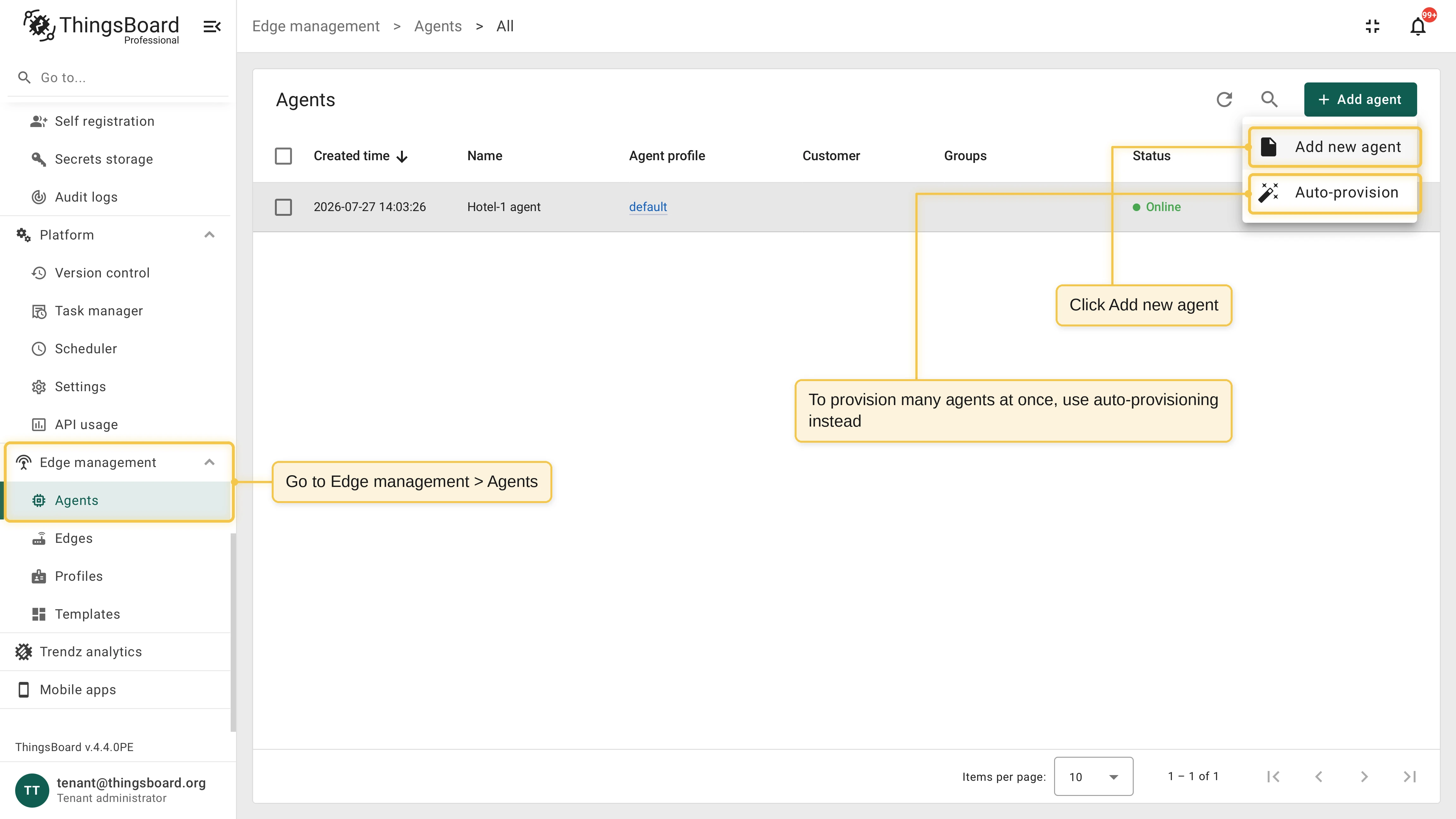
This guide shows how to install Remote Agent on a remote host and connect it to your ThingsBoard server. To provision many agents at once, use auto-provisioning instead.
Prerequisites
Section titled “Prerequisites”- ThingsBoard server or a ThingsBoard Cloud tenant.
- Docker installed on the target machine (Linux, amd64 or arm64).
- Outbound network access from the target machine to the ThingsBoard gRPC port. The agent shares the port with ThingsBoard Edge (
EDGES_RPC_PORT, default7070).
Create an agent and install it
Section titled “Create an agent and install it”Go to Edge management > Agents and click Add new agent.
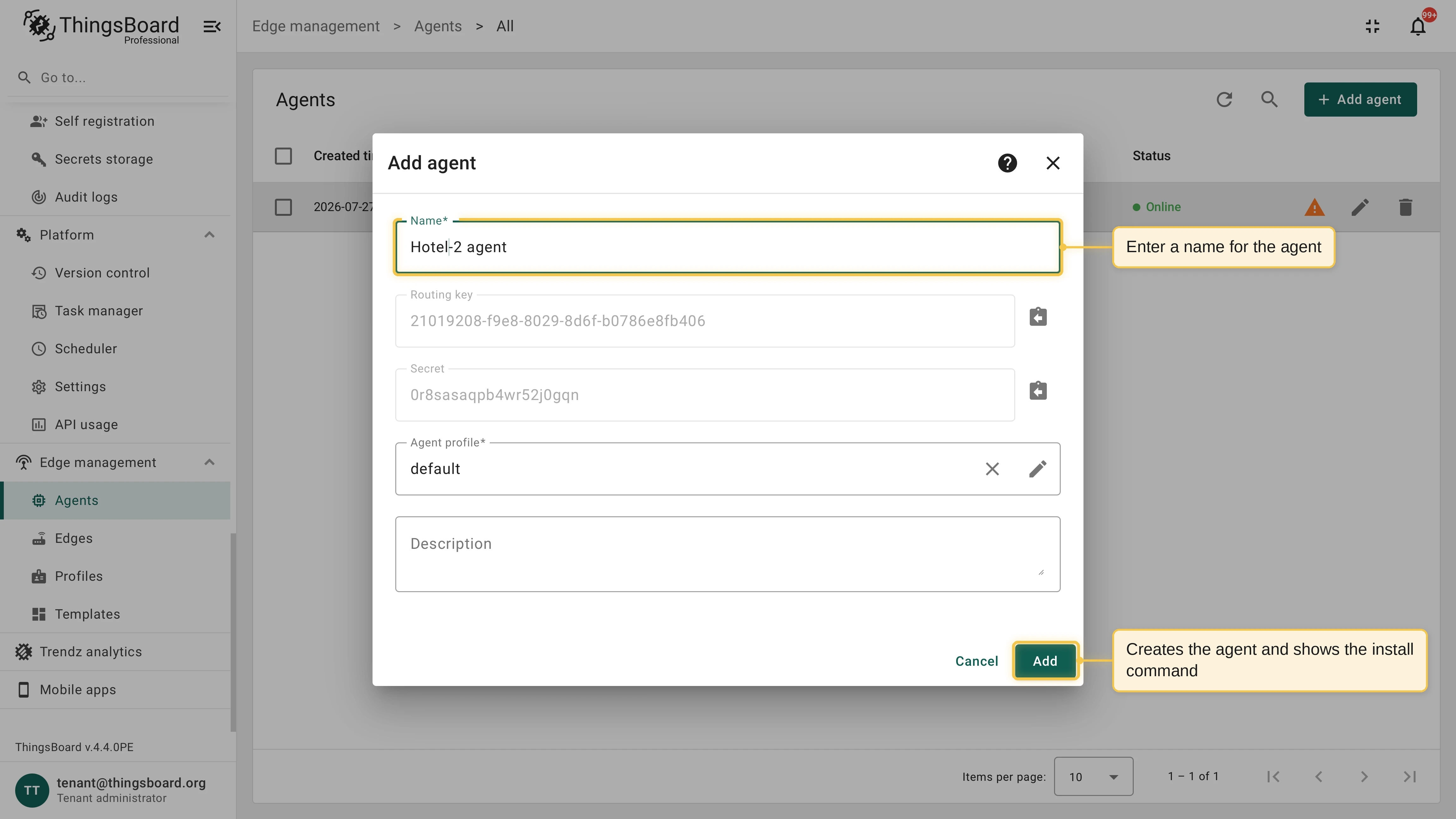
Enter the agent name, optionally add a description, and click Add. ThingsBoard creates the agent and generates its routing key and secret.
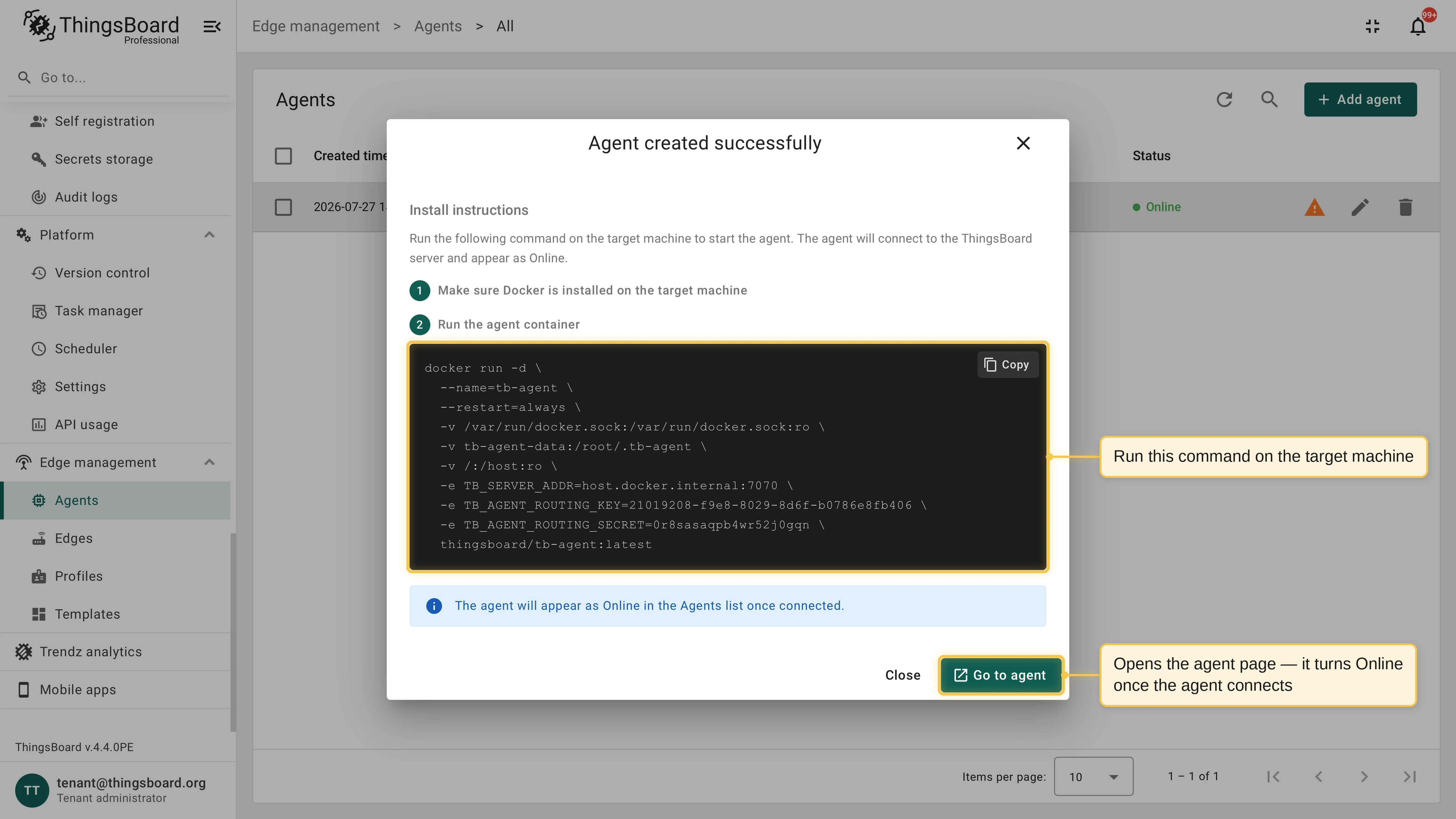
In the Agent created successfully dialog, open Install instructions. The dialog shows a
docker runcommand with the server address and credentials already filled in.Run the command on the target machine:
Terminal window docker run -d \--name=tb-agent \--restart=always \-v /var/run/docker.sock:/var/run/docker.sock:ro \-v tb-agent-data:/root/.tb-agent \-v /:/host:ro \-e TB_SERVER_ADDR=<thingsboard-host>:7070 \-e TB_AGENT_ROUTING_KEY=<routing-key> \-e TB_AGENT_ROUTING_SECRET=<routing-secret> \-e TB_RPC_SSL_ENABLED=false \thingsboard/tb-remote-agent:1.0.0Verify the connection. The agent appears as Online in the Agents list once it connects.
You can reopen the command at any time: open the agent details and click Install instructions.
What the command mounts
Section titled “What the command mounts”| Mount | Purpose |
|---|---|
/var/run/docker.sock |
Required. Lets the agent manage containers, images, volumes, and networks on the host. |
tb-agent-data:/root/.tb-agent |
Required. Persists agent credentials, execution state, and rollback snapshots across container restarts. Without it, completed steps can re-execute and rollbacks cannot restore the previous application state. |
/:/host:ro |
Optional. A read-only view of the host filesystem, used only to report total host disk capacity. Omit it if you do not need this metric. |
Connect over TLS
Section titled “Connect over TLS”If your ThingsBoard server terminates the gRPC connection with TLS, set TB_RPC_SSL_ENABLED to true. For certificates signed by a public CA, no other change is needed. For self-signed certificates, mount the CA certificate and point TB_RPC_SSL_CERT at it:
docker run -d \--name=tb-agent \--restart=always \-v /var/run/docker.sock:/var/run/docker.sock:ro \-v tb-agent-data:/root/.tb-agent \-v /:/host:ro \-v /path/to/certs/ca.pem:/certs/ca.pem:ro \-e TB_SERVER_ADDR=<thingsboard-host>:7070 \-e TB_AGENT_ROUTING_KEY=<routing-key> \-e TB_AGENT_ROUTING_SECRET=<routing-secret> \-e TB_RPC_SSL_ENABLED=true \-e TB_RPC_SSL_CERT=/certs/ca.pem \thingsboard/tb-remote-agent:1.0.0Configuration reference
Section titled “Configuration reference”The agent is configured with environment variables.
Connection
Section titled “Connection”| Variable | Default | Description |
|---|---|---|
TB_SERVER_ADDR |
localhost:50051 |
ThingsBoard gRPC address as host:port. Use the Edge RPC port of your server (default 7070). |
TB_AGENT_ROUTING_KEY |
Agent identifier. Required unless auto-provisioning is enabled. | |
TB_AGENT_ROUTING_SECRET |
Agent authentication secret. Required unless auto-provisioning is enabled. | |
TB_RPC_SSL_ENABLED |
false |
Enables TLS for the gRPC connection. |
TB_RPC_SSL_CERT |
Path to a custom CA certificate in PEM format. When empty and TLS is enabled, the system CA pool is used. | |
AUTO_PROVISION |
false |
Enables auto-provisioning through an agent profile. |
TB_PROVISION_KEY |
Agent profile provision key. Required when auto-provisioning is enabled. | |
TB_PROVISION_SECRET |
Agent profile provision secret. Required when auto-provisioning is enabled. |
Runtime
Section titled “Runtime”| Variable | Default | Description |
|---|---|---|
TB_MAX_TRANSIENT_RETRIES |
10 |
Maximum restart attempts for containers with the on-failure restart policy before a deployment step is aborted. |
TB_IDEMPOTENCY_RETENTION_DAYS |
7 |
Days to keep records of completed command steps. |
TB_COMPOSE_SYNC_INTERVAL_SEC |
60 |
Interval between application state sync cycles. |
TB_HOST_DISK_MOUNT |
/host |
Path inside the agent container where the host root filesystem is mounted. Used to report total host disk capacity. |
TB_HOST_DISK_PATH |
Overrides automatic detection: the agent reads disk capacity from this exact path instead. |
Communication and security
Section titled “Communication and security”- The agent uses outbound connections only. It connects to the same gRPC port as ThingsBoard Edge (default
7070) and opens no listening ports on the host. TLS is optional and supports custom CA certificates. - The agent talks to the Docker Engine API directly and does not require the Docker Compose CLI on the host. It applies standard Docker Compose labels to every resource it creates, so managed applications look and behave like regular Docker Compose deployments.
- The agent replaces its own container on command from ThingsBoard, so a new agent release is rolled out from the UI. See Agent self-upgrade.
Troubleshooting
Section titled “Troubleshooting”The agent stays Offline. Check the agent container logs with docker logs tb-agent. The most common cause is an unreachable TB_SERVER_ADDR:
- Inside a container,
localhostrefers to the container itself. To reach a ThingsBoard server running on the same machine, usehost.docker.internal:7070where supported, the Docker bridge IP (like172.17.0.1:7070), or the actual host IP address. - Make sure the gRPC port is open in firewalls between the host and the server.
Connection drops. The agent reconnects automatically with exponential backoff (2 seconds to 5 minutes). Commands issued while the agent is offline are delivered after it reconnects.
Re-install on the same host. The tb-agent-data volume keeps the agent state. To connect the host to a different agent entity, remove the container and the volume, then run the new install command:
docker rm -f tb-agent && docker volume rm tb-agent-dataWas this helpful?