Remote Agent
Remote Agent is a remote Docker container manager for ThingsBoard and ThingsBoard Cloud. The agent runs as a Docker container on a remote host, connects to your ThingsBoard server, and manages Docker Compose applications on that host. You deploy, update, upgrade, and restart these applications from the ThingsBoard UI, monitor their state, and watch live container logs, without SSH access to the machine.
Use the agent to:
- Install and upgrade ThingsBoard Edge remotely. Deploy Edge instances on customer sites and push upgrades from the cloud, including automatic database migration, volume backups, and rollback on failure.
- Deploy and manage IoT Gateways. Install gateways on remote machines and keep them updated without manual Docker commands.
- Run any Docker Compose application. The Generic application type deploys custom Docker Compose projects: brokers, databases, or your own services.
- Adopt existing deployments. If Edge instances, gateways, or other Docker Compose applications already run on a host, the agent discovers and synchronizes them. Existing environments become manageable from ThingsBoard without redeploying anything.
- Keep the agent itself current. The agent replaces its own container with a new agent image on command from the UI, without SSH access to the host. See Agent self-upgrade.
- Update fleets in bulk. Restart, update, upgrade, or delete all applications that share an application profile across hundreds of agents with a single bulk action.
How it works
Section titled “How it works”The agent opens an outbound gRPC stream to the ThingsBoard server and authenticates with a routing key and secret. The server sends step-based commands over this stream; the agent executes them against the local Docker Engine and reports acknowledgment, progress, and results for every step.
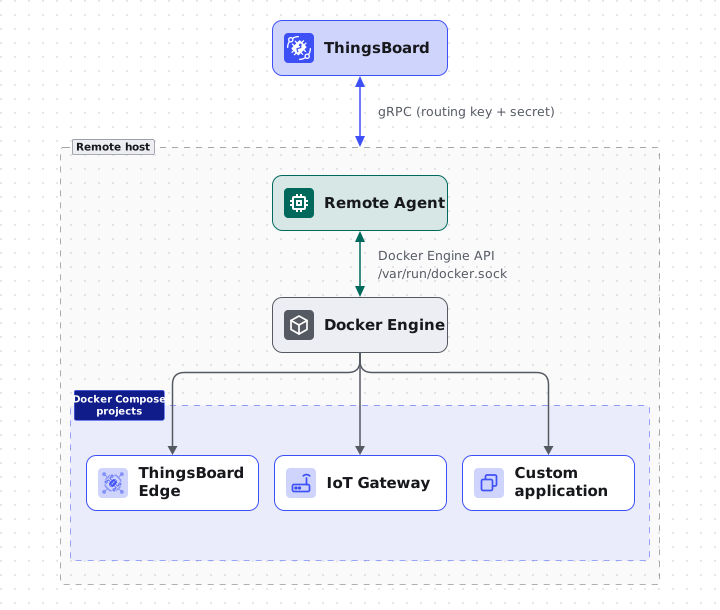
Every command step is idempotent: completed steps are persisted on the agent, so network retries, reconnects, and agent restarts never re-execute finished work. Operations that change an application are safe too: the agent backs up the selected volumes first, and if any step fails, it rolls the application back to its previous state. See Application actions.
Key concepts
Section titled “Key concepts”| Concept | Description |
|---|---|
| Agent | A ThingsBoard entity that represents one tb-agent container running on a remote host. Authenticates with a routing key and secret. |
| Agent profile | Fleet-level provisioning settings: a provisioning strategy, assigned application profiles, and a generated provisioning command for new hosts. |
| Application | One Docker Compose project managed by an agent. Each application has one of three types: Edge, Gateway, or Generic. |
| Application profile | A reusable application configuration: application type, template version, Docker Compose configuration, and custom arguments. |
| Template | A versioned application definition for the ThingsBoard Edge and IoT Gateway application types. Defines the Docker Compose configuration per product version and the step sequences for install, upgrade, restart, rollback, and delete operations. |
| Unit | A Docker resource that belongs to an application: a container, volume, or network. |
| Event | A tracked execution of an operation on an application, with per-step progress and status. |
| Bulk action | An operation applied to all applications that match an application profile across a fleet of agents. |
Monitoring
Section titled “Monitoring”A connected agent continuously reports:
- Status: Online or Offline, shown in the Agents table.
- Host metrics: CPU, memory, and disk usage of the host.
- Application metrics: CPU, memory, and volume usage per application and per container.
- State: Container states, image digests, and the current Docker Compose configuration of every managed project.
- Logs: Live container logs, streamed on demand to the log viewer.
Edge and Gateway upgrade tracking
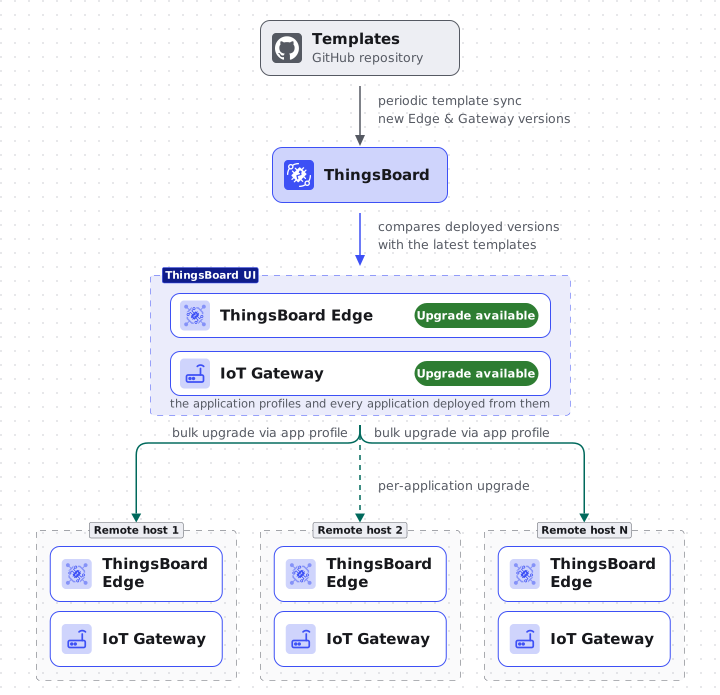
Section titled “Edge and Gateway upgrade tracking”ThingsBoard has native upgrade support for ThingsBoard Edge and IoT Gateway applications. The server periodically syncs application templates from a public GitHub repository, so new product versions become available for upgrade without a platform update. When a deployed application falls behind the latest template version, ThingsBoard marks it with an Upgrade available chip in the Applications table, on its application profile, and on the linked ThingsBoard Edge entity. From there, a single upgrade action moves the application to the new version, with volume backups and automatic rollback. A bulk upgrade propagates one upgrade to every host that runs the application profile.
Next steps
Section titled “Next steps”- Install Remote Agent: connect your first agent.
- Agent self-upgrade: move the agent to a new image from the UI.
- Agent profiles: auto-provision agents at scale.
- Applications: deploy and manage Docker Compose applications.
- Application profiles: reusable configurations and templates.
- Application actions: restart, update, upgrade, and delete applications remotely, with backup and rollback.
- Bulk actions: operate on fleets.
Was this helpful?