Script Calculated Field
Script calculated fields use TBEL (ThingsBoard Expression Language) to perform advanced, real-time computations on telemetry and attributes. Unlike Simple fields, Script fields support conditional logic, iteration over rolling time-series windows, and returning multiple results in a single execution.
Use Script when you need:
- Multi-step calculations (e.g., dew point, air density, efficiency metrics)
- Conditional rules (e.g., generate status flags based on multiple inputs)
- Multiple output keys computed in a single pass
- Event-like telemetry with explicit timestamps
- Rolling analytics (rolling average, trend detection, anomaly detection)
Configuration
Section titled “Configuration”- Open the Data processing ⇾ Calculated fields page.
- Click the + Add calculated field ⇾ Create new calculated field in the top-right corner.
- In General, enter a title, specify the entity the field applies to, and select the Script type.
- Add Arguments, write the Script function, and configure Output.
- Click Add to save.
Arguments
Section titled “Arguments”Script fields support three argument types. The data source can be the current entity, another Device/Asset, the Customer, the Current tenant, or the Current owner.
- Attribute — a single attribute value (Server, Client, or Shared scope) with an optional default fallback.
- Latest telemetry — the most recent value of a telemetry key, with an optional default fallback.
- Time series rolling — a sliding historical window of telemetry values. Exposes aggregation methods and merge utilities — see Rolling Argument API below.
Script Function
Section titled “Script Function”The script must implement:
function calculate(ctx, arg1, arg2, ...): object | object[]The function returns a single JSON object (multiple output keys at server time) or an array of JSON objects (multiple time series records with explicit timestamps).
Context object (ctx):
| Property | Description |
|---|---|
ctx.latestTs |
Most recent timestamp (ms) from telemetry-based arguments |
ctx.args.<arg>.ts |
Timestamp of a single-value argument |
ctx.args.<arg>.value |
Value of a single-value argument |
ctx.args.<arg>.timeWindow |
{ startTs, endTs } of a rolling argument |
ctx.args.<arg>.values |
Array of { ts, value } for a rolling argument |
ctx.args.<arg>.<method>() |
Built-in methods: mean(), sum(), min(), max(), first(), last(), etc. |
Arguments are also passed as direct function parameters, so you can use temperature directly
instead of ctx.args.temperature.value.
Example — dew point:
function calculate(ctx, temperature, humidity) { var a = 17.625; var b = 243.04; var alpha = ((a * temperature) / (b + temperature)) + Math.log(humidity / 100.0); var dewPoint = toFixed((b * alpha) / (a - alpha), 1); return { "dewPoint": dewPoint };}Example — time series with explicit timestamp:
function calculate(ctx, temperatureF) { var temperatureC = (temperatureF - 32) / 1.8; return { "ts": ctx.latestTs, "values": { "temperatureC": toFixed(temperatureC, 2) } };}Example — array output (one record per time window entry):
function calculate(ctx, temperature, defrost) { var merged = temperature.merge(defrost); var result = []; foreach(item: merged) { if (item.v1 > -5.0 && item.v2 == 0) { result.add({ ts: item.ts, values: { issue: { temperature: item.v1, defrostState: false } } }); } } return result;}Output
Section titled “Output”Stores results as time series or attributes. For array returns, each element becomes a separate time series record.
For output strategy options, see Calculated Fields — Output Strategy.
Rolling Argument API
Section titled “Rolling Argument API”When an argument uses the Time series rolling type, it exposes a rich API for aggregating and
aligning historical telemetry. The argument is passed directly as a function parameter (e.g., temperature)
and provides:
.timeWindow—{ startTs, endTs }of the configured window.values— array of{ ts, value }records within the window- Aggregation methods and merge utilities described below
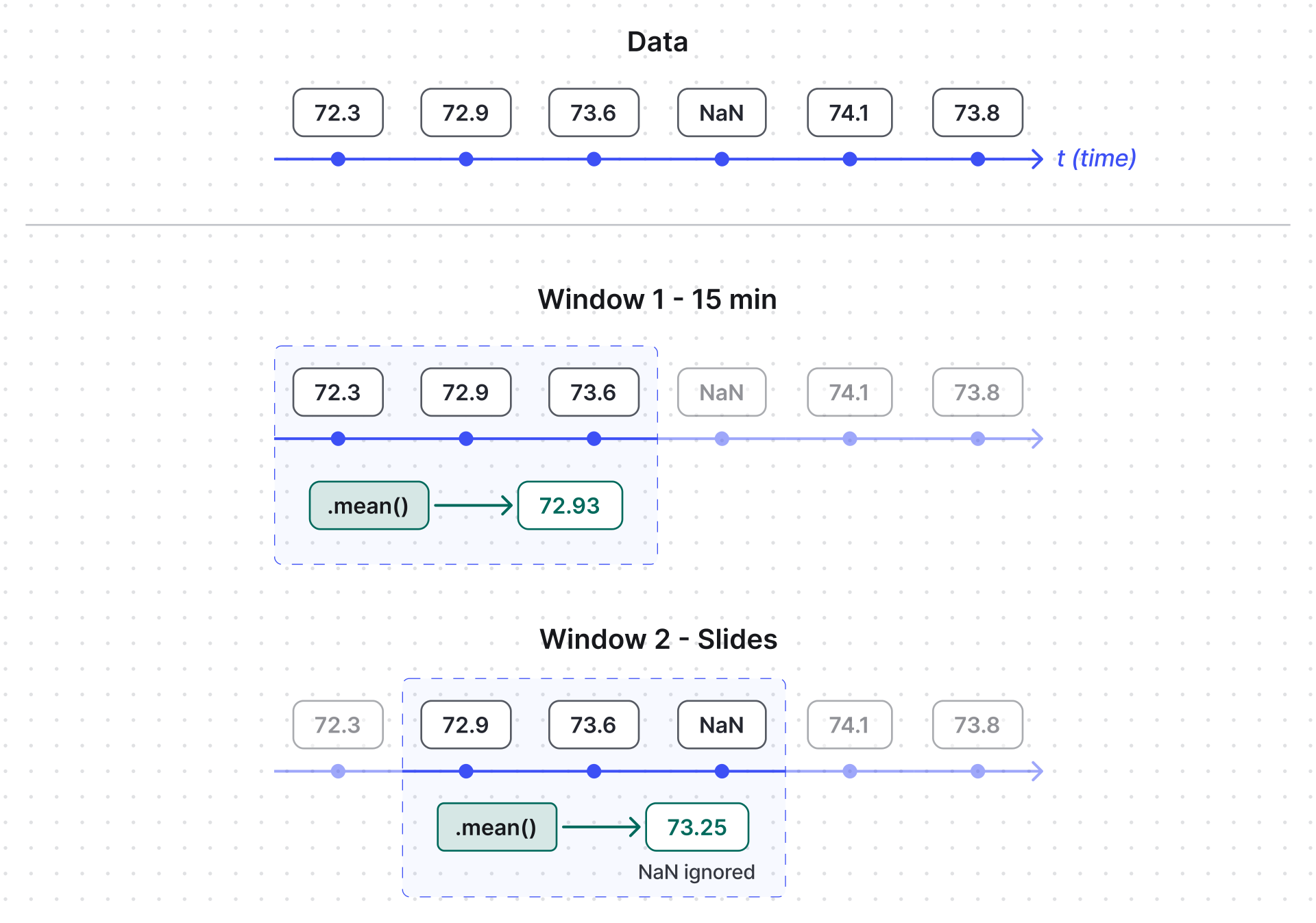
Aggregation Methods
Section titled “Aggregation Methods”All methods accept an optional ignoreNaN boolean (default true):
| Method | ignoreNaN = true (default) |
ignoreNaN = false |
|---|---|---|
max() |
Highest value, ignoring NaN | NaN if any NaN exists |
min() |
Lowest value, ignoring NaN | NaN if any NaN exists |
mean(), avg() |
Average, ignoring NaN | NaN if any NaN exists |
std() |
Standard deviation, ignoring NaN | NaN if any NaN exists |
median() |
Median, ignoring NaN | NaN if any NaN exists |
count() |
Count of values, ignoring NaN | Count including NaN |
last() |
Most recent non-NaN value | Last value even if NaN |
first() |
Oldest non-NaN value | First value even if NaN |
sum() |
Total sum, ignoring NaN | NaN if any NaN exists |
Given this rolling argument:
{ "temperature": { "timeWindow": { "startTs": 1740643762896, "endTs": 1740644662896 }, "values": [ { "ts": 1740644350000, "value": 72.32 }, { "ts": 1740644360000, "value": 72.86 }, { "ts": 1740644370000, "value": 73.58 }, { "ts": 1740644380000, "value": "NaN" } ] }}Result:
var avgTemp = temperature.mean();        // 72.92var tempMax = temperature.max();         // 73.58var valueCount = temperature.count();    // 3
var avgTempNaN = temperature.mean(false);     // NaNvar tempMaxNaN = temperature.max(false);      // NaNvar valueCountNaN = temperature.count(false); // 4
Merging Rolling Arguments
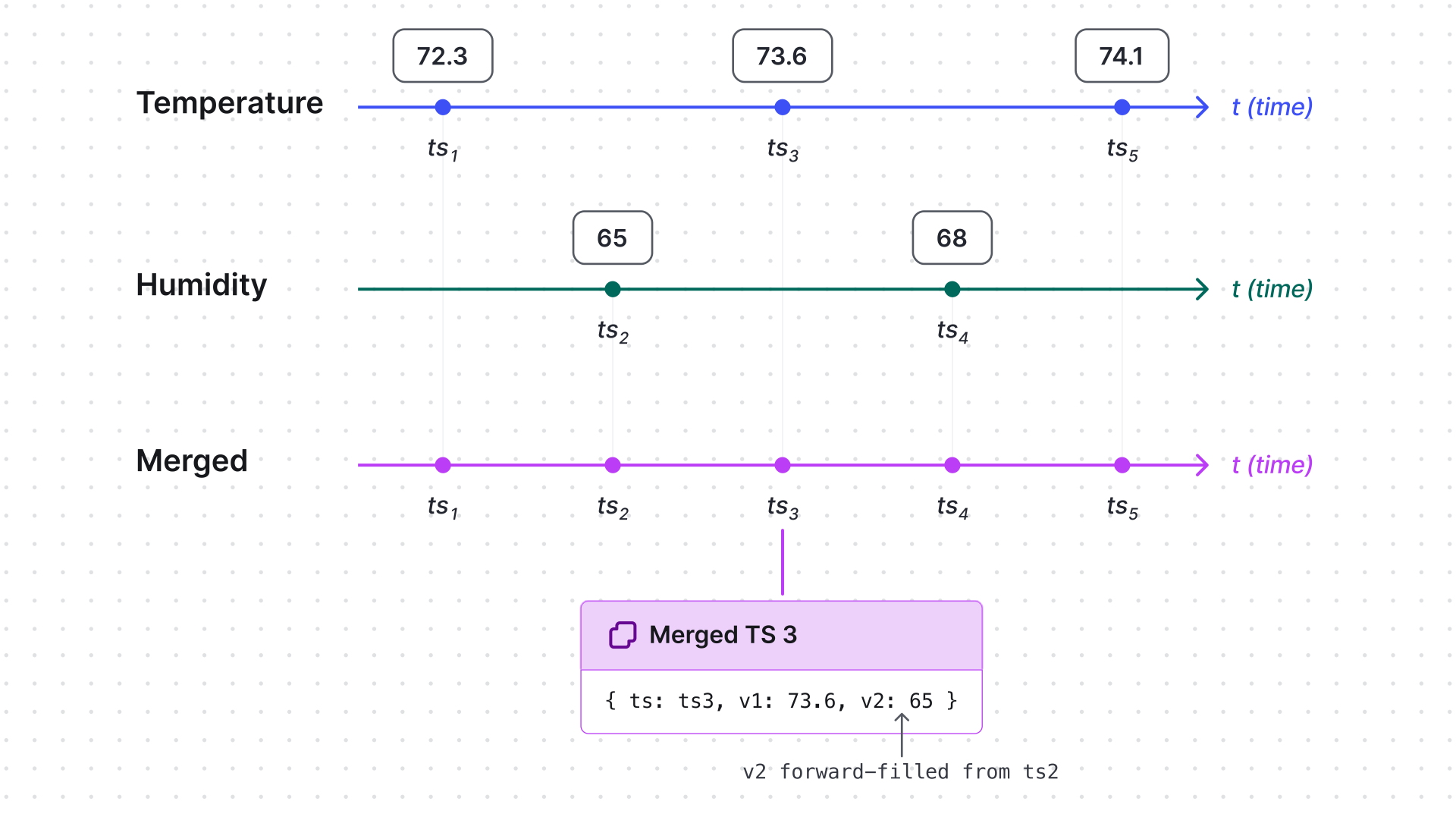
Section titled “Merging Rolling Arguments”Use merge and mergeAll to align timestamps across multiple telemetry streams.
Missing values at a given timestamp are filled with the most recent known value;
if no previous value exists, NaN is used.
| Method | Description | Returns |
|---|---|---|
merge(other, settings) |
Merges with another rolling argument. Aligns timestamps and fills missing values with the previous available value. | Merged object with timeWindow and aligned values |
mergeAll(others, settings) |
Merges multiple rolling arguments. Aligns timestamps and fills missing values with the previous available value. | Merged object with timeWindow and aligned values |
Parameters:
| Parameter | Type | Description |
|---|---|---|
other |
Rolling argument | Single rolling argument to combine with |
others |
Rolling argument[] | Array of rolling arguments to combine with |
settings.ignoreNaN |
boolean | Whether to skip NaN values when filling gaps (default true) |
settings.timeWindow |
{ startTs, endTs } |
Override the time window for the merge operation |
Each merged record has the shape { ts, v1, v2, ... } where v1 is the value from the calling
argument and v2, v3, … are values from the merged arguments. Missing values at a timestamp
are forward-filled from the most recent known reading.
Merge two arguments:
var merged = temperature.merge(humidity, { ignoreNaN: false });// merged.values[i] = { ts, v1: tempValue, v2: humidityValue }Merge three or more arguments:
var merged = temperature.mergeAll([humidity, pressure], { ignoreNaN: true });// merged.values[i] = { ts, v1: tempValue, v2: humidityValue, v3: pressureValue }Common use cases: sensor data synchronization, anomaly detection across multiple streams, predictive maintenance combining vibration, temperature, and operational status.
Example 1: Fahrenheit to Celsius
Section titled “Example 1: Fahrenheit to Celsius”A device sending temperature in Fahrenheit under the temperatureF key.
Goal: convert to Celsius, round to two decimal places,
and store as temperatureC using the same timestamp.
- Open the Data processing ⇾ Calculated fields page.
- Click the + Add calculated field ⇾ Create new calculated field in the top-right corner.
- In General:
- Title: F to C
- Entity: a device sending temperature (or its device profile)
- Type: Script.
- Add argument:
- Argument type: Latest telemetry
- Time series key:
temperatureF - Argument name:
temperatureF
- Write the script:
function calculate(ctx, temperatureF) {var temperatureC = (temperatureF - 32) / 1.8;return { "ts": ctx.latestTs, "values": { "temperatureC": toFixed(temperatureC, 2) } };}
- Output type: Time series.
- Click Add.
Result: temperatureC appears on the device’s Latest telemetry tab whenever temperatureF updates.
Example 2: Air Density from Cross-Entity Data
Section titled “Example 2: Air Density from Cross-Entity Data”The Building A asset has two related devices:
- Smart Device — publishes
temperature(°F) as telemetry - Altimeter — provides
altitudeas a server attribute
Goal: compute air density and store it as airDensity telemetry on the Building A asset.
- Open the Data processing ⇾ Calculated fields page.
- Click the + Add calculated field ⇾ Create new calculated field in the top-right corner.
- In General:
- Title: Air density calculation
- Apply the calculated field to the building asset profile.
- Type: Script.
- Add two arguments:
- Argument 1:
- Entity: Altimeter
- Type: Attribute (Server),
- Key:
altitude - Name:
altitude
- Argument 2:
- Entity: Smart Device
- Type: Time series rolling
- Key:
temperature - Name:
temperature - Time window: 15 minutes
- Argument 1:
- Write the script:
function calculate(ctx, altitude, temperature) {var avgTemperature = temperature.mean(); // Get average temperaturevar temperatureK = (avgTemperature - 32) * (5 / 9) + 273.15; // Convert Fahrenheit to Kelvinvar pressure = 101325 * Math.pow((1 - 2.25577e-5 * altitude), 5.25588); // Estimate air pressure based on altitudevar airDensity = pressure / (287.05 * temperatureK); // Air density formulareturn { "airDensity": toFixed(airDensity, 2) };}
- Output type: Time series.
- Click Add.
Result: airDensity appears on Building A’s Latest telemetry tab.
Example 3: Freezer Anomaly Detection
Section titled “Example 3: Freezer Anomaly Detection”A freezer device publishes temperature (°C) and defrost (0 = OFF, 1 = ON).
Goal: generate an issue telemetry record whenever defrost = 0 and temperature > -5°C.
- Open the Data processing ⇾ Calculated fields page.
- Click the + Add calculated field ⇾ Create new calculated field in the top-right corner.
- In General:
- Title: Freezer Anomaly Detection
- Apply the calculated field to the freezer device profile.
- Type: Script.
- Add two rolling arguments (15-minute window each):
- Argument 1:
- Entity: Current entity (freezer device)
- Type: Time series rolling
- Key:
defrost - Name:
defrost - Time window: 15 minutes
- Argument 2:
- Entity: Current entity (freezer device)
- Type: Time series rolling
- Key:
temperature - Name:
temperature - Time window: 15 minutes
- Argument 1:
- Write the script:
function calculate(ctx, temperature, defrost) {var merged = temperature.merge(defrost);var result = [];foreach(item: merged) {if (item.v1 > -5.0 && item.v2 == 0) {result.add({ ts: item.ts, values: { issue: { temperature: item.v1, defrostState: false } } });}}return result;}
- Output type: Time series.
- Click Add.
Result: When the condition is met, an issue appears on the device with values such as { "temperature": 0.8, "defrostState": false }, indicating a potentially critical state.
Was this helpful?