Architecture Overview
ThingsBoard is a multi-tenant IoT platform designed to scale horizontally. Add more instances of any service to handle more load. There is no single point of failure — the system continues operating when individual instances go down.
Technology Stack
Section titled “Technology Stack”ThingsBoard relies on the following third-party components:
| Component | Role | Required? |
|---|---|---|
| PostgreSQL | Entity storage (devices, users, dashboards, rule chains) | Always required |
| Apache Kafka | Message queue between services in cluster mode | Production clusters |
| Redis / Valkey | Shared cache for credentials, sessions, profiles | Multi-node deployments |
| Apache Cassandra | Time-series storage (Hybrid mode) | High-throughput production |
| Zookeeper | Service discovery, partition assignment | Cluster mode |
| HAProxy / nginx | Load balancer for HTTP, MQTT, CoAP | Cluster mode |
Single-node deployments require only PostgreSQL. All other components are added as you scale.
Database Layer
Section titled “Database Layer”ThingsBoard stores entities and attributes in PostgreSQL. For time-series data, you can choose between two strategies:
| Strategy | Time-series storage | Write throughput | Recommended for |
|---|---|---|---|
| SQL | PostgreSQL | ≤5–10K data points/sec | Small deployments, simplicity |
| Hybrid | Cassandra | ~1M data points/sec | High-throughput production |
See Database Layer for write batching, partitioning strategies, Cassandra tuning, and storage efficiency comparison.
Deployment Modes
Section titled “Deployment Modes”ThingsBoard supports two deployment architectures:
| Mode | Description | Best for |
|---|---|---|
| Monolithic | All services in a single Java process | Development, small-to-medium workloads |
| Microservices | Each service runs as a separate container | Production, horizontal scaling, HA |
Both modes can run as a single server or as a cluster. See Deployment Scenarios for sizing guidance and Performance for benchmark results.
Multi-tenancy and Tenant Isolation
Section titled “Multi-tenancy and Tenant Isolation”Tenant isolation is enforced at every layer of the platform. The entity hierarchy — Tenant → Customer → Devices & Assets — determines access boundaries. Each tenant has independent rule chains, dashboards, device profiles, and user roles. System resources (database partitions, message queue topics, cache entries) are partitioned per tenant, so one tenant’s traffic spike cannot affect another.
Tenant profiles define per-tenant resource limits and quotas:
| Category | What it controls |
|---|---|
| Entity limits | Maximum devices, assets, dashboards, users, and other entities per tenant |
| API limits | Rule engine executions and transport messages per second |
| Rate limits | Per-transport and per-device message rate limiting (see Rate Limiting below) |
| Data retention (TTL) | Per-tenant time-to-live for telemetry, alarms, RPC, audit logs |
| WebSocket limits | Maximum sessions and subscriptions per tenant and customer |
| Isolated queues | Dedicated Rule Engine Queues per tenant for performance isolation |
| Notifications | Email/SMS quotas, alarm quotas |
| Calculated fields | Maximum calculated fields per entity, arguments, rolling data points |
Authentication
Section titled “Authentication”ThingsBoard uses different authentication mechanisms for devices and users.
Device authentication happens on every incoming message. When a device connects via MQTT, HTTP, or CoAP, the Transport layer validates its credentials before accepting any data. Supported credential types:
| Credential Type | Protocol | How it works |
|---|---|---|
| Access Token | MQTT, HTTP, CoAP | String token sent as MQTT username or HTTP/CoAP query parameter |
| MQTT Basic | MQTT | Client ID + username + password combination |
| X.509 Certificate | MQTT (TLS) | Device presents a client certificate during TLS handshake |
Credentials are cached after the first lookup — subsequent messages from the same device are validated from cache without a database query. This is critical for throughput: at 100K messages/second, each credential lookup hitting the database would overwhelm PostgreSQL.
User authentication uses JWT tokens for REST API and WebSocket connections. Users authenticate once via login endpoint, receive a JWT token pair (access + refresh), and include the access token in subsequent API requests. Token validation is stateless — the server verifies the JWT signature without a database lookup.
Data Flow
Section titled “Data Flow”When a device sends data, it follows the same path regardless of deployment mode (monolithic or microservices):
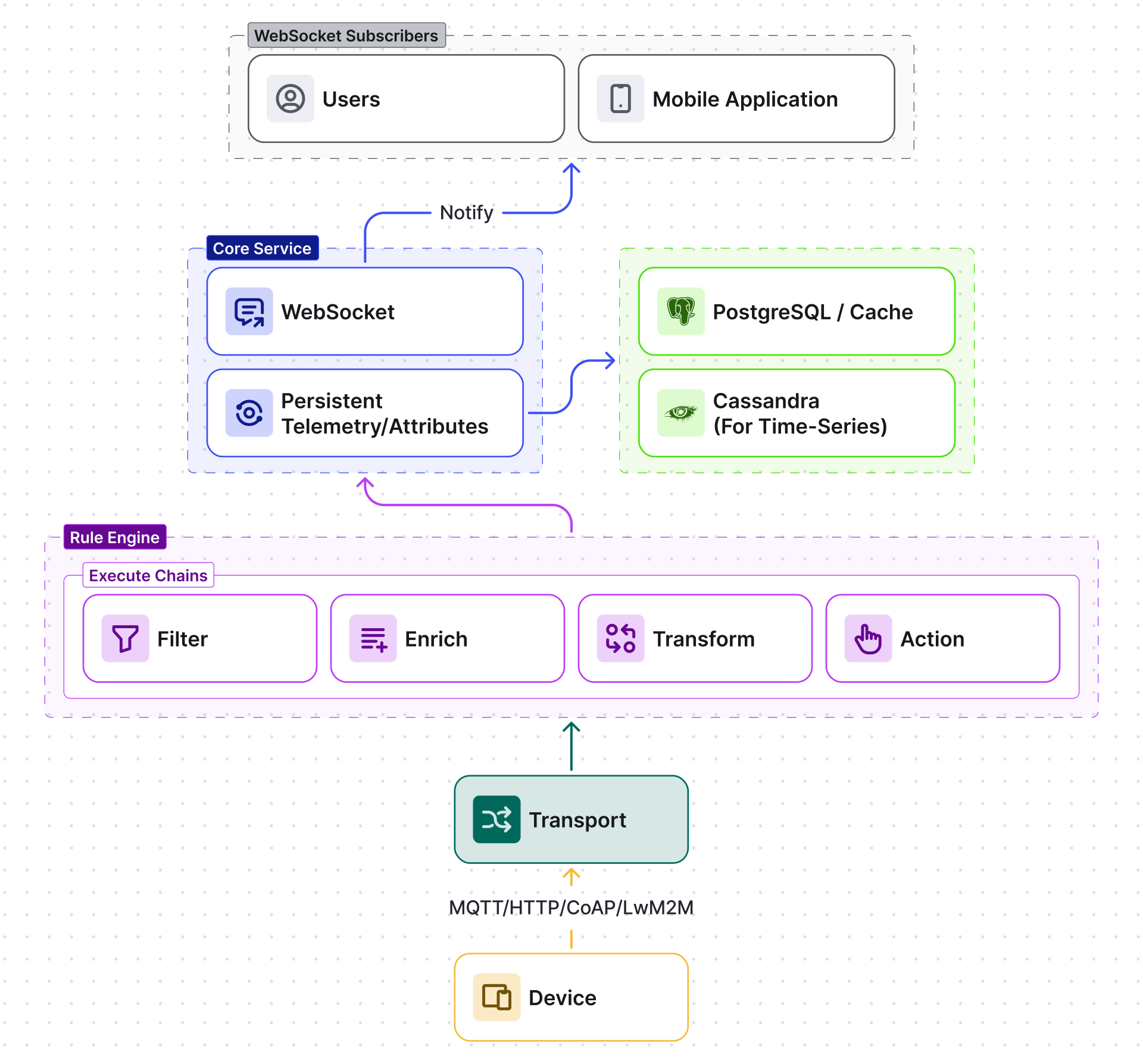
- Connect — Device opens a connection to the Transport layer (MQTT, HTTP, CoAP, or LwM2M).
- Resolve tenant — Transport identifies the owning tenant from device credentials.
- Authenticate — Transport validates device credentials against the Core service. Invalid credentials are rejected immediately. Credentials are cached to avoid a database query on every message.
- Push to Rule Engine — Transport converts the protocol-specific payload into a unified message and forwards it to the Rule Engine via the message queue.
- Execute Rule Chains — The Rule Engine processes the message through the tenant’s configured rule chains — filtering, enriching, transforming, and triggering actions.
- Persist — Action nodes save telemetry, attributes, or alarms to the database.
- Notify — Core pushes real-time updates to WebSocket subscribers (dashboards).
Server-side RPC
Section titled “Server-side RPC”The reverse data path — server to device — follows a different route. When a user or rule chain sends a command to a device:
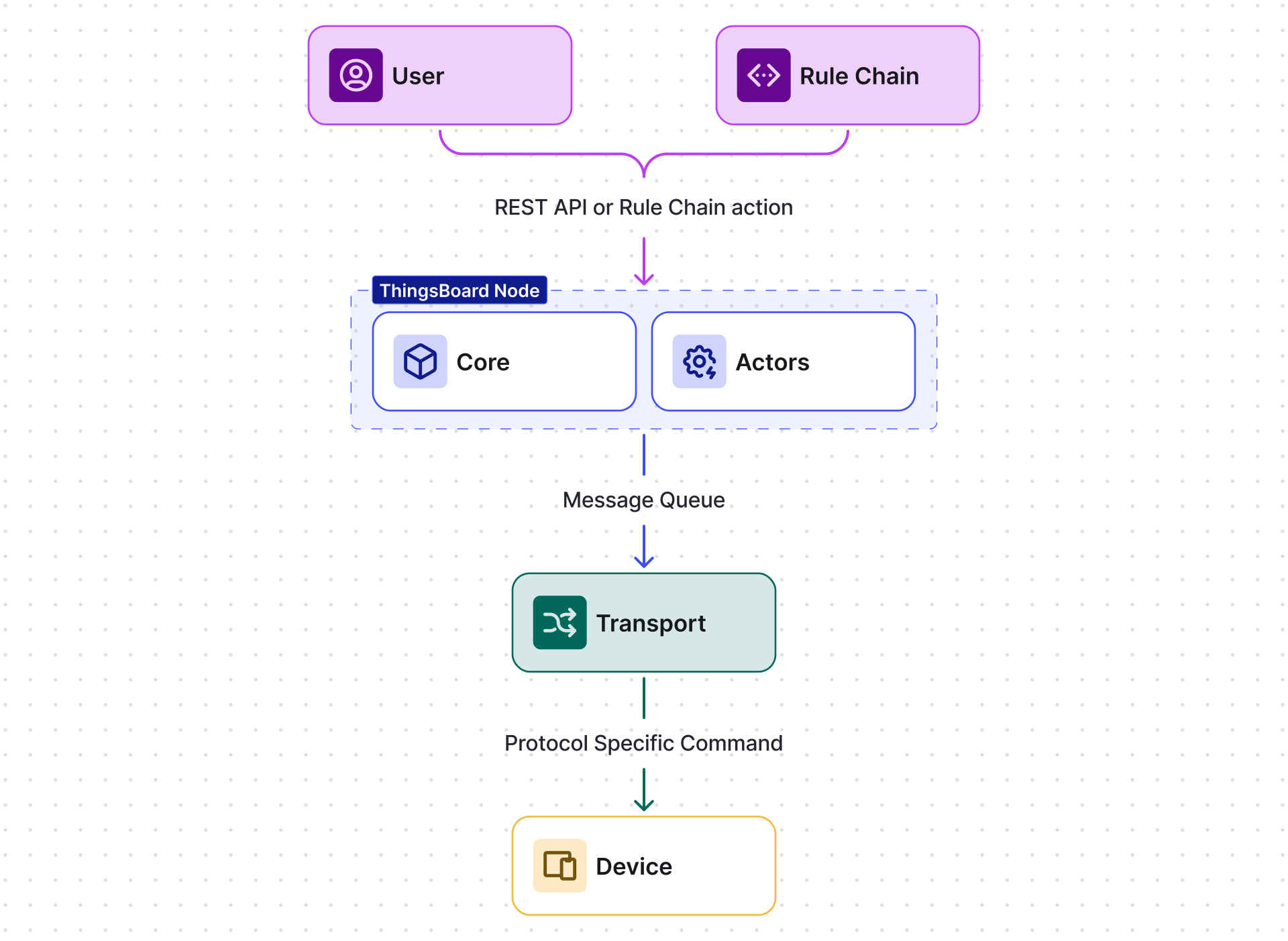
- Initiate — A REST API call or rule chain action node creates an RPC request for a specific device.
- Route to owner — The Core service identifies which ThingsBoard node owns the target device’s actor (via consistent hashing). In a cluster, the request is forwarded via gRPC to the correct node.
- Device actor — The device’s actor receives the RPC request, checks whether the device has an active session, and forwards the command to the Transport layer via the message queue.
- Deliver — The Transport layer sends the command to the device over the device’s active connection (MQTT publish, CoAP response, etc.).
- Response — The device responds (optional), and the response flows back through the same path in reverse.
If the device is offline, the behavior depends on RPC type: one-way RPC is fire-and-forget, while two-way RPC waits for a response with a configurable timeout.
WebSocket Subscriptions
Section titled “WebSocket Subscriptions”Dashboards and the REST API use WebSocket connections for real-time updates. When a user opens a dashboard:
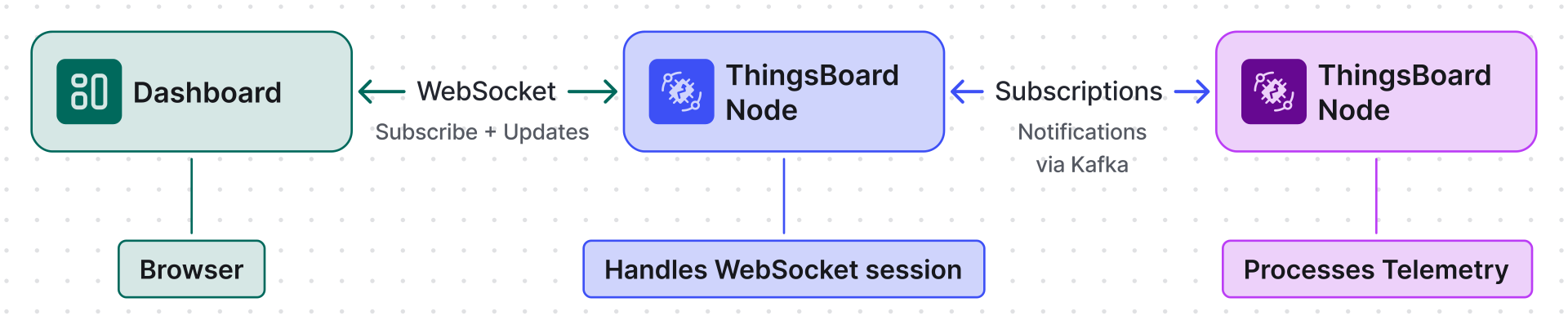
- Connect — The browser opens a WebSocket connection to a ThingsBoard Node.
- Subscribe — The dashboard sends subscription commands for specific entity attributes or time-series keys (e.g., “subscribe to device ABC, key temperature”).
- Register — The TB Node registers the subscription in the subscription manager. In a cluster, subscriptions are tracked per-node, and subscription notifications flow via the
tb_core.notificationsKafka topic. - Update — When new telemetry arrives (from a device, rule chain, or API), the node processing the telemetry detects matching subscriptions and pushes the update to the subscriber’s WebSocket session.
This means real-time updates work across cluster nodes — the device’s telemetry may be processed by node A, while the dashboard is connected to node B. The notification flows through Kafka to ensure delivery.
Rate Limiting
Section titled “Rate Limiting”ThingsBoard enforces rate limits at multiple levels to protect against traffic spikes and ensure fair resource sharing:
| Level | Where enforced | What it controls |
|---|---|---|
| Transport | Transport layer | Messages per second per device and per tenant (MQTT, HTTP, CoAP, LwM2M) |
| REST API | Core service | API calls per second per tenant and per customer |
| Rule Engine | Rule Engine | Rule engine messages per second per tenant |
| WebSocket | Core service | Subscription updates per second per session |
| Notifications | Core service | Email/SMS per hour per tenant |
Rate limit configuration is set per tenant profile. When a limit is exceeded, the platform rejects additional messages with an appropriate error (e.g., MQTT CONNACK with “rate limit” reason, HTTP 429 Too Many Requests). Rate limit counters are stored in the cache (the rateLimits namespace) for fast, distributed enforcement across cluster nodes.
Services
Section titled “Services”ThingsBoard is split into the following service groups:
| Service | Responsibility | Protocols |
|---|---|---|
| Transports | Accept device connections, convert protocol-specific payloads into a unified format, push messages to the rule engine. Each protocol runs in its own process. | MQTT, HTTP, CoAP, LwM2M, SNMP |
| ThingsBoard Node | Core service — REST API, WebSocket subscriptions, Rule Engine, Actor System, device connectivity state, entity management | HTTP/REST, WebSocket |
| JS Executor | Execute user-defined JavaScript from rule engine script nodes in isolated sandboxes. Deploy 20+ instances in production. | Internal (Kafka) |
| Web UI | Serve the Angular-based dashboard application, proxy REST/WS to ThingsBoard Node | HTTP |
Integration Executor — runs platform integrations (OPC-UA, SigFox, TheThingsNetwork, etc.), pulling data from external systems and pushing it into ThingsBoard via the rule engine.
Transport services are protocol-specific — each protocol runs in its own process (or pod in Kubernetes). See the individual API references for protocol details: MQTT API, HTTP API, CoAP API, LwM2M API.
Internal Components
Section titled “Internal Components”These components work identically in both monolithic and microservices deployments:
| Component | Purpose |
|---|---|
| Actor System | Manages isolated per-entity state (device actors, rule chain actors, tenant actors). Each actor processes messages sequentially, eliminating concurrency issues. |
| Cache Layer | Caches device credentials, entity profiles, attributes, and sessions to avoid database queries on every message. Supports Caffeine (local) and Redis (shared). |
| Service Discovery | In cluster mode, Zookeeper tracks which nodes are alive. Single-node deployments skip Zookeeper entirely. |
| Consistent Hashing | Distributes entities across cluster nodes deterministically. When a node joins or leaves, only a fraction of entities re-balance. |
| gRPC | Inter-node communication in cluster mode. Forwards messages to the node that owns the target entity. |
Inter-service Communication
Section titled “Inter-service Communication”Services communicate through a message queue. Messages are partitioned by entity ID — all messages for a single device always land on the same partition, preserving order and enabling stateful processing.
| Queue | Use case | Persistence |
|---|---|---|
| Apache Kafka | Production clusters | Disk-based, survives restarts |
| In-Memory | Development, single-node setups | Lost on restart |
See Message Queue for the full topic topology, partitioning strategy, and producer/consumer tuning.
Was this helpful?