Propagation Calculated Field
Propagation automatically transfers data from the current entity to one or more related entities resolved through entity relations. It can copy values as-is or compute a new value before sending — ideal for synchronizing telemetry and attributes across entity hierarchies.
Use Propagation when you need to:
- Mirror device telemetry to a parent asset (battery level, signal quality, last status)
- Push configuration attributes from an asset to child devices (HVAC mode, setpoints)
- Compute a derived value on a device and store it on the related asset (e.g., dew point → greenhouse)
- Propagate to multiple entities at once (all devices under a building or fleet)
Configuration
Section titled “Configuration”- Open the Data processing ⇾ Calculated fields page.
- Click the + Add calculated field ⇾ Create new calculated field in the top-right corner.
- In General, enter a title, specify the entity the field applies to, and select the Propagation type.
- Configure the Propagation path, Data to propagate, and Output.
- Click Add to save.
Propagation Path
Section titled “Propagation Path”Defines the path from the current entity to the target entity.
| Setting | Options |
|---|---|
| Relation direction | Up to parent — propagate to the parent entity Down to child — propagate to child entities |
| Relation type | The relation type between entities (e.g., Contains, Manages) |
Only relations between Device, Asset, Customer, and Tenant entities are supported. At most 1000 entities are resolved at the last level of the relation path (the Relation search entity limit in Calculated Fields — Limits & Quotas).
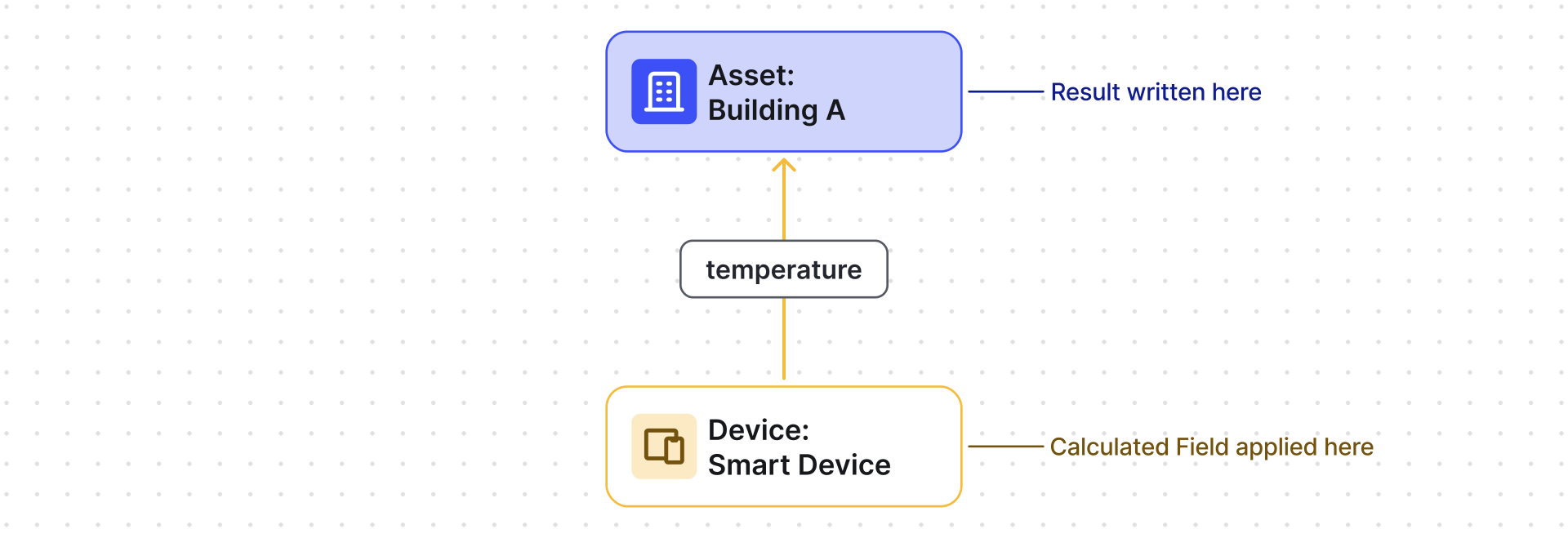
Up to parent
Section titled “Up to parent”Calculated field runs on the child, writes to its parents.
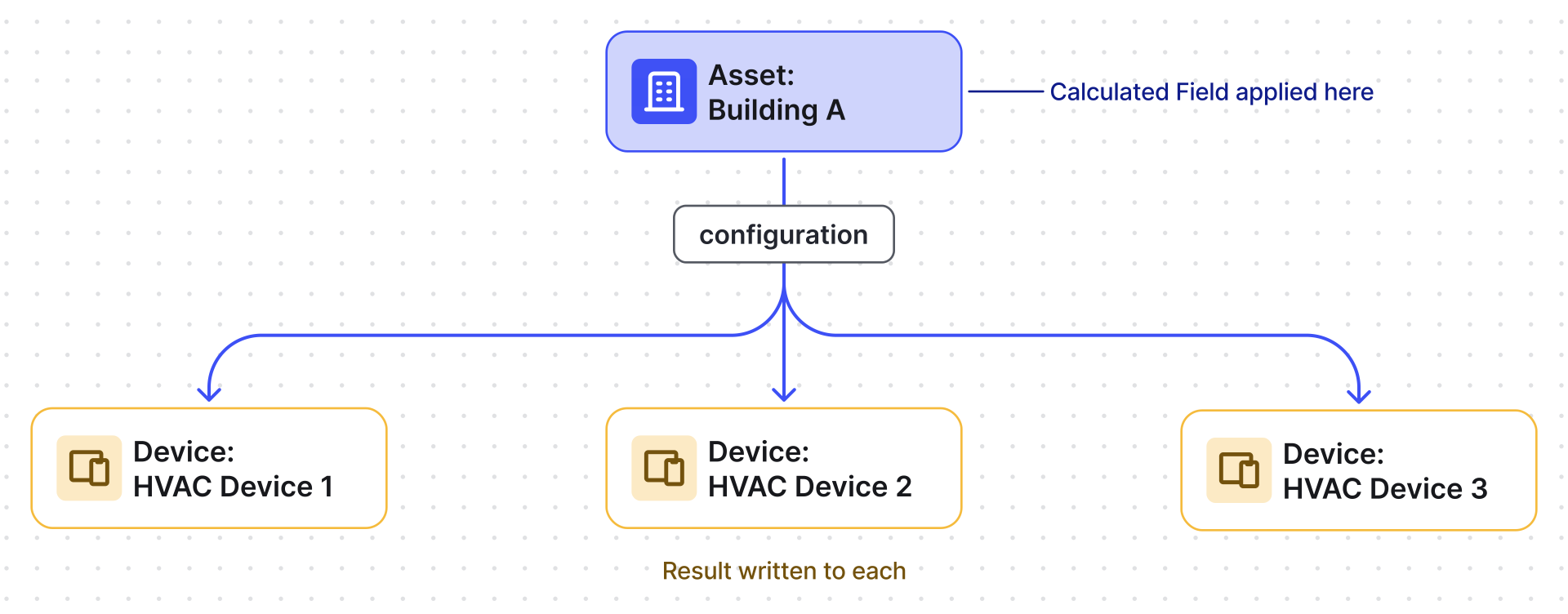
Down to child
Section titled “Down to child”Calculated field runs on the parents, writes to all matching children.
Data to Propagate
Section titled “Data to Propagate”Two modes are available:
Arguments only — direct copy. Reads attribute or latest telemetry from the current entity and writes it to the related entity. Optionally rename the key before storing (via Output key).
Calculation result — compute and propagate. Reads data from multiple entities (current entity, devices, assets, customer, tenant), applies a TBEL script, then propagates the computed result to the related entity.
Script function (Calculation result mode):
The function follows the same convention as Script fields — return a JSON object whose key is used directly as the output Time series key / Attribute key. There is no separate key field to fill in the Output section for this mode; the returned key alone decides it:
function calculate(ctx, arg1, arg2, ...) { var result = arg1 + arg2; return { "outputKey": result };}For the ctx object and rolling argument methods, see
Script — Script Function.
Output
Section titled “Output”Data is stored on each related entity as either time series or attributes.
For output strategy options, see Calculated Fields — Output Strategy.
Troubleshooting
Section titled “Troubleshooting”Propagation Path Not Updating After Edit
Section titled “Propagation Path Not Updating After Edit”Problem: After editing Relation direction or Relation type, the field continues using the original path.
Cause: The propagation path is cached at creation. Updating only the relation settings does not trigger re-initialization.
Solution: Modify any argument (e.g., change the Default value) to force re-initialization. If arguments must remain unchanged, delete and recreate the field.
Example 1: Battery Level to Parent Asset
Section titled “Example 1: Battery Level to Parent Asset”A Tracker A device sends batteryLevel as telemetry.
Goal: propagate batteryLevel to the related Truck 1 asset as a server-side attribute deviceBatteryLevel.
Setup: Create a Contains relation from Truck 1 to Tracker A (direction: From).
- Apply the Propagation calculated field to the tracker device profile.
- Select propagation path: Up to parent, relation type: Contains.
- Mode: Arguments only. Add argument:
- Entity type: Current entity
- Argument type: Latest telemetry
- Time series key:
batteryLevel - Output key:
deviceBatteryLevel
- Output type: Attribute (Server).
- Click Add.
Result: deviceBatteryLevel is stored on the Truck 1 asset as a server-side attribute.
Example 2: Dew Point Propagated to Parent Asset
Section titled “Example 2: Dew Point Propagated to Parent Asset”A Smart Device sends temperature and humidity. It is linked to Greenhouse A via Contains.
Goal: compute dew point and store it as dewPoint telemetry on the greenhouse asset.
- Apply the Propagation calculated field to the smart-device device profile.
- Propagation path: Up to parent, relation type: Contains.
- Mode: Calculation result. Add two arguments:
humidity— Latest telemetry from current entitytemperature— Latest telemetry from current entity
- Write the script:
function calculate(ctx, temperature, humidity) {var a = 17.625;var b = 243.04;var alpha = ((a * temperature) / (b + temperature)) + Math.log(humidity / 100.0);var dewPoint = toFixed((b * alpha) / (a - alpha), 1);return { "dewPoint": dewPoint };}
- Output type: Time series.
- Click Add.
Result: dewPoint is stored as telemetry on Greenhouse A.
Example 3: HVAC Mode to Multiple Child Devices
Section titled “Example 3: HVAC Mode to Multiple Child Devices”Building A asset manages multiple HVAC devices via a Manages relation.
The asset has hvacMode as a server-side attribute.
Goal: propagate hvacMode from Building A down to all managed HVAC devices.
- Apply the Propagation calculated field to the building asset profile.
- Propagation path: Down to child, relation type: Manages.
- Mode: Arguments only. Add argument:
- Entity type: Current entity
- Argument type: Attribute (Server)
- Attribute key:
hvacMode - Output key:
hvacMode
- Output type: Attribute (Server).
- Click Add.
Result: Each HVAC device receives the hvacMode attribute with the current value (e.g., cooling).
Was this helpful?