Database Layer
ThingsBoard uses a two-tier database architecture: PostgreSQL handles all entities and attributes, while time-series data goes to a configurable backend — PostgreSQL or Cassandra. PostgreSQL is always required. Cassandra is an optional addition for high-throughput time-series workloads.
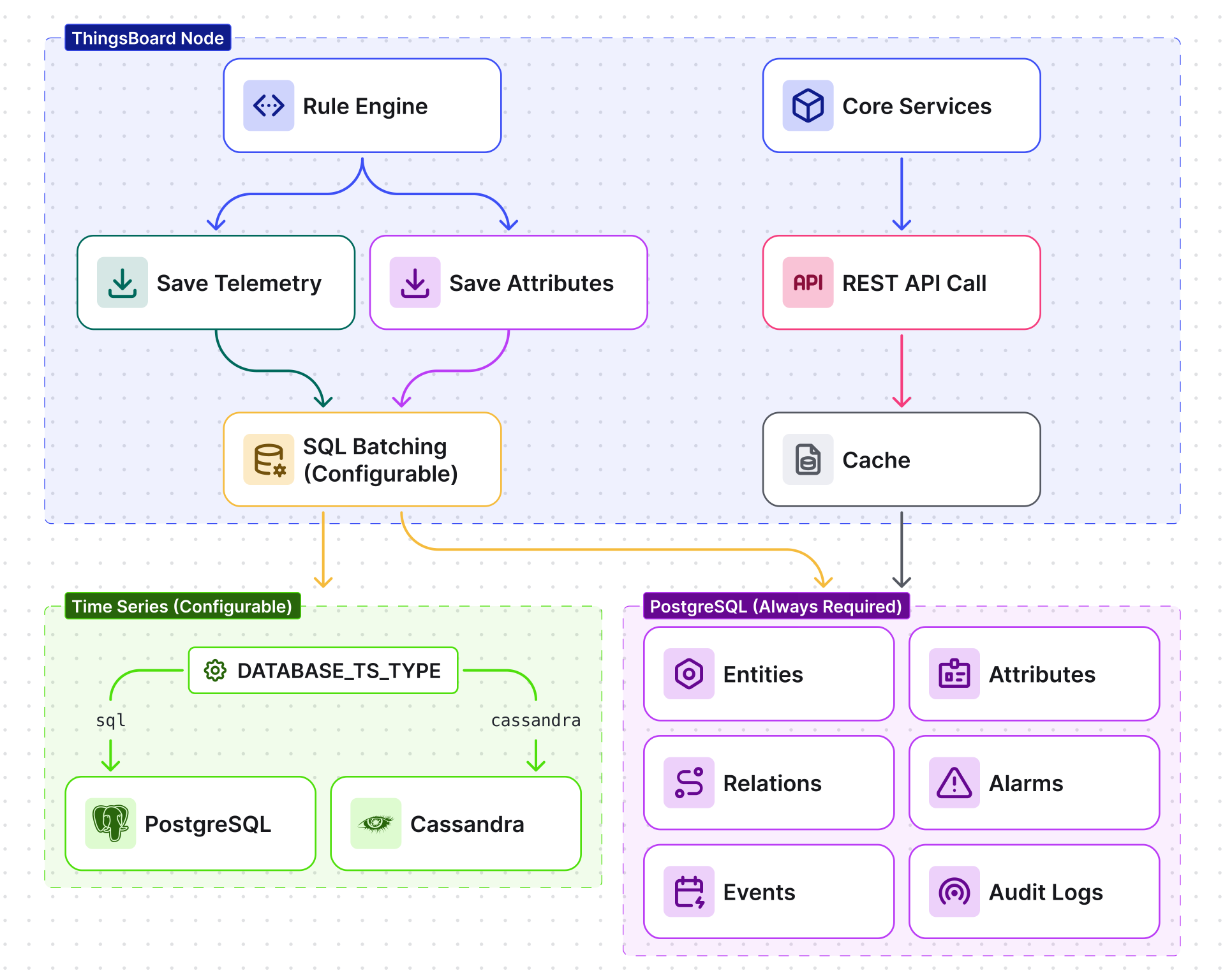
What Gets Stored Where
Section titled “What Gets Stored Where”| Data Type | Storage | Configurable? |
|---|---|---|
| Entities — devices, assets, users, customers, dashboards, rule chains, device profiles, tenant profiles | PostgreSQL | No — always PostgreSQL |
| Attributes — server, client, and shared attributes for all entities | PostgreSQL | No — always PostgreSQL |
| Relations — entity-to-entity relationships (parent-child, contains, manages) | PostgreSQL | No — always PostgreSQL |
| Alarms — alarm records, acknowledgements, clear events | PostgreSQL | No — always PostgreSQL |
| Time-series — telemetry key-value pairs with timestamps | PostgreSQL or Cassandra | Yes — DATABASE_TS_TYPE |
| Events — audit logs, rule engine debug events, lifecycle events | PostgreSQL | No — always PostgreSQL (optionally a dedicated PostgreSQL instance) |
Time-series Backend Options
Section titled “Time-series Backend Options”Set the time-series backend with DATABASE_TS_TYPE:
| Backend | DATABASE_TS_TYPE |
Write Throughput | Storage Efficiency | Best for |
|---|---|---|---|---|
| PostgreSQL | sql |
Up to 5–10K data points/sec | Baseline | Small deployments, simplicity |
| Cassandra | cassandra |
~1M data points/sec | ~5× better than PostgreSQL | High-throughput production, large-scale IoT |
The latest time-series value cache can use a separate backend from the full time-series history. Set DATABASE_TS_LATEST_TYPE independently (defaults to sql).
Storage Efficiency
Section titled “Storage Efficiency”Cassandra is roughly 5× more storage-efficient than PostgreSQL for time-series data:
| Scenario | PostgreSQL (×2 replication) | Cassandra (RF=3) |
|---|---|---|
| 1 TB raw telemetry | ~2 TB total | ~600 GB total |
PostgreSQL
Section titled “PostgreSQL”PostgreSQL stores all entities, attributes, relations, alarms, and events. When DATABASE_TS_TYPE=sql, it also stores time-series data. This section covers tuning PostgreSQL for both roles.
Connection Pool
Section titled “Connection Pool”ThingsBoard uses HikariCP to manage PostgreSQL connections:
| Variable | Default | Description |
|---|---|---|
SPRING_DATASOURCE_URL |
jdbc:postgresql://localhost:5432/thingsboard |
Database connection URL |
SPRING_DATASOURCE_MAXIMUM_POOL_SIZE |
16 |
Maximum connections in the pool |
Write Batching
Section titled “Write Batching”ThingsBoard batches writes to maximize PostgreSQL throughput. Instead of inserting one row at a time, it collects data points into batches and flushes them periodically.
Time-series batching (when DATABASE_TS_TYPE=sql):
| Variable | Default | Description |
|---|---|---|
SQL_TS_BATCH_SIZE |
10000 |
Maximum data points per batch |
SQL_TS_BATCH_MAX_DELAY_MS |
100 |
Maximum wait time (ms) before flushing an incomplete batch |
SQL_TS_BATCH_THREADS |
3 |
Number of threads processing batches |
SQL_TS_CALLBACK_THREAD_POOL_SIZE |
12 |
Thread pool for write callbacks |
Latest time-series values (used by dashboard widgets):
| Variable | Default | Description |
|---|---|---|
SQL_TS_LATEST_BATCH_SIZE |
1000 |
Maximum entries per batch |
SQL_TS_LATEST_BATCH_MAX_DELAY_MS |
50 |
Maximum flush delay (ms) |
SQL_TS_LATEST_BATCH_THREADS |
3 |
Batch processing threads |
Attribute batching:
| Variable | Default | Description |
|---|---|---|
SQL_ATTRIBUTES_BATCH_SIZE |
1000 |
Maximum attributes per batch |
SQL_ATTRIBUTES_BATCH_MAX_DELAY_MS |
50 |
Maximum flush delay (ms) |
SQL_ATTRIBUTES_BATCH_THREADS |
3 |
Batch processing threads |
Partitioning
Section titled “Partitioning”PostgreSQL time-series tables are partitioned by time to keep queries fast and enable efficient data expiration. Set the partition granularity with SQL_POSTGRES_TS_KV_PARTITIONING:
| Value | Partition size | Best for |
|---|---|---|
DAYS |
1 day | High write volume — more partitions but faster drops |
MONTHS |
1 month (default) | Most deployments |
YEARS |
1 year | Very low write volume |
INDEFINITE |
No partitioning | Not recommended for production |
Event tables (audit logs, rule engine debug events, lifecycle events) also use time-based partitioning:
| Variable | Default | Description |
|---|---|---|
SQL_EVENTS_REGULAR_PARTITION_SIZE_HOURS |
168 (7 days) |
Regular events partition size |
SQL_EVENTS_DEBUG_PARTITION_SIZE_HOURS |
1 |
Debug events partition size (smaller for faster cleanup) |
Dedicated Events Database
Section titled “Dedicated Events Database”For high-traffic deployments, you can offload events (audit logs, rule engine debug events, lifecycle events) to a separate PostgreSQL database. This prevents event write spikes from affecting entity queries on the main database.
Enable with SPRING_DEDICATED_EVENTS_DATASOURCE_ENABLED=true, then configure:
| Variable | Default | Description |
|---|---|---|
SPRING_EVENTS_DATASOURCE_URL |
jdbc:postgresql://localhost:5432/thingsboard_events |
Events database connection URL |
SPRING_EVENTS_DATASOURCE_USERNAME |
postgres |
Events database username |
SPRING_EVENTS_DATASOURCE_PASSWORD |
postgres |
Events database password |
SPRING_EVENTS_DATASOURCE_MAXIMUM_POOL_SIZE |
4 |
Connection pool size for events DB |
Distributed PostgreSQL (Citus)
Section titled “Distributed PostgreSQL (Citus)”A single PostgreSQL server applies every attribute and latest-value update, and at large fleet sizes it becomes the write bottleneck. Set DATABASE_CITUS_ENABLED=true to run the relational database on a Citus cluster instead. Citus spreads devices, assets, entity views, alarms, attributes, and latest values across worker nodes, so write capacity grows as you add workers.
With Citus enabled, the attribute and latest-value write queues run one thread per shard instead of SQL_ATTRIBUTES_BATCH_THREADS and SQL_TS_LATEST_BATCH_THREADS, and the default SPRING_DATASOURCE_MAXIMUM_POOL_SIZE of 16 is too small. See Distributed PostgreSQL (Citus) for setup, sizing, and operations.
Cassandra
Section titled “Cassandra”When using Cassandra for time-series storage (DATABASE_TS_TYPE=cassandra), these are the most important configuration options.
Consistency Levels
Section titled “Consistency Levels”| Variable | Default | Description |
|---|---|---|
CASSANDRA_READ_CONSISTENCY_LEVEL |
ONE |
Read consistency. ONE = read from nearest replica (fastest). QUORUM = majority of replicas (stronger consistency). |
CASSANDRA_WRITE_CONSISTENCY_LEVEL |
ONE |
Write consistency. ONE = acknowledge after one replica writes (fastest). QUORUM = acknowledge after majority writes. |
For production with RF=3, consider ONE for reads and ONE for writes to maximize throughput. Use QUORUM when data consistency is more important than speed.
Query Concurrency
Section titled “Query Concurrency”| Variable | Default | Description |
|---|---|---|
CASSANDRA_QUERY_CONCURRENT_LIMIT |
1000 |
Maximum concurrent Cassandra queries. Prevents overwhelming the cluster. |
CASSANDRA_QUERY_BUFFER_SIZE |
200000 |
Query buffer size. Queries exceeding the concurrent limit are buffered here. |
CASSANDRA_QUERY_DISPATCHER_THREADS |
2 |
Threads dispatching queries from the buffer |
CASSANDRA_QUERY_CALLBACK_THREADS |
4 |
Threads processing query results |
CASSANDRA_QUERY_RESULT_PROCESSING_THREADS |
50 |
Threads processing result sets |
Connection Settings
Section titled “Connection Settings”| Variable | Default | Description |
|---|---|---|
CASSANDRA_URL |
127.0.0.1:9042 |
Contact point(s) for the Cassandra cluster |
CASSANDRA_LOCAL_DATACENTER |
datacenter1 |
Local datacenter name for DCAware routing |
CASSANDRA_MAX_REQUESTS_PER_CONNECTION_LOCAL |
32768 |
Maximum concurrent requests per local connection |
CASSANDRA_COMPRESSION |
none |
Protocol compression (reduces network bandwidth) |
Data Retention (TTL)
Section titled “Data Retention (TTL)”ThingsBoard automatically deletes old records based on a configured Time-to-Live (TTL). By default TTL is disabled — records are kept forever. Configuration depends on the storage backend.
PostgreSQL TTL
Section titled “PostgreSQL TTL”PostgreSQL applies a single global TTL to all time-series data across all tenants and entities. A background cleanup job runs periodically and removes expired records.
| Variable | Default | Description |
|---|---|---|
SQL_TTL_TS_ENABLED |
true |
Enable automatic TTL cleanup |
SQL_TTL_TS_EXECUTION_INTERVAL |
86400000 (1 day) |
How often the cleanup job runs, in milliseconds |
SQL_TTL_TS_TS_KEY_VALUE_TTL |
0 (disabled) |
Retention period in seconds; 0 means records never expire |
Cassandra TTL
Section titled “Cassandra TTL”Cassandra supports granular TTL at three levels, from broadest to most specific:
-
System level — the maximum TTL cap for the entire platform, set via
TS_KV_TTL. No entity can have a longer retention than this value. -
Tenant level — a maximum TTL per tenant, configured in the tenant profile. Overrides the system default for that tenant.
-
Entity level — a specific TTL per entity. Two options let you configure it:
- Rule Chain: The Save Time Series rule node in your rule chain writes raw telemetry to the database. Its Default TTL field determines how long each record lives, and the
TTLmessage-metadata property can override it on a per-message basis. Set a shorter TTL here when raw readings are only useful for a short operational window. See Save Time Series, Advanced settings for the full option set. - Calculated Fields: Any calculated field can carry its own TTL for the values it produces. The TTL property is exposed on the field when Output type is set to Time series and Output strategy is set to Process right away. See Calculated Fields, Output strategy for details.
Together these enable multi-level retention. Raw telemetry can expire quickly, while derived values produced by calculated fields live on independently, each with the TTL that matches its own analytical purpose. Read more in the Efficient Aggregation and Data Retention in ThingsBoard blog post.
- Rule Chain: The Save Time Series rule node in your rule chain writes raw telemetry to the database. Its Default TTL field determines how long each record lives, and the
| Variable | Default | Description |
|---|---|---|
TS_KV_TTL |
0 (disabled) |
Maximum system-level TTL in seconds; 0 means records never expire |
TS_KV_PARTITIONING |
MONTHS |
Time-series partition granularity: DAYS, MONTHS, YEARS, INDEFINITE |
Events and Audit Log TTL
Section titled “Events and Audit Log TTL”These TTL settings apply to operational data stored in PostgreSQL, regardless of the time-series backend:
| Variable | Default | Description |
|---|---|---|
SQL_TTL_EVENTS_EVENTS_TTL |
0 (disabled) |
Events TTL in seconds |
SQL_TTL_EVENTS_DEBUG_EVENTS_TTL |
604800 (7 days) |
Debug events TTL in seconds |
SQL_TTL_EDGE_EVENTS_TTL |
2628000 (30 days) |
Edge events TTL in seconds |
SQL_TTL_AUDIT_LOGS_SECS |
0 (disabled) |
Audit log TTL in seconds |
SQL_TTL_NOTIFICATIONS_SECS |
2592000 (30 days) |
Notifications TTL in seconds |
For the complete list of database environment variables, see Configuration Reference.
Was this helpful?