
Smart retail
The Smart Retail solution template deploys a multi-tenant supermarket monitoring system. It represents a generic smart retail solution where you can provision multiple customers (retail companies) and assign a pool of IoT devices to each customer.
The solution includes an administration dashboard for provisioning retail companies, supermarkets, and devices, and a manager dashboard for monitoring store conditions, alarms, and floor plans. It covers nine device profiles for cold chain, inventory, security, and occupancy monitoring.
Key application areas
Section titled “Key application areas”This solution template can be used as a baseline for:
- Supermarket chains: Deploy standardized monitoring across stores for cold chain integrity and stock availability
- Convenience stores: Monitor security sensors and environmental conditions in smaller retail footprints
- Smart warehousing: Track environmental conditions and asset status in distribution centers
Install solution template
Section titled “Install solution template”To understand how the Smart Retail solution works, start by installing the solution template.
- Go to Solution templates in the main menu.
- Find Smart retail and click Install.
- Follow the provided configuration instructions and click Close.
- The Smart Supermarket Administration dashboard opens automatically.
After installation, a fully functional simulation for monitoring supermarket conditions is created automatically. No devices, integrations, or custom code are required to start exploring the solution.
System components
Section titled “System components”The Smart Retail solution includes:
- Dashboards: Smart Supermarket Administration dashboard for provisioning retail companies, supermarkets, and devices; Smart Supermarket dashboard (manager view) for monitoring store conditions and alarms
- Devices: 29 pre-provisioned demo devices across nine device profiles (Freezer, Chiller, Smart Shelf, Smart Bin, Liquid Level Sensor, Door Sensor, Motion Sensor, Smoke Sensor, Occupancy Sensor) with pre-loaded telemetry data
- Device profiles: Nine profiles with pre-configured alarm rules for temperature monitoring, inventory tracking, security detection, occupancy monitoring, and battery health
- Rule chain: Supermarket Devices rule chain that processes telemetry, aggregates alarm counts, and calculates device state (normal/major/critical) for dashboard visualization
- Entity groups: Supermarkets asset group and Supermarket Devices device group per customer, plus shared dashboard groups for role-based access
- Customers and users: Two sample retail companies with pre-configured supermarkets, users, and role-based access control (Read Only, User, Administrator)
Edge support. The solution can optionally be deployed to ThingsBoard Edge for local data processing and reduced latency. Edge is available as an add-on for your license or subscription. The edge computing instructions appear in the solution instructions dialog when the Edge add-on is active.
Dashboards
Section titled “Dashboards”The solution creates two dashboards: an administration dashboard for provisioning and a manager dashboard for monitoring.
Administration dashboard
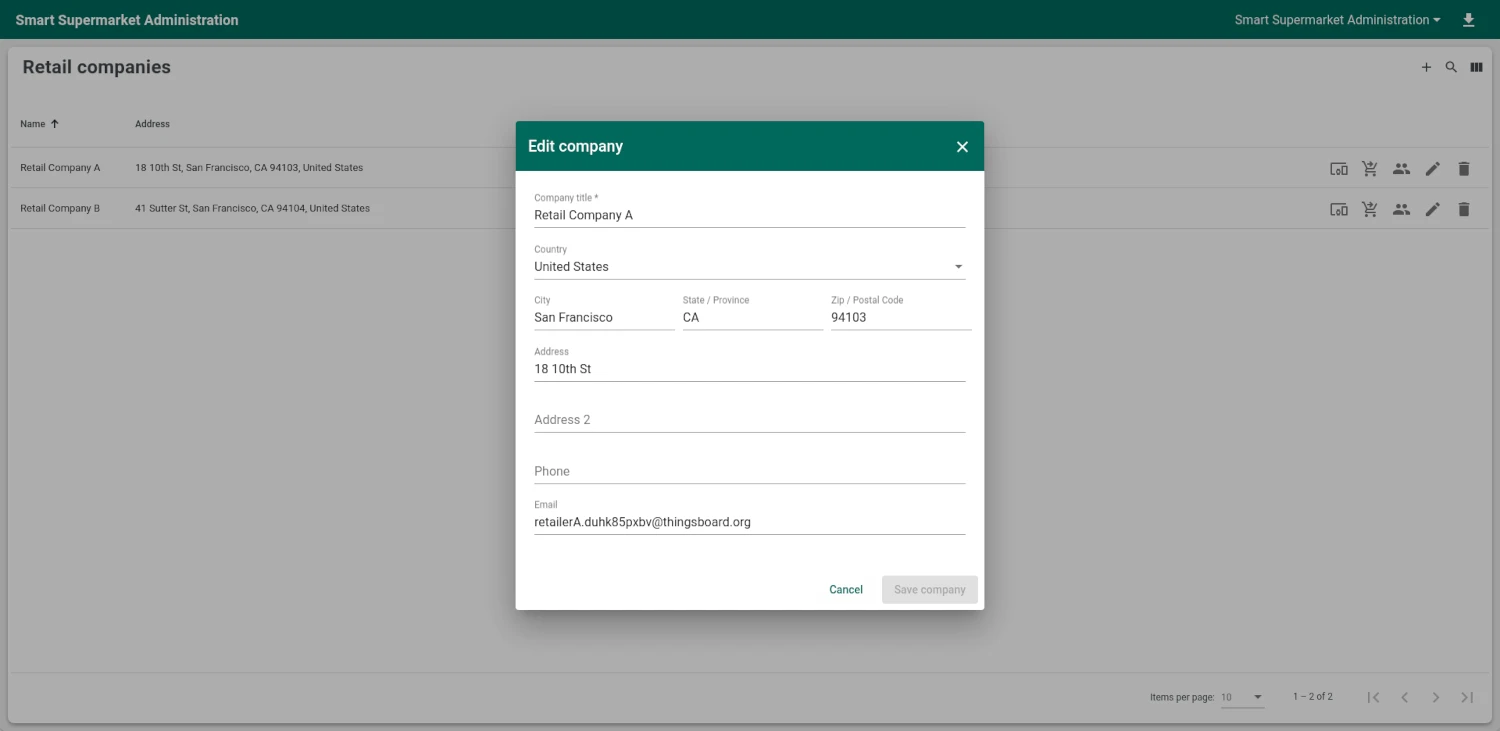
Section titled “Administration dashboard”The Smart Supermarket Administration dashboard is the central hub for provisioning customers, users, supermarkets, and devices.
The administration dashboard consists of multiple states:
- Main state: List of retail companies with controls to add, edit, or delete companies. Navigate to a company to manage its devices, supermarkets, and users
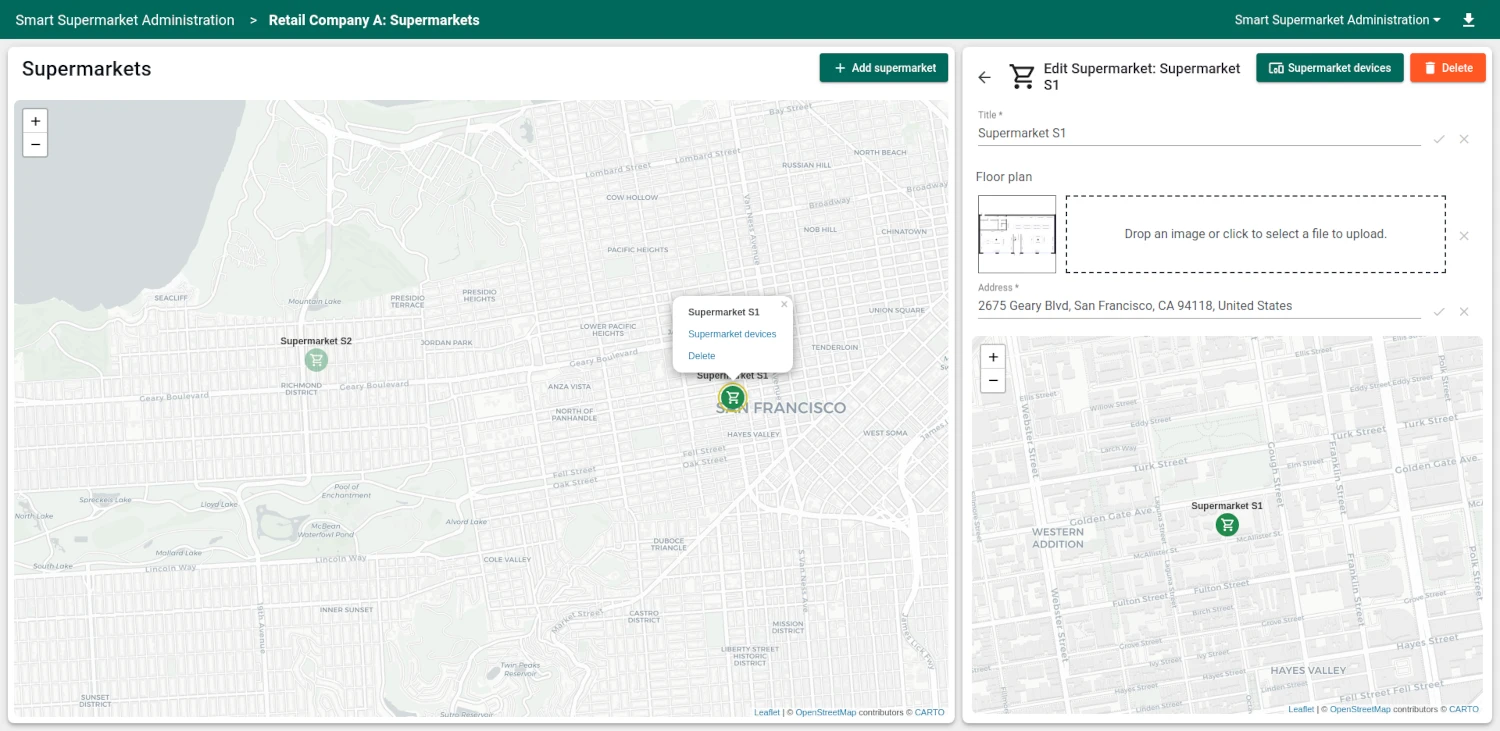
- Supermarket management: View supermarkets for a retail company on a map and in a list. Add supermarkets with floor plans and addresses
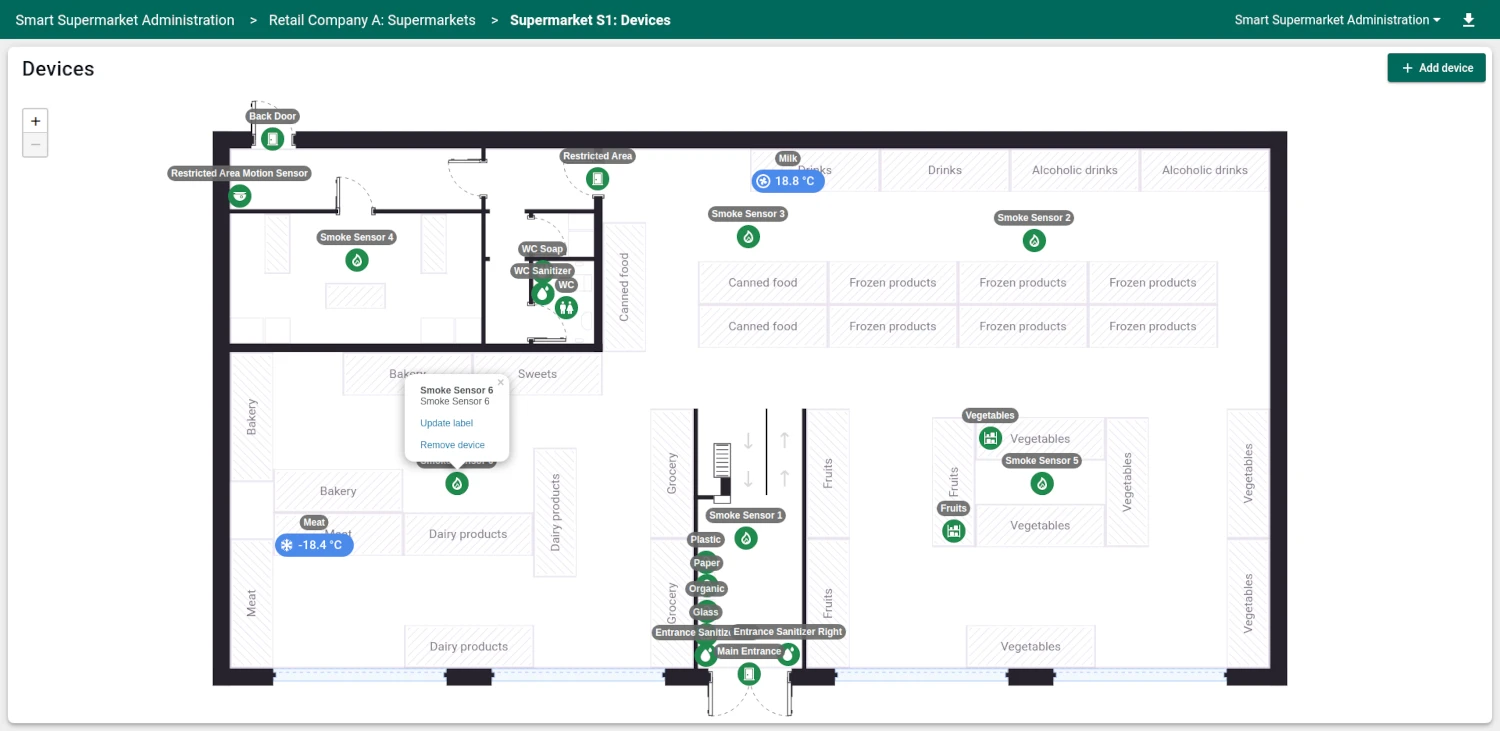
- Supermarket devices: Indoor map with the uploaded floor plan and device markers. Drag and drop devices to set their position on the floor plan
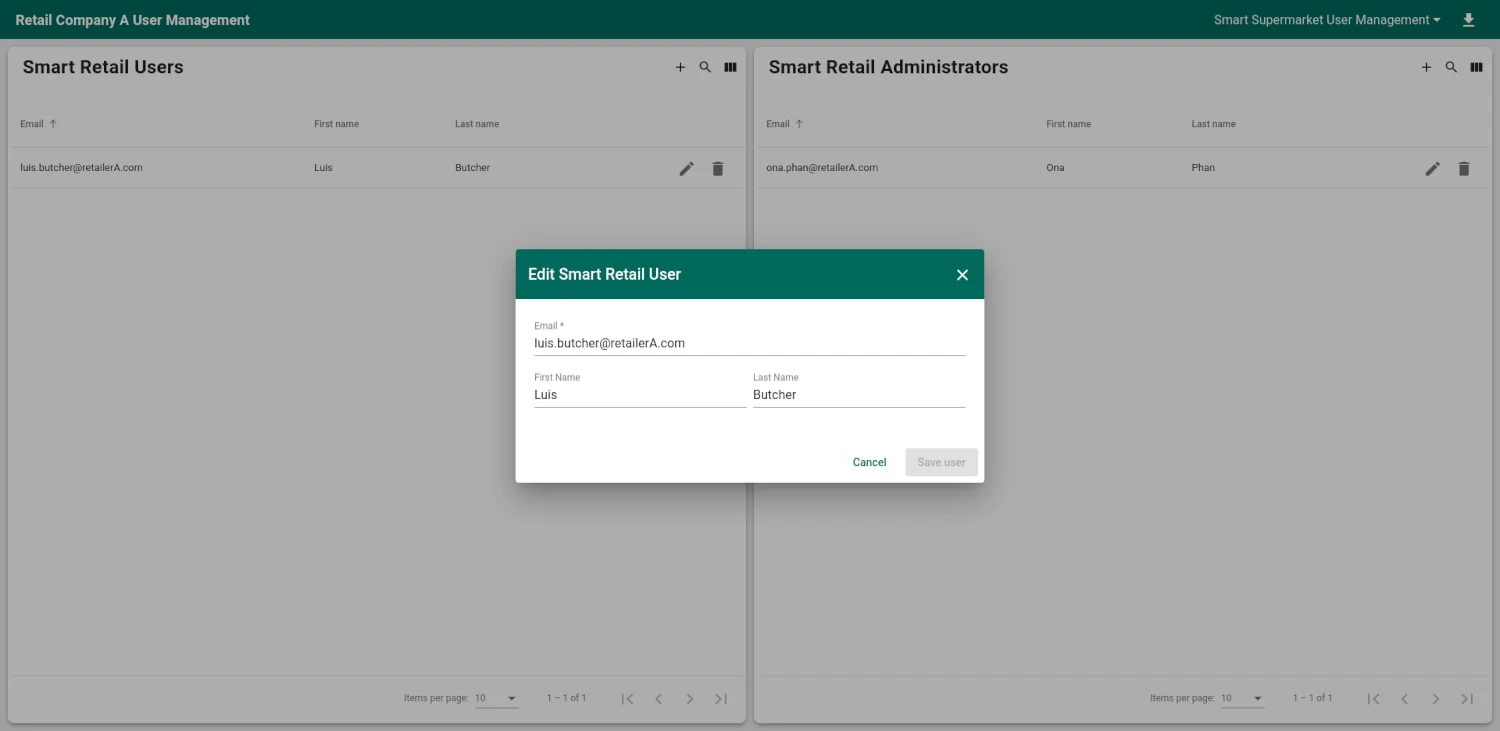
- User management: Manage users for a retail company, assign roles, and edit user details
Manager dashboard
Section titled “Manager dashboard”The Smart Supermarket dashboard is designed for supermarket managers to monitor store conditions in real time.
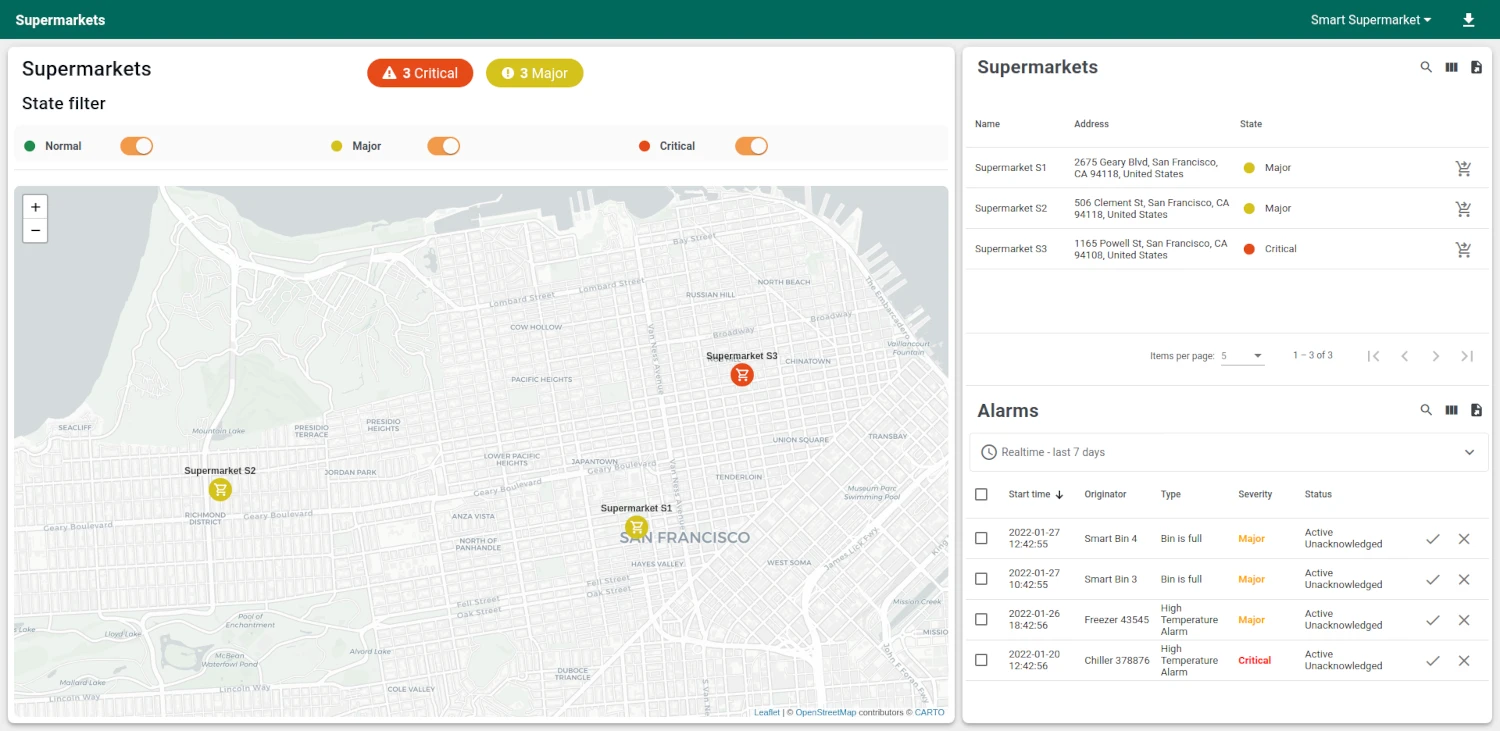
The manager dashboard consists of multiple states:
- Regional overview: Map of supermarkets with color-coded severity markers (green for normal, orange for major, red for critical). A device list and alarms list are displayed alongside the map. Filter by Normal, Major, or Critical state. Click a store marker to navigate to its floor plan
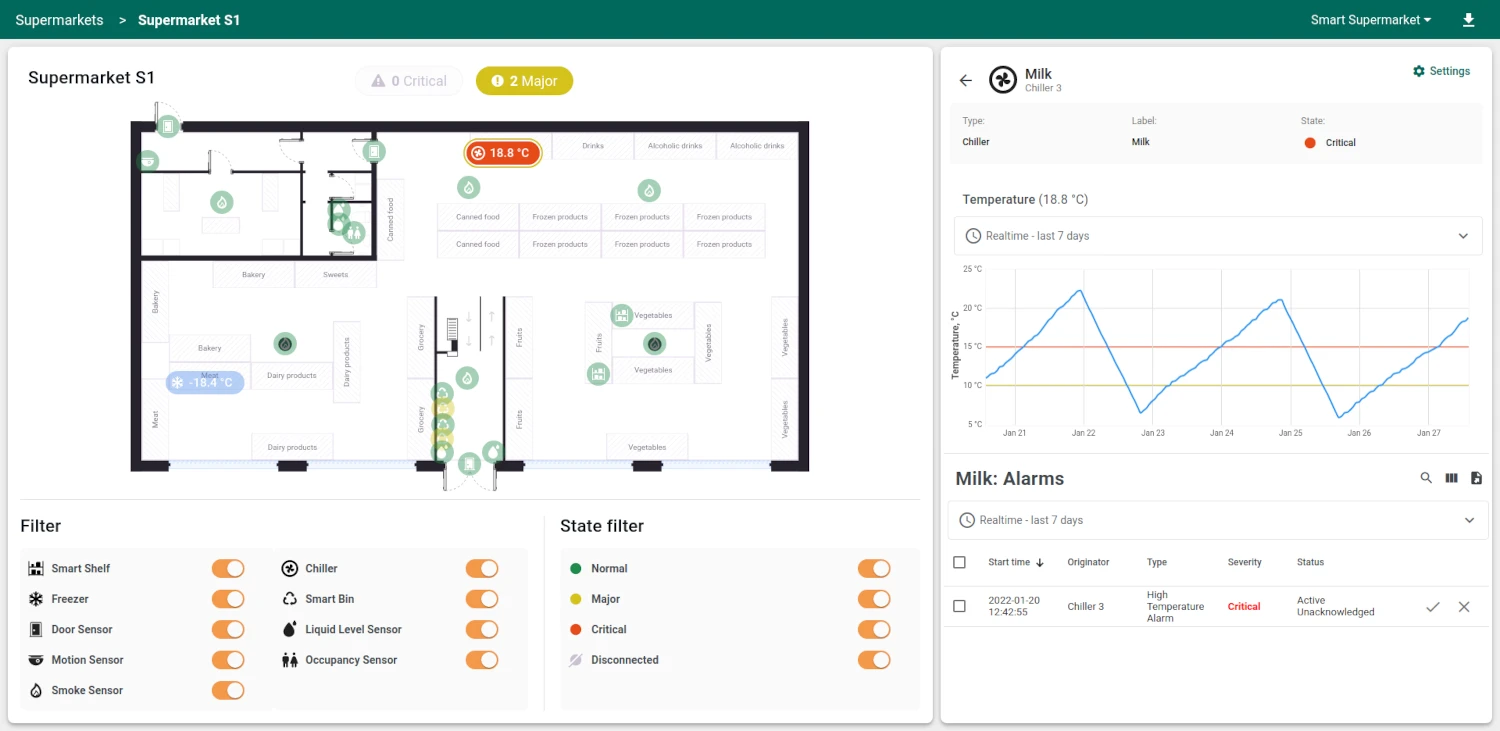
- Floor plan: Indoor map with device markers and severity indicators. Filter devices by type (Freezer, Chiller, Smart Shelf, Smart Bin, Liquid Level Sensor, Door Sensor, Motion Sensor, Smoke Sensor, Occupancy Sensor) and by alarm state. Filters persist between visits. Click a device marker to open the details panel
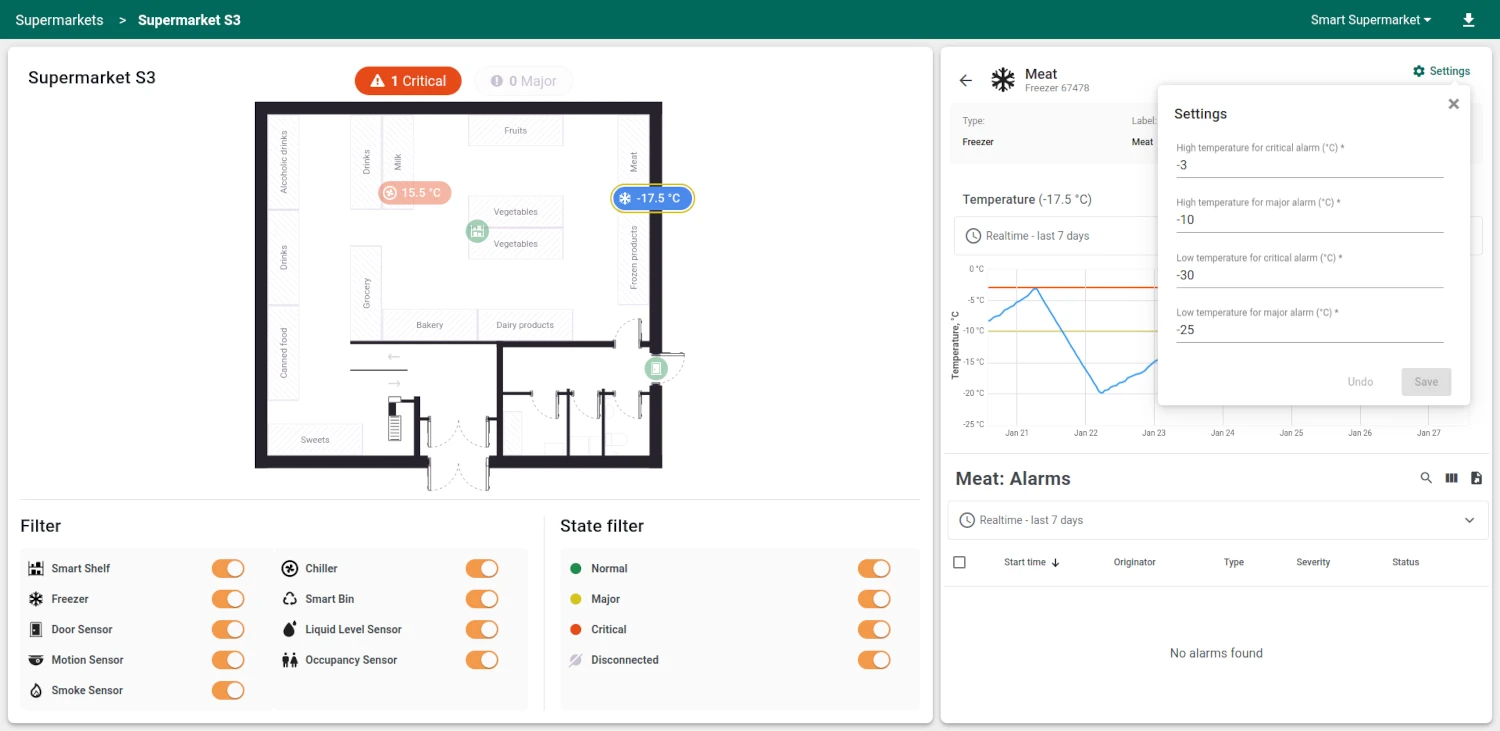
- Device details: Device-specific telemetry charts, battery level indicator, alarm threshold configuration, and a list of active alarms for the selected device
The dashboards can be fully customized using the dashboard development tools.
Devices
Section titled “Devices”The solution creates 29 devices with demo data across two sample retail companies and three supermarkets. Each device type publishes telemetry in JSON format. To send telemetry on behalf of any device, replace $ACCESS_TOKEN with the actual access token and adjust the JSON payload to match the device type:
curl -v -X POST \-d '{"temperature": -5.4}' \http://THINGSBOARD_HOST_NAME/api/v1/$ACCESS_TOKEN/telemetry \--header "Content-Type:application/json"The example uses the HTTP API. Other connectivity options (MQTT, CoAP, LwM2M, etc.) are supported as well. See connecting devices for details.
Freezer
Section titled “Freezer”Monitors frozen goods storage temperature. Used in meat, seafood, and frozen food sections.
{"temperature": -5.4}Chiller
Section titled “Chiller”Monitors refrigerated storage temperature. Used for dairy, beverages, and fresh produce.
{"temperature": 6.2}Smart Shelf
Section titled “Smart Shelf”Tracks product weight on store shelves to detect low stock levels.
{"weight": 42}Smart Bin
Section titled “Smart Bin”Monitors waste container fullness to optimize collection schedules.
{"level": 35, "batteryLevel": 89}Liquid Level Sensor
Section titled “Liquid Level Sensor”Tracks liquid levels in dispensers like soap, sanitizer, or cleaning supplies.
{"level": 85, "batteryLevel": 99}Door Sensor
Section titled “Door Sensor”Detects door open/close state. Monitors back doors, restricted areas, and main entrances for security and duration tracking.
{"open": true, "batteryLevel": 99}Motion Sensor
Section titled “Motion Sensor”Detects movement in restricted areas during non-working hours for intrusion monitoring.
{"motion": true, "batteryLevel": 99}Smoke Sensor
Section titled “Smoke Sensor”Detects smoke presence for fire safety monitoring across the store.
{"alarm": false, "batteryLevel": 99}Occupancy Sensor
Section titled “Occupancy Sensor”Monitors occupancy duration in areas like restrooms to detect prolonged occupation.
{"occupied": true, "batteryLevel": 95}Alarms
Section titled “Alarms”Alarm generation is handled by alarm rules configured in the device profiles. The solution includes 18 alarm rules across nine device profiles. All alarms propagate to the parent supermarket asset and customer via “Contains” relations, enabling severity-coded markers on the dashboard maps.
Cold chain:
- Freezer: High temperature (Major above -2° C, Critical above -1° C) and low temperature (Major below -25° C, Critical below -30° C)
- Chiller: High temperature (Major above 10° C, Critical above 12° C) and low temperature (Major below 4° C, Critical below 2° C)
Inventory and stock:
- Smart Shelf: Low item weight (Major below 20, Critical below 10)
- Smart Bin: Fullness level (Major above 70%, Critical above 90%)
- Liquid Level Sensor: Low level (Major below 30%, Critical below 10%)
Security:
- Door Sensor: Left open duration (Major above 30 min, Critical above 60 min) and intrusion during non-working hours (22:00–06:00)
- Motion Sensor: Motion detected during non-working hours
- Smoke Sensor: Fire alarm on smoke detection
Occupancy:
- Occupancy Sensor: Prolonged occupation (Major above 30 min, Critical above 60 min)
Battery:
- Smart Bin, Liquid Level Sensor, Door Sensor, Motion Sensor, Smoke Sensor, and Occupancy Sensor profiles include battery monitoring (Major below 30%, Critical below 10%)
All alarm thresholds are dynamic, stored as server-side device attributes. Managers can adjust thresholds for each device from the manager dashboard device details panel.
Customers
Section titled “Customers”To demonstrate multi-tenancy and data isolation, the solution creates two sample retail companies, each with pre-configured supermarkets and users. Each company gets two user groups: Smart Retail Users (assigned the Smart Retail User role) and Smart Retail Administrators (assigned the Smart Retail Administrator role). You can find the generated user credentials in the solution instructions.
The solution defines three roles:
- Smart Retail Read Only: Read-only access to Smart Supermarket dashboards. Assigned to all customer users by default via a shared dashboard group
- Smart Retail User: Read-only access to entities, write access to alarms and device/asset attributes. For supermarket managers who monitor conditions and acknowledge alarms
- Smart Retail Administrator: Write access to devices and assets within the customer scope. For company administrators who provision supermarkets and manage the device fleet
Additional customers and users can be created via the administration UI. See advanced RBAC for more information.
Conclusion
Section titled “Conclusion”The Smart Retail solution template delivers a multi-tenant supermarket monitoring system with 29 pre-provisioned devices across nine profiles, 18 alarm rules covering cold chain, inventory, security, occupancy, and battery monitoring, interactive floor plans with drag-and-drop device placement, and role-based access control. It enables fast onboarding and serves as a foundation for both demonstrations and production retail monitoring use cases.
Was this helpful?