
Assisted living
The Assisted Living solution template deploys a healthcare monitoring system for senior living facilities. It is designed for environments where staff need real-time visibility into residents’ vital signs, indoor location, and critical safety events.
The template combines wearable wristbands (BLE/LoRa), environmental and safety sensors, and gateways to collect telemetry, detect abnormal conditions, and trigger alarms. It also provides administrative tools to manage facility layout (floors, zones, and rooms) and assign devices to residents and rooms.
Key application areas
Section titled “Key application areas”This solution template can be used as a baseline for:
- Assisted living facilities: Continuous monitoring of resident vitals, panic button events, and indoor location to support timely staff response
- Nursing homes and long-term care centers: Automated detection of health anomalies and safety hazards (smoke, leaks, open doors and windows) to reduce operational risk
- Memory care units: Prevention of wandering and rapid resident localization using RSSI-based indoor positioning and door/window monitoring
- Retirement communities: Light-touch supervision using wearables and room sensors, providing assistance only when alerts indicate potential issues
Install solution template
Section titled “Install solution template”To understand how the Assisted Living solution works, start by installing the solution template.
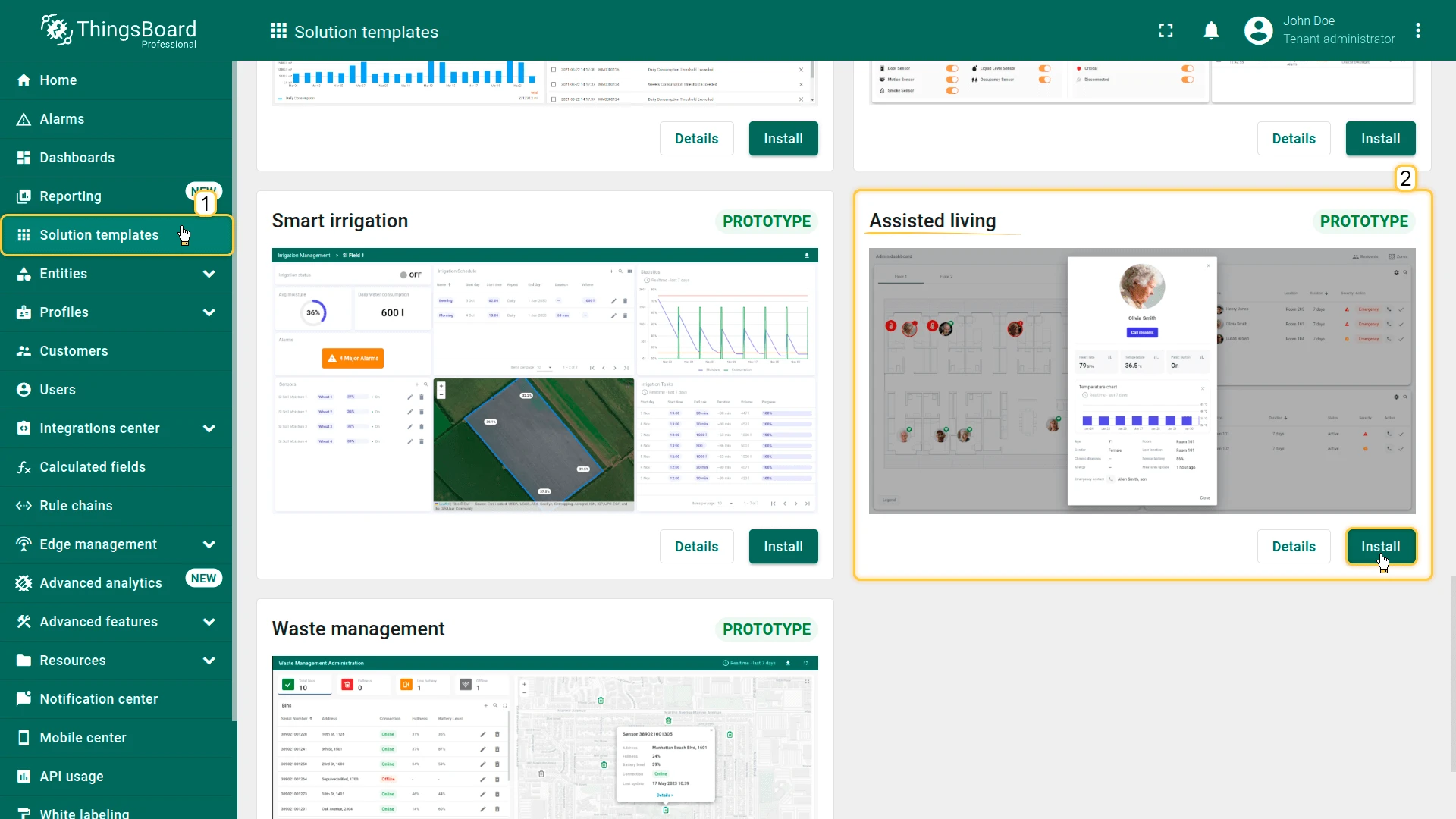
- Go to Solution templates in the main menu.
- Find Assisted living and click Install.
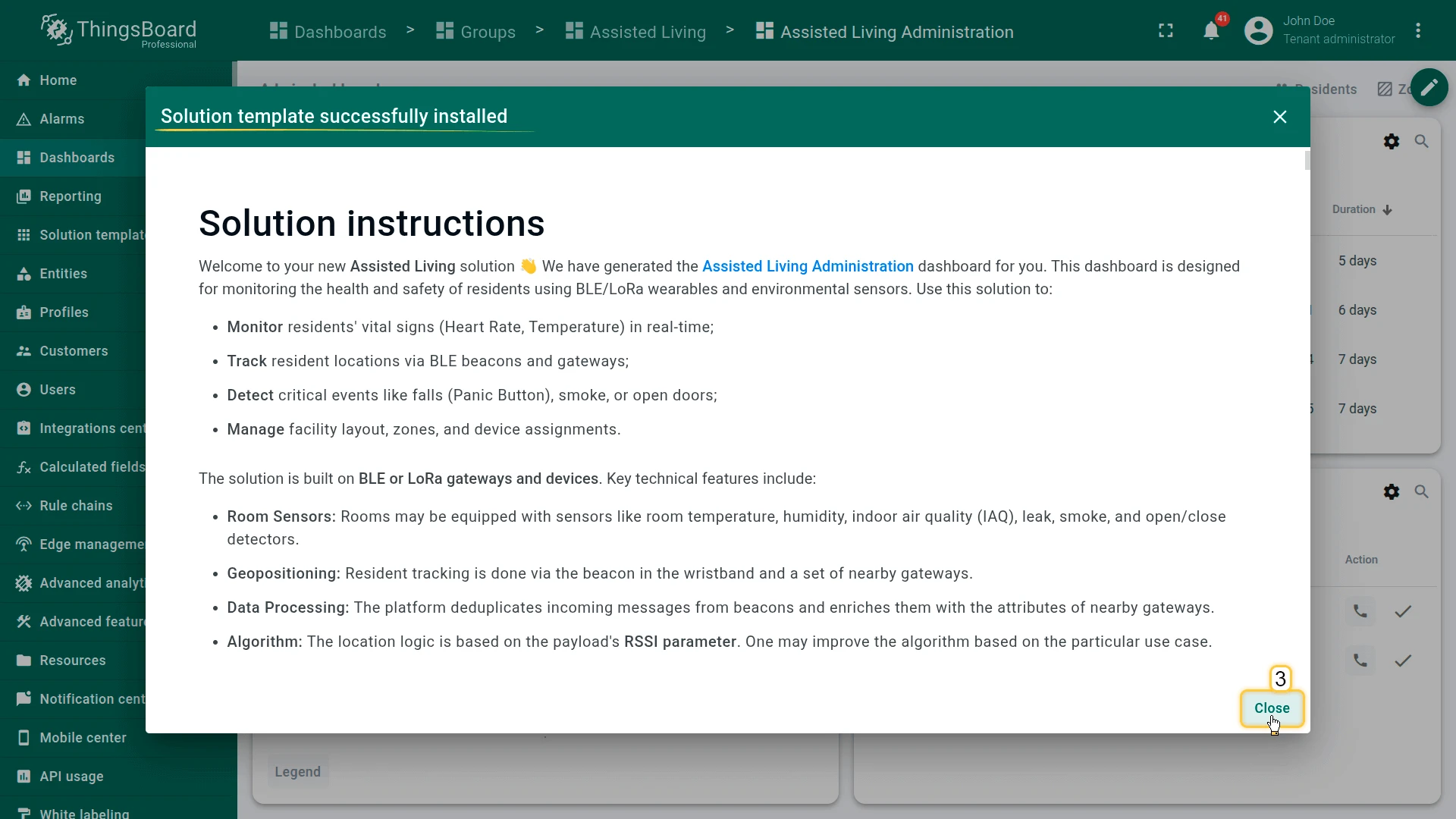
- Follow the provided configuration instructions and click Close.
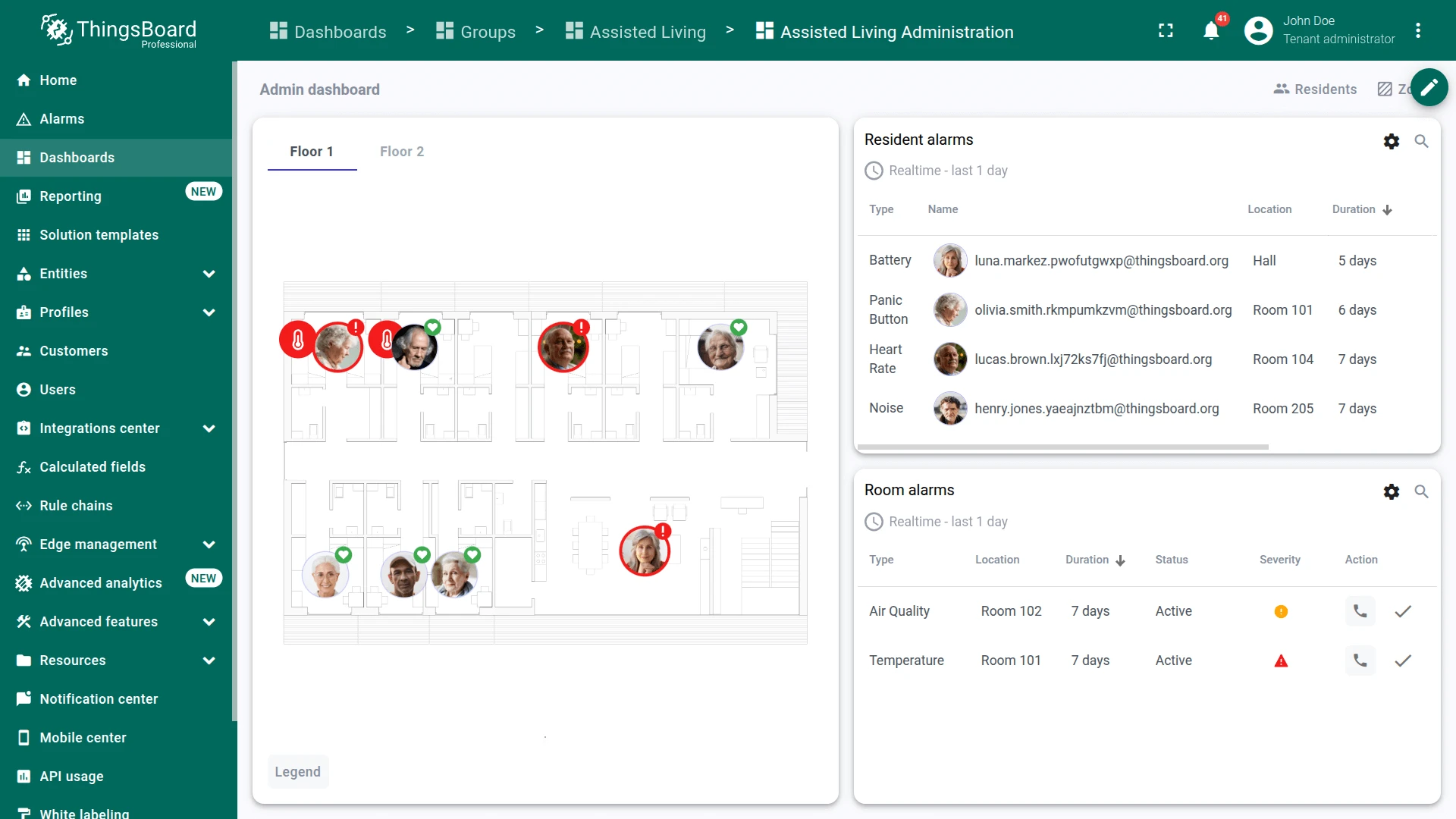
- The Assisted Living Administration dashboard opens automatically.
After installation, a fully functional simulation for monitoring resident health and facility safety is created automatically. No devices, integrations, or custom code are required to start exploring the solution.
System components
Section titled “System components”The Assisted Living solution includes:
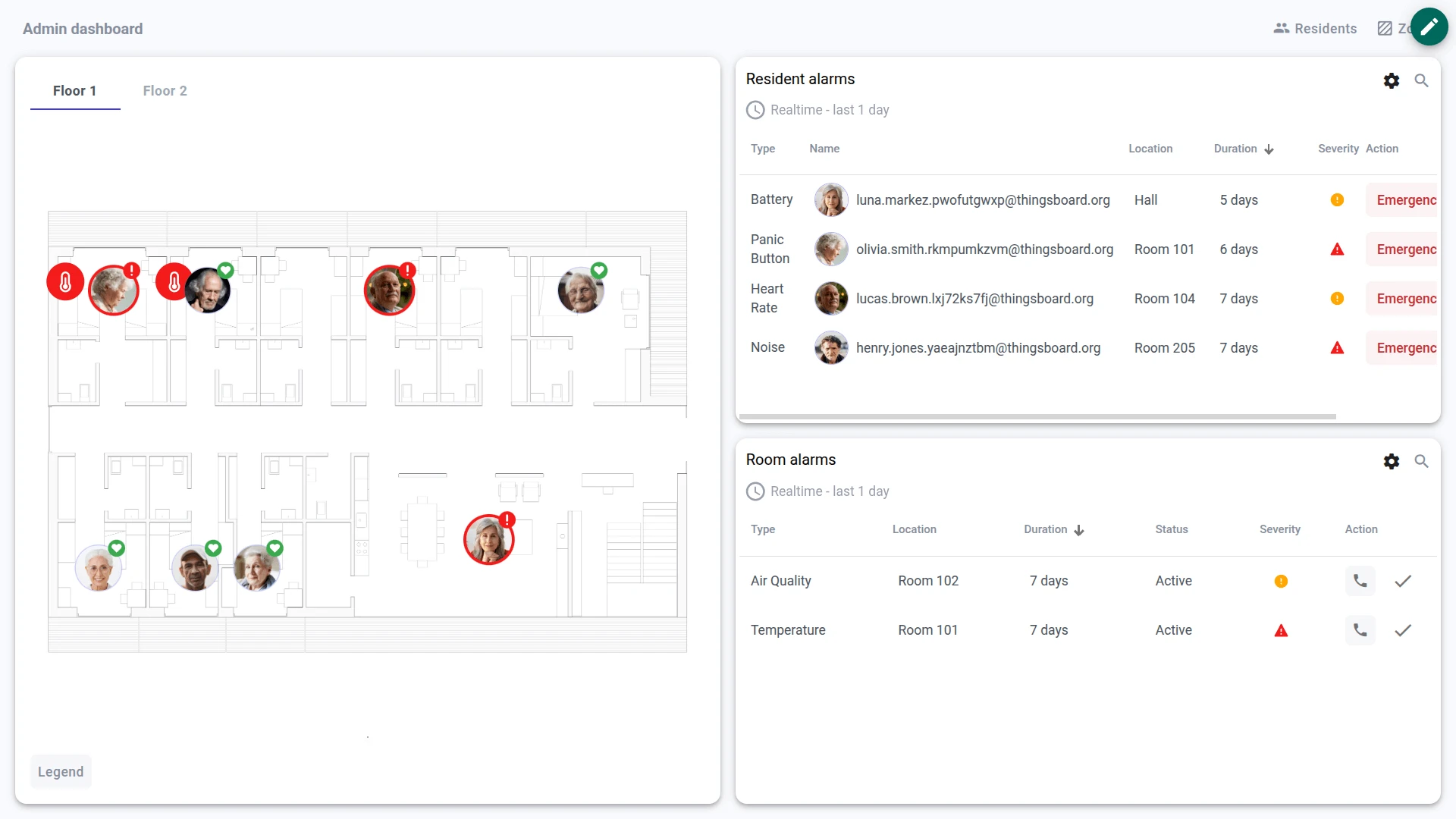
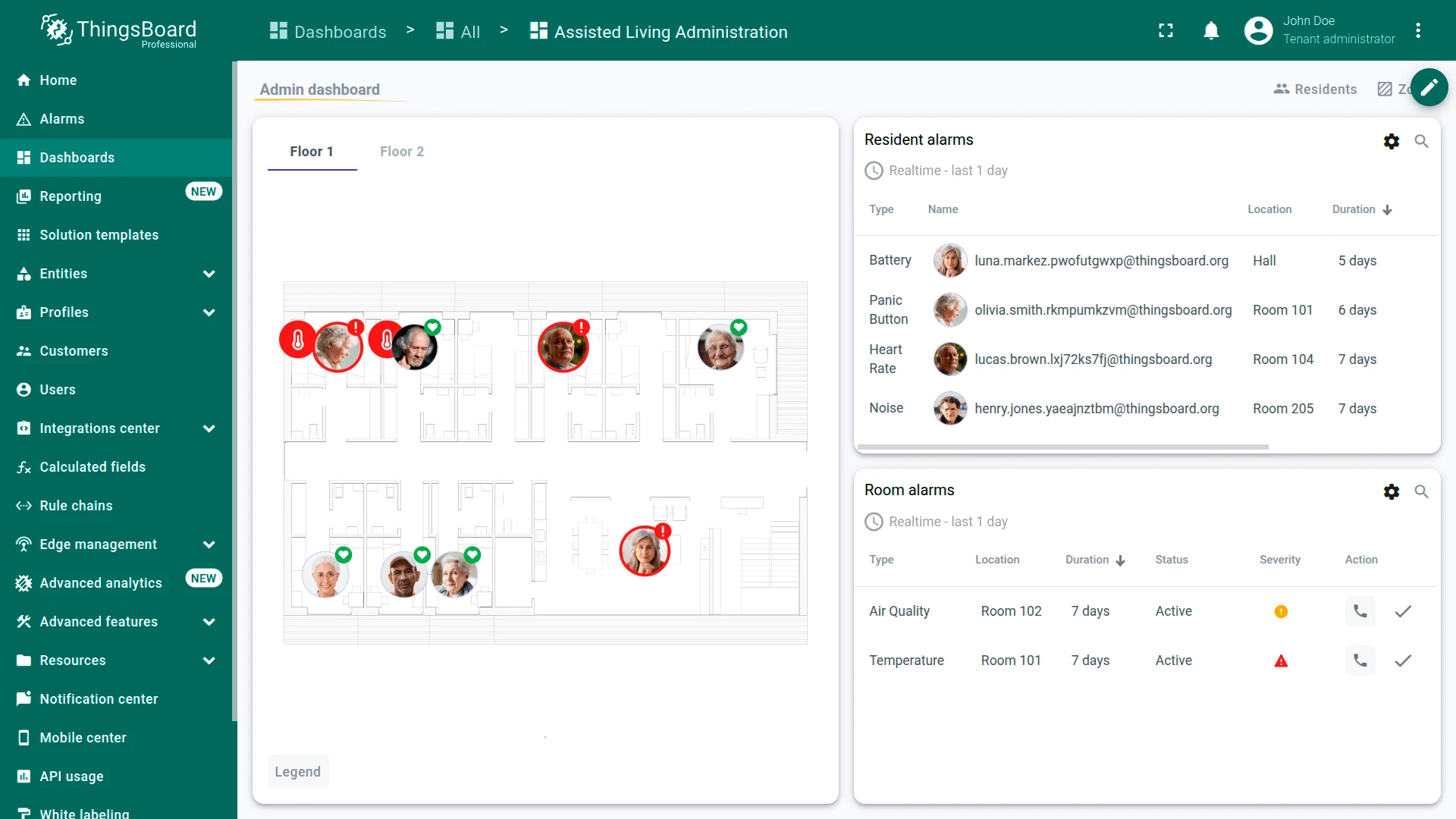
- Dashboard: The Assisted Living Administration dashboard provides real-time visualization of resident vitals, indoor location tracking on interactive floor plans, alarm management, and tools for managing zones, rooms, and device assignments
- Devices: 34 pre-provisioned demo devices including resident wristbands, room sensors, door and window sensors, smoke and leak sensors, and gateways, with demo telemetry data
- Device profiles: Seven profiles with pre-configured alarm rules for health events (heart rate, body temperature, panic button, noise), safety hazards (smoke, water leak, door/window), environmental conditions (temperature, humidity, air quality), and battery monitoring
- Indoor positioning: RSSI-based location derived from BLE beacon messages received by multiple gateways, associating residents with the corresponding room or zone based on the strongest signal
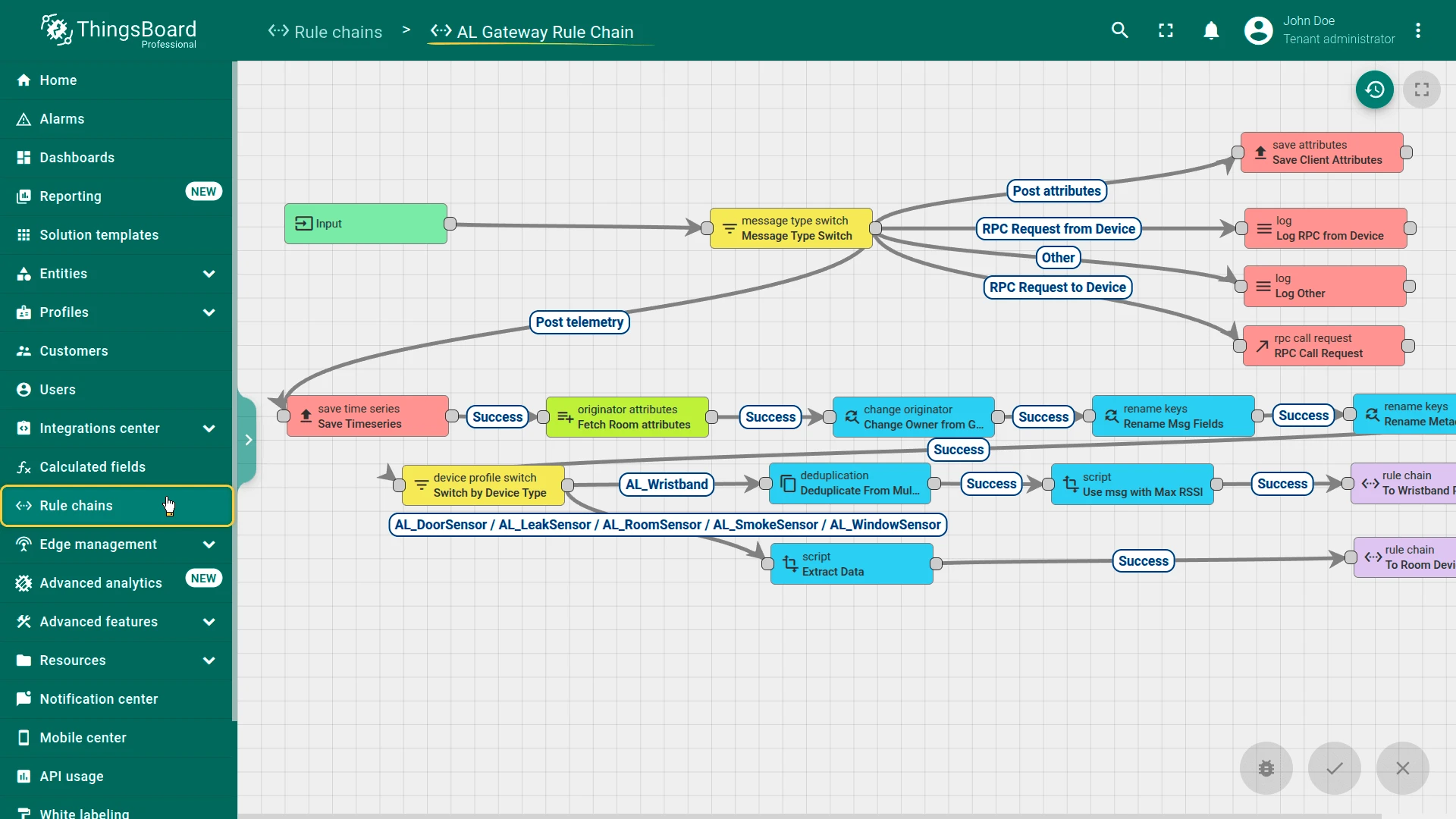
- Rule chains: AL Gateway Rule Chain (message deduplication, device identification, RSSI-based location), AL Wristband Device Rule Chain (vitals processing and alarm propagation), AL Room Device Rule Chain (environmental telemetry and alarm evaluation)
- Customers and users: Demo customer with pre-configured users and role-based access control
Edge support. The solution can optionally be deployed to ThingsBoard Edge for local data processing and reduced latency. Edge is available as an add-on for your license or subscription. The edge computing instructions appear in the solution instructions dialog when the Edge add-on is active.
Dashboard
Section titled “Dashboard”The Assisted Living Administration dashboard serves as the primary interface for monitoring and managing the facility. It consists of four states:
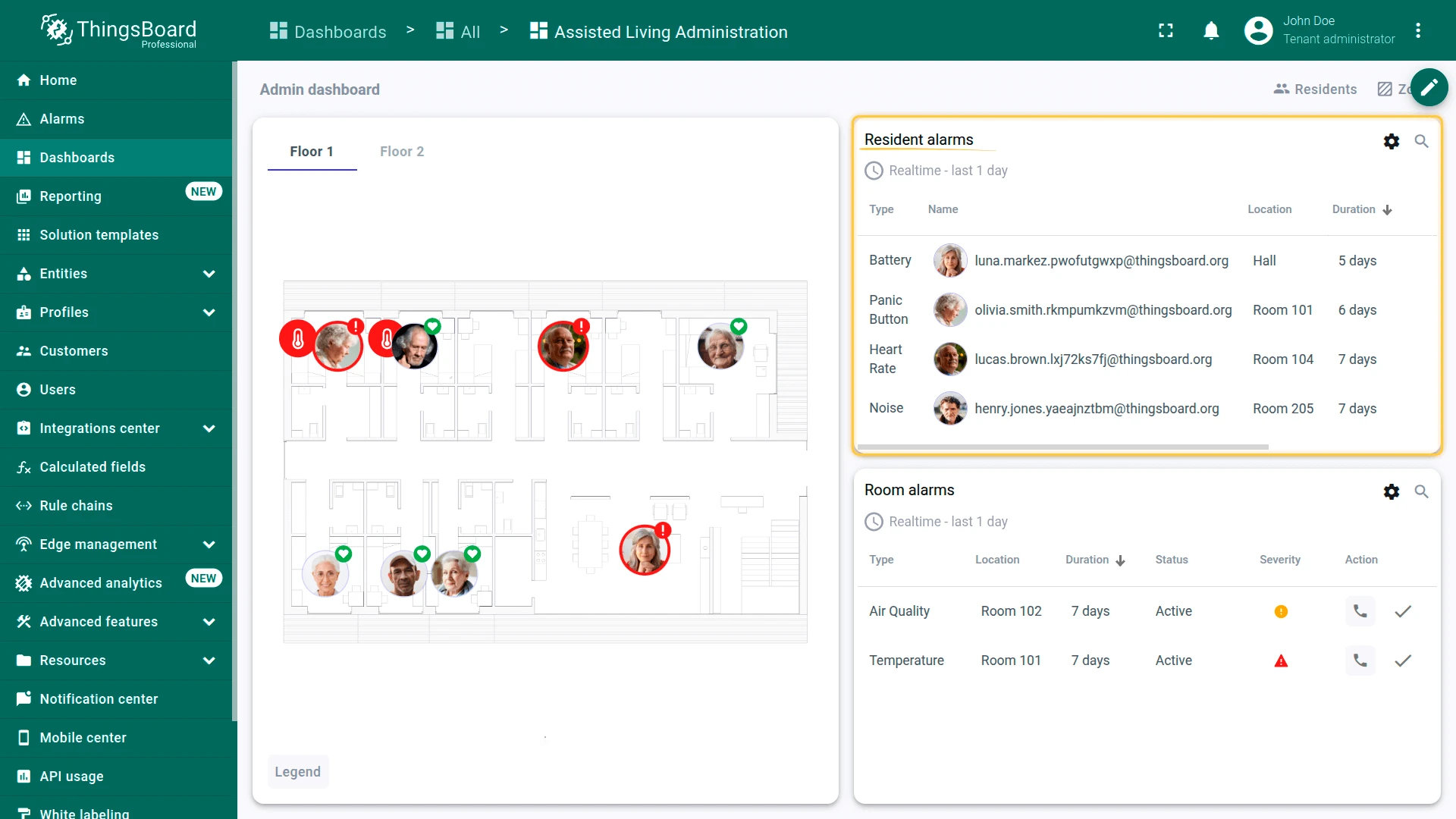
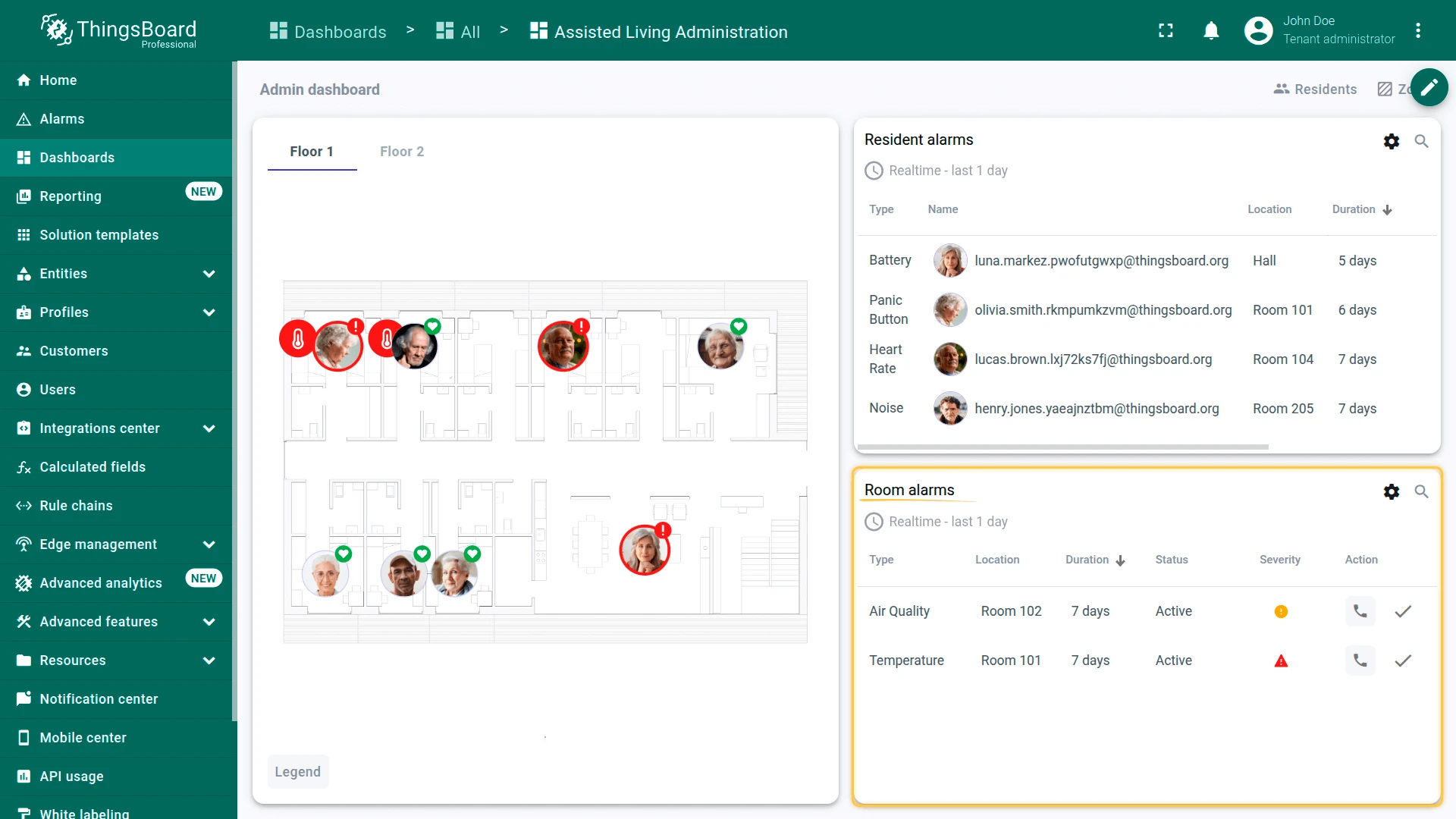
Main state (overview)
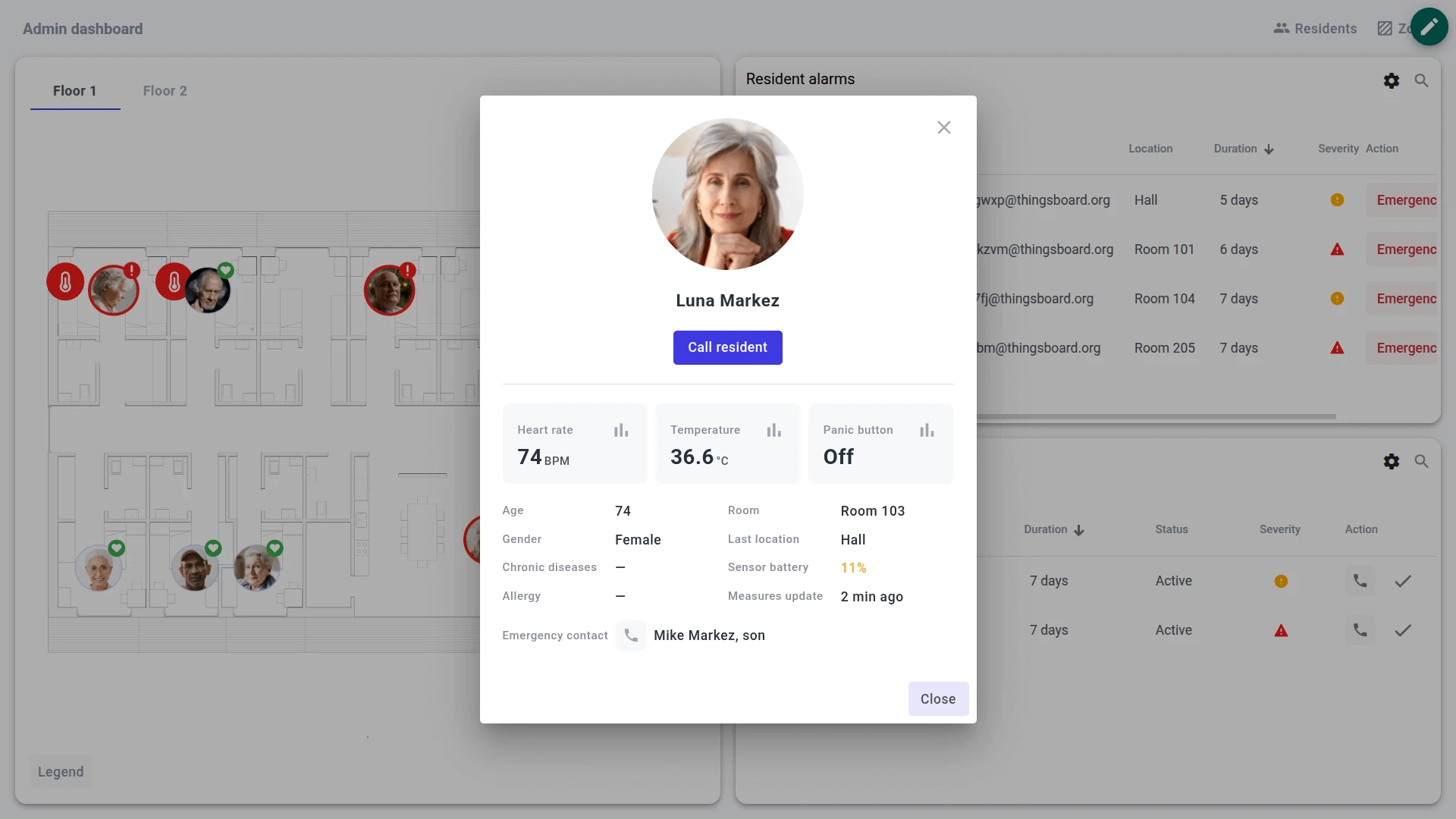
- View residents on an interactive floor plan with markers showing vitals and location
- Switch between floors using floor tabs
- Monitor resident alarms (panic button, abnormal vitals, noise) with quick actions (Call Ambulance, Call Nurse, Call Attendant)
- Monitor room alarms (smoke, leaks, door/window, environmental) with acknowledgment actions
- Configure alarm thresholds via the settings panel
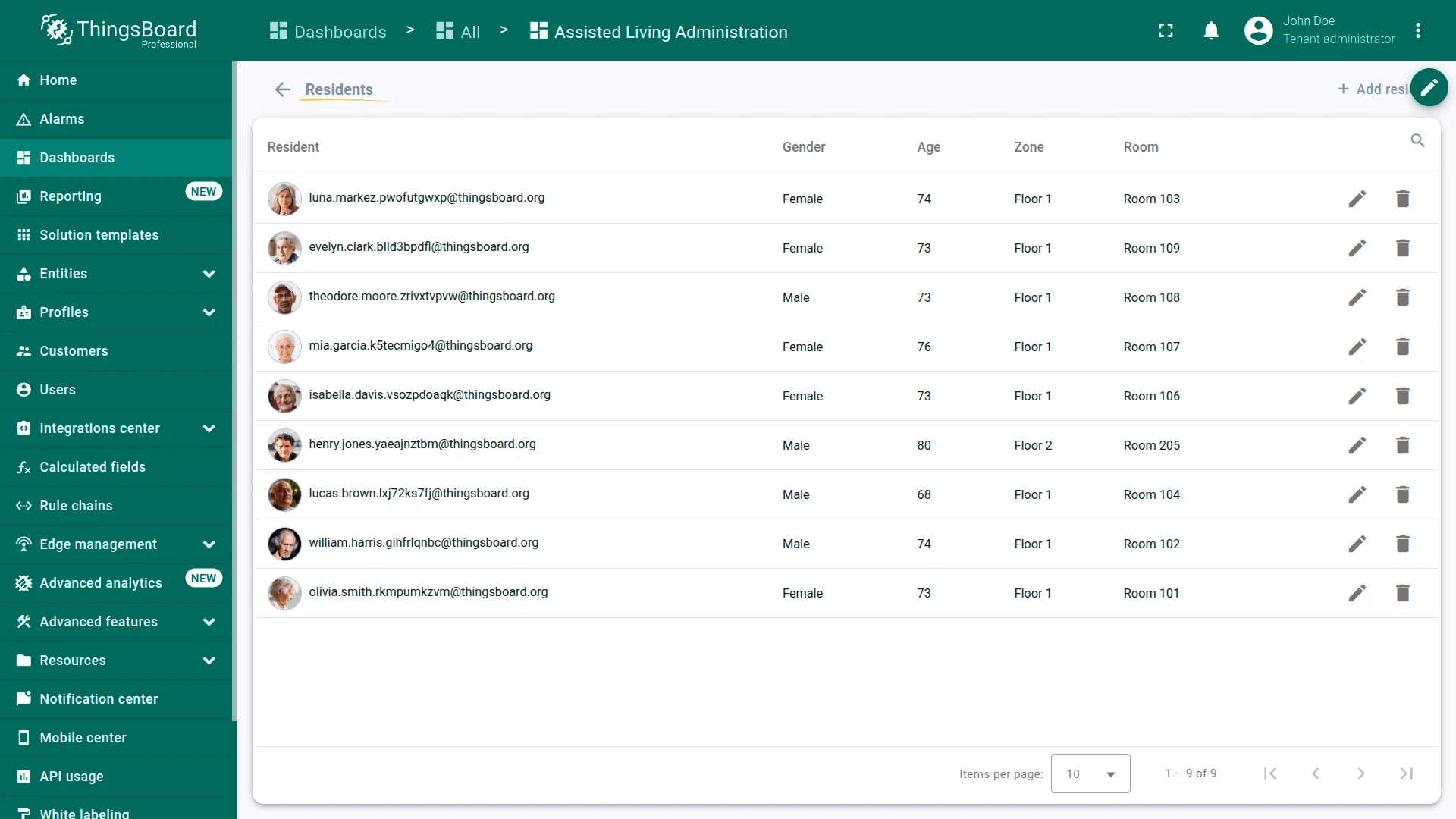
Residents state
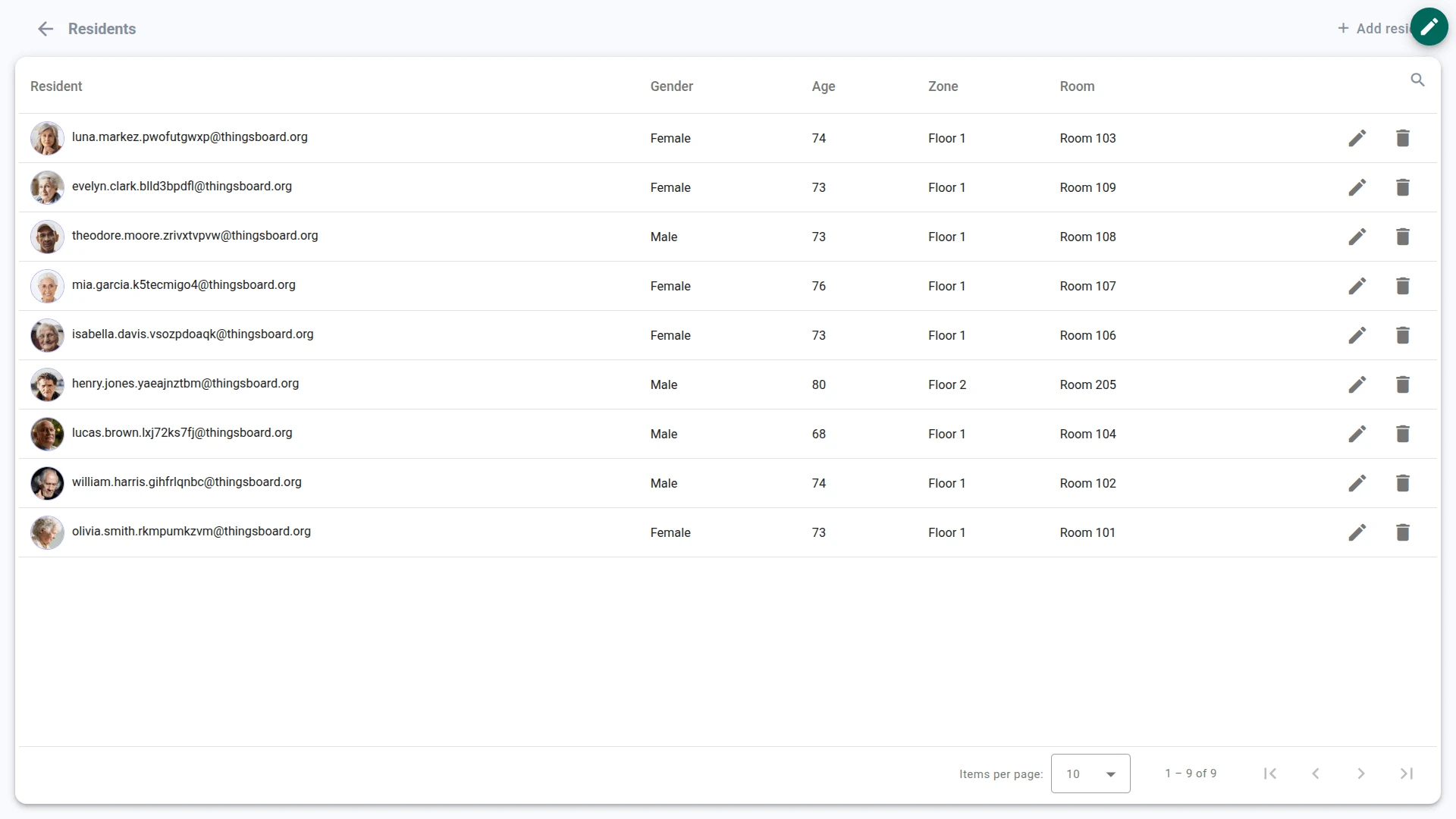
- Browse the resident roster with personal and medical details
- Add new residents with personal info, emergency contact, health data, and location
- Assign wristband devices to residents
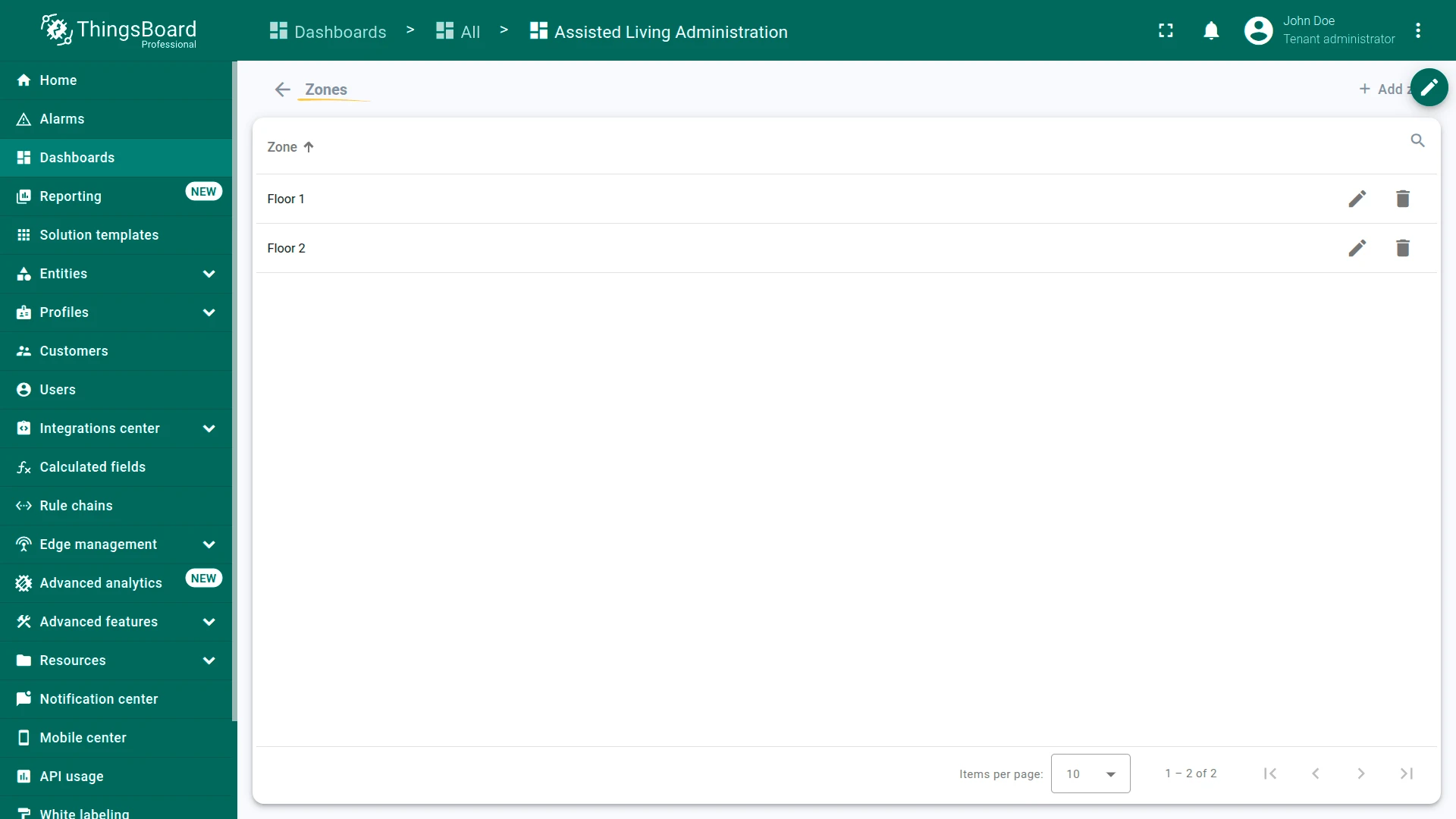
Zones state
- Manage the facility hierarchy (floors and zones)
- Upload floor plan images for each zone
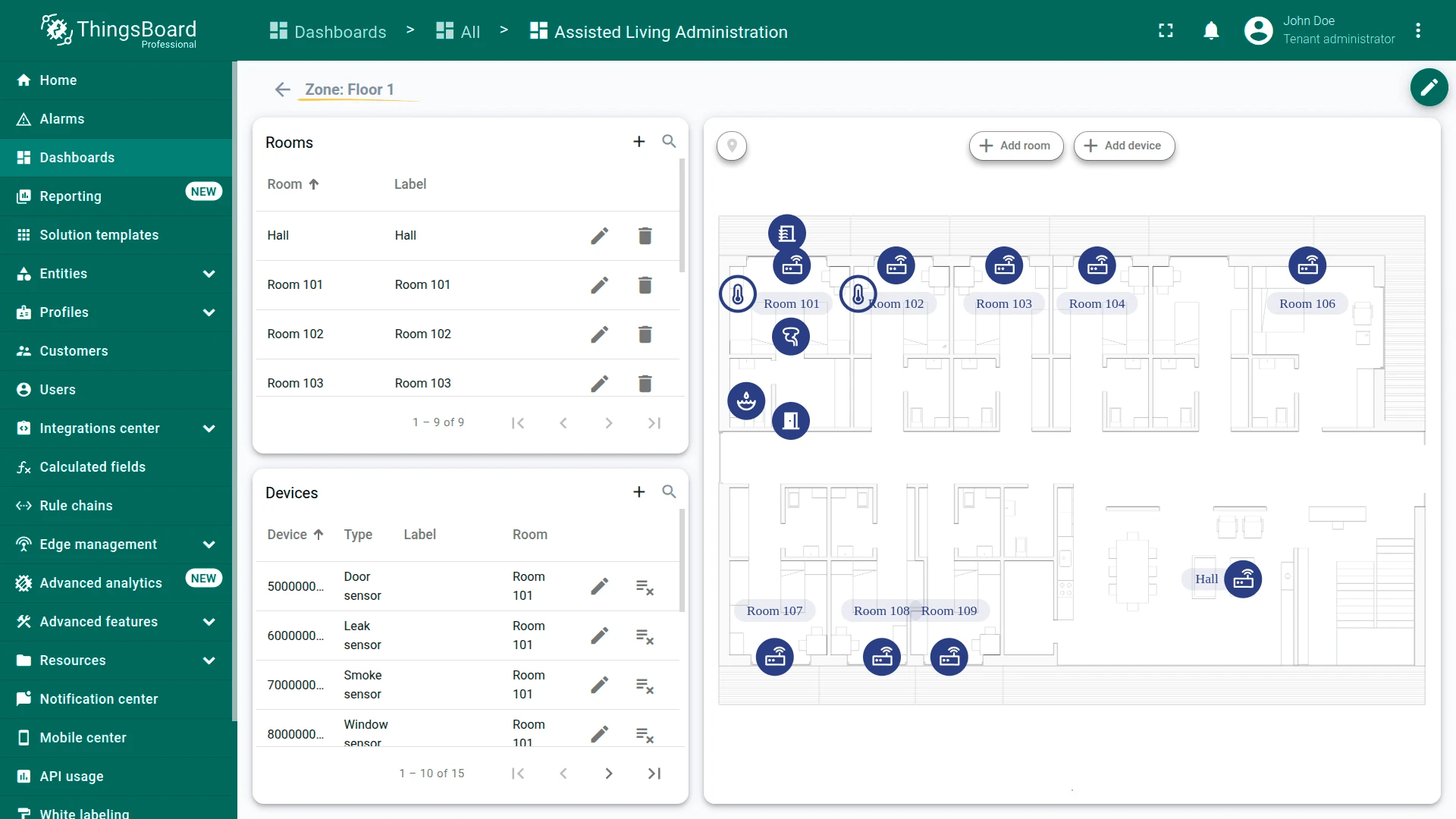
Zone details state
- Map rooms on the floor plan for a selected zone
- Assign devices (room sensors, door/window sensors, smoke and leak sensors) to rooms
The dashboard can be fully customized using the dashboard development tools.
Devices
Section titled “Devices”The solution creates 34 devices with demo data, simulating a facility with two floors, 10 rooms, and 9 residents. All devices communicate through gateways using BLE or LoRa protocols. The gateway forwards telemetry to ThingsBoard in a wrapper format that includes the device serial number. To send telemetry on behalf of a device, replace $ACCESS_TOKEN with the gateway access token:
curl -v -X POST \-d '{"serial": "C00000025FE2", "data":{"pulse": 55}}' \http://THINGSBOARD_HOST_NAME/api/v1/$ACCESS_TOKEN/telemetry \--header "Content-Type:application/json"The example uses the HTTP API. Other connectivity options (MQTT, CoAP, LwM2M, etc.) are supported as well. See connecting devices for details.
AL_Wristband
Section titled “AL_Wristband”Wearable device worn by residents. Reports vital signs, panic button events, noise level, battery status, and BLE beacon signals for indoor positioning. Each wristband is assigned to a resident.
{"serial": "C00000025FE2", "data": {"pulse": 55, "temperature": 36.6, "battery": 95, "panicButton": 0, "noise": 45}}AL_RoomSensor
Section titled “AL_RoomSensor”Monitors environmental conditions in a room. Reports temperature, humidity, indoor air quality (IAQ), and battery level.
{"serial": "E00000015FE1", "data": {"temperature": 22.5, "humidity": 45, "iaq": 80, "battery": 90}}AL_DoorSensor
Section titled “AL_DoorSensor”Detects whether a door is open or closed. Used on back doors, restricted areas, and room entrances.
{"serial": "500000015FE1", "data": {"open": true, "battery": 95}}AL_WindowSensor
Section titled “AL_WindowSensor”Detects whether a window is open or closed. Similar to the door sensor but installed on windows.
{"serial": "800000015FE1", "data": {"open": false, "battery": 98}}AL_SmokeSensor
Section titled “AL_SmokeSensor”Detects smoke presence for fire safety monitoring.
{"serial": "700000015FE1", "data": {"smoke": false, "battery": 99}}AL_LeakSensor
Section titled “AL_LeakSensor”Detects water leaks in rooms, bathrooms, and utility areas.
{"serial": "600000015FE1", "data": {"leak": false, "battery": 97}}AL_Gateway
Section titled “AL_Gateway”Collects BLE and LoRa data from nearby wristbands and sensors and forwards messages to ThingsBoard. Each gateway is assigned to a room and provides RSSI signal strength values used for indoor positioning. The gateway with the strongest signal determines the resident’s current location.
Alarms
Section titled “Alarms”Alarm generation is handled by alarm rules configured in the device profiles. The solution includes 17 alarm rules across seven device profiles. All alarms propagate to the parent entity (room or resident) for dashboard visualization. Thresholds for Major and Critical severity levels can be adjusted from the dashboard settings.
Resident alarms (wristband):
- Panic button: Major on single press, Critical on two or more presses
- Heart rate: Major if pulse falls below 60 or exceeds 120 BPM. Critical if below 50 or exceeds 140 BPM
- Body temperature: Major if below 36° C or exceeds 37° C. Critical if below 35.5° C or exceeds 38° C
- High noise: Major if noise level exceeds 80 dB, Critical if exceeds 100 dB
- Low battery: Major if battery drops below 25%, Critical if below 15%
Infrastructure alarms (room and safety sensors):
- Room temperature: Major if below 18° C or exceeds 26° C. Critical if below 16° C or exceeds 28° C
- Room humidity: Major if below 30% or exceeds 70%. Critical if below 25% or exceeds 75%
- Air quality (IAQ): Major if IAQ exceeds 150, Critical if exceeds 300
- Door/window open: Major if left open longer than 30 min, Critical if longer than 60 min
- Smoke detected: Critical when smoke is detected
- Water leak: Critical when a leak is detected
- Sensor battery: Each sensor profile (room, door, window, smoke, leak) includes its own battery alarm — Major below 25%, Critical below 15%
Rule chains
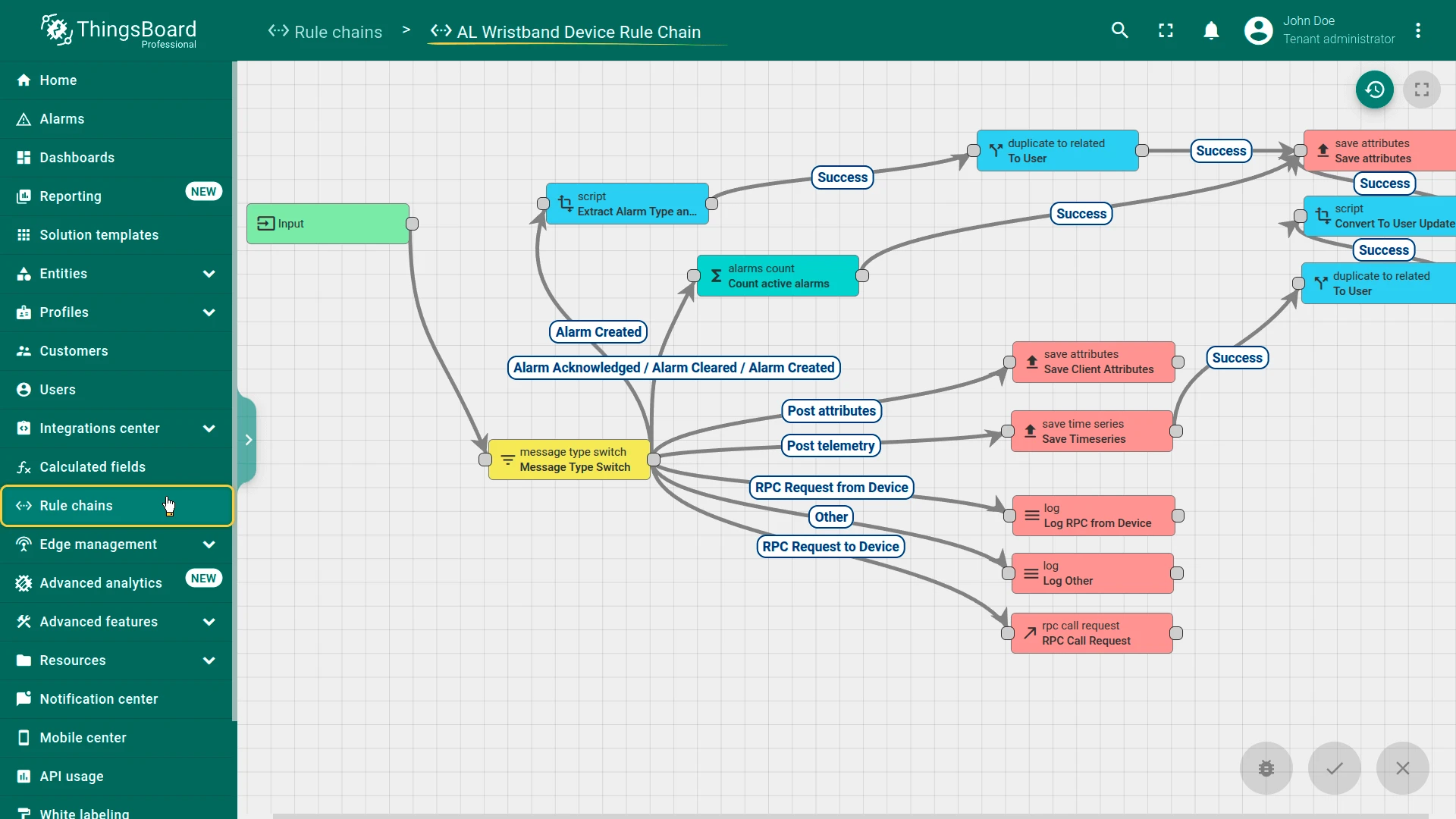
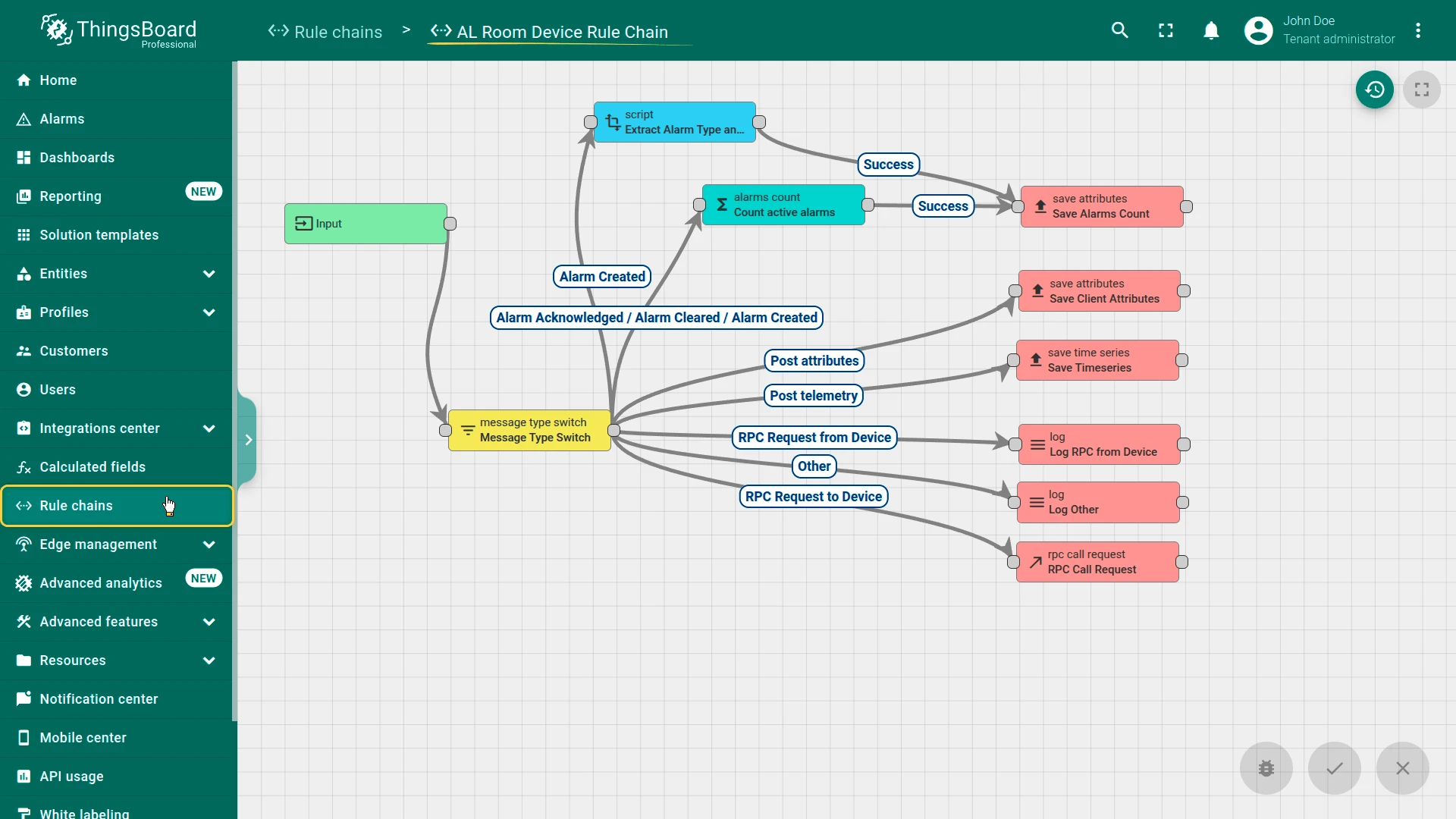
Section titled “Rule chains”The solution uses three rule chains to process telemetry from gateways and devices:
- AL Gateway Rule Chain: Processes data received from gateways. Deduplicates messages from multiple sources (3-second window), identifies target devices using serial numbers from the payload, enriches messages with gateway attributes (room, zone), routes data based on device type (wristband or room sensor), and determines resident location using the strongest RSSI value from the nearest gateway
- AL Wristband Device Rule Chain: Saves vitals telemetry, evaluates alarm rules, and counts active alarms. The alarm count is propagated to the corresponding resident user entity for dashboard visualization
- AL Room Device Rule Chain: Saves environmental telemetry and evaluates alarm rules for infrastructure sensors (room, door, window, smoke, leak)
Customers
Section titled “Customers”The solution creates a sample customer (Assisted Living Company) with two user groups:
- Administrators: Users with full access to the Assisted Living Administration dashboard. They manage the facility, configure alarm thresholds, and respond to alerts. The solution creates one administrator with auto-generated credentials
- Residents: User entities representing the monitored individuals (nine demo residents). Each resident user is linked to a wristband device, and alarm counts from that wristband are propagated to the resident user entity for dashboard visualization. Resident users do not log in to the platform — they are data entities used for tracking
You can find the generated administrator credentials in the solution instructions. Additional customers and users can be created via the administration UI.
Conclusion
Section titled “Conclusion”The Assisted Living solution template delivers a healthcare monitoring system with real-time resident vital tracking, RSSI-based indoor positioning, 17 configurable alarm rules covering health events and safety hazards, interactive floor plan management, and three dedicated rule chains for gateway processing and alarm propagation. It enables fast onboarding and serves as a foundation for both demonstrations and production senior care monitoring use cases.
Was this helpful?