Security Settings
ThingsBoard allows system administrators to configure security settings that control login behavior, password requirements, and JWT token parameters.
To access security settings, navigate to Security ⇾ General in the left-hand menu.
General Policy
Section titled “General Policy”This section controls account lockout behavior and link expiration times.
- Maximum number of failed login attempts — sets the number of unsuccessful login attempts allowed before the account is locked.
- Notification on account lockout — specify an email address to receive a notification when a user account is locked.
- User activation link TTL — defines the time-to-live (in hours) for activation links sent to new users. After this period, the link expires and a new one must be generated.
- Password reset link TTL — sets the expiration time (in hours) for password reset links sent via email.
- Mobile secret key length — determines the length of the secret key used for mobile authentication.
Password Policy
Section titled “Password Policy”Configure the following password requirements:
- Minimum password length — the minimum number of characters in the password. Must be between 6 and 50.
- Maximum password length — the maximum number of characters in the password. Must be greater than the minimum length.
- Minimum number of uppercase letters — minimum number of uppercase letters required in the password.
- Minimum number of lowercase letters — minimum number of lowercase letters required in the password.
- Minimum number of digits — minimum number of digit characters required in the password.
- Minimum number of special characters — minimum number of special characters (e.g.
!,@,#) required in the password. - Password expiration period in days — forces users to change their password after the specified number of days.
- Password reuse frequency in days — prevents users from reusing a previous password within the specified number of days.
- Allow whitespace — when enabled, spaces are allowed in the password.
- Force to reset password if not valid — when enabled, users whose password no longer meets the current policy must reset it via email before logging in.
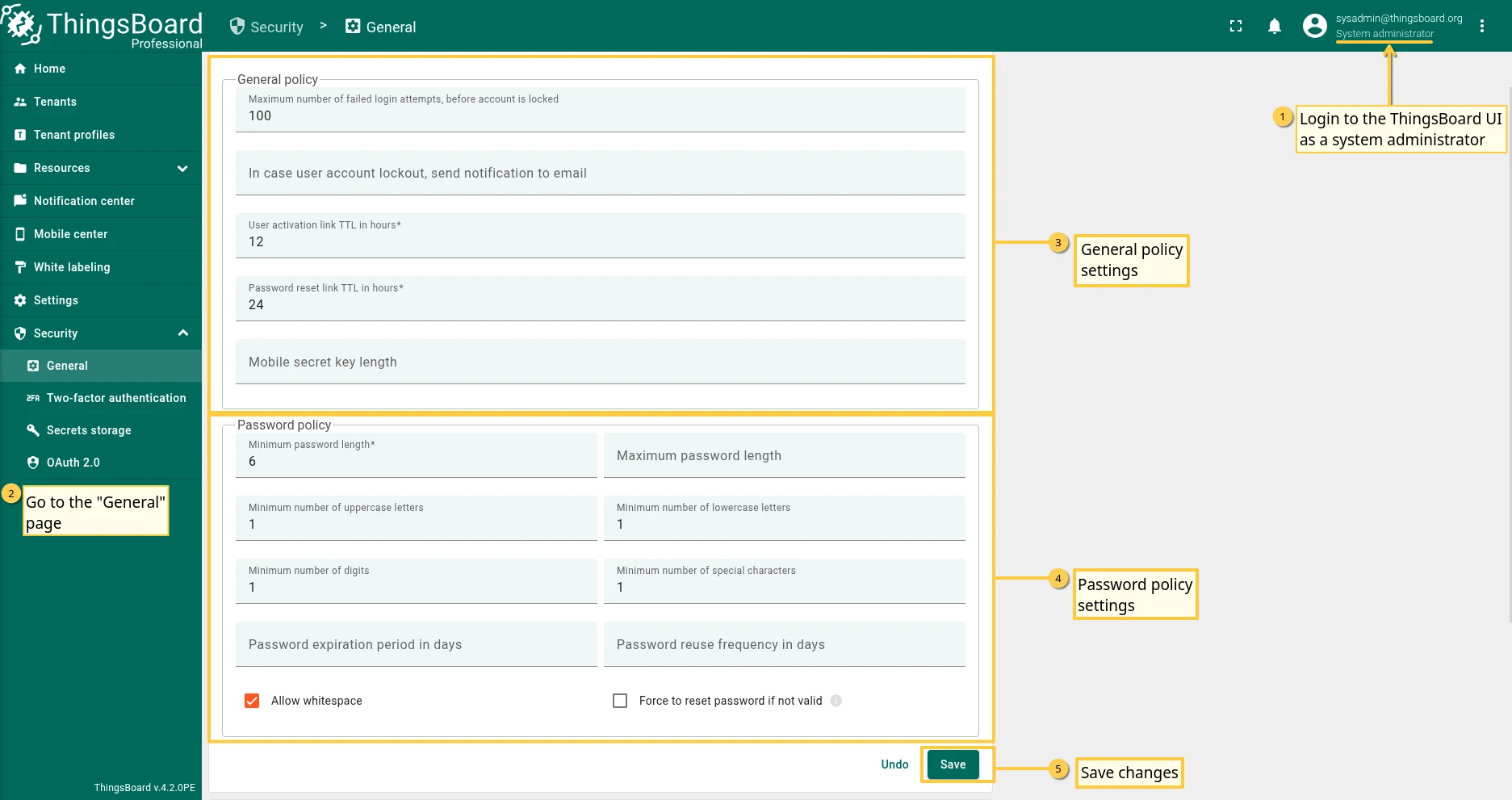
After configuring the general and password policy settings, click Save to apply the changes.
JWT Security Settings
Section titled “JWT Security Settings”ThingsBoard uses JSON Web Tokens (JWT) for authentication and session management. Configure token generation, signing, and expiration below.
- Issuer name — the name of the issuer included in all generated JWT tokens. Used to identify the token source during validation.
- Signing key — a Base64-encoded string of at least 512 bits used to sign and verify JWT tokens. Click Generate key to create a new random key.
- Token expiration time (sec) — the lifetime of JWT tokens in seconds. After this period, the token expires and the user must re-authenticate. Default:
9000seconds. Minimum:60seconds. - Refresh token expiration time (sec) — the lifetime of refresh tokens in seconds. Refresh tokens allow users to obtain new JWT tokens without re-entering their credentials. Default:
604800seconds (7 days). Minimum:900seconds.
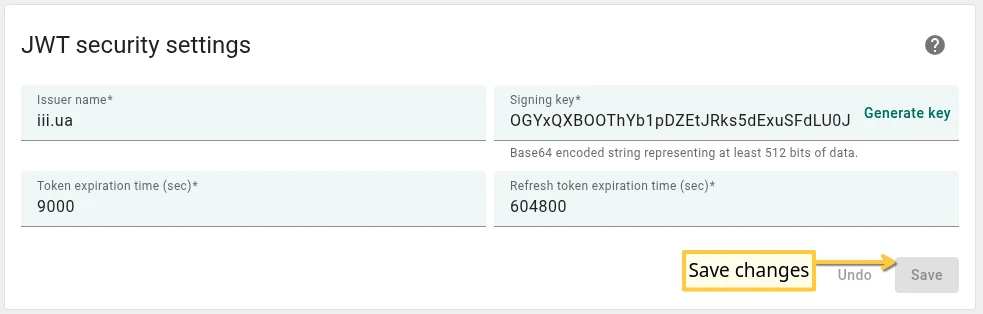
After configuring JWT settings, click Save to apply the changes.
Practical Recommendations
Section titled “Practical Recommendations”- Configure the password policy to require strong passwords with uppercase letters, lowercase letters, digits, and special characters.
- Enable Two-factor authentication to add an extra layer of protection.
- Set a short User activation link TTL (e.g., 1–4 hours) to reduce the window of exposure for unactivated accounts.
- Rotate the JWT Signing key periodically or after a suspected key compromise. Note that rotating the key invalidates all active sessions.
Was this helpful?
Thank you for your feedback!