Rule Engine Queues
Rule Engine uses message queues to guarantee delivery under load, handle traffic spikes, and control the order in which messages are submitted to rule chains. The Rule Engine continuously polls its assigned queues and processes messages in batches.
ThingsBoard supports two queue backends:
- Kafka — distributed, durable, and production-ready. Messages survive service restarts. Can be used in monolith deployments; required in cluster deployments.
- In-Memory — lightweight and fast. Messages are lost on restart. Available in monolith deployments only — not supported in cluster mode. Suitable for development or small-scale single-node environments.
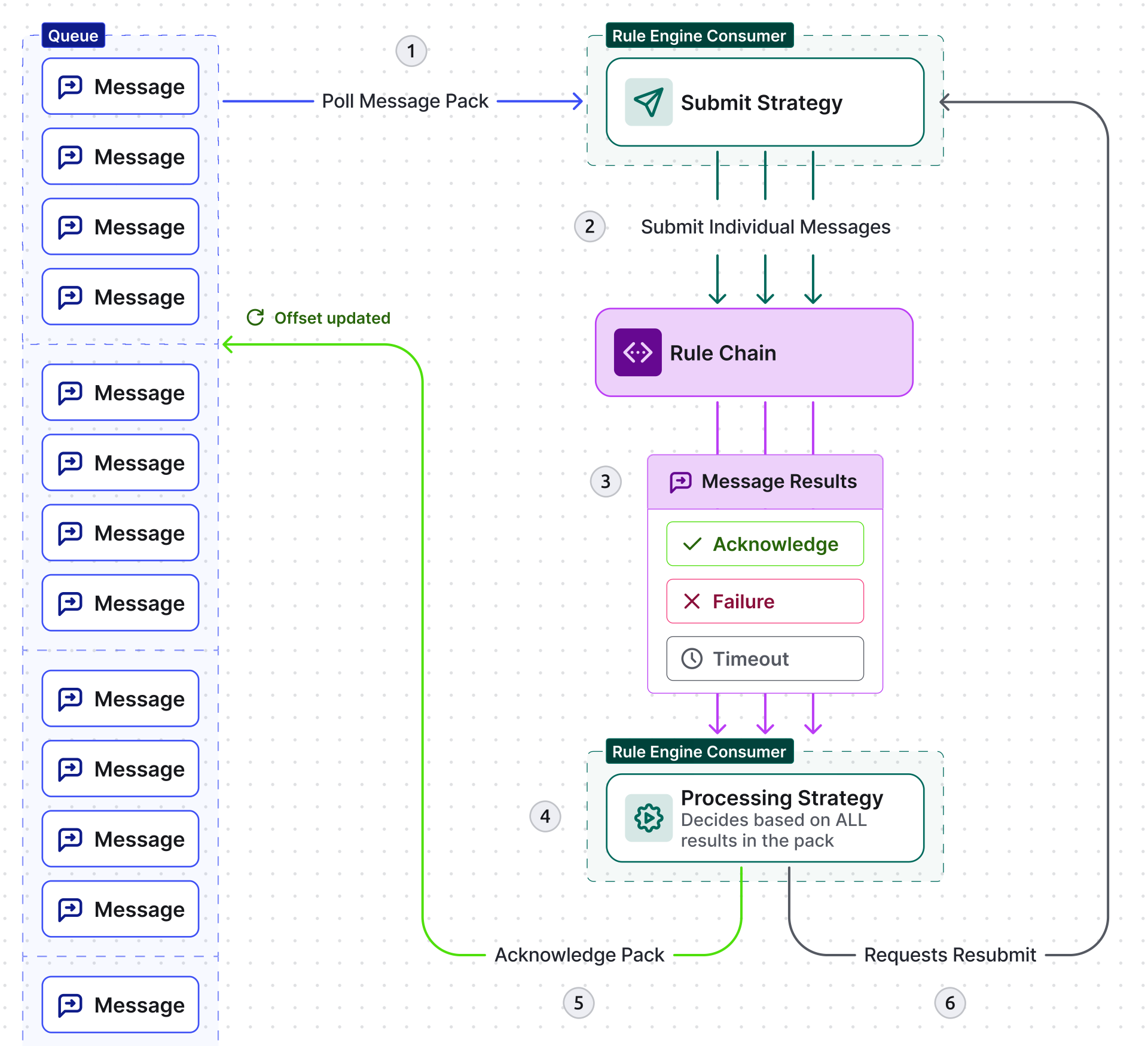
- Consumer polls a message pack (batch) from the queue.
- Submit strategy sends individual messages to the rule chain.
- Each message completes with: ack, failure, or timeout.
- Processing strategy collects all results for the pack.
- If all succeeded — ack the pack and commit the queue offset.
- If any failed/timed out — loop back to submit strategy to resubmit only the failed messages.
Queue Settings
Section titled “Queue Settings”Each queue is defined by the following settings:
| Setting | Description |
|---|---|
| Name | Used for statistics, logging, and the Checkpoint node |
| Submit settings | Controls how messages from a polled batch are delivered to rule chains |
| Retries processing settings | Controls how failed or timed-out messages are re-processed |
| Polling settings | Poll interval, partitions, and processing timeout |
| Custom properties | Provider-specific topic/queue properties applied at queue creation |
Submit Strategies
Section titled “Submit Strategies”The submit strategy controls how messages from a polled batch are submitted to rule chains:
| Strategy | Behavior |
|---|---|
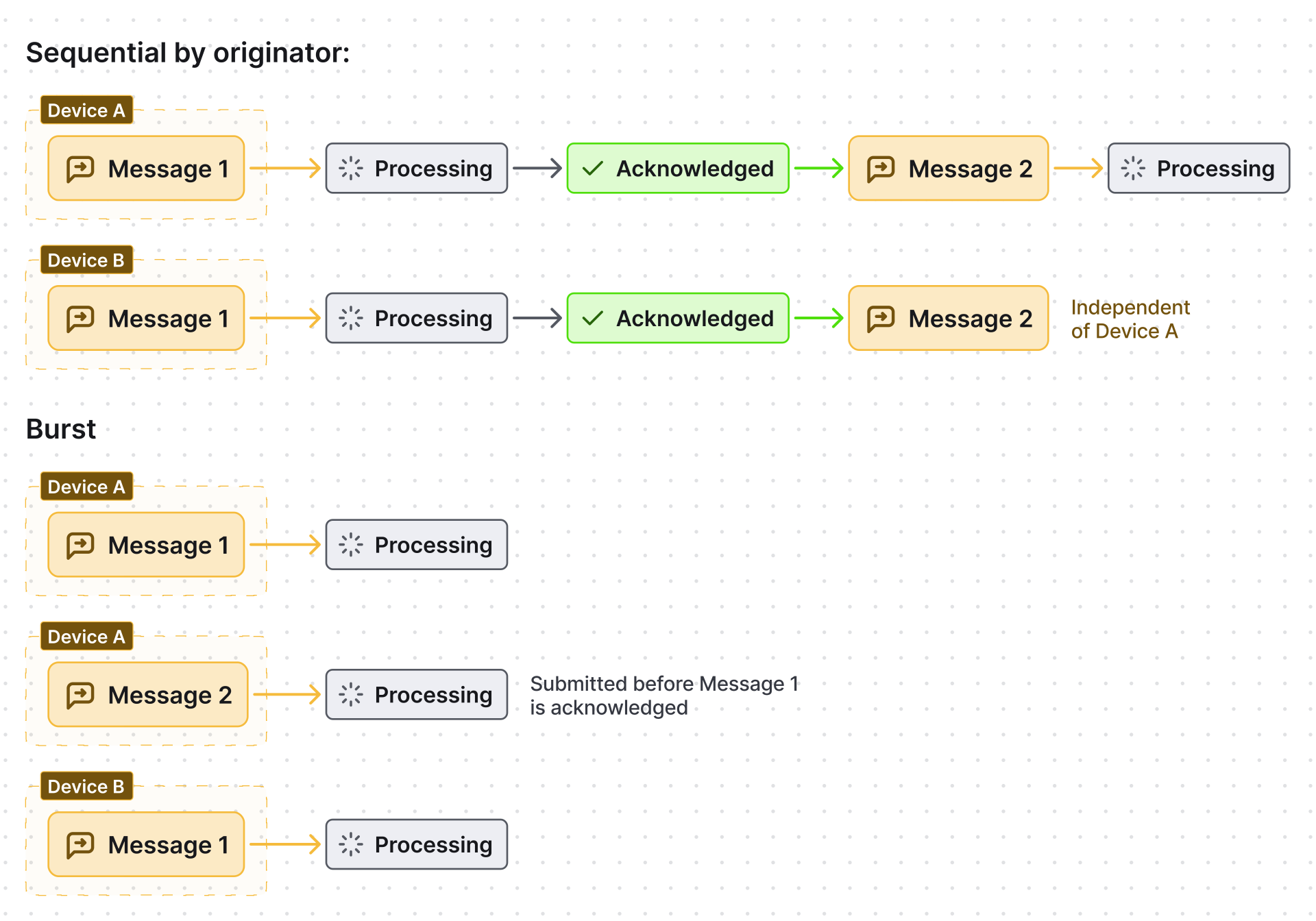
| Burst | All messages submitted immediately in arrival order |
| Batch | Messages grouped into fixed-size batches; next batch waits for the previous to be acknowledged |
| Sequential by originator | One message per entity at a time; next message for the same entity waits for acknowledgement |
| Sequential by tenant | One message per tenant at a time; next message for the same tenant waits |
| Sequential | One message at a time across all entities — slowest, but guarantees strict ordering |
Retry (Processing) Strategies
Section titled “Retry (Processing) Strategies”The retry strategy controls what happens when messages fail or time out:
| Strategy | On failure | On timeout |
|---|---|---|
| Skip all failures | Acknowledge and discard | Still processed (not cancelled) |
| Skip all failures and timeouts | Acknowledge and discard | Cancel and discard |
| Retry failed | Retry failed messages only | Ignore timeouts |
| Retry timeout | Ignore failures | Retry timed-out messages only |
| Retry failed and timeout | Retry both | Retry both |
| Retry all | Retry entire pack even if only one message failed | Retry entire pack |
All retry strategies share these parameters:
| Parameter | Description |
|---|---|
| Number of retries | Maximum retry iterations; 0 = unlimited |
| Percentage of failures for skipping retries | Skip retry if the failure percentage is below this threshold |
| Retry within | Seconds to wait before the first retry |
| Additional retry within | Seconds to wait for the second and subsequent retry attempts |
Polling Settings
Section titled “Polling Settings”| Setting | Description |
|---|---|
| Poll interval | Milliseconds between polls when no new messages arrive |
| Partitions | Number of partitions; higher values allow more parallel processing |
| Send message poll for each consumer | When enabled, each partition gets its own consumer thread |
| Processing within | Milliseconds allowed to process a polled message pack before timeout |
Default Queues
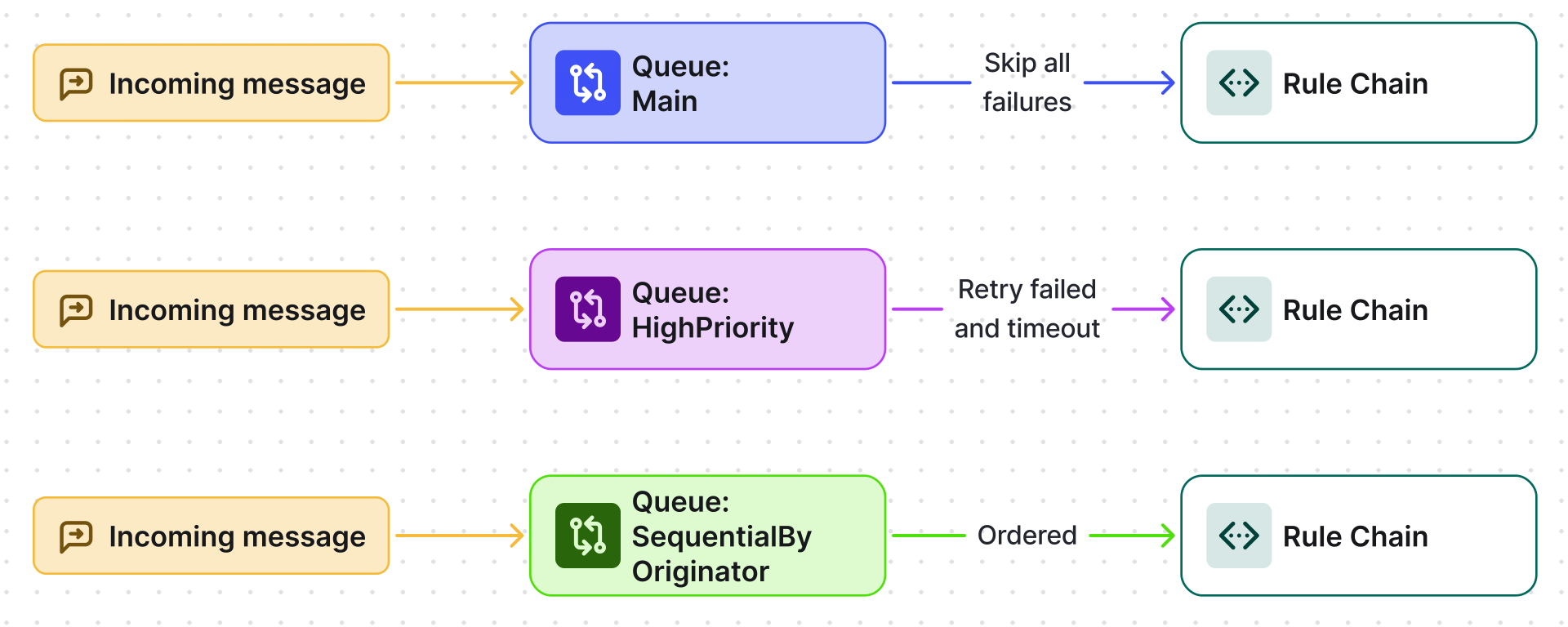
Section titled “Default Queues”Three queues are pre-configured out of the box:
| Queue | Submit strategy | Retry strategy | Purpose |
|---|---|---|---|
| Main | Burst | Skip all failures | Default entry point for all messages; backward-compatible |
| HighPriority | Burst | Retry failed and timeout | Alarms, notifications, and critical steps — retries until success |
| SequentialByOriginator | Sequential by originator | Skip all failures | Guaranteed per-entity message ordering |
Create a Queue
Section titled “Create a Queue”- Log in as System Administrator.
- Go to Settings → Queues.
- Click + to open the new queue form.
- Enter the queue Name, select Submit and Retry strategies, and configure polling settings.
- Click Add.
For queue configuration specific to isolated tenants, see Tenant Profiles — Isolated Rule Engine.
Was this helpful?
Thank you for your feedback!