Claiming
Device claiming transfers a device from the tenant’s account to a specific customer. A manufacturer ships thousands of devices pre-provisioned under the tenant — then each end customer claims their own unit using a secret key. Once claimed, only that customer’s users can see the device and its data.
There are two scenarios depending on what the device can do. Both end the same way: the customer opens the Claim Device widget, enters the device name and secret key, and ownership transfers.
Device-Side Claiming
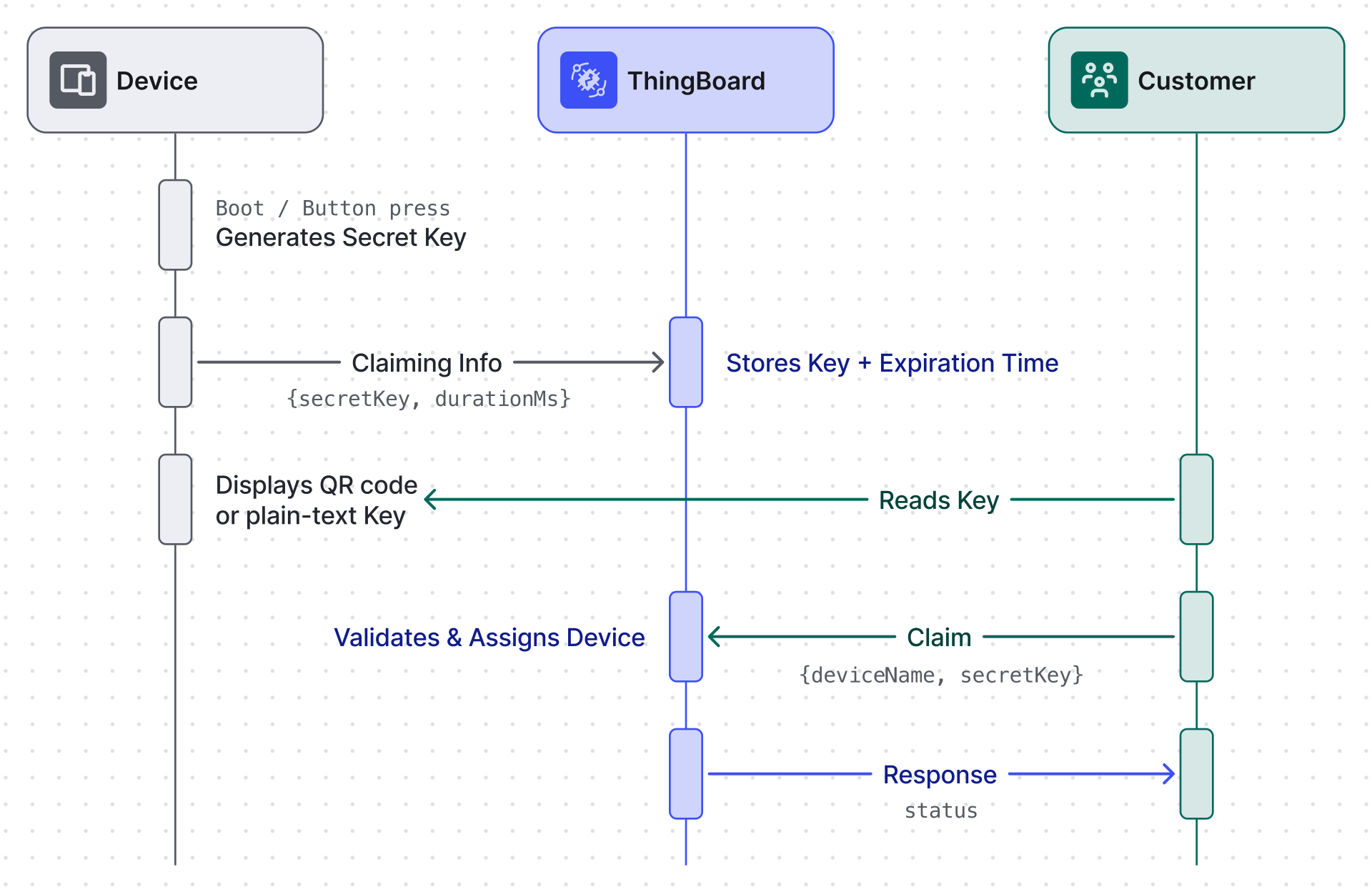
Section titled “Device-Side Claiming”Use this when the device has a display, button, or indicator and can show the customer a code at setup time — for example, a Wi-Fi thermostat that shows a PIN on its screen during first boot, or a smart meter with a QR code generated on demand. The device generates a secret key on a trigger and publishes it to ThingsBoard; the customer reads it directly off the device and claims it.
1. Enable Claiming
Section titled “1. Enable Claiming”Claiming must be enabled before a device can publish claiming data. Choose one:
- Globally — set
SECURITY_CLAIM_ALLOW_CLAIMING_BY_DEFAULT=true - Per device — add a server-side attribute
claimingAllowed = trueon the device
2. Device Publishes the Claiming Key
Section titled “2. Device Publishes the Claiming Key”The device sends the following payload over any supported transport (MQTT, HTTP, CoAP):
{ "secretKey": "your-secret", "durationMs": 60000}secretKey— the secret customers must provide. Omit to use an empty string.durationMs— how long the key is valid (milliseconds). Omit to use the system default (SECURITY_CLAIM_DURATION). Maximum is 24 hours.
ThingsBoard stores the key and records its expiry in the device’s expirationTime server attribute.
3. Customer Claims the Device
Section titled “3. Customer Claims the Device”The customer uses the Claim Device widget (or the REST API below), entering the device name and the secret key shown on the device.
Server-Side Claiming
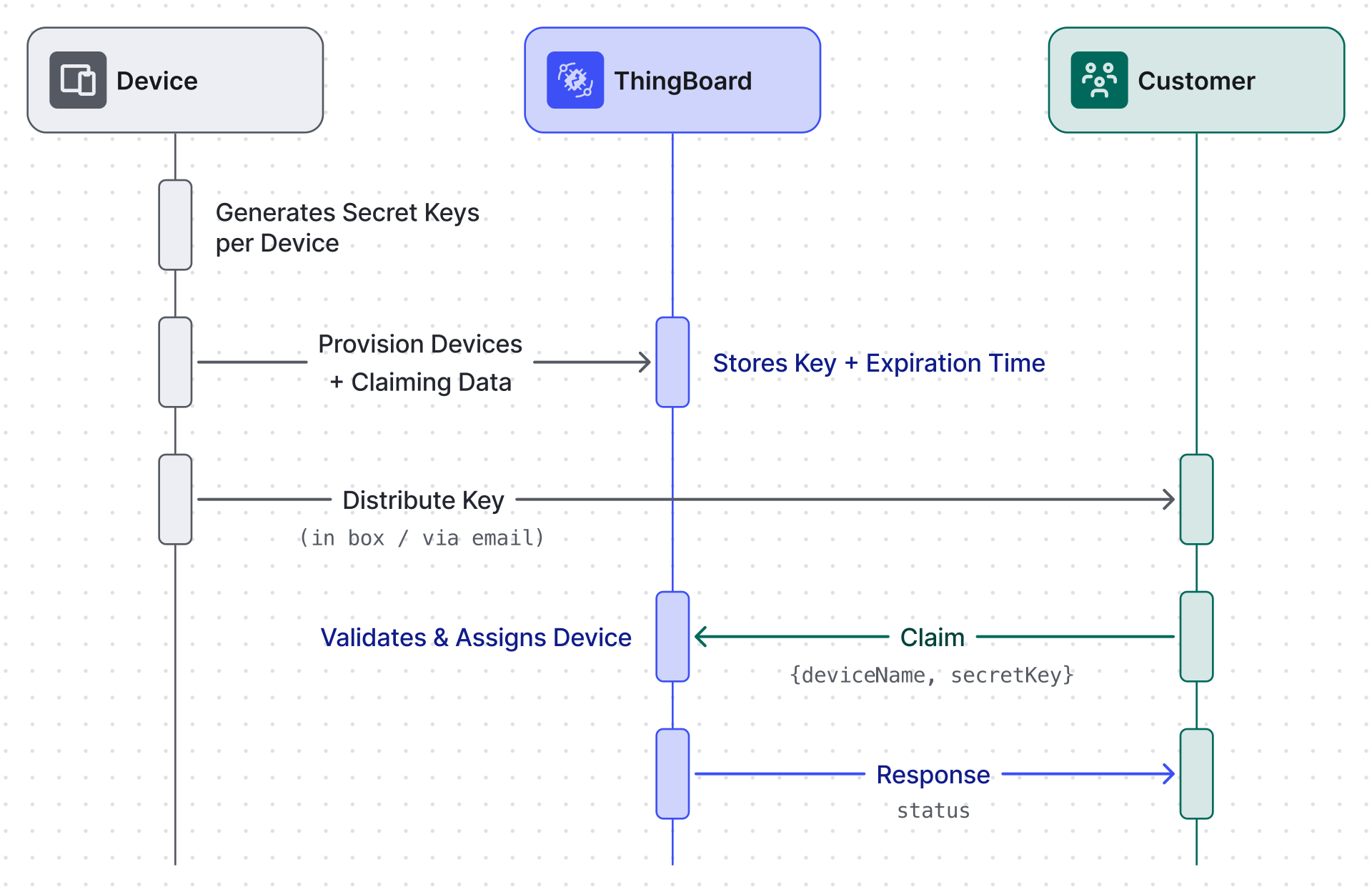
Section titled “Server-Side Claiming”Use this when the device has no UI at all — NB-IoT sensors, LoRaWAN trackers, or any device auto-provisioned via Platform Integrations that the customer never physically interacts with. The tenant generates secrets in advance and includes them in the product packaging, a welcome email, or a customer portal; the customer never touches the device to get the code.
1. Upload the Claiming Data
Section titled “1. Upload the Claiming Data”For each device, set a server-side attribute named claimingData:
{ "secretKey": "your-secret", "expirationTime": 1735689600000}secretKey— the secret to distribute to the customer.expirationTime— Unix timestamp in milliseconds after which claiming is no longer allowed.
This can be done via the UI (Device ⇾ Attributes ⇾ Add) or in bulk via the REST API.
2. Distribute the Key
Section titled “2. Distribute the Key”Send the device name and secret key to the customer through any external channel. The customer will need both to complete claiming.
3. Customer Claims the Device
Section titled “3. Customer Claims the Device”Same as device-side: the customer uses the Claim Device widget or calls the REST API.
Claiming via REST API
Section titled “Claiming via REST API”Customers can claim a device programmatically:
POST /api/customer/device/{deviceName}/claimContent-Type: application/json
{"secretKey": "your-secret"}
On success the device is assigned to the requesting customer’s account.
Reclaiming a Device
Section titled “Reclaiming a Device”To return a device to the tenant (remove customer ownership):
DELETE /api/customer/device/{deviceName}/claimAfter reclaiming, the claimingAllowed attribute is removed (when SECURITY_CLAIM_ALLOW_CLAIMING_BY_DEFAULT is false), so the device cannot be claimed again until it is re-enabled.
Configuration Reference
Section titled “Configuration Reference”| Environment Variable | Default | Description |
|---|---|---|
SECURITY_CLAIM_ALLOW_CLAIMING_BY_DEFAULT |
true |
Allow all devices to be claimed without a per-device claimingAllowed attribute |
SECURITY_CLAIM_DURATION |
86400000 |
Default claiming key validity in milliseconds (24 hours) |
CACHE_SPECS_CLAIM_DEVICES_TTL |
1440 |
Maximum time-to-live for the in-memory claim cache (minutes) |
Was this helpful?