Relations
Relations connect two entities within the same Tenant, modeling real-world relationships such as hierarchy, ownership, or dependency.
Data Model
Section titled “Data Model”Each relation consists of:
- from — source entity (entity type + UUID)
- to — target entity (entity type + UUID)
- type — a free-text string identifying the relationship kind (e.g.,
Contains) - additionalInfo — optional JSON object for custom metadata
Relations have no timestamp — they represent a structural link, not an event.
Example:
{ "from": { "entityType": "ASSET", "id": "156c853f-89b1-321b-635j-y8febb2784h4" }, "to": { "entityType": "DEVICE", "id": "784f394c-42b6-435a-983c-b7beff2784f9" }, "type": "Contains", "additionalInfo": {}}Direction
Section titled “Direction”A relation always flows from a source entity (From) to a target entity (To):

Direction matters when querying: fetching relations from an entity lists its children; fetching relations to an entity reveals its parents.
Relation Types
Section titled “Relation Types”The type is a free-text string — use built-in conventions or define your own:
| Type | Meaning |
|---|---|
| Contains | A hierarchically contains B |
| Manages | A manages or is responsible for B |
| Uses | A depends on or uses B |
| Supports | A provides abstract support to B |
Any string is valid — ThingsBoard places no restrictions on type names.
Hierarchy Example
Section titled “Hierarchy Example”The Contains relation naturally models parent–child structures:
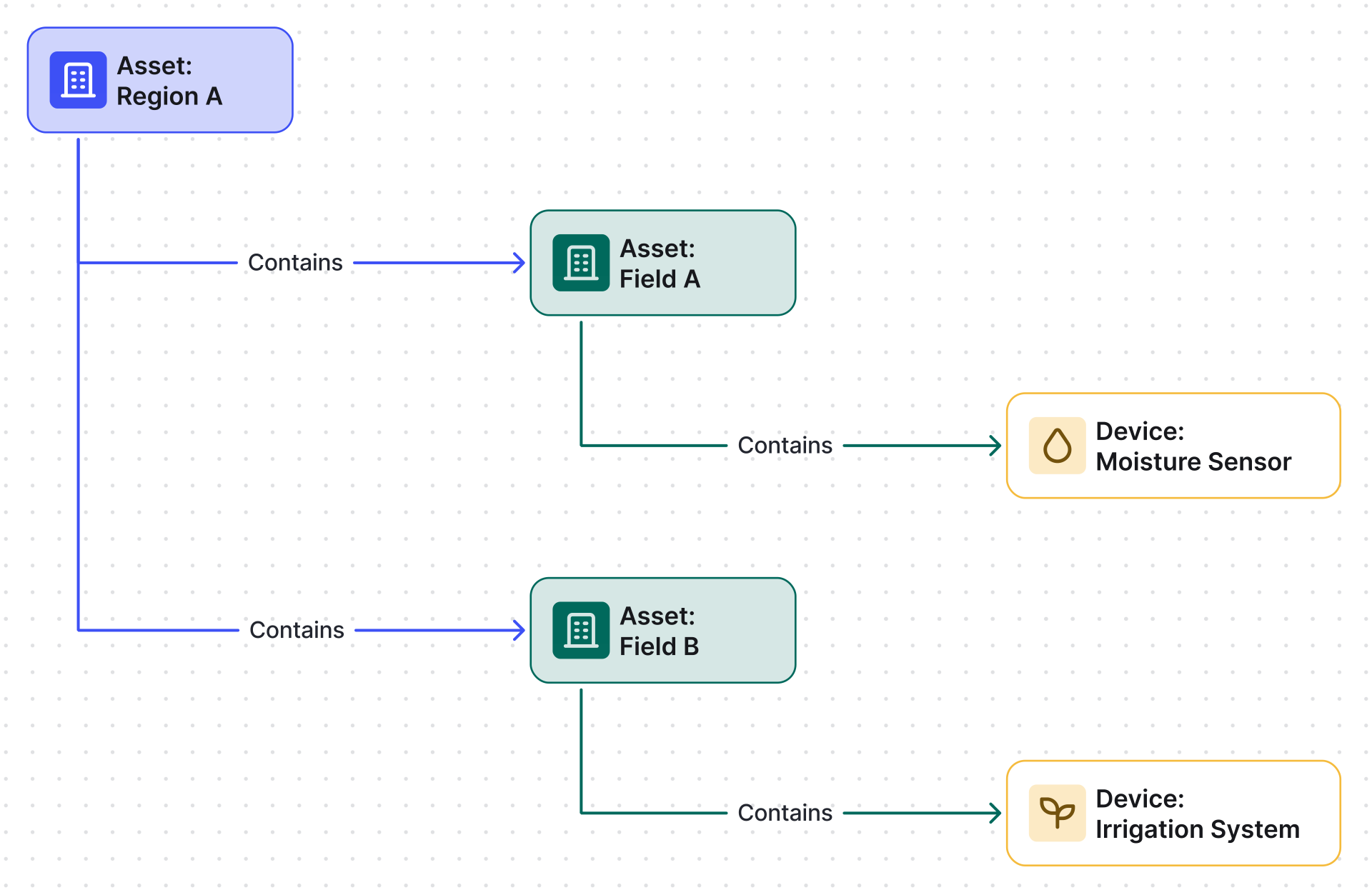
Querying relations from Region A returns Field A and Field B. Querying relations to Moisture Sensor reveals Field A as its parent.
Managing Relations
Section titled “Managing Relations”Via UI
Section titled “Via UI”- Open the entity details page.
- Navigate to the Relations tab.
- Select the direction: From (this entity is the source) or To (this entity is the target).
- Click + to open the Add relation dialog.
- Enter the Relation type — choose a built-in value such as
Containsor type any custom string. - Select the target entity.
- Optionally fill in Additional info (JSON) for metadata.
- Click Add.
Via REST API
Section titled “Via REST API”Relations can be created, queried, and deleted via the REST API. Authenticate using a JWT token in the X-Authorization header. Separate endpoints are available for querying by direction (from/to) and filtering by entity type or relation type.
What You Can Do with Relations
Section titled “What You Can Do with Relations”| Capability | Description | Guide |
|---|---|---|
| Build entity hierarchies | Model sites, buildings, floors, and rooms as nested asset trees using Contains |
— |
| Power dynamic dashboards | Resolve related entities via entity aliases to build reusable dashboards that adapt to any customer or deployment | Dashboards |
| Route and enrich in Rule Engine | Check relation presence, fetch related entity data, duplicate messages to related devices | Rule Engine |
| Aggregate across related entities | Compute min/max/avg/sum/count over all entities related to a parent | Calculated Fields |
| Propagate and transform data | Push computed values to related entities; detect geofencing events relative to related zones | Calculated Fields |
| Query via REST API | Create, list, and delete relations programmatically | REST API |
Was this helpful?