Multi-Tenancy & Hierarchy
What is multi-tenancy? Multi-tenancy lets a single ThingsBoard instance securely serve multiple independent organizations, each with isolated data, users, and configuration. This architecture is supported by ThingsBoard Community Edition, Professional Edition, and Private Cloud.
Why multi-tenancy? Running one platform instance for many business units or customers cuts infrastructure costs and centralizes administration, without sacrificing data isolation or security.
ThingsBoard organizational hierarchy:
- System Administrator: Platform administrator who creates and manages tenants, and controls system-wide resources without owning IoT entities.
- Tenant: Top-level organizational entity representing an independent company or business unit. Owns and manages its resources, such as devices, assets, and dashboards.
- Customer: Logical sub-organization within a tenant, representing a client organization, regional branch, or internal department — used to organize and scope a subset of the tenant’s resources for secure access delegation.
- User: Authenticated account with assigned roles and permissions. Can belong to either the tenant or one of its customers and accesses only the resources available within its scope.
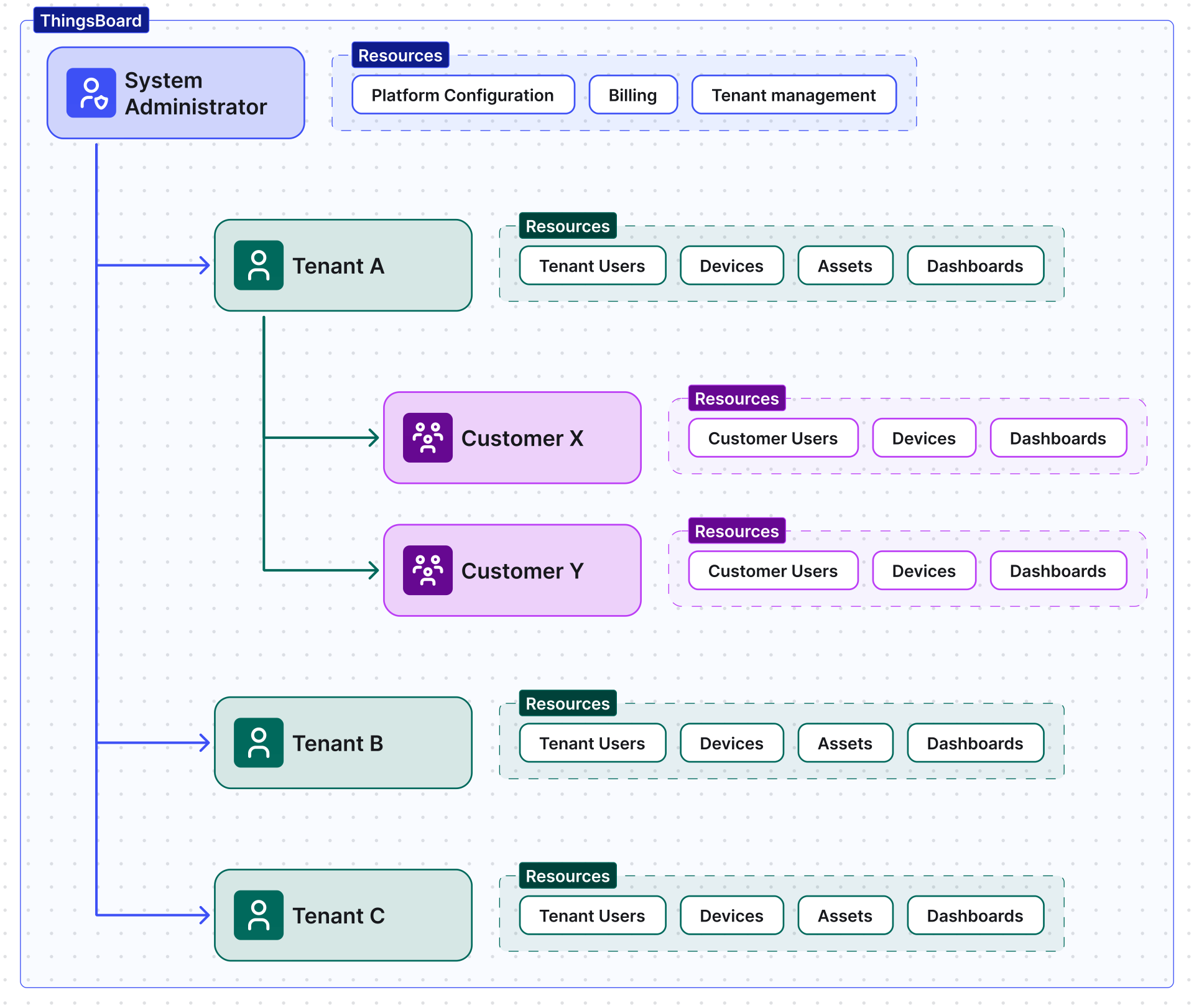
How are tenants isolated? Isolation is enforced at the platform level: each entity belongs to exactly one tenant, and permissions are governed by role-based access control. A Tenant Administrator can never see or access another tenant’s resources, while the System Administrator retains global visibility across all tenants.
Was this helpful?