Custom Subscriptions
Custom subscriptions let you create and replace data subscriptions at runtime — beyond what the widget’s static datasource configuration supports. Use them whenever you need to change which keys or which entities are queried based on user input, settings, or widget logic.
When to Use Custom Subscriptions
Section titled “When to Use Custom Subscriptions”The default subscription is created from the datasource configuration the user sets in the dashboard widget settings. A custom subscription lets you override that at runtime:
- Key filtering — the user selects which data key to chart from a dropdown; only that key is subscribed
- Entity filtering — the user picks devices from a list; only those entities are queried
- Type override — a Time-Series widget that also needs a Latest Values subscription for a separate display element
- Multi-select filtering — the user selects combinations of entities and keys; the subscription rebuilds on each change
Overview
Section titled “Overview”Create a subscription using self.ctx.subscriptionApi.createSubscription(options, deep):
self.ctx.subscriptionApi.createSubscription(options, true) .subscribe(subscription => { // subscription is ready — use it here });The second argument (true) enables deep mode — the subscription fetches full historical data for the configured time window. Pass false for a lightweight subscription that only receives new incoming data.
The method returns an RxJS Observable. Store the subscription reference so you can unsubscribe later:
self.ctx.$scope.customSubscription = self.ctx.subscriptionApi.createSubscription(options, true) .subscribe(subscription => { /* ... */ });Subscription Options
Section titled “Subscription Options”| Property | Type | Description |
|---|---|---|
type |
String |
Subscription type: 'timeseries', 'latest', or 'alarm' |
datasources |
Array<Datasource> |
Data to subscribe to (time-series and latest subscriptions) |
alarmSource |
Datasource |
Alarm data source (alarm subscriptions only) |
datasourcesOptional |
Boolean |
Whether datasources are optional. Always true for static widgets |
hasDataPageLink |
Boolean |
Whether pageLink is used for entity paging |
singleEntity |
Boolean |
Retrieve data from the first found entity only |
pageSize |
Number |
Number of entities per page |
warnOnPageDataOverflow |
Boolean |
Show a warning when paged data overflows |
useDashboardTimewindow |
Boolean |
Use the dashboard’s time window instead of timeWindowConfig |
dashboardTimewindow |
Timewindow |
The dashboard time window (pass self.ctx.dashboardTimewindow) |
timeWindowConfig |
Timewindow |
Custom time window, used when useDashboardTimewindow is false |
legendConfig |
LegendConfig |
Legend display parameters |
decimals |
Number |
Decimal places for all keys |
units |
String |
Units symbol shown next to values for all keys |
callbacks |
WidgetSubscriptionCallbacks |
Lifecycle callbacks — see Callbacks below |
type determines what data is returned:
'timeseries'— historical data over the configured time window;data[i].datais an array of[timestamp, value]pairs'latest'— most recent value only;data[i].datais a single[timestamp, value]pair'alarm'— alarm data; usealarmSourceinstead ofdatasources
Time window — to sync with the dashboard time window, set useDashboardTimewindow: true and pass dashboardTimewindow: self.ctx.dashboardTimewindow. To use a custom range, set useDashboardTimewindow: false and provide timeWindowConfig.
Datasources
Section titled “Datasources”Each object in the datasources array describes what data to subscribe to:
| Field | Type | Description |
|---|---|---|
type |
DatasourceType |
'entity' for entity-based data, 'entityCount' to count matching entities, 'function' for generated data |
aliasName |
String |
Name of the datasource |
dataKeys |
Array<DataKey> |
Keys to subscribe to |
latestDataKeys |
Array<DataKey> |
Keys to subscribe to as latest values alongside a time-series subscription |
pageLink |
EntityDataPageLink |
Page link for entity paging |
keyFilters |
Array<KeyFilter> |
Filter subscribed data by key value — see Key filters below |
entityFilter |
EntityFilter |
Filter which entities to subscribe to — see Entity filters below |
latestDataKeys — available in 'timeseries' subscriptions. Lets you subscribe to some keys as latest values (most recent reading only) while other keys stream full time-series data. Useful when you need a current-value display alongside a chart.
Inheriting the default datasource — the most convenient way to build a datasource is to spread the default subscription’s datasource and override only what changes:
const datasources = self.ctx.defaultSubscription.datasources.map(ds => ({ ...ds, dataKeys // replace keys; entity, entityFilter, etc. are inherited}));Custom entity filter — to query a specific set of entities, build the datasource with an explicit entityFilter:
const datasources = [{ type: 'entity', dataKeys, entityFilter: { type: 'entityList', entityType: 'DEVICE', entityList: ['id1', 'id2'] }}];Entity Filters
Section titled “Entity Filters”The entity filter defines which entities the subscription retrieves data from. The type field selects the filter strategy.
Single Entity
Section titled “Single Entity”Filter one specific entity by ID:
{ type: 'singleEntity', singleEntity: { id: 'd521edb0-2a7a-11ec-94eb-213c95f54092', entityType: 'DEVICE' }}Entity List
Section titled “Entity List”Filter entities of the same type by an explicit list of IDs:
{ type: 'entityList', entityType: 'DEVICE', entityList: [ 'e6501f30-2a7a-11ec-94eb-213c95f54092', 'e6657bf0-2a7a-11ec-94eb-213c95f54092' ]}Entity Name
Section titled “Entity Name”Filter entities whose name starts with a given string:
{ type: 'entityName', entityType: 'DEVICE', entityNameFilter: 'Air Quality'}Entity Type
Section titled “Entity Type”Filter all entities of a given type:
{ type: 'entityType', entityType: 'CUSTOMER'}Asset Type
Section titled “Asset Type”Filter assets by profile type and name prefix:
{ type: 'assetType', assetTypes: ['charging station'], assetNameFilter: 'Tesla'}Device Type
Section titled “Device Type”Filter devices by profile type and name prefix:
{ type: 'deviceType', deviceTypes: ['Temperature Sensor'], deviceNameFilter: 'ABC'}Entity View Type
Section titled “Entity View Type”Filter entity views by type and name prefix:
{ type: 'entityViewType', entityViewTypes: ['Concrete Mixer'], entityViewNameFilter: 'CAT'}Edge Type
Section titled “Edge Type”Filter edge instances by type and name prefix:
{ type: 'edgeType', edgeTypes: ['Factory'], edgeNameFilter: 'Nevada'}API Usage State
Section titled “API Usage State”Query API usage for a tenant or specific customer:
{ type: 'apiUsageState', customerId: { id: 'd521edb0-2a7a-11ec-94eb-213c95f54092', entityType: 'CUSTOMER' }}// omit customerId to get current tenant API usageRelations Query
Section titled “Relations Query”Filter entities related to a root entity, traversing the relation graph:
{ type: 'relationsQuery', rootEntity: { entityType: 'ASSET', id: 'e51de0c0-2a7a-11ec-94eb-213c95f54092' }, direction: 'FROM', // 'FROM' or 'TO' maxLevel: 1, fetchLastLevelOnly: false, filters: [ { relationType: 'Contains', entityTypes: ['DEVICE', 'ASSET'] } ]}maxLevel controls how many relation levels to traverse recursively. When maxLevel > 1, fetchLastLevelOnly: true returns only entities at the deepest level.
Asset Search Query
Section titled “Asset Search Query”Filter assets related to a root entity by relation type and asset profile type:
{ type: 'assetSearchQuery', rootEntity: { entityType: 'ASSET', id: 'e51de0c0-2a7a-11ec-94eb-213c95f54092' }, direction: 'FROM', maxLevel: 1, fetchLastLevelOnly: false, relationType: 'Contains', assetTypes: ['Charging station']}Device Search Query
Section titled “Device Search Query”Filter devices related to a root entity by relation type and device profile type:
{ type: 'deviceSearchQuery', rootEntity: { entityType: 'ASSET', id: 'e52b0020-2a7a-11ec-94eb-213c95f54092' }, direction: 'FROM', maxLevel: 2, fetchLastLevelOnly: true, relationType: 'Contains', deviceTypes: ['Air Quality Sensor', 'Charging port']}Entity View Search Query
Section titled “Entity View Search Query”Filter entity views related to a root entity:
{ type: 'entityViewSearchQuery', rootEntity: { entityType: 'ASSET', id: 'e52b0020-2a7a-11ec-94eb-213c95f54092' }, direction: 'FROM', maxLevel: 1, fetchLastLevelOnly: false, relationType: 'Contains', entityViewTypes: ['Concrete mixer']}Edge Search Query
Section titled “Edge Search Query”Filter edge instances related to a root entity:
{ type: 'edgeSearchQuery', rootEntity: { entityType: 'ASSET', id: 'e52b0020-2a7a-11ec-94eb-213c95f54092' }, direction: 'FROM', maxLevel: 2, fetchLastLevelOnly: true, relationType: 'Contains', edgeTypes: ['Factory']}Scheduler Event Query
Section titled “Scheduler Event Query”Filter scheduler events by originating entity and event type:
{ type: 'schedulerEvent', originator: { entityType: 'DEVICE', id: 'e01d2630-d710-11ef-a015-9bbc9baea46f' }, eventType: 'Light switch scheduler'}Key Filters
Section titled “Key Filters”Key filters (keyFilters) let you subscribe only to entities whose attribute or telemetry value satisfies a logical expression. Multiple filters are combined with AND. Filtering is based on the latest known value — not historical data.
Each filter object has three parts:
{ key: { type: 'TIME_SERIES', key: 'temperature' }, valueType: 'NUMERIC', predicate: { type: 'NUMERIC', operation: 'GREATER', value: { defaultValue: 20, dynamicValue: null } }}Key Object
Section titled “Key Object”Defines which field or key to evaluate:
| Type | Description |
|---|---|
CLIENT_ATTRIBUTE |
Client-side attribute |
SHARED_ATTRIBUTE |
Shared attribute |
SERVER_ATTRIBUTE |
Server-side attribute |
ATTRIBUTE |
Any attribute (client, shared, or server) |
TIME_SERIES |
Latest time-series value |
ENTITY_FIELD |
Entity field such as name, label, etc. |
ALARM_FIELD |
Entity field used in alarm queries only |
{ type: 'SERVER_ATTRIBUTE', key: 'maxTemperature' }Value Type
Section titled “Value Type”Declares the data type of the key, which determines which predicate operations are available:
| Type | Applies to | Operations |
|---|---|---|
STRING |
String or JSON values | EQUAL, NOT_EQUAL, STARTS_WITH, ENDS_WITH, CONTAINS, NOT_CONTAINS |
NUMERIC |
Long and Double values | EQUAL, NOT_EQUAL, GREATER, LESS, GREATER_OR_EQUAL, LESS_OR_EQUAL |
BOOLEAN |
Boolean values | EQUAL, NOT_EQUAL |
DATE_TIME |
Timestamps (ms since epoch) | EQUAL, NOT_EQUAL, GREATER, LESS, GREATER_OR_EQUAL, LESS_OR_EQUAL |
Predicate Object
Section titled “Predicate Object”Defines the logical expression to evaluate. Supports four predicate types: STRING, NUMERIC, BOOLEAN, and COMPLEX.
Simple predicate — value less than 100:
{ type: 'NUMERIC', operation: 'LESS', value: { defaultValue: 100, dynamicValue: null }}Complex predicate — combines multiple conditions with OR or AND:
// value < 10 OR value > 20{ type: 'COMPLEX', operation: 'OR', predicates: [ { type: 'NUMERIC', operation: 'LESS', value: { defaultValue: 10, dynamicValue: null } }, { type: 'NUMERIC', operation: 'GREATER', value: { defaultValue: 20, dynamicValue: null } } ]}Complex predicates can be nested to any depth:
// value < 10 OR (value > 50 AND value < 60){ type: 'COMPLEX', operation: 'OR', predicates: [ { type: 'NUMERIC', operation: 'LESS', value: { defaultValue: 10, dynamicValue: null } }, { type: 'COMPLEX', operation: 'AND', predicates: [ { type: 'NUMERIC', operation: 'GREATER', value: { defaultValue: 50, dynamicValue: null } }, { type: 'NUMERIC', operation: 'LESS', value: { defaultValue: 60, dynamicValue: null } } ] } ]}Dynamic Values
Section titled “Dynamic Values”Instead of a hardcoded threshold, the predicate value can reference an attribute of the current user, customer, or tenant:
{ type: 'NUMERIC', operation: 'GREATER', value: { defaultValue: 0, dynamicValue: { sourceType: 'CURRENT_USER', // 'CURRENT_USER' | 'CURRENT_CUSTOMER' | 'CURRENT_TENANT' sourceAttribute: 'temperatureThreshold' } }}defaultValue is used when the referenced attribute does not exist for the chosen source.
Callbacks
Section titled “Callbacks”The callbacks object wires subscription lifecycle events back to your widget code:
| Function | Description |
|---|---|
onDataUpdated |
Called after data is updated |
onLatestDataUpdated |
Called in time-series subscriptions after latestDataKeys data is updated |
onDataUpdateError |
Called when a data update fails |
onLatestDataUpdateError |
Called in time-series subscriptions when a latestDataKeys update fails |
legendDataUpdated |
Called after legend data changes |
timeWindowUpdated |
Called after the time window changes |
dataLoading |
Called when data is loading |
rpcStateChanged |
Called when RPC state changes |
onRpcSuccess |
Called in RPC subscriptions after a successful command |
onRpcFailed |
Called in RPC subscriptions after a failed command |
Typical usage — forward subscription events to your widget lifecycle functions:
callbacks: { onDataUpdated: () => { self.onDataUpdated(); }, onLatestDataUpdated: () => { self.onLatestDataUpdated(); }, onDataUpdateError: (subscription, e) => { console.error('Data error', e); }}Replacing the Default Subscription
Section titled “Replacing the Default Subscription”When a custom subscription replaces defaultSubscription (required for embedded chart components), follow this sequence inside the .subscribe() callback:
.subscribe(subscription => { self.ctx.defaultSubscription = subscription; self.ctx.data = subscription.data; self.ctx.datasources = subscription.datasources; self.ctx.defaultSubscription.update(); // triggers initial data fetch});Unsubscribing
Section titled “Unsubscribing”Always unsubscribe before creating a new custom subscription, and again in onDestroy:
// Before creating a new subscriptionif (self.ctx.$scope.customSubscription) {  self.ctx.$scope.customSubscription.unsubscribe();}
// In onDestroy — prevent memory leaksself.onDestroy = function() {  if (self.ctx.$scope.customSubscription) {    self.ctx.$scope.customSubscription.unsubscribe();  }};
Common Pitfalls
Section titled “Common Pitfalls”Not unsubscribing — creating a new subscription without unsubscribing from the previous one leaves the old subscription running, consuming server resources and triggering stale onDataUpdated callbacks.
Skipping update() — calling self.ctx.defaultSubscription.update() after assignment triggers the initial data fetch. Without it the widget displays no data until the next natural refresh.
Callbacks vs .subscribe() — callbacks in the options fire on every data update throughout the subscription’s lifetime. The .subscribe() callback fires once when the subscription is created. Put data handling in callbacks.onDataUpdated, not in .subscribe().
Examples
Section titled “Examples”Entity Count
Section titled “Entity Count”Subscribe to the total number of devices in the system alongside the number of currently active devices. This uses the entityCount datasource type with a count key, and a keyFilters entry to restrict the second datasource to entities where active == true.
self.onInit = function() {  const datasources = [    {      type: 'entityCount',      dataKeys: [        {          name: 'count',          type: 'count',          label: 'Devices',          decimals: 0,          settings: {}        }      ],      entityFilter: {        type: 'entityType',        entityType: 'DEVICE'      }    },    {      type: 'entityCount',      dataKeys: [        {          name: 'count',          type: 'count',          label: 'Active Devices',          decimals: 0,          settings: {}        }      ],      entityFilter: {        type: 'entityType',        entityType: 'DEVICE'      },      keyFilters: [        {          key: { type: 'ATTRIBUTE', key: 'active' },          valueType: 'BOOLEAN',          predicate: {            type: 'BOOLEAN',            operation: 'EQUAL',            value: { defaultValue: true, dynamicValue: null }          }        }      ]    }  ];
  const subscriptionOptions = {    type: 'latest',    datasources,    callbacks: {      onDataUpdated: () => { self.onDataUpdated(); }    }  };
  self.ctx.subscriptionApi.createSubscription(subscriptionOptions, true)    .subscribe(subscription => {      self.ctx.defaultSubscription = subscription;      self.ctx.data = subscription.data;      self.ctx.datasources = subscription.datasources;      // data is not yet available here — wait for onDataUpdated    });};
self.onDataUpdated = function() {  const total  = parseInt(self.ctx.data[0]?.data[0]?.[1] || 0);  const active = parseInt(self.ctx.data[1]?.data[0]?.[1] || 0);  self.ctx.$scope.total  = total;  self.ctx.$scope.active = active;  self.ctx.detectChanges();};
Key points:
type: 'entityCount'— returns the count of entities matchingentityFilterandkeyFilters, not their telemetry. The data key must usetype: 'count'andname: 'count'.- Two datasources in one subscription — both counts are delivered in a single
onDataUpdatedcall:ctx.data[0]for total,ctx.data[1]for active. keyFilters— narrows the second count to devices where theactiveattribute equalstrue.- Data is not available in
.subscribe()— the subscription object arrives before the first data fetch completes. Read data only inonDataUpdated.
Attributes and Telemetry for Filtered Entities
Section titled “Attributes and Telemetry for Filtered Entities”Subscribe to the latest temperature telemetry and active attribute for all active devices in the system:
self.onInit = function() {  const datasources = [    {      type: 'entity',      dataKeys: [        {          name: 'temperature',          type: 'timeseries',          label: 'Temperature',          decimals: 0,          settings: {}        },        {          name: 'active',          type: 'attribute',          label: 'Active',          decimals: 0,          settings: {}        }      ],      entityFilter: {        type: 'entityType',        entityType: 'DEVICE'      },      keyFilters: [        {          key: { type: 'ATTRIBUTE', key: 'active' },          valueType: 'BOOLEAN',          predicate: {            type: 'BOOLEAN',            operation: 'EQUAL',            value: { defaultValue: true, dynamicValue: null }          }        }      ]    }  ];
  const subscriptionOptions = {    type: 'latest',    datasources,    callbacks: {      onDataUpdated: () => { self.onDataUpdated(); }    }  };
  self.ctx.subscriptionApi.createSubscription(subscriptionOptions, true)    .subscribe(subscription => {      self.ctx.defaultSubscription = subscription;      self.ctx.data = subscription.data;      self.ctx.datasources = subscription.datasources;      // data is not yet available here — wait for onDataUpdated    });};
self.onDataUpdated = function() {  // ctx.data contains one entry per key per entity  // e.g. ctx.data[0] = temperature for entity 0, ctx.data[1] = active for entity 0, etc.  self.ctx.detectChanges();};
Key points:
type: 'entity'— subscribes to actual entity data (telemetry and attributes), as opposed toentityCount.- Mixed key types —
dataKeyscan combinetimeseriesandattributekeys in a single datasource. Both are delivered viaonDataUpdated. keyFilters— restricts the entity set to devices whereactive == true, but still subscribes to bothtemperatureandactivevalues for each matching device.subscriptionOptions.type: 'latest'— returns only the most recent value per key. Use'timeseries'instead if you need the full history over a time window.
Subscription with Page Link
Section titled “Subscription with Page Link”Subscribe to the latest temperature and active values for thermostat devices where temperature > 30, showing two entities per page:
self.onInit = function() {  const datasources = [    {      type: 'entity',      dataKeys: [        {          name: 'temperature',          type: 'timeseries',          label: 'Temperature',          settings: {}        },        {          name: 'active',          type: 'attribute',          label: 'Active',          settings: {}        }      ],      entityFilter: {        type: 'deviceType',        deviceTypes: ['thermostat']      },      keyFilters: [        {          key: { type: 'TIME_SERIES', key: 'temperature' },          valueType: 'NUMERIC',          predicate: {            type: 'NUMERIC',            operation: 'GREATER',            value: { defaultValue: 30, dynamicValue: null }          }        }      ]    }  ];
  const subscriptionOptions = {    type: 'latest',    datasources,    hasDataPageLink: true,    callbacks: {      onDataUpdated: () => { self.onDataUpdated(); }    }  };
  self.ctx.$scope.pageLink = {    page: 0,    pageSize: 2,    dynamic: true  };
  self.ctx.subscriptionApi.createSubscription(subscriptionOptions, true)    .subscribe(subscription => {      self.ctx.defaultSubscription = subscription;      subscribeForPaginatedData(self.ctx.$scope.pageLink);      self.ctx.data = subscription.data;      self.ctx.datasources = subscription.datasources;      self.ctx.dataPages = subscription.dataPages;      self.ctx.datasourcePages = subscription.datasourcePages;      // data is not yet available here — wait for onDataUpdated    });};
function subscribeForPaginatedData(pageLink) {  self.ctx.defaultSubscription.subscribeAllForPaginatedData(pageLink, null);}
self.onDataUpdated = function() {  // ctx.dataPages contains the current page of entity data  // ctx.datasourcePages contains the corresponding datasource info  self.ctx.detectChanges();};
Key points:
hasDataPageLink: true— switches the subscription into paginated mode. Without this flag,pageLinkandsubscribeAllForPaginatedDatahave no effect.pageLink— controls which page of results to fetch.pageis zero-based,pageSizesets the number of entities per page. Settingdynamic: trueautomatically adds new entities to the widget if they start matching the filter criteria at runtime.subscribeAllForPaginatedData(pageLink, null)— must be called after the subscription is created to trigger the first paginated data fetch. The second argument accepts a sort order configuration (nulluses the default).dataPages/datasourcePages— paged equivalents ofctx.dataandctx.datasources. Use these instead ofctx.datawhen working with paginated subscriptions to access entity data by page.- To navigate pages, update
pageLink.pageand callsubscribeForPaginatedDataagain with the new page link.
Time-Series Subscription with Latest Keys
Section titled “Time-Series Subscription with Latest Keys”Subscribe to the temperature time-series history for a specific device by name, while also tracking its active attribute as a latest value in the same subscription:
self.onInit = function() {  const datasources = [    {      type: 'entity',      dataKeys: [        {          name: 'temperature',          type: 'timeseries',          label: 'Temperature',          settings: {}        }      ],      latestDataKeys: [        {          name: 'active',          type: 'attribute',          label: 'Active',          settings: {}        }      ],      entityFilter: {        type: 'entityName',        entityType: 'DEVICE',        entityNameFilter: 'Thermostat T2'      }    }  ];
  const subscriptionOptions = {    type: 'timeseries',    datasources,    useDashboardTimewindow: true,    ignoreDataUpdateOnIntervalTick: true,    callbacks: {      onDataUpdated: () => { self.onDataUpdated(); }    }  };
  self.ctx.subscriptionApi.createSubscription(subscriptionOptions, true)    .subscribe(subscription => {      self.ctx.defaultSubscription = subscription;      self.ctx.data = subscription.data;      self.ctx.datasources = subscription.datasources;      // data is not yet available here — wait for onDataUpdated    });};
self.onDataUpdated = function() {  // ctx.data[0].data — array of [timestamp, value] pairs for temperature  // ctx.latestData — latest values for keys declared in latestDataKeys  self.ctx.detectChanges();};
Key points:
type: 'timeseries'— delivers the full history ofdataKeysover the configured time window. Each entry inctx.data[i].datais a[timestamp, value]pair, sorted oldest to newest.latestDataKeys— runs a parallel latest-value subscription alongside the time-series one. Useful for displaying current state (e.g.active) without including it in the chart data. Updates arrive viaonLatestDataUpdatedif you define that callback, or alongsideonDataUpdated.useDashboardTimewindow: true— syncs the subscription time window with the dashboard time window control. When the user shifts the time window in the dashboard, the subscription automatically re-fetches with the new range.ignoreDataUpdateOnIntervalTick: true— suppressesonDataUpdatedcalls that fire on the platform’s polling interval when no new data has actually arrived. With this set tofalse(the default),onDataUpdatedfires every second regardless of new data.entityNamefilter — targets a specific device by name prefix. Here'Thermostat T2'matches exactly one device; the subscription returns data only for that entity.
Alarm Subscription
Section titled “Alarm Subscription”Subscribe to alarms from thermostat devices, paginated and sorted by creation time:
self.onInit = function() {  const alarmSource = {    type: 'entity',    dataKeys: [      { type: 'alarm', name: 'createdTime' },      { type: 'alarm', name: 'originator' },      { type: 'alarm', name: 'type' },      { type: 'alarm', name: 'severity' },      { type: 'alarm', name: 'status' }    ],    entityFilter: {      type: 'deviceType',      deviceTypes: ['thermostat']    }  };
  const alarmDataPageLink = {    page: 0,    pageSize: 10,    statusList: [],    // empty = all statuses    severityList: [],  // empty = all severities    typeList: [],      // empty = all alarm types    sortOrder: {      key: { type: 'ALARM_FIELD', key: 'createdTime' },      direction: 'DESC'    }  };
  const subscriptionOptions = {    type: 'alarm',    alarmSource,    useDashboardTimewindow: true,    callbacks: {      onDataUpdated: () => { self.onDataUpdated(); }    }  };
  self.ctx.subscriptionApi.createSubscription(subscriptionOptions, true)    .subscribe(subscription => {      self.ctx.alarmsSubscription = subscription;      self.ctx.alarmsSubscription.subscribeForAlarms(alarmDataPageLink, null);      // alarm data is not yet available here — wait for onDataUpdated    });};
self.onDataUpdated = function() {  const alarms = self.ctx.alarmsSubscription.alarms;  // alarms.data          — array of AlarmInfo objects for the current page  // alarms.totalElements — total number of matching alarms  // alarms.totalPages    — total number of pages  self.ctx.detectChanges();};
Key points:
type: 'alarm'— alarm subscriptions usealarmSourceinstead ofdatasources. ThedataKeysinsidealarmSourceusetype: 'alarm'and reference alarm fields by name (createdTime,originator,type,severity,status).subscribeForAlarms(alarmDataPageLink, null)— must be called after the subscription is created to start fetching alarm data. The second argument accepts additional query parameters (nulluses defaults).alarmDataPageLink— controls filtering and pagination:statusList,severityList, andtypeListnarrow results (empty array = all values included);sortOrdersets the sort field and direction.ctx.alarmsSubscription.alarms— the alarm page object, available inonDataUpdated. Containsdata(current page ofAlarmInfoobjects),totalElements, andtotalPages.- Stored separately — alarm subscriptions are stored on
ctx.alarmsSubscription, notctx.defaultSubscription, to keep them independent from the widget’s main data subscription.
Subscription with Post-Processing
Section titled “Subscription with Post-Processing”Custom subscriptions support client-side post-processing of incoming data. This lets users supply a JavaScript function that transforms each value before the widget receives it — for example, converting weight from kilograms to grams.
The approach is to subscribe to the same key twice: once for the raw value and once with usePostProcessing: true and a user-defined function body read from widget settings.
Settings schema — add a javascript field to the widget settings form so the user can enter a conversion function. The function receives (time, value, prevValue, timePrev, prevOrigValue) and must return the transformed value:
{ "schema": { "type": "object", "properties": { "weightPostProcessingFunction": { "title": "Weight post-processing: f(time, value, prevValue, timePrev, prevOrigValue)", "type": "string", "default": "return value;" } } }, "form": [ { "key": "weightPostProcessingFunction", "type": "javascript" } ]}The default return value; passes the value through unchanged:
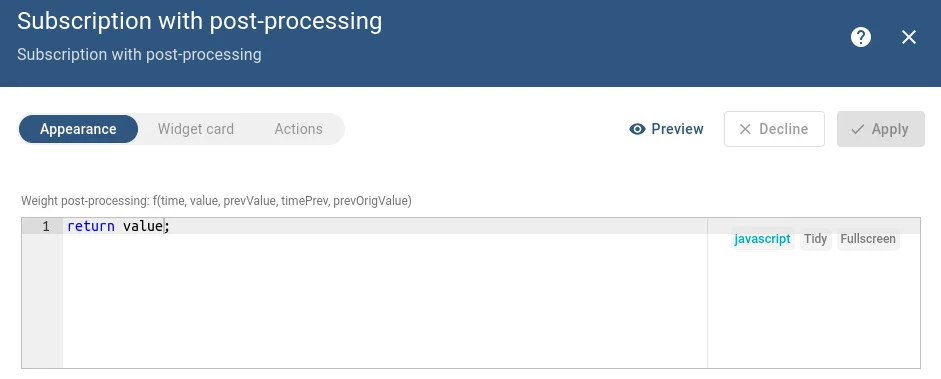
The user can replace it with any transformation, e.g. return value * 1000; to convert kg → g:
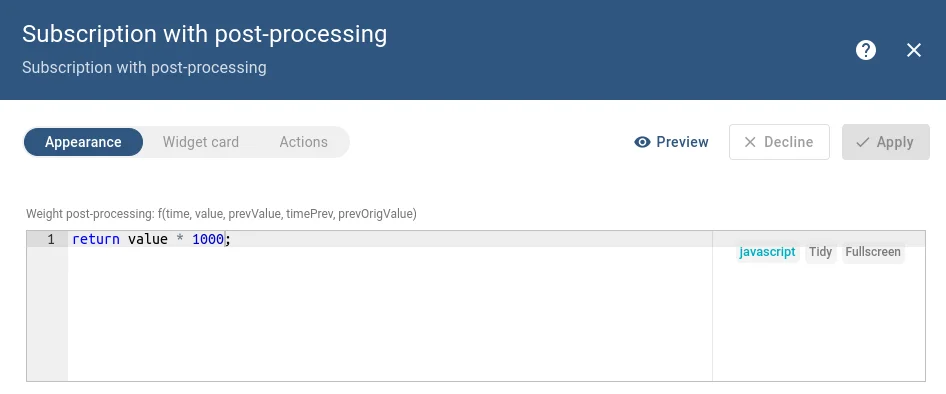
Subscription — subscribe to the weight key twice: the first entry is the raw value, the second has usePostProcessing: true and reads the function body from self.ctx.settings:
self.onInit = function() {  const datasources = [    {      type: 'entity',      dataKeys: [        {          name: 'weight',          type: 'timeseries',          label: 'Weight telemetry',          decimals: 0,          settings: {}        },        {          name: 'weight',          type: 'timeseries',          label: 'Post-processed weight',          decimals: 0,          settings: {},          usePostProcessing: true,          postFuncBody: self.ctx.settings.weightPostProcessingFunction        },        {          name: 'active',          type: 'attribute',          label: 'Active',          decimals: 0,          settings: {}        }      ],      entityFilter: {        type: 'entityType',        entityType: 'DEVICE'      },      keyFilters: [        {          key: { type: 'ATTRIBUTE', key: 'active' },          valueType: 'BOOLEAN',          predicate: {            type: 'BOOLEAN',            operation: 'EQUAL',            value: { defaultValue: true, dynamicValue: null }          }        }      ]    }  ];
  const subscriptionOptions = {    type: 'latest',    datasources,    callbacks: {      onDataUpdated: () => { self.onDataUpdated(); }    }  };
  self.ctx.subscriptionApi.createSubscription(subscriptionOptions, true)    .subscribe(subscription => {      self.ctx.defaultSubscription = subscription;      self.ctx.data = subscription.data;      self.ctx.datasources = subscription.datasources;      // data is not yet available here — wait for onDataUpdated    });};
self.onDataUpdated = function() {  // ctx.data[0].data — raw weight value  // ctx.data[1].data — post-processed weight value (transformed by user function)  // ctx.data[2].data — active attribute  self.ctx.detectChanges();};
Key points:
usePostProcessing: true— enables post-processing for that specific data key. The platform calls the function for every incoming value before placing it inctx.data.postFuncBody— the JavaScript function body as a string. It receives five arguments:time(current timestamp ms),value(current raw value),prevValue(previous processed value),timePrev(previous timestamp ms),prevOrigValue(previous raw value). It mustreturnthe transformed value.- Same key subscribed twice — both entries share the same
name: 'weight', but produce independent entries inctx.data.ctx.data[0]holds the raw value;ctx.data[1]holds the post-processed value. - Settings schema format — post-processing functions use the legacy
{ schema, form }settings format with"type": "javascript"in the form definition, which renders a code editor in the widget settings panel.
Next Steps
Section titled “Next Steps”- Time-Series — key-selector dropdown with embedded platform chart
- Embedded Chart tutorial — multi-key selection with custom subscription
- Advanced Topics — multi-select entity + key filtering
- Widget API Reference — full
subscriptionApireference and data structures
Was this helpful?