Message Queue
All ThingsBoard services communicate through a message queue. Every message is partitioned by entity ID, so all messages for a given device always land on the same partition — preserving order and enabling stateful processing in the Actor System.
Queue Backends
Section titled “Queue Backends”ThingsBoard supports two queue implementations. Set the backend with the TB_QUEUE_TYPE environment variable:
| Backend | TB_QUEUE_TYPE |
Persistence | Use case |
|---|---|---|---|
| In-Memory | in-memory |
None — messages lost on restart | Development, single-node demos |
| Apache Kafka | kafka |
Disk-based, survives restarts | Production, any cluster deployment |
Message Queue vs Rule Engine Queues
Section titled “Message Queue vs Rule Engine Queues”The message queue described on this page is the infrastructure-level transport — Kafka or in-memory — that carries messages between ThingsBoard services (transports, core, rule engine, JS executors).
This is different from Rule Engine Queues, which are a higher-level abstraction configured in the ThingsBoard UI. Rule Engine Queues control how messages are submitted to and processed by rule chains — submit strategy (burst, batch, sequential), retry policy, polling interval, and parallelism. They run on top of the message queue backend: when you configure a Rule Engine Queue named “HighPriority”, its messages still flow through Kafka (or in-memory) under the hood.
Message Flow
Section titled “Message Flow”The diagram below shows how the main services communicate through Kafka topics:
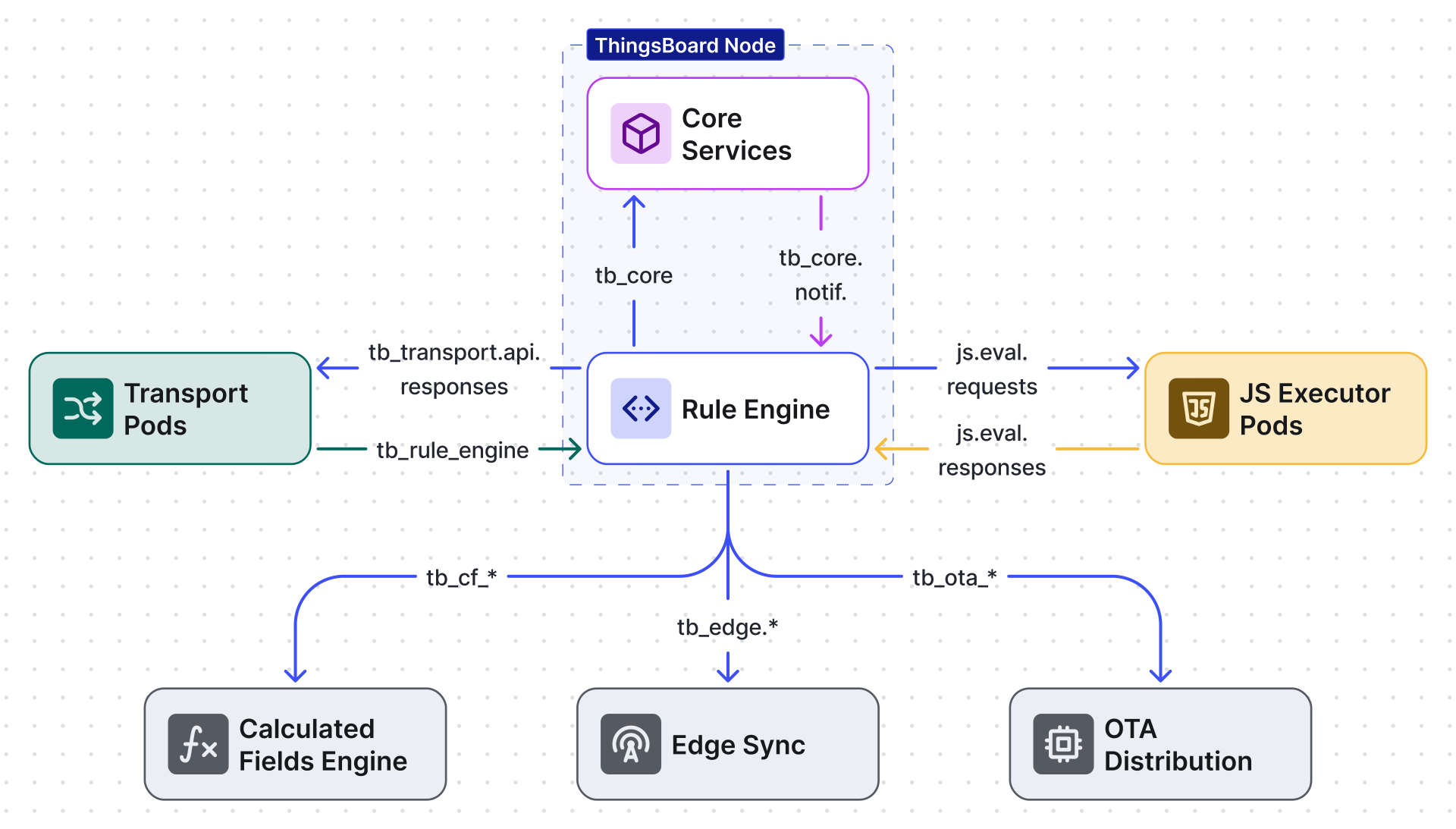
Kafka Topic Topology
Section titled “Kafka Topic Topology”When running with Kafka, ThingsBoard creates the following topics. Each topic has a specific role in the data pipeline:
Core Topics
Section titled “Core Topics”| Topic | Direction | Purpose |
|---|---|---|
tb_rule_engine |
Transport → Rule Engine | Telemetry, attributes, RPC requests, device lifecycle events |
tb_core |
Rule Engine → Core | Entity lifecycle events, connectivity updates, subscription management |
tb_core.notifications |
Any → Core | Lightweight notifications (WebSocket pushes, entity invalidations) |
tb_transport.api.requests |
Transport → Core | Credential validation, attribute fetch, claim requests |
tb_transport.api.responses |
Core → Transport | Authentication results, attribute values |
Script Execution Topics
Section titled “Script Execution Topics”| Topic | Direction | Purpose |
|---|---|---|
js.eval.requests |
TB Node → JS Executor | JavaScript evaluation requests from rule engine script nodes |
js.eval.responses |
JS Executor → TB Node | Script evaluation results |
Operational Topics
Section titled “Operational Topics”| Topic | Direction | Purpose |
|---|---|---|
tb_ota_package |
Core → Transport | OTA firmware/software update distribution |
tb_housekeeper |
Internal | Cleanup tasks — orphaned entities, expired sessions, stale data |
tb_housekeeper.reprocessing |
Internal | Failed housekeeper tasks queued for retry (90-day retention) |
Edge Topics
Section titled “Edge Topics”| Topic | Direction | Purpose |
|---|---|---|
tb_edge |
Core ↔ Edge | Edge synchronization commands and responses |
tb_edge.notifications |
Core → Edge | Edge event notifications |
Calculated Fields Topics
Section titled “Calculated Fields Topics”| Topic | Direction | Purpose |
|---|---|---|
tb_cf_event |
Core → CF Engine | Calculated field trigger events |
tb_cf_state |
CF Engine | Calculated field state snapshots (compacted topic, infinite retention) |
EDQS Topics (Entity Data Query Service)
Section titled “EDQS Topics (Entity Data Query Service)”| Topic | Direction | Purpose |
|---|---|---|
edqs.events |
Core → EDQS | Entity change events for query indexing |
edqs.requests |
API → EDQS | Query requests (3-minute retention) |
edqs.state |
EDQS | Index state snapshots (compacted topic, infinite retention) |
Partitioning and Ordering
Section titled “Partitioning and Ordering”Messages are assigned to Kafka partitions using a hash of the entity ID. ThingsBoard supports three hash functions, configured via TB_QUEUE_PARTITIONS_HASH_FUNCTION_NAME:
| Hash Function | Value | Notes |
|---|---|---|
| MurmurHash3 128-bit | murmur3_128 |
Default — good distribution, fast |
| MurmurHash3 32-bit | murmur3_32 |
Lighter, slightly less uniform |
| SHA-256 | sha256 |
Cryptographic, slower but uniform |
Because the same entity always maps to the same partition, a single consumer thread processes all messages for that entity in order. This is critical for correctness — device state updates, rule chain processing, and attribute writes must happen sequentially.
Partition count controls parallelism. More partitions allow more consumer threads, increasing throughput. The number of partitions per topic is configured via topic property strings (e.g., TB_QUEUE_KAFKA_RE_TOPIC_PROPERTIES includes partitions:1 by default for the rule engine topic).
Producer Tuning
Section titled “Producer Tuning”These environment variables control how ThingsBoard produces messages to Kafka:
| Variable | Default | Description |
|---|---|---|
TB_KAFKA_ACKS |
all |
Acknowledgment level. all = wait for all in-sync replicas (safest). 1 = leader only (faster). 0 = fire-and-forget (not recommended). |
TB_KAFKA_BATCH_SIZE |
16384 |
Maximum batch size in bytes before sending to broker |
TB_KAFKA_LINGER_MS |
1 |
Milliseconds to wait for more records before sending a batch. Higher values increase throughput at the cost of latency. |
TB_KAFKA_COMPRESSION_TYPE |
none |
Compression algorithm: none, gzip. Use gzip to reduce network bandwidth in high-throughput deployments. |
TB_KAFKA_RETRIES |
1 |
Retry count for transient send failures |
TB_KAFKA_MAX_REQUEST_SIZE |
1048576 |
Maximum request size in bytes (1 MB default) |
Consumer Tuning
Section titled “Consumer Tuning”These variables control how ThingsBoard consumes messages from Kafka:
| Variable | Default | Description |
|---|---|---|
TB_QUEUE_KAFKA_MAX_POLL_RECORDS |
8192 |
Maximum records returned per poll() call. Lower values reduce processing latency; higher values increase throughput. |
TB_QUEUE_KAFKA_MAX_POLL_INTERVAL_MS |
300000 |
Maximum time between poll() calls before the consumer is considered dead and rebalanced (5 minutes). |
TB_QUEUE_KAFKA_SESSION_TIMEOUT_MS |
10000 |
Heartbeat session timeout. If Kafka doesn’t receive a heartbeat within this window, the consumer is evicted. |
TB_QUEUE_KAFKA_AUTO_OFFSET_RESET |
earliest |
Where to start reading when no committed offset exists: earliest (beginning) or latest (end). |
TB_QUEUE_KAFKA_MAX_PARTITION_FETCH_BYTES |
16777216 |
Maximum data per partition per fetch request (16 MB) |
TB_QUEUE_KAFKA_FETCH_MAX_BYTES |
134217728 |
Maximum total data per fetch request across all partitions (128 MB) |
Topic Retention and Compaction
Section titled “Topic Retention and Compaction”Most topics use time-based retention (default 7 days / 604800000 ms). Notable exceptions:
| Topic | Retention | Cleanup Policy | Reason |
|---|---|---|---|
JS Executor (js.eval.*) |
1 day | Delete | Short-lived request/response pairs |
| Housekeeper reprocessing | 90 days | Delete | Failed tasks need longer retry window |
CF State (tb_cf_state) |
Infinite | Compact | State snapshots — only latest value per key matters |
EDQS State (edqs.state) |
Infinite | Compact | Index state — compacted to latest per key |
EDQS Requests (edqs.requests) |
3 minutes | Delete | Ephemeral query requests |
Topic properties (retention, segment size, partition count, min.insync.replicas) are configurable per topic via environment variables like TB_QUEUE_KAFKA_RE_TOPIC_PROPERTIES. The format is semicolon-separated key:value pairs:
retention.ms:604800000;segment.bytes:52428800;retention.bytes:1048576000;partitions:1;min.insync.replicas:1Replication Factor
Section titled “Replication Factor”Set TB_QUEUE_KAFKA_REPLICATION_FACTOR (default 1) to control how many Kafka brokers hold a copy of each partition. For production clusters, set this to 3 with at least 3 Kafka brokers.
Consumer Statistics
Section titled “Consumer Statistics”ThingsBoard can log consumer group lag — the difference between the latest message offset and the consumer’s committed offset. Enable with TB_QUEUE_KAFKA_CONSUMER_STATS_ENABLED (default true). Lag statistics print every TB_QUEUE_KAFKA_CONSUMER_STATS_MIN_PRINT_INTERVAL_MS (default 60 seconds).
High consumer lag indicates the service cannot keep up with incoming message volume — scale the service or increase partition count.
For the complete list of queue and Kafka environment variables, see Configuration Reference.
Was this helpful?