Distributed PostgreSQL (Citus)
ThingsBoard can run its relational database on Citus, an open-source PostgreSQL extension that spreads tables across several PostgreSQL servers. With Citus, write capacity for device attributes and latest telemetry values grows by adding worker nodes instead of moving to a larger database server. This page explains how ThingsBoard places its data on a Citus cluster, how to install or convert a deployment, and how to size and operate the cluster.
When to use Citus
Section titled “When to use Citus”ThingsBoard stores one row per entity and key for attributes (attribute_kv) and latest telemetry values (ts_kv_latest). Every incoming telemetry key overwrites its row, so these tables receive a constant stream of updates. A single PostgreSQL server applies all of them, and at large fleet sizes it becomes the write bottleneck even when time-series history is already in Cassandra.
Consider Citus when:
- The write rate to attributes and latest values approaches what one PostgreSQL server sustains, and the ThingsBoard write queues keep growing.
- The fleet keeps growing, and you want to add capacity by adding servers.
- A larger database instance is no longer available or no longer cost-effective.
A well-tuned single PostgreSQL server with spare capacity is easier to operate. A Citus cluster has more nodes to provision, back up, and monitor, so choose it when the write load requires it.
How ThingsBoard uses Citus
Section titled “How ThingsBoard uses Citus”A Citus cluster consists of one coordinator node and several worker nodes. ThingsBoard connects to the coordinator through SPRING_DATASOURCE_URL, the same way it connects to a single PostgreSQL server. Each table falls into one of three categories:
| Category | Tables | Placement |
|---|---|---|
| Distributed | attribute_kv, ts_kv_latest (by entity_id); device, asset, entity_view (by id); alarm, entity_alarm (by originator_id) |
Split into shards by a hash of the distribution column and spread across workers |
| Reference | About 25 tables that every query reads and that grow slowly, like tenant, customer, device_profile, asset_profile, relation, key_dictionary, rule_chain, dashboard, and device_credentials |
Copied in full to every worker |
| Coordinator-local | Partitioned tables blob_entity, report, and alarm_comment, and tables not listed above |
Stay on the coordinator |
All distributed tables share one co-location group. A device row, its attributes, its latest values, and the alarms it originates sit on the same shard, so queries that join them run on one worker.
Connection modes
Section titled “Connection modes”ThingsBoard routes attribute and latest-value operations in one of two modes:
- Smart routing (default): ThingsBoard computes the shard for each entity and sends single-entity reads and writes directly to the worker that owns it. The coordinator handles schema changes, coordinator-local tables, and queries that span several workers.
- Coordinator routing: ThingsBoard sends every statement to the coordinator, which forwards it to the owning worker. This mode needs no network access from ThingsBoard to the workers, but at high throughput the coordinator becomes the bottleneck.
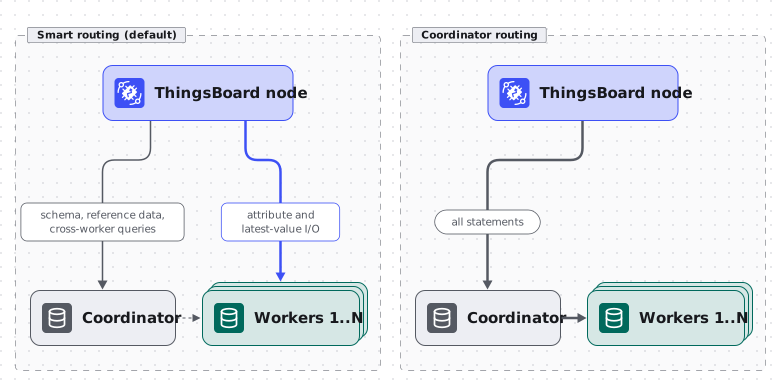
Smart routing is on whenever DATABASE_CITUS_ENABLED=true. To use coordinator routing, set DATABASE_CITUS_SMART_ROUTING_ENABLED=false.
With smart routing, each ThingsBoard node opens a connection pool to every worker. The pools use the same database name, username, and password as SPRING_DATASOURCE_URL. Worker addresses come from the coordinator’s pg_dist_node catalog. At startup, ThingsBoard checks that every worker is reachable and fails to start if one is not.
Inside Docker networks or behind NAT, ThingsBoard may not reach the worker addresses registered in Citus. In that case, map them with DATABASE_CITUS_SMART_ROUTING_WORKER_HOST_OVERRIDES as comma-separated nodename=host:port pairs.
Prepare the Citus cluster
Section titled “Prepare the Citus cluster”Before you install ThingsBoard or convert an existing database, set up a Citus cluster with one coordinator and the number of workers you need.
-
Deploy the coordinator and worker nodes with the Citus extension installed. The
citusdata/citusDocker image includes it and preloads it. For a package installation, install the Citus package that matches your PostgreSQL major version, addcitustoshared_preload_librariesinpostgresql.conf, and restart PostgreSQL. Without the preload,CREATE EXTENSION citusfails withCitus can only be loaded via shared_preload_libraries. See the Citus documentation for the packages. -
Create the
thingsboarddatabase on the coordinator and on every worker, with the same name and credentials on all nodes, and enable the extension in it on every node:CREATE EXTENSION IF NOT EXISTS citus;With the
citusdata/citusimage, setPOSTGRES_DB=thingsboardon every node instead. The image then creates the database and the extension on first start. -
Configure node-to-node authentication so the coordinator and workers can connect to each other. In the
citusdata/citusimage, set thePGUSERandPGPASSWORDenvironment variables on every node. -
Register the coordinator and the workers. Connect to the
thingsboarddatabase on the coordinator and run:CREATE EXTENSION IF NOT EXISTS citus;SELECT citus_set_coordinator_host('coordinator-host', 5432);SELECT citus_add_node('worker-1-host', 5432);SELECT citus_add_node('worker-2-host', 5432); -
Verify that every node is registered:
SELECT nodename, nodeport, noderole FROM pg_dist_node ORDER BY groupid;
Install ThingsBoard on Citus
Section titled “Install ThingsBoard on Citus”On a new installation, ThingsBoard creates the schema and distributes the tables during the install step.
-
Prepare the Citus cluster as described in Prepare the Citus cluster.
-
Point
SPRING_DATASOURCE_URLat thethingsboarddatabase on the coordinator. -
Set the Citus parameters on every ThingsBoard node and on the install job:
Terminal window DATABASE_CITUS_ENABLED=trueDATABASE_CITUS_SHARD_COUNT=32SPRING_DATASOURCE_MAXIMUM_POOL_SIZE=80See Size the cluster to choose values for your deployment.
-
Run the installation for your deployment type. When Citus is enabled, the install log shows
Citus enabled: distributing KV tables and creating reference tables....
Convert an existing PostgreSQL deployment
Section titled “Convert an existing PostgreSQL deployment”ThingsBoard converts an existing PostgreSQL database to Citus in place with a dedicated upgrade step. The conversion distributes the tables listed in How ThingsBoard uses Citus, rewrites the alarm primary keys to include originator_id, and turns the dimension tables into reference tables.
-
Upgrade ThingsBoard to the target version on plain PostgreSQL first. The conversion fails if the database schema version differs from the version of the ThingsBoard package that runs it. On ThingsBoard Professional Edition 4.3, upgrade to 4.3.1.4 or later: that upgrade adds and backfills
entity_alarm.originator_id, which the conversion requires. -
Stop all ThingsBoard nodes and back up the database.
-
Check for alarm index rows without an originator. After a rolling upgrade to 4.3.1.4, nodes that still ran an older version could insert
entity_alarmrows with an emptyoriginator_id, and the conversion refuses to run while any remain:SELECT count(*) FROM entity_alarm WHERE originator_id IS NULL;If the count is not zero, fill them in from the
alarmtable:UPDATE entity_alarm ea SET originator_id = a.originator_id FROM alarm a WHERE a.id = ea.alarm_id AND ea.originator_id IS NULL; -
Turn the existing PostgreSQL server into the Citus coordinator: install a Citus release that supports its PostgreSQL major version, add
citustoshared_preload_librariesand restart PostgreSQL, then add the workers and register them as described in Prepare the Citus cluster. -
Set
DATABASE_CITUS_ENABLED=trueand the other Citus parameters for the upgrade run and for every ThingsBoard node. -
Run the upgrade with
postgres-to-citusas the source version. For a package installation:Terminal window sudo /usr/share/thingsboard/bin/install/upgrade.sh --fromVersion=postgres-to-citusFor Docker and Kubernetes deployments, pass the same
--fromVersion=postgres-to-citusvalue to the upgrade script of your deployment. The log reportsPostgreSQL -> Citus conversion finishedwhen the conversion completes. -
Start the ThingsBoard nodes.
Size the cluster
Section titled “Size the cluster”Shard count
Section titled “Shard count”DATABASE_CITUS_SHARD_COUNT (default 32) sets the number of shards for every distributed table. The value is fixed when the tables are distributed, so choose it for the largest number of workers you expect to run, not the number you start with. Use a value that is greater than or equal to that worker count, ideally a multiple of it.
With Citus enabled, ThingsBoard runs one attribute write queue and one latest-value write queue per shard, so each batch targets a single shard. These queues replace SQL_ATTRIBUTES_BATCH_THREADS and SQL_TS_LATEST_BATCH_THREADS. Each ThingsBoard node runs 2 × shard_count KV writer threads, so a higher shard count also means more threads and connections.
Connection pools
Section titled “Connection pools”The default SPRING_DATASOURCE_MAXIMUM_POOL_SIZE of 16 is too small for Citus and stalls writes.
| Pool | Parameter | Sizing guideline |
|---|---|---|
| Coordinator pool, per ThingsBoard node | SPRING_DATASOURCE_MAXIMUM_POOL_SIZE |
2 × shard_count plus headroom for the rest of the application. Around 80 for shard_count=32 |
| Worker pool, per ThingsBoard node and worker | DATABASE_CITUS_SMART_ROUTING_WORKER_POOL_SIZE (default 8) |
At least 2 × shard_count ÷ worker_count, plus headroom for routed reads |
With smart routing, attribute and latest-value traffic moves from the coordinator pool to the worker pools. Both write queues send their batches to the worker that owns the shard, so one ThingsBoard node can run up to 2 × shard_count ÷ worker_count flushes against a worker at the same time. A routed read or write that cannot get a worker connection within DATABASE_CITUS_SMART_ROUTING_WORKER_CONNECTION_TIMEOUT_MS fails without falling back to the coordinator. With the default shard_count=32, the default worker pool size of 8 covers concurrent flushes only with eight or more workers. Increase it for fewer or more heavily loaded workers.
Set max_connections on each worker to cover the worker pools of all ThingsBoard nodes: worker_pool_size × number of ThingsBoard nodes, plus the connections the coordinator opens to the worker. Watch the HikariCP pending-connection count under peak load and adjust the pool sizes.
Operate the cluster
Section titled “Operate the cluster”Add workers
Section titled “Add workers”To add write capacity, add a worker with citus_add_node on the coordinator and move shards onto it with the Citus shard rebalancer. ThingsBoard keeps working during the rebalance. It refreshes the shard placements every DATABASE_CITUS_SMART_ROUTING_PLACEMENT_REFRESH_INTERVAL_MS (default 5 minutes) and opens a pool to the new worker. Until the next refresh, Citus forwards operations sent to a worker that no longer owns the shard, so a stale placement doesn’t cause incorrect writes.
The refresh also retires pools for removed workers and rebuilds the pool of a worker whose address changed. Lower the interval to pick up topology changes faster.
High availability
Section titled “High availability”You can run each worker as a primary with a standby, managed by a tool like Patroni. When the HA manager promotes a standby and updates pg_dist_node, ThingsBoard connects only to the writable primary, drops connections to the demoted node, and refreshes the worker list right after the first failed operation. DATABASE_CITUS_SMART_ROUTING_FAILOVER_REFRESH_DEBOUNCE_MS limits how often these error-triggered refreshes run.
Backup and restore
Section titled “Backup and restore”Back up the coordinator and every worker, and restore them together. A backup of the coordinator alone doesn’t contain the distributed data.
Independent dumps or disk snapshots of each node don’t line up in time. To get a consistent cluster state, use point-in-time recovery (PITR) on every node and create a cluster-wide restore point on the coordinator:
SELECT citus_create_restore_point('before-upgrade');Citus writes the named restore point on the coordinator and all workers. Restore every node to that same restore point.
Behavior differences on Citus
Section titled “Behavior differences on Citus”- Uniqueness checks: Citus can’t enforce unique constraints that don’t include the distribution column. ThingsBoard drops those constraints on distributed tables and enforces rules like a unique device name per tenant in the application.
- Multi-shard writes: ThingsBoard sets
citus.multi_shard_modify_modetosequential, so a single write that spans several shards runs one shard at a time. Single-entity writes and all reads aren’t affected. - Relation queries: Queries that follow relations resolve the matching entity IDs on the coordinator.
DATABASE_CITUS_RELATION_QUERY_MAX_RESOLVED_ENTITIES(default1000000) caps that number, and a query that exceeds it fails with an error instead of exhausting coordinator memory. - Delete and re-create of the same key: Attribute and latest-value versions increment per row instead of using a global sequence. When the same key is deleted and re-created concurrently, cached values can briefly show the wrong state until the cache entry expires. Sequential delete and re-create work correctly.
- Shard count changes: ThingsBoard reads the shard layout at startup. If you change the number of shards in Citus, restart all ThingsBoard nodes.
Configuration parameters
Section titled “Configuration parameters”| Variable | Default | Description |
|---|---|---|
DATABASE_CITUS_ENABLED |
false |
Enables Citus support |
DATABASE_CITUS_SHARD_COUNT |
32 |
Number of shards for distributed tables, fixed at distribution time |
DATABASE_CITUS_SMART_ROUTING_ENABLED |
Value of DATABASE_CITUS_ENABLED |
Sends single-entity KV operations directly to the owning worker |
DATABASE_CITUS_SMART_ROUTING_WORKER_HOST_OVERRIDES |
Empty | Comma-separated nodename=host:port overrides for worker addresses |
DATABASE_CITUS_SMART_ROUTING_WORKER_POOL_SIZE |
8 |
Connection pool size per worker on each ThingsBoard node |
DATABASE_CITUS_SMART_ROUTING_PLACEMENT_REFRESH_INTERVAL_MS |
300000 |
Interval for refreshing shard placements and worker pools |
DATABASE_CITUS_SMART_ROUTING_WORKER_CONNECTION_TIMEOUT_MS |
10000 |
Connection and borrow timeout for worker pools |
DATABASE_CITUS_SMART_ROUTING_FAILOVER_REFRESH_DEBOUNCE_MS |
10000 |
Minimum interval between refreshes triggered by worker failover errors |
DATABASE_CITUS_RELATION_QUERY_MAX_RESOLVED_ENTITIES |
1000000 |
Maximum number of entity IDs a relation query can resolve on the coordinator |
For full descriptions, see Core and Rule Engine configuration. For the rest of the database settings, see Database layer.
Was this helpful?